Upgrade & Secure Your Future with DevOps, SRE, DevSecOps, MLOps!
We spend hours scrolling social media and waste money on things we forget, but won’t spend 30 minutes a day earning certifications that can change our lives.
Master in DevOps, SRE, DevSecOps & MLOps by DevOps School!
Learn from Guru Rajesh Kumar and double your salary in just one year.
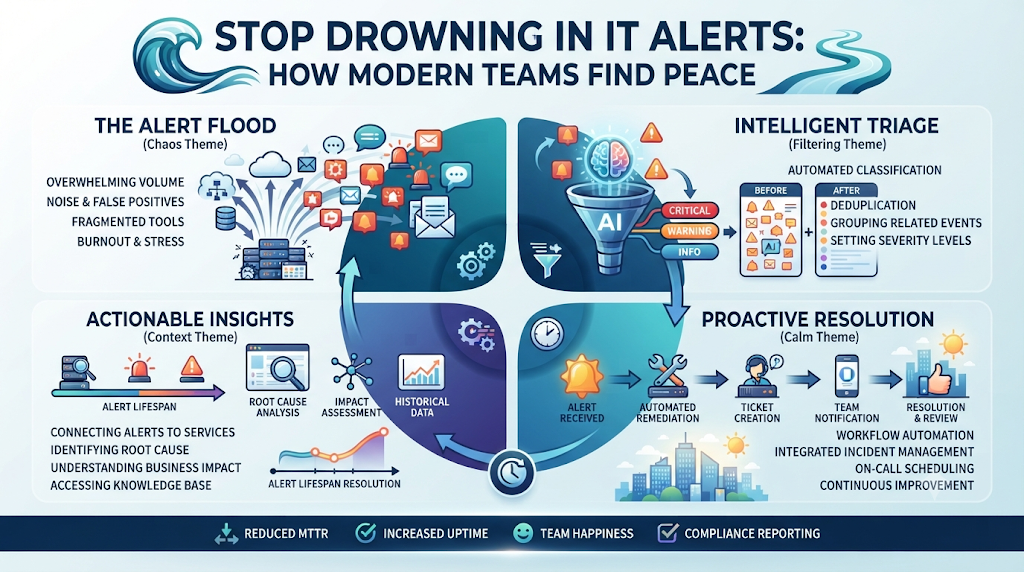
Your phone buzzes at two in the morning. You wake up with a jolt, grab your laptop, and rush to check the screen. Another warning flashes red. You log in, run a quick check, and realize it is a false alarm. Nothing is broken. You go back to sleep, only for the phone to ring again an hour later.
If this sounds like your normal week, you are not alone. IT teams everywhere deal with a flood of system notifications every single day. Most of these pings mean nothing. They are just background noise from servers talking to each other. When your team sees hundreds of warnings every day, people start to tune them out. That is when real problems slip past unnoticed, leading to messy outages that ruin your day.
To fix this mess, many smart teams now use TheAIOps to sort the noise and highlight real issues. Let us look at how smart systems change the way you handle system alerts, protect your sanity, and keep your business running smoothly.
The Hidden Cost of Endless System Noise
Alert fatigue is a slow killer of team spirit. When your screen lights up all day long, people get tired. They stop paying close attention.
Think about the boy who cried wolf. After the fifth false warning, nobody runs to help. In IT, that means a real server crash sits in the queue while your team sleeps through it.
People burn out fast. Good engineers leave jobs where they get woken up every night for no good reason. Fixing this problem is not just about quiet nights. It is about keeping your best people on the team.
Why Old Monitoring Tools Make Things Worse
Most old school tools are simple counters. If a server hits eighty percent CPU use, they scream for help. They do not look at context. They do not know if your traffic is normal for a Tuesday afternoon.
Every single disk warning, minor network blip, and routine update creates a separate ticket. Your team spends hours opening tabs, closing tabs, and hunting for ghosts.
You do not need more alerts. You need better answers. You need a setup that looks at the big picture and only speaks up when something is truly broken.
How Smart Systems Look at Data Differently
Smart platforms use step-by-step rules to study how your systems normally behave. They learn what normal looks like over weeks and months.
If a server spikes in use during a daily backup, the system knows that is normal. It stays quiet. But if that same spike happens at midnight with no backup running, it flags the issue right away.
This cuts out ninety percent of the junk data. Your team only sees the things that need human hands to fix them.
Real World Stories: How IT Teams Survived the Chaos
- Story One: A major online shop faced five hundred alerts every hour during a big sale. Engineers spent the whole day closing fake tickets while a real payment gateway failed. Once they brought in smart filtering, their alert volume dropped by ninety percent, and they caught the payment bug in minutes.
- Story Two: A small hospital IT crew had one person on call each night. That person woke up four to six times every night for minor disk warnings. After cleaning up their warning rules, the night engineer slept through the night for the first time in years.
- Story Three: A cloud hosting company suffered a major outage because an engineer muted a noisy channel out of frustration, missing a real warning hidden inside the noise. Moving to a smart grouping tool stopped the spam and brought true problems to the top.
- Story Four: A banking app team spent more time writing reports about false alarms than fixing real bugs. Automated sorting gave them their afternoons back, letting them build new features instead of chasing ghosts.
- Story Five: A delivery startup lost track of a failing database because it blended in with hundreds of routine logs. Smart grouping tied all those small logs into one clear warning about the main database.
- Story Six: A university tech crew faced endless calls from professors about slow Wi-Fi. The monitoring tools sent alerts for every single dropped packet. Filtering out routine drops showed them the real issue was a single broken switch in the science building.
- Story Seven: A streaming service team dealt with constant burnout. Engineers quit every few months because of weekend shifts. Cleaning up the alert rules brought peace back, and nobody quit that year.
- Story Eight: A retail chain had twenty stores with old servers that sent disk space warnings every day. Setting up smart rules meant they only got a ping when space dropped below five percent, saving hundreds of wasted hours.
- Story Nine: A gaming company launched a new map update. The servers threw out thousands of memory warnings. Smart grouping grouped them all into one single notification, saving the team from total panic.
- Story Ten: A government agency had strict rules about response times. Their team missed a deadline because they were digging through a mountain of spam warnings. Smart sorting put critical security logs right at the top of the queue.
Comparing Traditional Monitoring and Smart Operations
| Feature | Old Monitoring Tools | Modern Smart Platforms |
| Alert Volume | Thousands of loud, unorganized pings | Clean, grouped list of real issues |
| False Alarms | Happens all day long | Filtered out by behavior tracking |
| Team Stress | High burnout and constant night calls | Calm environment and normal sleep |
| Root Cause | Hard to find under heavy noise | Clear link shown right away |
Common Mistakes and How to Fix Them
- Mistake One: Setting warning thresholds too low.
- Fix: Raise your limits so you only get notified when a system is close to failing.
- Mistake Two: Sending every warning to every person on the team.
- Fix: Route specific messages to the exact team member who owns that service.
- Mistake Three: Ignoring warning trends over time.
- Fix: Review your logs weekly to spot recurring minor bugs before they turn into big crashes.
- Mistake Four: Treating all notifications with the same priority.
- Fix: Use clear color tags like high, medium, and low to show what needs fast action.
- Mistake Five: Buying complex tools without training your staff.
- Fix: Run short workshops so everyone knows how to read the new dashboards.
- Mistake Six: Leaving old rules active after a system upgrade.
- Fix: Clean out dead rules whenever you change your software or cloud setup.
- Mistake Seven: Relying only on automated tools without human checks.
- Fix: Have your lead engineer check the filter rules once a month.
- Mistake Eight: Turning off alerts completely when your team gets tired.
- Fix: Fix the root cause of the noise instead of silencing the system.
- Mistake Nine: Not tracking how many false alarms you get each week.
- Fix: Keep a simple count to measure if your cleanup efforts are working.
- Mistake Ten: Forgetting to update your on call rotation list.
- Fix: Link your alert tool directly to your team calendar so messages always reach the right person.
Step-by-Step Implementation Roadmap
- Audit your current alerts: Count how many system notifications your team gets every single day for one full week.
- List your top pain points: Find out which specific warnings wake people up at night for no good reason.
- Clean up old rules: Turn off any warning rule that has not pointed to a real problem in the last three months.
- Group related signals: Set up your tools to bundle multiple logs from the same server crash into one single ticket.
- Set clear priority levels: Define what counts as an emergency versus something that can wait until morning.
- Route messages smartly: Send database warnings to the database team and network warnings to the network team.
- Test your setup: Run a small test failure to make sure the right person gets the right message on their phone.
- Train your team: Show everyone how to use the new dashboard and explain the new priority levels.
- Review weekly metrics: Check your alert counts every Friday to see if the noise level is going down.
- Refine and improve: Adjust your filters monthly based on what you learn from recent system behavior.
1. What is alert fatigue in IT teams?
Alert fatigue happens when your team gets so many system notifications that they stop paying attention, leading to missed warnings and real outages.
2. Why do traditional monitoring tools cause so much noise?
Older tools count simple thresholds like high CPU use without checking context, sending a new ping for every minor event.
3. How do smart platforms cut down false alarms?
They learn normal system behavior over time and stay quiet during routine spikes, only speaking up when something breaks.
4. What are the signs that my team suffers from alert fatigue?
If your engineers ignore notifications, complain about night calls, or miss real problems, your team has alert fatigue.
5. How does clean alert management improve staff retention?
When engineers get to sleep through the night and do not waste time on fake tickets, they stay at their jobs longer.
6. Can small businesses benefit from smart alert filtering?
Yes, small teams have fewer people, making it even more important to save time and stop wasting hours on false alarms.
7. How often should we review our monitoring rules?
You should check your alert rules at least once a month to remove dead rules and adjust thresholds.
8. What is the difference between an alert and a log?
A log is a record of an event, while an alert is a direct call for a human to step in and fix a problem.
9. How do I start reducing alert noise today?
Start by counting your daily warnings and turning off any rule that has not caught a real issue recently.
10. Why is active team training important for new tools?
If your staff does not understand how the new filters work, they will not trust the system and might miss critical updates.
Final Recommendation
Start small by picking your loudest, most annoying server warning this week. Look at why it fires so often, adjust the limit, or turn it off if it adds no value. Cleaning up your system notifications takes time, but every rule you fix brings your team one step closer to calm, focused work and peaceful nights.
