Upgrade & Secure Your Future with DevOps, SRE, DevSecOps, MLOps!
We spend hours scrolling social media and waste money on things we forget, but won’t spend 30 minutes a day earning certifications that can change our lives.
Master in DevOps, SRE, DevSecOps & MLOps by DevOps School!
Learn from Guru Rajesh Kumar and double your salary in just one year.
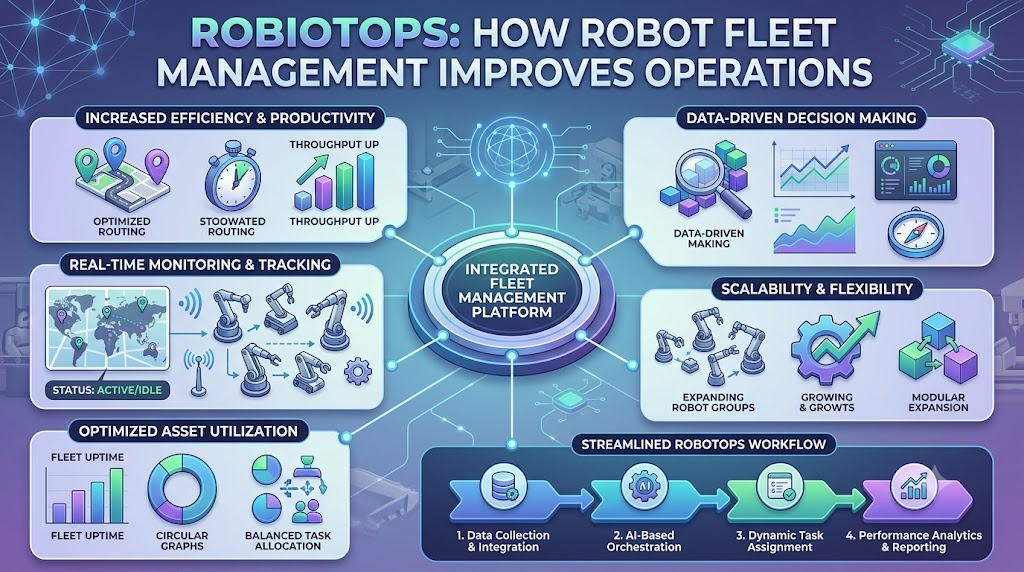
A robot works perfectly during testing but starts failing after entering a busy warehouse. One machine loses its network connection, another runs low on battery, and a third cannot find a clear route. The engineering team receives multiple complaints. Someone needs to inspect the robots, identify the problems, and restore normal operations. If the company manages hundreds of robots, this process becomes even harder. Building a robot is one challenge. Keeping a fleet of robots working reliably every day is another.
This is the problem that RobotOps addresses. It combines robotics engineering with software development, monitoring, automation, and maintenance practices. The goal is to help teams manage robots throughout their working life, not just during development. In this article, you’ll learn how RobotOps works, why Robot Fleet Management matters, and which practical skills can help you enter robotics operations.
RobotOps Explained in Simple Terms
RobotOps is a way to develop, deploy, monitor, maintain, and manage robotic systems using software engineering and operations practices.
It brings ideas from DevOps, automation, observability, and lifecycle management into robotics.
Traditional robotics work often concentrates on making a machine complete its assigned task. RobotOps also asks how the team will support that machine after deployment.
Imagine a company operating autonomous delivery robots. Developers build the navigation software, but someone must also manage updates, investigate errors, monitor connectivity, and organize maintenance.
RobotOps helps connect these responsibilities.
Why Does This Approach Matter?
Robots operate in environments that can change constantly. A warehouse layout may change, a factory component may wear down, or a network connection may become unstable.
A robot that performs well in controlled testing may behave differently in production.
RobotOps encourages teams to plan for these situations through:
- Monitoring and diagnostics
- Controlled software releases
- Simulation and testing
- Maintenance planning
- Incident response
- Operational documentation
The exact approach depends on the type of robot, its environment, and the organization’s needs.
If you’re exploring the subject, RobotOps resources can help you learn more about robotics operations and related technical concepts.
Why RobotOps Matters in Real Operations
A robotics project does not end when the robot starts working. The team must continue supporting the machine as software, hardware, and operating conditions change.
Let’s look at the main problems RobotOps can help address.
Reducing the Impact of Robot Downtime
Robot downtime occurs when a robot cannot perform its intended work.
A warehouse robot may stop because of a low battery, a blocked route, a hardware issue, or a software error.
When one robot stops, the impact depends on the workflow. Other robots may need to wait, tasks may be reassigned, or a technician may need to intervene.
Monitoring tools can help teams detect problems and investigate their causes.
They do not prevent every failure, but they can improve the team’s visibility and response process.
Managing Failed Deployments
Robotic systems rely on software updates for improvements and bug fixes.
However, a change that works in a development environment may cause problems on a physical robot.
For example, a navigation update might behave differently when the robot encounters real obstacles.
A structured deployment process helps teams:
- Test changes before release.
- Identify the robots receiving the update.
- Review relevant safety requirements.
- Deploy changes in a controlled manner.
- Check for unexpected behavior.
- Follow a recovery process when necessary.
The right release strategy depends on the system’s risk level and technical capabilities.
Replacing Manual Monitoring With Better Visibility
Imagine an engineer responsible for 100 robots but having no shared dashboard.
They may need to log in to different systems, contact technicians, or inspect individual machines to understand what is happening.
A centralized monitoring approach can bring relevant information into one place.
The team may be able to see robot availability, connectivity, errors, and maintenance-related information.
This is similar to an air traffic control display, where operators use a shared view to understand many moving elements. Robotics monitoring has different requirements, but the idea of shared visibility is similar.
Supporting Operational Safety
Robots may operate near workers, vehicles, machinery, and other equipment.
An unexpected movement, sensor issue, or software change can create safety concerns.
RobotOps encourages teams to include safety checks in deployment and operational processes.
However, software monitoring is not a replacement for physical safety systems, risk assessments, or applicable safety requirements.
Understanding Robot Fleet Management
Robot Fleet Management is the process of managing multiple robots through coordinated monitoring, maintenance, software management, and operational controls.
It becomes especially useful when an organization operates many robots in the same facility or across different locations.
Instead of handling each robot separately, the team uses shared systems and procedures to manage the fleet.
What Can a Fleet Management System Do?
Capabilities vary between platforms, but common functions include:
- Registering and identifying robots
- Monitoring robot connectivity
- Tracking operational status
- Managing software versions
- Coordinating tasks
- Reviewing battery information
- Supporting remote diagnostics
- Recording maintenance details
- Managing access permissions
Some systems focus on specific robot types or industries. Others support broader fleet operations.
Before selecting a solution, check whether it fits your robot hardware, software architecture, and business requirements.
Example: Managing Robots in a Distribution Center
Consider a distribution center that uses 60 autonomous mobile robots.
An Autonomous Mobile Robot (AMR) is a robot that navigates its surroundings without continuous manual driving.
The operations team needs to know which robots are available, which are charging, and which have encountered problems.
A fleet management system may help answer these questions through a shared interface.
For example:
| Information | Operational Use |
|---|---|
| Robot connectivity | Identify potentially disconnected machines |
| Battery status | Understand charging requirements |
| Error information | Support troubleshooting |
| Task status | Review operational progress |
| Software version | Track deployed software |
The information available depends on the robot and the management platform.
RobotOps and Fleet Management: What’s the Difference?
These terms are related but not identical.
Robot Fleet Management focuses on coordinating and managing multiple robots.
RobotOps covers a wider operational lifecycle, including development, testing, deployment, monitoring, maintenance, and incident management.
Fleet management can be a central part of a RobotOps workflow, particularly for organizations operating multiple machines.
Essential Concepts Behind RobotOps
RobotOps combines several technical areas. Understanding these concepts makes it easier to see how robotics software and operations connect.
Telemetry: Listening to Robot Data
Telemetry is information collected from a robot and sent to another system for analysis or monitoring.
A robot may produce telemetry about:
- Battery levels
- Motor temperature
- Position
- Speed
- Sensor readings
- System errors
Think about a fitness tracker. It collects information such as heart rate and movement, then displays the data for review.
Robot telemetry works on a similar basic principle, although the signals depend on the robot.
Good telemetry helps engineers understand what the robot is doing without requiring constant physical inspection.
Observability: Finding the Reason Behind a Problem
Observability helps teams understand a system’s internal condition through the information it produces.
This may involve logs, metrics, events, and other operational signals.
Suppose a robot suddenly stops.
A monitoring dashboard might show that the robot is offline. Logs could reveal a communication error, while other data might show an unusual battery reading.
Engineers can use these signals to investigate the issue.
Monitoring answers:
What appears to be happening?
Observability helps investigate:
Why might this be happening?
The two concepts work together, but neither guarantees that every failure will be easy to diagnose.
Robot Lifecycle Management
Robot lifecycle management covers the stages a robot passes through, from initial development to retirement.
A lifecycle may include:
- Design
- Software development
- Simulation
- Physical testing
- Deployment
- Monitoring
- Maintenance
- Updates
- Retirement
A robot’s software and hardware requirements can change over time.
For example, a factory may change its production layout, requiring updates to robot routes or operating procedures.
Lifecycle management helps teams prepare for these changes instead of treating deployment as the final step.
Predictive Maintenance
Predictive maintenance uses equipment data and analysis to identify signs of possible future problems.
Suppose a motor repeatedly shows unusual temperature readings. Engineers may investigate the issue before a more serious failure occurs.
Predictive maintenance depends on reliable measurements and appropriate analytical methods.
It cannot predict every failure, and it should work alongside regular inspections and maintenance procedures.
Incident Management for Robots
Incident management is a structured approach to detecting, investigating, and responding to operational problems.
In robotics, incidents may include:
- Network disconnections
- Navigation failures
- Sensor errors
- Software crashes
- Failed updates
A response plan helps the team decide what to check, who should investigate, and how to document the outcome.
A consistent process is particularly useful when multiple teams support the same fleet.
Skills You Need to Develop for RobotOps
RobotOps brings together robotics, software, and operational knowledge.
You do not need to master every skill immediately. Start with the technologies and practices that match your learning goals.
Learn ROS 2
ROS 2 (Robot Operating System 2) is a framework that provides tools and communication capabilities for developing robotics applications.
It is not a conventional operating system like Windows or Linux.
ROS 2 helps different components of a robotic application exchange information.
For example, a sensor component may publish data that a navigation component uses to plan movement.
Begin with these concepts:
- Nodes
- Topics
- Services
- Actions
- Messages
- ROS 2 command-line tools
The value of learning each concept depends on the type of robotics system you plan to work with.
Understand Robotics Middleware
Middleware is software that helps different application components communicate with one another.
In robotics, middleware connects software components such as sensors, controllers, and navigation modules.
Understanding how messages move between components can help you troubleshoot communication and integration issues.
Practice With Simulation
Robot simulation provides a virtual environment for testing selected robot behaviors.
You can use simulation to explore navigation, obstacle avoidance, and software changes.
For example, you could test how a robot responds when a planned route becomes blocked.
Simulation reduces the need for some early physical experiments, but it cannot reproduce every real-world condition.
Study Navigation and Perception
Navigation involves planning and following routes.
Perception involves interpreting information collected by sensors.
A mobile robot may use cameras or lidar to detect its surroundings and navigation software to determine a route.
Learning these concepts helps you understand how a robot makes movement-related decisions.
Build Basic DevOps Skills
DevOps practices can support robotics software development and operations.
Useful areas include:
- Version control
- Automated testing
- Software deployment
- Configuration management
- Monitoring
- Incident response
Start with small projects. Apply one practice at a time and understand why it helps.
A Step-by-Step RobotOps Implementation Guide
You can begin building RobotOps skills with a small robot simulation or a development platform.
The following roadmap provides a practical starting point.
Step 1: Identify the Operational Requirements
First, understand what your robot needs to do.
Ask yourself:
- What task does it perform?
- Where will it operate?
- Which components does it depend on?
- What problems could interrupt its work?
- What information should engineers monitor?
For example, a warehouse robot may need navigation, obstacle detection, and battery monitoring.
A robotic arm may require different operational checks related to its movement, controller, and production environment.
Start with the actual requirements rather than choosing tools first.
Step 2: Test Scenarios in Simulation
Build or use a suitable simulation environment.
Try scenarios such as:
- Obstacles appearing on a route
- Changes in navigation settings
- Temporary communication problems
- Different environmental conditions
- Software configuration changes
Simulation can help you test repeatable scenarios before physical deployment.
Afterward, validate important behaviors on real hardware using suitable safety procedures.
Step 3: Select the Right Telemetry
Determine which data your team needs.
You might begin with:
- Connectivity status
- Battery information
- Navigation errors
- Software health
- Sensor warnings
Avoid collecting large amounts of information without a clear operational purpose.
For example, if your main question is why a robot stops unexpectedly, focus on signals that can help investigate that event.
Step 4: Create a Shared Fleet View
When multiple robots are involved, establish a consistent way to identify and monitor them.
A shared dashboard may help teams:
- Locate affected robots
- Review reported errors
- Check operational status
- Compare information across machines
Not every system needs the same level of centralization. Choose an approach that suits your architecture and network conditions.
Step 5: Introduce Controlled Software Releases
Create a repeatable process for testing and deploying changes.
A basic workflow might include:
- Develop the change.
- Test it in an appropriate environment.
- Review deployment requirements.
- Select the target robots.
- Deploy the update.
- Monitor the results.
- Follow the recovery plan if necessary.
For larger fleets, staged deployment may be useful where supported by the system.
Step 6: Create an Incident Response Plan
Prepare for common operational failures.
For example, define what happens when a robot loses connectivity.
A response might involve checking the robot’s condition, reviewing available diagnostics, investigating the cause, and following approved recovery procedures.
Document the incident afterward.
This helps your team identify recurring problems and improve future responses.
Tools Used in Robotics Operations
Different RobotOps projects need different tools. Your selection should depend on your robot platform, technical requirements, budget, and team’s experience.
Here are some examples grouped by purpose.
| Category | Examples | Purpose |
|---|---|---|
| Simulation | Gazebo, Webots | Test robot behavior in virtual environments |
| Middleware | ROS 2 | Support communication between robotics software components |
| Navigation | Nav2 | Provide navigation capabilities for supported ROS 2 systems |
| Fleet management | Robot-specific platforms, custom systems | Manage and monitor multiple robots |
| Telemetry | ROS 2 data pipelines, monitoring solutions | Collect and review operational information |
| Automation | CI/CD tools, scripts | Support testing and software deployment |
These examples do not represent a universal tool recommendation.
Some platforms may require specific hardware, integrations, or technical expertise. Evaluate compatibility before introducing a tool into production.
For additional learning, RobotsOps.com covers topics related to robotics software, simulation, fleet management, and RobotOps practices.
Best Practices for Robot Fleet Management
Managing robots effectively requires more than installing a monitoring dashboard.
Teams should establish processes that support daily operations and future changes.
Use Centralized Monitoring Where Appropriate
A shared monitoring system can help teams review information from multiple robots.
Use clear robot identifiers and display information that supports practical decisions.
For example, the operations team should be able to distinguish between a disconnected robot and one that is simply charging.
Support Remote Diagnostics
Remote diagnostics can help engineers investigate certain problems without immediately visiting the robot.
However, remote access must follow appropriate security and safety controls.
Some issues still require physical inspection or intervention.
Schedule Software Updates
Create a process for reviewing and deploying software updates.
Test changes before deployment and maintain appropriate recovery procedures.
Avoid assuming that an update is safe simply because it worked on one robot.
Include Safety Reviews
Safety checks should be part of relevant deployment and maintenance workflows.
The requirements depend on the robot, environment, and applicable standards.
Monitoring systems support operations but cannot replace physical protective measures.
Document Incident Response
Create clear instructions for handling recurring issues.
Examples include:
- Robot disconnection
- Navigation failure
- Software crash
- Update failure
- Sensor-related errors
Review incident records regularly to identify patterns and areas for improvement.
Common Challenges and Mistakes
RobotOps projects can face problems when teams focus only on development and overlook operational planning.
Mistake 1: Testing Only on Physical Robots
Testing every scenario directly on physical hardware may increase time, cost, and operational risk.
How to improve: Use simulation for suitable tests, then validate important behaviors on real equipment.
Mistake 2: Operating Without Centralized Visibility
When robot information is spread across disconnected systems, teams may struggle to identify common issues.
How to improve: Build a shared monitoring approach that matches the fleet’s requirements.
Mistake 3: Neglecting Software Version Management
Different robots may run different software versions without proper tracking.
How to improve: Maintain version records and introduce a controlled update process.
Mistake 4: Collecting Unnecessary Telemetry
Large data volumes can increase storage and processing requirements without helping troubleshooting.
How to improve: Choose telemetry based on specific operational questions.
Mistake 5: Ignoring Hardware and Environmental Factors
Not every failure comes from software.
How to improve: Investigate hardware, sensors, networking, environment, and software as part of a complete troubleshooting process.
Practical Case Study: Managing a Fleet Update
Consider a factory that uses several robotic arms for repetitive production tasks.
The engineering team develops a software update to improve a movement-related function. Before releasing it across the factory, the team needs to check whether the update works correctly with the existing hardware and production workflow.
What Could Go Wrong?
A software change might behave differently across robot configurations. It could also introduce an unexpected issue that affects production.
This is why the team should avoid treating every robot as identical without checking compatibility.
A Structured Update Process
The team could follow these steps:
- Test the software in a suitable development environment.
- Validate the update on representative equipment.
- Review relevant safety and operational requirements.
- Select a limited group of robots for an initial rollout.
- Monitor the results.
- Expand deployment when appropriate.
- Follow recovery procedures if a problem occurs.
This process does not guarantee a successful deployment.
Its purpose is to make software changes more controlled and give the team a way to respond to problems.
The same principles can apply to other types of robotic systems, although the specific testing and safety requirements will differ.
Simulation vs. Real-World Testing
Simulation and physical testing serve different purposes.
| Simulation | Physical Testing |
|---|---|
| Uses a virtual environment | Uses actual robot hardware |
| Supports repeatable testing | Reveals physical system behavior |
| Can help test selected scenarios early | Validates real sensors and equipment |
| May not reproduce all environmental conditions | Requires suitable safety procedures |
| Useful for development and experimentation | Necessary for appropriate physical validation |
A practical robotics workflow often combines both approaches.
The balance depends on the robot, test objective, environment, and risks involved.
FAQs
1. What does RobotOps mean for a beginner?
RobotOps means applying software and operations practices to robotic systems.
It covers activities such as testing, deployment, monitoring, maintenance, and troubleshooting.
2. Can small robotics projects use RobotOps?
Yes. You can practice RobotOps with a simulation project or a single physical robot.
Start with basic version control, testing, monitoring, and documentation.
3. What problems does Robot Fleet Management address?
It helps teams organize the supervision and maintenance of multiple robots.
Depending on the platform, it may support status tracking, task coordination, software management, and diagnostics.
4. Is RobotOps useful in manufacturing?
RobotOps can support manufacturing environments that depend on robotic equipment.
Its applications may include software management, operational monitoring, maintenance planning, and incident response.
5. What should I learn first in ROS 2?
Begin with the basic communication concepts, including nodes, topics, services, and actions.
Then practice building or examining a small robotics application.
6. How does telemetry help engineers?
Telemetry provides information about a robot’s condition and behavior.
Engineers can use this data to monitor systems and investigate selected operational problems.
7. Why is centralized monitoring useful?
Centralized monitoring brings relevant information into a shared view.
This can help teams review multiple robots and identify issues without checking every machine separately.
8. What is predictive maintenance in robotics?
Predictive maintenance uses equipment data to identify possible signs of future problems.
It depends on suitable data and analysis and does not guarantee accurate failure predictions.
9. What tools are used in RobotOps?
Tools may include simulation platforms, ROS 2, navigation frameworks, fleet management systems, monitoring solutions, and automation tools.
The right combination depends on your project’s needs.
10. How can I gain practical RobotOps experience?
Work on a project that includes simulation, robotics software, monitoring, and controlled changes.
Focus on understanding the complete workflow instead of learning tools separately.
Conclusion
RobotOps changes how teams approach robotics by connecting development with long-term operational responsibilities. Robot Fleet Management helps organizations coordinate and monitor multiple machines, while simulation, ROS 2, telemetry, and automation support different parts of the robotics lifecycle. Building a reliable workflow requires suitable testing, monitoring, maintenance, and incident response practices. If you want to continue exploring these concepts, visit RobotsOps.com for more robotics operations learning resources.
