Upgrade & Secure Your Future with DevOps, SRE, DevSecOps, MLOps!
We spend hours scrolling social media and waste money on things we forget, but won’t spend 30 minutes a day earning certifications that can change our lives.
Master in DevOps, SRE, DevSecOps & MLOps by DevOps School!
Learn from Guru Rajesh Kumar and double your salary in just one year.
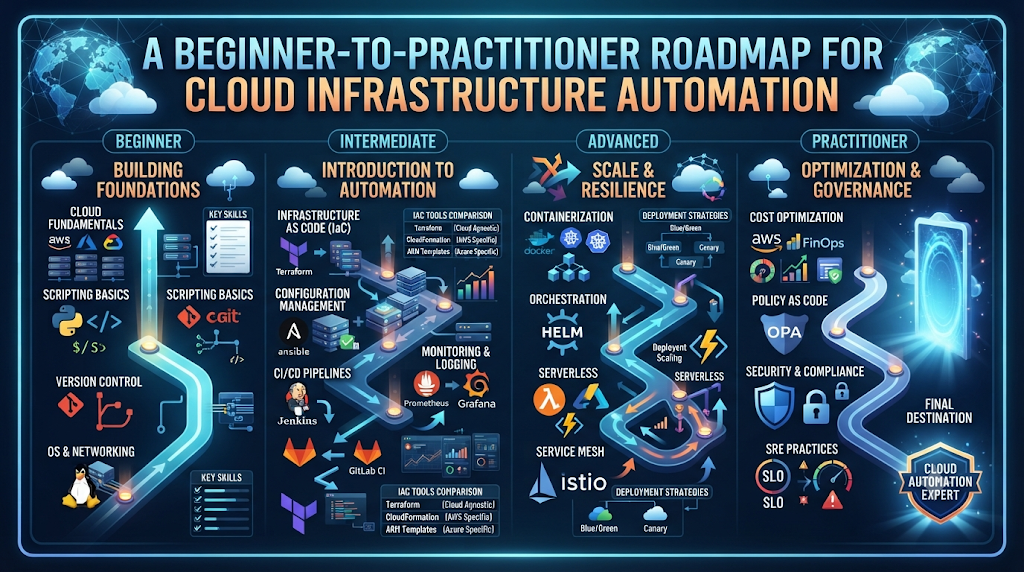
Picture a talented cloud engineer spending four hours every Friday clicking through cloud consoles, approving routine environment requests, and restarting stalled containers by hand. None of that work builds new product value—it just keeps yesterday’s setup alive. When teams ask what is NoOps, they are usually searching for a way out of that repetitive operational grind without turning production into a reckless free-for-all.
At NoOpsSchool, we approach automation from the daily reality of engineers, architects, and IT leaders who want cleaner workflows and stronger career skills. Instead of treating NoOps like a buzzword that magically deletes an entire department, this article explores how teams replace manual ticket queues with reliable code, self-service pipelines, and smart guardrails—while keeping experienced humans firmly in charge of architecture, security, and judgment.
Moving From Manual Tickets to Self-Service Infrastructure
At its heart, NoOps (“No Operations”) is an operational model where routine infrastructure provisioning, deployments, scaling, and basic recovery run through automated, policy-driven software rather than manual human steps.
Why does that distinction matter? Because the name “NoOps” often triggers skepticism among seasoned engineers. Nobody who has ever survived a database failover or a cloud provider outage believes human accountability disappears. What disappears is the repetitive manual labor—copying server configs, hand-editing firewall rules, or babysitting routine releases—so people can focus on system design, reliability, and governance.
Why Growing Cloud Teams Hit a Wall Without Automation
- Ticket Bottlenecks Slow Product Teams: When developers wait days for manual staging servers or database credentials, delivery speed stalls.
- Configuration Drift Creates Fragile Environments: Hand-configured servers slowly diverge from each other, causing bugs that appear in production but never in testing.
- Alert Fatigue Burns Out Good Engineers: Paging humans for predictable issues—like restarting a hung worker container—wastes focus needed for complex incidents.
NoOps vs DevOps: Building on Collaboration Rather Than Replacing It
Engineers often debate NoOps vs DevOps as if organizations must pick one winner. In practice, NoOps grows directly out of strong DevOps habits. DevOps broke down the wall between developers and operations teams through shared ownership and continuous delivery. NoOps pushes that foundation further by turning repeatable operational tasks into self-service platforms and automated policies.
| Area of Comparison | Traditional Operations | DevOps Practices | NoOps-Oriented Model |
| How Servers & Cloud Resources Start | Manual console clicks and ticket queues | Scripted or declarative Infrastructure as Code | Self-service templates and Git-triggered automated provisioning |
| How Code Reaches Production | Manual release checklists on fixed dates | Automated CI/CD pipelines with team reviews | Policy-checked pipelines, GitOps sync, and automated canary rollbacks |
| How Systems Respond to Trouble | Humans receive alerts and log in to fix issues | Shared dashboards, runbooks, and scripted fixes | Health probes, auto-scaling, self-healing restarts, and anomaly filtering |
| Where Engineers Spend Their Time | Day-to-day maintenance and patching | Building pipelines and improving collaboration | Platform architecture, security rules, cost governance, and complex incidents |
Inside a Modern NoOps Stack: Core Tools and Workflows
No single software vendor sells “NoOps in a box.” Instead, teams combine proven NoOps automation tools so code changes move from a developer’s laptop to live infrastructure cleanly and traceably:
- Declarative Provisioning (Terraform and OpenTofu): Engineers describe networks, clusters, and permissions in readable configuration files stored in Git, letting automation calculate and apply changes safely.
- Container Packaging and Orchestration (Docker and Kubernetes): Applications run inside portable containers while Kubernetes manages placement, traffic routing, horizontal scaling, and automatic container replacement.
- Automated Pipelines and GitOps (GitHub Actions, GitLab CI/CD, Argo CD): CI pipelines test and package code on every commit, while GitOps controllers continuously align live cluster state with approved Git manifests.
- Telemetry and Intelligent Detection (Prometheus, Grafana, OpenTelemetry): Unified metrics, logs, and traces give teams clear visibility, while AIOps capabilities help group related symptoms before paging responders.
- Managed Cloud and Serverless Services (AWS, Microsoft Azure, Google Cloud): Offloading operating system patching and server fleet maintenance to managed services removes layers of routine infrastructure upkeep.
Hands-On Example: Pairing IaC With Self-Healing Kubernetes Configs
To see how these pieces connect, look at a clean workflow. First, an OpenTofu or Terraform block defines a versioned storage bucket with encryption enforced automatically—no manual console clicks required:
Terraform
resource "aws_s3_bucket" "artifact_store" {
  bucket = "company-automated-artifacts-prod"

  tags = {
    Team       = "platform-ops"
    ManagedBy  = "terraform"
  }
}

resource "aws_s3_bucket_server_side_encryption_configuration" "artifact_sse" {
  bucket = aws_s3_bucket.artifact_store.id

  rule {
    apply_server_side_encryption_by_default {
      sse_algorithm = "AES256"
    }
  }
}
Second, a Kubernetes HorizontalPodAutoscaler lets a stateless API scale up during traffic spikes and scale back down overnight without human intervention:
YAML
apiVersion: autoscaling/v2
kind: HorizontalPodAutoscaler
metadata:
  name: catalog-api-hpa
spec:
  scaleTargetRef:
    apiVersion: apps/v1
    kind: Deployment
    name: catalog-api
  minReplicas: 2
  maxReplicas: 10
  metrics:
    - type: Resource
      resource:
        name: cpu
        target:
          type: Utilization
          averageUtilization: 70
Together, declarative infrastructure and automated scaling keep environments consistent while adjusting capacity around real demand.
A Practical Seven-Step Path to Smarter Automation
Trying to automate everything overnight usually creates brittle scripts nobody trusts. Follow a calm, incremental sequence instead:
- Map Where Time Goes Today: Track two weeks of operational tickets and manual deployment steps to find the biggest repetitive time sinks.
- Version-Control Every Configuration: Move stray shell scripts, server configs, and deployment manifests into Git before building pipelines.
- Standardize Infrastructure as Code: Introduce Terraform or OpenTofu modules with mandatory peer review and remote state locking.
- Automate Testing and Progressive Delivery: Build CI/CD pipelines that run security and unit checks automatically before deploying to staging or production.
- Wire Up Observability Early: Ensure logs, metrics, and traces are active so automated actions never happen in the dark.
- Add Controlled Self-Healing and Policy Guardrails: Configure health probes, autoscaling, and automated policy checks while keeping human approval gates on destructive changes.
- Review Outcomes Monthly: Check whether deployment lead time, error rates, and manual toil are actually improving—and adjust priorities accordingly.
Real-World Scenarios in Everyday Cloud Operations
- On-Demand Feature Environments: When a developer opens a pull request, an automated pipeline spins up an isolated preview stack using Terraform and Kubernetes, runs integration tests, and tears the environment down once the branch merges—cutting both wait times and idle cloud bills.
- Automatic Recovery From Memory Leaks: A background worker gradually consumes too much memory under heavy load. Kubernetes detects the memory threshold breach, terminates the unhealthy pod cleanly, and routes traffic to healthy replicas while logging the event for engineers to fix during business hours.
- Automated Security Policy Enforcement: Before any container image deploys to production, CI scanning blocks images with critical vulnerabilities or hardcoded secrets, stopping preventable security gaps before they reach live servers.
Weighing the Benefits Against Real Operational Risks
Automation delivers measurable wins—faster environment delivery, fewer manual typos, reproducible disaster recovery, and calmer workweeks—but smart leaders plan around its trade-offs:
- Upfront Design Investment: Building clean IaC modules, golden templates, and test suites requires focused engineering time before speedups appear.
- Faster Propagation of Mistakes: Just as automation deploys good updates quickly, an unreviewed pipeline bug can push a bad configuration across dozens of services in minutes.
- Skill and Governance Demands: Teams need clear role boundaries, least-privilege IAM permissions, and audit trails so automated systems remain transparent and secure.
Common Pitfalls to Watch Out For
- Automating Broken Workflows: Writing scripts around a confusing manual process simply produces faster chaos.
- Forgetting Rollback Paths: Every automated deployment pipeline needs a tested, one-step way to revert changes when metrics degrade.
- Treating Automation as “Set and Forget”: Cloud APIs, container base images, and compliance rules change constantly—automation code needs regular care just like application code.
Building Skills, Teams, and External Support for Automation
Shifting toward automated operations changes what teams look for in technical talent. Hands-on fluency in Linux, cloud networking, Infrastructure as Code, Docker, Kubernetes, CI/CD, GitOps, observability, and cloud security becomes essential across roles:
- Hands-On Engineers focus on writing reusable IaC modules, maintaining CI/CD and GitOps pipelines, tuning Kubernetes clusters, and building automated monitoring workflows.
- Solution and Platform Architects focus on multi-account cloud structure, reliability patterns, security boundaries, and scalable automation strategy.
- Engineering and IT Managers focus on team enablement, risk governance, budget accountability, and prioritizing high-impact operational improvements.
Whether you are building personal expertise or planning organizational change, NoOpsSchool supports several practical paths:
- Structured Learning and Credentials: Professionals can explore a NoOps training course or pursue role-focused credentials—including NoOps certification, NoOps engineer certification, NoOps architect training, and NoOps manager certification—to organize technical skills around real operational responsibilities. (Training and certifications build structured knowledge and professional credibility, though career outcomes always depend on hands-on practice and broader experience.)
- Advisory and Specialized Project Help: Organizations planning cloud modernization or pipeline standardization can work with NoOps consulting services for operational assessments and strategy, or hire NoOps freelancers when they need focused, short-term expertise in Terraform, Kubernetes, or automated monitoring while keeping internal oversight intact.
Frequently Asked Questions (FAQs)
1. What is NoOps in everyday cloud engineering?
NoOps is an operational approach that relies on Infrastructure as Code, self-service pipelines, and policy-driven automation to handle routine server and deployment tasks—freeing engineers to focus on architecture, reliability, and security.
2. How does NoOps vs DevOps play out inside real companies?
DevOps establishes collaboration, shared ownership, and continuous delivery between development and operations teams, while NoOps builds on those foundations to automate repetitive operational work into self-service workflows.
3. Does adopting NoOps mean firing operations engineers?
No. Organizations still rely heavily on experienced engineers and architects to design cloud platforms, manage security and compliance, control cloud spend, and investigate complex production incidents.
4. Which NoOps automation tools should a team adopt first?
Most teams start with Git for version control, Terraform or OpenTofu for Infrastructure as Code, Docker and Kubernetes for container workloads, GitHub Actions or Argo CD for automated delivery, and Prometheus or OpenTelemetry for observability.
5. Who benefits from a NoOps training course or NoOps certification?
DevOps engineers, cloud administrators, software developers, architects, and IT managers who want structured, practical skills in infrastructure automation, cloud-native workflows, and operational governance benefit most.
6. How do engineer, architect, and manager learning tracks differ?
Engineer tracks emphasize hands-on pipelines, containers, and IaC; architect tracks emphasize system design, scalability, and automation strategy; and manager tracks emphasize governance, risk control, and team adoption.
7. When should an organization consider NoOps consulting services?
Consulting is helpful when teams are planning a cloud migration, evaluating operational bottlenecks, designing standardized CI/CD and security guardrails, or building a multi-quarter automation roadmap.
8. What should teams keep in mind before they hire NoOps freelancers?
Define clear deliverables, grant least-privilege temporary access, require all work to live in your company’s Git repositories with documentation, and maintain internal code review for security.
9. Can small engineering teams use NoOps practices?
Yes—small teams often benefit the most by using managed cloud services, simple IaC templates, and automated CI/CD pipelines so they spend time building product features rather than maintaining servers.
10. How do teams keep automated infrastructure secure?
Combine least-privilege IAM roles, automated vulnerability and secret scanning in CI pipelines, peer code reviews for all IaC changes, and continuous audit logging.
Conclusion
Reducing manual operational toil is not about removing humans from technology—it is about putting human creativity where it counts most. By pairing Infrastructure as Code, container orchestration, automated delivery pipelines, and strong observability with clear governance, teams deliver software faster and sleep easier.
Whether you are looking to sharpen your automation skills, earn a role-aligned credential, or plan a smoother cloud operations workflow for your organization, visit NoOpsSchool to explore available training courses, certification paths, consulting services, and automation resources.
