Upgrade & Secure Your Future with DevOps, SRE, DevSecOps, MLOps!
We spend hours scrolling social media and waste money on things we forget, but won’t spend 30 minutes a day earning certifications that can change our lives.
Master in DevOps, SRE, DevSecOps & MLOps by DevOps School!
Learn from Guru Rajesh Kumar and double your salary in just one year.
Introduction
Email Security Tools are specialized platforms that protect organizations from phishing, malware, spam, and other email-based threats. They monitor inbound and outbound emails to detect malicious content, enforce compliance policies, and ensure safe communication. In plain terms, these tools act as a shield for one of the most commonly exploited communication channels in organizations.
In +, with the rise of remote work, cloud-based email platforms, and increasingly sophisticated phishing and social engineering attacks, email security is more critical than ever. Organizations face threats like ransomware, business email compromise, and insider attacks, making advanced email security solutions a necessity.
Real-world use cases:
- Blocking phishing emails and malicious attachments.
- Monitoring and filtering outbound emails for sensitive data leaks.
- Enforcing compliance with GDPR, HIPAA, and SOC 2 policies.
- Detecting impersonation attempts and domain spoofing.
- Integrating with security operations centers (SOC) for real-time threat response.
Evaluation criteria buyers should consider:
- Detection accuracy for spam, malware, and phishing.
- Integration with email platforms like Microsoft 365, Google Workspace, or on-prem servers.
- Real-time monitoring and alerting capabilities.
- Policy enforcement and automated remediation.
- Threat intelligence integration for advanced detection.
- Reporting and audit-ready compliance features.
- User behavior analytics and impersonation detection.
- Ease of deployment and administration.
- API support and automation capabilities.
Best for: Security teams, IT administrators, compliance officers, and organizations with high email usage or sensitive communications.
Not ideal for: Very small teams with minimal email usage or low-risk email environments; simpler spam filters may suffice.
Key Trends in Email Security Tools
- AI and Machine Learning: Tools leverage AI to detect phishing, malware, and abnormal behaviors in real time.
- Cloud-Native Security: Email protection for cloud platforms like Microsoft 365 and Google Workspace is standard.
- Integration with SOC and SIEM: Advanced alerting and automated threat response integration.
- Impersonation and Domain Fraud Detection: Detects BEC and spoofed domains.
- Behavioral Analytics: Monitors user behavior to identify suspicious activity.
- Automated Remediation: Integrates with security workflows to quarantine or remediate threats automatically.
- Compliance Enforcement: Policies aligned with GDPR, HIPAA, SOC 2, and ISO 27001.
- Threat Intelligence Feeds: Updates from global intelligence sources improve detection.
- Mobile Device and BYOD Coverage: Secures emails accessed via mobile and personal devices.
- Flexible Deployment Models: Cloud, hybrid, or on-premises deployment based on organizational requirements.
How We Selected These Tools (Methodology)
- Assessed market adoption and mindshare among enterprise security and IT teams.
- Evaluated feature completeness, including phishing detection, malware scanning, encryption, and policy enforcement.
- Reviewed performance and reliability, minimizing false positives and ensuring timely alerts.
- Analyzed security posture, including encryption, authentication, and compliance alignment.
- Checked integration capabilities with email platforms, SOC, SIEM, and automation tools.
- Considered customer fit across SMB, mid-market, and enterprise environments.
- Evaluated automation and remediation support for operational efficiency.
- Assessed reporting, dashboards, and alerting for actionable insights.
- Reviewed support and community resources for onboarding and troubleshooting.
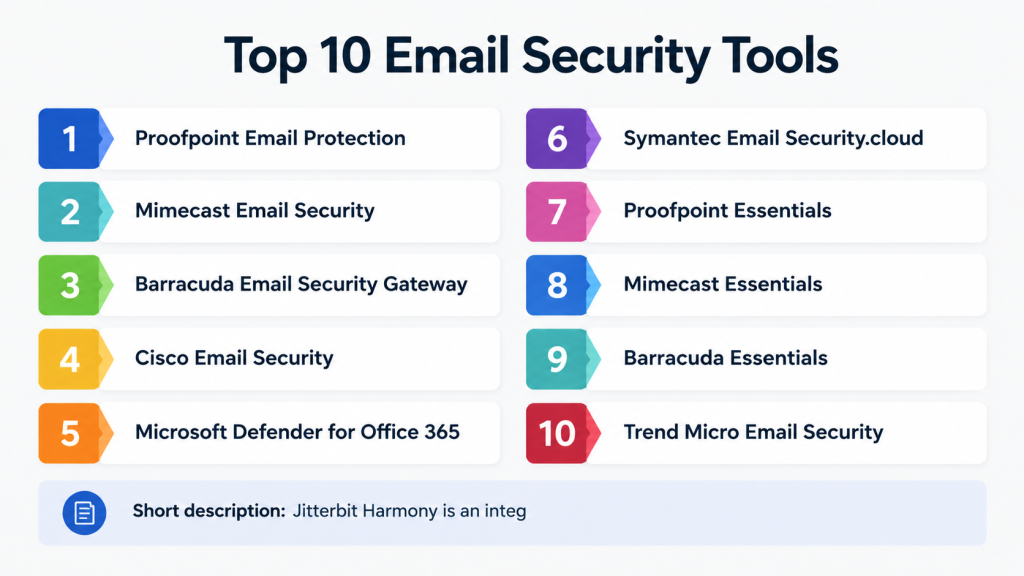
Top 10 Email Security Tools
#1 — Proofpoint Email Protection
Short description: Proofpoint Email Protection provides advanced threat detection and prevention for phishing, malware, and spam. It integrates with major email platforms to provide real-time threat intelligence and compliance support, suitable for enterprises with high-risk communications.
Key Features
- Phishing and malware detection
- Spam filtering and policy enforcement
- Real-time threat intelligence
- Data loss prevention for email
- Advanced reporting and compliance
- Integration with SOC and SIEM
Pros
- Enterprise-grade protection
- Strong integration with multiple email platforms
Cons
- Premium pricing
- Requires trained personnel for full utilization
Platforms / Deployment
- Web / Windows / macOS / Linux
- Cloud / Hybrid
Security & Compliance
- MFA, encryption, RBAC
- SOC 2, ISO 27001, GDPR
Integrations & Ecosystem
- Microsoft 365, Google Workspace, Exchange
- API access for automation
- SIEM integration
Support & Community
- Professional support tiers
- Documentation and community forums
#2 — Mimecast Email Security
Short description: Mimecast protects organizations from advanced email threats, providing spam filtering, impersonation protection, and data leak prevention across cloud and hybrid email environments.
Key Features
- Advanced threat detection and quarantine
- Domain spoofing and impersonation protection
- Data leak prevention
- Continuous monitoring and alerting
- Compliance reporting
Pros
- High detection accuracy
- Easy integration with cloud email platforms
Cons
- Learning curve for advanced features
- Higher cost for small organizations
Platforms / Deployment
- Web / Windows / macOS
- Cloud / Hybrid
Security & Compliance
- MFA, encryption
- SOC 2, ISO 27001
Integrations & Ecosystem
- Microsoft 365, Google Workspace, Exchange
- API support for automation
- SIEM integration
Support & Community
- Professional support
- Online knowledge base
#3 — Barracuda Email Security Gateway
Short description: Barracuda provides comprehensive email protection with advanced spam filtering, malware detection, and policy enforcement. It is suitable for mid-market to enterprise organizations seeking hybrid deployment flexibility.
Key Features
- Spam and malware filtering
- Phishing and BEC detection
- Policy enforcement and data protection
- Reporting and analytics
- Cloud and on-prem deployment options
Pros
- Flexible deployment
- Easy-to-configure policies
Cons
- UI may be less modern than competitors
- Limited advanced analytics
Platforms / Deployment
- Web / Windows / Linux
- Cloud / Hybrid / On-prem
Security & Compliance
- Encryption, RBAC
- Not publicly stated
Integrations & Ecosystem
- Microsoft 365, Exchange, Google Workspace
- API access for workflow automation
- SIEM integration
Support & Community
- Professional support tiers
- Documentation and online forums
#4 — Cisco Email Security
Short description: Cisco Email Security protects email systems against malware, phishing, and spam. It leverages threat intelligence and provides compliance reporting, making it suitable for enterprises with global email infrastructures.
Key Features
- Malware and phishing protection
- Spam filtering and content control
- Advanced threat intelligence
- Policy enforcement and reporting
- Cloud and on-premises deployment
Pros
- Enterprise-level threat protection
- Integration with Cisco security ecosystem
Cons
- Premium pricing
- Complexity for small teams
Platforms / Deployment
- Web / Windows / Linux / macOS
- Cloud / Hybrid / On-prem
Security & Compliance
- MFA, encryption, RBAC
- SOC 2, ISO 27001
Integrations & Ecosystem
- Microsoft 365, Google Workspace, Exchange
- API automation
- SIEM integration
Support & Community
- Professional support tiers
- Knowledge base and community forums
#5 — Microsoft Defender for Office 365
Short description: Microsoft Defender secures Office 365 environments with advanced threat protection, anti-phishing, and malware detection, integrated directly into Microsoft 365 infrastructure.
Key Features
- Anti-phishing and malware detection
- Safe links and attachment scanning
- Real-time threat intelligence
- Data loss prevention
- Compliance reporting
Pros
- Deep integration with Microsoft 365
- Real-time threat updates
Cons
- Limited for non-Microsoft email systems
- Requires Microsoft 365 subscription
Platforms / Deployment
- Web / Windows / macOS
- Cloud
Security & Compliance
- MFA, encryption
- SOC 2, ISO 27001, GDPR
Integrations & Ecosystem
- Office 365 apps
- SIEM and ITSM integrations
- API automation
Support & Community
- Microsoft support tiers
- Extensive documentation
#6 — Symantec Email Security.cloud
Short description: Symantec Email Security.cloud provides advanced email protection with spam filtering, malware detection, and policy enforcement for enterprises and mid-sized organizations.
Key Features
- Spam and malware filtering
- Phishing and impersonation detection
- Data loss prevention
- Policy enforcement and reporting
- Cloud-based management
Pros
- Cloud-native deployment
- High detection accuracy
Cons
- Premium pricing
- Limited customization options
Platforms / Deployment
- Web / Cloud
- Cloud-native
Security & Compliance
- MFA, encryption
- SOC 2, ISO 27001
Integrations & Ecosystem
- Microsoft 365, Google Workspace, Exchange
- API automation
- SIEM integration
Support & Community
- Professional support tiers
- Documentation and tutorials
#7 — Proofpoint Essentials
Short description: Proofpoint Essentials provides SMB-focused email security with phishing protection, spam filtering, and malware detection, designed for smaller organizations or distributed teams.
Key Features
- Anti-phishing and malware scanning
- Spam and content filtering
- Policy enforcement
- Reporting and analytics
- Cloud-based management
Pros
- Simplified deployment for SMBs
- Affordable and easy-to-use
Cons
- Limited advanced features
- Focused on SMB segment
Platforms / Deployment
- Web / Cloud
- Cloud-native
Security & Compliance
- MFA, encryption
- Not publicly stated
Integrations & Ecosystem
- Microsoft 365, Google Workspace
- API automation
- Compatible with SIEM
Support & Community
- Professional support
- Documentation and knowledge base
#8 — Mimecast Essentials
Short description: Mimecast Essentials offers SMB and mid-market email security with phishing, spam, and malware protection, along with basic policy enforcement and reporting features.
Key Features
- Phishing and malware protection
- Spam filtering and content control
- Policy enforcement
- Reporting and compliance dashboards
- Cloud-native management
Pros
- Easy to deploy and manage
- Good detection capabilities
Cons
- Lacks enterprise-level automation
- Limited integrations
Platforms / Deployment
- Web / Cloud
- Cloud-native
Security & Compliance
- Not publicly stated
Integrations & Ecosystem
- Office 365, Google Workspace
- API support for basic workflows
Support & Community
- Online documentation
- Professional support tiers
#9 — Barracuda Essentials
Short description: Barracuda Essentials protects email against phishing, spam, and malware while providing encryption and archiving capabilities for SMBs and mid-sized enterprises.
Key Features
- Spam, malware, and phishing detection
- Email encryption and archiving
- Policy enforcement and reporting
- Threat intelligence integration
- Cloud management
Pros
- Easy-to-use interface
- Cloud-native deployment
Cons
- Limited advanced analytics
- Pricing can increase with larger mail volumes
Platforms / Deployment
- Web / Cloud
- Cloud-native
Security & Compliance
- Not publicly stated
Integrations & Ecosystem
- Microsoft 365, Google Workspace, Exchange
- API automation
Support & Community
- Documentation and tutorials
- Professional support
#10 — Trend Micro Email Security
Short description: Trend Micro Email Security provides advanced email protection with anti-spam, anti-malware, and phishing protection, alongside policy enforcement and compliance reporting.
Key Features
- Anti-spam and malware scanning
- Phishing detection
- Policy enforcement and DLP
- Reporting and compliance dashboards
- Cloud and hybrid management
Pros
- Mature threat protection technology
- Multi-platform compatibility
Cons
- Premium pricing
- Complex configuration for small teams
Platforms / Deployment
- Web / Windows / macOS / Linux
- Cloud / Hybrid
Security & Compliance
- MFA, encryption
- SOC 2, ISO 27001
Integrations & Ecosystem
- Microsoft 365, Google Workspace, Exchange
- API automation and SIEM integration
Support & Community
- Professional support tiers
- Knowledge base and tutorials
Comparison Table (Top 10)
| Tool Name | Best For | Platform(s) Supported | Deployment | Standout Feature | Public Rating |
|---|---|---|---|---|---|
| Proofpoint Email Protection | Enterprise email security | Web / Windows / macOS / Linux | Cloud / Hybrid | Advanced phishing and malware detection | N/A |
| Mimecast Email Security | Enterprise & mid-market | Web / Windows / macOS | Cloud / Hybrid | Impersonation and BEC detection | N/A |
| Barracuda Email Security | SMBs & mid-sized teams | Web / Windows / macOS | Cloud / Hybrid | Spam, malware, and phishing defense | N/A |
| Cisco Email Security | Enterprise email | Web / Windows / macOS / Linux | Cloud / Hybrid | Threat intelligence integration | N/A |
| Microsoft Defender 365 | Microsoft 365 users | Web / Windows / macOS | Cloud | Deep integration with Microsoft 365 | N/A |
| Symantec Email Security.cloud | Mid-market & enterprise | Web / Cloud | Cloud | Cloud-native protection | N/A |
| Proofpoint Essentials | SMB-focused | Web / Cloud | Cloud | Simplified email protection | N/A |
| Mimecast Essentials | SMB & mid-market | Web / Cloud | Cloud | Cloud-native threat protection | N/A |
| Barracuda Essentials | SMB & mid-market | Web / Cloud | Cloud | Email encryption & archiving | N/A |
| Trend Micro Email Security | Enterprise & mid-market | Web / Windows / macOS / Linux | Cloud / Hybrid | Advanced threat protection | N/A |
Evaluation & Scoring of Email Security Tools
| Tool Name | Core (25%) | Ease (15%) | Integrations (15%) | Security (10%) | Performance (10%) | Support (10%) | Value (15%) | Weighted Total (0–10) |
|---|---|---|---|---|---|---|---|---|
| Proofpoint Email Protection | 9 | 7 | 8 | 9 | 8 | 8 | 7 | 8.2 |
| Mimecast Email Security | 8 | 7 | 7 | 8 | 8 | 7 | 7 | 7.7 |
| Barracuda Email Security | 7 | 8 | 7 | 7 | 7 | 7 | 7 | 7.2 |
| Cisco Email Security | 8 | 7 | 8 | 8 | 8 | 7 | 7 | 7.8 |
| Microsoft Defender 365 | 9 | 7 | 7 | 9 | 8 | 8 | 7 | 8.0 |
| Symantec Email Security.cloud | 8 | 7 | 7 | 8 | 7 | 7 | 7 | 7.5 |
| Proofpoint Essentials | 7 | 8 | 6 | 7 | 7 | 7 | 6 | 6.9 |
| Mimecast Essentials | 7 | 7 | 6 | 7 | 7 | 6 | 6 | 6.8 |
| Barracuda Essentials | 7 | 7 | 6 | 7 | 7 | 6 | 6 | 6.8 |
| Trend Micro Email Security | 8 | 7 | 7 | 8 | 7 | 7 | 7 | 7.5 |
Interpretation: Weighted totals highlight the relative strengths across features, ease of use, integrations, security, performance, support, and value. They help organizations compare and prioritize solutions based on operational needs.
Which Email Security Tool Is Right for You?
Solo / Freelancer
- Use Proofpoint Essentials or Mimecast Essentials for lightweight protection and simplified management.
SMB
- Barracuda Email Security or Mimecast Essentials for cost-effective cloud-native protection.
Mid-Market
- Symantec Email Security.cloud or Mimecast Email Security for broader integrations and compliance.
Enterprise
- Proofpoint Email Protection, Cisco Email Security, or Microsoft Defender 365 for comprehensive, multi-platform protection.
Budget vs Premium
- SMBs can leverage Essentials or Barracuda solutions.
- Enterprises benefit from premium, automated, and AI-powered platforms.
Feature Depth vs Ease of Use
- Enterprise tools offer deep threat intelligence and automated remediation.
- SMB-focused tools emphasize usability with essential security features.
Integrations & Scalability
- API-rich platforms support SIEM, ITSM, and workflow integration.
- Cloud-native solutions scale effectively across high-volume email environments.
Security & Compliance Needs
- Organizations in regulated industries should prioritize Proofpoint, Microsoft Defender 365, or Cisco Email Security.
- Smaller organizations with limited compliance requirements can leverage Barracuda or Mimecast Essentials.
Frequently Asked Questions (FAQs)
1: What is an email security tool?
It protects email communications from phishing, malware, spam, and impersonation attacks, while enforcing policies and compliance.
2: Which email platforms are supported?
Most tools integrate with Microsoft 365, Google Workspace, Exchange, and other enterprise email platforms.
3: Can these tools detect phishing attacks?
Yes, advanced threat intelligence and machine learning detect phishing attempts in real time.
4: How often should email security scans run?
Continuous monitoring is recommended, with real-time alerting for high-risk messages.
5: Can email security tools enforce compliance policies?
Yes, they provide audit-ready reports and policy enforcement aligned with SOC 2, ISO 27001, HIPAA, and GDPR.
6: Are these tools suitable for SMBs?
Yes, many offer cloud-native or simplified deployment options suitable for smaller teams.
7: Can they detect business email compromise (BEC)?
Yes, enterprise-grade tools detect domain spoofing and impersonation attacks.
8: Do these tools support mobile email security?
Many cloud-native solutions protect emails on mobile and BYOD devices.
9: Can automated remediation prevent threats?
Yes, platforms can quarantine messages, block attachments, and enforce policy violations automatically.
10: How do I choose the right email security tool?
Evaluate based on email platform, organization size, compliance requirements, threat exposure, and budget.
Conclusion
Email Security Tools are essential for protecting organizations against growing email-based threats. The best tool depends on organizational size, email usage, compliance requirements, and threat exposure. SMBs may leverage simplified, cloud-native solutions, while enterprises benefit from premium platforms with AI-driven threat detection, automation, and multi-platform integration. Organizations should shortlist 2–3 tools, run pilot deployments, and evaluate fit with email workflows, integration, and compliance requirements to ensure secure and compliant communications.
