Upgrade & Secure Your Future with DevOps, SRE, DevSecOps, MLOps!
We spend hours scrolling social media and waste money on things we forget, but won’t spend 30 minutes a day earning certifications that can change our lives.
Master in DevOps, SRE, DevSecOps & MLOps by DevOps School!
Learn from Guru Rajesh Kumar and double your salary in just one year.
Introduction
AI content generation tools help users create written, visual, audio, video, marketing, and business content with the help of artificial intelligence. In simple words, these tools can draft blogs, social posts, emails, ads, product descriptions, images, scripts, landing pages, summaries, and creative ideas faster than manual writing alone.
AI content generation matters now because content teams need speed, personalization, consistency, and scale. Businesses are expected to publish across websites, social media, email, search, ads, communities, and internal knowledge platforms. AI tools help reduce blank-page time, improve content workflows, and support teams that need regular output.
Common use cases include:
- Blog and article drafting
- Social media content creation
- Email and ad copywriting
- Product descriptions
- AI image generation
- Sales and support content
- Content repurposing and summarization
Buyers should evaluate:
- Content quality and accuracy
- Brand voice controls
- SEO support
- Team collaboration
- Workflow automation
- Multilingual support
- Integrations
- Security and compliance
- Plagiarism and originality controls
- Pricing and usage limits
Best for: marketers, content writers, SEO teams, agencies, creators, SaaS companies, e-commerce teams, sales teams, product marketers, and enterprises that produce content at scale.
Not ideal for: teams that need fully human-authored expert content only, highly regulated content without human review, or businesses that publish rarely and can manage content manually.
Key Trends in AI Content Generation Tools
- AI content tools are moving from simple writing assistants to full content workflow platforms.
- Brand voice and style control are becoming major buying factors for marketing teams.
- Generative AI is increasingly used for repurposing content across blogs, emails, ads, videos, and social media.
- Enterprises are demanding better governance, approval workflows, audit logs, and permission controls.
- AI image, video, and text generation are merging into multimodal content platforms.
- SEO teams are focusing more on helpful, original, expert-reviewed content instead of mass AI publishing.
- Content tools are adding collaboration features for writers, editors, designers, and marketing managers.
- Integrations with CMS, CRM, email platforms, social schedulers, and analytics tools are becoming essential.
- AI detection, plagiarism checks, and fact-review workflows are becoming more important.
- Pricing models are shifting toward usage limits, seats, credits, and enterprise contracts.
How We Selected These Tools
The following tools were selected using practical SaaS and content workflow evaluation logic:
- Market adoption and recognition among content, marketing, and creator teams
- Feature completeness across writing, editing, SEO, collaboration, and automation
- Quality of generated content and ability to support different content types
- Brand voice, tone, and template flexibility
- Integrations with marketing, CMS, CRM, and productivity tools
- Security and governance signals where publicly known
- Fit for freelancers, agencies, SMBs, and enterprises
- Ease of use for non-technical users
- Support quality, documentation, and learning resources
- Practical value for real-world content production workflows
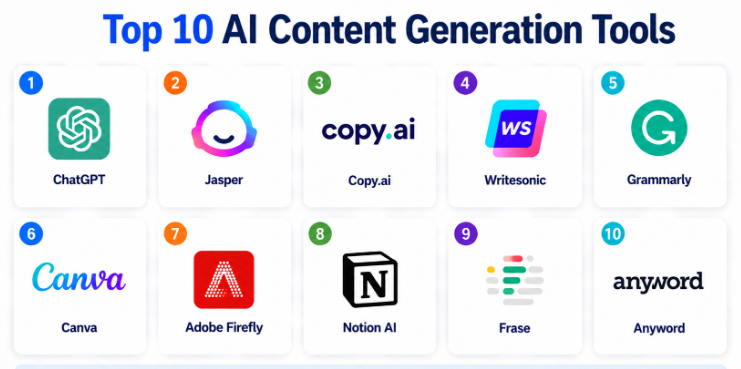
Top 10 AI Content Generation Tools
#1 — ChatGPT
Short description:
ChatGPT is a general-purpose AI assistant used for content drafting, brainstorming, rewriting, summarization, research support, and workflow automation.
It is suitable for creators, marketers, students, founders, sales teams, support teams, and enterprise users.
The tool can help create blogs, social posts, email drafts, product descriptions, scripts, outlines, and knowledge content.
It is flexible because users can guide the tone, structure, format, and level of detail through prompts.
ChatGPT is especially useful for teams that need ideation, content repurposing, and writing assistance across many formats.
It can also support business workflows beyond content, such as planning, analysis, documentation, and customer communication.
The quality of output depends strongly on prompt clarity, review process, and subject knowledge.
Human editing is still important for accuracy, originality, compliance, and brand alignment.
Key Features
- Long-form and short-form content generation
- Rewriting, summarization, and ideation
- Support for multiple tones and formats
- Code, data, and workflow assistance
- Custom instructions and project-based usage options
- Multilingual writing support
- Useful for marketing, sales, support, and documentation workflows
Pros
- Very flexible across many content types
- Strong for brainstorming and content repurposing
- Useful for both individuals and teams
Cons
- Requires human review for factual accuracy
- Brand voice consistency depends on user setup
- Not a dedicated SEO or CMS platform by itself
Platforms / Deployment
Web / iOS / Android / Cloud
Security & Compliance
Enterprise security controls may be available depending on plan. Specific compliance details should be verified by buyers based on their plan and use case.
Integrations & Ecosystem
ChatGPT can fit into broad writing, productivity, and business workflows. Its value increases when teams use it with clear prompts, templates, review steps, and content governance.
- Productivity workflows
- Writing and editing workflows
- Marketing planning
- Customer support drafts
- API-based applications
- Knowledge and documentation workflows
Support & Community
ChatGPT has broad adoption, learning resources, and a large user community. Support depth varies by plan.
#2 — Jasper
Short description:
Jasper is an AI content generation platform focused on marketing teams, brand content, campaign assets, and business writing.
It helps teams create blog drafts, ad copy, social posts, emails, landing page content, and campaign messaging.
Jasper is often used by marketing departments and agencies that need brand consistency across multiple content formats.
The platform is designed to support team workflows, templates, brand voice, and campaign execution.
It can help marketers speed up content production while keeping messaging more consistent.
Jasper is useful for teams that publish frequently and need structured content workflows.
It is more marketing-focused than general-purpose AI assistants.
Teams should still use editorial review for accuracy, originality, and brand approval.
Key Features
- Marketing-focused AI writing
- Brand voice controls
- Campaign content workflows
- Templates for ads, blogs, emails, and social content
- Team collaboration features
- Content repurposing support
- Workflow and productivity features
Pros
- Strong fit for marketing teams and agencies
- Helps maintain consistent brand messaging
- Useful for campaign-based content production
Cons
- May be more than solo users need
- Pricing may be higher than basic writing tools
- Human review is still required for final publishing
Platforms / Deployment
Web / Cloud
Security & Compliance
Enterprise security controls may be available. Specific compliance details are Not publicly stated unless confirmed for a specific plan.
Integrations & Ecosystem
Jasper is designed to work with marketing workflows and team-based content production.
- Marketing workflows
- Campaign planning
- Browser-based writing workflows
- Content collaboration
- Business writing processes
- Creative asset workflows
Support & Community
Jasper provides documentation, onboarding resources, and customer support. Community strength is strong among marketers and content teams.
#3 — Copy.ai
Short description:
Copy.ai is an AI writing platform focused on marketing copy, sales content, email workflows, and business communication.
It helps teams create social posts, ad copy, website copy, email sequences, blog ideas, and outreach messages.
The platform is useful for sales teams, marketers, founders, and agencies that need fast content drafts.
Copy.ai is designed to reduce repetitive writing work and support repeatable go-to-market workflows.
It can help users generate content variations for testing different messages.
The tool is especially useful for teams producing short-form marketing and sales content.
It can also support workflow automation around content and outreach.
Teams should review outputs carefully to avoid generic messaging and ensure accuracy.
Key Features
- AI copywriting templates
- Sales and marketing content generation
- Email and outreach content support
- Blog ideas and short-form drafts
- Workflow automation features
- Team collaboration options
- Multiformat content generation
Pros
- Good for fast marketing and sales copy
- Useful for message testing and variations
- Easy for non-technical users
Cons
- Long-form depth may require more editing
- Output can feel generic without strong prompts
- Advanced brand governance may vary by plan
Platforms / Deployment
Web / Cloud
Security & Compliance
Security details may vary by plan. Specific compliance certifications are Not publicly stated unless confirmed by the vendor.
Integrations & Ecosystem
Copy.ai works well in go-to-market content workflows where users need repeated copy variations and outreach content.
- Sales workflows
- Marketing campaigns
- Email content
- Social media content
- Website copy workflows
- Team collaboration processes
Support & Community
Copy.ai provides documentation, product resources, and customer support options. Community visibility is strong among marketers and startup teams.
#4 — Writesonic
Short description:
Writesonic is an AI content generation platform for blog writing, ad copy, product descriptions, landing pages, and marketing content.
It is useful for content marketers, SEO teams, e-commerce sellers, freelancers, and small businesses.
The platform supports multiple content formats and can help users create drafts quickly.
Writesonic is often selected by teams that want a practical mix of long-form and short-form content generation.
It can support blog outlines, article drafts, social content, and product-focused writing.
The platform also includes tools for conversational AI and related writing workflows.
It is suitable for teams that want speed and variety without building custom AI workflows.
Human review remains important for accuracy, tone, and publishing quality.
Key Features
- Blog and article generation
- Ad and landing page copy
- Product description writing
- Social media content creation
- Conversational AI capabilities
- SEO-friendly writing support
- Multiple templates and content formats
Pros
- Good range of content templates
- Useful for freelancers and SMBs
- Supports both long-form and short-form content
Cons
- Content quality depends on prompt and review
- Brand control may need manual refinement
- Advanced enterprise governance may vary
Platforms / Deployment
Web / Cloud
Security & Compliance
Security and compliance details are Not publicly stated unless confirmed for a specific plan.
Integrations & Ecosystem
Writesonic fits into digital marketing, e-commerce, and content production workflows.
- Blog writing workflows
- Social media content
- E-commerce product copy
- Landing page writing
- Conversational AI workflows
- Marketing productivity processes
Support & Community
Writesonic provides documentation, support resources, and product guides. Community strength is visible among content creators and small business users.
#5 — Grammarly
Short description:
Grammarly is a writing assistant that supports grammar correction, rewriting, tone improvement, clarity, and AI-assisted content creation.
It is widely used by professionals, students, teams, marketers, customer support agents, and business users.
While it is not only a content generation tool, it is valuable for improving and polishing AI-generated or human-written content.
Grammarly helps users write clearer emails, documents, social posts, reports, and business messages.
Its strength is in editing, clarity, correctness, and tone guidance.
It can also help users create drafts and rewrite text for different audiences.
The tool is practical for daily writing across many roles and industries.
Teams that need full campaign generation may use it alongside other AI content platforms.
Key Features
- Grammar and spelling correction
- AI rewriting and drafting
- Tone and clarity suggestions
- Business writing assistance
- Browser and document workflow support
- Team writing consistency features
- Plagiarism checking may be available depending on plan
Pros
- Excellent for polishing and improving content
- Easy to use across daily writing workflows
- Strong fit for teams that care about clarity and tone
Cons
- Not a full marketing campaign platform
- Long-form generation depth may be limited compared with dedicated tools
- Some advanced features depend on plan
Platforms / Deployment
Web / Windows / macOS / iOS / Android / Browser extensions / Cloud
Security & Compliance
Enterprise security controls may be available depending on plan. Specific compliance details should be verified based on organizational requirements.
Integrations & Ecosystem
Grammarly works across many writing environments, making it useful for everyday content quality improvement.
- Browsers
- Email tools
- Document editors
- Business communication platforms
- Writing workflows
- Team productivity tools
Support & Community
Grammarly provides strong documentation, support resources, and broad user adoption. It has a large user base across professional and educational environments.
#6 — Canva
Short description:
Canva is a visual content creation platform that includes AI-powered design and content generation features.
It helps users create social media graphics, presentations, ads, documents, videos, brand kits, and marketing assets.
Canva is useful for creators, marketers, small businesses, agencies, educators, and enterprise teams.
Its AI features can support text generation, design suggestions, image creation, editing, and content repurposing.
The platform is especially strong when teams need both content and visual design in one place.
Canva is easy for non-designers and helps speed up creative workflows.
It supports collaboration, templates, and brand consistency for teams.
It may not replace specialized copywriting or advanced image-generation tools for complex creative work.
Key Features
- AI-assisted design and content creation
- Social media and marketing templates
- Presentation and document creation
- Brand kit and team collaboration
- Image editing and visual asset creation
- Video and short-form creative support
- Easy drag-and-drop interface
Pros
- Very easy for non-designers
- Strong for visual content and brand assets
- Good for teams producing social and marketing content
Cons
- Advanced creative control may be limited
- Text generation may need editing
- Not focused only on long-form written content
Platforms / Deployment
Web / Windows / macOS / iOS / Android / Cloud
Security & Compliance
Team and enterprise security controls may be available. Specific compliance details are Not publicly stated unless confirmed for a specific plan.
Integrations & Ecosystem
Canva fits into visual marketing, social media, education, and brand content workflows.
- Social media workflows
- Presentation workflows
- Brand asset management
- Team collaboration
- Content planning
- Design and publishing workflows
Support & Community
Canva offers documentation, learning resources, templates, and support options. It has a very large creator and business user community.
#7 — Adobe Firefly
Short description:
Adobe Firefly is Adobe’s generative AI toolset for creative content generation, especially visual assets.
It helps users generate images, design elements, text effects, and creative variations.
The platform is useful for designers, marketers, creative teams, agencies, and enterprises already using Adobe tools.
Firefly is especially strong for teams that need AI-assisted creative production inside professional design workflows.
It can support campaign visuals, concept development, social media graphics, and creative experimentation.
The tool works best when paired with human creative direction and design review.
It is more visual and creative-focused than general AI writing platforms.
Teams should evaluate licensing, brand safety, and workflow fit before using it at scale.
Key Features
- AI image generation
- Creative asset generation
- Text effects and design support
- Integration with Adobe creative workflows
- Visual concept development
- Image editing assistance
- Support for creative production workflows
Pros
- Strong fit for creative professionals
- Useful inside Adobe design ecosystems
- Good for campaign visuals and creative exploration
Cons
- Less focused on written content
- Best value comes for Adobe users
- Advanced content workflows may require other tools
Platforms / Deployment
Web / Adobe creative ecosystem / Cloud
Security & Compliance
Enterprise security controls may be available through Adobe plans. Specific compliance details are Not publicly stated unless confirmed for a specific plan.
Integrations & Ecosystem
Adobe Firefly is designed to work with creative and design production workflows.
- Adobe creative tools
- Design workflows
- Marketing asset creation
- Brand creative processes
- Visual content production
- Creative review workflows
Support & Community
Adobe provides documentation, learning content, customer support options, and a large creative professional community.
#8 — Notion AI
Short description:
Notion AI is an AI writing and productivity assistant built into the Notion workspace.
It helps users write, summarize, brainstorm, organize notes, create project documents, and improve internal knowledge content.
The tool is useful for teams already using Notion for documentation, planning, content calendars, and knowledge management.
Notion AI is strong for internal content workflows rather than only public marketing content.
It can help teams turn rough notes into polished documents, summaries, action plans, and content drafts.
It is useful for founders, product teams, marketing teams, operations teams, and creators.
The value is strongest when content and knowledge already live inside Notion.
Teams using other knowledge systems may find it less central to their workflow.
Key Features
- AI writing inside Notion pages
- Summarization and rewriting
- Brainstorming and content drafting
- Meeting notes and knowledge support
- Workspace-based productivity workflows
- Team collaboration
- Internal documentation assistance
Pros
- Great for teams already using Notion
- Useful for notes, docs, and planning content
- Helps improve internal knowledge workflows
Cons
- Less specialized for SEO or marketing campaigns
- Best value depends on Notion adoption
- Advanced content governance may vary by workspace setup
Platforms / Deployment
Web / Windows / macOS / iOS / Android / Cloud
Security & Compliance
Workspace security controls may be available depending on plan. Specific compliance details should be verified based on plan and organizational requirements.
Integrations & Ecosystem
Notion AI works best inside Notion’s workspace and knowledge management ecosystem.
- Internal documentation
- Project planning
- Content calendars
- Team knowledge bases
- Meeting notes
- Productivity workflows
Support & Community
Notion provides documentation, templates, support resources, and a strong user community around productivity and knowledge management.
#9 — Frase
Short description:
Frase is an AI content and SEO-focused platform that helps users research, outline, write, and optimize content.
It is useful for SEO writers, content marketers, agencies, and small businesses that publish search-focused articles.
The platform helps users understand topic coverage, content structure, and optimization opportunities.
Frase can support blog briefs, content outlines, article drafts, and content improvement workflows.
It is especially useful when teams want AI writing combined with SEO research support.
The tool helps reduce manual research time and supports structured content planning.
It is not a full replacement for expert editorial review or original research.
Teams should use it as part of a balanced SEO and content quality process.
Key Features
- AI content briefs
- SEO content optimization
- Topic research support
- Article outline generation
- Content scoring workflows
- Drafting and rewriting support
- Competitor content analysis features
Pros
- Strong for SEO-focused content workflows
- Helps create structured article briefs
- Useful for agencies and content teams
Cons
- Not ideal for non-SEO content types
- Output still requires human editing
- Research quality depends on user review
Platforms / Deployment
Web / Cloud
Security & Compliance
Security and compliance details are Not publicly stated unless confirmed for a specific plan.
Integrations & Ecosystem
Frase fits into SEO, blog production, and content planning workflows.
- SEO content workflows
- Blog writing
- Content briefs
- Editorial planning
- Website content optimization
- Marketing team workflows
Support & Community
Frase provides documentation, support resources, and learning materials. Community visibility is strongest among SEO and content marketing users.
#10 — Anyword
Short description:
Anyword is an AI copywriting platform focused on marketing performance, ad copy, messaging, and conversion-oriented content.
It helps teams create and test copy for ads, landing pages, emails, social posts, and campaign messaging.
The platform is useful for marketers, performance teams, e-commerce companies, and agencies.
Anyword focuses on generating content variations and helping teams evaluate which messaging may perform better.
It can support brand voice, audience targeting, and performance-oriented copy workflows.
The tool is especially useful for paid media and conversion-focused content creation.
It is less suited for teams that only need general writing or internal documentation.
Human review is still important to ensure accuracy, compliance, and brand fit.
Key Features
- AI marketing copy generation
- Ad and landing page copy support
- Content variation testing
- Audience-focused messaging
- Brand voice workflows
- Performance-oriented copy suggestions
- Campaign content generation
Pros
- Strong for ad copy and conversion-focused writing
- Useful for testing message variations
- Good fit for performance marketing teams
Cons
- Less useful for technical long-form content
- Best suited for marketing use cases
- Advanced governance details may vary by plan
Platforms / Deployment
Web / Cloud
Security & Compliance
Security details may vary by plan. Specific compliance details are Not publicly stated unless confirmed by the vendor.
Integrations & Ecosystem
Anyword fits into digital marketing, paid media, and campaign content workflows.
- Ad campaign workflows
- Landing page copy
- Email marketing
- Social media content
- Brand messaging
- Marketing analytics workflows
Support & Community
Anyword provides documentation, customer resources, and support options. Community visibility is strongest among marketers and performance teams.
Comparison Table
| Tool Name | Best For | Platform(s) Supported | Deployment | Standout Feature | Public Rating |
|---|---|---|---|---|---|
| ChatGPT | Flexible content generation and brainstorming | Web / iOS / Android | Cloud | General-purpose AI writing and workflow assistant | N/A |
| Jasper | Marketing teams and agencies | Web | Cloud | Brand-focused marketing content workflows | N/A |
| Copy.ai | Sales and marketing copy | Web | Cloud | Fast copy generation for go-to-market teams | N/A |
| Writesonic | Blog, ad, and product content | Web | Cloud | Broad template-based content generation | N/A |
| Grammarly | Editing, rewriting, and writing quality | Web / Windows / macOS / iOS / Android | Cloud | Grammar, clarity, tone, and AI writing support | N/A |
| Canva | Visual and social content creation | Web / Windows / macOS / iOS / Android | Cloud | AI-assisted design and content creation | N/A |
| Adobe Firefly | Creative visual generation | Web / Adobe ecosystem | Cloud | Generative AI for professional visual assets | N/A |
| Notion AI | Workspace writing and documentation | Web / Windows / macOS / iOS / Android | Cloud | AI writing inside team knowledge workflows | N/A |
| Frase | SEO content planning and optimization | Web | Cloud | AI content briefs and SEO optimization | N/A |
| Anyword | Performance marketing copy | Web | Cloud | Conversion-focused copy variations | N/A |
Evaluation & Scoring of AI Content Generation Tools
| Tool Name | Core (25%) | Ease (15%) | Integrations (15%) | Security (10%) | Performance (10%) | Support (10%) | Value (15%) | Weighted Total (0–10) |
|---|---|---|---|---|---|---|---|---|
| ChatGPT | 9 | 9 | 8 | 8 | 9 | 8 | 9 | 8.65 |
| Jasper | 8 | 8 | 8 | 7 | 8 | 8 | 7 | 7.75 |
| Copy.ai | 8 | 9 | 7 | 7 | 8 | 7 | 8 | 7.80 |
| Writesonic | 8 | 8 | 7 | 6 | 8 | 7 | 8 | 7.55 |
| Grammarly | 8 | 9 | 9 | 8 | 9 | 8 | 8 | 8.45 |
| Canva | 9 | 9 | 8 | 8 | 8 | 9 | 9 | 8.65 |
| Adobe Firefly | 8 | 8 | 9 | 8 | 8 | 9 | 7 | 8.10 |
| Notion AI | 7 | 9 | 8 | 8 | 8 | 8 | 8 | 8.00 |
| Frase | 8 | 8 | 7 | 6 | 8 | 7 | 8 | 7.55 |
| Anyword | 8 | 8 | 7 | 6 | 8 | 7 | 7 | 7.35 |
These scores are comparative and should be used as a shortlist guide.
A higher score does not mean the tool is best for every team or every content type.
Creative teams may value Canva or Adobe Firefly more, while SEO teams may prefer Frase.
Marketing teams may prefer Jasper, Copy.ai, or Anyword, while general teams may get more value from ChatGPT or Grammarly.
Always test tools with your real content workflow before making a final decision.
Which AI Content Generation Tool Is Right for You?
Solo / Freelancer
Solo users should choose tools that are easy to use, flexible, and affordable. ChatGPT is a strong general choice for writing, ideas, outlines, rewriting, and research support. Grammarly is useful for polishing content. Canva is helpful for social media and visuals. Frase can be useful for SEO-focused freelancers.
SMB
Small and mid-sized businesses should focus on content speed, brand consistency, and ease of adoption. Jasper, Copy.ai, Writesonic, Canva, Grammarly, and ChatGPT are practical options. SMBs should avoid buying too many overlapping tools and should create a clear content review process.
Mid-Market
Mid-market teams usually need team collaboration, campaign workflows, brand voice, SEO support, and approval processes. Jasper, Canva, Grammarly, Frase, ChatGPT, and Anyword can work well depending on the content mix. Teams should evaluate integrations with CMS, CRM, social media, and marketing automation platforms.
Enterprise
Enterprises should prioritize security, governance, access control, brand compliance, approval workflows, and data privacy. ChatGPT enterprise plans, Grammarly business options, Canva enterprise options, Adobe Firefly through Adobe workflows, and Jasper enterprise-focused features may be suitable depending on requirements. Enterprise teams should involve legal, IT, security, and brand teams before rollout.
Budget vs Premium
Budget-conscious users may start with ChatGPT, Grammarly, Canva, or lower-tier writing tools. Premium tools may be better when teams need brand voice, governance, collaboration, templates, campaign workflows, or enterprise support. The real cost should include user seats, AI credits, review time, design time, and publishing workflow effort.
Feature Depth vs Ease of Use
If ease of use is the top priority, Canva, Grammarly, ChatGPT, and Copy.ai are strong choices. If feature depth matters more, Jasper, Frase, Adobe Firefly, and Anyword may be better for specialized workflows. Teams should choose based on content type, not tool popularity.
Integrations & Scalability
A good AI content tool should fit into existing workflows such as CMS, email marketing, CRM, social scheduling, design tools, analytics, documentation platforms, and approval systems. Large teams should check whether the tool supports shared workspaces, permissions, templates, and brand controls.
Security & Compliance Needs
Security-focused teams should evaluate SSO, RBAC, audit logs, data retention, user permissions, workspace controls, and content governance. This is especially important for finance, healthcare, legal, enterprise SaaS, government, and regulated industries. Sensitive or confidential content should not be entered into tools unless the plan and policy allow it.
Frequently Asked Questions
1. What is an AI content generation tool?
An AI content generation tool is software that uses artificial intelligence to create or improve text, images, videos, ads, emails, blogs, social posts, and other content. It helps users save time and produce content ideas faster.
2. Can AI content tools replace human writers?
AI content tools can support writers, but they should not fully replace human judgment. Human review is important for accuracy, originality, brand tone, legal safety, and expert insight.
3. What pricing models do AI content tools use?
Pricing may be based on monthly subscriptions, user seats, word limits, credits, image generation limits, team plans, or enterprise contracts. Buyers should check usage limits before choosing a tool.
4. How long does onboarding usually take?
Basic onboarding can be quick for individual users. Team onboarding takes longer because companies need brand guidelines, templates, approval workflows, user permissions, and review processes.
5. What are common mistakes when using AI content tools?
Common mistakes include publishing without editing, using weak prompts, ignoring brand voice, creating generic content, and not checking facts. Teams should build a clear human review process.
6. Are AI content generation tools secure?
Security depends on the vendor, plan, and configuration. Teams should review data retention, access controls, user permissions, encryption, and whether sensitive content is allowed under the selected plan.
7. Can AI content tools help with SEO?
Yes, some AI tools can help with topic ideas, outlines, meta descriptions, content briefs, and optimization. However, SEO success still depends on helpful content, expertise, search intent, technical SEO, and editorial quality.
8. Which integrations matter most?
Important integrations include CMS, CRM, email marketing tools, social media schedulers, design platforms, analytics tools, documentation systems, and project management tools. The right integrations depend on the content workflow.
9. Should small businesses use AI content tools?
Yes, small businesses can benefit from AI content tools if they use them carefully. These tools can help with blogs, social media, product descriptions, emails, and marketing copy, but content should still be reviewed before publishing.
10. What are alternatives to AI content generation tools?
Alternatives include human writers, agencies, freelancers, templates, content calendars, design tools, manual research, and traditional editing workflows. Many teams use AI tools alongside human creators instead of replacing them.
Conclusion
AI content generation tools are now practical parts of modern marketing, writing, design, and business communication workflows. They can help teams brainstorm faster, create drafts, improve clarity, design visuals, repurpose content, and support campaign execution. However, the best tool depends on your team size, content type, budget, security needs, brand requirements, and workflow maturity. ChatGPT is strong for flexible writing and ideation, Jasper is useful for marketing teams, Grammarly improves quality, Canva and Adobe Firefly support visual creativity, and Frase helps SEO-focused content teams.
