Upgrade & Secure Your Future with DevOps, SRE, DevSecOps, MLOps!
We spend hours scrolling social media and waste money on things we forget, but won’t spend 30 minutes a day earning certifications that can change our lives.
Master in DevOps, SRE, DevSecOps & MLOps by DevOps School!
Learn from Guru Rajesh Kumar and double your salary in just one year.
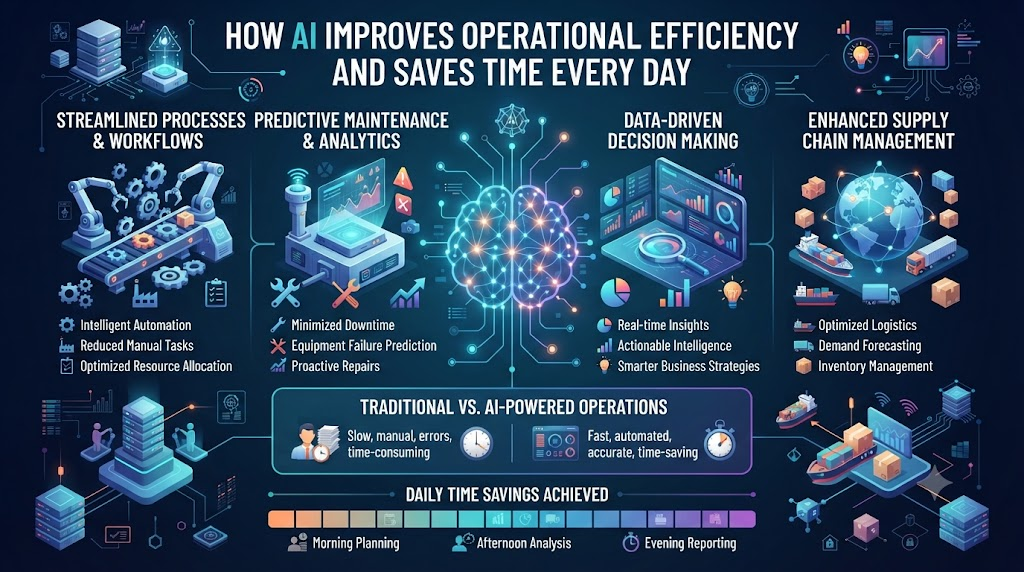
Your servers crash at midnight. You wake up to a wall of red alerts. You spend three hours digging through log files just to find a broken database connection. We have all lived this nightmare. It is slow, painful, and burns out your best team members.
Operational efficiency used to mean hiring more people to watch more screens. Today, that model fails because data grows faster than human teams can read it. You need a smarter way to handle routine tasks and spot trouble before it breaks your systems.
That is where smart automation steps in to help. To see how modern teams build these systems, you can check out resources like TheAIOps to learn practical methods. Artificial intelligence takes over the heavy lifting of watching metrics, sorting tickets, and fixing common bugs.
When you let software handle the repetitive work, your team gets to focus on building cool features and growing the business. This shift does not just save money; it saves your sanity. Let us look at how smart tools change the way modern teams run their daily operations.
Understanding the Real Cost of Manual Work
Manual work drains your team’s energy. When engineers spend half their day copying data or rebooting stuck servers, they miss big chances to innovate. Small mistakes creep in because humans get tired.
A tired engineer typing a quick command can accidentally delete a production table. Smart tools do not get tired. They follow exact steps every single time without losing focus.
Switching to automated systems stops human error in its tracks. You set up a clear rule once, and the machine follows it forever. Your team shifts from putting out fires to planning for the future.
How Smart Rules Catch Trouble Early
Old monitoring tools rely on simple static thresholds. If CPU use hits ninety percent, an alarm goes off. But ninety percent might be normal during a big product launch.
Smart software learns what normal behavior looks like over time. It looks at the time of day, day of the week, and user traffic trends. If CPU use spikes at three in the morning on a Sunday, the system flags it as unusual.
This smart approach cuts down on false alarms. Your engineers only get paged when something is truly broken. They sleep better and work faster when an actual emergency happens.
The Power of Instant Log Analysis
When a system fails, finding the root cause feels like hunting for a needle in a haystack. You open gigabytes of text logs and scroll for hours. It is slow and frustrating.
Modern AI tools read those log files in milliseconds. They scan millions of lines of text and find the exact error message that caused the crash.
Instead of guessing what went wrong, your team gets a direct link to the faulty code line. Resolution times drop from hours down to mere minutes. That keeps your customers happy and your apps online.
| Traditional Monitoring | Smart AI Operations |
| Static alerts that trigger false alarms | Dynamic baselines that learn normal patterns |
| Manual log searching across servers | Instant text analysis and root cause finding |
| Reactive fixes after crashes happen | Proactive fixes before users notice trouble |
| High burnout from midnight pages | Low stress with automated healing scripts |
Automating Routine Ticket Routing
Customer support and IT help desks drown in incoming tickets every day. Passwords expire, software updates fail, and users ask the same questions over and over. Sorting these tickets by hand takes a huge amount of time.
Smart classification tools read incoming requests and send them to the right team instantly. They can even solve simple password resets without human help.
Your support staff spends time helping users with complex problems instead of playing digital mail carrier. Response times drop, and customer satisfaction scores go way up.
Scaling Operations Without Adding Headcount
As your company grows, your server load grows with it. In the past, doubling your user base meant doubling your operations team. That gets expensive very fast.
Smart automation lets you scale your infrastructure without growing your staff at the same rate. One engineer can manage ten thousand servers instead of just fifty.
The software handles routine scaling up and down based on live traffic. Your business grows profitably while your overhead stays under control.
Real-World Story About Server Crashes
- A major retail store lost fifty thousand dollars every minute their checkout page went down during a holiday sale.
- Their engineering team was fast asleep when a memory leak caused the main database cluster to lock up completely.
- Traditional monitoring tools missed the issue because overall server CPU usage stayed low while memory filled up.
- A smart operations platform noticed the slow memory leak pattern ten minutes before the final crash happened.
- The system automatically triggered a safe cache clearance script and restarted the background worker threads.
- Customer checkouts continued without a single interruption, and the shoppers never knew a crisis was avoided.
- The on-call engineer woke up to a resolved notification log instead of a blaring phone call at midnight.
- The team reviewed the automated fix in the morning and updated their code to patch the memory leak permanently.
- This single automated intervention saved the company thousands of dollars in lost sales and prevented customer churn.
- The leadership team approved a wider rollout of smart automation tools across all engineering departments the very next week.
Managing Cloud Costs With Smart Forecasting
Cloud bills can spiral out of control if you leave virtual machines running when nobody is using them. Development servers often stay turned on all weekend long.
Smart optimization tools track usage patterns and shut down idle resources automatically. They also buy spot instances when cloud prices drop.
You stop wasting money on empty servers. Your finance team will love seeing your monthly cloud bills drop by twenty or thirty percent.
Common Mistakes and Pitfalls
- Trying to automate everything on day one without a clear plan leads to massive confusion and wasted time. Fix this by starting with one small, repetitive task like log backup sorting.
- Buying expensive enterprise software before your team knows basic scripting creates unused tools that gather digital dust. Fix this by testing open-source tools first to prove value.
- Ignoring team feedback when rolling out new workflows makes engineers hate the new systems. Fix this by involving the people on call in designing the automation rules.
- Setting alerts with zero tuning causes alert fatigue where staff ignore every warning message. Fix this by reviewing and adjusting thresholds every single month.
- Forgetting to document your automated scripts leaves the company blind if the creator leaves. Fix this by keeping a shared playbook for every automation rule.
- Relying one hundred percent on machine decisions without human safety checks can cause massive runaway errors. Fix this by keeping human approval steps for major system changes.
- Failing to secure your automation credentials lets bad actors steal administrative access to your servers. Fix this by using secure vaults and role-based access controls.
- Treating smart operations as a one-time project instead of an ongoing habit leads to old rules breaking over time. Fix this by assigning a rotation owner to maintain scripts.
- Neglecting to measure baseline metrics before you start means you cannot prove if your changes actually worked. Fix this by tracking resolution time from day one.
- Copying another company’s setup without checking if it fits your specific tech stack wastes valuable engineering hours. Fix this by designing custom workflows for your needs.
Step-by-Step Implementation Roadmap
- Audit your current daily operations to find the tasks that waste the most time and cause the most stress.
- Pick one single repetitive workflow, such as weekly log cleanup or basic server restarts, for your first test project.
- Gather baseline performance numbers so you can measure how much time your team saves with the new setup.
- Choose simple automation tools that match your current programming languages and cloud provider setup.
- Write out the exact step-by-step logic for your chosen task in plain English before writing any code.
- Build your automation script in a safe staging environment that does not touch live production users.
- Test the script against simulated failures to make sure it handles unexpected errors without breaking things.
- Deploy the script to production with a human review step so an engineer approves the final action.
- Monitor the automated runs closely for the first two weeks to catch any edge cases or weird bugs.
- Remove the human approval step once the script proves it runs reliably over fifty successful cycles.
Frequently Asked Questions
1. Will artificial intelligence replace my entire operations team?
No, software handles routine tasks like log sorting and server reboots, but humans make high-level strategy decisions and fix complex new bugs.
2. How hard is it to start using smart operations tools?
You can start very small by writing a simple script to handle one repetitive weekly task before moving on to bigger systems.
3. What skills do my engineers need to learn first?
Basic scripting skills and an understanding of your cloud provider metrics are enough to get started with modern automation tools.
4. How do I convince my boss to buy automation software?
Show them how many hours your team wastes on manual fixes and calculate the money saved by cutting server downtime.
5. Are automated systems safe to run on live production servers?
Yes, as long as you test them thoroughly in a staging environment and keep human approval steps for major changes.
6. How long does it take to see results from smart workflows?
Most teams see a drop in routine support tickets and faster incident response times within the first month of use.
7. What is the biggest risk when setting up automated fixes?
Writing scripts with bugs that repeat errors across multiple servers before a human can step in to stop them.
8. Do I need expensive enterprise tools to improve efficiency?
No, many great open-source tools and simple cloud utilities can help you automate workflows without breaking your budget.
9. How often should we update our automation rules?
You should review and tune your alert thresholds and automation scripts at least once every month as your app grows.
10. Can small startups use these smart operational methods?
Yes, setting up good automation early helps small teams scale up smoothly without burning out their founders.
Final Recommendation and Next Steps
Do not try to fix every operational problem in your company today. Pick one single annoying task that wastes your team’s time this week. Write down the steps you take to fix it by hand. Turn those steps into a simple script and test it in your staging environment. Once you see how much time it saves, move on to the next bottleneck. Building a reliable system is a marathon, not a sprint. Take your first small step today and watch your daily stress melt away.
