Upgrade & Secure Your Future with DevOps, SRE, DevSecOps, MLOps!
We spend hours scrolling social media and waste money on things we forget, but won’t spend 30 minutes a day earning certifications that can change our lives.
Master in DevOps, SRE, DevSecOps & MLOps by DevOps School!
Learn from Guru Rajesh Kumar and double your salary in just one year.
Every night, servers break down when you want to sleep. Your phone buzzes with fifty alerts in one minute. Most of those alerts mean nothing, but one of them means your main website is down. You spend hours looking through endless logs just to find the broken piece of code. This is the daily pain of running modern computer systems.
Manual incident management is too slow for today’s fast world. Traditional tools send too much noise and not enough signal. Teams get tired, make mistakes, and miss critical warnings. We need a better way to handle system failures without losing our sanity. That is where smart automated platforms step in to help your team work smarter.
To explore how advanced event platforms handle these modern challenges, you can check out TheAIOps for more insights. These platforms change how you see system health by filtering out the noise and pointing you right to the root cause. Let us look at how modern tools change the game for every system administrator.
What Is Modern IT Incident Management?
Incident management means finding and fixing computer system problems fast. When a server crashes, your users get angry, and your boss calls you. You need a clear process to find the bug, fix the bug, and get back online. In the past, this job required sitting at a desk and reading raw text files line by line.
Today, systems are too big for human eyes to watch alone. Microservices, cloud servers, and mobile apps create millions of data points every single second. If you rely on old methods, you will miss vital clues. Modern incident management combines human skill with smart computer programs to catch problems before users even notice them.
Why Old Monitoring Tools Fail Today
Old monitoring tools rely on simple rules. If CPU usage goes over ninety percent, they send an alarm. But high CPU usage is not always a bad thing. Sometimes a big backup is running as planned. Old tools do not know the difference between normal work and a real emergency.
This creates a huge problem called alert fatigue. When your phone rings ten times an hour for fake problems, you start to ignore it. Then, when a real crisis happens, you sleep through the warning. Smart tools learn what normal looks like so they only wake you up when something is truly broken.
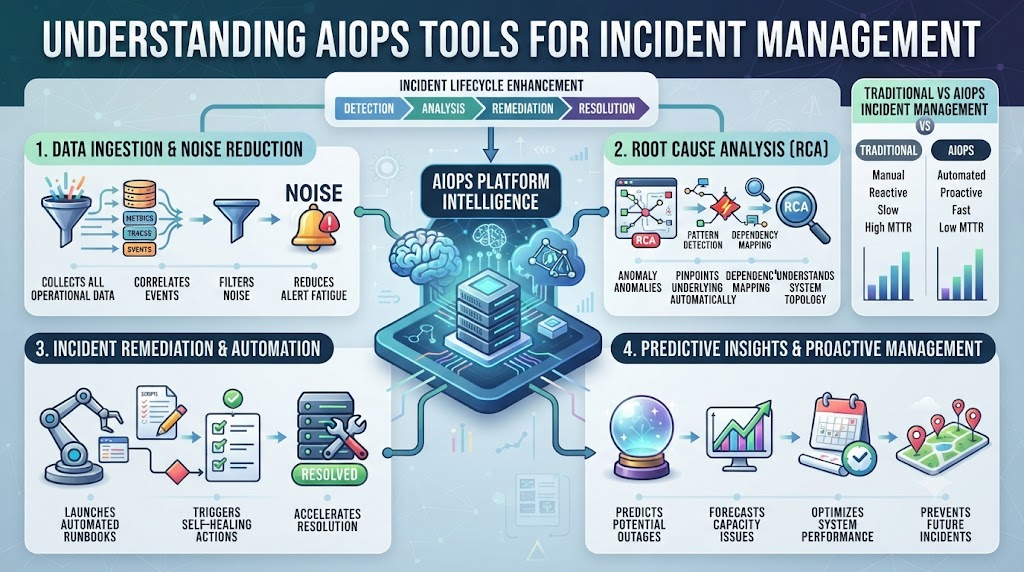
| Feature | Old Monitoring Tools | Smart AIOps Tools |
| Alert Volume | High noise and many fake alarms | Low noise and high accuracy |
| Data Source | Single server metrics | Cross-cloud and multi-system data |
| Root Cause | Found manually by humans | Found automatically by smart rules |
| Learning Curve | Static rules set by hand | Dynamic learning from past events |
How Smart Systems Reduce Alert Fatigue
Smart systems look at all your logs, metrics, and traces at the same time. They group related alerts into a single incident ticket. Instead of getting fifty emails for one server crash, you get one clean summary. This saves precious time when every second counts.
These platforms also use historical data to predict future failures. If a database usually slows down every Friday afternoon, the system warns you ahead of time. You can fix the memory leak before the crash happens. Moving from reactive firefighting to proactive prevention changes your entire workday.
Real-World Story About Server Crashes
- The payment gateway crashed on a busy Friday afternoon, freezing customer checkouts worldwide while engineers stared blindly at endless red terminal screens.
- An overloaded database CPU triggered over five hundred distinct alerts across three separate communication channels within a span of ten frantic seconds.
- The on-call engineer ignored the noisy group chat because false alarms happened constantly during regular business hours, delaying any real troubleshooting action.
- A smart event management platform quietly grouped all five hundred alerts into a single incident ticket pointing to one locked database table.
- The system automatically ran a safe diagnostic script that revealed a rogue background query locking the main user table in the database.
- An automated remediation step killed the stuck query safely without needing manual login access from the exhausted on-call engineering team.
- The payment gateway recovered fully within three minutes, sparing the business from thousands of dollars in lost revenue and customer frustration.
- Management reviewed the incident logs the next morning and praised the team for their rapid, calm, and structured incident response workflow.
- The engineering lead updated the monitoring rules to catch that specific table lock warning before it could cause another system slowdown.
- The team enjoyed a peaceful weekend without any unexpected middle-of-the-night emergency pages disrupting their rest and family time.
Common Mistakes and Pitfalls
- Ignoring alert thresholds: Setting triggers too low creates constant noise. Fix this by tuning thresholds based on real historical peak traffic data.
- Trusting default settings: Relying on out-of-the-box tool rules misses custom app needs. Fix this by tailoring rules to your unique system architecture.
- Silencing without fixing: Muting annoying alerts without finding the root cause leads to bigger crashes later. Fix this by investigating every recurring warning.
- Working in isolated silos: Keeping incident notes hidden from other teams slows down repair work. Fix this by sharing post-mortem notes in a central wiki.
- Skipping team training: Buying expensive tools without teaching staff how to use them wastes money. Fix this by running weekly hands-on practice workshops.
- Ignoring cloud logs: Forgetting to pull logs from third-party cloud services leaves blind spots. Fix this by connecting all external API logs to your main hub.
- Overcomplicating workflows: Building massive approval chains for simple fixes delays recovery time. Fix this by empowering junior staff to run safe automated scripts.
- Failing to test backups: Assuming disaster recovery plans work without testing them leads to nasty surprises. Fix this by running monthly failover drill simulations.
- Not tracking metrics: Failing to measure mean time to resolution hides ongoing team burnout. Fix this by reviewing incident resolution speeds every single month.
- Relying purely on gut feelings: Guessing the cause of a bug instead of checking data wastes hours. Fix this by always following the step-by-step log trail.
Step-by-Step Implementation Roadmap
- Audit your current monitoring setup to list every tool that currently sends alerts to your team phones.
- Define clear service level objectives so everyone knows what normal system uptime looks like for your business users.
- Connect your primary log sources, metrics collectors, and cloud platforms into a single centralized observation dashboard.
- Set up smart event grouping rules to merge duplicate or related alerts into single manageable incident tickets.
- Create simple automated playbooks for common low-risk server fixes like restarting stalled worker threads or clearing temporary caches.
- Train your on-call engineering staff on how to read and trust the new consolidated incident management workflow.
- Run a controlled test failure in a staging environment to see how quickly the system catches and flags the issue.
- Go live with the new platform during low-traffic hours while keeping an experienced senior engineer on standby watch.
- Review your weekly incident reports with the team to identify remaining alert noise and fine-tune your threshold rules.
- Continuously update your automated playbooks as your application code evolves and grows over future development cycles.
Frequently Asked Questions
1. What does AIOps stand for in simple terms?
AIOps stands for artificial intelligence for IT operations, meaning smart software that helps engineers find and fix computer bugs faster.
2. How do these modern tools stop alert fatigue?
They group hundreds of messy server warnings into one clean ticket so your phone stops ringing all night long.
3. Do I need coding skills to use these platforms?
No, most modern platforms offer simple visual dashboards and drag-and-drop rule builders for everyday team use.
4. How long does it take to set up a smart incident tool?
Basic setup takes a few days, while full team integration and custom rule tuning usually take a few weeks.
5. Can small startup teams benefit from these tools?
Yes, small teams benefit greatly because they have fewer people available to watch servers manually around the clock.
6. Are my company logs safe in cloud-based monitoring tools?
Yes, reputable platforms use strong encryption and strict security compliance standards to keep your company data completely safe.
7. What is the main difference between logs and metrics?
Metrics show numbers like CPU usage over time, while logs show text stories about specific events happening inside your app.
8. How do I convince my boss to buy an incident tool?
Show them how many hours your team wastes on fake alerts and calculate the money lost during past server downtime events.
9. Will automation replace human system administrators?
No, automation handles boring repetitive tasks, freeing human engineers to focus on building cool new software features.
10. What is the first step to begin our automation journey?
List all your current alert sources and delete any old warning rules that nobody on your team actually reads or uses.
Final Recommendation and Next Steps
Start small by picking one noisy server cluster to test your new incident management strategy. Do not try to fix your entire infrastructure on day one. Clean up your basic alert rules, connect your main logs, and measure how much time your team saves in the first week. Taking these small steps today will build a calm, reliable, and smooth IT operation for tomorrow.
