Upgrade & Secure Your Future with DevOps, SRE, DevSecOps, MLOps!
We spend hours scrolling social media and waste money on things we forget, but won’t spend 30 minutes a day earning certifications that can change our lives.
Master in DevOps, SRE, DevSecOps & MLOps by DevOps School!
Learn from Guru Rajesh Kumar and double your salary in just one year.
Introduction
A busy dinner service can feel like a race. Phones ring nonstop at the host stand. Guests line up at the front door. Meanwhile, good tables sit empty because no one can find the booking list.
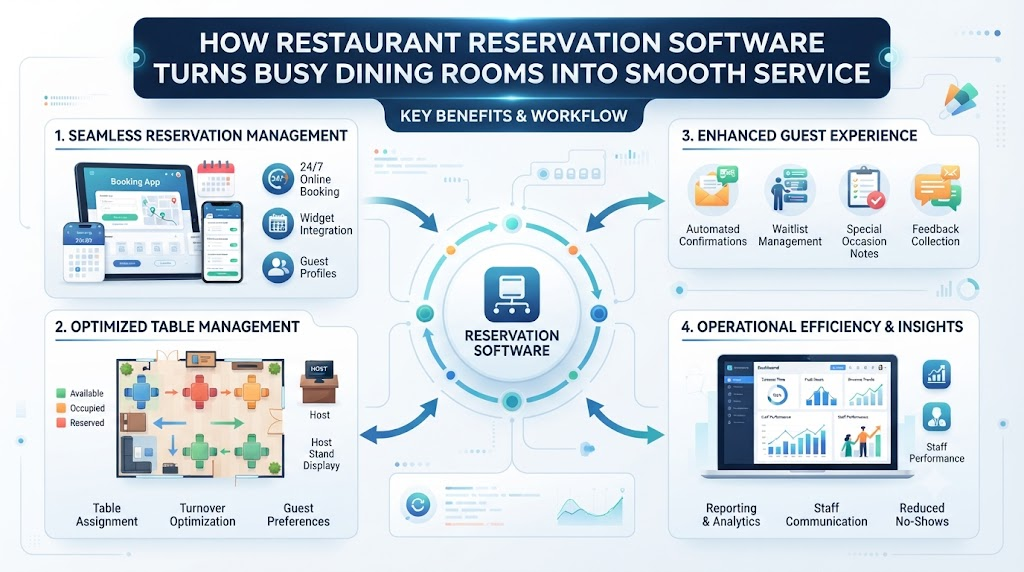
Each missed call can mean a lost cover. Each empty seat costs money. Each long wait risks a poor guest review. Modern tools can fix this. Restaurant reservation software takes bookings online, day and night. It also shows live table status on one clear screen.
DineGlobe is one such platform. It links online reservations with front-of-house table control in one simple place. This guide explains these tools in plain English. It covers booking pages, table maps, waitlists, and host stand screens. You will also learn how small restaurants can start for free.
Why Modern Dining Rooms Need Digital Reservation Systems
The basic goal of reservation software is simple. It lets guests book a table online at any hour. So your team spends less time on the phone. Staff can then focus on greeting guests and warm hospitality.
Old paper logbooks create daily problems. Pages tear. Notes get smudged. Pencil marks fade. A booking written at nine in the morning may vanish by dinner.
Paper also invites double bookings. Two hosts can write the same table for the same time. Then a party waits at the door with no seat.
Good software prevents this. The system locks each table to one booking at a time. It also tracks table turns. A turn means one full meal cycle, from seating to bill payment.
When turns are timed well, more covers fit into each service. Covers means the number of guests served. Restaurant reservation software keeps this math clear. It also fills gaps between bookings. So your dining room stays busy but never overcrowded.
Direct Bookings vs Third-Party Dining Marketplaces
Smart owners now ask one key question. Who owns the guest relationship? Third-party dining marketplaces bring bookings, but they charge a fee for each cover. They also keep the guest data. Direct booking pages change this. You own the booking. You own the guest details. And you pay no commission. Here is how the main booking channels compare.
| Booking Channel | Guest Data Ownership | Per-Cover Commission Fees | Brand Experience | Operational Control |
|---|---|---|---|---|
| Direct Restaurant Booking Page | Full ownership of names, emails, phone numbers, and dining notes | Zero commission; no per-cover fees | Your logo, photos, and voice at every step | Complete control of hours, holds, and table rules |
| Third-Party Marketplace App | Marketplace keeps the profile and contact data | Commission charged on every booked cover | Standard app design shared with thousands of venues | Limited control of booking rules and guest contact |
| Traditional Phone Bookings | Restaurant owns details if staff record them correctly | No commission, but staff time costs money | Warm and personal, yet slow during rush hours | Depends fully on host team accuracy |
| Walk-In Only Operations | No advance data collected | None | Lively and spontaneous | Wait times swing wildly during peaks |
A direct booking page is easy to share. Post your custom booking link on your website, social pages, and menu cards. Guests tap, pick a time, and get instant confirmation. Their details land straight in your system. This builds direct loyalty. You can send personal offers and birthday notes. You also keep the full profit on each meal.
Direct Restaurant Booking System and Customer Relationships
A direct restaurant booking system is easy to explain. Guests book straight from your own website. No middleman sits between you and the diner. No third party takes a cut of your hard work.
Each booking gets a clear confirmation code. Guests see the date, time, party size, and table zone. So they arrive calm and informed.
Life happens, and plans change. Self-service cancellation links let guests fix their own bookings. They can cancel or reschedule without a single phone call. Your staff saves hours each week.
You also keep full control of diner notes. A guest marks a shellfish allergy once. Your kitchen sees it forever. Regulars get their favorite corner table noted.
An online restaurant booking system works day and night. It fills seats while your team sleeps. Late-night diners book after their own dinners. Guests plan from other time zones.
This direct link builds real bonds. Guests feel remembered. Hosts feel prepared. Managers see each booking in one clean list. Over time, your guest list becomes a true business asset. It drives repeat visits and steady growth.
The system also flags repeat guests for you. A host can welcome them by name at the door. Small touches like this turn first-time visitors into loyal regulars. And loyal regulars tell their friends.
Restaurant Table Management Software and Live Seating
Table management software does one big job. It connects each incoming reservation to a real physical table in real time. So the dining room and the booking page always match.
The system tracks each table’s full journey. It shows when a table is booked, seated, eating, or paying. Hosts see the status on one live screen.
Seating buffers matter here. A buffer is extra time left between bookings. It absorbs late arrivals and slow meals. Good software lets you set buffers by party size. A table of two may turn fast. A table of eight needs more time.
Meal durations also stay tracked. The system learns your average turn times. So quotes stay honest and realistic.
Occupied and clean tables show up in different colors. Bussing staff clear and mark tables ready. The host stand sees it right away. Restaurant table management software removes all guesswork from seating.
The result is simple. Faster turns, calmer hosts, and fewer awkward guest waits. Your dining room flows like clockwork night after night.
Restaurant Floor Plan Software and Layout Optimization
Floor plan software turns your dining room into a live map. You see each table, booth, bar seat, and patio spot from a bird’s-eye view. The map looks like a simple drawing of your room.
Building the map is easy. You drag tables onto a grid. You name each one. You add the chair count for each seat. The software remembers it all.
Large parties need smart combining. The software lets you join small tables into one big setup. Two square tables become an eight-person banquet in seconds. You can also split them back apart after the meal.
Reservation holds protect special evenings. Mark the corner booth for an anniversary at seven. The system blocks it from the open list. Nothing else can claim it.
Server sections stay fair too. You divide the map into balanced zones. Each server gets an equal share of seats and turns. Restaurant floor plan software makes this visual and instant. Managers adjust sections before service.
The result is steady workload, fair tips, and smoother guest care all night long. Guests also enjoy a room that never feels cramped or confusing.
Restaurant Waitlist Management Software for Peak Hours
Friday and Saturday evenings test each dining room. The booking list is full. Yet more guests arrive at the door, hoping for a table.
This moment shapes the whole visit. A long, confusing wait drives people away. A clear, honest wait keeps them close.
Restaurant waitlist management software fixes the Friday chaos. Guests join a digital list with their name and party size. The system tracks all parties in order. No one gets skipped or forgotten.
Accurate wait times are the magic. The software checks your real dining room turn averages. So a quote of forty-five minutes is based on facts, not guesses.
Then notifications do the walking. The system texts guests when their table is ready. They can stroll nearby instead of crowding the doorway. Some tools let guests watch their spot in line from their phone.
Walk-away rates drop fast with this setup. Parties wait longer when the quote feels fair. Covers grow. Reviews glow. And the host stand stays calm, even during the busiest hour of the week.
Restaurant Host Stand Software for Smooth Shift Handovers
The host stand is the brain of your dining room. It welcomes guests, seats parties, and tracks each table. Host stand software gives that desk one central screen for all service details.
Arrivals show up as they happen. The host sees the party of four booked for seven. They are checked in and waiting at the bar. Table statuses update in real time. A clean table turns green the moment bussing ends.
Managers stay informed without hovering. The screen shows covers seated, covers booked, and walk-in counts for the shift. Numbers update live, so decisions rest on fresh data.
Shift handovers become smooth. The outgoing host sees complete notes for the incoming team. Each hold, VIP note, and pending party stays visible. Nothing falls through cracks between lunch and dinner.
Restaurant host stand software also runs on simple hardware. A basic tablet at the podium works fine. So even compact teams get big-restaurant control. New hosts train faster too. One clear screen beats a wall of paper notes and sticky reminders.
Restaurant Walk-In Management Software for Spontaneous Diners
Some guests do not book ahead. Some of the best covers come from people who simply walk by. Walk-in management software helps hosts welcome them without breaking the reservation plan.
The day’s booking grid shows open gaps between reserved tables. Maybe a four-top sits free from six-fifteen until seven-thirty. The software flags it clearly.
Quick guest registration takes seconds. The host types a name and party size at the door. The system finds the best table that fits the gap. So a walk-in couple fills a slot before the next reservation arrives.
The balance matters most. Advance bookings deserve their promised seats. Yet open gaps should never sit empty. Restaurant walk-in management software keeps both sides happy.
Open tables update on the fly. As walk-ins get seated, the live map shifts. Hosts always see the current picture. Walk-in diners get warm seats. Reserved guests get on-time tables. Each square foot of your dining room earns its keep.
Essential Front-of-House Shift Readiness Checklist
Great service starts before the first guest arrives. A quick pre-shift review saves the whole evening. Strong teams check their dining room like pilots check a plane. This simple checklist keeps each service on track from the first minute.
| Check Point | What to Review | Operational Impact |
|---|---|---|
| Table Availability & Holds | Confirm open tables for each slot and verify holds for VIP guests and anniversaries | Prevents double seating and honors promised bookings |
| Combined Table Layouts | Check planned table joins for large parties against expected arrivals | Avoids last-minute room shuffling and guest delays |
| Expected Shift Covers | Review total booked covers and compare with staffing levels | Balances kitchen load and server workload |
| Walk-In Seating Buffer | Confirm flexible tables kept open for expected walk-in traffic | Captures spontaneous covers without breaking reservations |
| Server Station Balance | Check that each section holds a fair mix of tables and turns | Keeps service speed and tip earnings even |
| Special Guest Notes | Scan allergies, celebrations, seating needs, and repeat-guest notes | Delivers personal hospitality from the very first hello |
Ten quiet minutes before service can change the whole night. The manager and head host review bookings together. They spot the crush hours, the empty gaps, and the big parties early. So the team fixes small problems before guests arrive. Calm starts lead to smooth finishes.
Restaurant Reservation Software for Small Restaurants
Small restaurants often skip reservation tools. Owners think such software needs big budgets or a full-time front desk team. That old idea is now wrong.
Independent bistros, family diners, neighborhood cafes, and boutique eateries have small teams. Often the owner is also the host, the cashier, and the barista. Each free minute counts.
Restaurant reservation software for small restaurants fits this reality. The tools run on a phone or a single tablet. Setup takes a day, not an IT project.
Bookings arrive online without any staff time. The system confirms them at once. So a two-person team gains a full online front desk.
Small venues also gain smarter seating. The software tracks the handful of tables carefully. It fills lunch gaps and protects the busy dinner window.
No special hardware is required either. A shared tablet at the counter works. Owners check bookings from home in the morning. They even see live status during a quick grocery run. Compact restaurants get the same control as large hotel dining rooms. And the playing field levels overnight.
Free Restaurant Reservation System and Pilot Programs
Budget worry stops many owners from trying modern tools. Free pilot programs remove that worry for good. A pilot is a zero-cost trial. You test the software first. Then you decide with real results, not sales talk.
A free restaurant reservation system pilot usually includes the core features. You get online booking pages for your website. You get visual table layouts with live status. You get waitlist tools for busy nights.
Role-based staff logins are also part of the package. Each team member sees only what their job needs. Hosts seat guests. Managers edit rules. Owners see reports.
The terms stay transparent in good pilots. No hidden fees. No surprise charges after the first month. You learn the system while your guests enjoy smoother service.
Testing before committing protects your budget. Some venues run pilots for weeks. They measure booked covers, wait times, and no-show rates. Data makes the final decision easy. If the tools help, you scale up with confidence.
Multilingual Support and Modern Operations with DineGlobe
Modern dining rooms serve the whole world. Tourists, business travelers, and diverse local teams fill tables each night. One-language software slows them all down.
DineGlobe solves this as an all-in-one dining platform. It unites online reservations, table layouts, waitlists, and arrival tracking in one tool. And its interface speaks many languages.
Host stand screens switch between English, Japanese, and Arabic in seconds. A Japanese-speaking host seats guests with ease. An Arabic-speaking manager reads shift reports without trouble.
Hotel teams with global staff feel the difference most. Staff rotations span countries and cultures. Shared software must speak each person’s language.
Global guests benefit too. They book and manage tables in a language they trust. So the guest journey feels warm from the first click.
One platform, many languages, zero language mix-ups. That is the DineGlobe approach to modern front-of-house operations.
Real-Life Dining Room Scenarios
- A downtown bistro seats walk-in couples at high-top tables between booked seatings. Meanwhile, the host team holds the window booths for two anniversary dinners. The live floor map shows each hold. So the team seats walk-in guests without touching reserved tables.
- A neighborhood family restaurant expects a large birthday group. The host joins two square tables into an eight-person banquet using visual floor-plan controls. Chair counts and server sections update at once. The whole setup takes less than a minute.
- An independent sushi bar shares direct booking links on its website and social pages. Guests book without any third-party commission. The owner also tracks dietary preferences and repeat visitors in the same guest profiles.
- An international hotel dining room runs host stand screens in English, Japanese, and Arabic. Team members switch the display during shift handovers. Each host reads the same live table map in their own language. Guests receive the same warm welcome at any hour.
Common Mistakes to Avoid in Restaurant Table and Booking Management
- Paper slips get lost during busy lunch services. A booking vanishes, and a party arrives with no seat. Switch to a digital booking list that saves each entry at once.
- Overbooking peak hours leaves no seating buffers. Delayed guests then block new parties. Always hold buffer minutes per booking based on party size.
- Relying fully on third-party portals cuts you off from loyal guests. You also pay a fee on each cover. Add a direct booking link to your own website today.
- Table statuses often stay stale after guests pay. The room looks full when it is not. Teach bussing staff to mark tables clean the moment they finish.
- Walk-in diners get turned away when hosts cannot see gap times. Open slots sit empty all night. Use live grid views to spot and fill booking gaps fast.
- Guessed wait times upset waiting guests and spark bad reviews. Real turn averages give honest numbers. Let software track your actual dining room turn data.
- Shared logins let staff edit shift rules by mistake. One tap can change holds for the whole week. Set role-based permissions so each staff member only sees their tools.
- Small venues sometimes sign rigid, high-fee contracts too early. They pay for features they never use. Test a free pilot system first and compare real results.
Simple Reservation Setup and Service Checklist
- Customize your booking page. Add clear opening hours, seating zones, and party size limits before launch.
- Build your floor plan. Place each table with exact numbers and chair counts so hosts seat with confidence.
- Set default turn times. Base meal times on party size so the system quotes realistic open slots.
- Train your host team. Practice adding walk-ins and updating live table status before the first rush.
- Turn on guest messages. Automatic confirmations and self-service change links cut phone time sharply.
Frequently Asked Questions
1. What is the difference between direct booking systems and third-party restaurant portals?
Direct booking systems run on your own website. Guests book straight from you, so you keep each detail and pay no commission. Third-party portals list many venues in one app. They bring reach, but they charge a fee for each booked cover. Portals also control the guest data and limit your contact with diners.
2. How does online table management software stop double bookings during busy shifts?
The software locks each table to one reservation per time slot. When a host seats a party, the table closes for new bookings until it turns. The live grid updates at once on each device. So two people can never claim the same table. The system also applies your turn times and buffers for you.
3. Can small independent cafes benefit from digital reservation platforms?
Yes, and often faster than large venues. A small cafe team lacks spare staff for phone bookings. Online booking pages handle reservations around the clock at no labor cost. The software runs on a phone or tablet. Owners track covers during quiet hours and protect peak tables. Even a ten-table room gains smoother, fuller service.
4. How does restaurant floor plan software handle large party table combinations?
The visual map shows each table with exact chair counts. Hosts select two or more tables and join them into one layout. The system then blocks that joined block from the open list. After the party leaves, one tap splits the tables back into normal setup. Server sections and covers update across the whole floor plan at once.
5. What is the best way to handle walk-in diners during fully booked evenings?
Keep a small seating buffer open for spontaneous guests. Check the booking grid for gap times between reserved seatings. Add walk-ins quickly with name and party size. Then seat them into the gaps that fit. Waitlist software also quotes honest return times and texts guests when tables open. So walk-ins feel welcome, not turned away.
6. How does digital waitlist software estimate accurate return times for waiting guests?
The software studies your real dining room data. It tracks how long each party size takes to finish a meal. Then it compares open tables with the current waitlist. The quote updates as tables turn and new parties arrive. So a quote of thirty minutes is based on live math. Guests trust honest numbers and wait calmly.
7. Can guests modify or cancel their reservations without calling the restaurant?
Yes. Each confirmation message includes a self-service link. Guests open it to change their time, date, or party size. They can also cancel with one tap. The system updates your live grid instantly. Freed tables reopen for new bookings right away. Your staff avoids phone tag and keeps full focus on guests in the room.
8. What hardware or devices do host teams need to run modern host stand software?
Very little. A standard tablet or touchscreen at the podium covers most needs. Many venues also use a phone for the manager on duty. The software runs in a web browser or a simple app. No special servers or costly installs are required. Most teams start with devices they already own and add more as they grow.
9. How do role-based staff permissions protect restaurant booking data?
Each team member gets a login tied to their job. Hosts seat guests and manage waitlists. Managers adjust rules and floor plans. Owners view reports and settings. Nobody can edit tools outside their role. This stops slips that change holds or shift rules. It also keeps guest details private and your booking history clean.
10. Why is multilingual platform support useful for modern hospitality teams?
Dining teams and guests come from everywhere. Multilingual screens let each host work in their strongest language. Switching between English, Japanese, and Arabic takes seconds. Training gets faster and mistakes drop. International guests also enjoy smoother service. The whole front-of-house speaks one shared system, in any language each person prefers.
11. What features are included in a free restaurant reservation system pilot?
Most pilots include the core toolkit. You get an online booking page, a visual floor plan, and a digital waitlist. Role-based staff logins come standard too. Automatic guest messages and self-service booking links are usually included. Honest pilots show all terms up front. There are no hidden fees or forced long-term contracts during the trial.
12. How does DineGlobe combine table management, waitlists, and bookings in one tool?
DineGlobe unites all front-of-house tasks on one platform. Online bookings flow straight into your live table map. Waitlists connect to real turn times. Walk-ins fill gaps as they appear. Host stand screens show arrivals and statuses in real time. Managers watch covers and pacing from any device. The interface also switches between English, Japanese, and Arabic for global teams.
Conclusion
Smooth dining service rests on four pillars. Warm hospitality welcomes each guest. Live table capacity keeps the room full but never crowded. Direct bookings protect your profits and your guest relationships. And clear front-of-house coordination turns busy shifts into calm, steady flow. Modern software simply makes these pillars easier to hold each night. Start small, test a free pilot, and let the data guide your choices. Dear restaurateurs, remember this always. Smooth, organized table systems do more than fill seats. They create the relaxed, memorable dining moments that keep guests coming back for years.
