Upgrade & Secure Your Future with DevOps, SRE, DevSecOps, MLOps!
We spend hours scrolling social media and waste money on things we forget, but won’t spend 30 minutes a day earning certifications that can change our lives.
Master in DevOps, SRE, DevSecOps & MLOps by DevOps School!
Learn from Guru Rajesh Kumar and double your salary in just one year.
Introduction
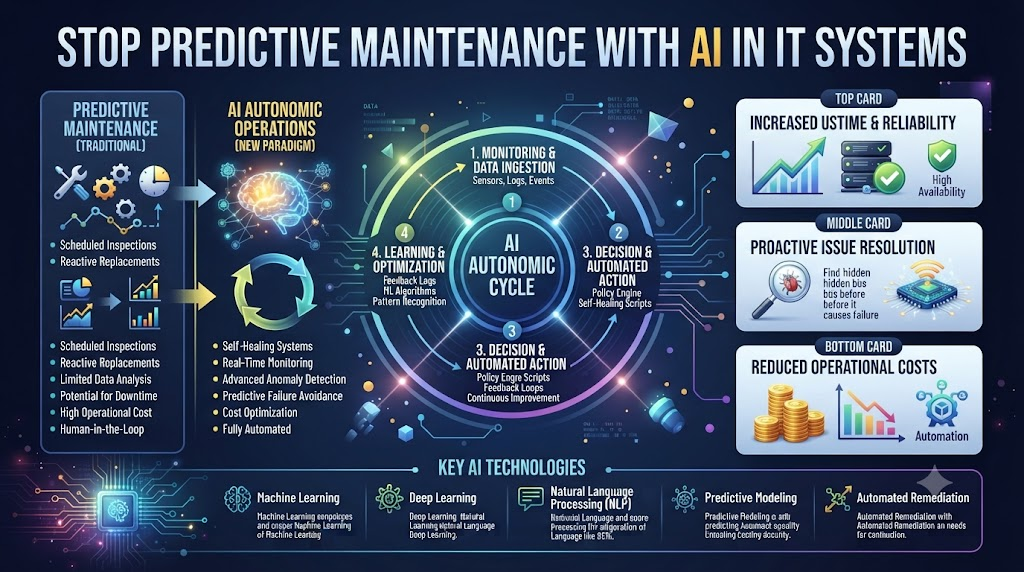
You sit at your desk. Your phone rings. A server just crashed. Your users are mad. You have to fix it right now. This is the old way to run IT. We wait for things to break. Then we rush to fix them. But what if you could see the crash coming before it happens?
That is what predictive maintenance does for your tech stack. It uses smart step-by-step rules to watch your gear. It finds tiny warning signs long before a breakdown. You get time to fix the issue on a normal Tuesday afternoon. No late-night panic needed.
Many teams now visit TheAIOps to learn how to set up these smart tools. They want to stop putting out fires all day long. They want to plan their work and sleep through the night. Let us look at how you can do this too.
Why Old IT Maintenance Fails You
Old IT maintenance relies on simple schedules. You check a server every month. Or you wait until a hard drive dies. Both ways fail you. Monthly checks miss fast-moving bugs. Waiting for a crash hurts your bottom line.
When a server drops offline, customers leave. Your team gets stressed. You spend hours digging through logs to find the root cause. This drains your energy and your budget. You need a better way to handle system health.
Smart monitoring changes the game. It looks at your servers every second. It learns what normal looks like. When something looks a little bit weird, it tells you right away. You catch small bugs before they turn into big outages.
How Machine Learning Spots Hidden Risks
Machine learning sounds complex. But it is just a tool that finds patterns. It looks at millions of data points from your network. It sees things human eyes miss.
Think about CPU temperature, fan speed, and memory use. A human cannot track all of these across five hundred servers at once. But an AI tool can. It learns that a fan speeding up by five percent means a crash is coming in three days.
This gives you a huge advantage. You do not have to guess. You get clear alerts with exact details. You can swap out the bad part during a routine maintenance window. Your users never even notice a bump in the road.
The Cost of Downtime in Modern Business
Downtime costs real money. Every minute your web store is down, you lose sales. Every minute your staff cannot log in, work stops. These losses add up fast.
Beyond money, downtime hurts trust. Customers want systems that just work. If your site goes down often, they will find a new vendor. Fixing this problem protects your brand and your revenue.
Predictive tools slash your downtime to near zero. They catch risks early. You fix issues while they are small. Your systems stay up, your customers stay happy, and your business keeps growing.
Real-World Story About Server Crasches / Case Studies
- The Midnight Outage: A major bank lost power to its main database at midnight. The team spent six hours restoring backups. An AI tool later showed the memory leaked for days before the crash.
- The Silent Disk Failure: A retail site lost a hard drive on Black Friday. No one checked the disk health alerts. A smart monitor would have flagged the failing drive a week prior.
- The Cloud Bill Shock: A software firm left a test server running full blast all weekend. Cloud costs spiked. An AI tool would have spotted the unusual resource spike and sent an instant warning.
- The Memory Leak Trap: A gaming company saw slow frame rates every Sunday. The team rebooted servers manually each time. A predictive model found the leaky code and fixed the root cause.
- The Network Switch Drop: A school district lost internet during final exams. A switch overheated due to dust buildup. Smart sensors would have warned staff about the rising heat levels early.
- The Email Server Freeze: A hospital lost email access during surgery scheduling. The hard drive was full. An AI monitor would have predicted the fill rate and triggered a clean-up task.
- The Payment Gateway Glitch: A shop lost credit card processing for an hour. The API timed out due to traffic growth. Predictive alerts would have suggested scaling up servers before noon.
- The Backup Failure: A legal firm thought backups ran fine. But the tape drive failed silently. A smart system would have caught the missed job and alerted an admin immediately.
- The Firewall Lockout: A security tool blocked all incoming traffic due to a false alarm. The team scrambled to log in. AI anomaly detection would have spotted the weird traffic drop instantly.
- The Database Deadlock: A media site crashed under heavy news traffic. The database locked up. A predictive tool would have spotted slow queries and recommended a quick index fix.
Comparing Traditional Monitoring and AI Systems
| Feature | Old Monitoring | AI Predictive Maintenance |
| Alert Type | After the crash happens | Before the crash happens |
| Data Usage | Simple static thresholds | Deep pattern analysis |
| Team Stress | High panic mode | Low calm planning |
| Downtime | Frequent and costly | Rare and controlled |
| Setup Effort | Easy manual rules | Smart automated learning |
Common Mistakes and Pitfalls
- Mistake: Collecting too much useless data. Fix: Focus on metrics that matter, like CPU, memory, and disk health.
- Mistake: Ignoring early warning alerts. Fix: Treat every low-level alert as a real hint to check your gear.
- Mistake: Trusting AI without human review. Fix: Always have an engineer check the fix before applying it to live systems.
- Mistake: Skipping baseline setup time. Fix: Let your AI tool run for two weeks to learn what normal traffic looks like.
- Mistake: Buying tools that are too complex. Fix: Pick simple software that fits your team size and skill level.
- Mistake: Failing to update system logs. Fix: Keep your logs clean so the AI can read them without errors.
- Mistake: Relying on one single metric. Fix: Combine CPU, disk, and network data for a complete system view.
- Mistake: Not training your team on the tool. Fix: Run short workshops so everyone knows how to read the AI alerts.
- Mistake: Forgetting to test your backups. Fix: Always verify your backups work before making big changes based on AI hints.
- Mistake: Setting alert thresholds too tight. Fix: Adjust sensitivity to stop fake alarms from burning out your staff.
Step-by-Step Implementation Roadmap
- Audit Your Current Gear: List all your servers, cloud instances, and network switches in a simple spreadsheet.
- Define Your Goals: Pick one system to start with, like your main customer database or web server.
- Clean Your Data Sources: Make sure your system logs and monitoring tools are active and easy to read.
- Choose Your AI Tool: Select a reliable predictive maintenance platform that fits your budget and needs.
- Set Up Baselines: Let the AI tool run quietly for two weeks to learn your normal daily traffic.
- Configure Smart Alerts: Set up alerts to go to your team chat app when unusual spikes happen.
- Run a Small Test: Simulate a high load on a test server to see if the AI warns you early.
- Train Your Team: Show your engineers how to read the new dashboard and take action on alerts.
- Go Live Slowly: Turn on predictive alerts for your production systems during a low-traffic time.
- Review and Tune: Check your alerts weekly. Adjust the rules to reduce false alarms and improve accuracy.
FAQs
1. What is predictive maintenance in IT?
Predictive maintenance uses smart step-by-step rules to watch your servers and spot bugs before they cause a crash.
2. How does AI help prevent server downtime?
AI looks at millions of system data points to find tiny warning signs that human engineers might miss.
3. Do I need a big team to use AI tools?
No. Many modern tools are built for small teams and do not require expert data scientists to run.
4. How long does it take to set up an AI monitor?
Most tools take about two weeks to learn your system baselines and start sending useful alerts.
5. Will AI tools replace my IT staff?
No. AI helps your staff by finding problems early so they can focus on creative projects instead of putting out fires.
6. What data do I need to start predicting failures?
You need basic system logs, CPU use numbers, memory stats, and disk health metrics.
7. Are AI maintenance tools expensive?
Prices vary based on your company size, but the money saved by stopping one big outage usually pays for the tool.
8. How do I stop false alarm alerts?
You can adjust the sensitivity settings on your tool after it runs for a few weeks to filter out noise.
9. Can predictive maintenance work in the cloud?
Yes. Cloud systems generate lots of log data that AI tools can read and analyze very easily.
10. What is the first step I should take today?
List your most important server and check if your current monitoring software tracks basic CPU and memory health.
Final Recommendation and Next Steps
Do not wait for your next big outage to start using smart tools. Pick one critical server today and set up basic health tracking. Look at your logs. Find where your system usually fails.
Take things one step at a time. Talk to your team about what causes the most stress. Then use an AI tool to tackle that exact problem first. You will see fewer crashes, lower stress levels, and much happier customers.
