Upgrade & Secure Your Future with DevOps, SRE, DevSecOps, MLOps!
We spend hours scrolling social media and waste money on things we forget, but won’t spend 30 minutes a day earning certifications that can change our lives.
Master in DevOps, SRE, DevSecOps & MLOps by DevOps School!
Learn from Guru Rajesh Kumar and double your salary in just one year.
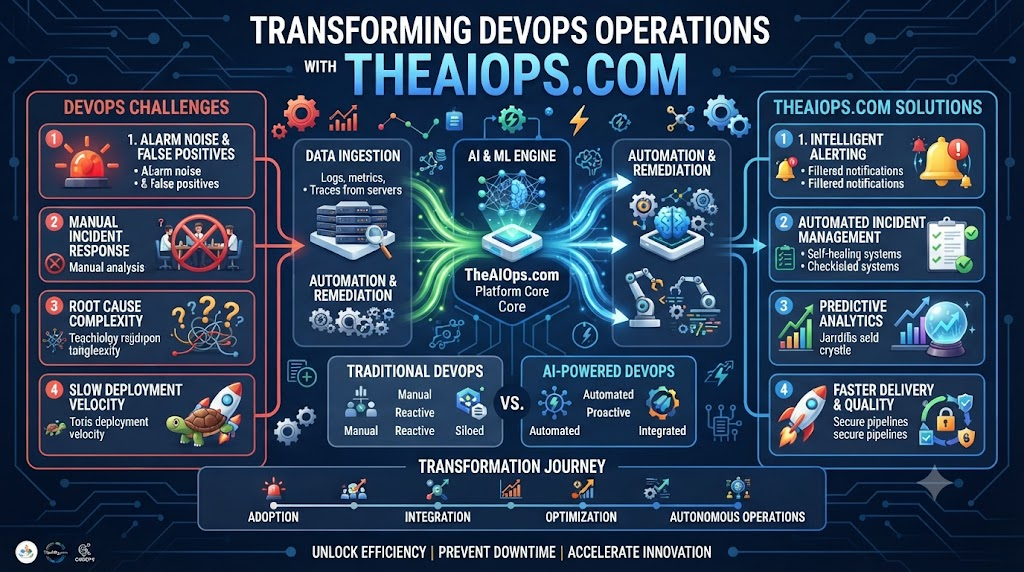
Your phone buzzes at two in the morning with another loud alert. You roll out of bed, open your laptop, and stare at a wall of confusing red error codes. Fixing the same server bug for the third time this week drains all your energy. You want to build cool new features, not spend your nights fighting broken infrastructure.
Modern platforms like TheAIOps.com show you how smart automation lifts this heavy burden off your shoulders. Let us explore how you can use simple, powerful steps to make your technical systems stable, fast, and remarkably easy to run.
Understanding the True Cost of Manual Toil
Every minute your team spends on routine manual tasks is time stolen from innovation. Copying files, restarting stuck services, and checking disk spaces manually takes hours.
When humans do repetitive chores under pressure, mistakes happen very easily. A single typo in a command line can take down your entire live application.
Automation removes human error by letting scripts handle the boring work safely. Your engineers get to focus on solving interesting problems instead of routine chores.
Why Speed and Safety Go Hand in Hand
People often think you must choose between moving fast and keeping systems safe. That old idea holds back many growing companies from shipping updates quickly.
When you build automated checks into your code pipelines, safety becomes your default state. The system tests every update automatically before it touches your live production servers.
If a bug slips into the code, automated guardrails catch it instantly and block the release. You get the best of both worlds with fast updates and zero downtime.
Taming the Flood of Server Alarms
Your servers generate thousands of log entries and system messages every single hour. Most of these messages are harmless background noise that require zero human attention.
When every small event triggers a loud alarm, your team stops taking alerts seriously. This dangerous habit leads to missed warnings when a real disaster strikes your app.
Smart monitoring tools filter out the noise and highlight only the critical issues. You find the root cause of failures in minutes instead of digging through endless logs.
Designing Your First Self-Healing System
A self-healing system can detect a broken service and fix it without human help. You write a simple rule that tells the server what to do when things fail.
For example, if your web worker stops responding, a script restarts the process automatically. The service comes back online before any customer notices a broken page load.
You turn stressful midnight emergencies into quiet background events that resolve themselves in seconds. Your uptime numbers stay high while your stress levels drop.
Keeping Cloud Costs Under Control with Automation
Running cloud servers can get very expensive if you leave idle resources running overnight. Many teams forget to turn off staging servers and test clusters after work hours.
Automated scheduling tools can spin down unused test environments every evening and start them up again. You save a lot of money on your monthly cloud infrastructure bill instantly.
Smart resource management ensures you pay only for the compute power your business actually needs. Financial efficiency becomes a natural byproduct of your daily engineering workflow.
Real-World Stories About Server Crashes and Fixes
- A popular online food delivery platform crashed during a Friday dinner rush because a database ran out of memory. The engineering crew added an auto-scaling script that expands database storage instantly whenever usage hits eighty percent.
- A busy media website spent two hours every morning clearing old cache files from twelve separate web servers. They set up a background cron job that purps the old cache safely while everyone sleeps.
- A sudden network failure cut off access to the primary payment gateway during a busy morning sale event. A self-healing routing script noticed the drop and switched traffic to a backup connection in under five seconds.
- A junior engineer accidentally deleted a vital configuration file on a live server during a routine patch task. The deployment tool caught the missing file and restored a clean version from backup within three seconds.
- A memory leak caused a major background processing service to freeze every afternoon at peak business hours. The team deployed an automated restart rule that clears the memory safely before any crash can happen.
- An e-commerce store suffered unexpected downtime because their security certificates expired without any prior warning. They installed an automated renewal tool that updates all certificates thirty days before their expiration date.
- A security audit missed a critical system patch because the IT team forgot to check an old backup server. An automated asset discovery script found the hidden node and applied the security patch overnight without human help.
- A massive surge in bot traffic overloaded the login page and blocked real customers from signing into accounts. An automated rate-limiting rule spotted the bad traffic spike and blocked the malicious IP addresses in real time.
- A disk failure on a core database cluster caused data sync errors across multiple cloud regions. The automated failover system promoted a healthy read replica to primary status before any data loss could occur.
- A slow database query locked up the main user table and froze the web application for twenty minutes. The monitoring system killed the bad query automatically and sent a detailed incident report to the team chat.
| Feature | Manual IT Operations | Automated IT Operations |
| Response Speed | Slow (Requires human login and debugging) | Instant (Runs via scripts in seconds) |
| Error Rate | High (Fatigue leads to accidental typos) | Low (Scripts follow precise steps exactly) |
| Team Burnout | High (Constant wake-up calls disrupt sleep) | Low (Systems heal themselves quietly) |
| Operational Cost | High (Needs large teams for routine upkeep) | Low (Efficient use of engineering hours) |
Common Mistakes and Pitfalls in IT Automation
- Automating broken workflows too soon: You might write scripts for a process that is already messy and unorganized. Clean up your workflow first before you try to write any automation code.
- Ignoring security access permissions: Giving scripts full admin rights can expose your entire system to hackers if a bug occurs. Always follow the rule of least privilege and grant only needed access.
- Failing to test your scripts: Running untested automation scripts on a live production server is a recipe for instant disaster. Always test your code thoroughly in a safe staging environment first.
- Forgetting to monitor the automation: Some teams set up tools and then walk away, ignoring failures in the scripts themselves. Check your automation logs regularly to make sure your background tasks run properly.
- Overcomplicating simple workflows: Building massive custom frameworks for basic tasks wastes valuable time and creates hard-to-maintain code. Keep your scripts simple, short, and easy for any team member to read.
- Not documenting your scripts: Writing clever code without comments leaves the rest of your team completely lost when you take a day off. Add clear comments to explain what each part of your script does.
- Relying on alerts for every event: Setting up alarms for every minor CPU blip trains your team to ignore all alerts. Only trigger warnings for issues that actually require human action right now.
- Skipping regular system backups: Relying completely on auto-repair tools without keeping safe backups can lead to permanent data loss. Always verify that your backup snapshots run and restore correctly each month.
- Failing to train the team: Building cool automation tools that only one person knows how to use creates a major bottleneck. Share your knowledge and run training sessions so everyone understands the new setup.
- Ignoring user feedback: Forcing rigid automated rules on your developers without asking for their input will lead to workarounds. Listen to your team and adjust your automation rules based on their daily needs.
Step-by-Step Implementation Roadmap
- Audit your current alert channels: List every notification your team receives each day and cross out the ones that offer zero useful value.
- Identify repetitive daily tasks: Track what your engineers spend the most time doing manually during a normal work week.
- Choose your first small project: Pick one simple, low-risk task like clearing log files or restarting a stuck worker service.
- Write a simple script: Draft a clear, short script that performs the task without any complex loops or hard-to-read syntax.
- Test in a safe environment: Run your new script in a staging server cluster to make sure it works exactly as expected.
- Deploy to production: Move your tested script into the live environment with a small group of servers to watch its behavior.
- Monitor the results: Keep a close eye on the automated task for one full week to catch any hidden bugs early.
- Add simple logging: Make sure your script writes a clear note to a file every time it runs successfully or fails.
- Share the guide with your team: Write down how the script works and share it in your team wiki so everyone knows.
- Scale up your automation: Move on to more advanced tasks like auto-scaling and self-healing once your first script runs smoothly.
Faqs
1. What does IT automation mean?
IT automation is the use of software scripts to perform technical operations without manual human effort.
2. Why do engineering teams love automation?
Engineering teams love automation because it saves time, stops human typos, and speeds up product releases.
3. How do automated tools stop crashes?
Automated tools watch server health metrics and run fix scripts before minor glitches turn into outages.
4. What causes alert fatigue in tech?
Alert fatigue happens when constant false alarms overwhelm engineers and cause them to miss real warnings.
5. Do I need expensive tools to start?
No, you can start with basic shell scripts and simple monitoring rules before buying enterprise tools.
6. How can I test scripts safely?
Always run and test your automation scripts in a closed staging environment that mimics live servers.
7. What is an automated runbook?
An automated runbook is a stored script that resolves a known infrastructure problem automatically when triggered.
8. How often should I audit my scripts?
You should check your automation scripts and log files at least once a month to ensure smooth execution.
9. Will automation replace my team?
No, automation helps your team work smarter by taking over boring, repetitive daily chores.
10. Where should my team begin?
Begin by listing your most annoying manual task and writing a simple script to handle it.
Final Recommendation and Next Steps
Start small today by automating just one annoying task that wastes your team time. Do not try to fix your entire infrastructure in a single weekend.
Build confidence with small wins before you tackle bigger system challenges. Review your automation scripts every month to keep them clean and useful. Empower your DevOps team to focus on building great products while smart tools handle the routine work.
