Upgrade & Secure Your Future with DevOps, SRE, DevSecOps, MLOps!
We spend hours scrolling social media and waste money on things we forget, but won’t spend 30 minutes a day earning certifications that can change our lives.
Master in DevOps, SRE, DevSecOps & MLOps by DevOps School!
Learn from Guru Rajesh Kumar and double your salary in just one year.
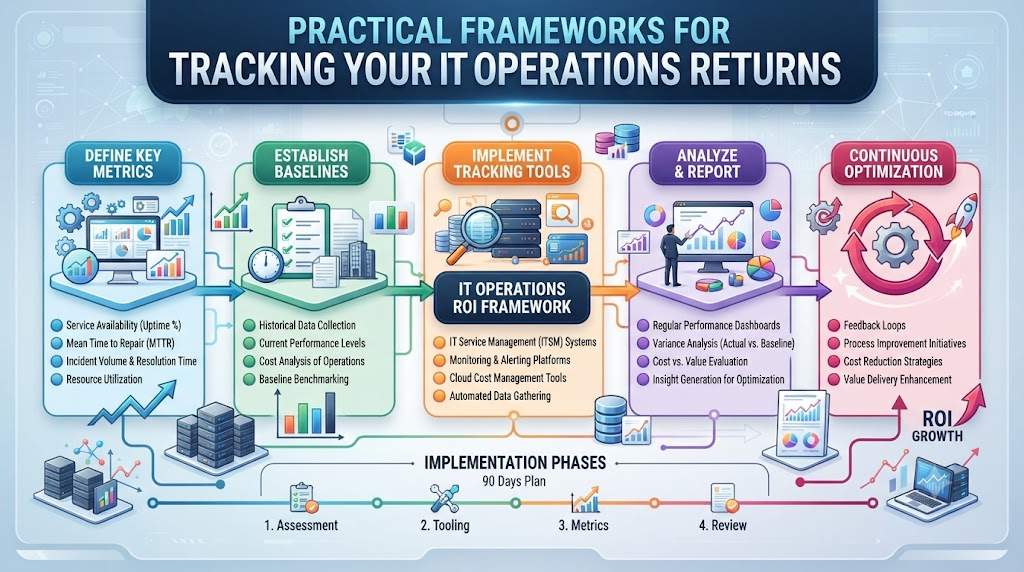
Your boss walks into your office. They ask you a simple question about your tech budget. They want to know what money your new smart tools made back. You freeze because tracking software value is hard.
Most IT teams struggle to show clear numbers to finance leaders. You spend money on smart automation tools to fix server alerts. But proving that spend saved cash feels like guessing in the dark.
This is where TheAIOps.com steps in to help you fix this exact problem. It gives you clear frameworks to track your savings, cut wasted hours, and prove your worth.
Let us look at how you can measure your tech returns without losing your mind.
The Real Problem With IT Spending
You buy new software to make life easier. Your team installs smart monitoring tools to catch bugs fast. Everyone feels happy on launch day.
Soon, finance asks for proof of value. They want to see charts, savings, and clear returns. You point at fewer alerts on your screen. Finance smiles politely and asks for actual dollar amounts.
That gap between tech wins and business cash is huge. Most engineers do not speak the language of finance. You end up talking about speed while they talk about budgets.
Why Old Tracking Methods Fail
Old metrics focus on system uptime and alert counts. These numbers mean a lot to your technical team. They mean nothing to the people holding the corporate purse strings.
When servers run smoothly, leadership thinks everything is fine. They assume the software runs itself for free. They forget the licensing fees, training costs, and setup hours.
If you cannot show hard savings, your budget gets cut next quarter. You need a better way to translate technical work into business value.
Translating Tech Wins Into Dollars
You need to connect technical fixes to real financial gains. Every hour your team saves on fixing bugs is money kept in the bank. Every prevented outage protects your company revenue.
Start by looking at how much manual work costs your company. If an engineer spends two hours on a routine patch, calculate that wage. Multiply that by the number of times you run that patch each month.
When your smart tools automate that task, you save real cash. You can show these exact labor savings to your finance department.
Setting Up Your Baseline Metrics
You cannot measure progress if you do not know your starting point. Before you bring in new tools, record your current operational costs. Track how many hours your team spends on manual fixes.
Write down your average incident response time. Note how long it takes to solve a typical server crash. Count how many false alarms wake your team up at night.
These baseline numbers act as your anchor. Once your automation tools run, you compare new data against these old records.
Tracking Labor Savings Without Confusion
Manual work drains your team’s energy and your company budget. When engineers chase repetitive alerts, they miss chances to build new features.
Calculate the hourly rate of your support staff. Add up the time they spend on repetitive ticket triaging each week.
When your automation platform resolves those tickets instantly, capture those saved hours. Show finance how your team now focuses on revenue projects instead of firefighting.
Measuring Downtime Reduction in Hard Dollars
Server crashes cost companies thousands of dollars every single minute. When your store goes offline, customers leave and never come back.
Smart monitoring tools catch issues before systems break completely. They stop minor glitches from turning into major business disasters.
To measure this, track your total downtime hours this year. Multiply those hours by your average revenue loss per hour. Subtract your new downtime total from your old baseline to find your exact savings.
Handling Hidden Costs in Your Software Stack
Software licenses are only part of your total tech spend. You also spend money on cloud storage, data transfer, and third-party integrations.
Many teams forget to include training time in their cost calculations. If your staff spends weeks learning a new tool, count those lost hours.
Add up every hidden fee before you calculate your final returns. This keeps your finance team happy and builds trust in your numbers.
Building Trust With Finance Teams Using Data
Finance teams love clean spreadsheets and clear logic. They do not care about fancy tech terms or complex jargon. They want to see input costs versus output gains.
Speak their language by showing direct cost avoidance. Show them how your smart software stops expensive problems before they start.
When you bring clean data to review meetings, you win respect. You turn your IT department from a cost center into a growth partner.
Real-World Stories About Server Crashes and Fixes
- A mid-sized retail store suffered a midnight database crash during a huge holiday sale event.
- The manual recovery process took three full hours because engineers had to wake up and log in remotely.
- Lost sales during those three hours totaled over fifty thousand dollars in missed customer checkouts.
- The team installed automated self-healing scripts to catch database memory spikes early.
- Three months later, a similar memory spike happened during a busy weekend afternoon.
- The automation tool restarted the service in under ten seconds before any customer noticed.
- Support engineers slept peacefully through the night instead of scrambling to fix the issue.
- The company saved over forty thousand dollars in potential revenue loss from that single automated fix.
- Finance leaders reviewed the incident report and approved the software renewal budget the next day.
- The team used the extra budget to expand their automation coverage across all cloud servers.
Comparing Manual IT Operations vs. Automated Operations
| Feature | Manual IT Operations | Automated Operations |
| Response Time | Hours to find and fix bugs | Seconds to detect and resolve |
| Labor Cost | High hourly wages for routine tasks | Low cost once rules are set |
| Human Error | Common during late-night fixes | Rare because scripts follow exact steps |
| Downtime | Frequent and expensive | Minimal and short-lived |
| Team Morale | Low due to constant burnout | High due to creative work focus |
Common Mistakes and Pitfalls
- Mistake: Forgetting to record your baseline costs before launching new tools.
- Solution: Write down your current manual hours and incident costs before installing any software.
- Mistake: Focusing only on technical uptime instead of business revenue.
- Solution: Translate system stability into customer retention and sales numbers.
- Mistake: Ignoring employee training time in your expense calculations.
- Solution: Include staff learning hours and setup time in your total cost analysis.
- Mistake: Using complex tech jargon during finance budget reviews.
- Solution: Use simple words and clear dollar amounts when talking to leaders.
- Mistake: Setting up automation rules without testing them first.
- Solution: Run dry runs in a safe test environment before going live.
- Mistake: Expecting instant financial returns on day one.
- Solution: Give your team a few months to gather clean data and trends.
- Mistake: Failing to update your baseline metrics as your company grows.
- Solution: Review and refresh your cost numbers at the start of every quarter.
- Mistake: Hiding software subscription fees from your final ROI report.
- Solution: List every single licensing fee, cloud cost, and add-on expense clearly.
- Mistake: Relying on gut feelings instead of hard operational logs.
- Solution: Pull data straight from your monitoring dashboards for every report.
- Mistake: Working in silos without talking to your finance partners.
- Solution: Schedule monthly sync meetings with finance to keep your metrics aligned.
Step-by-Step Implementation Roadmap
- Audit Current Costs: Gather all your current spending data on IT labor, software licenses, and server hosting fees.
- Record Baseline Metrics: Measure your average incident response time, monthly downtime hours, and manual ticket volume.
- Define Success Goals: Sit down with your leadership team to agree on what metrics matter most for your business.
- Deploy Smart Tools: Install your automation platform across a small test group of non-critical cloud servers.
- Train Your Team: Teach your engineers how to write automation scripts and monitor system alerts safely.
- Monitor Initial Results: Track how many routine tickets your new software resolves automatically over thirty days.
- Calculate Labor Savings: Multiply the hours saved by your staff’s hourly wage to find your labor return.
- Measure Downtime Impact: Compare your new downtime hours against your old baseline to calculate revenue protected.
- Build Finance Reports: Create clean, simple spreadsheets showing your total costs versus your hard dollar savings.
- Review and Scale: Present your findings to company leaders and expand your automation stack across all departments.
Final Recommendation and Next Steps
You now have a clear path to prove your tech value. Do not wait for your finance team to ask for budget cuts before you act.
Start by gathering your baseline numbers this week. Talk to your team, check your old incident logs, and write down your current costs.
Use simple metrics to show your bosses how much money you save. Build trust, secure your tech budget, and grow your automation journey with confidence.
Frequently Asked Questions
1. What is AIOps ROI and why do I need to measure it?
AIOps ROI measures the financial return on your investment in smart IT automation tools. You need to measure it so you can prove to your finance team that your software purchases save money and protect company revenue.
2. How do I calculate labor savings from automation tools?
You calculate labor savings by multiplying the number of manual hours saved by your support staff’s hourly wage. This gives you a clear dollar amount to show leaders.
3. What baseline metrics should I record before starting?
You should record your average incident response time, monthly downtime hours, and total hours spent on manual ticket fixes before launching any new tools.
4. Why do finance teams reject standard technical metrics?
Finance teams care about cash flow, budgets, and revenue rather than server uptime or alert counts. Translating tech wins into dollar amounts bridges this communication gap.
5. How long does it take to see positive returns on automation?
Most teams see clear positive returns within three to six months once their automation scripts catch routine bugs and reduce manual workloads.
6. What hidden costs should I include in my ROI calculation?
You must include software licensing fees, cloud storage costs, third-party integrations, and staff training hours in your total expense calculations.
7. How do I avoid using complex tech jargon with my boss?
Replace heavy technical terms with everyday words that focus on business outcomes, such as saved hours, protected sales, and reduced labor costs.
8. What is the biggest mistake teams make when tracking returns?
The biggest mistake is failing to record accurate baseline costs before launching new software, which makes it impossible to prove real improvement.
9. How often should I update my ROI progress reports?
You should review and update your ROI metrics at the end of every quarter to keep your finance leaders informed and supportive.
10. Can small IT teams benefit from measuring automation returns?
Yes, small teams benefit greatly because clear ROI reports help them secure extra budget and hire additional staff when needed.
