Upgrade & Secure Your Future with DevOps, SRE, DevSecOps, MLOps!
We spend hours scrolling social media and waste money on things we forget, but won’t spend 30 minutes a day earning certifications that can change our lives.
Master in DevOps, SRE, DevSecOps & MLOps by DevOps School!
Learn from Guru Rajesh Kumar and double your salary in just one year.
Introduction
PLC (Programmable Logic Controller) programming tools are software platforms that allow engineers and technicians to design, simulate, and manage control programs for industrial automation systems. These tools translate logic diagrams, ladder logic, and function block diagrams into executable code that controls machinery, manufacturing processes, and critical infrastructure. In +, the automation industry continues to expand rapidly, and effective PLC programming software is central to operational efficiency, safety, and integration with modern industrial IoT systems.
Real-world use cases include:
- Automating assembly lines in automotive manufacturing.
- Controlling bottling and packaging systems in food and beverage production.
- Managing conveyor systems, robotic arms, and sensor-driven operations in warehouses.
- Programming water treatment or energy management systems for utilities.
- Integrating PLCs with SCADA systems for real-time monitoring and predictive maintenance.
When evaluating PLC programming tools, buyers should consider:
- Supported programming languages (Ladder Logic, Structured Text, Function Block, etc.)
- Simulation and testing capabilities
- Hardware compatibility and vendor support
- Integration with SCADA, MES, and IoT systems
- Real-time debugging and diagnostics
- Cloud or local deployment options
- Security features and compliance support
- Licensing model and scalability
- Vendor support and community strength
Best for: Industrial automation engineers, control system integrators, manufacturing facilities, utilities, and medium to large-scale enterprises implementing automated processes.
Not ideal for: Small-scale operations with minimal automation, educational settings where simplified simulators may suffice, or teams using proprietary hardware with vendor-specific programming tools.
Key Trends in PLC Programming Tools
- AI-assisted programming: Tools increasingly suggest code snippets, optimize logic, and detect potential errors automatically.
- Cloud-based PLC development: Enables remote collaboration and deployment of updates across distributed facilities.
- Enhanced simulation environments: More realistic virtual testing to reduce production downtime.
- Interoperability with IoT and SCADA: Seamless integration with industrial IoT devices and supervisory control systems.
- Cybersecurity integration: Multi-factor authentication, encrypted communications, and compliance with ISO 27001 and IEC 62443 standards.
- Model-based design adoption: Engineers can design high-level system models that automatically generate PLC code.
- Support for hybrid deployment: Cloud, on-premises, and hybrid solutions depending on operational needs.
- Edge computing integration: PLC programming platforms are incorporating edge analytics for faster decision-making.
- Open standards and vendor neutrality: Increased compatibility with third-party devices and programming standards.
- Subscription and modular pricing: Flexible pricing aligned with feature usage, number of devices, and team size.
How We Selected These Tools (Methodology)
- Evaluated market adoption, mindshare, and industry reputation.
- Assessed completeness of supported programming languages and advanced simulation features.
- Considered reliability, performance, and uptime from real-world industrial deployments.
- Reviewed security posture and compliance adherence with industrial standards.
- Checked integrations with SCADA, MES, IoT, and cloud platforms.
- Evaluated suitability across SMB, mid-market, and enterprise segments.
- Analyzed vendor support, documentation quality, and community engagement.
- Balanced enterprise-grade tools, developer-focused solutions, and open-source platforms.
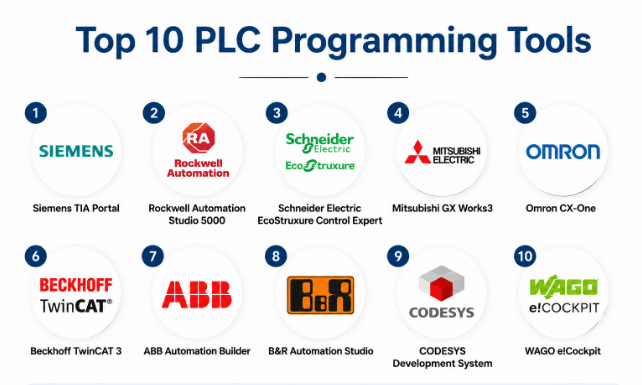
Top 10 PLC Programming Tools
#1 — Siemens TIA Portal
Short description: TIA Portal is Siemens’ integrated development environment for PLCs, HMIs, and drives. It offers a unified platform for programming, simulation, and diagnostics for industrial automation professionals working in complex manufacturing environments.
Key Features
- Unified programming environment for PLC, HMI, and motion control
- Ladder Logic, Structured Text, Function Block support
- Simulation and testing tools
- Integration with Siemens SCADA and IoT platforms
- Centralized diagnostics and error reporting
Pros
- Comprehensive Siemens hardware support
- Powerful simulation and debugging capabilities
Cons
- High learning curve for beginners
- Best suited for Siemens-only environments
Platforms / Deployment
- Windows
- On-premises / Hybrid
Security & Compliance
- Not publicly stated
Integrations & Ecosystem
Supports Siemens PLCs, SCADA systems, and industrial drives.
- SCADA integration
- Industrial IoT connectivity
- API access for third-party automation
- Motion control systems
Support & Community
- Extensive Siemens support network
- Strong documentation and tutorials
#2 — Rockwell Automation Studio 5000
Short description: Studio 5000 is Rockwell Automation’s flagship software for Allen-Bradley PLCs, offering programming, simulation, and configuration tools for industrial automation engineers in manufacturing and process industries.
Key Features
- Ladder, Function Block, and Structured Text programming
- Simulation environment for testing and validation
- Integrated motion and safety programming
- Diagnostic tools and error handling
- Centralized project management
Pros
- Seamless integration with Allen-Bradley hardware
- Strong diagnostic tools
Cons
- Vendor-locked environment
- Relatively expensive for small teams
Platforms / Deployment
- Windows
- On-premises
Security & Compliance
- Not publicly stated
Integrations & Ecosystem
- SCADA and MES integration
- Motion controllers
- Safety systems
- API for custom extensions
Support & Community
- Rockwell support and training available
- Active industrial automation community
#3 — Schneider Electric EcoStruxure Control Expert
Short description: EcoStruxure Control Expert provides a robust PLC programming environment for Schneider Electric automation controllers, emphasizing modular project design and advanced simulation.
Key Features
- IEC 61131-3 compliant programming
- Ladder Logic and Function Block programming
- Advanced simulation and diagnostics
- Modular project architecture
- Integration with EcoStruxure SCADA and IoT
Pros
- Strong hardware integration
- Modular and scalable design
Cons
- Limited non-Schneider hardware support
- Learning curve for complex projects
Platforms / Deployment
- Windows
- On-premises / Hybrid
Security & Compliance
- Not publicly stated
Integrations & Ecosystem
- SCADA and IoT connectivity
- MES integration
- APIs for custom extensions
- Motion control support
Support & Community
- Comprehensive support from Schneider Electric
- Tutorials and knowledge base available
#4 — Mitsubishi GX Works3
Short description: GX Works3 is Mitsubishi Electric’s PLC programming environment, designed for modern automation systems. It simplifies development with an intuitive interface while supporting advanced ladder, structured text, and function block programming.
Key Features
- Integrated development for Mitsubishi PLCs
- Ladder Logic, Structured Text, and Function Block support
- Simulation and debugging tools
- Project organization and version control
- HMI and network device integration
Pros
- Efficient for Mitsubishi PLC deployments
- Powerful debugging and simulation
Cons
- Hardware-specific platform
- Limited open system interoperability
Platforms / Deployment
- Windows
- On-premises
Security & Compliance
- Not publicly stated
Integrations & Ecosystem
- Mitsubishi HMIs and PLCs
- Network device connectivity
- SCADA integration
- API access for extensions
Support & Community
- Active support and documentation
- User forums and community guides
#5 — Omron CX-One
Short description: CX-One is Omron’s integrated automation software, offering programming, simulation, and configuration for Omron PLCs and connected devices.
Key Features
- Ladder and Function Block programming
- Simulation and debugging
- Network configuration tools
- Integration with Omron HMIs
- Centralized project management
Pros
- Simplifies programming for Omron PLCs
- Unified environment for hardware and software
Cons
- Limited third-party hardware support
- Steeper learning curve for beginners
Platforms / Deployment
- Windows
- On-premises
Security & Compliance
- Not publicly stated
Integrations & Ecosystem
- Omron PLCs, HMIs, and sensors
- Networked device integration
- SCADA connectivity
Support & Community
- Omron support and documentation
- Community forums
#6 — Beckhoff TwinCAT 3
Short description: TwinCAT 3 offers a flexible PLC programming and automation platform for Beckhoff controllers, combining traditional PLC programming with modern C/C++ and .NET integration for complex automation systems.
Key Features
- IEC 61131-3 compliant programming
- C/C++ and .NET integration
- Simulation and real-time debugging
- Integration with Beckhoff I/O and drives
- Centralized project management
Pros
- High flexibility for complex projects
- Multi-language support
Cons
- Steeper learning curve
- Best suited for Beckhoff hardware
Platforms / Deployment
- Windows
- On-premises / Hybrid
Security & Compliance
- Not publicly stated
Integrations & Ecosystem
- Beckhoff I/O devices
- SCADA and MES integration
- API support
- IoT connectivity
Support & Community
- Strong technical documentation
- Developer community available
#7 — ABB Automation Builder
Short description: ABB Automation Builder unifies PLC, HMI, and robot programming into one platform, providing engineers with tools to develop, simulate, and deploy industrial automation solutions efficiently.
Key Features
- Ladder Logic, Structured Text, and Function Block support
- Integrated HMI and robot programming
- Simulation and validation tools
- Centralized diagnostics
- Project version control
Pros
- Unified environment reduces complexity
- Good for ABB hardware ecosystems
Cons
- Limited third-party PLC support
- May require extensive training
Platforms / Deployment
- Windows
- On-premises
Security & Compliance
- Not publicly stated
Integrations & Ecosystem
- ABB PLCs, robots, and HMIs
- SCADA and MES integration
- API support
Support & Community
- Documentation and tutorials available
- ABB technical support
#8 — B&R Automation Studio
Short description: Automation Studio provides a unified PLC programming environment for B&R industrial controllers, with extensive simulation, visualization, and debugging tools.
Key Features
- Ladder Logic, Structured Text, and Function Block support
- Simulation and testing environment
- Visualization tools for HMI
- Diagnostics and error tracking
- Integration with B&R devices
Pros
- Comprehensive support for B&R hardware
- Powerful visualization tools
Cons
- Hardware-specific environment
- Complexity for beginners
Platforms / Deployment
- Windows
- On-premises
Security & Compliance
- Not publicly stated
Integrations & Ecosystem
- B&R PLCs, HMIs, and I/O modules
- SCADA integration
- API access
Support & Community
- Strong technical documentation
- Dedicated support
#9 — CODESYS Development System
Short description: CODESYS is a vendor-independent PLC programming platform that supports multiple hardware devices and programming languages, enabling flexible industrial automation solutions.
Key Features
- IEC 61131-3 compliance
- Supports Ladder, Structured Text, and Function Blocks
- Multi-vendor PLC support
- Simulation and debugging tools
- HMI and SCADA integration
Pros
- Vendor-neutral flexibility
- Large hardware compatibility
Cons
- May require additional training for specific hardware
- Less integrated than vendor-specific tools
Platforms / Deployment
- Windows / Linux
- On-premises / Hybrid
Security & Compliance
- Not publicly stated
Integrations & Ecosystem
- Multi-vendor PLCs
- SCADA and HMI support
- APIs for customization
Support & Community
- Active global user community
- Documentation and tutorials
#10 — WAGO e!Cockpit
Short description: e!Cockpit is WAGO’s programming environment for its controllers, offering easy-to-use programming, simulation, and deployment tools for industrial automation systems.
Key Features
- Ladder Logic, Structured Text, and Function Block support
- Simulation and diagnostics
- HMI integration
- Project management
- Centralized control for multiple devices
Pros
- User-friendly interface
- Good integration with WAGO hardware
Cons
- Limited third-party support
- Smaller ecosystem than vendor-neutral platforms
Platforms / Deployment
- Windows
- On-premises
Security & Compliance
- Not publicly stated
Integrations & Ecosystem
- WAGO controllers and HMIs
- SCADA integration
- API access
Support & Community
- Documentation and tutorials available
- Vendor support
Comparison Table (Top 10)
| Tool Name | Best For | Platform(s) Supported | Deployment | Standout Feature | Public Rating |
|---|---|---|---|---|---|
| Siemens TIA Portal | Siemens PLCs | Windows | On-premises / Hybrid | Unified PLC/HMI/Motion | N/A |
| Rockwell Studio 5000 | Allen-Bradley PLCs | Windows | On-premises | Integrated diagnostics | N/A |
| Schneider EcoStruxure | Schneider PLCs | Windows | On-premises / Hybrid | Modular project architecture | N/A |
| Mitsubishi GX Works3 | Mitsubishi PLCs | Windows | On-premises | Intuitive interface | N/A |
| Omron CX-One | Omron PLCs | Windows | On-premises | Unified Omron environment | N/A |
| Beckhoff TwinCAT 3 | Beckhoff controllers | Windows | On-premises / Hybrid | Multi-language support | N/A |
| ABB Automation Builder | ABB PLCs/Robots | Windows | On-premises | Unified environment | N/A |
| B&R Automation Studio | B&R PLCs | Windows | On-premises | Visualization tools | N/A |
| CODESYS Development System | Multi-vendor PLCs | Windows / Linux | On-premises / Hybrid | Vendor-neutral | N/A |
| WAGO e!Cockpit | WAGO PLCs | Windows | On-premises | User-friendly interface | N/A |
Evaluation & Scoring of PLC Programming Tools
| Tool Name | Core (25%) | Ease (15%) | Integrations (15%) | Security (10%) | Performance (10%) | Support (10%) | Value (15%) | Weighted Total (0–10) |
|---|---|---|---|---|---|---|---|---|
| Siemens TIA Portal | 9 | 7 | 8 | 7 | 9 | 8 | 8 | 8.1 |
| Rockwell Studio 5000 | 8 | 8 | 7 | 7 | 8 | 8 | 7 | 7.7 |
| Schneider EcoStruxure | 8 | 7 | 8 | 7 | 8 | 8 | 8 | 7.9 |
| Mitsubishi GX Works3 | 8 | 8 | 7 | 7 | 8 | 8 | 7 | 7.8 |
| Omron CX-One | 7 | 8 | 7 | 7 | 7 | 8 | 7 | 7.5 |
| Beckhoff TwinCAT 3 | 8 | 7 | 8 | 7 | 8 | 8 | 7 | 7.8 |
| ABB Automation Builder | 8 | 7 | 7 | 7 | 8 | 8 | 7 | 7.7 |
| B&R Automation Studio | 8 | 7 | 7 | 7 | 8 | 8 | 7 | 7.7 |
| CODESYS Development System | 8 | 7 | 8 | 7 | 8 | 8 | 7 | 7.8 |
| WAGO e!Cockpit | 7 | 8 | 7 | 7 | 7 | 8 | 7 | 7.5 |
Interpretation: Scores reflect comparative strength in core features, usability, integration, and value. High scores indicate platforms with more extensive features and robust support ecosystems. Organizations should align choice with hardware, team expertise, and scale.
Which PLC Programming Tool Is Right for You?
Solo / Freelancer
Small-scale automation projects may benefit from WAGO e!Cockpit or Omron CX-One for simplicity and ease of use.
SMB
Medium-sized facilities could use Mitsubishi GX Works3 or Schneider EcoStruxure for moderate automation complexity and multi-device integration.
Mid-Market
Enterprises with multiple plants or varied PLC brands may prefer Beckhoff TwinCAT 3 or CODESYS for flexibility and vendor-neutral support.
Enterprise
Large-scale operations with diverse automation equipment should consider Siemens TIA Portal, Rockwell Studio 5000, or ABB Automation Builder for centralized management and robust diagnostics.
Budget vs Premium
Budget-friendly: Omron CX-One, WAGO e!Cockpit
Premium: Siemens TIA Portal, Rockwell Studio 5000, ABB Automation Builder
Feature Depth vs Ease of Use
- Advanced programming and simulation: Siemens TIA Portal, TwinCAT 3
- Simple adoption: WAGO e!Cockpit, Omron CX-One
Integrations & Scalability
Check SCADA, MES, IoT, and HMI support. Vendor-neutral tools like CODESYS are ideal for multi-vendor setups.
Security & Compliance Needs
Prioritize platforms with robust encryption, access controls, and compliance with IEC 62443, ISO 27001, or industry-specific standards where available.
Frequently Asked Questions (FAQs)
1. What are typical licensing models for PLC programming tools?
Most platforms offer perpetual licenses, subscription-based models, or combination plans depending on project scale and vendor policy.
2. How long does it take to onboard new engineers?
Onboarding varies from a few days for simple platforms to several weeks for enterprise-grade solutions with advanced features.
3. Can PLC tools simulate real-world operations?
Yes, most tools provide virtual simulation and debugging features to test programs before deployment, reducing downtime and errors.
4. Are these tools compatible with multiple PLC brands?
Vendor-specific tools are limited to their hardware; CODESYS and TwinCAT 3 support multi-vendor integration.
5. How secure are these PLC programming platforms?
Security features vary; encryption, authentication, and user access controls are common. Verify vendor compliance certifications for critical systems.
6. Can I integrate PLC software with SCADA or MES systems?
Yes, most enterprise-grade platforms support integration with SCADA, MES, and IoT systems via APIs or built-in connectors.
7. What is the cost range for these tools?
Costs range from budget-friendly options like WAGO e!Cockpit to premium platforms such as Siemens TIA Portal or Rockwell Studio 5000. Pricing often depends on the number of users and features.
8. Do these tools support cloud deployment?
Some platforms, like Siemens TIA Portal and TwinCAT 3, offer hybrid or cloud deployment options for remote monitoring and collaboration.
9. How do updates and maintenance work?
Software updates are generally provided via vendor support agreements; some tools offer automatic updates for cloud or hybrid deployments.
10. Are AI features important in PLC programming software?
AI features help with code optimization, predictive error detection, and simulation efficiency, particularly for complex and large-scale automation projects.
Conclusion
Selecting the right PLC programming tool depends on hardware compatibility, team expertise, project scale, and integration needs. Enterprise-grade platforms like Siemens TIA Portal or Rockwell Studio 5000 offer advanced diagnostics and centralized control, while budget-friendly tools like Omron CX-One and WAGO e!Cockpit provide simplicity for smaller deployments. It is recommended to shortlist 2–3 platforms, run simulations or pilot programs, and validate integration, security, and scalability to ensure the best fit for your industrial automation environment.
