Upgrade & Secure Your Future with DevOps, SRE, DevSecOps, MLOps!
We spend hours scrolling social media and waste money on things we forget, but won’t spend 30 minutes a day earning certifications that can change our lives.
Master in DevOps, SRE, DevSecOps & MLOps by DevOps School!
Learn from Guru Rajesh Kumar and double your salary in just one year.
Introduction
Production scheduling tools are software solutions designed to help manufacturers and operations managers plan, allocate, and optimize production workflows efficiently. These platforms automate task assignments, sequence production runs, and track progress in real-time, enabling businesses to meet deadlines, optimize resource utilization, and reduce operational costs.
In+, production scheduling tools have become critical due to increased complexity in manufacturing environments, global supply chain variability, and the rise of AI-driven predictive planning. Modern tools integrate with ERP, MES, and IoT devices, providing actionable insights, predictive analytics, and adaptive scheduling capabilities for dynamic production environments.
Real-world use cases:
- Sequencing tasks in assembly lines to maximize throughput.
- Allocating workforce and machine resources efficiently.
- Managing multi-site or global production schedules.
- Minimizing downtime and balancing workload across machines.
- Predicting delays and adjusting schedules proactively using AI insights.
Evaluation criteria buyers should consider:
- Real-time monitoring and scheduling flexibility
- AI-driven predictive planning
- Resource allocation and capacity management
- Integration with ERP and MES systems
- Cloud vs on-premises deployment options
- Multi-site production support
- Ease of use and user interface
- Analytics and reporting capabilities
- Security and role-based access
- Licensing model and total cost of ownership
Best for: Production managers, operations planners, manufacturing engineers, and industrial enterprises of all sizes. Suitable for SMBs, mid-market manufacturers, and large enterprises with complex production needs.
Not ideal for: Small workshops or teams with minimal production complexity, or businesses that only require basic task tracking without advanced scheduling features.
Key Trends in Production Scheduling Tools Toolkits
- AI-driven predictive scheduling for dynamic production environments.
- Cloud-based collaboration and remote scheduling capabilities.
- IoT sensor integration for real-time machine and production data.
- Hybrid deployment models combining cloud and on-premises capabilities.
- Automation of task sequencing and resource allocation.
- Integration with ERP, MES, and supply chain platforms.
- Real-time analytics dashboards for operational decision-making.
- Scenario planning and “what-if” simulations for capacity planning.
- Enhanced security and compliance features, including RBAC and encryption.
- Subscription and flexible licensing models for SMBs and large enterprises.
How We Selected These Tools (Methodology)
- Market adoption and industry mindshare.
- Completeness of production scheduling functionalities.
- Reliability and performance benchmarks in manufacturing environments.
- Security posture and compliance with industrial standards.
- Integration capabilities with ERP, MES, and IoT devices.
- Multi-site and enterprise scalability.
- Quality of documentation, onboarding, and training resources.
- AI and predictive analytics support.
- Customer testimonials and industry use cases.
- Flexibility in deployment (cloud, hybrid, on-premises).
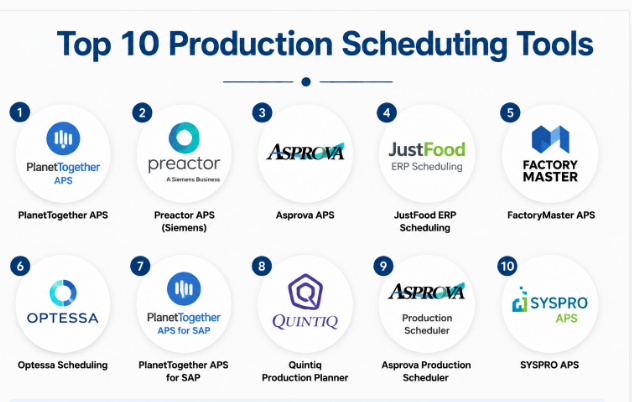
Top 10 Production Scheduling Tools Tools
#1 — PlanetTogether APS
Short description: PlanetTogether Advanced Planning and Scheduling (APS) software provides real-time scheduling and production optimization. Designed for manufacturers, it enables efficient sequencing, resource allocation, and scenario simulation for dynamic operations.
Key Features
- Real-time scheduling and rescheduling
- AI-driven predictive planning
- Resource allocation optimization
- Scenario simulations for production changes
- Multi-site support
- ERP and MES integration
- Cloud and on-premises deployment
Pros
- Strong predictive analytics
- Flexible and scalable for multi-site operations
- Easy visualization of production bottlenecks
Cons
- Initial implementation requires training
- Licensing can be costly for small firms
- Customization may require professional services
Platforms / Deployment
- Windows / Web
- Cloud / Self-hosted / Hybrid
Security & Compliance
- Not publicly stated
Integrations & Ecosystem
- ERP systems (SAP, Oracle, Microsoft Dynamics)
- MES platforms
- API for custom automation
- IoT sensors for real-time data
Support & Community
- Vendor support packages
- Online documentation and training resources
- User community forums
#2 — Preactor APS (Siemens)
Short description: Preactor APS by Siemens is a flexible production scheduling solution designed for discrete and process manufacturing. It provides visualization, predictive planning, and optimization of production sequences.
Key Features
- Multi-site scheduling
- Predictive analytics and “what-if” scenarios
- ERP integration
- Capacity and resource management
- Real-time dashboards
- Customizable workflow templates
Pros
- Strong industrial adoption
- Robust scenario simulation
- Integrates well with Siemens and third-party ERP
Cons
- Steep learning curve
- Windows-focused platform
- Advanced modules may require additional licenses
Platforms / Deployment
- Windows / Web
- Cloud / Self-hosted / Hybrid
Security & Compliance
- Not publicly stated
Integrations & Ecosystem
- Siemens ERP and MES
- IoT and automation devices
- API support for external integration
Support & Community
- Vendor-provided documentation
- Training and onboarding programs
- Community forums
#3 — Asprova APS
Short description: Asprova APS is a production scheduling tool focused on high-mix, low-volume manufacturing. It supports visual scheduling, AI-driven planning, and real-time resource management to optimize manufacturing workflows.
Key Features
- Graphical scheduling interface
- AI optimization engine
- Resource and capacity management
- Real-time production updates
- Integration with ERP and MES
- Multi-site support
Pros
- Efficient for high-mix production
- Visual interface simplifies planning
- Real-time updates reduce delays
Cons
- Proprietary license model
- Limited cloud support
- May require expert setup for complex workflows
Platforms / Deployment
- Windows / Web
- Self-hosted / Hybrid
Security & Compliance
- Not publicly stated
Integrations & Ecosystem
- ERP systems
- MES platforms
- IoT and sensors
- API for custom extensions
Support & Community
- Vendor support and documentation
- Training resources
- User community
#4 — JustFood ERP Scheduling
Short description: JustFood ERP integrates production scheduling with food manufacturing processes. It supports compliance, quality control, and scheduling in regulated environments.
Key Features
- Recipe-based scheduling
- Compliance tracking
- Real-time production monitoring
- Resource allocation
- ERP integration
- Analytics dashboards
Pros
- Tailored for food manufacturing
- Built-in compliance tracking
- Cloud-enabled scheduling
Cons
- Industry-specific; less suitable outside food
- Licensing may be costly
- Limited advanced AI features
Platforms / Deployment
- Web / Windows
- Cloud / Self-hosted
Security & Compliance
- Not publicly stated
Integrations & Ecosystem
- ERP modules
- Quality and compliance systems
- API support
Support & Community
- Vendor documentation and support
- Industry-specific training
- Customer community
#5 — FactoryMaster APS
Short description: FactoryMaster APS provides manufacturing scheduling, resource planning, and real-time production optimization for discrete manufacturing environments.
Key Features
- Production sequencing and scheduling
- Resource allocation
- Real-time dashboards
- ERP integration
- Multi-site management
- Predictive analytics for delays
Pros
- User-friendly interface
- Flexible scheduling
- Integrates with existing ERP systems
Cons
- Limited advanced AI capabilities
- Windows-focused deployment
- May require customization for large enterprises
Platforms / Deployment
- Windows / Web
- Cloud / Self-hosted / Hybrid
Security & Compliance
- Not publicly stated
Integrations & Ecosystem
- ERP platforms
- MES platforms
- API support
- IoT sensor integration
Support & Community
- Vendor support and onboarding
- Documentation and tutorials
- User community
#6 — Optessa Scheduling
Short description: Optessa is an AI-driven production scheduling platform designed for complex manufacturing. It provides constraint-based optimization and real-time scheduling adjustments.
Key Features
- Constraint-based scheduling
- AI optimization engine
- Real-time production monitoring
- Multi-site and resource management
- ERP integration
- Scenario simulation and planning
Pros
- Strong AI optimization
- Efficient for complex production environments
- Scenario planning reduces bottlenecks
Cons
- Advanced setup requires training
- Enterprise-focused pricing
- Limited small-business adoption
Platforms / Deployment
- Web / Windows
- Cloud / Hybrid
Security & Compliance
- Not publicly stated
Integrations & Ecosystem
- ERP systems
- MES platforms
- API for workflow automation
Support & Community
- Vendor documentation
- Training programs
- User community
#7 — PlanetTogether APS for SAP
Short description: PlanetTogether APS for SAP combines advanced scheduling with SAP ERP integration, providing real-time visibility, predictive planning, and optimization.
Key Features
- Real-time schedule adjustments
- AI predictive planning
- ERP integration with SAP
- Resource and capacity management
- Scenario simulation
- Multi-site deployment
Pros
- Tight integration with SAP
- Strong analytics and AI capabilities
- Scalable for large enterprises
Cons
- SAP-centric; less flexible with other ERPs
- Learning curve for new users
- Licensing costs
Platforms / Deployment
- Windows / Web
- Cloud / Self-hosted / Hybrid
Security & Compliance
- Not publicly stated
Integrations & Ecosystem
- SAP ERP
- MES platforms
- IoT sensors
- API support
Support & Community
- Vendor training
- Documentation and tutorials
- Customer support
#8 — Quintiq Production Planner
Short description: Quintiq Production Planner provides optimization and scheduling for complex manufacturing and logistics operations, enabling AI-driven decision-making.
Key Features
- Constraint-based scheduling
- Predictive analytics
- Multi-site planning
- Resource allocation
- ERP integration
- Scenario simulation
Pros
- Powerful optimization engine
- Supports global operations
- Flexible scenario planning
Cons
- Enterprise-focused
- Costly implementation
- Requires expert training
Platforms / Deployment
- Windows / Web
- Cloud / Self-hosted / Hybrid
Security & Compliance
- Not publicly stated
Integrations & Ecosystem
- ERP platforms
- MES integration
- IoT and sensors
- API support
Support & Community
- Vendor documentation
- Training resources
- Support packages
#9 — Asprova Production Scheduler
Short description: Asprova Production Scheduler is designed for high-mix, high-volume manufacturers, providing real-time scheduling, visualization, and optimization.
Key Features
- Gantt chart visualization
- Real-time schedule updates
- Resource and capacity management
- ERP integration
- Multi-site planning
- Scenario simulation
Pros
- Visual and intuitive interface
- Real-time updates
- Efficient for complex workflows
Cons
- Proprietary license
- Limited cloud support
- Expert setup required
Platforms / Deployment
- Windows / Web
- Self-hosted / Hybrid
Security & Compliance
- Not publicly stated
Integrations & Ecosystem
- ERP platforms
- MES systems
- API support
- IoT sensor data
Support & Community
- Vendor training
- Documentation
- User community
#10 — SYSPRO APS
Short description: SYSPRO APS provides advanced scheduling for discrete manufacturers, integrating with SYSPRO ERP for production planning, resource management, and optimization.
Key Features
- ERP-integrated scheduling
- Real-time production monitoring
- Resource and capacity management
- Scenario planning
- Analytics dashboards
- Multi-site support
Pros
- ERP integration
- Scalable for SMBs to mid-market
- User-friendly dashboards
Cons
- Less advanced AI features
- Windows-focused
- Limited global enterprise adoption
Platforms / Deployment
- Windows / Web
- Cloud / Self-hosted / Hybrid
Security & Compliance
- Not publicly stated
Integrations & Ecosystem
- SYSPRO ERP
- MES systems
- API support
- IoT sensor integration
Support & Community
- Vendor support and documentation
- Training programs
- User community
Comparison Table (Top 10)
| Tool Name | Best For | Platform(s) Supported | Deployment | Standout Feature | Public Rating |
|---|---|---|---|---|---|
| PlanetTogether APS | Multi-site manufacturers | Windows / Web | Cloud / Self-hosted / Hybrid | AI-driven predictive scheduling | N/A |
| Preactor APS | Discrete & process industries | Windows / Web | Cloud / Self-hosted / Hybrid | Multi-site scenario simulation | N/A |
| Asprova APS | High-mix manufacturers | Windows / Web | Self-hosted / Hybrid | Visual scheduling and optimization | N/A |
| JustFood ERP Scheduling | Food manufacturing | Web / Windows | Cloud / Self-hosted | Recipe-based scheduling | N/A |
| FactoryMaster APS | Discrete manufacturers | Windows / Web | Cloud / Self-hosted / Hybrid | Resource allocation | N/A |
| Optessa Scheduling | Complex manufacturing | Web / Windows | Cloud / Hybrid | Constraint-based AI optimization | N/A |
| PlanetTogether APS for SAP | SAP-integrated manufacturers | Windows / Web | Cloud / Self-hosted / Hybrid | Tight SAP ERP integration | N/A |
| Quintiq Production Planner | Global operations | Windows / Web | Cloud / Self-hosted / Hybrid | AI-driven scenario planning | N/A |
| Asprova Production Scheduler | High-volume production | Windows / Web | Self-hosted / Hybrid | Gantt chart visualization | N/A |
| SYSPRO APS | SMB to mid-market manufacturers | Windows / Web | Cloud / Self-hosted / Hybrid | ERP-integrated scheduling | N/A |
Evaluation & Scoring of Production Scheduling Tools
| Tool Name | Core (25%) | Ease (15%) | Integrations (15%) | Security (10%) | Performance (10%) | Support (10%) | Value (15%) | Weighted Total (0–10) |
|---|---|---|---|---|---|---|---|---|
| PlanetTogether APS | 9 | 7 | 9 | 7 | 9 | 8 | 7 | 8.0 |
| Preactor APS | 8 | 7 | 8 | 7 | 8 | 7 | 7 | 7.5 |
| Asprova APS | 8 | 7 | 8 | 7 | 8 | 7 | 6 | 7.4 |
| JustFood ERP Scheduling | 7 | 8 | 7 | 7 | 7 | 7 | 6 | 7.2 |
| FactoryMaster APS | 8 | 7 | 8 | 7 | 8 | 7 | 7 | 7.5 |
| Optessa Scheduling | 9 | 7 | 8 | 7 | 9 | 7 | 6 | 7.6 |
| PlanetTogether APS for SAP | 9 | 7 | 9 | 7 | 9 | 8 | 7 | 8.0 |
| Quintiq Production Planner | 9 | 6 | 8 | 7 | 9 | 7 | 6 | 7.6 |
| Asprova Production Scheduler | 8 | 7 | 8 | 7 | 8 | 7 | 6 | 7.4 |
| SYSPRO APS | 8 | 8 | 7 | 7 | 8 | 7 | 6 | 7.4 |
Interpretation: Weighted totals offer a comparative view considering core features, ease of use, integration, security, performance, support, and value. Higher scores indicate better overall capability.
Which Production Scheduling Tool Is Right for You?
Solo / Freelancer
- Cloud-first or small-scale platforms like JustFood ERP Scheduling or SYSPRO APS are ideal for pilot projects or single-factory operations.
SMB
- FactoryMaster APS, Asprova APS, or Preactor APS provide flexible scheduling with moderate cost and integration capabilities.
Mid-Market
- PlanetTogether APS, Optessa Scheduling, or Quintiq Production Planner provide advanced predictive planning and multi-site support.
Enterprise
- PlanetTogether APS for SAP or high-end Asprova APS deliver full-scale optimization, AI-driven scheduling, and ERP integration.
Budget vs Premium
- Small businesses may opt for cloud-native, subscription models (SYSPRO, JustFood).
- Enterprise solutions with AI optimization and multi-site support are premium-priced (PlanetTogether APS, Quintiq).
Feature Depth vs Ease of Use
- User-friendly tools: JustFood ERP Scheduling, SYSPRO APS.
- Advanced functionality: PlanetTogether APS, Optessa Scheduling, Quintiq Production Planner.
Integrations & Scalability
- Evaluate ERP, MES, and IoT integrations.
- Multi-site and multi-factory support is essential for enterprise operations.
Security & Compliance Needs
- Ensure encryption, RBAC, and access controls are in place.
- Enterprise-grade deployments may require additional security audits.
Frequently Asked Questions (FAQs)
1. What are the pricing models for production scheduling tools?
Pricing varies: subscription, perpetual licenses, or site-based. Costs depend on deployment size and features.
2. How long does implementation take?
Small deployments may take a few weeks, while enterprise-level setups require months of configuration and testing.
3. Can these tools integrate with ERP and MES systems?
Yes, most production scheduling platforms integrate with ERP and MES for seamless data exchange and workflow automation.
4. Are cloud-based production scheduling tools secure?
Leading platforms use encryption, access controls, and role-based permissions. Enterprise deployments may require additional measures.
5. Which industries benefit most?
Discrete and process manufacturing sectors, including automotive, electronics, aerospace, food, and pharmaceuticals.
6. Do these tools support AI-driven predictive planning?
Yes, platforms like PlanetTogether APS, Optessa Scheduling, and Quintiq offer AI optimization and predictive scheduling capabilities.
7. Can they handle multi-site operations?
Yes, enterprise-grade solutions support centralized scheduling across multiple sites or factories.
8. Are these tools easy to use?
Ease of use varies: JustFood ERP Scheduling and SYSPRO APS are beginner-friendly, while PlanetTogether APS and Quintiq require training.
9. How do these tools help reduce downtime?
Real-time monitoring, predictive analytics, and scenario simulations help optimize schedules and prevent production delays.
10. Are there alternatives to production scheduling tools?
For small-scale operations, ERP modules or task-tracking dashboards may suffice, but they lack advanced optimization and AI features.
Conclusion
Production scheduling tools are critical for manufacturers aiming to optimize workflows, allocate resources efficiently, and meet production deadlines. The right tool depends on company size, complexity, integration needs, and budget. Cloud-native platforms like SYSPRO APS and JustFood ERP Scheduling suit small factories or pilot projects, while enterprise solutions such as PlanetTogether APS, Optessa Scheduling, and Quintiq Production Planner provide advanced AI-driven
