Upgrade & Secure Your Future with DevOps, SRE, DevSecOps, MLOps!
We spend hours scrolling social media and waste money on things we forget, but won’t spend 30 minutes a day earning certifications that can change our lives.
Master in DevOps, SRE, DevSecOps & MLOps by DevOps School!
Learn from Guru Rajesh Kumar and double your salary in just one year.
Introduction
Catering Management Software helps catering businesses manage events, menus, quotes, proposals, orders, staffing, production, payments, delivery, and client communication from one system. In simple terms, it helps caterers organize every step from inquiry to final service.
It matters now because catering teams handle more custom menus, corporate orders, weddings, recurring events, dietary needs, delivery schedules, staffing shortages, and margin pressure.
Common use cases include:
- Creating catering quotes and proposals.
- Managing event menus and production sheets.
- Scheduling staff, rentals, and deliveries.
- Tracking customer communication and payments.
- Managing repeat corporate catering orders.
Buyers should evaluate:
- Proposal and quote builder
- Menu and recipe management
- Event calendar
- Production sheets
- Staffing tools
- Payment support
- CRM features
- Online ordering
- Reporting
- Multi-location support
Best for: catering companies, event caterers, restaurants with catering services, corporate catering teams, wedding caterers, hotels, venues, cloud kitchens, and food-service operators.
Not ideal for: very small food sellers with occasional orders, restaurants that only need basic POS ordering, or teams that manage simple catering through spreadsheets without growth plans.
Key Trends in Catering Management Software
- AI-assisted quoting: More tools are moving toward smarter proposal drafting, pricing suggestions, and automated client follow-ups.
- Online catering ordering: Corporate clients expect self-service menus, recurring orders, and easy checkout.
- Production automation: Kitchen teams need clear production sheets, prep lists, packing lists, and delivery notes.
- Dietary and allergen tracking: Catering teams must manage allergens, dietary requests, substitutions, and menu notes more carefully.
- Integrated payments: Deposits, invoices, partial payments, and final balances are becoming standard software needs.
- Event CRM growth: Caterers want full client history, notes, contracts, preferences, and follow-up tasks.
- Delivery and logistics visibility: Catering orders require driver instructions, timing, route planning, and on-site service details.
- Multi-location catering control: Restaurant groups and catering brands need centralized menus, pricing, and reporting.
- Margin-focused menu planning: Food cost, labor, rentals, and delivery charges are becoming more connected to proposal pricing.
- Mobile event execution: Teams want event details, timelines, packing lists, and contact information accessible on phones or tablets.
How We Selected These Tools
The Top 10 tools were selected using practical catering business criteria:
- Market recognition in catering, hospitality, event, and food-service operations.
- Strength of event management, proposals, menus, and production workflows.
- Fit for independent caterers, restaurants, corporate catering, and enterprise teams.
- Support for online ordering, CRM, contracts, and payments.
- Ability to manage kitchen production, staffing, delivery, and event execution.
- Reporting quality for sales, revenue, orders, and operations.
- Ease of use for sales, kitchen, operations, and event teams.
- Multi-location or multi-brand support where relevant.
- Integration potential with accounting, payments, POS, websites, and calendars.
- Overall value for improving catering efficiency and client experience.
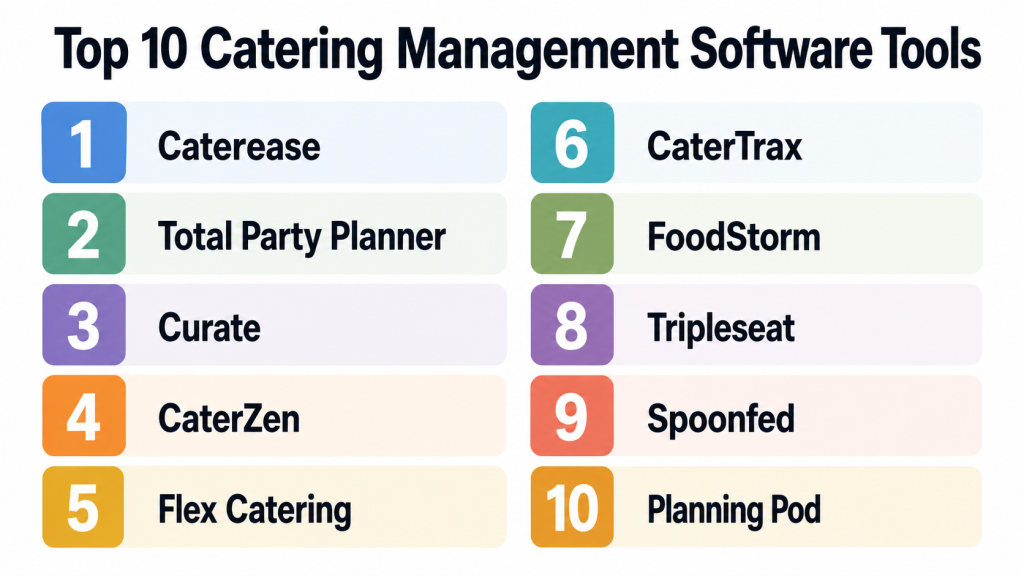
Top 10 Catering Management Software Tools
#1 — Caterease
Short description:
Caterease is a catering and event management platform built for caterers, event planners, venues, hotels, and food-service teams. It helps manage event details, proposals, menus, contracts, staffing, production, and customer communication. Caterease is useful for businesses handling custom events, weddings, corporate catering, and venue-based hospitality. It is especially strong for detailed event documentation and operational planning. The platform fits teams that need structured event workflows instead of simple order tracking.
Key Features
- Event management.
- Proposal and contract creation.
- Menu planning.
- Production reports.
- Staffing and scheduling support.
- Customer database.
- Event calendar and task tracking.
Pros
- Strong for detailed catering and event workflows.
- Useful for custom events and venue-based catering.
- Good reporting and documentation support.
Cons
- May require training for new users.
- Can feel more detailed than small teams need.
- Setup quality affects long-term usability.
Platforms / Deployment
Windows / Web options may vary; Cloud / Hybrid deployment may vary.
Security & Compliance
SSO/SAML, MFA, encryption, audit logs, RBAC, SOC 2, ISO 27001, GDPR, HIPAA: Not publicly stated.
Integrations & Ecosystem
Caterease supports catering and event operations.
- Accounting workflows
- Payment tools
- Calendar workflows
- Event documents
- Customer records
- Production reports
Support & Community
Support and onboarding resources are available. Community strength is strong among traditional caterers, venues, and event professionals.
#2 — Total Party Planner
Short description:
Total Party Planner is catering management software designed for caterers that need to manage proposals, menus, events, production, staffing, invoices, and customer communication. It is useful for catering companies that want to replace spreadsheets and disconnected documents. The platform helps teams organize event details and create professional client-facing documents. It is especially practical for small and mid-sized catering businesses. Total Party Planner works well when sales, kitchen, and operations teams need one shared view of event details.
Key Features
- Catering proposal builder.
- Event calendar.
- Menu management.
- Production sheets.
- Staffing tools.
- Invoicing support.
- Customer management.
Pros
- Good fit for small and mid-sized caterers.
- Helps organize event details clearly.
- Useful for proposals, production, and operations.
Cons
- May not fit complex enterprise catering operations.
- Advanced integrations should be checked.
- Requires accurate menu and event setup.
Platforms / Deployment
Web-based platform; Cloud deployment.
Security & Compliance
SSO/SAML, MFA, encryption, audit logs, RBAC, SOC 2, ISO 27001, GDPR, HIPAA: Not publicly stated.
Integrations & Ecosystem
Total Party Planner connects key catering workflows.
- Client management
- Event documents
- Production reports
- Invoices
- Calendar workflows
- Menu records
Support & Community
Support and onboarding resources are available. Community strength is good among catering businesses.
#3 — Curate
Short description:
Curate is an event and catering operations platform used by caterers, florists, rental companies, and event professionals. For caterers, it helps manage proposals, recipes, ingredients, production, rentals, staffing, and event execution. Curate is useful when catering teams need to connect sales proposals with kitchen and operational details. It is especially strong for businesses that manage complex event logistics. The platform fits catering companies that want better control over event profitability and execution planning.
Key Features
- Proposal management.
- Menu and recipe planning.
- Production sheets.
- Event logistics.
- Rental and equipment tracking.
- Staffing details.
- Profitability visibility.
Pros
- Strong for event-focused catering operations.
- Helps connect proposal details with execution.
- Useful for complex weddings and corporate events.
Cons
- May be more advanced than very small caterers need.
- Setup requires good process mapping.
- Pricing and feature fit should be reviewed carefully.
Platforms / Deployment
Web-based platform; Cloud deployment.
Security & Compliance
SSO/SAML, MFA, encryption, audit logs, RBAC, SOC 2, ISO 27001, GDPR, HIPAA: Not publicly stated.
Integrations & Ecosystem
Curate supports event and catering workflows.
- Proposal tools
- Event calendars
- Production lists
- Recipe and ingredient workflows
- Rental planning
- Client communication
Support & Community
Support and onboarding resources are available. Community strength is strong among event-focused catering and hospitality businesses.
#4 — CaterZen
Short description:
CaterZen is catering software for restaurants, caterers, and corporate catering teams that need online ordering, CRM, marketing, proposals, and order management. It is useful for businesses that want to grow repeat catering sales and manage customer relationships. CaterZen supports both event catering and recurring corporate orders. It is especially practical for restaurants that want to build a catering revenue channel. The platform combines catering operations with sales and marketing features.
Key Features
- Online catering ordering.
- CRM and customer history.
- Proposal and order management.
- Email marketing support.
- Delivery and production details.
- Payment workflows.
- Reporting and sales tracking.
Pros
- Strong for catering sales growth.
- Good fit for restaurants offering catering.
- Useful CRM and marketing features.
Cons
- May not be as deep for complex event production as event-first tools.
- Setup requires clean menus and pricing.
- Marketing features may require regular management.
Platforms / Deployment
Web-based platform; Cloud deployment.
Security & Compliance
SSO/SAML, MFA, encryption, audit logs, RBAC, SOC 2, ISO 27001, GDPR, HIPAA: Not publicly stated.
Integrations & Ecosystem
CaterZen supports catering sales and operations.
- Online ordering
- Customer database
- Email marketing
- Payment workflows
- Delivery notes
- Reporting dashboards
Support & Community
Support and onboarding resources are available. Community strength is good among restaurant caterers and corporate catering operators.
#5 — Flex Catering
Short description:
Flex Catering is a catering management platform built for caterers, restaurants, and food-service businesses that handle online catering orders, event orders, production, invoicing, and customer management. It is useful for businesses that need a balance of online ordering and operational control. Flex Catering can support corporate catering, event catering, and recurring food orders. It works well for teams that want a cloud-based system for managing orders from inquiry to fulfillment. The platform is practical for growing catering businesses.
Key Features
- Online ordering.
- Catering order management.
- Event management.
- Production sheets.
- Invoicing and payments.
- Customer database.
- Delivery and logistics details.
Pros
- Good balance of online ordering and catering operations.
- Useful for corporate and event catering.
- Cloud-based access supports team visibility.
Cons
- Advanced customization should be validated.
- May require setup effort for menus and workflows.
- Integration availability may vary by need.
Platforms / Deployment
Web-based platform; Cloud deployment.
Security & Compliance
SSO/SAML, MFA, encryption, audit logs, RBAC, SOC 2, ISO 27001, GDPR, HIPAA: Not publicly stated.
Integrations & Ecosystem
Flex Catering supports end-to-end catering workflows.
- Online ordering
- Event calendars
- Production sheets
- Customer records
- Invoices
- Delivery workflows
Support & Community
Support and onboarding resources are available. Community strength is moderate among catering operators.
#6 — CaterTrax
Short description:
CaterTrax is a catering management and online ordering platform often used by enterprise food-service operators, healthcare facilities, universities, corporate dining teams, and hospitality organizations. It helps manage catering orders, menus, customer accounts, production, billing, and service details. CaterTrax is especially useful for high-volume institutional catering and managed food-service environments. It supports structured ordering and operational workflows. The platform is best for organizations that need scalable catering order management.
Key Features
- Online catering ordering.
- Menu management.
- Customer account management.
- Production and fulfillment details.
- Billing support.
- Multi-location workflows.
- Reporting and order tracking.
Pros
- Strong for institutional and enterprise catering.
- Good fit for corporate dining and campus food service.
- Supports structured high-volume ordering.
Cons
- May be too enterprise-focused for small caterers.
- Setup and implementation may require planning.
- Pricing and configuration should be reviewed carefully.
Platforms / Deployment
Web-based platform; Cloud deployment.
Security & Compliance
SSO/SAML, MFA, encryption, audit logs, RBAC, SOC 2, ISO 27001, GDPR, HIPAA: Not publicly stated.
Integrations & Ecosystem
CaterTrax supports managed food-service workflows.
- Online ordering portals
- Customer accounts
- Production workflows
- Billing systems
- Menu management
- Reporting tools
Support & Community
Support and implementation resources are available. Community strength is strong in institutional catering and managed food-service environments.
#7 — FoodStorm
Short description:
FoodStorm is catering and prepared food order management software used by grocery stores, retailers, caterers, and food-service teams. It helps manage catering orders, prepared food orders, online ordering, production, fulfillment, and customer communication. FoodStorm is especially useful for grocery and retail food businesses offering catering trays, holiday meals, prepared foods, and event orders. The platform is strong for high-volume order workflows. It fits businesses that need operational control over both catering and prepared food programs.
Key Features
- Catering order management.
- Prepared food ordering.
- Online ordering portal.
- Production planning.
- Customer communication.
- Store-level fulfillment workflows.
- Reporting and order visibility.
Pros
- Strong for grocery and retail food catering.
- Good for high-volume prepared food operations.
- Helps organize production and fulfillment.
Cons
- May not fit traditional event caterers perfectly.
- Best value depends on prepared food order volume.
- Integration needs should be reviewed.
Platforms / Deployment
Web-based platform; Cloud deployment.
Security & Compliance
SSO/SAML, MFA, encryption, audit logs, RBAC, SOC 2, ISO 27001, GDPR, HIPAA: Not publicly stated.
Integrations & Ecosystem
FoodStorm supports retail food and catering workflows.
- Online ordering
- Store fulfillment
- Production workflows
- Customer communication
- Menu management
- Reporting dashboards
Support & Community
Support and onboarding resources are available. Community strength is strong among grocery, retail food, and prepared food operators.
#8 — Tripleseat
Short description:
Tripleseat is a sales and event management platform used by restaurants, hotels, venues, and hospitality groups. It helps manage event inquiries, leads, proposals, contracts, payments, and event details. For catering teams, Tripleseat is useful when catering is connected with private dining, banquets, group events, and venue sales. It is especially strong for managing event sales pipelines and client communication. The platform fits restaurants and venues that need better event revenue management.
Key Features
- Event lead management.
- Proposal and contract workflows.
- Event calendar.
- Payment and deposit support.
- Client communication.
- Event documents.
- Reporting and sales pipeline tracking.
Pros
- Strong for private events and venue catering.
- Helpful sales pipeline visibility.
- Good fit for restaurants and hospitality groups.
Cons
- Not a full kitchen production system by itself.
- Catering production may require additional tools.
- Best suited for sales and event management workflows.
Platforms / Deployment
Web-based platform; Cloud deployment.
Security & Compliance
SSO/SAML, MFA, encryption, audit logs, RBAC, SOC 2, ISO 27001, GDPR, HIPAA: Not publicly stated.
Integrations & Ecosystem
Tripleseat connects event sales with hospitality operations.
- CRM workflows
- Event documents
- Payment tools
- Calendar systems
- Restaurant event workflows
- Reporting dashboards
Support & Community
Support and onboarding resources are available. Community strength is strong among restaurants, venues, and hospitality event teams.
#9 — Spoonfed
Short description:
Spoonfed is catering software focused on corporate catering, workplace food orders, and recurring catering operations. It helps businesses manage online ordering, customer accounts, menus, production, delivery, and invoicing. Spoonfed is useful for caterers and restaurants that serve offices, meetings, business lunches, and repeat corporate clients. It is especially helpful when clients need easy ordering and account-based workflows. The platform fits businesses that want to grow business-to-business catering.
Key Features
- Corporate catering online ordering.
- Customer account management.
- Menu and order management.
- Production sheets.
- Delivery details.
- Invoicing support.
- Reporting and customer insights.
Pros
- Strong for corporate catering workflows.
- Good for repeat business customers.
- Helps simplify ordering and fulfillment.
Cons
- May not be ideal for wedding or custom event catering.
- Best value depends on corporate order volume.
- Integration needs should be checked.
Platforms / Deployment
Web-based platform; Cloud deployment.
Security & Compliance
SSO/SAML, MFA, encryption, audit logs, RBAC, SOC 2, ISO 27001, GDPR, HIPAA: Not publicly stated.
Integrations & Ecosystem
Spoonfed supports corporate catering operations.
- Online ordering
- Account management
- Invoicing workflows
- Production sheets
- Delivery instructions
- Reporting tools
Support & Community
Support and onboarding resources are available. Community strength is good among corporate catering teams.
#10 — Planning Pod
Short description:
Planning Pod is an event planning and venue management platform that can support catering businesses managing events, proposals, contracts, timelines, payments, and client details. While it is not only catering-specific, it is useful for caterers involved in event planning and client coordination. It helps teams organize event details, communicate with clients, and manage documents. Planning Pod fits small and mid-sized event businesses that need broader event management rather than only food production. It is practical for caterers who also manage event logistics.
Key Features
- Event management.
- Proposal and contract tools.
- Client management.
- Payment tracking.
- Event timelines.
- Task management.
- Document organization.
Pros
- Good for event-focused caterers.
- Useful for client communication and planning.
- Supports broader event management needs.
Cons
- Not as catering-specific as dedicated tools.
- Kitchen production features may be limited.
- Menu costing and food production depth should be validated.
Platforms / Deployment
Web-based platform; Cloud deployment.
Security & Compliance
SSO/SAML, MFA, encryption, audit logs, RBAC, SOC 2, ISO 27001, GDPR, HIPAA: Not publicly stated.
Integrations & Ecosystem
Planning Pod supports event and client workflows.
- Event calendars
- Client records
- Documents
- Payment tracking
- Task workflows
- Proposal management
Support & Community
Support resources are available. Community strength is good among event planners, venues, and small event businesses.
Comparison Table
| Tool Name | Best For | Platform(s) Supported | Deployment | Standout Feature | Public Rating |
|---|---|---|---|---|---|
| Caterease | Detailed catering and event operations | Windows / Web varies | Cloud / Hybrid varies | Deep event documentation | N/A |
| Total Party Planner | Small and mid-sized caterers | Web | Cloud | Catering proposals and production sheets | N/A |
| Curate | Complex event catering | Web | Cloud | Proposal-to-production workflows | N/A |
| CaterZen | Restaurant and corporate catering sales | Web | Cloud | CRM and online ordering | N/A |
| Flex Catering | Growing catering businesses | Web | Cloud | Online ordering plus operations | N/A |
| CaterTrax | Institutional and enterprise catering | Web | Cloud | Structured high-volume ordering | N/A |
| FoodStorm | Grocery and prepared food catering | Web | Cloud | Prepared food order management | N/A |
| Tripleseat | Restaurants and venues with private events | Web | Cloud | Event sales pipeline management | N/A |
| Spoonfed | Corporate catering | Web | Cloud | Account-based business ordering | N/A |
| Planning Pod | Event-focused caterers | Web | Cloud | Broader event planning workflows | N/A |
Evaluation & Scoring of Catering Management Software
| Tool Name | Core (25%) | Ease (15%) | Integrations (15%) | Security (10%) | Performance (10%) | Support (10%) | Value (15%) | Weighted Total (0–10) |
|---|---|---|---|---|---|---|---|---|
| Caterease | 9 | 7 | 7 | 7 | 8 | 8 | 7 | 7.70 |
| Total Party Planner | 8 | 8 | 7 | 7 | 8 | 8 | 8 | 7.75 |
| Curate | 9 | 7 | 8 | 7 | 8 | 8 | 7 | 7.85 |
| CaterZen | 8 | 8 | 8 | 7 | 8 | 8 | 8 | 7.90 |
| Flex Catering | 8 | 8 | 7 | 7 | 8 | 7 | 8 | 7.65 |
| CaterTrax | 9 | 7 | 8 | 8 | 8 | 8 | 7 | 7.95 |
| FoodStorm | 8 | 8 | 8 | 7 | 8 | 8 | 7 | 7.80 |
| Tripleseat | 8 | 8 | 8 | 7 | 8 | 8 | 7 | 7.80 |
| Spoonfed | 8 | 8 | 7 | 7 | 8 | 7 | 8 | 7.65 |
| Planning Pod | 7 | 8 | 7 | 7 | 7 | 7 | 8 | 7.30 |
These scores are comparative and should not be treated as universal rankings. A wedding caterer may prefer Caterease or Curate, while a restaurant building corporate catering may prefer CaterZen or Spoonfed. Grocery and retail food businesses may find FoodStorm more relevant. Enterprise and institutional catering teams may need CaterTrax. Always compare software against your event types, ordering model, team size, and production workflow.
Which Catering Management Software Tool Is Right for You?
Solo / Freelancer
Solo caterers, private chefs, and small event food businesses should prioritize simple proposals, client details, event calendars, and payment tracking. Planning Pod, Total Party Planner, or a lightweight catering platform can be practical starting points.
The goal should be to save time, look professional, and avoid missing event details. A large enterprise system may not be necessary.
SMB
Small and mid-sized caterers need proposal tools, menus, production sheets, staffing notes, payments, and client communication. Total Party Planner, CaterZen, Flex Catering, and Curate are good options depending on business style.
SMBs should focus on repeatable workflows, clear event documents, kitchen planning, and client follow-up.
Mid-Market
Mid-market catering businesses often need stronger production workflows, online ordering, CRM, delivery coordination, and reporting. Caterease, Curate, CaterZen, Spoonfed, and FoodStorm are strong candidates.
At this stage, software should help sales, kitchen, finance, and operations work from the same event data.
Enterprise
Enterprise caterers, corporate food-service teams, universities, hospitals, and managed food-service operators need structured ordering, account controls, reporting, and multi-location workflows. CaterTrax, FoodStorm, Tripleseat, and Caterease may be more suitable.
Enterprise teams should validate permissions, data controls, integrations, reporting depth, onboarding, and support.
Budget vs Premium
Budget-friendly tools are better for simple event management and small catering teams. Premium platforms are better when the business needs online ordering, production automation, CRM, billing, multi-location support, and operational reporting.
Do not evaluate only monthly cost. Also consider time saved, fewer missed details, faster proposals, better client experience, and stronger event execution.
Feature Depth vs Ease of Use
Simple tools are easier to launch and train staff on. Deeper tools offer more control over proposals, kitchen production, rentals, staffing, payments, and reporting.
Choose ease of use if your catering operation is small. Choose feature depth if your events are complex, custom, high-volume, or multi-team.
Integrations & Scalability
Catering software becomes more useful when it connects with accounting, payments, calendars, websites, POS, online ordering, CRM, and production workflows. Without integrations, teams may still duplicate data across systems.
Before choosing, test how a catering order moves from inquiry to proposal, kitchen production, delivery, invoice, and final payment.
Security & Compliance Needs
Catering tools may store client contact details, payment records, event contracts, staff notes, dietary requirements, invoices, and operational documents. Security and access controls matter.
Ask vendors about encryption, user permissions, MFA, audit logs, backups, payment security, and data export options. If details are not clearly confirmed, treat them as not publicly stated.
Frequently Asked Questions
1. What is Catering Management Software?
Catering Management Software helps catering businesses manage events, menus, quotes, proposals, production, staffing, payments, and client communication. It keeps catering details organized from inquiry to final delivery or service.
2. How is catering software different from restaurant POS software?
Restaurant POS software mainly handles daily orders and payments. Catering software focuses on future events, custom proposals, production sheets, client communication, deposits, delivery notes, and event planning.
3. What pricing models are common?
Common pricing models include monthly subscriptions, per-user pricing, per-location pricing, setup fees, transaction fees, and enterprise custom pricing. Some tools may charge more for online ordering, integrations, or support.
4. How long does implementation take?
Small teams can start quickly if menus and pricing are simple. Larger teams may need more time to enter menus, configure proposals, set up production sheets, train staff, and connect payment or accounting tools.
5. What are common mistakes when choosing catering software?
Common mistakes include choosing only by price, ignoring kitchen production needs, not testing proposal workflows, overlooking payment requirements, and failing to involve sales, kitchen, and operations teams in the decision.
6. Can catering software manage online orders?
Yes, many catering tools support online ordering. This is useful for corporate catering, recurring lunches, grocery catering, prepared foods, and customers who prefer self-service ordering.
7. Can these tools manage staffing and event logistics?
Many catering platforms include staffing notes, task lists, event timelines, delivery details, and production documents. However, depth varies, so teams should test event workflows before purchasing.
8. Are catering management platforms secure?
Security varies by vendor. Businesses should ask about permissions, encryption, MFA, payment security, audit logs, data backups, and export options because catering systems may store sensitive client and payment information.
9. Can I switch catering software later?
Yes, but switching requires planning. You may need to migrate clients, menus, recipes, event history, templates, invoices, and documents. It is best to test the new system with a few real events before fully switching.
10. What are alternatives to Catering Management Software?
Alternatives include spreadsheets, shared calendars, basic CRM tools, restaurant POS notes, accounting software, manual documents, and generic project management tools. Dedicated catering software is better when events, menus, production, and client communication become harder to manage manually.
Conclusion
Catering Management Software helps catering teams improve proposals, manage event details, organize production, handle payments, and deliver a better client experience. The best platform depends on your catering model, event complexity, order volume, client type, and operational workflow. Small caterers may prefer Total Party Planner, Planning Pod, or Flex Catering. Restaurant caterers may choose CaterZen or Spoonfed. Event-heavy teams may prefer Caterease or Curate. Institutional and high-volume operations may need CaterTrax or FoodStorm. There is no single best tool for every catering business.
