Upgrade & Secure Your Future with DevOps, SRE, DevSecOps, MLOps!
We spend hours scrolling social media and waste money on things we forget, but won’t spend 30 minutes a day earning certifications that can change our lives.
Master in DevOps, SRE, DevSecOps & MLOps by DevOps School!
Learn from Guru Rajesh Kumar and double your salary in just one year.
Your phone buzzes at 3 a.m. A service is down. You open your laptop and see hundreds of alerts. Some are critical. Most are noise. You have no idea where to start.
This is the daily reality for many IT teams. Data floods in from everywhere. Servers, networks, apps, cloud tools. Each one screams for attention. But finding the real problem feels like searching for a needle in a haystack.
TheAIOps.com changes this. It uses AI to cut through the chaos and give you clear answers. Instead of drowning in alerts, you see what actually matters. Instead of guessing, you decide with confidence.
In this guide, we break down how TheAIOps.com supports IT decision-making. You will learn the core features, real-world results, common mistakes, and a step-by-step plan to get started. The platform helps you move from reactive firefighting to smart, data-backed choices.
What Is AIOps and Why IT Leaders Need It Now
AIOps means using AI to run IT operations. It watches your systems, spots problems early, and helps you fix them fast. Think of it as a smart assistant that never sleeps.
The market is exploding. Gartner projects the global AIOps market will hit $18 billion by 2026 . Large enterprises are adopting fast. By 2026, 60% of big companies will use AIOps in some form .
Why the rush? Because manual monitoring cannot keep up. Modern IT environments are too complex. A single service can depend on dozens of systems. One failure can trigger a cascade of alerts.
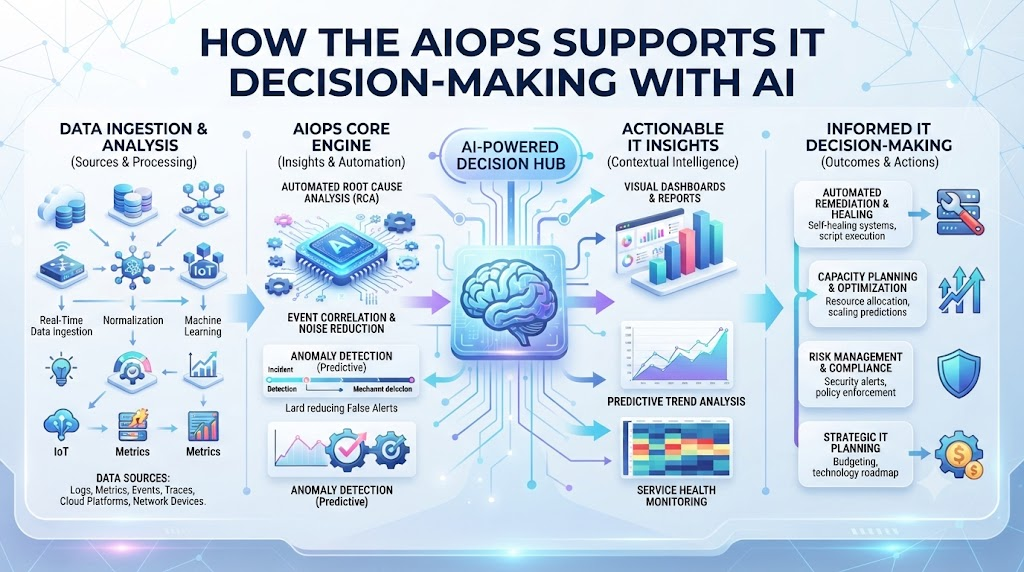
AIOps platforms like TheAIOps.com solve this by correlating signals. They connect the dots between logs, metrics, and traces. Then they surface the root cause. This cuts detection time from hours to minutes .
But AIOps is not just about speed. It is about better decisions. When you know the real problem, you fix the right thing. You stop wasting time on symptoms. Your team focuses on what matters.
Core Capabilities of TheAIOps.com for Decision Support
TheAIOps.com is built around one goal: help you decide with confidence. Every feature serves that purpose.
Intelligent alert grouping is the first big win. Instead of 500 alerts for one outage, you get one grouped incident. The platform uses machine learning to cluster related signals. This alone can cut alert noise by 50% or more .
Root cause analysis goes deeper. The platform traces failures back through your service map. It asks: what changed? What broke first? What is the actual source? This turns hours of manual digging into a few clicks.
Predictive insights look ahead. The system learns normal behavior for each service. When patterns shift, it warns you before users feel pain. This shifts you from reactive to proactive.
Automated remediation closes the loop. For known issues, the platform can apply fixes automatically. Restart a service. Clear a cache. Scale a resource. You set the guardrails. The platform acts within them.
Each capability builds on the last. Together, they give you a clear picture for every decision.
TheAIOps.com vs Traditional Monitoring: A Direct Comparison
Traditional monitoring tools show you data. TheAIOps.com shows you what to do. Here is how they stack up.
| Capability | Traditional Monitoring | TheAIOps.com |
|---|---|---|
| Alert handling | Fires every threshold breach | Groups and prioritizes by impact |
| Root cause | Manual investigation across tools | Automated correlation and tracing |
| Prediction | None or basic thresholds | ML-based anomaly detection |
| Remediation | Manual runbooks | Automated with policy guardrails |
| Decision speed | Hours to days | Minutes |
| Noise reduction | 0–10% | 50–90% |
How TheAIOps.com Improves Root Cause Analysis
Root cause analysis is where AIOps shines brightest. Without it, you are guessing. With it, you are deciding.
Here is how TheAIOps.com does it. First, it builds a service map. This shows how your apps, databases, and networks connect. Next, it watches for anomalies. When something breaks, it traces backward through the map.
Imagine a checkout page failing. Traditional tools show database errors. But the real cause might be a network issue three layers away. TheAIOps.com connects those dots automatically.
This matters for decision-making. You stop fixing the wrong thing. You stop escalating to the wrong team. You act on the truth.
The platform also remembers past incidents. When a similar pattern appears, it suggests known fixes. This turns tribal knowledge into searchable, repeatable decisions. Your junior engineers decide like seniors.
Research shows AIOps can shorten RCA cycles from hours to minutes . That is the difference between a minor blip and a major outage.
10 Real-World Scenarios: How Teams Use TheAIOps.com
Here are ten stories from IT teams that adopted AIOps to fix decision paralysis.
- E-commerce checkout crash. A retailer’s payment service failed during peak hours. TheAIOps.com correlated database connection errors with a network latency spike. The team fixed the network issue in 12 minutes instead of two hours.
- Healthcare system slowdown. A hospital’s patient portal slowed to a crawl. Traditional tools showed high CPU. AIOps traced it to a misconfigured load balancer. Fix time dropped from 45 minutes to under 10 .
- Telecom network alarm flood. A carrier received three million events per month. TheAIOps.com cut noise by 70%. Engineers finally focused on real problems .
- Banking batch job failure. A nightly batch job failed silently. AIOps detected the anomaly before users noticed. The team rolled back a bad deployment before morning.
- SaaS platform database overload. A connection pool exhausted at 2 a.m. TheAIOps.com auto-scaled the pool within policy limits. No human needed. No outage happened.
- Retail inventory sync lag. Inventory data fell out of sync across regions. AIOps correlated it to a message queue backup. The team fixed the queue and prevented stock errors.
- Media streaming buffering spike. Users complained about buffering. Traditional tools showed healthy servers. AIOps found a CDN routing issue. Fix applied in 15 minutes.
- Government service outage. A citizen portal went down. AIOps traced it to a failed certificate renewal. The team renewed it and restored service in 20 minutes.
- Logistics routing errors. Delivery routes went haywire. AIOps linked it to a GPS service API change. The team patched the integration and saved the day.
- University exam platform crash. Students could not access exams. AIOps found a memory leak in a recent update. Rollback completed in 8 minutes. Exams resumed.
Each story ends the same way: better decisions, faster fixes, less pain.
10 Common Mistakes and Pitfalls to Avoid
AIOps is powerful. But teams often stumble. Here are ten mistakes and how to fix them.
- Starting too big. You try to cover every service at once. The data is messy. Results are poor. Fix: Start with one high-pain service. Prove value. Then expand .
- Ignoring data quality. Your logs, metrics, and traces live in silos. AIOps cannot correlate what it cannot see. Fix: Centralize your telemetry first. Clean it. Give it shared identifiers.
- No clear owner. The platform becomes a dashboard nobody checks. Fix: Name one person accountable for a specific metric, like MTTR on a key service .
- Chasing full automation too fast. You give the system write access before governance exists. Bad things happen. Fix: Define approval thresholds first. Start with low-risk actions only.
- Trusting every correlation. The platform surfaces a wrong root cause. You act on it. You break something else. Fix: Keep humans in the loop for high-impact changes .
- Skipping governance. No policy for what AI can and cannot do. Fix: Build governance before autonomy. Define identity, permissions, and audit trails .
- Measuring the wrong things. You track alert count instead of decision quality. Fix: Measure MTTR, change failure rate, and operator hours saved .
- Forgetting the human side. Engineers distrust the system. They ignore its advice. Fix: Show explainability. Let them see why the platform made a recommendation .
- No feedback loop. The system does not learn from outcomes. Fix: Feed every resolved incident back into the model. Tune continuously .
- Abandoning after pilot. The POC works. Then momentum dies. Fix: Build a roadmap past the pilot. Assign budget and ownership for scale .
These mistakes are common. They are also fixable. Awareness is the first step.
How TheAIOps.com Supports Faster Decision Cycles
Speed matters. But speed without accuracy is dangerous. TheAIOps.com balances both.
The platform reduces decision time in three ways. First, it filters noise. You see fewer, better signals. Second, it suggests actions. You do not start from scratch. Third, it automates low-risk fixes. You approve once, and the system handles the rest.
This cycle compounds. Each resolved incident teaches the system. Each decision gets faster. Each fix gets smarter.
Gartner predicts that by 2029, only 20% of AI-suggested actions will need human approval. In 2025, that number was 80% . The shift happens because trust grows with evidence.
TheAIOps.com is built for that journey. It starts with recommendations. It earns autonomy over time.
Step-by-Step Implementation Roadmap for TheAIOps.com
Here is your ten-step plan to adopt TheAIOps.com and improve decisions.
- Assess your current state. Map your monitoring tools, data sources, and alert volume. Identify where noise and downtime cost you most.
- Pick one pilot service. Choose a service with high pain and clear business impact. Checkout, payment, or a customer-facing API.
- Centralize your data. Connect logs, metrics, traces, and tickets. Ensure shared identifiers so the platform can correlate .
- Set up the platform. Deploy TheAIOps.com. Connect your pilot service. Define your service map.
- Baseline your metrics. Measure current MTTR, alert volume, and incident frequency. You need a before picture.
- Run detection and correlation. Let the platform group alerts and surface root causes. Do not automate yet. Just observe.
- Review and tune. Check the platform’s recommendations. Correct mistakes. Improve data quality. Build trust.
- Introduce low-risk automation. Start with safe actions: restart a known service, clear a cache. Set approval gates.
- Expand scope. Add more services. Onboard more teams. Apply lessons from the pilot.
- Govern and scale. Establish a standing governance review. Reassess autonomy tiers. Keep improving.
This roadmap is proven. It works because it sequences correctly. Data first. Trust second. Autonomy third.
1. What is TheAIOps.com and what does it do?
TheAIOps.com is an AI-powered platform for IT operations. It collects data from your systems, groups related alerts, finds root causes, and helps you fix problems faster. It supports better IT decisions by cutting through noise and surfacing what matters.
2. How does TheAIOps.com reduce alert noise?
The platform uses machine learning to cluster related alerts into single incidents. Instead of 500 alerts for one outage, you see one grouped issue. This can cut noise by 50% to 90% depending on your environment .
3. Can TheAIOps.com fix problems automatically?
Yes, for known low-risk issues. You set the guardrails. The platform acts within them. For example, it can restart a service or scale a resource. Higher-risk actions still need human approval.
4. How long does it take to see results from TheAIOps.com?
Most teams see value in the first 6 to 10 weeks during a pilot. The goal is a measurable before-and-after on MTTR and alert volume. Full scaling takes longer, typically 4 to 6 months .
5. Does TheAIOps.com replace my existing monitoring tools?
No. It sits on top of them. It ingests data from your current tools, correlates it, and adds intelligence. You keep your monitoring stack. TheAIOps.com makes it smarter.
6. What data does TheAIOps.com need to work?
It needs logs, metrics, traces, and events from your systems. It also benefits from tickets, service maps, and change history. The more data it has, the better its correlations .
7. Is TheAIOps.com suitable for small IT teams?
Yes. Small teams often benefit most because they have less capacity for manual triage. The platform acts as a force multiplier. One engineer can handle what used to require three.
8. How does TheAIOps.com handle data privacy and security?
The platform enforces data minimization, role-based access, and encryption. You control what data flows in and who sees it. Governance is built into the design .
9. What is the biggest mistake teams make with TheAIOps.com?
Starting too big. Trying to cover everything at once leads to messy data and poor results. Start with one high-pain service. Prove value. Then expand .
10. How do I measure ROI from TheAIOps.com?
Track MTTR reduction, alert noise reduction, incident frequency, and operator hours saved. Tie these to business metrics like downtime cost and customer satisfaction. Most teams see positive ROI within the first quarter.
Final Recommendation and Next Steps
TheAIOps.com is not just another tool. It is a decision engine. It turns noise into signal. It turns guessing into knowing. It turns slow into fast.
Your next steps are clear. Start small. Pick one painful service. Connect your data. Let the platform show you what it can do. Measure the difference.
Do not wait for perfection. Do not try to boil the ocean. The teams that win with AIOps start narrow and expand. They build trust with evidence. They let automation grow as confidence grows.
