Upgrade & Secure Your Future with DevOps, SRE, DevSecOps, MLOps!
We spend hours scrolling social media and waste money on things we forget, but won’t spend 30 minutes a day earning certifications that can change our lives.
Master in DevOps, SRE, DevSecOps & MLOps by DevOps School!
Learn from Guru Rajesh Kumar and double your salary in just one year.
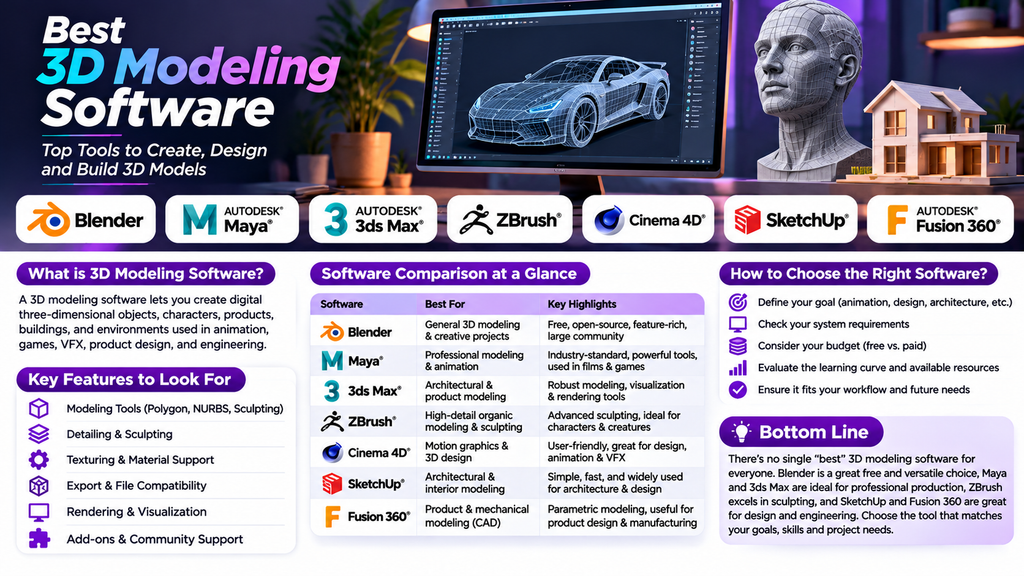
Best 3D Modeling Software: Top Tools to Create, Design and Build 3D Models
Introduction
3D modeling software allows designers, engineers, artists, and creators to transform ideas into detailed three-dimensional objects and environments. These tools are used across industries such as architecture, engineering, animation, gaming, product design, manufacturing, and visual effects.
With many applications available, selecting the right 3D modeling software can be challenging. Some tools specialize in precise engineering models, while others focus on organic sculpting, character creation, or architectural visualization. Understanding their features and intended uses can help you choose the right solution.
What Is 3D Modeling Software?
3D modeling software enables users to create digital representations of objects using points, edges, surfaces, and geometric shapes. Depending on the application, users can build mechanical components, buildings, characters, furniture, vehicles, and complex digital environments.
Common features include polygon modeling, sculpting, parametric design, texturing, material creation, rendering, and file export.
Best 3D Modeling Software Options
- Blender
Blender is a free, open-source 3D creation application offering modeling, sculpting, animation, texturing, and rendering tools. Its broad feature set makes it suitable for beginners and experienced artists working on a variety of projects.
Best for: General 3D modeling, animation, creative projects, and learning.
- Autodesk Maya
Autodesk Maya is a professional 3D application used for modeling, character creation, animation, and visual effects. It offers extensive tools for building detailed digital assets and integrating them into production pipelines.
Best for: Character modeling, animation, film, and game production.
- Autodesk 3ds Max
Autodesk 3ds Max provides modeling, visualization, and rendering capabilities. It is frequently used in architectural visualization, interior design, product visualization, and certain game development workflows.
Best for: Architecture, interiors, and professional 3D visualization.
- ZBrush
ZBrush specializes in digital sculpting and detailed organic modeling. Artists can create characters, creatures, facial details, and complex surface forms using sculpting brushes and high-resolution geometry.
Best for: Character sculpting, creatures, and detailed organic models.
- Cinema 4D
Cinema 4D is known for its accessible modeling tools and motion graphics capabilities. It is useful for creating visual designs, product scenes, animated graphics, and assets for advertising and media production.
Best for: Motion graphics, design, and creative 3D projects.
- SketchUp
SketchUp is a 3D modeling tool commonly used for architectural concepts, interior layouts, furniture, and spatial design. Its approachable interface can help users create and communicate design ideas efficiently.
Best for: Architecture, interior design, and conceptual modeling.
- Autodesk Fusion
Autodesk Fusion combines 3D CAD modeling with engineering and manufacturing workflows. Its parametric design tools allow users to define dimensions and relationships, making it useful for modifying mechanical parts and product concepts.
Best for: Mechanical design, product development, and manufacturing.
Comparison of Popular 3D Modeling Software
Blender — Versatile 3D modeling and creative projects.
Autodesk Maya — Professional modeling, animation, and production.
Autodesk 3ds Max — Architectural visualization and detailed modeling.
ZBrush — Organic sculpting and high-detail characters.
Cinema 4D — Motion graphics and visual design.
SketchUp — Architectural and interior modeling.
Autodesk Fusion — Parametric CAD and mechanical design.
How to Choose the Right 3D Modeling Software
- Define your goal. Decide whether you need modeling for engineering, architecture, animation, product design, or digital sculpting.
- Evaluate your experience. Beginners may prefer applications with accessible interfaces and learning resources.
- Check hardware requirements. Detailed models, complex scenes, and rendering can require substantial memory and graphics performance.
- Compare costs. Consider free options, subscriptions, licensing, training, and additional plugins.
- Check file compatibility. Ensure the software supports the file formats required by your clients, collaborators, or manufacturing workflow.
- Try a sample project. Build a simple object and test how easily you can model, edit, and export it.
Tips for Better 3D Modeling
- Start with simple shapes before adding complex details.
- Keep object names and project files organized.
- Use real-world dimensions when precision matters.
- Maintain clean topology for models intended for animation or deformation.
- Apply modifiers and sculpting details thoughtfully.
- Check textures, materials, and scale before exporting.
- Save incremental versions to protect your work.
Common Mistakes to Avoid
Choosing software solely because it is popular can lead to unnecessary complexity. Other common mistakes include ignoring file compatibility, creating unnecessarily dense geometry, overlooking scale, and failing to consider the final use of a model.
For engineering projects, verify dimensional accuracy and manufacturing requirements. For animation, pay attention to topology and deformation. For architectural visualization, consider the quality of materials, lighting, and presentation.
Conclusion
The best 3D modeling software depends on your goals and workflow. Blender offers a versatile starting point, Maya and 3ds Max support professional creative production, ZBrush excels at digital sculpting, Cinema 4D supports design and motion graphics, SketchUp is useful for architecture, and Autodesk Fusion serves engineering and product development.
Compare tools based on their features, learning curve, hardware requirements, cost, and file compatibility. Practicing with a small project before making a final decision is an effective way to identify the software that best fits your needs.
