Upgrade & Secure Your Future with DevOps, SRE, DevSecOps, MLOps!
We spend hours scrolling social media and waste money on things we forget, but won’t spend 30 minutes a day earning certifications that can change our lives.
Master in DevOps, SRE, DevSecOps & MLOps by DevOps School!
Learn from Guru Rajesh Kumar and double your salary in just one year.
Introduction
Home Automation Hubs help users connect, control, and automate smart home devices from one central system. In simple words, a hub acts like the brain of a smart home. It can connect lights, sensors, locks, thermostats, cameras, speakers, switches, plugs, appliances, and security devices so they can work together through rules, scenes, schedules, voice commands, or mobile apps.
Home automation hubs matter now because smart homes are becoming more mixed and complex. Many homes use devices from different brands, protocols, and ecosystems. Modern buyers also care about local control, privacy, Matter support, Thread, Zigbee, Z-Wave, energy savings, security, and reliable automations that still work even when the internet is slow or unavailable. Apple notes that Matter accessories require a home hub in Apple Home, and Thread-based Matter accessories require a Thread-enabled home hub or supported Thread border router.
Real-world use cases include smart lighting automation, home security routines, climate control, energy-saving schedules, leak detection, door lock automation, voice-controlled scenes, elderly care monitoring, and multi-room smart home management.
Buyers should evaluate device compatibility, local control, Matter support, Thread support, Zigbee, Z-Wave, privacy, mobile app quality, automation depth, voice assistant support, reliability, setup complexity, and long-term ecosystem support.
Best for: Homeowners, renters with smart devices, smart home enthusiasts, families, home office users, landlords, property managers, accessibility-focused users, and anyone managing multiple smart devices across brands.
Not ideal for: Users with only one or two Wi-Fi smart devices, people who only need basic voice control, or buyers who prefer a single-brand app without advanced automation needs.
Key Trends in Home Automation Hubs
- Matter is becoming a major compatibility layer because users want devices from different brands to work together more easily across Apple Home, Google Home, SmartThings, Alexa, and other ecosystems.
- Thread support is becoming more important for low-power smart home devices because it can improve reliability for sensors, locks, switches, and other connected accessories.
- Local automation is gaining popularity because many users want routines to work even if the cloud service is delayed or the internet is down.
- Privacy-first smart homes are becoming a bigger priority as users become more aware of voice data, camera access, device telemetry, and cloud dependency.
- AI-assisted automation is growing through smarter routines, behavior-based suggestions, occupancy-based actions, energy optimization, and voice-based home control.
- Multi-protocol hubs are becoming more valuable because modern homes may use Wi-Fi, Zigbee, Z-Wave, Bluetooth, Matter, Thread, and LAN-based devices together.
- Smart speakers are becoming hub-like controllers because devices such as HomePod, Echo, and Nest Hub can act as control points for smart home ecosystems.
- DIY power users are choosing local and open platforms such as Home Assistant and Hubitat because they want deeper customization, privacy, and automation control.
- Ecosystem lock-in remains a buyer concern because some hubs work best only inside Apple, Amazon, Google, Samsung, or other vendor ecosystems.
- Long-term support matters more than before because cloud shutdowns or discontinued products can affect smart devices that depend heavily on vendor services.
How We Selected These Tools
- We selected hubs and platforms that are widely recognized in smart home automation, device control, and connected home ecosystems.
- We considered compatibility with major smart home devices, including lights, locks, sensors, cameras, thermostats, switches, speakers, and appliances.
- We reviewed support for modern protocols such as Matter, Thread, Zigbee, Z-Wave, Wi-Fi, Bluetooth, and LAN-based integrations where applicable.
- We considered automation depth, including scenes, routines, triggers, conditions, local execution, and advanced rule-building.
- We included a balanced mix of consumer-friendly hubs, power-user platforms, local-first systems, and ecosystem-based smart home controllers.
- We considered privacy and reliability because smart homes often include sensitive devices such as cameras, locks, alarms, and occupancy sensors.
- We considered ease of setup for beginners as well as advanced customization for technical users.
- We reviewed ecosystem strength, including app quality, device compatibility, community support, and long-term adoption.
- We avoided guessing public ratings, certifications, exact pricing, or compliance claims where details are not clearly known.
- We treated scoring as a comparative buyer guide, not as an official technical benchmark or universal ranking.
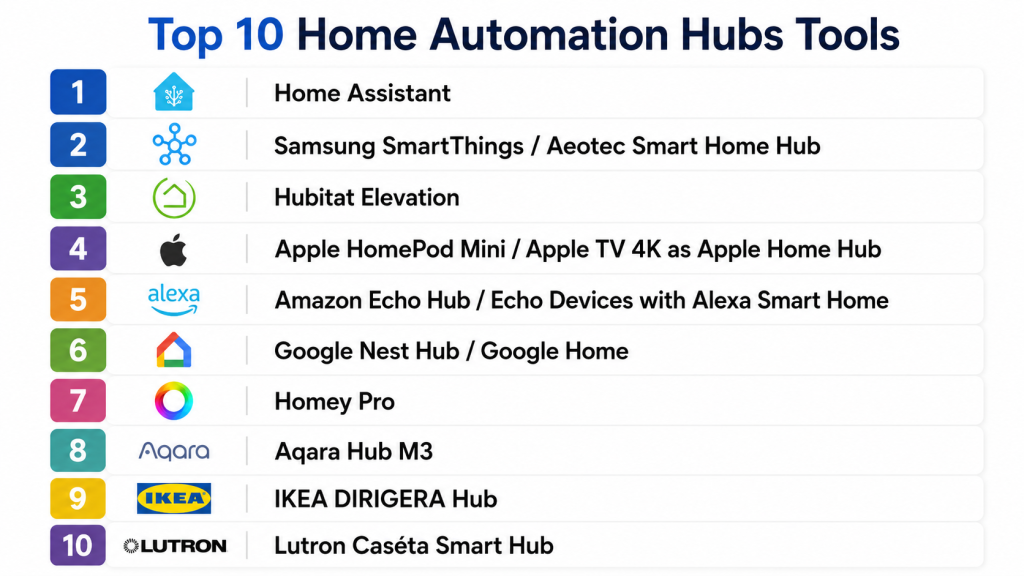
Top 10 Home Automation Hubs Tools
1 — Home Assistant
Short description:
Home Assistant is a powerful open-source home automation platform designed for users who want deep control, local automation, privacy, and wide device compatibility. It can run on dedicated hardware, mini PCs, servers, Raspberry Pi-style devices, virtual machines, and Home Assistant-branded hardware. It is popular among smart home enthusiasts, privacy-focused users, developers, and advanced DIY users. Home Assistant is especially strong for connecting many brands and protocols into one unified dashboard. It is not the simplest option for beginners, but it is one of the most flexible platforms for serious home automation.
Key Features
- Local-first smart home automation
- Large integration ecosystem
- Advanced automation rules and dashboards
- Support for Matter, Thread, Zigbee, Z-Wave, Wi-Fi, and many cloud integrations depending on hardware
- Custom dashboards and automations
- Strong community add-ons
- Self-hosted deployment options
Pros
- Very flexible and highly customizable
- Strong privacy and local-control orientation
- Large community and wide device integration support
Cons
- Setup can be technical for beginners
- Requires more maintenance than simple consumer hubs
- Hardware and protocol support may require extra dongles or devices
Platforms / Deployment
Web / iOS / Android / Linux / Docker / Virtual machine / Dedicated hardware
Self-hosted / Hybrid / Local-first
Security & Compliance
Home Assistant supports user accounts, permissions, local control, encrypted remote access options depending on setup, and community-supported security practices. Enterprise certifications such as SOC 2, ISO 27001, GDPR, or HIPAA are not publicly stated for general self-hosted use.
Integrations & Ecosystem
Home Assistant has one of the broadest smart home ecosystems because it connects consumer devices, local protocols, cloud services, and custom integrations.
- Matter and Thread support depending on setup
- Zigbee and Z-Wave support with compatible hardware
- Wi-Fi and LAN device integrations
- Voice assistant integrations
- Energy dashboards and sensor data
- Community add-ons and custom components
Support & Community
Home Assistant has strong documentation, active forums, community guides, add-ons, and developer participation. Official support depends on the hardware or subscription service used, while community support is very strong.
2 — Samsung SmartThings / Aeotec Smart Home Hub
Short description:
Samsung SmartThings is a widely used smart home ecosystem, and the Aeotec Smart Home Hub is one of the major dedicated hub options for SmartThings users. It helps connect and automate smart devices across different protocols such as Zigbee, Z-Wave, Matter, Thread, and Wi-Fi depending on hub version and configuration. Aeotec describes its Smart Home Hub as a controller for connecting, automating, and controlling multiple smart devices through protocols including Zigbee, Z-Wave, Matter, Thread, and Wi-Fi. It is suitable for mainstream smart home users who want broad compatibility without building everything manually. SmartThings is a good middle ground between beginner-friendly control and fairly capable automation.
Key Features
- SmartThings app-based device control
- Zigbee, Z-Wave, Matter, Thread, and Wi-Fi support depending on hub model
- Automation routines and scenes
- Smart home device grouping
- Voice assistant compatibility
- Multi-brand device support
- Remote access through the SmartThings ecosystem
Pros
- Good balance of usability and compatibility
- Strong consumer smart home ecosystem
- Suitable for users who want many brands under one app
Cons
- Some features may depend on cloud services
- Protocol support can vary by hub version
- Advanced users may find automation depth less flexible than Home Assistant
Platforms / Deployment
Web access varies / iOS / Android
Cloud / Hybrid / Local execution for some compatible devices and routines
Security & Compliance
User account security, device permissions, and ecosystem-level security controls may be available. Specific certifications such as SOC 2, ISO 27001, GDPR, or HIPAA should be verified directly with the vendor.
Integrations & Ecosystem
SmartThings has a broad consumer ecosystem and works with many smart home brands, appliances, sensors, lighting products, and connected devices.
- Zigbee device support depending on hub
- Z-Wave support depending on hub version
- Matter and Thread support depending on hub
- Samsung appliance ecosystem
- Alexa and Google Assistant compatibility
- SmartThings-compatible devices and services
Support & Community
SmartThings has official documentation, app-based support, device partner resources, and an active user community. Support quality may depend on region, device brand, and whether the issue is with the hub, app, or connected device.
3 — Hubitat Elevation
Short description:
Hubitat Elevation is a local-first home automation hub designed for users who want fast, private, and reliable automations without heavy cloud dependency. Hubitat promotes local processing, customizable automations, dashboards, and compatibility with Matter, Zigbee, Z-Wave, and Wi-Fi devices. It is popular among power users who want more control than mainstream hubs but less self-hosting complexity than Home Assistant. Hubitat is a strong fit for homes with many sensors, switches, locks, and automations that should run locally. It is especially useful when reliability and privacy are top priorities.
Key Features
- Local automation processing
- Zigbee and Z-Wave support depending on model
- Matter support depending on model and updates
- Custom dashboards
- Rule-based automation engine
- Device compatibility across many smart home categories
- LAN and cloud integration options
Pros
- Strong local execution and privacy focus
- Good automation depth for advanced users
- Does not require full DIY server management
Cons
- Interface may feel less beginner-friendly than mass-market apps
- Device compatibility may need checking before purchase
- Some integrations may require community drivers or extra setup
Platforms / Deployment
Web / Mobile app availability may vary
Local hub / Hybrid with optional cloud services
Security & Compliance
Hubitat emphasizes local processing and privacy-oriented operation. User access controls may be available. Enterprise certifications such as SOC 2, ISO 27001, GDPR, or HIPAA are not publicly stated.
Integrations & Ecosystem
Hubitat works well for users who want local automations across multiple protocols and device types.
- Zigbee devices
- Z-Wave devices
- Matter-compatible devices depending on setup
- Wi-Fi and LAN integrations
- Alexa and Google Home integrations
- Community drivers and apps
Support & Community
Hubitat has documentation, user forums, support resources, community-created drivers, and active user discussions. Community strength is a major advantage for advanced integrations.
4 — Apple HomePod Mini / Apple TV 4K as Apple Home Hub
Short description:
Apple Home uses HomePod, HomePod mini, or Apple TV as the home hub for remote access, automation, and Matter accessory support. This setup is best for users already invested in iPhone, iPad, Mac, Apple Watch, and Apple Home-compatible accessories. Apple states that HomePod mini and HomePod become home hubs automatically when set up, and Thread-enabled Matter accessories need a Thread-enabled home hub such as HomePod mini or supported Apple TV 4K models. Apple Home is strong for users who want a polished, privacy-focused, and simple smart home experience. It is less flexible than DIY platforms but very convenient for Apple households.
Key Features
- Apple Home app control
- HomePod or Apple TV hub functionality
- Matter accessory support
- Thread support with compatible hub models
- Siri voice control
- Automations and scenes
- Strong Apple device ecosystem integration
Pros
- Excellent fit for Apple users
- Simple and polished user experience
- Good privacy-oriented ecosystem positioning
Cons
- Best experience requires Apple devices
- Less flexible than Home Assistant or Hubitat
- Device compatibility depends on HomeKit or Matter support
Platforms / Deployment
iOS / iPadOS / macOS / watchOS / HomePod / Apple TV
Cloud / Local ecosystem features / Hub-based Apple Home architecture
Security & Compliance
Apple emphasizes privacy and secure smart home control. Specific enterprise certifications such as SOC 2, ISO 27001, GDPR, or HIPAA for Apple Home usage are not publicly stated in this context.
Integrations & Ecosystem
Apple Home works best with HomeKit and Matter-compatible accessories and Apple devices.
- HomeKit accessories
- Matter accessories
- Thread accessories with supported hubs
- Siri voice control
- Apple TV and HomePod ecosystem
- Apple Home automations and scenes
Support & Community
Apple provides official support documentation, device setup guides, OS-level updates, and customer support. Community support is strong through Apple user groups and smart home discussions.
#5 — Amazon Echo Hub / Echo Devices with Alexa Smart Home
Short description:
Amazon Alexa smart home hubs use Echo devices, Echo Hub, and Alexa-compatible controllers to manage smart devices, routines, voice commands, and connected home experiences. This ecosystem is suitable for users who want voice-first control, easy routines, and broad consumer device compatibility. Alexa works with many smart home products across lighting, plugs, thermostats, cameras, locks, sensors, and appliances. Some Echo devices include built-in smart home hub features such as Zigbee or Matter support depending on model. Alexa is best for users who want easy voice automation and large consumer device support rather than deep local automation control.
Key Features
- Alexa voice control
- Smart home routines
- Broad device compatibility
- Matter support depending on device
- Zigbee support on selected Echo models
- Smart display and dashboard options
- Remote app control through Alexa
Pros
- Very beginner-friendly for voice control
- Large smart device ecosystem
- Good for simple routines and everyday smart home control
Cons
- Many features depend on cloud services
- Local automation depth is limited compared with power-user hubs
- Privacy-conscious users may prefer local-first alternatives
Platforms / Deployment
iOS / Android / Echo devices / Smart displays
Cloud / Hybrid depending on device and protocol
Security & Compliance
Amazon account security features and device privacy controls may be available. Specific certifications such as SOC 2, ISO 27001, GDPR, or HIPAA for general Alexa smart home usage are not publicly stated in this context.
Integrations & Ecosystem
Alexa has a broad smart home ecosystem and works with many consumer devices and services.
- Alexa-compatible smart devices
- Matter devices depending on model
- Zigbee devices on selected Echo models
- Voice routines and scenes
- Smart displays and speakers
- Third-party smart home skills
Support & Community
Amazon provides help documentation, device support, app-based setup guidance, and customer service. Community support is broad because Alexa is widely used in consumer smart homes.
#6 — Google Nest Hub / Google Home
Short description:
Google Nest Hub and Google Home provide a smart home control ecosystem for users who prefer Google Assistant, Android integration, smart displays, and Google-compatible connected devices. It is useful for controlling lights, thermostats, cameras, speakers, plugs, and Matter-compatible devices from the Google Home app. Google Home is a strong fit for Android users and households already using Nest products. It provides a simple interface for voice control, routines, and smart home scenes. It is less customizable than advanced platforms but works well for mainstream users who want convenience and broad compatibility.
Key Features
- Google Home app control
- Google Assistant voice control
- Smart display dashboard
- Matter device support depending on device and setup
- Routines and household automations
- Nest device ecosystem integration
- Multi-room audio and media control
Pros
- Good fit for Android and Google users
- Simple smart home control through app and voice
- Strong Nest product ecosystem
Cons
- Advanced local automation is limited
- Some features depend on cloud services
- Compatibility varies by device and region
Platforms / Deployment
iOS / Android / Nest Hub devices / Google smart speakers
Cloud / Hybrid depending on device and protocol
Security & Compliance
Google account security, app permissions, and device privacy controls may be available. Specific certifications such as SOC 2, ISO 27001, GDPR, or HIPAA for general Google Home smart home usage are not publicly stated in this context.
Integrations & Ecosystem
Google Home works with many consumer smart devices and is especially strong for Google and Nest users.
- Nest thermostats, cameras, and speakers
- Matter-compatible accessories
- Google Assistant routines
- Android ecosystem integration
- Smart displays and speakers
- Third-party connected devices
Support & Community
Google provides official help documentation, app support, device setup guides, and customer resources. Community support is strong because Google Home and Nest devices are widely used.
#7 — Homey Pro
Short description:
Homey Pro is a premium smart home hub designed to connect many different smart home devices and protocols into one app-based automation experience. It is built for users who want strong compatibility without managing a fully DIY self-hosted system. Homey Pro supports a wide range of smart home categories and is known for its visual automation style. It is suitable for advanced homeowners, smart home enthusiasts, and users who want multi-brand device control with a clean interface. Homey Pro is positioned as a powerful all-in-one hub for mixed-device households.
Key Features
- Multi-protocol smart home control
- Visual automation flows
- Broad device compatibility
- Local and cloud-connected device support depending on integration
- App-based dashboards
- Voice assistant integrations
- Advanced automation logic
Pros
- Clean user experience for advanced automation
- Good for multi-brand smart homes
- Less technical than fully self-hosted platforms
Cons
- Premium pricing compared with basic hubs
- Compatibility should be checked before purchase
- Some integrations may depend on app availability or cloud services
Platforms / Deployment
Web / iOS / Android
Dedicated hub / Cloud / Hybrid depending on integration
Security & Compliance
User account controls and device permissions may be available. Specific certifications such as SOC 2, ISO 27001, GDPR, or HIPAA are not publicly stated unless confirmed directly by the vendor.
Integrations & Ecosystem
Homey Pro is designed for users who want one hub for many smart home device brands and automation types.
- Zigbee and Z-Wave support depending on model
- Wi-Fi and infrared support depending on model
- Matter and Thread support depending on model and updates
- App-based device integrations
- Voice assistant compatibility
- Visual automation flows
Support & Community
Homey provides documentation, app ecosystem resources, and customer support. Community support exists around device apps, automations, and smart home setup discussions.
#8 — Aqara Hub M3
Short description:
Aqara Hub M3 is a smart home hub designed for Aqara devices and broader smart home integration through modern protocols. It is suitable for users who want sensors, switches, curtains, locks, lighting, cameras, and automation devices from the Aqara ecosystem. Aqara hubs are often used by people who want affordable smart sensors and reliable home automation scenes. The M3 is more advanced than older basic hubs and is relevant for users who care about Matter, Thread, Zigbee, and ecosystem bridging. It is best for households that already use or plan to use Aqara smart home products.
Key Features
- Aqara ecosystem control
- Zigbee device connectivity
- Matter support depending on setup
- Thread-related support depending on device capability
- Automation scenes and triggers
- Smart sensor and security workflows
- Voice assistant ecosystem compatibility
Pros
- Strong for Aqara sensors and accessories
- Good smart home value for device-heavy households
- Useful for automation based on motion, doors, temperature, and security sensors
Cons
- Best experience is inside the Aqara ecosystem
- Compatibility outside Aqara should be checked carefully
- Advanced users may prefer more open platforms
Platforms / Deployment
iOS / Android / App-based control
Cloud / Hybrid / Local functions may vary by setup
Security & Compliance
Account security, device permissions, and access controls may be available through the Aqara ecosystem. Specific certifications such as SOC 2, ISO 27001, GDPR, or HIPAA are not publicly stated in this context.
Integrations & Ecosystem
Aqara is strong for sensor-rich smart homes and can connect with several larger smart home ecosystems depending on device support.
- Aqara sensors and switches
- Zigbee accessories
- Matter ecosystem bridging depending on setup
- Apple Home, Alexa, and Google compatibility may vary by device
- Security and environmental sensors
- Automation scenes
Support & Community
Aqara provides official documentation, app support, setup resources, and product guides. Community support is active among smart home users because Aqara devices are popular for affordable automation setups.
#9 — IKEA DIRIGERA Hub
Short description:
IKEA DIRIGERA Hub is a smart home hub designed for IKEA smart home products such as lights, blinds, sensors, remotes, and connected accessories. It is best for users who want simple, affordable home automation built around IKEA’s smart home ecosystem. DIRIGERA is suitable for beginners, renters, small apartments, and families who want easy lighting and device automation. It is not as advanced as Home Assistant or Hubitat, but it is easier for casual users. It works well when the smart home focus is lighting, simple scenes, and practical daily convenience.
Key Features
- IKEA smart device control
- Lighting and blind automation
- App-based smart home setup
- Scene and room control
- Sensor and remote support
- Simple user experience
- Integration with larger ecosystems may vary
Pros
- Beginner-friendly setup
- Good for affordable smart lighting and home basics
- Strong fit for IKEA smart home users
Cons
- Limited advanced automation compared with power-user hubs
- Best experience is inside IKEA ecosystem
- Device compatibility outside IKEA should be checked
Platforms / Deployment
iOS / Android
Dedicated hub / Cloud / Hybrid depending on feature
Security & Compliance
Basic account and app security controls may be available. Specific certifications such as SOC 2, ISO 27001, GDPR, or HIPAA are not publicly stated in this context.
Integrations & Ecosystem
DIRIGERA is mainly focused on IKEA smart home products and simple automation workflows.
- IKEA smart lights
- IKEA smart blinds
- Sensors and remotes
- Room and scene control
- App-based automations
- External ecosystem compatibility may vary
Support & Community
IKEA provides product support, app guidance, documentation, and retail support channels. Community support exists among budget smart home and IKEA smart device users.
Short description:
Lutron Caséta Smart Hub is a focused smart home hub designed mainly for Lutron lighting controls, dimmers, switches, shades, and related accessories. It is not a general-purpose hub for every smart home device category, but it is highly relevant for users who want reliable lighting automation. Lutron is especially popular in homes where lighting performance, wall controls, dimming quality, and reliability matter. It works well with larger smart home ecosystems when users want Lutron lighting to connect with voice assistants and automation platforms. It is best for people who want dependable smart lighting rather than a broad experimental hub.
Key Features
- Lutron lighting and dimmer control
- Smart switch and shade support
- Scene and schedule automation
- App-based remote control
- Voice assistant integrations
- Reliable lighting performance
- Integration with larger smart home ecosystems
Pros
- Strong reputation for lighting reliability
- Excellent fit for smart switches and dimmers
- Good option for users who want stable lighting automation
Cons
- Not a broad multi-device automation hub
- Best value is limited to Lutron ecosystem
- Advanced whole-home automation may require another hub
Platforms / Deployment
iOS / Android
Dedicated hub / Cloud / Hybrid depending on integration
Security & Compliance
Account security and app-based access controls may be available. Specific certifications such as SOC 2, ISO 27001, GDPR, or HIPAA are not publicly stated in this context.
Integrations & Ecosystem
Lutron Caséta works best as a lighting-focused hub that connects with broader smart home platforms.
- Lutron switches and dimmers
- Lutron shades
- Voice assistant integrations
- Apple Home, Alexa, and Google compatibility may vary
- Smart home platform integrations
- Lighting scenes and schedules
Support & Community
Lutron provides official documentation, product support, installer resources, and customer assistance. Community support is strong among smart lighting, home automation, and renovation-focused users.
Comparison Table
| Tool Name | Best For | Platform(s) Supported | Deployment | Standout Feature | Public Rating |
|---|---|---|---|---|---|
| Home Assistant | Power users and privacy-focused smart homes | Web / iOS / Android / Linux / Docker | Self-hosted / Hybrid | Local-first automation and huge integration ecosystem | N/A |
| Samsung SmartThings / Aeotec Smart Home Hub | Mainstream multi-brand smart homes | iOS / Android / Web access varies | Cloud / Hybrid | Broad consumer device compatibility | N/A |
| Hubitat Elevation | Local automation and advanced DIY users | Web / Mobile varies | Local hub / Hybrid | Local processing and customizable automations | N/A |
| Apple HomePod Mini / Apple TV 4K | Apple ecosystem households | iOS / iPadOS / macOS / Apple TV / HomePod | Apple Home hub / Cloud / Local ecosystem | Apple Home and Thread-enabled Matter support | N/A |
| Amazon Echo Hub / Echo Devices | Voice-first smart homes | iOS / Android / Echo devices | Cloud / Hybrid | Alexa routines and voice control | N/A |
| Google Nest Hub / Google Home | Google and Android households | iOS / Android / Nest devices | Cloud / Hybrid | Google Assistant and Nest ecosystem control | N/A |
| Homey Pro | Premium multi-protocol smart homes | Web / iOS / Android | Dedicated hub / Hybrid | Visual automation flows and broad device support | N/A |
| Aqara Hub M3 | Aqara sensor and automation ecosystems | iOS / Android | Hub / Cloud / Hybrid | Aqara ecosystem with modern protocol support | N/A |
| IKEA DIRIGERA Hub | Simple affordable smart homes | iOS / Android | Dedicated hub / Hybrid | Easy IKEA lighting and home automation | N/A |
| Lutron Caséta Smart Hub | Reliable smart lighting automation | iOS / Android | Dedicated hub / Hybrid | Stable lighting, dimmer, and shade control | N/A |
Evaluation & Scoring of Home Automation Hubs
| Tool Name | Core (25%) | Ease (15%) | Integrations (15%) | Security (10%) | Performance (10%) | Support (10%) | Value (15%) | Weighted Total (0–10) |
|---|---|---|---|---|---|---|---|---|
| Home Assistant | 10 | 6 | 10 | 8 | 8 | 9 | 9 | 8.70 |
| Samsung SmartThings / Aeotec Smart Home Hub | 8 | 8 | 8 | 7 | 8 | 8 | 8 | 7.90 |
| Hubitat Elevation | 8 | 7 | 8 | 8 | 9 | 8 | 8 | 8.00 |
| Apple HomePod Mini / Apple TV 4K | 7 | 9 | 7 | 8 | 8 | 8 | 8 | 7.75 |
| Amazon Echo Hub / Echo Devices | 7 | 9 | 8 | 7 | 7 | 8 | 8 | 7.70 |
| Google Nest Hub / Google Home | 7 | 9 | 8 | 7 | 7 | 8 | 8 | 7.70 |
| Homey Pro | 8 | 8 | 8 | 7 | 8 | 8 | 7 | 7.75 |
| Aqara Hub M3 | 7 | 8 | 7 | 7 | 8 | 7 | 8 | 7.40 |
| IKEA DIRIGERA Hub | 6 | 9 | 6 | 7 | 7 | 7 | 8 | 7.00 |
| Lutron Caséta Smart Hub | 7 | 9 | 7 | 7 | 9 | 8 | 8 | 7.80 |
These scores are comparative and should be used as a buyer guide, not as official product ratings. A higher score means the hub performs strongly across the selected criteria, but the best choice depends on the user’s ecosystem and device mix. Home Assistant scores high for flexibility, while Apple, Amazon, Google, IKEA, and Lutron may be easier for mainstream users. Buyers should adjust the scores based on their devices, privacy needs, automation depth, budget, and technical comfort.
Which Home Automation Hub Tool Is Right for You?
Solo / Freelancer
Solo users, renters, and people living in apartments usually need a hub that is simple, affordable, and easy to manage. They may not need a complex self-hosted setup unless they enjoy customization.
Good options include Apple HomePod mini, Amazon Echo devices, Google Nest Hub, IKEA DIRIGERA, Aqara Hub M3, and Lutron Caséta Smart Hub. These choices work well for simple lighting, voice control, sensors, and daily convenience.
SMB
Small offices, boutique rental properties, smart studios, guest houses, and small business spaces may need reliable automation for lighting, access, climate, and security devices. Ease of management is important because there may not be a dedicated smart home technician.
Good options include SmartThings, Hubitat, Homey Pro, Lutron Caséta, and Google or Alexa-based hubs. SMB buyers should prioritize reliability, device compatibility, user access, and simple support.
Mid-Market
Mid-market property managers, co-living operators, small hotels, serviced apartments, and multi-unit landlords may need more structured control over devices, routines, and access. They may also need stronger reporting, security, and repeatable deployment.
Good options include Home Assistant, SmartThings, Hubitat Elevation, Homey Pro, Aqara Hub M3, and Lutron Caséta for lighting-focused deployments. Buyers should validate remote management, network reliability, and device lifecycle support.
Enterprise
Large properties, premium villas, hospitality brands, assisted living spaces, and managed residential portfolios need a more careful approach. Consumer hubs may work for specific use cases, but enterprise environments often need professional smart building or property automation systems.
Good options may include Home Assistant for customized local control, Lutron for lighting reliability, Apple Home for premium residential ecosystems, or professionally managed automation platforms depending on project scope. Enterprise buyers should involve IT, security, installers, and facility teams early.
Budget vs Premium
Budget buyers should consider IKEA DIRIGERA, Aqara Hub M3, Amazon Echo devices, Google Nest Hub, or a basic SmartThings-compatible setup. These options can support common smart home needs without high upfront complexity.
Premium buyers may prefer Homey Pro, Hubitat Elevation, Home Assistant with dedicated hardware, Apple Home with HomePod or Apple TV, or Lutron Caséta for reliable lighting. Premium does not always mean better for everyone; it usually means more control, better reliability, or stronger ecosystem fit.
Feature Depth vs Ease of Use
If you want maximum control, choose Home Assistant or Hubitat. These platforms provide deeper automation logic, stronger local control, and more customization.
If you want simplicity, choose Apple Home, Alexa, Google Home, IKEA DIRIGERA, Aqara, or Lutron. These platforms are better for users who want easy setup and predictable everyday use.
Integrations & Scalability
If your home has many brands and protocols, integration depth matters. Home Assistant, SmartThings, Hubitat, and Homey Pro are better suited for mixed-device homes.
If your home is mostly inside one ecosystem, choose a matching hub. Apple users should consider Apple Home. Google users may prefer Google Home. Alexa users may prefer Echo-based control. Aqara and IKEA users may benefit from their own hubs.
Security & Compliance Needs
Smart home hubs can control sensitive devices such as locks, cameras, alarms, presence sensors, and garage doors. Buyers should review account security, two-factor authentication, local control, remote access, device permissions, update history, and cloud dependency.
Privacy-focused users should consider local-first options such as Home Assistant and Hubitat. Mainstream users should still enable strong passwords, account protection, software updates, and secure Wi-Fi.
Frequently Asked Questions
1. What is a Home Automation Hub?
A Home Automation Hub is a central controller that connects and manages smart home devices. It helps devices work together through automations, scenes, schedules, voice commands, and app-based control.
2. Do I need a hub for every smart home device?
No, many Wi-Fi smart devices can work directly through their own apps. A hub becomes useful when you want better automation, multi-brand control, local reliability, or support for protocols like Zigbee, Z-Wave, Thread, or Matter.
3. What is the difference between Wi-Fi, Zigbee, Z-Wave, Thread, and Matter?
Wi-Fi connects devices directly to your network, while Zigbee, Z-Wave, and Thread are low-power smart home protocols. Matter is a compatibility standard designed to help devices work across major smart home ecosystems.
4. Which home automation hub is best for beginners?
Apple Home, Amazon Echo, Google Home, IKEA DIRIGERA, Aqara Hub, and SmartThings are generally easier for beginners. They provide app-based setup and simple automations without requiring deep technical knowledge.
5. Which hub is best for advanced users?
Home Assistant and Hubitat Elevation are strong choices for advanced users. They offer deeper automation, local control, broader customization, and more flexibility than many mainstream consumer hubs.
6. Is local control important?
Yes, local control can improve speed, reliability, and privacy. It allows some automations to run even when the internet is unavailable, depending on the hub, device type, and automation setup.
7. Are home automation hubs secure?
Security depends on the hub, setup, network, account protection, and device updates. Users should enable strong passwords, two-factor authentication, secure Wi-Fi, regular updates, and careful remote access settings.
8. Can I use multiple hubs in one home?
Yes, many users run multiple hubs, such as Apple Home for voice control, Lutron for lighting, and Home Assistant for advanced automation. However, too many hubs can increase complexity if not planned properly.
9. What is Matter, and why does it matter?
Matter is a smart home compatibility standard that helps devices work across major ecosystems. It can reduce vendor lock-in, but users should still check whether each device and hub supports the features they need.
10. What mistakes should buyers avoid?
Common mistakes include buying devices before checking compatibility, ignoring local control, choosing only based on voice assistant support, using weak Wi-Fi, skipping updates, and relying too much on one cloud service.
Conclusion
Home Automation Hubs make smart homes more useful by connecting devices, simplifying control, and enabling automations that improve comfort, safety, convenience, and energy efficiency. The best hub depends on your ecosystem, technical comfort, device mix, privacy expectations, and budget. Home Assistant is excellent for power users who want maximum control. SmartThings and Homey Pro are strong for multi-brand smart homes. Hubitat is a good local-first choice. Apple Home, Alexa, and Google Home are better for mainstream users who want simple voice and app control. Aqara, IKEA DIRIGERA, and Lutron Caséta are strong when your smart home is focused on their ecosystems.
