Upgrade & Secure Your Future with DevOps, SRE, DevSecOps, MLOps!
We spend hours scrolling social media and waste money on things we forget, but won’t spend 30 minutes a day earning certifications that can change our lives.
Master in DevOps, SRE, DevSecOps & MLOps by DevOps School!
Learn from Guru Rajesh Kumar and double your salary in just one year.
Introduction
Meeting Room Booking Software helps organizations reserve meeting rooms, conference spaces, huddle rooms, shared workspaces, and workplace resources from one digital system. In simple terms, it helps employees find an available room, book it, invite attendees, add equipment needs, and avoid double bookings.
It matters now because hybrid work has changed how offices are used. Companies need better visibility into room availability, office occupancy, workplace utilization, visitor needs, and employee collaboration patterns. Manual room booking through spreadsheets or informal chat messages often creates confusion, wasted space, and meeting delays.
Common use cases include:
- Booking meeting rooms through calendar tools.
- Showing room availability on office displays.
- Managing hybrid workplace schedules.
- Tracking room usage and occupancy.
- Reserving equipment, catering, or visitor support.
Buyers should evaluate:
- Calendar integrations
- Room display support
- Mobile app experience
- Desk and space booking support
- Check-in and no-show handling
- Occupancy analytics
- Visitor management integrations
- Hardware compatibility
- Security and access controls
- Pricing and scalability
Best for: offices, coworking spaces, enterprises, universities, agencies, hybrid workplaces, facility managers, HR teams, IT teams, operations teams, and companies with multiple meeting rooms or shared spaces.
Not ideal for: very small teams with one room, companies that only use simple calendar invites, or organizations that do not need room analytics, displays, check-in, or workplace management features.
Key Trends in Meeting Room Booking Software
- Hybrid workplace optimization: Companies are using room booking data to understand when employees come in and how spaces are used.
- AI-assisted space recommendations: Modern tools are moving toward suggesting the best room based on size, attendees, equipment, location, and availability.
- Room display adoption: Tablet-based room panels help employees see availability, check in, extend meetings, and release unused rooms.
- No-show reduction: Auto-release features help free rooms when organizers do not check in.
- Desk and room booking convergence: Many tools now combine meeting rooms, hot desks, parking, lockers, and shared resources.
- Occupancy analytics: Facilities teams want data on utilization, peak office days, underused rooms, and space planning.
- Sensor and workplace IoT integration: Occupancy sensors and room panels are helping businesses understand real room usage.
- Microsoft 365 and Google Workspace dependence: Calendar synchronization is now a core requirement for room booking success.
- Employee experience focus: Booking tools must feel simple enough for everyday use by non-technical employees.
- Security and access governance: Enterprises need SSO, user roles, location permissions, visitor access controls, and audit trails.
How We Selected These Tools
The following tools were selected using practical workplace and facility management criteria:
- Market recognition in room booking, workplace experience, and hybrid office management.
- Strength of meeting room scheduling and resource reservation features.
- Integration with Microsoft 365, Google Workspace, Slack, Teams, and workplace tools.
- Support for room displays, mobile apps, and employee self-service.
- Fit for SMBs, coworking spaces, mid-market companies, and enterprises.
- Occupancy analytics and workplace utilization reporting.
- Support for desk booking, visitor management, and hybrid workplace workflows.
- Security posture, access control, and admin capabilities where publicly known.
- Ease of deployment for IT, facilities, HR, and operations teams.
- Overall value for improving office collaboration and space efficiency.
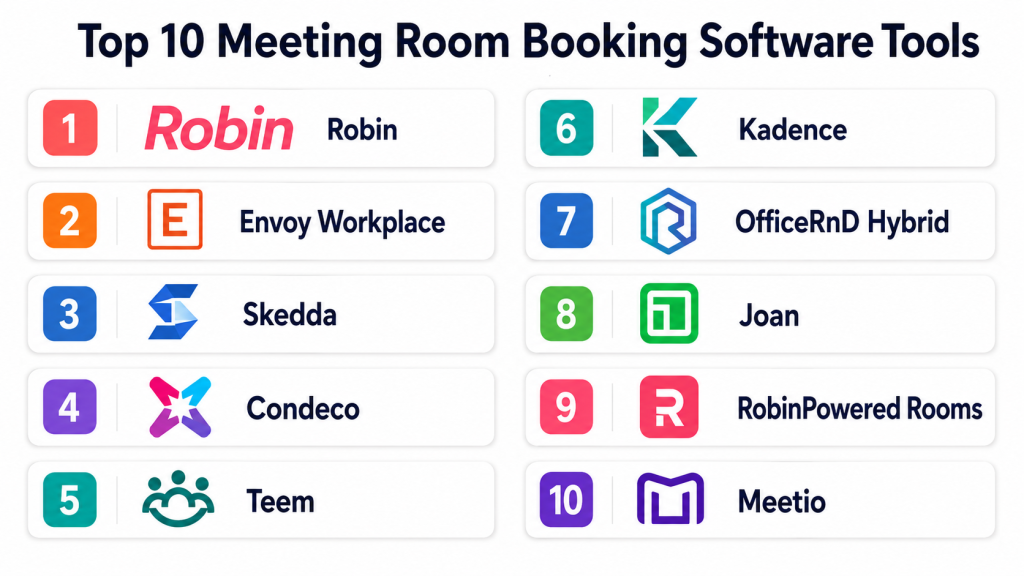
Top 10 Meeting Room Booking Software Tools
#1 — Robin
Short description:
Robin is a workplace management platform that helps teams book meeting rooms, desks, and shared office spaces. It is designed for hybrid workplaces where employees need visibility into office availability, coworkers, and resources. Robin supports room scheduling, desk booking, office maps, analytics, and employee coordination. It is useful for organizations that want to improve space utilization and reduce workplace friction. The platform is a strong fit for mid-sized and enterprise teams managing hybrid office environments.
Key Features
- Meeting room booking.
- Desk and space booking.
- Interactive office maps.
- Calendar integrations.
- Workplace analytics.
- Employee presence visibility.
- Room display support.
Pros
- Strong fit for hybrid workplaces.
- Combines room booking and desk booking.
- Useful analytics for office space planning.
Cons
- May be more than small teams need.
- Best value depends on employee adoption.
- Setup requires accurate office maps and room data.
Platforms / Deployment
Web / iOS / Android; Cloud deployment.
Security & Compliance
SSO/SAML, MFA, encryption, audit logs, RBAC, SOC 2, ISO 27001, GDPR, HIPAA: Not publicly stated.
Integrations & Ecosystem
Robin works well with workplace and collaboration systems.
- Microsoft 365
- Google Workspace
- Slack
- Microsoft Teams
- Room displays
- Workplace analytics tools
Support & Community
Robin provides onboarding, support resources, and documentation. Community strength is strong among hybrid workplace and facilities teams.
#2 — Envoy Workplace
Short description:
Envoy Workplace is a workplace experience platform that includes desk booking, room booking, visitor management, employee sign-in, deliveries, and workplace analytics. It is useful for companies that want meeting room booking connected with broader office operations. Envoy is especially relevant for hybrid workplaces where employees, visitors, and office access need to be managed together. It helps facilities and operations teams understand workplace usage and improve employee experience. The platform fits SMBs, mid-market companies, and enterprises.
Key Features
- Meeting room booking.
- Desk booking.
- Visitor management.
- Employee workplace scheduling.
- Workplace analytics.
- Room and resource visibility.
- Integrations with workplace tools.
Pros
- Strong all-in-one workplace operations platform.
- Good visitor management and office access features.
- Useful for hybrid office planning.
Cons
- May be broader than teams needing only room booking.
- Pricing and modules should be reviewed carefully.
- Setup may require workplace policy alignment.
Platforms / Deployment
Web / iOS / Android; Cloud deployment.
Security & Compliance
SSO/SAML, MFA, encryption, audit logs, RBAC, SOC 2, ISO 27001, GDPR, HIPAA: Not publicly stated.
Integrations & Ecosystem
Envoy connects room booking with broader office operations.
- Microsoft 365
- Google Workspace
- Slack
- Access control systems
- Visitor management workflows
- Workplace analytics
Support & Community
Envoy provides onboarding, documentation, and support resources. Community strength is high among workplace operations teams.
#3 — Skedda
Short description:
Skedda is a space booking platform used for meeting rooms, shared offices, coworking spaces, classrooms, sports facilities, studios, and community spaces. It helps organizations manage room availability, booking rules, user permissions, payments, and calendars. Skedda is especially useful when spaces require flexible booking policies and access rules. It fits coworking spaces, universities, nonprofits, offices, and venues. The platform is a strong choice for teams that need configurable room and space scheduling.
Key Features
- Meeting room and space booking.
- Booking rules and policies.
- User permissions.
- Calendar views.
- Payment support where needed.
- Space availability management.
- Reporting and usage insights.
Pros
- Flexible for many space booking use cases.
- Good for coworking, education, and community spaces.
- Strong booking rule configuration.
Cons
- Workplace experience features may be lighter than broader platforms.
- Advanced enterprise workplace analytics may require another tool.
- Setup depends on clear booking policies.
Platforms / Deployment
Web-based platform; Cloud deployment.
Security & Compliance
SSO/SAML, MFA, encryption, audit logs, RBAC, SOC 2, ISO 27001, GDPR, HIPAA: Not publicly stated.
Integrations & Ecosystem
Skedda supports room and resource booking workflows.
- Calendar systems
- Payment workflows
- User access controls
- Website booking pages
- Space management dashboards
- Reporting tools
Support & Community
Support and documentation are available. Community strength is good among space managers, coworking operators, and education teams.
#4 — Condeco
Short description:
Condeco is a workplace scheduling platform for meeting room booking, desk booking, visitor workflows, and hybrid workplace management. It is designed for larger organizations that need structured workplace control across offices, floors, and regions. Condeco helps employees find and book rooms, desks, and collaboration spaces while giving facilities teams usage analytics. It is especially useful for enterprises with formal workplace policies and multiple locations. The platform fits organizations needing scale, governance, and strong workplace planning tools.
Key Features
- Meeting room booking.
- Desk booking.
- Workplace scheduling.
- Room display support.
- Visitor and service request workflows.
- Utilization analytics.
- Multi-location management.
Pros
- Strong fit for enterprise workplace management.
- Good for hybrid office coordination.
- Supports structured room and desk booking policies.
Cons
- May be too complex for small teams.
- Implementation can require planning.
- Pricing is likely enterprise-oriented.
Platforms / Deployment
Web / mobile app support; Cloud deployment; deployment options may vary.
Security & Compliance
SSO/SAML, MFA, encryption, audit logs, RBAC, SOC 2, ISO 27001, GDPR, HIPAA: Not publicly stated.
Integrations & Ecosystem
Condeco connects with enterprise workplace environments.
- Microsoft 365
- Google Workspace
- Room panels
- Workplace sensors
- Visitor workflows
- Facilities reporting tools
Support & Community
Enterprise support and onboarding resources are available. Community strength is strong among large workplace and facilities teams.
#5 — Teem
Short description:
Teem is a workplace experience and room booking platform focused on meeting room scheduling, room displays, workplace analytics, and office utilization. It helps employees book rooms, check availability, manage meeting spaces, and release unused rooms. Teem is useful for companies with many rooms and frequent meeting conflicts. It supports workplace teams that need better visibility into room usage and no-show behavior. The platform fits mid-market and enterprise offices looking to optimize shared meeting spaces.
Key Features
- Meeting room booking.
- Room display panels.
- No-show and check-in support.
- Workplace analytics.
- Calendar integration.
- Office space utilization reports.
- Employee room search.
Pros
- Strong room display and utilization focus.
- Helps reduce ghost meetings.
- Good for offices with many shared meeting rooms.
Cons
- May not include broader workplace features needed by some teams.
- Hardware planning may be required.
- Product availability and packaging should be reviewed.
Platforms / Deployment
Web / iOS / Android; Cloud deployment.
Security & Compliance
SSO/SAML, MFA, encryption, audit logs, RBAC, SOC 2, ISO 27001, GDPR, HIPAA: Not publicly stated.
Integrations & Ecosystem
Teem supports meeting room and workplace workflows.
- Microsoft 365
- Google Workspace
- Room displays
- Slack
- Workplace analytics
- Office resource scheduling
Support & Community
Support and onboarding resources are available. Community strength is good among office and workplace operations teams.
#6 — Kadence
Short description:
Kadence is a hybrid workplace platform that supports desk booking, room booking, employee scheduling, and workplace coordination. It helps employees plan office days, find available rooms, and collaborate with colleagues. Kadence is useful for companies that want to improve hybrid work planning and office attendance visibility. It is especially relevant for distributed teams that need flexible workplace scheduling. The platform fits modern organizations focused on employee experience and workplace utilization.
Key Features
- Meeting room booking.
- Desk booking.
- Team scheduling.
- Office attendance planning.
- Workplace analytics.
- Mobile app support.
- Calendar integrations.
Pros
- Strong hybrid workplace focus.
- Helps employees coordinate office days.
- Good for teams balancing rooms, desks, and presence.
Cons
- May be more than basic room booking needs.
- Adoption depends on employee usage.
- Advanced facilities workflows should be evaluated.
Platforms / Deployment
Web / iOS / Android; Cloud deployment.
Security & Compliance
SSO/SAML, MFA, encryption, audit logs, RBAC, SOC 2, ISO 27001, GDPR, HIPAA: Not publicly stated.
Integrations & Ecosystem
Kadence connects workplace booking with employee coordination.
- Microsoft 365
- Google Workspace
- Slack
- HR and workplace workflows
- Desk booking systems
- Workplace analytics
Support & Community
Support and onboarding resources are available. Community strength is growing among hybrid workplace teams.
#7 — OfficeRnD Hybrid
Short description:
OfficeRnD Hybrid is a workplace management platform that supports desk booking, meeting room booking, office maps, employee scheduling, and hybrid work analytics. It helps companies manage flexible office spaces and improve workplace planning. OfficeRnD is useful for businesses adopting hybrid work and needing visibility into how people use office resources. It can support both internal workplaces and flexible office environments. The platform fits companies that want room booking connected with desk and workplace management.
Key Features
- Meeting room booking.
- Desk booking.
- Interactive floor plans.
- Employee scheduling.
- Workplace analytics.
- Calendar integration.
- Resource management.
Pros
- Good for hybrid office and flexible space management.
- Combines room and desk booking.
- Useful for office utilization insights.
Cons
- May be too broad for simple room-only needs.
- Setup requires accurate floor plans and resources.
- Advanced enterprise controls should be reviewed.
Platforms / Deployment
Web / mobile app support; Cloud deployment.
Security & Compliance
SSO/SAML, MFA, encryption, audit logs, RBAC, SOC 2, ISO 27001, GDPR, HIPAA: Not publicly stated.
Integrations & Ecosystem
OfficeRnD Hybrid supports workplace and office operations.
- Microsoft 365
- Google Workspace
- Slack
- Floor plan tools
- Workplace analytics
- Employee scheduling workflows
Support & Community
Support and onboarding resources are available. Community strength is good among hybrid workplace and flexible office teams.
#8 — Joan
Short description:
Joan is a meeting room booking and workplace display solution known for room panels, desk booking, visitor management features, and workplace scheduling. It helps employees see room availability, book rooms from displays, check in, and avoid meeting conflicts. Joan is useful for offices that want simple room displays and meeting room visibility. It is especially relevant for teams that prefer dedicated workplace hardware combined with scheduling software. The platform fits SMBs and mid-market offices.
Key Features
- Meeting room displays.
- Room booking.
- Desk booking support.
- Check-in and room release.
- Visitor management features.
- Calendar integrations.
- Workplace analytics.
Pros
- Strong room display experience.
- Easy room availability visibility.
- Good for offices needing dedicated panels.
Cons
- Hardware costs should be considered.
- Broader workplace management may require additional tools.
- Feature depth depends on selected plan and devices.
Platforms / Deployment
Web / iOS / Android / room display hardware; Cloud deployment.
Security & Compliance
SSO/SAML, MFA, encryption, audit logs, RBAC, SOC 2, ISO 27001, GDPR, HIPAA: Not publicly stated.
Integrations & Ecosystem
Joan connects room displays with workplace scheduling.
- Microsoft 365
- Google Workspace
- Room panels
- Desk booking workflows
- Visitor workflows
- Workplace analytics
Support & Community
Support resources and hardware guidance are available. Community strength is good among teams using room display solutions.
#9 — RobinPowered Rooms
Short description:
RobinPowered Rooms is a room scheduling solution within Robin’s workplace platform, focused on helping teams find and book meeting spaces. It supports room search, availability, calendar integration, room displays, and workplace analytics. It is useful for companies that need room booking but may also grow into desk booking and broader hybrid workplace management. RobinPowered Rooms works well for office teams facing meeting conflicts and underused spaces. It fits companies that want a room-first approach with room to expand into full workplace management.
Key Features
- Meeting room search.
- Calendar-based booking.
- Room displays.
- Office maps.
- Room usage analytics.
- Check-in and no-show visibility.
- Workplace expansion options.
Pros
- Strong room-first workflow.
- Good analytics for room utilization.
- Can expand into broader Robin workplace features.
Cons
- Overlaps with Robin’s broader platform.
- Best value depends on workplace needs.
- Setup requires accurate room data.
Platforms / Deployment
Web / iOS / Android; Cloud deployment.
Security & Compliance
SSO/SAML, MFA, encryption, audit logs, RBAC, SOC 2, ISO 27001, GDPR, HIPAA: Not publicly stated.
Integrations & Ecosystem
RobinPowered Rooms connects with office collaboration tools.
- Microsoft 365
- Google Workspace
- Slack
- Microsoft Teams
- Room displays
- Workplace analytics
Support & Community
Support and onboarding resources are available. Community strength is strong among hybrid workplace and facilities teams.
#10 — Meetio
Short description:
Meetio is a meeting room booking and workplace scheduling solution focused on room displays, room booking, desk management, and resource scheduling. It helps employees find rooms, book spaces, check in, and manage meeting room usage. Meetio is useful for offices that want dedicated room panels and simple workplace scheduling. It supports teams that need better visibility into available rooms and shared resources. The platform fits SMBs, schools, offices, and larger organizations needing room display-based booking.
Key Features
- Meeting room booking.
- Room display panels.
- Desk booking support.
- Calendar integration.
- Room check-in.
- Resource scheduling.
- Usage analytics.
Pros
- Strong for room display-based workflows.
- Simple booking experience for employees.
- Useful for offices and education environments.
Cons
- Hardware planning may be needed.
- Advanced workplace analytics may vary by plan.
- Broader enterprise workplace features should be evaluated.
Platforms / Deployment
Web / iOS / Android / room display hardware; Cloud deployment.
Security & Compliance
SSO/SAML, MFA, encryption, audit logs, RBAC, SOC 2, ISO 27001, GDPR, HIPAA: Not publicly stated.
Integrations & Ecosystem
Meetio connects room displays with common workplace systems.
- Microsoft 365
- Google Workspace
- Room panels
- Desk booking workflows
- Workplace resources
- Usage reports
Support & Community
Support and documentation are available. Community strength is good among room display and workplace scheduling users.
Comparison Table
| Tool Name | Best For | Platform(s) Supported | Deployment | Standout Feature | Public Rating |
|---|---|---|---|---|---|
| Robin | Hybrid workplace management | Web / iOS / Android | Cloud | Room and desk booking with analytics | N/A |
| Envoy Workplace | Workplace operations and visitors | Web / iOS / Android | Cloud | Room booking plus visitor management | N/A |
| Skedda | Flexible space booking | Web | Cloud | Configurable booking rules | N/A |
| Condeco | Enterprise workplace scheduling | Web / mobile app support | Cloud / Varies | Large-scale workplace governance | N/A |
| Teem | Room displays and utilization | Web / iOS / Android | Cloud | No-show reduction and room analytics | N/A |
| Kadence | Hybrid team coordination | Web / iOS / Android | Cloud | Office day and room planning | N/A |
| OfficeRnD Hybrid | Hybrid office and flexible workplace | Web / mobile app support | Cloud | Floor plans and workplace analytics | N/A |
| Joan | Room display-first offices | Web / iOS / Android / hardware | Cloud | Dedicated room display panels | N/A |
| RobinPowered Rooms | Room-first workplace teams | Web / iOS / Android | Cloud | Room search and utilization insights | N/A |
| Meetio | Room panels and workplace resources | Web / iOS / Android / hardware | Cloud | Room display-based booking | N/A |
Evaluation & Scoring of Meeting Room Booking Software
| Tool Name | Core (25%) | Ease (15%) | Integrations (15%) | Security (10%) | Performance (10%) | Support (10%) | Value (15%) | Weighted Total (0–10) |
|---|---|---|---|---|---|---|---|---|
| Robin | 9 | 8 | 9 | 8 | 8 | 8 | 8 | 8.35 |
| Envoy Workplace | 9 | 8 | 9 | 8 | 8 | 8 | 7 | 8.20 |
| Skedda | 8 | 9 | 7 | 7 | 8 | 8 | 9 | 8.05 |
| Condeco | 9 | 7 | 9 | 8 | 8 | 8 | 7 | 8.05 |
| Teem | 8 | 8 | 8 | 7 | 8 | 8 | 7 | 7.70 |
| Kadence | 8 | 8 | 8 | 7 | 8 | 8 | 8 | 7.90 |
| OfficeRnD Hybrid | 8 | 8 | 8 | 7 | 8 | 8 | 8 | 7.90 |
| Joan | 8 | 8 | 8 | 7 | 8 | 7 | 8 | 7.75 |
| RobinPowered Rooms | 8 | 8 | 9 | 8 | 8 | 8 | 7 | 8.05 |
| Meetio | 8 | 8 | 8 | 7 | 8 | 7 | 8 | 7.75 |
These scores are comparative and should not be treated as universal rankings. A small office may prefer Skedda, Joan, or Meetio because ease and cost matter most. A hybrid workplace may prefer Robin, Kadence, OfficeRnD Hybrid, or Envoy Workplace. Enterprise organizations may need Condeco or Envoy because governance and multi-location control are more important. Always test tools against your calendars, rooms, employees, devices, and workplace policies.
Which Meeting Room Booking Software Tool Is Right for You?
Solo / Freelancer
Solo professionals and very small teams usually do not need advanced meeting room booking software. A basic calendar tool may be enough if there is only one meeting space.
If a small studio, training room, or shared room must be booked by external users, Skedda, Joan, or Meetio can be practical because they are easier to understand and manage.
SMB
Small and mid-sized businesses need simple room booking, calendar sync, room displays, and basic analytics. Skedda, Joan, Meetio, RobinPowered Rooms, and Teem are strong options.
SMBs should focus on ease of use, employee adoption, calendar integration, room availability, and check-in workflows.
Mid-Market
Mid-market companies often need hybrid workplace planning, desk booking, multiple offices, visitor management, and space analytics. Robin, Envoy Workplace, Kadence, OfficeRnD Hybrid, and Condeco are good candidates.
At this stage, meeting room booking should connect with workplace strategy, not just room calendars.
Enterprise
Enterprise organizations need governance, SSO, permissions, multi-region support, analytics, visitor workflows, room displays, and workplace policy controls. Condeco, Envoy Workplace, Robin, and OfficeRnD Hybrid are strong enterprise-oriented options.
Enterprises should review security, access controls, data privacy, hardware support, analytics, and implementation resources.
Budget vs Premium
Budget-friendly tools work well for simple room booking, shared spaces, and small offices. Premium tools are better when companies need hybrid workplace analytics, visitor management, workplace sensors, desk booking, and multi-location governance.
Do not compare only subscription price. Consider time saved, fewer room conflicts, better office utilization, and reduced real estate waste.
Feature Depth vs Ease of Use
Simple tools are easier for employees to adopt. Deeper platforms provide better analytics, policy controls, hybrid scheduling, room displays, sensors, and visitor workflows.
Choose ease of use when your office has simple booking needs. Choose feature depth when your workplace is large, hybrid, or multi-location.
Integrations & Scalability
Meeting room booking software should connect with Microsoft 365, Google Workspace, Slack, Microsoft Teams, visitor management, room displays, access control, workplace sensors, and HR systems where needed.
Before choosing a platform, test calendar sync, recurring meetings, room release, display updates, and mobile booking.
Security & Compliance Needs
Meeting room booking systems may store employee names, meeting titles, visitor information, location data, office attendance, and workplace behavior insights. Security and privacy must be reviewed.
Ask vendors about SSO, MFA, encryption, role-based permissions, audit logs, data retention, device security, and privacy controls. If details are not clearly confirmed, treat them as not publicly stated.
Frequently Asked Questions
1. What is Meeting Room Booking Software?
Meeting Room Booking Software helps employees find, reserve, manage, and check into meeting rooms or shared office spaces. It reduces double bookings, room conflicts, and confusion around availability.
2. How is meeting room booking different from a calendar system?
A calendar system schedules meetings, but meeting room booking software adds room search, displays, check-in, no-show release, occupancy analytics, equipment booking, and workplace usage insights.
3. What pricing models are common?
Common pricing models include monthly subscriptions, per-room pricing, per-user pricing, per-location pricing, hardware costs, and enterprise custom pricing. Some platforms charge separately for room displays or visitor management.
4. How long does implementation take?
Small offices can launch quickly if calendar systems and room lists are clean. Larger companies may need more time for SSO, room displays, floor plans, policies, visitor workflows, and employee training.
5. What are common mistakes when choosing meeting room booking software?
Common mistakes include ignoring calendar integration, not testing room displays, failing to define booking rules, overlooking no-show handling, and choosing a tool employees find difficult to use.
6. Can meeting room booking software reduce unused rooms?
Yes, many tools reduce unused rooms by using check-ins, auto-release rules, and analytics. If someone books a room but does not show up, the room can be released for others.
7. Do these tools support desk booking too?
Many modern room booking platforms also support desk booking, parking, lockers, and shared workplace resources. This is especially useful for hybrid offices.
8. Are meeting room booking platforms secure?
Security varies by vendor. Organizations should ask about encryption, SSO, MFA, role-based access, audit logs, device security, privacy controls, and data retention before choosing a platform.
9. Can I switch meeting room booking software later?
Yes, but switching requires planning. You may need to migrate room lists, floor plans, booking rules, display devices, integrations, user groups, and workplace analytics history.
10. What are alternatives to Meeting Room Booking Software?
Alternatives include Microsoft Outlook rooms, Google Calendar resources, spreadsheets, reception-managed bookings, shared calendars, or manual office coordination. Dedicated tools are better when rooms are frequently used or conflicts are common.
Conclusion
Meeting Room Booking Software helps organizations reduce room conflicts, improve employee experience, support hybrid work, and make better decisions about office space. The best platform depends on office size, calendar stack, meeting room volume, hybrid workplace strategy, budget, and security needs. Small offices may prefer Skedda, Joan, Meetio, or RobinPowered Rooms. Hybrid teams may choose Robin, Kadence, OfficeRnD Hybrid, or Envoy Workplace. Large enterprises may need Condeco, Envoy, or Robin for deeper governance and analytics. There is no single best tool for every workplace.
