Upgrade & Secure Your Future with DevOps, SRE, DevSecOps, MLOps!
We spend hours scrolling social media and waste money on things we forget, but won’t spend 30 minutes a day earning certifications that can change our lives.
Master in DevOps, SRE, DevSecOps & MLOps by DevOps School!
Learn from Guru Rajesh Kumar and double your salary in just one year.
Introduction
Endpoint Protection Platforms (EPP) are comprehensive security solutions designed to safeguard devices such as laptops, desktops, mobile devices, and servers from malware, ransomware, phishing attacks, and other cyber threats. Unlike traditional antivirus software, EPP solutions combine multiple layers of protection—including threat detection, prevention, and response—to provide a centralized security framework across an organization.
In today’s environment, cyber threats are more sophisticated and frequent than ever. Organizations face increased regulatory requirements, remote workforce challenges, and the need for real-time threat intelligence. EPPs have evolved to address these challenges, integrating AI-driven threat detection, behavioral analytics, and automated remediation.
Real-world use cases include:
- Securing endpoints across a hybrid workforce, including remote and on-site employees.
- Preventing ransomware attacks on enterprise file servers and shared drives.
- Enforcing compliance across healthcare, finance, and retail industries.
- Protecting intellectual property and sensitive data on corporate laptops.
- Providing visibility and analytics for IT teams to monitor endpoint security posture.
Evaluation criteria for buyers:
- Core threat detection and prevention capabilities
- AI and behavioral analytics integration
- Deployment flexibility (cloud, on-prem, hybrid)
- Integration with SIEM, SOC, and IT management tools
- Compliance and regulatory support (HIPAA, GDPR, SOC 2)
- Ease of use and administration
- Performance impact on endpoints
- Support and community resources
- Pricing and value for scale
Best for: Security teams, IT managers, mid-sized to enterprise companies, industries with regulatory requirements such as finance, healthcare, and government.
Not ideal for: Small businesses with minimal endpoint exposure or organizations relying solely on basic antivirus solutions may find EPP platforms overly complex or costly.
Key Trends in Endpoint Protection Platforms
AI-driven malware detection and behavioral analytics are becoming standard, providing proactive threat prevention.
- Cloud-native EPP solutions reduce infrastructure management while offering scalable protection.
- Integration with zero-trust frameworks is increasingly common, enforcing identity-based access controls.
- Real-time automated threat response and remediation minimize human intervention.
- Multi-layered protection including anti-exploit, anti-ransomware, and web threat prevention.
- Increasing focus on compliance reporting for GDPR, HIPAA, SOC 2, and ISO standards.
- Unified endpoint management (UEM) integration allows for seamless device control and patch management.
- Adoption of lightweight agents to reduce performance impact on user devices.
- Subscription and flexible licensing models are replacing traditional perpetual licenses.
- Enhanced interoperability with SIEM, SOAR, and EDR tools for full security ecosystem integration.
How We Selected These Tools (Methodology)
- Evaluated market adoption and mindshare among enterprise, SMB, and mid-market organizations.
- Assessed feature completeness, including malware protection, AI threat detection, and remediation.
- Reviewed reliability and performance signals, ensuring minimal endpoint resource impact.
- Verified security posture, including encryption, RBAC, MFA, and regulatory compliance support.
- Considered integration and ecosystem compatibility, including APIs, SIEM, and IT management tools.
- Analyzed customer fit, focusing on size, industry, and remote workforce support.
- Factored in update cadence and threat intelligence responsiveness.
- Included support and community feedback, evaluating documentation and onboarding quality.
- Weighted evaluation criteria to balance protection, usability, and value.
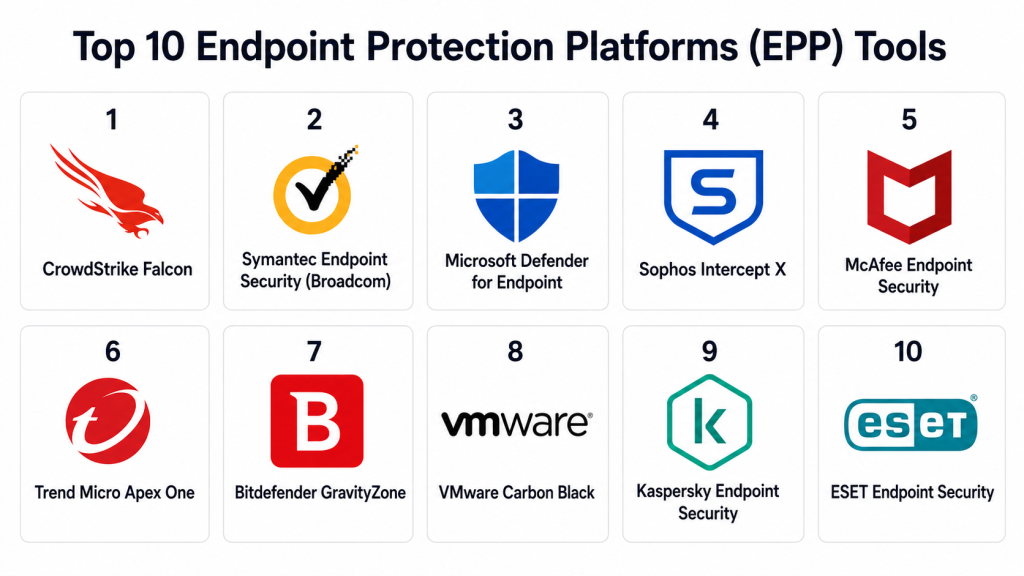
Top 10 Endpoint Protection Platforms (EPP) Tools
#1 — CrowdStrike Falcon
Short description: CrowdStrike Falcon is a cloud-native EPP designed for enterprises seeking advanced threat detection and response. It uses AI-driven analytics to identify and prevent malware and ransomware attacks in real time. Ideal for mid-sized to large organizations.
Key Features
- AI-powered endpoint threat detection
- Real-time behavioral analytics
- Threat intelligence integration
- Cloud-native architecture
- Automated remediation workflows
- Zero-trust support
Pros
- Lightweight agent with minimal system impact
- Rapid deployment across global environments
Cons
- Higher cost for smaller organizations
- Advanced features may require specialized staff
Platforms / Deployment
- Windows / macOS / Linux / iOS / Android
- Cloud
Security & Compliance
- SSO/SAML, MFA, encryption, audit logs, RBAC
- SOC 2, ISO 27001, GDPR
Integrations & Ecosystem
Cloud-first platform with APIs for SIEM and SOAR integration.
- Microsoft 365 integration
- ServiceNow workflow automation
- API access for custom dashboards
Support & Community
- Comprehensive documentation and tutorials
- Tiered support plans
- Active community forums
#2 — Symantec Endpoint Security (Broadcom)
Short description: Symantec Endpoint Security provides layered protection against modern cyber threats. It combines signature-based malware detection with machine learning and device control for comprehensive endpoint security.
Key Features
- Behavioral and AI-based malware detection
- Device and application control
- Anti-ransomware and anti-exploit modules
- Cloud-delivered threat intelligence
- Integrated firewall
Pros
- Strong reputation and enterprise adoption
- Extensive policy configuration options
Cons
- Complex administration interface
- Higher learning curve for smaller IT teams
Platforms / Deployment
- Windows / macOS / Linux / iOS / Android
- Cloud / On-prem / Hybrid
Security & Compliance
- SSO/SAML, MFA, encryption, RBAC
- Not publicly stated
Integrations & Ecosystem
- Integration with Broadcom security suite
- API for SIEM tools
- Support for managed services
Support & Community
- Extensive enterprise support options
- Knowledge base and forums available
#3 — Microsoft Defender for Endpoint
Short description: A built-in endpoint protection solution for Microsoft environments, offering threat and vulnerability management, attack surface reduction, and endpoint detection and response (EDR).
Key Features
- Threat & vulnerability management
- AI-driven attack detection
- Endpoint detection and response (EDR)
- Integration with Microsoft 365 security stack
- Automated investigation and remediation
Pros
- Native integration with Windows and Microsoft 365
- Cost-effective for existing Microsoft users
Cons
- Limited support for non-Windows platforms
- Advanced features require licensing tiers
Platforms / Deployment
- Windows / macOS / Linux / iOS / Android
- Cloud / Hybrid
Security & Compliance
- SSO/SAML, MFA, encryption
- Not publicly stated
Integrations & Ecosystem
- Microsoft 365 Defender ecosystem
- SIEM integration via Microsoft Sentinel
- API support for automation
Support & Community
- Microsoft documentation and community forums
- Tiered enterprise support
#4 — Sophos Intercept X
Short description: Sophos Intercept X is an EPP solution focusing on deep learning and anti-ransomware capabilities. It provides exploit prevention and synchronized security across endpoints and networks.
Key Features
- Deep learning malware detection
- Anti-ransomware protection
- Exploit prevention
- Root cause analysis
- Synchronized security with firewall and network devices
Pros
- Excellent ransomware prevention
- Integrated device and network security
Cons
- May require training for policy optimization
- Higher initial setup effort
Platforms / Deployment
- Windows / macOS / Linux / iOS / Android
- Cloud / Hybrid
Security & Compliance
- MFA, encryption, RBAC
- Not publicly stated
Integrations & Ecosystem
- Sophos Central management console
- API access for SIEM and automation
- Firewall and network device integration
Support & Community
- Knowledge base and live support
- Active user community
#5 — McAfee Endpoint Security
Short description: McAfee Endpoint Security offers centralized threat protection with dynamic application containment and machine learning for threat detection, suited for enterprises of all sizes.
Key Features
- Machine learning threat detection
- Dynamic application containment
- Integrated firewall and web control
- Centralized management console
- Threat intelligence updates
Pros
- Enterprise-grade policy management
- Mature security ecosystem
Cons
- Resource-intensive on older devices
- Can be complex to configure
Platforms / Deployment
- Windows / macOS / Linux / iOS / Android
- Cloud / On-prem / Hybrid
Security & Compliance
- MFA, encryption, audit logs
- Not publicly stated
Integrations & Ecosystem
- SIEM integration
- Cloud management console
- API support for custom workflows
Support & Community
- Documentation, training, and enterprise support
- Community forums
#6 — Trend Micro Apex One
Short description: Apex One delivers advanced threat detection, EDR capabilities, and behavioral analysis across endpoints. Suitable for mid-market and enterprise organizations.
Key Features
- AI and behavior analysis
- EDR and malware protection
- Vulnerability protection
- Automated threat remediation
- Cloud-delivered updates
Pros
- Strong malware detection and response
- Flexible deployment options
Cons
- UI may be overwhelming for smaller IT teams
- Licensing complexity
Platforms / Deployment
- Windows / macOS / Linux
- Cloud / On-prem / Hybrid
Security & Compliance
- Not publicly stated
Integrations & Ecosystem
- SIEM and cloud integrations
- APIs for automation
- Integration with Trend Micro security suite
Support & Community
- Tiered support plans
- Documentation and forums
#7 — Bitdefender GravityZone
Short description: Bitdefender GravityZone is a scalable EPP platform offering AI-driven malware detection, risk analytics, and integrated EDR for enterprises and MSPs.
Key Features
- AI-based threat prevention
- Risk analytics and reporting
- Integrated EDR and remediation
- Centralized management console
- Lightweight agent
Pros
- Minimal endpoint performance impact
- Scalable across large environments
Cons
- Advanced analytics require premium license
- Limited mobile device capabilities
Platforms / Deployment
- Windows / macOS / Linux / Android
- Cloud / Hybrid
Security & Compliance
- Encryption, MFA
- Not publicly stated
Integrations & Ecosystem
- API support for SIEM
- Managed service provider integration
- Cloud console extensibility
Support & Community
- Documentation and support tiers
- Community forums
#8 — VMware Carbon Black
Short description: Carbon Black combines next-gen antivirus, EDR, and behavioral analytics for enterprise-grade endpoint protection and threat hunting.
Key Features
- Behavioral EDR
- Next-gen antivirus
- Threat hunting tools
- Cloud-native architecture
- Real-time analytics
Pros
- Strong advanced threat detection
- Centralized cloud console
Cons
- Steep learning curve
- Licensing complexity
Platforms / Deployment
- Windows / macOS / Linux
- Cloud / Hybrid
Security & Compliance
- SSO, encryption, audit logs
- Not publicly stated
Integrations & Ecosystem
- SIEM integration
- APIs for automation
- VMware ecosystem integration
Support & Community
- Enterprise support tiers
- Documentation and online resources
#9 — Kaspersky Endpoint Security
Short description: Kaspersky Endpoint Security provides layered defense with antivirus, anti-malware, and device control. It is suitable for SMBs and enterprises seeking straightforward protection.
Key Features
- Anti-malware and antivirus
- Application and device control
- Vulnerability scanning
- Centralized management console
- Cloud-assisted protection
Pros
- Easy deployment and management
- Cost-effective for mid-sized companies
Cons
- Limited advanced analytics
- Some enterprise features require additional licensing
Platforms / Deployment
- Windows / macOS / Linux
- Cloud / On-prem / Hybrid
Security & Compliance
- Not publicly stated
Integrations & Ecosystem
- Central management console
- SIEM integration
- API support for automation
Support & Community
- Tiered support
- Knowledge base and community
#10 — ESET Endpoint Security
Short description: ESET Endpoint Security delivers antivirus, anti-phishing, and device control in a lightweight package. Suited for SMBs and remote workforce protection.
Key Features
- Antivirus and anti-phishing
- Device and application control
- Low resource consumption
- Centralized management console
- Cloud-assisted threat intelligence
Pros
- Lightweight agent
- Easy to deploy and manage
Cons
- Limited advanced EDR features
- Smaller ecosystem for integrations
Platforms / Deployment
- Windows / macOS / Linux / Android
- Cloud / Hybrid
Security & Compliance
- Not publicly stated
Integrations & Ecosystem
- Cloud console integration
- SIEM compatibility
- API support
Support & Community
- Documentation and support tiers
- Active knowledge base
Comparison Table (Top 10)
| Tool Name | Best For | Platform(s) Supported | Deployment | Standout Feature | Public Rating |
|---|---|---|---|---|---|
| CrowdStrike Falcon | Enterprises | Windows / macOS / Linux / iOS / Android | Cloud | AI-driven threat detection | N/A |
| Symantec Endpoint Security | Enterprises | Windows / macOS / Linux / iOS / Android | Cloud / On-prem / Hybrid | Layered protection | N/A |
| Microsoft Defender for Endpoint | Microsoft environments | Windows / macOS / Linux / iOS / Android | Cloud / Hybrid | Native Windows integration | N/A |
| Sophos Intercept X | Enterprises & SMBs | Windows / macOS / Linux / iOS / Android | Cloud / Hybrid | Anti-ransomware & exploit prevention | N/A |
| McAfee Endpoint Security | Enterprises | Windows / macOS / Linux / iOS / Android | Cloud / On-prem / Hybrid | Dynamic application containment | N/A |
| Trend Micro Apex One | Mid-market / Enterprises | Windows / macOS / Linux | Cloud / On-prem / Hybrid | Behavior analytics | N/A |
| Bitdefender GravityZone | Enterprises & MSPs | Windows / macOS / Linux / Android | Cloud / Hybrid | AI-driven malware prevention | N/A |
| VMware Carbon Black | Enterprises | Windows / macOS / Linux | Cloud / Hybrid | Behavioral EDR | N/A |
| Kaspersky Endpoint Security | SMBs & Enterprises | Windows / macOS / Linux | Cloud / On-prem / Hybrid | Easy deployment | N/A |
| ESET Endpoint Security | SMBs & Remote Workforces | Windows / macOS / Linux / Android | Cloud / Hybrid | Lightweight agent | N/A |
Evaluation & Scoring of EPP Tools
| Tool Name | Core (25%) | Ease (15%) | Integrations (15%) | Security (10%) | Performance (10%) | Support (10%) | Value (15%) | Weighted Total (0–10) |
|---|---|---|---|---|---|---|---|---|
| CrowdStrike Falcon | 9 | 8 | 8 | 9 | 9 | 8 | 7 | 8.6 |
| Symantec Endpoint Security | 8 | 6 | 7 | 8 | 8 | 7 | 6 | 7.4 |
| Microsoft Defender for Endpoint | 7 | 9 | 7 | 8 | 8 | 8 | 8 | 8.0 |
| Sophos Intercept X | 8 | 7 | 7 | 8 | 8 | 7 | 7 | 7.6 |
| McAfee Endpoint Security | 8 | 6 | 7 | 7 | 7 | 7 | 6 | 7.0 |
| Trend Micro Apex One | 8 | 7 | 7 | 7 | 8 | 7 | 7 | 7.5 |
| Bitdefender GravityZone | 9 | 8 | 7 | 8 | 9 | 8 | 7 | 8.3 |
| VMware Carbon Black | 9 | 6 | 7 | 8 | 9 | 7 | 6 | 7.7 |
| Kaspersky Endpoint Security | 7 | 8 | 6 | 7 | 7 | 6 | 7 | 7.1 |
| ESET Endpoint Security | 7 | 9 | 6 | 7 | 8 | 6 | 7 | 7.4 |
Interpretation: Scores reflect a comparative assessment based on functionality, usability, integration, security, performance, support, and value. Weighted totals provide a relative ranking but selection should consider organizational needs and environment.
Which EPP Tool Is Right for You?
Solo / Freelancer
Lightweight solutions like ESET Endpoint Security or Microsoft Defender for Endpoint provide protection with minimal overhead and easy setup.
SMB
Sophos Intercept X or Trend Micro Apex One balance advanced threat detection with manageable deployment complexity.
Mid-Market
Bitdefender GravityZone or McAfee Endpoint Security offer scalability and integration capabilities suitable for growing environments.
Enterprise
CrowdStrike Falcon, VMware Carbon Black, and Symantec Endpoint Security provide comprehensive, AI-driven protection with advanced analytics and global support.
Budget vs Premium
Budget-conscious teams may prioritize lightweight solutions with essential malware protection. Premium subscriptions unlock AI-driven EDR, automated remediation, and deep analytics.
Feature Depth vs Ease of Use
- Feature-rich platforms like CrowdStrike or VMware Carbon Black require more administration but offer sophisticated threat management.
- Easier-to-use platforms like ESET and Microsoft Defender provide simpler management with less customization.
Integrations & Scalability
Organizations needing SIEM, SOAR, or IT management integrations should prioritize CrowdStrike, Bitdefender, or Sophos. Smaller deployments may function well with Kaspersky or ESET.
Security & Compliance Needs
Industries with strict regulatory requirements should consider CrowdStrike Falcon, Symantec Endpoint Security, or Microsoft Defender, which support SOC 2, ISO 27001, and GDPR compliance.
Frequently Asked Questions (FAQs)
H3: What is an Endpoint Protection Platform (EPP)?
An EPP is a security solution that safeguards devices against malware, ransomware, and other cyber threats using prevention, detection, and response capabilities.
H3: How does AI improve EPP effectiveness?
AI analyzes behaviors and patterns to detect threats that traditional signature-based approaches may miss, enabling proactive threat prevention.
H3: Can EPP work with remote employees?
Yes, modern cloud-based EPPs provide protection for endpoints regardless of location, integrating seamlessly with VPNs and zero-trust frameworks.
H3: What deployment options are available?
EPP solutions offer cloud, on-premises, and hybrid deployments, allowing flexibility based on organizational needs and IT infrastructure.
H3: How do EPP tools integrate with other security platforms?
Many EPPs provide APIs and built-in connectors to SIEM, SOAR, and IT management tools for unified threat visibility and response.
H3: Are EPP solutions resource-intensive?
Lightweight agents are standard today, but some enterprise-grade platforms may require more CPU/memory, particularly during scans or updates.
H3: What regulatory compliance do EPPs support?
Compliance capabilities vary by vendor; many offer GDPR, HIPAA, SOC 2, and ISO 27001 support where explicitly stated.
H3: How long does deployment take?
Deployment ranges from a few hours for small teams to several weeks for large enterprises, depending on complexity and integration needs.
H3: Can I manage multiple platforms from a single console?
Yes, most modern EPP solutions provide centralized management consoles for cross-platform endpoint visibility and policy enforcement.
H3: How do I choose the right EPP?
Evaluate endpoint coverage, security features, ease of management, integrations, compliance needs, and cost to determine the best fit.
Conclusion
Endpoint Protection Platforms (EPP) are essential tools for safeguarding modern IT environments. Selection depends on organizational size, risk profile, compliance requirements, and integration needs. Lightweight solutions like ESET suit small teams, whereas AI-driven platforms like CrowdStrike Falcon or VMware Carbon Black are ideal for large enterprises with complex security demands. Next steps include shortlisting 2–3 platforms, running pilots to evaluate performance, and validating integration and security capabilities before full-scale adoption.
