Upgrade & Secure Your Future with DevOps, SRE, DevSecOps, MLOps!
We spend hours scrolling social media and waste money on things we forget, but won’t spend 30 minutes a day earning certifications that can change our lives.
Master in DevOps, SRE, DevSecOps & MLOps by DevOps School!
Learn from Guru Rajesh Kumar and double your salary in just one year.
Introduction
AI video generation tools help users create videos using artificial intelligence. In simple words, these tools can turn scripts, prompts, images, slides, product ideas, or text into videos with avatars, voiceovers, animations, subtitles, stock visuals, and branded layouts. They reduce the need for large production teams, cameras, studios, and complex editing work.
AI video generation matters now because businesses need more video content for websites, social media, product education, internal training, sales enablement, customer support, and online learning. Video is powerful, but traditional production is slow and costly. AI tools make video creation faster, more scalable, and easier for non-video teams.
Common use cases include:
- Marketing videos and product explainers
- Training and onboarding videos
- Social media clips
- Sales enablement videos
- AI avatar presentations
- Course and tutorial videos
- Internal communication videos
Buyers should evaluate:
- Video quality and realism
- Avatar and voice options
- Script-to-video workflow
- Editing flexibility
- Brand customization
- Collaboration features
- Export quality and formats
- Language support
- Security and access control
- Pricing, credits, and usage limits
Best for: marketers, creators, training teams, HR teams, SaaS companies, agencies, educators, product teams, sales teams, and enterprises that need frequent video content without heavy production overhead.
Not ideal for: film studios, high-end cinematic production teams, companies requiring fully custom live-action shoots, or teams that publish video rarely and can manage with basic editing tools.
Key Trends in AI Video Generation Tools
- AI video generation is moving from simple avatar videos to full creative video workflows.
- Text-to-video tools are becoming more useful for concept videos, ads, product demos, and short-form content.
- AI avatars are becoming common for training, onboarding, explainers, and multilingual communication.
- Video localization is growing, with more tools supporting voice cloning, dubbing, subtitles, and translated scripts.
- Brand control is becoming more important as teams need consistent colors, fonts, logos, templates, and messaging.
- Enterprises are focusing on permissions, approval workflows, identity controls, auditability, and data handling.
- Short-form video generation is growing for social media, ads, reels, and creator workflows.
- AI editing is reducing manual work through auto-cuts, captions, background cleanup, and smart resizing.
- Multimodal generation is combining text, image, audio, voice, avatars, and motion in one workflow.
- Pricing is increasingly based on credits, minutes, exports, seats, avatar usage, and enterprise contracts.
How We Selected These Tools
The tools below were selected using practical SaaS and product-analysis criteria:
- Market recognition across AI video, creator, marketing, and enterprise teams
- Strength of core video generation features
- Support for avatars, scripts, prompts, subtitles, voiceovers, editing, and branding
- Fit for multiple users, including creators, SMBs, agencies, and enterprises
- Ease of use for non-technical users
- Quality of output and usefulness in real business workflows
- Integration potential with content, marketing, training, and collaboration tools
- Security and governance features where publicly known
- Support resources, documentation, templates, and onboarding quality
- Practical value for repeated video production at scale
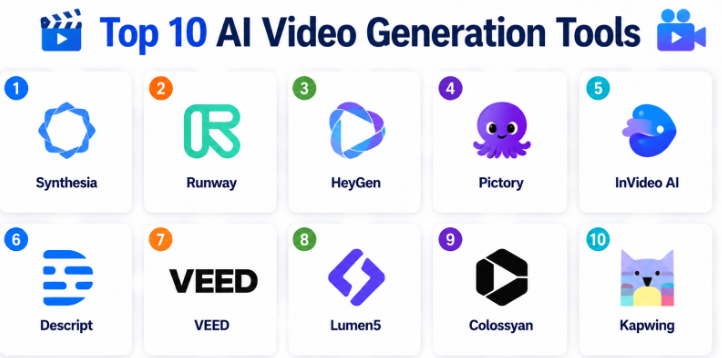
Top 10 AI Video Generation Tools
#1 — Synthesia
Short description:
Synthesia is an AI video generation platform focused on avatar-based business videos.
It helps teams create training videos, onboarding content, product explainers, internal updates, and multilingual video communication.
Users can write a script, choose an avatar, select a voice, and generate a professional-looking presentation-style video.
It is especially useful for companies that need repeatable video content without filming presenters.
Synthesia is commonly used by learning and development teams, HR teams, sales enablement teams, and enterprise communication teams.
The platform helps reduce the cost and time of traditional video production.
Its strength is structured business video creation rather than cinematic creative video generation.
Teams should still review scripts, tone, accuracy, and compliance before publishing.
Key Features
- AI avatar video generation
- Script-to-video workflow
- Multilingual video support
- Voiceover and subtitle options
- Templates for training and business videos
- Brand customization features
- Team collaboration options
Pros
- Strong for training and internal communication videos
- Reduces need for camera-based production
- Useful for multilingual business content
Cons
- Less suitable for cinematic or highly creative video production
- Avatar videos may not fit every brand style
- Advanced enterprise needs may require plan review
Platforms / Deployment
Web / Cloud
Security & Compliance
Enterprise security controls may be available depending on plan. Specific compliance details are Not publicly stated unless confirmed for a specific plan.
Integrations & Ecosystem
Synthesia fits well into business learning, training, and communication workflows.
- Learning and development workflows
- Internal communication
- Sales enablement content
- Product education
- HR onboarding
- Team collaboration workflows
Support & Community
Synthesia provides documentation, templates, onboarding resources, and support options. Community visibility is strong among business video and training teams.
#2 — Runway
Short description:
Runway is an AI creative platform known for video generation, video editing, image generation, and visual AI tools.
It is useful for creators, designers, marketers, studios, and creative teams experimenting with AI-powered video production.
Runway supports prompt-based video generation, video editing, background removal, motion tools, and creative workflows.
It is strong for visual experimentation, concept development, short videos, and creative content production.
The platform is less focused on corporate avatar presentations and more focused on creative generation and editing.
It helps teams produce visuals faster without relying only on traditional editing software.
Runway is useful for social campaigns, concept videos, ads, and creative storytelling.
Teams should test outputs carefully when they need strict brand accuracy or realistic continuity.
Key Features
- Text-to-video and image-to-video generation
- AI video editing tools
- Background removal and visual effects
- Creative asset generation
- Motion and transformation tools
- Browser-based creative workflow
- Support for short-form visual content
Pros
- Strong creative video generation capabilities
- Useful for experimentation and visual storytelling
- Good for creators and marketing teams
Cons
- Output control can vary by prompt and use case
- Not mainly built for structured training videos
- May require creative review and editing
Platforms / Deployment
Web / Cloud
Security & Compliance
Security and compliance details are Not publicly stated unless confirmed for a specific plan.
Integrations & Ecosystem
Runway fits creative production, design, social media, and video editing workflows.
- Creative video workflows
- Social media content
- Concept development
- Image and video assets
- Marketing production
- Design team workflows
Support & Community
Runway provides product resources, learning materials, and community examples. It has strong visibility among creators and AI video users.
#3 — HeyGen
Short description:
HeyGen is an AI video platform focused on avatar videos, personalized videos, voiceovers, and multilingual content.
It helps marketers, sales teams, educators, and businesses create presenter-style videos without recording a human speaker.
Users can create videos from scripts, choose avatars, generate voices, and localize content for different audiences.
HeyGen is useful for product explainers, outreach videos, learning content, social clips, and business communication.
The platform is designed for ease of use and fast video creation.
It is a practical option for teams that want both avatar video and marketing-oriented workflows.
Its strengths are speed, accessibility, and multilingual video production.
Teams should review avatar realism, brand fit, and usage rights before scaling.
Key Features
- AI avatar video generation
- Script-to-video creation
- Voiceover and dubbing support
- Multilingual content creation
- Personalized video workflows
- Templates for business videos
- Easy browser-based editing
Pros
- Easy for non-technical users
- Good for marketing and sales videos
- Useful for multilingual content production
Cons
- Avatar style may not fit every brand
- Advanced editing may require external tools
- Enterprise governance details may vary by plan
Platforms / Deployment
Web / Cloud
Security & Compliance
Security features may vary by plan. Specific compliance details are Not publicly stated unless confirmed by the vendor.
Integrations & Ecosystem
HeyGen fits into marketing, sales, education, and communication workflows.
- Sales outreach content
- Product explainer videos
- Learning content
- Social media video
- Multilingual campaigns
- Business presentation workflows
Support & Community
HeyGen provides documentation, help resources, and customer support options. Community visibility is strong among AI avatar and marketing video users.
#4 — Pictory
Short description:
Pictory is an AI video creation platform focused on turning scripts, blog posts, long-form content, and recordings into short videos.
It is useful for marketers, bloggers, YouTubers, coaches, educators, and small businesses that need quick content repurposing.
The platform can help convert written content into video summaries with visuals, captions, and voiceover support.
Pictory is especially helpful for teams that want to turn articles, webinars, or scripts into social-ready videos.
It supports faster video creation without requiring advanced editing skills.
The platform is best suited for content repurposing and lightweight marketing videos.
It may not be ideal for cinematic generation or advanced custom animation.
Teams should review visual quality and brand consistency before publishing.
Key Features
- Script-to-video workflow
- Blog-to-video conversion
- Caption and subtitle support
- Text-based video editing
- Stock visual support
- Video summarization workflows
- Social video creation
Pros
- Strong for content repurposing
- Easy for bloggers and marketers
- Saves time on short-form video production
Cons
- Less suitable for advanced cinematic video
- Output may need manual visual refinement
- Brand control may be limited compared with enterprise platforms
Platforms / Deployment
Web / Cloud
Security & Compliance
Security and compliance details are Not publicly stated unless confirmed for a specific plan.
Integrations & Ecosystem
Pictory fits content marketing and repurposing workflows.
- Blog content workflows
- Social media videos
- Webinar repurposing
- YouTube content support
- Marketing campaigns
- Caption-based editing
Support & Community
Pictory provides help resources, tutorials, and support options. It is commonly used by content creators and small businesses.
#5 — InVideo AI
Short description:
InVideo AI is an AI-powered video creation platform for marketing videos, social media clips, ads, explainers, and creator content.
It helps users generate videos from prompts, scripts, or ideas using templates, stock media, text, voiceovers, and editing tools.
The platform is useful for marketers, agencies, small businesses, creators, and social media teams.
InVideo AI is designed to make video creation faster for users without advanced editing experience.
It can support YouTube videos, reels, promotional videos, product content, and educational clips.
The platform is practical for high-volume social and marketing video production.
Its strength is ease of use and template-driven creation.
Users should still review generated videos for accuracy, tone, and brand quality.
Key Features
- Prompt-to-video generation
- Script-based video creation
- Templates and stock media
- Voiceover and subtitle support
- Social video formats
- Brand customization options
- Browser-based editing
Pros
- Good for social and marketing videos
- Easy for non-video professionals
- Useful for fast video production
Cons
- Advanced editing control may be limited
- Output can require manual polishing
- Heavy usage may depend on credits or plan limits
Platforms / Deployment
Web / Cloud
Security & Compliance
Security details may vary by plan. Specific compliance details are Not publicly stated.
Integrations & Ecosystem
InVideo AI works well in digital marketing and creator workflows.
- Social media content
- Marketing videos
- YouTube content
- Product promotions
- Brand video workflows
- Creator production processes
Support & Community
InVideo provides documentation, templates, tutorials, and support resources. Community visibility is strong among creators and SMB marketers.
#6 — Descript
Short description:
Descript is an AI-powered audio and video editing platform that helps users edit media through text-based workflows.
It is useful for podcasters, video creators, marketers, educators, and teams producing recorded content.
Descript can transcribe videos, let users edit by editing text, remove filler words, create captions, and support voice-related workflows.
While it is not only a video generation platform, it is very useful for AI-assisted video production and editing.
The platform helps reduce editing time and makes media editing easier for non-specialists.
It is strong for recorded video, podcasts, tutorials, interviews, and social clips.
Descript fits teams that create content from real recordings rather than only prompt-generated visuals.
It is best used when editing speed and workflow simplicity matter.
Key Features
- Text-based video editing
- Automatic transcription
- Caption and subtitle generation
- Filler word removal
- Screen recording support
- Audio enhancement tools
- Collaborative editing workflows
Pros
- Makes editing easier through text workflows
- Strong for podcasts, tutorials, and interviews
- Good for teams repurposing recorded content
Cons
- Not mainly a text-to-video generator
- Creative generation is limited compared with AI video generators
- Output depends on source recording quality
Platforms / Deployment
Web / Windows / macOS / Cloud
Security & Compliance
Team and enterprise security controls may be available depending on plan. Specific compliance details are Not publicly stated unless confirmed.
Integrations & Ecosystem
Descript fits modern creator, podcasting, and video editing workflows.
- Podcast production
- Screen recordings
- Video tutorials
- Social clips
- Transcript-based editing
- Team review workflows
Support & Community
Descript provides documentation, learning resources, templates, and support options. It has a strong community among creators and podcast teams.
#7 — VEED
Short description:
VEED is an online video editing and AI video creation platform for social media, marketing, subtitles, screen recording, and content editing.
It helps users create and edit videos directly in the browser without complex software.
The platform includes AI features such as subtitles, text-to-speech, translation, background cleanup, and quick editing tools.
VEED is useful for creators, marketers, educators, small businesses, and social media teams.
It is especially strong for quick edits, captions, branded clips, and social-ready videos.
The platform is not only AI generation; it is also a practical video editing workspace.
It fits teams that need speed and accessibility over deep post-production control.
Larger teams should review collaboration, brand, and security needs before scaling.
Key Features
- Online video editing
- AI subtitles and captions
- Text-to-speech support
- Translation and localization tools
- Screen recording
- Social media video templates
- Browser-based collaboration
Pros
- Easy and fast for social video editing
- Strong caption and subtitle workflows
- Good for non-technical users
Cons
- Less advanced than professional editing suites
- Not focused only on AI-generated video
- Complex enterprise workflows may need review
Platforms / Deployment
Web / Cloud
Security & Compliance
Security features may vary by plan. Specific compliance details are Not publicly stated unless confirmed for a specific plan.
Integrations & Ecosystem
VEED fits creator, marketing, and social publishing workflows.
- Social media videos
- Caption workflows
- Screen recording
- Marketing clips
- Educational content
- Team video review
Support & Community
VEED provides help resources, templates, and support options. It has strong visibility among creators and social media teams.
#8 — Lumen5
Short description:
Lumen5 is an AI-powered video creation platform focused on transforming written content into marketing and social videos.
It is useful for content marketers, agencies, publishers, and small businesses that want to repurpose blogs and articles.
The platform helps users create videos from text, choose layouts, add visuals, and produce branded content.
Lumen5 is especially helpful for teams that already have written content and want to turn it into shareable video.
It supports a template-driven workflow that reduces editing complexity.
The tool is strong for marketing updates, thought leadership clips, and social posts.
It may not be ideal for highly customized video production or advanced animation.
Teams should review brand templates and export needs before adopting it.
Key Features
- Blog-to-video creation
- Text-based video workflows
- Templates and branded layouts
- Stock media support
- Social media video formats
- Drag-and-drop editing
- Content repurposing workflows
Pros
- Strong for turning blogs into videos
- Easy for marketing teams
- Good for social media repurposing
Cons
- Limited for advanced creative editing
- Output may feel template-based
- Less useful for avatar or cinematic generation
Platforms / Deployment
Web / Cloud
Security & Compliance
Security and compliance details are Not publicly stated unless confirmed by the vendor.
Integrations & Ecosystem
Lumen5 fits content marketing, social media, and publishing workflows.
- Blog repurposing
- Social media publishing
- Marketing videos
- Brand templates
- Content campaigns
- Editorial workflows
Support & Community
Lumen5 provides product resources, templates, and customer support options. Community visibility is strong among marketers and content teams.
#9 — Colossyan
Short description:
Colossyan is an AI video platform focused on avatar-based learning, training, and corporate communication videos.
It helps teams create presenter-led videos from scripts without filming a person.
The platform is useful for learning and development teams, HR teams, trainers, educators, and enterprise communication teams.
Colossyan supports AI avatars, voiceovers, templates, and localization-style workflows.
It is especially relevant for companies producing training modules, compliance content, onboarding videos, and internal lessons.
The platform reduces production time for repeated business video needs.
Its main strength is structured learning and training content rather than cinematic video generation.
Teams should review avatar realism, script quality, and internal review processes before publishing.
Key Features
- AI avatar video generation
- Training and learning video workflows
- Script-to-video creation
- Voiceover and language support
- Business video templates
- Brand customization options
- Collaboration features
Pros
- Strong for corporate training videos
- Reduces dependency on recording presenters
- Useful for repeatable internal content
Cons
- Less suitable for highly creative video campaigns
- Avatar-based format may not fit all content
- Enterprise details may vary by plan
Platforms / Deployment
Web / Cloud
Security & Compliance
Security controls may be available depending on plan. Specific compliance details are Not publicly stated unless confirmed.
Integrations & Ecosystem
Colossyan fits training, onboarding, and workplace learning workflows.
- Corporate learning content
- HR onboarding
- Compliance training
- Internal communication
- Course development
- Business video creation
Support & Community
Colossyan provides documentation, onboarding resources, and support options. Community visibility is strongest among training and corporate video teams.
#10 — Kapwing
Short description:
Kapwing is an online video editing and content creation platform with AI-assisted tools for creators, marketers, and teams.
It helps users edit videos, add subtitles, resize content, remove backgrounds, generate clips, and create social-ready content.
Kapwing is practical for teams that want a simple browser-based workspace for fast video editing.
The platform supports creators who need to repurpose content for different platforms and formats.
Its AI features help reduce repetitive editing work and improve production speed.
Kapwing is especially useful for short-form videos, memes, social clips, educational content, and marketing assets.
It is less suited for high-end post-production or complex cinematic workflows.
Teams should review export quality, brand controls, and collaboration needs before scaling.
Key Features
- Online video editing
- AI subtitles and captions
- Background removal
- Social media resizing
- Clip generation workflows
- Collaborative editing
- Templates and quick content tools
Pros
- Easy for fast social video editing
- Useful for creators and small teams
- Good for repurposing content into multiple formats
Cons
- Not a full cinematic production tool
- Advanced AI generation may be limited
- Output may need manual polish for professional campaigns
Platforms / Deployment
Web / Cloud
Security & Compliance
Security and compliance details are Not publicly stated unless confirmed for a specific plan.
Integrations & Ecosystem
Kapwing fits social content, creator workflows, and lightweight team video production.
- Social media clips
- Educational videos
- Marketing content
- Caption workflows
- Team collaboration
- Browser-based editing
Support & Community
Kapwing provides documentation, tutorials, templates, and support resources. It has a strong community among creators and social media teams.
Comparison Table
| Tool Name | Best For | Platform(s) Supported | Deployment | Standout Feature | Public Rating |
|---|---|---|---|---|---|
| Synthesia | Business avatar videos and training | Web | Cloud | AI avatar videos for enterprise communication | N/A |
| Runway | Creative AI video generation | Web | Cloud | Text-to-video and creative AI editing tools | N/A |
| HeyGen | Avatar videos and localization | Web | Cloud | AI presenter videos with multilingual workflows | N/A |
| Pictory | Blog-to-video and content repurposing | Web | Cloud | Turning scripts and articles into videos | N/A |
| InVideo AI | Social and marketing video creation | Web | Cloud | Prompt-to-video and template-based creation | N/A |
| Descript | AI video and audio editing | Web / Windows / macOS | Cloud | Text-based video editing | N/A |
| VEED | Online editing and subtitle workflows | Web | Cloud | Fast browser-based editing with AI captions | N/A |
| Lumen5 | Content marketing videos | Web | Cloud | Blog and article repurposing into video | N/A |
| Colossyan | Training and learning videos | Web | Cloud | AI avatar videos for corporate learning | N/A |
| Kapwing | Social video editing and repurposing | Web | Cloud | Quick collaborative video editing | N/A |
Evaluation & Scoring of AI Video Generation Tools
| Tool Name | Core (25%) | Ease (15%) | Integrations (15%) | Security (10%) | Performance (10%) | Support (10%) | Value (15%) | Weighted Total (0–10) |
|---|---|---|---|---|---|---|---|---|
| Synthesia | 9 | 8 | 8 | 8 | 8 | 8 | 7 | 8.10 |
| Runway | 9 | 7 | 7 | 6 | 8 | 8 | 8 | 7.70 |
| HeyGen | 8 | 9 | 7 | 7 | 8 | 8 | 8 | 7.95 |
| Pictory | 7 | 9 | 7 | 6 | 7 | 7 | 8 | 7.35 |
| InVideo AI | 8 | 9 | 7 | 6 | 8 | 8 | 8 | 7.75 |
| Descript | 8 | 9 | 8 | 7 | 8 | 8 | 8 | 8.00 |
| VEED | 7 | 9 | 7 | 6 | 7 | 7 | 8 | 7.35 |
| Lumen5 | 7 | 8 | 7 | 6 | 7 | 7 | 7 | 7.05 |
| Colossyan | 8 | 8 | 7 | 7 | 8 | 8 | 7 | 7.65 |
| Kapwing | 7 | 9 | 7 | 6 | 7 | 7 | 8 | 7.35 |
These scores are comparative and should be used as a shortlist guide.
A high score does not mean the tool is best for every video workflow.
Avatar-video platforms are strong for training and communication, while creative tools are better for ads and visual experimentation.
Editing platforms are better when teams already have recorded content.
Always test the tool with real scripts, brand assets, languages, and export needs before selecting it.
Which AI Video Generation Tool Is Right for You?
Solo / Freelancer
Solo users should choose tools that are easy, affordable, and fast to learn. InVideo AI, VEED, Kapwing, Pictory, and Runway are practical choices depending on whether the user needs social videos, creative generation, or editing. Descript is helpful for creators who work with recorded videos or podcasts.
SMB
Small and mid-sized businesses should focus on speed, templates, brand consistency, and simple workflows. InVideo AI, Pictory, VEED, Kapwing, and HeyGen can help small teams create marketing videos without hiring a full production team. Businesses creating training videos may prefer Synthesia or Colossyan.
Mid-Market
Mid-market teams usually need collaboration, brand assets, repeatable workflows, localization, and better review processes. Synthesia, HeyGen, Descript, Runway, and InVideo AI can be strong options. Content teams that repurpose blogs or webinars may benefit from Pictory or Lumen5.
Enterprise
Enterprises should prioritize access control, governance, review workflows, localization, brand safety, scalability, and security. Synthesia and Colossyan are strong for training and internal communication. Descript can support media teams. Runway may support creative teams, while HeyGen can help with multilingual avatar videos.
Budget vs Premium
Budget-conscious users may start with simpler editing and social video platforms. Premium platforms are usually better when teams need avatars, localization, brand governance, enterprise support, and collaboration. The real cost should include video minutes, credits, exports, users, storage, subtitles, translations, and review time.
Feature Depth vs Ease of Use
If ease of use matters most, Pictory, VEED, Kapwing, and InVideo AI are good starting points. If feature depth matters more, Synthesia, Runway, Descript, HeyGen, and Colossyan may offer stronger specialized workflows. The right choice depends on whether you need generation, editing, avatars, or repurposing.
Integrations & Scalability
AI video tools should fit into your content calendar, LMS, CMS, social media workflow, marketing automation, brand asset system, and collaboration process. Teams should also check export formats, subtitle support, language options, team permissions, and API availability if automation is required.
Security & Compliance Needs
Security-focused teams should evaluate SSO, RBAC, audit logs, workspace permissions, data retention, consent for avatars or voices, and content approval workflows. This is especially important for healthcare, finance, legal, education, government, and enterprise training content.
Frequently Asked Questions
1. What is an AI video generation tool?
An AI video generation tool is software that helps create videos using artificial intelligence. It may generate videos from text, scripts, images, avatars, voiceovers, prompts, or existing recordings.
2. Can AI video tools replace professional video teams?
AI video tools can reduce production time, but they do not fully replace professional video strategy, storytelling, editing, and creative direction. Human review is still important for quality, accuracy, and brand fit.
3. What pricing models do AI video tools use?
Pricing often depends on user seats, video minutes, export limits, AI credits, avatar usage, voice features, storage, and enterprise plans. Buyers should check usage limits before choosing a tool.
4. How long does onboarding usually take?
Basic onboarding can be quick for simple tools. Enterprise onboarding may take longer because teams need brand templates, approval workflows, security review, training, and content guidelines.
5. What are common mistakes when using AI video tools?
Common mistakes include publishing without review, using weak scripts, ignoring brand style, overusing generic avatars, and not checking licensing or usage rights. Teams should create a clear review process before scaling.
6. Are AI video generation tools secure?
Security depends on the vendor and plan. Teams should review access controls, data handling, user permissions, avatar consent, voice usage rules, encryption, and retention policies before uploading sensitive content.
7. Which AI video tool is best for training videos?
Synthesia and Colossyan are strong choices for training and learning videos because they focus on avatar-based business communication. Descript is also useful when training content is based on recorded material.
8. Which tool is best for creative AI video generation?
Runway is a strong option for creative text-to-video and visual experimentation. It is better suited for creative teams than traditional training or corporate communication workflows.
9. Which integrations matter most?
Important integrations include LMS, CMS, social platforms, marketing tools, brand asset systems, collaboration tools, cloud storage, and workflow automation systems. The best integrations depend on how the video will be published and managed.
10. What are alternatives to AI video generation tools?
Alternatives include traditional video editing software, freelance editors, production agencies, animation tools, screen recording software, and manual video creation. AI tools are often used alongside these options rather than replacing them fully.
Conclusion
AI video generation tools are changing how businesses create training content, marketing videos, social clips, product explainers, internal updates, and creative assets. The best tool depends on your content type, team size, budget, security needs, brand requirements, and production workflow. Synthesia and Colossyan are strong for avatar-based business videos, Runway is strong for creative AI generation, HeyGen is useful for avatar and multilingual content, Descript is excellent for editing recorded media, and tools like Pictory, InVideo AI, VEED, Lumen5, and Kapwing are practical for fast marketing and social video production.
