Upgrade & Secure Your Future with DevOps, SRE, DevSecOps, MLOps!
We spend hours scrolling social media and waste money on things we forget, but won’t spend 30 minutes a day earning certifications that can change our lives.
Master in DevOps, SRE, DevSecOps & MLOps by DevOps School!
Learn from Guru Rajesh Kumar and double your salary in just one year.
Every digital service we enjoy relies on a massive foundation of interconnected technology. Behind every bank transfer, package tracking update, and streaming video sits a web of servers working together. When these machines run smoothly, life feels effortless. However, maintaining large digital networks is an immense challenge. Thousands of software programs generate continuous streams of data every second. Human engineers cannot read every notification or catch every glitch by hand. To keep networks stable, organizations depend on TheAIOps to master modern operational automation and intelligent infrastructure management.
Smart software helps computers detect problems early, find exact technical faults, and restore service without delay. This guide explores how automated tools manage technology, why businesses rely on them, and how you can enter this expanding career field.
The Shift From Manual Repairs to Smart Self-Healing
Managing enterprise technology once looked like operating a power plant switchboard. Engineers sat in front of wall-sized screens, watching green and red indicator lights. Whenever an alarm flashed red, a technician rushed to check cables, inspect machine cabinets, and type commands to restore service.
This reactive routine worked when companies owned just a few office servers. Modern businesses, however, operate across dozens of worldwide data centers. Digital traffic surges in seconds, and software updates roll out continuously.
When an issue occurs today, hundreds of connected systems trigger warnings at the same moment. Attempting to review each message by hand creates three major operational problems:
- Information Overload: Engineers face thousands of notifications, making it difficult to spot real emergencies.
- Delayed Response Times: Searching through text files across multiple computers delays vital system repairs.
- Repetitive Burnout: Talented software engineers spend valuable time clearing out temporary files instead of designing new features.
Automated operations software resolves these challenges. By using pattern recognition, smart tools filter out normal background activity, identify the true cause of an error, and trigger repairs automatically.
How Intelligent Operations Software Manages Digital Networks
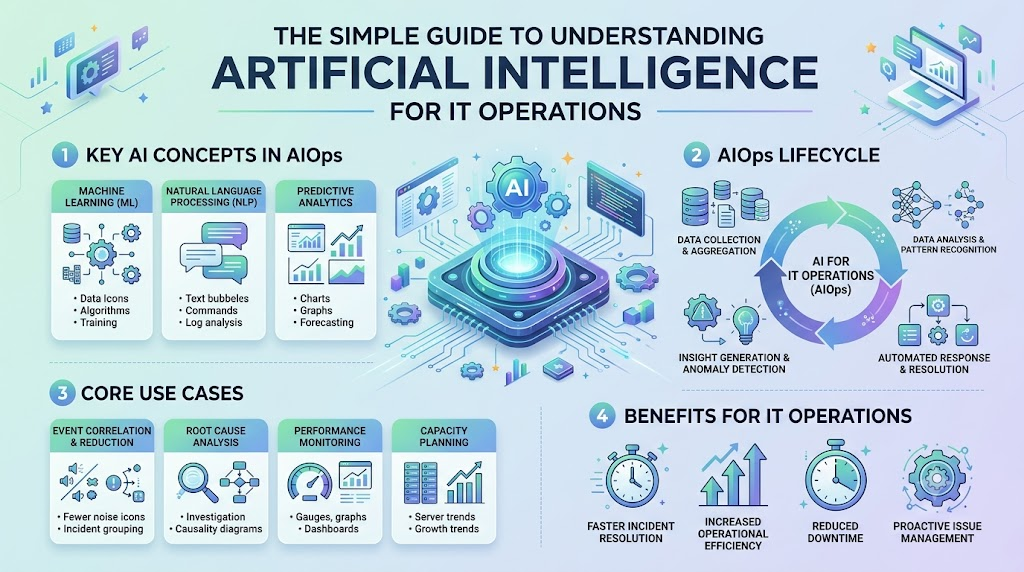
Smart automation software acts like a central nervous system for technology networks. It follows a straightforward, four-part process to protect application performance.
1. Gathering System Telemetry
First, the software gathers data from every server, application, and database. This data includes three vital categories:
- Performance Counters: Numbers that track processor workload, storage capacity, and network bandwidth.
- Activity Records: Detailed operational entries that capture exactly when a program begins or completes an action.
- Path Traces: Records tracking a single user request as it moves through various backend systems.
2. Learning Daily Operating Patterns
Next, machine learning algorithms analyze historical activity to determine regular patterns. The system learns that web traffic rises on weekday mornings and drops late at night. Because it understands standard routines, it does not sound false alarms during expected daily traffic increases.
3. Pinpointing Root Causes
When a failure happens, downstream programs often generate a wave of secondary errors. Rather than treating each warning as an isolated breakdown, the intelligent platform connects the clues. It traces the secondary errors back to the single misconfigured server that caused the issue, presenting engineers with one clear diagnosis.
4. Running Automated Repairs
Once the software identifies the exact fault, it takes immediate action. For common and well-understood glitches, it initiates automated repair routines—such as spinning up extra cloud servers or clearing a full memory cache. This automated intervention resolves incidents before everyday users experience any service disruption.
Comparing Traditional IT Support and Intelligent Operations
The difference between old maintenance models and modern automated operations centers on speed, accuracy, and engineering productivity.
| Operational Task | Traditional IT Support | Intelligent Automated Operations |
| System Visibility | Periodic checks on static dashboards | Continuous, real-time monitoring across all layers |
| Alert Management | Every alert is sent directly to human inboxes | Clustered alerts combined into single incident reports |
| Incident Discovery | Reactive; discovers bugs after users report them | Proactive; flags odd behavior before failures happen |
| Root-Cause Analysis | Manual review of separate log files | Algorithmic correlation across all system dependencies |
| System Recovery | Engineers type commands manually | Pre-approved automated routines restore services |
| Capacity Planning | Rough estimates based on past spending | Predictive models projecting exact resource needs |
Real-World Applications Across Modern Industries
Intelligent automation drives critical workflows across multiple sectors, ensuring essential services remain online:
- Online Banking Platforms: During major sales events, payment gateways experience sudden traffic surges. Automated systems balance server capacity instantly, preventing checkout failures and processing errors.
- Global Logistics Systems: Shipping companies track packages across air, sea, and road networks. If an internal database slows down, operations software reroutes digital traffic so warehouse scans continue without interruption.
- Healthcare Portals: Hospitals rely on cloud software to deliver diagnostic records and patient histories. Automated monitoring identifies connectivity issues immediately, ensuring medical staff have uninterrupted access to vital patient data.
Building a Career in Modern IT Operations
As businesses rely more heavily on cloud infrastructure, the demand for professionals who understand intelligent operations continues to rise.
Fundamental Skills for Beginners
You do not need decades of software engineering experience to start. Beginners can build a strong foundation by focusing on a few practical areas:
- Linux Fundamentals: Learning the basic command-line tools used to configure enterprise servers.
- Python Scripting: Writing straightforward scripts to parse system logs and automate recurring maintenance tasks.
- Cloud Infrastructure: Understanding how cloud computing platforms allocate virtual storage, networks, and virtual machines.
- Telemetry Basics: Learning how applications capture logs, track metrics, and generate tracing data.
Structured Learning and Career Growth
After mastering foundational skills, aspiring engineers often pursue focused learning paths. Comprehensive educational resources and certifications help professionals validate their practical skills for prospective employers. Structured training provides the tools needed to build self-healing cloud environments, moving engineering teams away from daily firefighting and toward high-impact infrastructure design.
Frequently Asked Questions
1. What is the main objective of intelligent IT operations?
The main objective is to keep software applications and computer networks running reliably by identifying, diagnosing, and resolving technical glitches before they impact end users.
2. How does automated software recognize that a system is failing?
The software analyzes historical performance data to understand healthy operating baselines. When metrics deviate significantly from those normal patterns, the system flags the anomaly for review.
3. Will automated operations software eliminate engineering jobs?
No. It automates repetitive and stressful troubleshooting tasks. This allows human engineers to spend their time building new product features, strengthening security, and improving system design.
4. What is the difference between a log and a metric?
A metric is a numeric measurement of system activity over time, such as CPU utilization. A log is a timestamped text record describing a specific event that took place inside an application.
5. Why is alert clustering important for operations teams?
When a single server fails, dozens of connected applications may send error messages simultaneously. Alert clustering bundles those related messages together so technicians solve one clear issue instead of reviewing hundreds of separate notifications.
6. What is the primary difference between monitoring and observability?
Monitoring informs engineers when a component is broken by checking predefined health thresholds. Observability enables engineers to inspect all system outputs to understand why a novel or unexpected failure occurred.
7. Can individuals without programming experience learn modern IT operations?
Yes. Many modern observability platforms provide intuitive visual interfaces and clear dashboards, making foundational concepts accessible to learners from non-technical backgrounds.
8. Why is fast root-cause identification critical for modern businesses?
Quickly finding the true source of an outage minimizes system downtime, protects company revenue, and preserves customer trust during technical failures.
9. What is an automated remediation routine?
An automated remediation routine is a pre-programmed script that executes automatically when specific issues occur, such as restarting an unresponsive service or allocating additional memory.
10. How do organizations begin adopting automated operations?
Companies typically start by identifying their most frequent, repetitive alerts. They then build simple automation workflows to handle those routine tasks before introducing advanced machine learning models.
Final Thoughts
Modern society depends on steady, uninterrupted access to digital infrastructure. From financial institutions and hospitals to schools and entertainment services, software powers everyday life. Managing global server networks using manual processes is no longer practical. Intelligent automation gives technology teams the speed and insight required to maintain resilient systems. By reducing alert fatigue, discovering root causes instantly, and resolving recurring problems automatically, modern operations tools keep the digital world fast, dependable, and ready for future growth.
