Upgrade & Secure Your Future with DevOps, SRE, DevSecOps, MLOps!
We spend hours scrolling social media and waste money on things we forget, but won’t spend 30 minutes a day earning certifications that can change our lives.
Master in DevOps, SRE, DevSecOps & MLOps by DevOps School!
Learn from Guru Rajesh Kumar and double your salary in just one year.
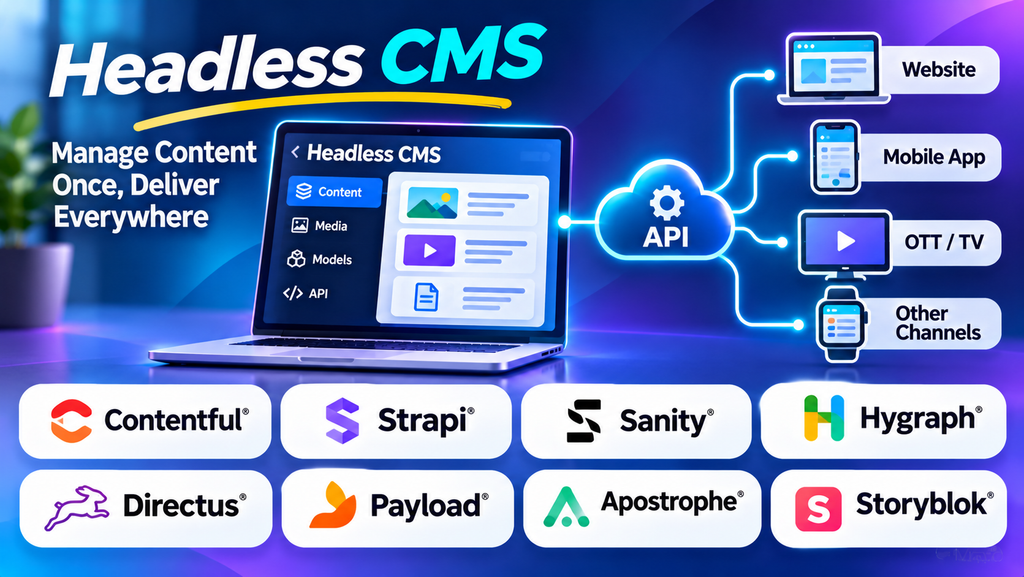
Businesses today publish content across websites, mobile applications, ecommerce stores, digital displays, and other online channels. Managing this content separately for every platform can create duplication, inconsistent messaging, and additional work for marketing and development teams.
A Headless Content Management System (Headless CMS) addresses this challenge by separating content management from the frontend presentation layer. Teams create and organize content in one central system, while websites and applications retrieve that content through APIs and display it according to their own design and functionality.
This architecture gives developers greater flexibility and helps organizations reuse content across digital experiences. However, it also introduces technical decisions around frontend development, integrations, hosting, and content delivery.
What Is a Headless CMS?
A Headless CMS is a content management platform that stores and manages content independently of the website or application that presents it. The content is commonly delivered through APIs, allowing different frontends to retrieve and display the same information.
In a traditional CMS, the content management system and the website presentation layer are generally connected. A headless CMS removes that direct dependency, allowing developers to build the frontend with technologies suited to their project.
For example, a retailer could manage product descriptions, promotional content, and buying guides in a headless CMS. A website, mobile application, and digital kiosk could then retrieve selected content from the same central repository.
Common headless CMS capabilities include:
- Structured content models: Organize information into reusable fields and content types.
- API-based delivery: Provide content to websites and applications through supported APIs.
- Content reuse: Publish approved information across multiple channels.
- Editorial workflows: Create, review, approve, and publish content.
- Localization: Manage translated content for different languages and markets, where supported.
- Access controls: Assign appropriate permissions to content editors, developers, and administrators.
- Integrations: Connect with frontend frameworks, analytics, commerce systems, and other services.
Specific capabilities depend on the platform, edition, and implementation.
Best Headless CMS Platforms to Consider
1. Contentful
Contentful is a headless content management platform designed to organize structured content and deliver it through APIs. It allows teams to define content models and reuse content across supported digital channels.
It may suit organizations building content-rich websites, mobile applications, digital products, or multilingual experiences. Marketing teams can manage content centrally while developers control how that content is presented in each frontend.
When evaluating Contentful, review content modeling, environment management, localization, API limits, integrations, user roles, and pricing for your expected content volume.
2. Strapi
Strapi is an open-source headless CMS that allows developers to manage structured content and expose it through APIs. It supports customization and can be deployed using hosting arrangements appropriate to the project.
Strapi may be suitable for startups, development teams, and businesses that want greater control over their content infrastructure. Developers can define content types, configure permissions, and connect the CMS to custom websites or applications.
The level of control also creates responsibilities. Teams should plan for hosting, upgrades, backups, security, deployment, and maintenance when operating a self-hosted installation.
3. Sanity
Sanity is a structured content platform known for its customizable editing environment and real-time content collaboration capabilities. It supports content modeling and API-based delivery for digital experiences.
It can be a strong candidate for teams that need flexible content structures, collaborative editing, and custom publishing workflows. Developers can tailor the editing experience to match how a particular organization creates and manages information.
Before choosing Sanity, evaluate its content query approach, customization requirements, collaboration features, integrations, pricing, and the technical expertise needed to maintain the implementation.
4. Storyblok
Storyblok combines headless content delivery with a visual editing experience. Its component-based approach allows developers to define reusable page components while editors work with content through supported visual tools.
It may appeal to marketing teams that want the flexibility of a headless architecture without losing all visual context during editing.
Assess its visual editor, component setup, localization, workflow controls, integrations, and how well the editing experience fits your team’s publishing process.
5. Hygraph
Hygraph is a headless content management platform that uses structured content and GraphQL-based content delivery. It can help organizations model relationships between content and deliver that information to different digital applications.
It may be worth considering for projects that require connected content types, structured data, and flexible API queries.
Evaluate the complexity of your content model, the team’s GraphQL experience, available integrations, governance features, and the plan limits relevant to your project.
6. Prismic
Prismic is a headless CMS that supports structured content, reusable page sections, and API-based delivery. Its page-building approach can help marketing teams assemble content using predefined components created by developers.
It can suit websites where editorial teams need to build landing pages and update marketing content without repeatedly requesting frontend changes.
Review its content modeling approach, visual editing tools, localization, integration options, and publishing controls to determine whether it supports your workflow.
7. Directus
Directus provides a data platform and content-management interface for working with structured data. It can connect to SQL databases and provide APIs and administrative tools for supported data models.
Directus may be useful when an organization wants to build an application around structured information while giving nontechnical users a way to manage records.
Because its architecture and deployment choices can differ from those of a conventional hosted CMS, assess database requirements, access controls, hosting, maintenance, and the skills available within your development team.
Headless CMS Platform Comparison
| Platform | Key strength | Potential fit |
|---|---|---|
| Contentful | Structured content and API delivery | Enterprise and multi-channel content projects |
| Strapi | Open-source flexibility and customization | Developers and teams seeking deployment control |
| Sanity | Customizable editing and structured content | Collaborative and content-rich applications |
| Storyblok | Visual editing with headless delivery | Marketing-led websites |
| Hygraph | GraphQL-based content delivery | Projects with connected content models |
| Prismic | Reusable page sections and editorial workflows | Marketing websites and landing pages |
| Directus | Structured data management and APIs | Applications built around relational data |
This comparison describes general product positioning, not a ranking. Features, deployment options, usage limits, and prices may vary, so check the current vendor documentation before making a decision.
How Does a Headless CMS Work?
A typical headless CMS architecture contains several connected components.
1. Content management
Editors create content through an administrative interface. This could include blog articles, product descriptions, images, promotional messages, or other structured information.
2. Content modeling
Developers define how content is organized. A blog article, for example, might contain a title, author, publication date, body, featured image, and related categories.
3. Content storage
The CMS stores the content and its associated metadata. The underlying infrastructure differs by platform and deployment model.
4. API delivery
A website or application requests the content it needs through supported APIs. Depending on the platform, delivery may use REST, GraphQL, or other mechanisms.
5. Frontend rendering
The frontend determines how the retrieved content appears to users. Developers may build it with technologies such as Next.js, React, Vue, or other compatible frameworks.
6. Publishing and updates
When editors update and publish content, the frontend can retrieve the revised information according to the system’s caching, publishing, and delivery configuration.
This separation lets content teams focus on information while development teams manage presentation and application behavior.
Headless CMS vs. Traditional CMS
Traditional CMS
A traditional CMS typically combines content management with a website presentation system. It often provides themes or templates, a publishing interface, and the functionality needed to render website pages.
This approach can simplify development for standard business websites and blogs. Teams may be able to launch quickly using existing themes and plugins.
Headless CMS
A headless CMS manages content separately from the frontend. The frontend is built and maintained as a separate application that consumes content through APIs.
This approach can support multiple channels and customized digital experiences, but it generally requires more frontend development and integration work.
| Comparison | Traditional CMS | Headless CMS |
|---|---|---|
| Presentation layer | Usually integrated | Separate frontend |
| Content delivery | Often tied to the website | Commonly API-based |
| Design flexibility | Depends on themes and customization | High frontend flexibility |
| Initial development | Often simpler for standard websites | Usually requires more development |
| Multi-channel publishing | May need additional configuration | A core architectural use case |
| Maintenance | CMS, plugins, themes, and hosting as applicable | CMS plus frontend, APIs, and delivery infrastructure |
A headless CMS is not automatically faster, cheaper, or more secure. These outcomes depend on architecture, implementation quality, hosting, and operational practices.
Benefits of Using a Headless CMS
Omnichannel content delivery
A central content repository can serve multiple frontends. This helps businesses reuse approved information rather than manually recreating it for every channel.
Greater frontend flexibility
Developers can choose technologies suited to their performance, design, accessibility, and functionality requirements without being restricted to the CMS’s built-in presentation layer.
Content reuse and consistency
Structured content makes it easier to reuse product details, brand information, articles, and other assets. Updates can be managed centrally, although each consuming application must handle content changes correctly.
Independent development workflows
Content management and frontend development can progress more independently. This may help larger teams coordinate work, provided their publishing and deployment processes are well designed.
Support for modern digital products
Headless architecture can be appropriate for websites, mobile applications, portals, and other digital experiences that need centralized content delivery.
Flexible integration options
API-based delivery can make it easier to connect content with ecommerce platforms, search services, personalization systems, and other applications.
Challenges and Limitations of Headless CMS
Greater technical complexity
The frontend is separate, so developers must build and maintain the presentation layer, API integrations, routing, preview experiences, and deployment pipeline.
Higher implementation costs
A headless solution may require frontend developers, backend expertise, hosting, monitoring, and ongoing maintenance. These costs should be compared with the total cost of a traditional CMS implementation.
Editorial preview requirements
Editors may need to see how content will appear before publishing. Preview functionality can require additional setup to connect the CMS with the frontend and display draft content securely.
Dependency on APIs
Applications rely on API availability, authentication, response performance, and rate limits. Teams should plan for error handling, caching, monitoring, and recovery from service disruptions.
More components to maintain
The CMS, frontend, integrations, and hosting may be managed separately. Clear ownership and documentation help prevent maintenance gaps.
SEO and rendering considerations
A headless architecture can support search-friendly websites, but the frontend must be implemented correctly. Metadata, canonical URLs, structured data, redirects, rendering, sitemap generation, and indexing need deliberate attention.
Common Use Cases for Headless CMS
- Ecommerce: Manage product descriptions, buying guides, campaigns, and category content across online storefronts and applications.
- Media and publishing: Organize articles, author profiles, media assets, and content for multiple digital channels.
- Mobile applications: Deliver reusable content to mobile apps without duplicating every item in a separate system.
- Enterprise websites: Support multiple brands, languages, departments, and digital properties through structured content.
- Marketing websites: Create and reuse landing page content through editorial components and publishing workflows.
- Digital portals: Provide information to customer, employee, or partner portals.
- Internet of Things and connected displays: Deliver selected content to compatible devices and interfaces through APIs.
The best fit depends on the complexity of the content, the number of channels, development capacity, and editorial requirements.
How to Choose the Right Headless CMS
- Define your channels: List the websites, mobile apps, portals, and other destinations that will consume content.
- Map your content types: Identify articles, products, landing pages, media assets, and relationships that need to be managed.
- Evaluate the editor experience: Test content creation, previews, approvals, scheduling, and localization.
- Review API requirements: Check API styles, rate limits, authentication, delivery performance, and integration support.
- Assess developer skills: Match the platform to the frameworks, programming languages, and operational expertise available.
- Compare hosting and pricing: Include subscription costs, infrastructure, API usage, development, support, and maintenance.
- Plan governance: Review permissions, audit records, environments, backups, and publishing controls.
- Run a pilot: Build a representative page or application and test the complete process from content creation to publication.
Headless CMS SEO Best Practices
A headless CMS can support strong SEO, but many important controls are implemented in the frontend rather than the content repository itself.
- Create descriptive metadata: Provide unique page titles and meta descriptions where appropriate.
- Use search-friendly URLs: Maintain readable paths and consistent URL rules.
- Render content reliably: Ensure search engines can access important page content through the chosen rendering strategy.
- Implement canonical URLs: Help search engines identify the preferred version of pages where duplicate URLs may occur.
- Generate XML sitemaps: Include the appropriate indexable pages and update the sitemap as content changes.
- Add structured data: Implement relevant schema markup in the frontend when suitable.
- Optimize images: Use appropriate image sizes, compression, descriptive alt text, and responsive image handling.
- Manage redirects: Preserve important URLs when content changes or pages are removed.
- Monitor performance: Test loading behavior, mobile usability, and Core Web Vitals.
- Check indexing: Use search engine tools to monitor crawling, indexing, and page-level issues.
Because the frontend is separate, SEO requirements should be included in the development specification rather than left entirely to the content editors.
Frequently Asked Questions
Is a headless CMS suitable for beginners?
It can be used by beginners for content editing, but setting up and maintaining the complete system usually requires more technical knowledge than a simple hosted website builder. The difficulty depends on the platform and the frontend implementation.
Is WordPress a headless CMS?
WordPress is traditionally used as a CMS with an integrated presentation layer, but it can also be configured for headless use through APIs. Whether it is a good fit depends on the required architecture and the team’s skills.
Does a headless CMS improve website performance?
It can support high-performance architectures, but performance is not guaranteed by the CMS alone. Frontend code, rendering strategy, caching, API latency, hosting, and content delivery all affect the result.
Is a headless CMS more secure?
Separating the frontend from the content management system can reduce certain forms of direct coupling, but security still depends on authentication, authorization, API protection, updates, infrastructure, and implementation quality.
What is the difference between a headless CMS and a website builder?
A website builder generally combines visual page design, hosting, and content management in one environment. A headless CMS focuses on managing and delivering content, leaving the frontend and its presentation to a separate application.
