Upgrade & Secure Your Future with DevOps, SRE, DevSecOps, MLOps!
We spend hours scrolling social media and waste money on things we forget, but won’t spend 30 minutes a day earning certifications that can change our lives.
Master in DevOps, SRE, DevSecOps & MLOps by DevOps School!
Learn from Guru Rajesh Kumar and double your salary in just one year.
Introduction
Video Surveillance Management Software helps organizations monitor, record, manage, search, and secure video footage from CCTV cameras, IP cameras, sensors, alarms, and access control systems. In simple words, it gives security teams one central place to watch live video, review past incidents, manage users, and respond faster when something goes wrong.
It matters more in and beyond because businesses now need smarter security, remote monitoring, AI-based alerts, faster investigation, and stronger compliance controls. From offices and factories to schools, hospitals, warehouses, retail chains, airports, and public spaces, video surveillance is no longer only about recording footage. It is about prevention, response, and evidence.
Common use cases include workplace monitoring, theft prevention, campus safety, warehouse protection, visitor tracking, and incident investigation.
Buyers should evaluate camera compatibility, video storage, AI analytics, remote access, cybersecurity, integrations, scalability, user permissions, support quality, and total cost.
Best for: Security teams, IT teams, facility managers, enterprises, retail chains, schools, hospitals, government sites, warehouses, and multi-location businesses.
Not ideal for: Very small homes or single-camera users who only need a basic mobile camera app.
Key Trends in Video Surveillance Management Software
- AI-powered video analytics is becoming a major feature for people detection, vehicle detection, object search, motion alerts, and suspicious activity recognition.
- Cloud-based video management is growing because teams want secure remote access without heavy local infrastructure.
- Hybrid deployment is becoming popular because businesses want local recording with cloud-based management.
- Cybersecurity is now a key buying factor, especially MFA, encryption, role-based access, audit logs, and secure remote access.
- Open camera compatibility is important because buyers want flexibility instead of being locked into one camera brand.
- Edge analytics is increasing because cameras and local devices can process video before sending data to servers or cloud platforms.
- Integrations with access control, alarms, visitor systems, POS systems, and incident management tools are becoming standard.
- Smart search is helping security teams reduce investigation time by filtering video based on people, objects, vehicles, and events.
- Subscription pricing is becoming common, especially for cloud and hybrid platforms.
- Compliance-ready storage, retention policies, and user audit trails are becoming more important for regulated industries.
How We Selected These Tools
The tools in this list were selected based on practical business value and market relevance.
- Strong recognition in video surveillance and physical security.
- Support for live monitoring, recording, search, playback, and investigation.
- Ability to support multiple cameras, users, and locations.
- Deployment flexibility across cloud, self-hosted, and hybrid environments.
- Camera and hardware compatibility.
- Security controls such as user roles, access control, audit logs, and authentication.
- Integration ecosystem with access control, alarms, analytics, sensors, and APIs.
- Fit for different buyers, including SMBs, mid-market companies, enterprises, and public-sector users.
- Product maturity and reliability for daily security operations.
- Practical usability for both security operators and IT administrators.
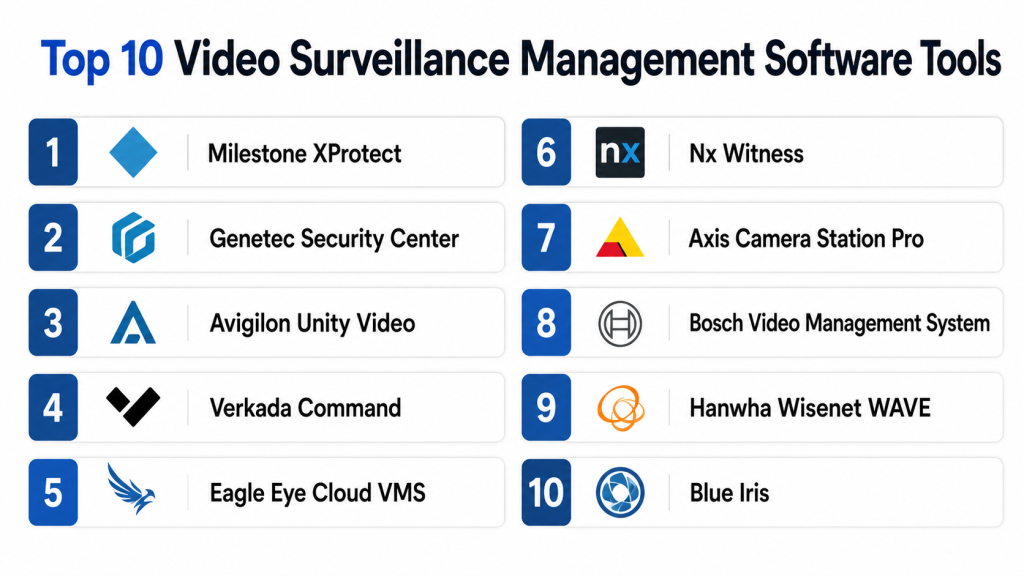
Top 10 Video Surveillance Management Software Tools
1 — Milestone XProtect
Short description:
Milestone XProtect is a widely recognized video management software platform used by enterprises, public-sector organizations, campuses, and security-focused businesses. It is known for its open-platform approach, strong camera compatibility, and broad integration ecosystem. The software helps teams monitor live video, manage recordings, investigate incidents, and connect video with other security systems. It is a strong choice for organizations that want flexibility instead of being limited to one hardware vendor. It is especially useful for complex, multi-site security environments.
Key Features
- Live video monitoring and centralized camera management
- Recording, playback, and investigation workflows
- Support for many IP camera models
- Multi-site surveillance management
- Role-based access and user permissions
- Integration with access control and analytics tools
- Open platform ecosystem for security extensions
Pros
- Strong camera compatibility
- Suitable for enterprise-scale deployments
- Large integration ecosystem
Cons
- Setup may require skilled administrators
- Licensing can feel complex for smaller teams
- Advanced features may require add-ons
Platforms / Deployment
Windows / Web / Mobile access
Self-hosted / Hybrid
Security & Compliance
Supports user permissions, role-based access, encryption options, and audit-related controls. Specific compliance certifications: Not publicly stated.
Integrations & Ecosystem
Milestone has a strong ecosystem for businesses that need to connect video surveillance with broader security operations.
- IP cameras
- Access control systems
- Alarm systems
- Video analytics tools
- APIs and SDKs
- Security operations platforms
Support & Community
Milestone offers documentation, partner support, training resources, and enterprise support options. Its partner ecosystem is strong in many regions.
2 — Genetec Security Center
Short description:
Genetec Security Center is a unified physical security platform that combines video surveillance, access control, license plate recognition, and security operations. It is designed for organizations that need more than basic video recording. Large enterprises, airports, government agencies, cities, campuses, and critical infrastructure teams often use it for complex environments. Its main strength is bringing different security functions into one platform. It is best for teams that need a centralized and scalable security system.
Key Features
- Unified video surveillance and access control
- Centralized security monitoring
- License plate recognition options
- Incident investigation workflows
- Multi-site management
- Role-based access control
- Event correlation across security systems
Pros
- Strong for complex enterprise environments
- Combines video with other physical security tools
- Suitable for large campuses and public-sector use
Cons
- May be too advanced for small businesses
- Implementation can require expert planning
- Premium cost structure may not suit every buyer
Platforms / Deployment
Windows / Web / Mobile access
Cloud / Self-hosted / Hybrid
Security & Compliance
Supports user permissions, authentication options, audit capabilities, and security administration features. Specific compliance certifications: Not publicly stated.
Integrations & Ecosystem
Genetec is strong in enterprise security ecosystems and supports many physical security integrations.
- Cameras
- Access control
- ALPR systems
- Intrusion systems
- Alarm systems
- Security operations tools
Support & Community
Genetec provides enterprise support, documentation, training, and partner-led implementation. It is best suited for organizations with mature security operations.
3 — Avigilon Unity Video
Short description:
Avigilon Unity Video is a video management solution focused on intelligent surveillance, high-quality video search, and faster investigation. It is commonly used in commercial buildings, campuses, healthcare, government, retail, and high-security environments. The platform works especially well with Avigilon cameras and security products. It helps teams identify events faster through AI-assisted search and analytics. It is useful for organizations that want modern video intelligence with reliable surveillance operations.
Key Features
- Live and recorded video management
- AI-powered search capabilities
- Appearance search features
- Motion and object detection
- Alarm and event management
- Centralized camera administration
- Access control ecosystem options
Pros
- Strong AI-assisted investigation features
- Good fit for high-security environments
- Works well with Avigilon hardware ecosystem
Cons
- Best experience is within the Avigilon ecosystem
- Advanced analytics may depend on compatible hardware
- Pricing details vary by deployment
Platforms / Deployment
Windows / Web / Mobile access
Self-hosted / Hybrid
Security & Compliance
Supports user permissions and security controls. Specific compliance certifications: Not publicly stated.
Integrations & Ecosystem
Avigilon Unity Video fits well within the Motorola Solutions security ecosystem.
- Avigilon cameras
- Access control systems
- Video analytics
- Alarm workflows
- Security monitoring tools
- Enterprise security systems
Support & Community
Support is available through vendor channels and certified partners. Documentation and onboarding resources are available.
4 — Verkada Command
Short description:
Verkada Command is a cloud-based physical security platform that includes video surveillance, access control, alarms, sensors, and building security tools. It is designed for teams that want simple remote access and centralized management without heavy local server maintenance. The platform is commonly used by schools, offices, retail chains, warehouses, and multi-location organizations. Verkada combines hardware and software in one managed ecosystem. It is best for buyers who prefer simplicity, cloud access, and fast deployment.
Key Features
- Cloud-managed video surveillance
- Browser and mobile-based remote access
- Camera health monitoring
- AI-based video search options
- Multi-site management
- User permissions and admin controls
- Integrated security devices and sensors
Pros
- Easy to manage remotely
- Good for distributed locations
- Clean and simple user experience
Cons
- More closed ecosystem than open VMS platforms
- Hardware dependency may limit flexibility
- Subscription cost should be reviewed carefully
Platforms / Deployment
Web / iOS / Android
Cloud
Security & Compliance
Supports MFA, role-based access, encryption, and audit-related controls. Specific certifications: Not publicly stated.
Integrations & Ecosystem
Verkada works best within its own cloud-managed ecosystem.
- Verkada cameras
- Access control
- Alarms
- Environmental sensors
- Visitor management
- Cloud administration
Support & Community
Vendor support, onboarding, and customer success options are available. Community strength is mostly vendor-led.
5 — Eagle Eye Cloud VMS
Short description:
Eagle Eye Cloud VMS is a cloud video management platform built for remote access, multi-location monitoring, and cloud-based video storage. It is useful for businesses that want to move away from traditional DVR or NVR systems. Retail stores, restaurants, schools, offices, and service businesses can benefit from its cloud-first model. The platform supports flexible deployment and works with many camera environments. It is a strong option for organizations that want cloud VMS without replacing every device immediately.
Key Features
- Cloud video management
- Remote live and recorded video access
- Multi-site monitoring
- Cloud storage options
- Camera compatibility
- User access controls
- Video analytics options
Pros
- Strong cloud-first VMS model
- Good for multi-location businesses
- Flexible camera support
Cons
- Subscription costs apply
- Internet reliability is important
- Advanced features may vary by plan
Platforms / Deployment
Web / iOS / Android
Cloud / Hybrid
Security & Compliance
Supports encryption, user roles, and cloud security controls. Specific certifications: Not publicly stated.
Integrations & Ecosystem
Eagle Eye supports integrations for business and security workflows.
- IP cameras
- Access control systems
- Cloud APIs
- Alarm workflows
- POS-related integrations
- Analytics tools
Support & Community
Support is available through vendor and partner channels. Documentation and onboarding support are generally available.
6 — Nx Witness
Short description:
Nx Witness is a modern video management software platform known for its clean interface, fast deployment, and flexible architecture. It is often used by SMBs, system integrators, mid-market companies, and security service providers. The platform supports live viewing, recording, playback, search, and device management. It is practical for offices, campuses, retail environments, and commercial buildings. It is a good fit for teams that want a balance between usability and technical flexibility.
Key Features
- Live video monitoring
- Recording and playback
- Easy camera discovery
- Fast video search
- Cross-platform client support
- Cloud connection options
- API and integration capabilities
Pros
- User-friendly interface
- Flexible for different business sizes
- Good balance of features and simplicity
Cons
- Enterprise-scale planning may still require expertise
- Compliance details may not always be clear
- Some integrations may need technical support
Platforms / Deployment
Windows / macOS / Linux / Web / Mobile access
Self-hosted / Hybrid
Security & Compliance
Supports user roles and access controls. Specific certifications: Not publicly stated.
Integrations & Ecosystem
Nx Witness supports integrations through APIs and third-party ecosystem options.
- IP cameras
- Video analytics
- Access control systems
- APIs
- Cloud connection
- Integrator-built solutions
Support & Community
Documentation and partner support are available. Community and integrator ecosystem are active in many regions.
7 — Axis Camera Station Pro
Short description:
Axis Camera Station Pro is a video management solution designed mainly for Axis camera environments. It is suitable for small and mid-sized businesses, schools, offices, retail stores, healthcare sites, and commercial facilities already using Axis devices. The platform supports live monitoring, recording, playback, event handling, and device management. It is easier to manage when the camera ecosystem is standardized around Axis. It is best for buyers who want reliable vendor-aligned video management.
Key Features
- Live video viewing
- Recording and playback
- Axis camera management
- Event and alarm handling
- User permissions
- Access control integration options
- Mobile and remote access options
Pros
- Strong fit for Axis camera users
- Reliable for SMB and mid-market use
- Easier management within one ecosystem
Cons
- Best value comes with Axis hardware
- Less open than broader VMS platforms
- May not suit highly mixed camera fleets
Platforms / Deployment
Windows / Mobile access
Self-hosted / Hybrid
Security & Compliance
Supports user access controls and security features. Specific compliance certifications: Not publicly stated.
Integrations & Ecosystem
Axis Camera Station Pro works strongly with Axis devices and selected third-party systems.
- Axis cameras
- Axis access control
- Audio devices
- Network devices
- Event triggers
- Mobile access
Support & Community
Axis provides documentation, support resources, and partner assistance. Support experience is strongest through Axis-certified channels.
8 — Bosch Video Management System
Short description:
Bosch Video Management System is designed for professional security environments that need reliable surveillance, event management, and integration with Bosch security products. It is often used in commercial, industrial, government, transportation, and critical infrastructure settings. The platform supports centralized monitoring, recording, and security event handling. It is suitable for teams that value stability and a mature vendor ecosystem. It works best for organizations already using Bosch security devices.
Key Features
- Centralized video management
- Live and recorded video
- Alarm and event handling
- Bosch camera compatibility
- Scalable architecture
- Operator-focused monitoring tools
- Security ecosystem integration
Pros
- Strong fit for professional security environments
- Reliable vendor ecosystem
- Good for industrial and enterprise settings
Cons
- May require trained installers
- Best experience is within Bosch ecosystem
- Smaller teams may find it complex
Platforms / Deployment
Windows
Self-hosted / Hybrid
Security & Compliance
Supports user access and security controls. Specific compliance certifications: Not publicly stated.
Integrations & Ecosystem
Bosch VMS integrates closely with Bosch security products and selected third-party systems.
- Bosch cameras
- Access control
- Intrusion systems
- Alarm systems
- Security operations tools
- Enterprise monitoring workflows
Support & Community
Support is available through Bosch and partner networks. Documentation and professional implementation support are generally available.
9 — Hanwha Wisenet WAVE
Short description:
Hanwha Wisenet WAVE is a video management software platform designed for simple setup, live monitoring, video recording, and quick playback. It is often used with Hanwha Vision cameras but can also support broader surveillance needs. The software is suitable for SMBs, schools, retail stores, offices, and commercial facilities. It focuses on ease of use and practical video management. It is a good option for teams that want a modern interface and vendor-backed VMS.
Key Features
- Live video monitoring
- Video recording and search
- Camera discovery
- Multi-server support
- User permissions
- Mobile viewing
- Event management
Pros
- Simple and modern user experience
- Good fit for Hanwha camera users
- Practical for SMB and mid-market setups
Cons
- Best value is within Hanwha ecosystem
- Advanced enterprise use may require planning
- Some compliance details are not publicly stated
Platforms / Deployment
Windows / macOS / Linux / Mobile access
Self-hosted / Hybrid
Security & Compliance
Supports access controls and user permissions. Specific compliance certifications: Not publicly stated.
Integrations & Ecosystem
Wisenet WAVE integrates well with Hanwha Vision devices and selected third-party systems.
- Hanwha cameras
- IP cameras
- Video analytics
- Event triggers
- Mobile applications
- Security integrations
Support & Community
Support is available through vendor and partner channels. Documentation is available, and many system integrators support deployments.
10 — Blue Iris
Short description:
Blue Iris is a video surveillance software option often used by small businesses, advanced home users, and budget-conscious technical users. It supports many IP cameras and provides recording, alerts, remote viewing, and local control. The platform is useful for users who want to manage their own video setup without a large enterprise system. It is not as enterprise-focused as tools like Genetec or Milestone. It works best for technically comfortable users who can manage configuration, storage, and system performance.
Key Features
- IP camera recording
- Motion detection
- Alerts and notifications
- Remote viewing
- Local storage control
- Camera grouping
- Basic automation options
Pros
- Cost-effective for smaller setups
- Flexible camera support
- Good local control
Cons
- Requires technical setup
- Not ideal for large enterprise environments
- Enterprise compliance features are limited
Platforms / Deployment
Windows / Mobile access
Self-hosted
Security & Compliance
Basic user and access controls are available. Enterprise compliance certifications: Not publicly stated.
Integrations & Ecosystem
Blue Iris is often used with IP cameras and local automation setups.
- IP cameras
- Local recording systems
- Mobile viewing
- Alerts
- Automation tools
- Network video devices
Support & Community
Documentation and community discussions are available. Support is more suitable for technical users than large enterprise security teams.
Comparison Table
| Tool Name | Best For | Platform(s) Supported | Deployment | Standout Feature | Public Rating |
|---|---|---|---|---|---|
| Milestone XProtect | Enterprise and open-platform VMS | Windows, Web, Mobile access | Self-hosted / Hybrid | Open ecosystem and camera compatibility | N/A |
| Genetec Security Center | Unified enterprise physical security | Windows, Web, Mobile access | Cloud / Self-hosted / Hybrid | Unified video, access control, and ALPR | N/A |
| Avigilon Unity Video | AI-assisted investigation | Windows, Web, Mobile access | Self-hosted / Hybrid | Advanced video search and analytics | N/A |
| Verkada Command | Cloud-managed multi-site security | Web, iOS, Android | Cloud | Simple cloud-first management | N/A |
| Eagle Eye Cloud VMS | Cloud VMS for distributed businesses | Web, iOS, Android | Cloud / Hybrid | Cloud video access and storage | N/A |
| Nx Witness | Flexible modern VMS | Windows, macOS, Linux, Web, Mobile access | Self-hosted / Hybrid | Clean interface and fast deployment | N/A |
| Axis Camera Station Pro | Axis camera environments | Windows, Mobile access | Self-hosted / Hybrid | Strong Axis ecosystem fit | N/A |
| Bosch Video Management System | Professional security operations | Windows | Self-hosted / Hybrid | Reliable Bosch security ecosystem | N/A |
| Hanwha Wisenet WAVE | SMB and mid-market surveillance | Windows, macOS, Linux, Mobile access | Self-hosted / Hybrid | Easy camera management | N/A |
| Blue Iris | Small business and technical users | Windows, Mobile access | Self-hosted | Affordable local video control | N/A |
Evaluation & Scoring of Video Surveillance Management Software
| Tool Name | Core (25%) | Ease (15%) | Integrations (15%) | Security (10%) | Performance (10%) | Support (10%) | Value (15%) | Weighted Total |
|---|---|---|---|---|---|---|---|---|
| Milestone XProtect | 9 | 7 | 9 | 8 | 9 | 8 | 8 | 8.30 |
| Genetec Security Center | 9 | 7 | 9 | 8 | 9 | 8 | 7 | 8.25 |
| Avigilon Unity Video | 8 | 8 | 8 | 8 | 8 | 8 | 7 | 7.85 |
| Verkada Command | 8 | 9 | 7 | 8 | 8 | 8 | 7 | 7.90 |
| Eagle Eye Cloud VMS | 8 | 8 | 8 | 8 | 8 | 8 | 8 | 8.00 |
| Nx Witness | 8 | 9 | 8 | 7 | 8 | 7 | 8 | 7.95 |
| Axis Camera Station Pro | 8 | 8 | 7 | 8 | 8 | 8 | 8 | 7.85 |
| Bosch Video Management System | 8 | 7 | 8 | 8 | 9 | 8 | 7 | 7.85 |
| Hanwha Wisenet WAVE | 8 | 8 | 7 | 7 | 8 | 7 | 8 | 7.65 |
| Blue Iris | 7 | 7 | 6 | 6 | 7 | 6 | 9 | 6.95 |
The scoring is comparative and should be used as a starting point, not as a final buying decision. A higher score means the tool performs strongly across multiple evaluation areas. However, the best tool depends on your camera environment, security goals, budget, and deployment model. A small business may prefer value and ease of use, while an enterprise may prioritize scalability, integrations, and compliance.
Which Video Surveillance Management Software Tool Is Right for You?
Solo / Freelancer
For personal office use, small studios, or a few-camera setup, Blue Iris can be a practical choice. It provides strong local control and flexible camera support at a lower cost. However, it requires technical confidence.
For users who want less maintenance and easier remote access, Eagle Eye Cloud VMS or Verkada Command may be more suitable.
SMB
Small and medium businesses should consider Nx Witness, Axis Camera Station Pro, Hanwha Wisenet WAVE, and Eagle Eye Cloud VMS. These tools offer a good balance of usability, camera management, and practical security features.
Retail stores, clinics, offices, schools, and small warehouses should focus on easy operation, reliable recording, mobile access, and support.
Mid-Market
Mid-market companies often need multi-site monitoring, better user management, integrations, and stronger investigation tools. Milestone XProtect, Nx Witness, Eagle Eye Cloud VMS, and Avigilon Unity Video are good options.
The final choice depends on whether the organization prefers open-platform flexibility, AI-powered search, cloud access, or vendor-aligned hardware.
Enterprise
Enterprises should evaluate Genetec Security Center, Milestone XProtect, Bosch Video Management System, and Avigilon Unity Video. These platforms are stronger for complex environments, multiple departments, strict security needs, and large-scale camera networks.
Enterprise buyers should involve security, IT, compliance, facilities, and procurement teams before selection.
Budget vs Premium
Budget-focused buyers may prefer Blue Iris, Hanwha Wisenet WAVE, or Nx Witness. These tools can work well for smaller or mid-sized setups.
Premium buyers with complex requirements may prefer Genetec, Milestone, Avigilon, or Bosch because they offer stronger enterprise depth and integration potential.
Feature Depth vs Ease of Use
For deep features and complex integrations, Genetec Security Center and Milestone XProtect are strong choices. For ease of use and faster deployment, Verkada Command, Eagle Eye Cloud VMS, Nx Witness, and Axis Camera Station Pro may be better.
Ease of use is important because security teams must react quickly during real incidents.
Integrations & Scalability
If integrations are important, Milestone and Genetec are strong because they support broad security ecosystems. If you prefer a vendor-aligned setup, Axis, Bosch, Avigilon, and Hanwha are practical.
For cloud scalability, Verkada and Eagle Eye Cloud VMS are worth shortlisting.
Security & Compliance Needs
Security-focused buyers should look for MFA, encryption, audit logs, user permissions, RBAC, retention controls, and secure remote access. Regulated industries should validate compliance needs directly with vendors before purchasing.
A VMS should not only record video. It should protect video access, control users, and provide clear evidence trails.
Frequently Asked Questions
1. What is Video Surveillance Management Software?
Video Surveillance Management Software is a platform used to manage live and recorded video from CCTV and IP cameras. It helps teams monitor locations, review incidents, manage users, and store footage securely.
2. How is VMS different from a basic camera app?
A basic camera app is usually built for simple viewing. VMS is designed for many cameras, multiple users, recording rules, access permissions, search, alerts, and security operations.
3. Is cloud VMS better than self-hosted VMS?
Cloud VMS is easier for remote access and multi-site management. Self-hosted VMS gives more local control. Hybrid VMS is useful when businesses want both local recording and cloud management.
4. What pricing model is common for video surveillance software?
Pricing may be per camera, per server, per location, per user, or subscription-based. Some tools also require costs for storage, analytics, hardware, support, or advanced integrations.
5. What is the biggest mistake buyers make?
The biggest mistake is choosing software only by price or camera count. Buyers should also check security, storage, support, integrations, scalability, and long-term maintenance needs.
6. Do these tools support AI video analytics?
Many modern VMS tools support AI features such as object detection, people detection, motion filtering, vehicle detection, and smart search. The exact features depend on the vendor, camera type, and license.
7. Can VMS integrate with access control systems?
Yes, many professional VMS platforms integrate with access control, alarms, sensors, visitor systems, and incident management tools. Buyers should always verify compatibility before purchase.
8. Is Video Surveillance Management Software secure?
It can be secure when configured correctly. Important security features include MFA, encryption, user permissions, audit logs, secure remote access, and regular software updates.
9. How long does implementation take?
Implementation depends on the number of cameras, locations, network readiness, storage needs, and integrations. A small setup can be faster, while enterprise deployment usually needs careful planning.
10. When should a business switch VMS tools?
A business should consider switching when the current system is hard to manage, lacks remote access, has poor search, cannot scale, or does not meet security and compliance needs.
Conclusion
Video Surveillance Management Software is now a core part of modern physical security. The right platform helps teams monitor live video, investigate incidents, manage users, protect footage, and connect surveillance with broader security systems. Milestone XProtect and Genetec Security Center are strong for enterprise and complex environments. Verkada Command and Eagle Eye Cloud VMS are useful for cloud-first teams. Nx Witness, Axis Camera Station Pro, and Hanwha Wisenet WAVE are practical for SMB and mid-market users. Blue Iris is useful for smaller technical setups.There is no single best tool for everyone. The best choice depends on your camera environment, locations, security needs, budget, and internal technical skills.
