Upgrade & Secure Your Future with DevOps, SRE, DevSecOps, MLOps!
We spend hours scrolling social media and waste money on things we forget, but won’t spend 30 minutes a day earning certifications that can change our lives.
Master in DevOps, SRE, DevSecOps & MLOps by DevOps School!
Learn from Guru Rajesh Kumar and double your salary in just one year.
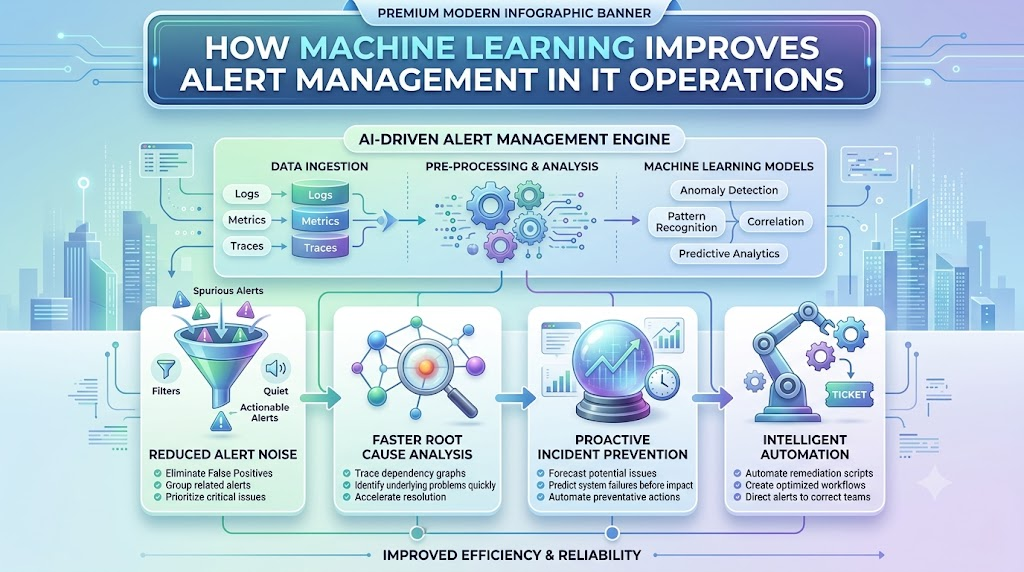
It’s 2 AM, and an engineer’s phone won’t stop buzzing. Within ten minutes, 200 alerts have piled up. Somewhere in that flood is the one alert that actually matters, a payment service that just went down. But which one is it?
This scene plays out in IT teams everywhere. When every alert looks the same on a screen, finding the real problem takes precious time, time you don’t have during an incident.
This is exactly the problem AI-based alert prioritization solves. At TheAIOps.com, we look at how AI helps teams cut through alert noise and focus on what truly needs attention first, so let’s break down how it actually works.
What Is Alert Prioritization?
Alert prioritization means sorting alerts by how much they matter.
Not every alert deserves the same response. A warning on a test server can usually wait. An error on a live payment service cannot.
Simple example: A test server shows high memory use. At the same time, the production payment API starts throwing errors. Both are alerts, but only one needs action right now.
Prioritization helps teams know where to look first.
Why IT Teams Receive Too Many Alerts
Most IT teams don’t have a shortage of alerts. They have too many.
Here’s why this happens:
- Large IT environments – More servers and services mean more alerts.
- Many monitoring tools – Different tools often send alerts for the same issue.
- Duplicate alerts – The same problem can trigger multiple alerts.
- Repeated alerts – A single issue may send alerts again and again.
- Low-value warnings – Many alerts don’t need real action.
- False alerts – Some alerts fire even when nothing is actually wrong.
- Related alerts from one problem – One root cause can create many separate alerts.
- Alerts from different services – A single outage can affect several connected systems at once.
When alerts pile up like this, it becomes harder to spot the one that truly matters.
What Is AI-Based Alert Prioritization?
AI-based alert prioritization uses machine learning to help rank alerts by their likely impact.
Instead of treating every alert the same way, AI looks at context. It considers things like which service is affected, how many users might be impacted, and what happened in similar situations before.
It’s worth saying clearly: AI does not always get it right. It supports human teams by making sorting faster, but people still make the final call on serious issues.
How AI Prioritizes Alerts
AI looks at several factors to decide how urgent an alert really is.
- Alert severity – How serious the underlying issue appears to be.
- Affected service – Which system or application triggered the alert.
- Customer impact – Whether real users are affected right now.
- Business importance – How critical that service is to the business.
- Service dependencies – Which other systems rely on the affected one.
- Historical incident data – What happened last time a similar alert appeared.
- Current system behavior – How the system is behaving compared to normal.
- Number of affected users – How widespread the impact is.
- Possible blast radius – How far the problem could spread if left unchecked.
- SLO or SLA impact – Whether the issue threatens an agreed service level.
- Recent system changes – Whether a recent deployment might be the cause.
TheAIOps.com discusses priority in terms of business impact, user impact, service criticality, SLO burn rate, and blast radius. These ideas simply mean: how much does this problem matter, and how fast is it getting worse?
Role of Machine Learning in Alert Prioritization
Machine learning helps by learning from what has already happened.
It studies patterns in:
- Previous alerts
- Past incidents
- Alert frequency
- System behavior
- Incident impact
- Historical resolutions
Over time, the model starts to notice which types of alerts usually turn into real incidents, and which ones tend to be noise. You don’t need to understand the math behind this. The key idea is simple: the system learns from history to make smarter guesses about the present.
How Alert Correlation Helps Prioritization
Not every alert is a separate problem. Many alerts come from the same root cause.
Example: A database slows down. This single issue can trigger API errors, application errors, and user login failures, all at once. That’s five or six alerts from one real problem.
TheAIOps.com describes correlation as a way to group these related signals together. Instead of showing engineers ten separate alerts, the system shows one connected incident. This makes the real problem much easier to see.
Alert Noise and Alert Fatigue
Alert noise means too many alerts, many of which are not useful.
Alert fatigue happens when engineers get so many alerts that they start to ignore them, even the important ones.
Repeated, low-value alerts are a real problem. They train people to tune out warnings, which can mean missing something serious.
Filtering, deduplication, grouping, and prioritization all help reduce this noise. Together, they cut down what engineers need to review by hand.
Alert Enrichment and Context
A bare alert like “CPU high on server X” doesn’t tell you much. An enriched alert tells you a lot more.
Useful context can include:
- Affected service
- Recent deployment
- Related alerts
- Service dependencies
- Metric data
- Logs
- Traces
- Severity
- Risk score
- Runbook information
TheAIOps.com describes alert enrichment as adding this kind of context to raw alerts. With more context, engineers can understand and act on an alert much faster, instead of digging around for basic facts.
Simple Example of AI-Based Alert Prioritization
Imagine an IT team receives these alerts within a few minutes:
- High CPU on a test server
- Database connection warning
- Payment API errors
- Login failures
- Network latency warning
Without prioritization, all five alerts might look equally urgent on a screen.
An AI-based system would review context. It might see that the payment API errors and login failures are connected to the database warning, and that this combination is affecting real customers. It could place these three near the top, while pushing the test server alert further down.
This isn’t a fixed rule that always applies the same way. Priority depends on your environment and what matters most to your business.
How Priority Scores Can Work
Many AIOps systems use a priority score to help sort alerts.
A score can factor in:
- Severity
- Urgency
- Business impact
- User impact
- Service importance
- Historical patterns
- Risk of spreading
Think of it as a way to turn many different signals into one number that helps teams sort alerts quickly. Different platforms may calculate this differently, so there’s no single formula that works everywhere.
AI-Based Prioritization vs Traditional Alert Rules
| Area | Traditional Alerting | AI-Based Prioritization |
|---|---|---|
| Alert rules | Fixed rules set by humans | Rules plus learned patterns |
| Context | Often limited | Includes service and business context |
| Alert grouping | Usually manual or none | Automated correlation |
| Priority | Often based on static severity | Based on impact and context |
| Historical data | Rarely used directly | Used to improve future ranking |
| Adaptation | Stays the same until updated | Can adjust as patterns change |
| Human review | Still needed | Still needed, but with better input |
Benefits of AI-Based Alert Prioritization
- Less alert noise – Fewer low-value alerts reach the team.
- Better focus – Engineers see the alerts that matter most, first.
- Faster triage – Less time spent figuring out where to start.
- Better use of engineer time – Less manual sorting, more actual problem-solving.
- Clearer incident views – Related alerts appear as one connected story.
- Better handling of large alert volumes – Scales better than manual review.
- More useful alerts – Alerts arrive with context, not just raw data.
These are practical improvements, not guarantees. Results depend on your data and setup.
Challenges and Limitations
AI-based alert prioritization isn’t perfect. Common challenges include:
- Poor data quality – Bad data leads to bad priority scores.
- Wrong alert rules – Outdated or incorrect rules can mislead the system.
- Missing historical data – New environments may lack enough past data.
- False positives – Sometimes low-priority alerts get marked as urgent.
- False negatives – Sometimes real problems get ranked too low.
- Bad service maps – If dependencies aren’t mapped correctly, impact estimates can be wrong.
- Model errors – No model is perfect all the time.
- Changing IT environments – Systems change, and models need to keep up.
- Lack of trust in automated decisions – Teams may hesitate to rely on AI without proof it works.
This is exactly why human review still matters, especially for high-impact decisions.
Best Practices for AI-Based Alert Prioritization
- Start with clean monitoring data.
- Remove duplicate alerts.
- Group related events together.
- Add useful context to alerts.
- Define which services matter most to the business.
- Track real incident outcomes over time.
- Review AI recommendations regularly.
- Tune the system as your environment changes.
- Keep humans involved in high-impact decisions.
- Measure whether alert quality actually improves.
Metrics to Measure Alert Prioritization
- Alert volume – How many alerts come in over time.
- Alert reduction rate – How much noise gets filtered out.
- False positive rate – How often alerts turn out to be non-issues.
- Mean Time to Detect (MTTD) – How fast teams notice a real problem.
- Mean Time to Acknowledge (MTTA) – How fast someone responds to an alert.
- Mean Time to Resolve (MTTR) – How fast the issue gets fixed.
- Incident accuracy – How often flagged alerts turn into real incidents.
- Number of actionable alerts – How many alerts actually require action.
These metrics help teams see whether prioritization is actually working, not just assumed to be working.
How TheAIOps.com Can Explain the Alert Prioritization Workflow
A typical workflow looks like this:
Collect → Filter → Group → Enrich → Prioritize → Route → Investigate → Resolve → Learn
- Collect – Gather alerts from all monitoring sources.
- Filter – Remove clearly low-value or duplicate alerts.
- Group – Correlate related alerts into one incident view.
- Enrich – Add context like logs, metrics, and service data.
- Prioritize – Rank alerts based on impact and urgency.
- Route – Send the alert to the right team or person.
- Investigate – Engineers look into the root cause.
- Resolve – The issue gets fixed.
- Learn – The system updates based on what happened.
Not every AIOps platform follows this exact sequence, but most follow a similar pattern.
Future of AI-Based Alert Prioritization
Alert management is likely to keep becoming more context-aware over time.
Expect to see progress in areas like:
- Better event correlation
- More dynamic priority scoring
- Improved anomaly detection
- Richer incident context
- Smarter alert routing
- More useful automated recommendations
- Human-approved remediation steps
These improvements will likely make teams faster, but human judgment will stay part of the process for serious decisions.
FAQs
1. What is AI-based alert prioritization?
It’s the use of AI and machine learning to rank alerts by how much they likely matter, based on context and impact.
2. Why do IT teams need alert prioritization?
Because most teams get far more alerts than they can review one by one, and not all alerts carry the same risk.
3. How does AIOps rank alerts?
It looks at factors like severity, affected service, user impact, business importance, and historical incident data.
4. What data can AI use for alert prioritization?
It can use past alerts, incident history, system metrics, logs, service dependencies, and current system behavior.
5. How does alert correlation help?
It groups related alerts from one root cause into a single incident view, instead of showing them as separate problems.
6. What is alert fatigue?
It happens when engineers receive so many alerts that they start ignoring them, including important ones.
7. Can AI remove all false alerts?
No. AI can reduce false alerts significantly, but it cannot guarantee zero false positives or false negatives.
8. Does AI replace IT engineers?
No. AI supports engineers by sorting and ranking alerts faster, but people still make key decisions.
9. What is alert enrichment?
It means adding useful context, like logs, metrics, and service details, to a raw alert so it’s easier to understand.
10. How can teams measure alert prioritization success?
By tracking metrics like alert reduction rate, false positive rate, MTTD, MTTA, and MTTR over time.
Conclusion
Alert overload is a real problem for IT teams, and it only grows as systems become more complex. AI-based alert prioritization helps by looking at context, ranking alerts by impact, and grouping related events into clearer incidents.
This doesn’t mean AI always gets it right, or that human judgment is no longer needed. It means engineers spend less time sorting through noise, and more time solving the problems that actually matter.
