Upgrade & Secure Your Future with DevOps, SRE, DevSecOps, MLOps!
We spend hours scrolling social media and waste money on things we forget, but won’t spend 30 minutes a day earning certifications that can change our lives.
Master in DevOps, SRE, DevSecOps & MLOps by DevOps School!
Learn from Guru Rajesh Kumar and double your salary in just one year.
Your phone buzzes at midnight with a high-priority security alert. You log into your dashboard and see a massive wave of failed login attempts hitting your main database. Your heart sinks because you know manual investigation will take hours. Attackers move fast, but human security teams get tired and overwhelmed by thousands of false alarms.
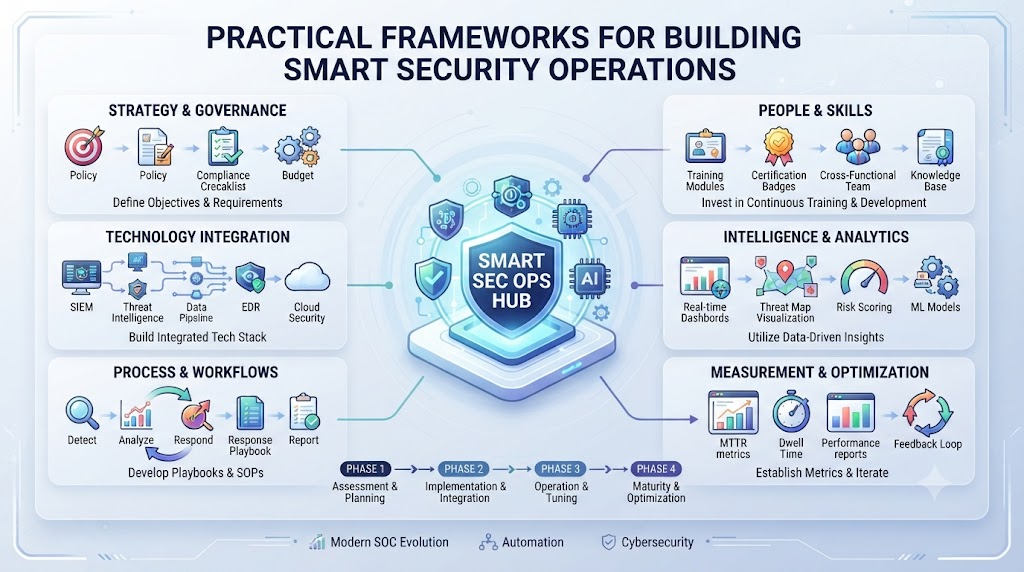
This is where TheAIOps.com steps in to help you transform how you handle network threats. It gives you smart automated guardrails to catch real intruders instantly while ignoring harmless background noise. Let us look at how you can build a strong AI-driven defense system without burning out your team.
Modern cyber threats grow more complex every single day. Traditional firewalls and manual log reviews can no longer keep up with modern attackers. You need intelligent systems that learn from your network traffic and adapt in real time.
The Hidden Dangers of Traditional Security Operations
Old security models rely on static rules and manual log reviews. Your security team spends hours staring at flashing red lights on a dashboard. Most of these alerts turn out to be harmless background noise.
This constant stream of false alarms creates severe mental exhaustion for your staff. When engineers get tired, they miss subtle signs of real breaches. Attackers exploit this fatigue to slip past your perimeter defenses unnoticed.
You cannot rely on human eyes alone to protect modern cloud networks. The volume of data is simply too massive for manual tracking.
Why Old Alert Systems Fail Modern Enterprises
Traditional security tools use simple rules to flag suspicious activity. If an IP address fails five logins, the system triggers a warning. Smart hackers know this and spread their login attempts across thousands of different proxy servers.
Your old firewall sees normal traffic patterns and lets the attacker right through. You end up with a false sense of security while your core data remains vulnerable.
Enterprise networks sprawl across multiple cloud providers and local data centers. Old monitoring tools lack the global visibility needed to spot distributed attacks.
The Cost of Alert Fatigue on Security Engineers
Alert fatigue is a silent killer in modern security operations centers. When your engineers receive five hundred alerts a night, they start ignoring notifications.
Missing one critical alert can result in a catastrophic data breach. Ransomware gangs move from initial entry to full encryption in a matter of hours.
If your team takes too long to triage alerts, your business suffers massive financial losses. Automating your initial alert filtering protects your team’s sanity and your company assets.
How Artificial Intelligence Transforms Threat Detection
Artificial intelligence changes the security game by looking at the big picture. Machine learning models analyze millions of log events in milliseconds.
Instead of waiting for known attack signatures, smart algorithms look for unusual behavior. If a normal user account suddenly downloads gigabytes of data at midnight, the system flags it.
This behavioral approach catches zero-day exploits that traditional tools completely miss. You gain proactive defense capabilities that stop threats before they cause damage.
Spotting Unusual User Behavior Before Attacks Happen
User behavior analytics form the backbone of modern AI security systems. Every employee and server has a normal pattern of daily activity.
Smart software learns these baseline patterns over weeks of observation. When an attacker steals valid login credentials, their behavior rarely matches the real owner.
The system notices strange typing speeds, unusual navigation paths, or odd access times. It locks the account instantly and notifies your security team for review.
Automated Response Actions That Stop Breaches Instantly
Detecting a threat is only half the battle in modern cybersecurity. You also need to neutralize the threat before it spreads across your network.
Automated playbooks take immediate action the moment a high-risk anomaly occurs. The system can isolate compromised virtual machines in less than one second.
This lightning-fast response prevents lateral movement by network intruders. Your core databases stay safe while the automated system contains the infected endpoint.
Integrating Machine Learning Into Your Defense Stack
Bringing machine learning into your security stack requires careful planning and clean data. You cannot simply plug in an AI tool and expect instant perfection.
Your engineering team must feed high-quality system logs into the training pipeline. Clean data helps the models learn accurate baselines without generating excessive false positives.
Start by running your AI tools in read-only observation mode for a few weeks. This lets you test accuracy without risking accidental lockouts of legitimate users.
Feeding Clean Data Into Your Security Models
Garbage in equals garbage out when working with machine learning models. If your server logs are messy or incomplete, your AI security tools will struggle.
Standardize your log formats across all cloud environments and physical servers. Ensure timestamps sync perfectly across every node in your enterprise network.
Clean data pipelines give your AI models the exact context they need to spot real threats accurately. This foundational step makes your entire security operation much stronger.
Training Your Team to Trust Automated Guardrails
Many veteran security engineers feel skeptical about letting software make automated blocking decisions. They worry about false positives shutting down critical business functions.
You must bridge this trust gap through education and transparent model testing. Show your team how the AI calculates confidence scores before taking action.
When engineers see the system make accurate calls over and over, trust grows naturally. They begin viewing the AI as a reliable digital partner rather than a replacement.
Securing Cloud Environments With Intelligent Monitoring
Cloud infrastructure introduces unique security challenges compared to physical offices. Virtual machines spin up and down dynamically across different global regions.
Traditional perimeter security fails when your servers live across multiple cloud providers. Intelligent monitoring tools map these shifting cloud topologies in real time.
They track API calls, storage bucket permissions, and container interactions continuously. You gain complete visibility over your entire cloud estate without manual tracking.
Mapping Multi-Cloud Vulnerabilities in Real Time
Modern enterprises rarely rely on just one cloud provider for their apps. You probably use a mix of different platforms for hosting, databases, and analytics.
AI security tools bridge the gaps between these disparate cloud ecosystems. They aggregate security logs into a single unified dashboard for your engineers.
This holistic view lets you spot misconfigured storage buckets or open ports instantly. You fix vulnerabilities before external attackers can scan and exploit them.
Protecting Sensitive Customer Data From Insider Threats
Not all security threats come from hackers sitting in distant countries. Sometimes, malicious actors or careless employees put customer data at risk internally.
Smart monitoring tracks internal data access patterns and privilege escalation attempts. If an ordinary support staff member tries to access executive payroll files, the system intervenes.
This internal vigilance protects your company against intellectual property theft and privacy violations. You keep customer trust intact by securing data at every single layer.
Real-World Stories About Server Crashes and Fixes
- A global financial services firm faced a sophisticated credential-stuffing attack during a major holiday weekend.
- Traditional rule-based firewalls failed to catch the attack because login requests came from distributed residential proxy IPs.
- Security engineers were asleep and missed the initial spike in failed authentication logs until morning.
- The team deployed an AI-driven behavioral monitoring platform to analyze login patterns in real time.
- Two weeks later, a similar botnet attack targeted the customer portal with millions of automated requests.
- The intelligent system detected the unusual speed and typing rhythm anomalies instantly without human intervention.
- Automated response scripts blocked the malicious IP ranges within three seconds of detection.
- Zero customer accounts were compromised, and legitimate users experienced zero service interruptions.
- The chief information security officer presented these success metrics to the board during the quarterly review.
- The company expanded their intelligent security budget to cover all secondary branch office networks.
Comparing Traditional Security vs. AI-Driven Security Operations
| Feature | Traditional Security Operations | AI-Driven Security Operations |
| Threat Detection | Static rule matching and signature lists | Behavioral anomaly detection and machine learning |
| Response Speed | Hours of manual review and ticket routing | Seconds of automated containment and isolation |
| False Alarms | High volume causing severe alert fatigue | Low volume filtered by smart baseline learning |
| Cloud Coverage | Limited visibility across distributed servers | Complete real-time mapping of multi-cloud assets |
| Staff Morale | Low due to constant nighttime firefighting | High due to focus on strategic engineering |
Common Mistakes and Pitfalls
- Mistake: Relying entirely on static firewall rules without behavioral analysis.
- Solution: Implement machine learning models that learn normal user patterns over time.
- Mistake: Ignoring high volumes of low-priority alerts until a real breach occurs.
- Solution: Use smart automation to group related alerts into single incident tickets.
- Mistake: Failing to clean and normalize security log data before feeding it to AI models.
- Solution: Establish data pipelines that standardize logs across all cloud and local servers.
- Mistake: Giving automated response tools full permission to shut down critical production systems without checks.
- Solution: Set up human-in-the-loop confirmation gates for high-impact blocking actions.
- Mistake: Forgetting to train internal engineering staff on how security models make decisions.
- Solution: Run regular workshops explaining model outputs and confidence scores to your team.
- Mistake: Assuming AI security tools are set-and-forget solutions that require no maintenance.
- Solution: Schedule weekly model performance reviews and drift checks with your security leads.
- Mistake: Overlooking insider threats by focusing solely on external perimeter defenses.
- Solution: Monitor internal user access logs and privilege escalation patterns continuously.
- Mistake: Using overly complex security jargon when explaining risks to non-technical leaders.
- Solution: Translate risk scores into potential financial losses and business impacts.
- Mistake: Failing to update threat detection baselines after major company software releases.
- Solution: Refresh your behavioral baselines immediately following major application deployments.
- Mistake: Working in silos between the network operations team and the security response team.
- Solution: Create shared dashboards and joint response protocols for both teams.
Step-by-Step Implementation Roadmap
- Audit Current Defenses: Review your existing firewall rules, log collection tools, and incident response times.
- Define Risk Priorities: Sit down with leadership to identify your most critical digital assets and data stores.
- Clean Your Log Data: Standardize log formats across all servers to ensure AI models receive accurate inputs.
- Deploy Pilot AI Tools: Install intelligent monitoring software on a non-critical staging network segment.
- Establish Behavioral Baselines: Let the system monitor normal user and server traffic for at least two weeks.
- Configure Automated Responses: Set up safe, automated playbooks for common low-risk threat scenarios.
- Train Security Engineers: Teach your staff how to interpret AI confidence scores and review automated actions.
- Run Incident Simulations: Test your new automated defense stack using controlled penetration testing scenarios.
- Review and Tune Rules: Adjust sensitivity thresholds to reduce false positives and catch subtle attack vectors.
- Scale Across Enterprise: Roll out your validated AI security framework across all primary production cloud environments.
Frequently Asked Questions
1. What is AI in IT security and why do I need it?
AI in IT security uses machine learning algorithms to detect and stop cyber threats faster than human teams alone. You need it because modern attackers use automated tools that move too fast for manual defenses.
2. How do machine learning models spot unusual network behavior?
Models learn normal daily patterns of user and server activity over time. When an event deviates from these baselines, the system flags it as a potential threat.
3. What is alert fatigue and how does automation fix it?
Alert fatigue happens when security staff receive hundreds of false alarms daily and stop paying attention. Automation filters out noise and groups related warnings into clean tickets.
4. How long does it take for AI security tools to learn baseline traffic?
Most systems require between two and four weeks of continuous observation to build accurate behavioral baselines for your specific enterprise network.
5. Can automated security tools accidentally block legitimate users?
Yes, poorly tuned rules can cause false positives. You prevent this by running tools in observation mode and setting up human confirmation gates for major actions.
6. What kind of log data do I need to feed my security AI?
You need standardized system logs, authentication records, network traffic flows, and cloud API access logs from all your primary environments.
7. How do intelligent tools help protect against insider threats?
They monitor internal user access patterns and privilege escalation attempts to catch employees or compromised accounts acting outside normal roles.
8. What is the biggest mistake teams make when adopting AI security?
The biggest mistake is treating AI tools as set-and-forget solutions without cleaning input data or reviewing model performance regularly.
9. How often should we update our threat detection baselines?
You should refresh your behavioral baselines immediately following major software releases or significant changes to your company network structure.
Final Recommendation and Next Steps
You now have a clear roadmap to secure your enterprise network with intelligent automation. Do not wait for a major breach to force your hand before you upgrade your defenses.
Start by auditing your log collection tools and reviewing your current alert volume this week. Sit down with your engineering leads to map out your most sensitive data assets.
Use smart monitoring tools to catch behavioral anomalies early and protect your company growth. Build trust, secure your cloud infrastructure, and step into the future of automated defense with confidence.
