Upgrade & Secure Your Future with DevOps, SRE, DevSecOps, MLOps!
We spend hours scrolling social media and waste money on things we forget, but won’t spend 30 minutes a day earning certifications that can change our lives.
Master in DevOps, SRE, DevSecOps & MLOps by DevOps School!
Learn from Guru Rajesh Kumar and double your salary in just one year.
Introduction
Desk booking and hotdesking software helps organizations manage shared desks, flexible workspaces, meeting areas, office capacity, employee schedules, and hybrid workplace planning. Instead of assigning every employee a permanent desk, companies can let employees reserve a desk, choose where they want to sit, check office availability, and coordinate in-office days with teammates.
This software matters because hybrid work is now a normal operating model for many companies. Offices are no longer used the same way every day, so workplace teams need better visibility into who is coming in, which desks are being used, which spaces are underused, and how to plan real estate costs more effectively.
Common use cases include hybrid office scheduling, desk reservations, neighborhood seating, visitor coordination, meeting room booking, space utilization analytics, and employee workplace experience management. Buyers should evaluate ease of booking, mobile app quality, floor plan support, calendar integrations, Microsoft Teams or Slack support, reporting depth, access controls, workplace policy management, scalability, and security.
Best for: HR teams, facilities teams, workplace managers, office administrators, operations leaders, hybrid companies, coworking spaces, and enterprises managing shared office space.
Not ideal for: Fully remote companies with no physical office, very small teams with fixed seating, or organizations that only need a simple shared calendar without workspace analytics or booking rules.
Key Trends in Desk Booking & Hotdesking Software
- AI-driven space planning: More platforms are adding AI-based recommendations for desk allocation, office capacity planning, attendance forecasting, and underused space detection.
- Hybrid work coordination: Desk booking is becoming part of broader employee scheduling, helping teams see when colleagues are in the office before choosing a day or desk.
- Workplace experience focus: Companies are moving beyond simple reservations and focusing on employee comfort, easy navigation, amenities, parking, visitors, and team neighborhoods.
- Real estate cost optimization: Facilities leaders are using occupancy analytics to reduce unused space, redesign floors, and make better lease decisions.
- Deeper Microsoft Teams and Slack integration: Employees want to book desks, see coworkers, and manage office days directly inside the tools they already use.
- Mobile-first booking: Mobile apps, QR check-in, desk check-out, office maps, and push reminders are becoming standard expectations.
- Privacy-aware workplace analytics: Companies need useful utilization data without creating a feeling of employee surveillance.
- Sensor and IoT integration: Some organizations are combining desk booking data with occupancy sensors, badge data, and room systems for more accurate workplace insights.
- Policy-based booking rules: Hybrid workplaces need rules for neighborhoods, departments, capacity limits, recurring reservations, visitor access, and no-show handling.
- Flexible pricing models: Buyers are comparing pricing based on users, desks, locations, rooms, analytics modules, integrations, and enterprise support.
How We Selected These Tools
The tools in this list were selected using a practical SaaS evaluation approach focused on hybrid workplace operations, employee experience, and facilities management needs.
- Market adoption and recognition: Tools widely known in workplace management, hybrid office planning, desk booking, and facilities operations were prioritized.
- Feature completeness: Platforms were evaluated for desk booking, room booking, floor plans, mobile access, check-in, analytics, visitor workflows, and policy controls.
- Reliability and performance signals: Preference was given to tools suitable for recurring office usage, multiple locations, and larger employee populations.
- Security posture signals: Access controls, identity integrations, admin permissions, data privacy, and enterprise readiness were considered where clearly known.
- Integrations and ecosystem: Tools with Microsoft 365, Google Workspace, Slack, Microsoft Teams, HR systems, access control, and analytics integrations were evaluated strongly.
- Customer fit across segments: The list includes tools for SMBs, mid-market companies, enterprises, coworking spaces, and global workplace teams.
- Ease of use: Platforms that make booking simple for employees and manageable for admins were scored higher.
- Analytics depth: Desk utilization, attendance trends, space planning, no-show tracking, and office capacity insights were included in the evaluation.
- Mobile and employee experience: Mobile booking, office maps, coworker visibility, and check-in experience were considered important.
- Support and onboarding: Documentation, implementation help, customer support, and enterprise onboarding were included in the comparison.
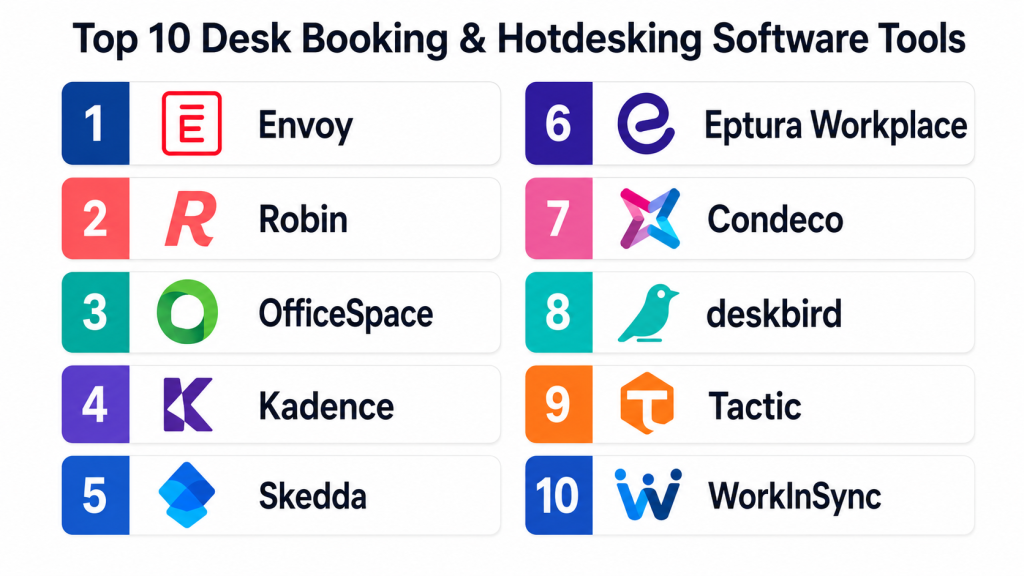
Top 10 Desk Booking & Hotdesking Software Tools
#1 — Envoy
Short description: Envoy is a workplace platform that supports desk booking, room booking, visitor management, employee scheduling, and workplace analytics. It is commonly used by companies managing hybrid offices and shared workspaces. Envoy helps employees reserve desks, coordinate office days, and check in when they arrive. It is also useful for workplace teams that need visitor workflows and office visibility in one place. It is a strong fit for growing teams and enterprises that want a broader workplace experience platform.
Key Features
- Desk booking and hoteling workflows
- Interactive workplace maps
- Room booking and workplace coordination
- Visitor management capabilities
- Employee check-in and attendance visibility
- Hybrid work scheduling features
- Workplace analytics and reporting
Pros
- Strong fit for hybrid workplace operations
- Combines desk booking with visitor and workplace workflows
- Good employee-facing experience
Cons
- May be more than needed for very small offices
- Advanced features may depend on plan
- Pricing should be reviewed carefully for multi-location teams
Platforms / Deployment
Web / iOS / Android
Cloud
Security & Compliance
Envoy provides business and workplace security controls. Specific details such as SSO/SAML, MFA, audit logs, RBAC, SOC 2, ISO 27001, GDPR, or HIPAA should be confirmed directly based on plan and agreement.
Integrations & Ecosystem
Envoy fits well into modern workplace and office operations environments.
- Microsoft 365 integrations
- Google Workspace integrations
- Slack and Microsoft Teams workflows may vary
- Access control integrations may vary
- HR and directory integrations may vary
- Workplace analytics exports
Support & Community
Envoy provides documentation, onboarding resources, and customer support. Larger organizations may receive stronger implementation and customer success support depending on plan.
#2 — Robin
Short description: Robin is a workplace management platform focused on desk booking, room scheduling, office maps, hybrid work coordination, and workplace analytics. It helps employees choose where to sit, book rooms, find teammates, and plan office days. Workplace teams can use Robin to understand space usage and improve office layouts. It is suitable for companies moving from fixed seating to flexible seating. Robin is often a good fit for mid-market and enterprise teams that care about employee experience and space visibility.
Key Features
- Desk booking and office hoteling
- Meeting room scheduling
- Interactive office maps
- Coworker visibility and office planning
- Space utilization analytics
- Mobile booking experience
- Hybrid workplace policy support
Pros
- Strong workplace experience focus
- Useful space analytics for facilities teams
- Good fit for hybrid office coordination
Cons
- May require setup effort for floor plans and policies
- Some features may be more useful for larger offices
- Advanced analytics may depend on package
Platforms / Deployment
Web / iOS / Android
Cloud
Security & Compliance
Robin offers workplace access and administrative controls. Specific details around SSO/SAML, MFA, RBAC, audit logs, SOC 2, ISO 27001, GDPR, or HIPAA should be confirmed directly. Not publicly stated for every item.
Integrations & Ecosystem
Robin connects with common productivity, calendar, and workplace systems.
- Microsoft 365 integrations
- Google Workspace integrations
- Slack and Microsoft Teams workflows may vary
- Calendar integrations
- Workplace directory integrations
- Analytics and reporting exports
Support & Community
Robin provides documentation, onboarding support, and customer resources. It is well suited for companies that need guidance around hybrid workplace setup and space planning.
#3 — OfficeSpace
Short description: OfficeSpace is a workplace management platform designed for space planning, desk booking, room booking, move management, workplace analytics, and facilities operations. It is especially useful for companies that need both employee-friendly booking and deeper workplace management capabilities. Facilities teams can use OfficeSpace to plan seating, manage floor plans, analyze utilization, and support office changes. It fits organizations with complex office layouts, multiple locations, or evolving hybrid policies. It may be more advanced than needed for simple desk-only booking.
Key Features
- Desk booking and hotdesking
- Space planning and floor plan management
- Room booking support
- Workplace utilization analytics
- Move management workflows
- Employee wayfinding and office maps
- Multi-location workplace management
Pros
- Strong fit for facilities and workplace operations
- Useful for larger offices and space planning
- Good combination of booking and analytics
Cons
- May require more setup than lightweight tools
- Best value appears in larger workplace environments
- Smaller teams may not need full facilities features
Platforms / Deployment
Web / iOS / Android
Cloud
Security & Compliance
OfficeSpace provides business security and workplace management controls. Specific details such as SSO/SAML, MFA, encryption, audit logs, RBAC, SOC 2, ISO 27001, GDPR, or HIPAA should be verified directly.
Integrations & Ecosystem
OfficeSpace is designed for workplace teams that need data from calendars, directories, and facilities systems.
- Microsoft 365 integrations
- Google Workspace integrations
- HR directory integrations may vary
- Workplace analytics exports
- Floor plan and facilities workflows
- API or advanced integrations may vary
Support & Community
OfficeSpace offers documentation, implementation assistance, and customer support. Organizations with complex facilities needs may benefit from structured onboarding.
#4 — Kadence
Short description: Kadence is a hybrid work platform focused on desk booking, team scheduling, office visibility, and employee coordination. It helps employees decide when to come into the office by showing where teammates are working and which desks are available. Kadence is useful for companies trying to make hybrid work more intentional instead of random. It supports desk booking, room booking, office neighborhoods, and workplace insights. It is a good fit for teams that want simple booking plus better collaboration planning.
Key Features
- Desk booking and space reservation
- Hybrid work scheduling
- Team visibility and coworker coordination
- Office neighborhood management
- Meeting room booking support
- Workplace analytics
- Mobile and web access
Pros
- Strong focus on hybrid team coordination
- Easy employee-facing booking experience
- Useful for improving office attendance planning
Cons
- May not offer the same depth as full facilities platforms
- Advanced enterprise workflows may depend on plan
- Smaller fixed-seat teams may not need it
Platforms / Deployment
Web / iOS / Android
Cloud
Security & Compliance
Kadence offers workplace access and admin controls. Specific details around SSO/SAML, MFA, audit logs, RBAC, SOC 2, ISO 27001, GDPR, or HIPAA should be confirmed directly. Not publicly stated for all details.
Integrations & Ecosystem
Kadence supports common hybrid workplace and productivity workflows.
- Microsoft 365 integrations
- Google Workspace integrations
- Slack and Microsoft Teams workflows may vary
- Calendar integrations
- Workplace directory support may vary
- Analytics exports
Support & Community
Kadence provides documentation, support resources, and onboarding help. It is practical for organizations that want to improve hybrid work adoption and team coordination.
#5 — Skedda
Short description: Skedda is a space booking platform used for desk booking, room scheduling, coworking spaces, studios, universities, offices, and shared facilities. It is known for flexible booking rules, self-service reservations, floor plans, and space management workflows. Skedda works well for organizations that need configurable booking policies without heavy enterprise complexity. It supports different space types, including desks, meeting rooms, equipment, and shared areas. It is a strong fit for SMBs, coworking spaces, education providers, and flexible offices.
Key Features
- Desk and space booking
- Interactive floor plans
- Booking rules and permissions
- Self-service reservation workflows
- Calendar and schedule views
- Payment support may vary by use case
- Usage reporting and admin controls
Pros
- Flexible for many types of shared spaces
- Good fit for SMBs and coworking-style environments
- Configurable booking rules
Cons
- May not provide deep enterprise workplace analytics
- Advanced integrations may depend on plan
- Employee experience may vary based on setup
Platforms / Deployment
Web
Cloud
Security & Compliance
Skedda provides account, booking, and admin controls. Specific details such as SSO/SAML, MFA, audit logs, RBAC, SOC 2, ISO 27001, GDPR, or HIPAA should be confirmed directly. Not publicly stated for all items.
Integrations & Ecosystem
Skedda supports flexible reservation workflows across different types of shared spaces.
- Calendar integrations
- Payment workflows may vary
- User directory support may vary
- Embedding and booking page options
- Reporting exports
- API options may vary by plan
Support & Community
Skedda provides help resources, documentation, and customer support. It is especially useful for teams that want practical booking workflows without heavy facilities complexity.
#6 — Eptura Workplace
Short description: Eptura Workplace is part of a broader workplace and asset management ecosystem that supports desk booking, room scheduling, space planning, visitor workflows, and workplace analytics. It is designed for organizations that need a mature workplace operations platform rather than a simple desk reservation tool. Eptura can support hybrid work, space utilization, real estate planning, and facilities management use cases. It is suitable for mid-market and enterprise organizations with multiple offices. It may be too complex for small teams with basic booking needs.
Key Features
- Desk booking and workplace reservations
- Meeting room scheduling
- Space planning and utilization analytics
- Visitor and workplace operations workflows
- Multi-location support
- Facilities and real estate insights
- Integration with broader workplace systems
Pros
- Strong fit for enterprise workplace management
- Useful for facilities, real estate, and operations teams
- Supports broader workplace transformation needs
Cons
- May require formal implementation
- Can be more complex than lightweight booking tools
- Best suited for organizations with larger workplace needs
Platforms / Deployment
Web / iOS / Android
Cloud / Hybrid options may vary
Security & Compliance
Eptura Workplace supports enterprise workplace management and administrative controls. Specific details such as SSO/SAML, MFA, audit logs, RBAC, SOC 2, ISO 27001, GDPR, or HIPAA should be confirmed directly based on product module and agreement.
Integrations & Ecosystem
Eptura Workplace is designed for organizations connecting workplace, facilities, and real estate systems.
- Microsoft 365 integrations
- Google Workspace integrations may vary
- HR and directory integrations may vary
- Facilities and asset systems
- Workplace analytics exports
- API and enterprise integration options may vary
Support & Community
Eptura provides enterprise support, onboarding, and customer success resources. Implementation depth may depend on selected modules and organization size.
#7 — Condeco
Short description: Condeco is a workplace scheduling platform focused on desk booking, meeting room booking, workspace management, and hybrid office coordination. It is often used by larger organizations that need structured booking rules, workplace visibility, and enterprise-grade administration. Condeco helps employees reserve desks and rooms while giving workplace teams insight into office usage. It can support multi-location workplace programs and formal workplace policies. It is a good fit for companies that need control, scale, and reliability.
Key Features
- Desk booking and workspace reservations
- Meeting room booking
- Office maps and workspace visibility
- Check-in and no-show management
- Multi-location support
- Workplace usage analytics
- Enterprise administration controls
Pros
- Strong fit for large organizations
- Good for structured hybrid workplace policies
- Useful desk and room booking combination
Cons
- May feel heavier than simple tools
- Implementation may require planning
- Smaller teams may not need full enterprise depth
Platforms / Deployment
Web / iOS / Android
Cloud / Deployment options may vary
Security & Compliance
Condeco includes enterprise workplace management controls. Specific details such as SSO/SAML, MFA, encryption, audit logs, RBAC, SOC 2, ISO 27001, GDPR, or HIPAA should be verified directly.
Integrations & Ecosystem
Condeco is built for enterprise workplace environments where booking data connects with calendars, rooms, and workplace systems.
- Microsoft 365 integrations
- Google Workspace integrations may vary
- Room display and meeting room systems
- Directory integrations
- Workplace analytics exports
- API or enterprise integrations may vary
Support & Community
Condeco provides documentation, onboarding, and support resources. Enterprise customers may receive more structured implementation and support depending on agreement.
#8 — deskbird
Short description: deskbird is a hybrid workplace tool focused on desk booking, office scheduling, team visibility, and employee-friendly workplace planning. It helps employees book desks, see who is in the office, and coordinate office days with teammates. deskbird is especially useful for companies that want a lightweight and modern approach to hybrid work. It can support HR, workplace, and operations teams that need better office attendance visibility. It is a good fit for SMBs and mid-market companies looking for simplicity.
Key Features
- Desk booking and hotdesking
- Hybrid work scheduling
- Coworker visibility
- Office attendance planning
- Mobile and web booking
- Workplace analytics
- Integrations with productivity tools
Pros
- Simple and modern employee experience
- Good for hybrid team coordination
- Practical for SMB and mid-market teams
Cons
- May not offer deep facilities management features
- Enterprise customization may depend on plan
- Advanced analytics may be limited compared with larger platforms
Platforms / Deployment
Web / iOS / Android
Cloud
Security & Compliance
deskbird provides workplace access and admin controls. Specific details around SSO/SAML, MFA, audit logs, RBAC, SOC 2, ISO 27001, GDPR, or HIPAA should be confirmed directly. Not publicly stated for all items.
Integrations & Ecosystem
deskbird supports common hybrid work and employee scheduling workflows.
- Microsoft Teams integrations may vary
- Slack integrations may vary
- Microsoft 365 integrations
- Google Workspace integrations
- Calendar workflows
- Analytics exports
Support & Community
deskbird provides documentation, onboarding resources, and customer support. It is suitable for teams seeking a simple hybrid work booking experience.
#9 — Tactic
Short description: Tactic is a hybrid workplace platform designed for desk booking, office maps, employee scheduling, room booking, and workplace coordination. It helps teams manage who is coming into the office, where they will sit, and how office space is being used. Tactic is practical for companies that want straightforward hybrid work planning without unnecessary complexity. It works well for fast-growing teams, distributed companies with offices, and workplace managers who need better visibility. It is a useful choice for teams that value simplicity and adoption.
Key Features
- Desk booking and hotdesking
- Office maps and seating visibility
- Employee office scheduling
- Meeting room booking support
- Coworker presence visibility
- Workplace usage insights
- Calendar and communication integrations
Pros
- Easy to understand and adopt
- Good for hybrid office coordination
- Useful for growing teams with flexible seating
Cons
- May not match deep enterprise workplace suites
- Advanced facilities features may be limited
- Best suited for teams focused on booking and coordination
Platforms / Deployment
Web / iOS / Android
Cloud
Security & Compliance
Tactic provides standard workplace admin and access controls. Specific details such as SSO/SAML, MFA, encryption, audit logs, RBAC, SOC 2, ISO 27001, GDPR, or HIPAA should be verified directly. Not publicly stated for all details.
Integrations & Ecosystem
Tactic connects with common workplace productivity tools to make desk booking easier for employees.
- Calendar integrations
- Microsoft 365 integrations may vary
- Google Workspace integrations may vary
- Slack or Microsoft Teams workflows may vary
- Reporting exports
- Directory integrations may vary
Support & Community
Tactic provides support resources, onboarding help, and documentation. It is a practical option for teams that want a lighter workplace booking setup.
#10 — WorkInSync
Short description: WorkInSync is a hybrid workplace platform that supports desk booking, meeting room booking, employee scheduling, office attendance, workplace analytics, and return-to-office planning. It is designed for organizations managing flexible work patterns across offices and teams. WorkInSync helps employees reserve workspaces and coordinate office visits while helping admins track usage trends. It is useful for companies with structured hybrid policies and multiple departments. It can support both employee experience and workplace operations.
Key Features
- Desk booking and workspace reservation
- Meeting room booking
- Hybrid work scheduling
- Employee attendance visibility
- Office capacity management
- Workplace analytics
- Integrations with business tools
Pros
- Good fit for structured hybrid workplaces
- Useful for employee scheduling and workplace visibility
- Supports broader office planning needs
Cons
- Setup may require policy planning
- Advanced features may depend on plan
- Smaller teams may not need the full platform
Platforms / Deployment
Web / iOS / Android
Cloud
Security & Compliance
WorkInSync provides workplace access and administrative controls. Specific details around SSO/SAML, MFA, audit logs, RBAC, SOC 2, ISO 27001, GDPR, or HIPAA should be confirmed directly. Not publicly stated for all items.
Integrations & Ecosystem
WorkInSync supports hybrid office workflows that connect scheduling, booking, and employee systems.
- Microsoft 365 integrations may vary
- Google Workspace integrations may vary
- HR system integrations may vary
- Calendar integrations
- Reporting and analytics exports
- API options may vary
Support & Community
WorkInSync provides documentation, onboarding, and customer support resources. It is useful for organizations that need help operationalizing hybrid work policies.
Comparison Table
| Tool Name | Best For | Platform(s) Supported | Deployment | Standout Feature | Public Rating |
|---|---|---|---|---|---|
| Envoy | Hybrid offices and visitor workflows | Web, iOS, Android | Cloud | Desk booking plus visitor management | N/A |
| Robin | Hybrid workplace coordination | Web, iOS, Android | Cloud | Office maps and coworker visibility | N/A |
| OfficeSpace | Facilities and space planning teams | Web, iOS, Android | Cloud | Space planning with workplace analytics | N/A |
| Kadence | Team-based hybrid scheduling | Web, iOS, Android | Cloud | Coworker coordination and office planning | N/A |
| Skedda | SMBs, coworking, shared spaces | Web | Cloud | Flexible booking rules | N/A |
| Eptura Workplace | Enterprise workplace operations | Web, iOS, Android | Cloud / Hybrid varies | Broader workplace and facilities ecosystem | N/A |
| Condeco | Large organizations and structured policies | Web, iOS, Android | Cloud / Varies | Enterprise desk and room booking | N/A |
| deskbird | Modern hybrid teams | Web, iOS, Android | Cloud | Simple employee-friendly desk booking | N/A |
| Tactic | Growing hybrid teams | Web, iOS, Android | Cloud | Lightweight office coordination | N/A |
| WorkInSync | Structured hybrid workplace programs | Web, iOS, Android | Cloud | Desk booking with office attendance planning | N/A |
Evaluation & Scoring of Desk Booking & Hotdesking Software
| Tool Name | Core (25%) | Ease (15%) | Integrations (15%) | Security (10%) | Performance (10%) | Support (10%) | Value (15%) | Weighted Total (0–10) |
|---|---|---|---|---|---|---|---|---|
| Envoy | 9 | 8 | 8 | 8 | 8 | 8 | 7 | 8.10 |
| Robin | 9 | 8 | 8 | 7 | 8 | 8 | 8 | 8.15 |
| OfficeSpace | 9 | 7 | 8 | 8 | 8 | 8 | 7 | 7.95 |
| Kadence | 8 | 9 | 8 | 7 | 8 | 8 | 8 | 8.05 |
| Skedda | 8 | 8 | 7 | 7 | 8 | 7 | 9 | 7.80 |
| Eptura Workplace | 10 | 7 | 8 | 8 | 8 | 8 | 7 | 8.10 |
| Condeco | 9 | 7 | 8 | 8 | 8 | 8 | 7 | 7.95 |
| deskbird | 8 | 9 | 7 | 7 | 8 | 7 | 8 | 7.80 |
| Tactic | 8 | 9 | 7 | 7 | 8 | 7 | 8 | 7.80 |
| WorkInSync | 8 | 8 | 7 | 7 | 8 | 8 | 8 | 7.80 |
These scores are comparative and should be used as a practical shortlist guide. A higher score does not mean the tool is best for every organization. For example, Eptura Workplace may be better for complex enterprise workplace management, while Skedda may be better for a smaller shared office or coworking environment. Buyers should validate each tool through demos, integration checks, employee testing, security review, and pricing review.
Which Desk Booking & Hotdesking Software Tool Is Right for You?
Solo / Freelancer
Solo professionals usually do not need full desk booking software unless they manage a small coworking space, studio, or shared office. If they only need to reserve a desk occasionally, a simple calendar or coworking app may be enough.
Good options include:
- Skedda for small shared spaces or studios
- Tactic for simple office coordination
- deskbird for lightweight desk booking
For solo users, the main goal should be simplicity. Avoid complex enterprise platforms unless there is a clear need for floor plans, policies, and analytics.
SMB
Small and growing businesses often need easy desk booking, simple office maps, team visibility, and basic reporting. They may not need heavy facilities management, but they do need a smooth employee experience.
Good options include:
- deskbird for simple hybrid workplace booking
- Tactic for fast-growing teams
- Skedda for shared space booking rules
- Kadence for team-based hybrid scheduling
SMBs should focus on employee adoption. If employees find the system difficult, they may avoid using it, and workplace data will become unreliable.
Mid-Market
Mid-market companies usually need stronger booking policies, better reporting, multiple office support, and integrations with calendars or communication tools. These teams often need to balance employee flexibility with workplace planning.
Good options include:
- Robin for office maps and coworker visibility
- Kadence for hybrid scheduling and team coordination
- Envoy for desk booking plus workplace workflows
- OfficeSpace for deeper space planning
Mid-market teams should evaluate no-show handling, recurring reservations, floor plan management, analytics, and integration with employee directories.
Enterprise
Enterprise organizations need scale, governance, security, multi-location support, advanced analytics, admin controls, and implementation support. They may also need integration with facilities systems, HR tools, access control, and real estate planning.
Good options include:
- Eptura Workplace for broader enterprise workplace management
- Condeco for structured desk and room booking
- OfficeSpace for facilities and space planning
- Envoy for workplace experience and visitor workflows
- Robin for hybrid office coordination at scale
Enterprise buyers should involve IT, HR, facilities, security, legal, and real estate teams before selecting a platform.
Budget vs Premium
Budget-focused teams should look at tools that offer strong desk booking without unnecessary enterprise complexity. Skedda, deskbird, Tactic, and Kadence can be practical options depending on office size and booking rules.
Premium buyers should consider Envoy, Robin, OfficeSpace, Eptura Workplace, and Condeco if they need multi-location support, advanced analytics, room booking, visitor workflows, and stronger admin controls.
The best value is not always the lowest price. It is the platform that improves office usage, reduces manual coordination, and gives reliable workplace data.
Feature Depth vs Ease of Use
If ease of use matters most, deskbird, Tactic, Kadence, and Skedda are good options. These platforms are easier for employees and admins to adopt.
If feature depth matters more, OfficeSpace, Eptura Workplace, Condeco, Envoy, and Robin may be better suited. These tools can support broader workplace operations, analytics, and multi-location needs.
The right balance depends on office complexity, employee count, workplace policy maturity, and reporting needs.
Integrations & Scalability
Integrations are important because desk booking should not sit alone. Employees often want booking inside Microsoft Teams, Slack, Outlook, Google Calendar, or mobile apps.
Strong options for integration-heavy teams include:
- Envoy for broader workplace workflows
- Robin for office maps and calendar-connected booking
- OfficeSpace for facilities and workplace systems
- Eptura Workplace for enterprise workplace ecosystems
- Kadence for hybrid scheduling and productivity workflows
Before buying, confirm whether integrations are native, third-party, API-based, or only available in higher-tier plans.
Security & Compliance Needs
Desk booking software may store employee schedules, office attendance, visitor data, workplace preferences, and location-related information. This makes privacy and access control important.
Buyers should check:
- SSO/SAML support
- MFA availability
- Role-based access control
- Admin permission levels
- Audit logs
- Data retention controls
- Privacy settings
- Regional data handling requirements
- Employee visibility settings
Security should be reviewed before rollout, especially for enterprises, regulated industries, and companies with sensitive workplace data.
Frequently Asked Questions
1. What is desk booking and hotdesking software?
Desk booking and hotdesking software helps employees reserve shared desks or workspaces in an office. It also helps workplace teams manage seating, office capacity, space usage, and hybrid work schedules.
2. How is hotdesking different from hoteling?
Hotdesking usually means employees use any available desk when they come to the office. Hoteling usually means employees reserve a specific desk in advance, often through a booking system.
3. What pricing model do desk booking tools usually follow?
Pricing varies by vendor. Common models include per-user pricing, per-desk pricing, per-location pricing, module-based pricing, and custom enterprise pricing. Some tools may charge extra for analytics, integrations, visitor management, or advanced support.
4. What is the biggest mistake when choosing desk booking software?
The biggest mistake is choosing a tool without understanding employee behavior and workplace policy. If booking rules are confusing or employees do not see value, adoption may be low and office usage data may become unreliable.
5. Do desk booking tools integrate with Microsoft Teams and Slack?
Many modern desk booking tools offer integrations with Microsoft Teams, Slack, Outlook, Google Calendar, or similar productivity tools. Availability may vary by vendor and plan, so buyers should confirm before purchase.
6. Can desk booking software help reduce office costs?
Yes, desk booking analytics can show how often desks and rooms are used. Facilities teams can use this data to reduce unused space, redesign seating areas, improve office layouts, and make better real estate decisions.
7. Is desk booking software secure?
Most business-grade platforms include basic access controls, but security depth varies. Buyers should confirm SSO, MFA, role permissions, audit logs, encryption, privacy controls, and compliance documentation before rollout.
8. How long does implementation usually take?
A simple setup can be done quickly, but larger implementations may require floor plan uploads, desk mapping, department rules, employee directory sync, calendar integration, security review, and user training.
9. Can employees see who is coming into the office?
Many desk booking tools offer coworker visibility or team scheduling features. Admins should configure privacy settings carefully so employees get useful coordination without feeling monitored.
10. What alternatives exist if we do not need full desk booking software?
Alternatives include shared calendars, spreadsheets, simple forms, room booking tools, or internal communication channels. These may work for very small teams but can become difficult to manage as office usage grows.
Conclusion
Desk booking and hotdesking software helps organizations make hybrid work more organized, visible, and employee-friendly. The best platform depends on office size, workplace policy, employee behavior, integration needs, security expectations, and facilities goals. A small team may only need simple desk reservations, while an enterprise may need multi-location management, analytics, visitor workflows, room booking, and real estate planning.Envoy is strong for workplace experience and visitor workflows. Robin is useful for office maps and hybrid coordination. OfficeSpace and Eptura Workplace are strong for facilities and workplace operations. Kadence, deskbird, and Tactic are practical for employee-friendly hybrid scheduling. Skedda is flexible for shared spaces and SMBs. Condeco is a strong option for structured enterprise booking. WorkInSync is useful for organizations managing hybrid attendance and workplace planning.
