Upgrade & Secure Your Future with DevOps, SRE, DevSecOps, MLOps!
We spend hours scrolling social media and waste money on things we forget, but won’t spend 30 minutes a day earning certifications that can change our lives.
Master in DevOps, SRE, DevSecOps & MLOps by DevOps School!
Learn from Guru Rajesh Kumar and double your salary in just one year.
Introduction
Patent search tools help inventors, researchers, legal teams, IP professionals, startups, and enterprises search patent documents, analyze prior art, monitor competitors, review patent families, and understand technology trends. In simple words, these tools help users find existing inventions and patent filings before making legal, product, or research decisions.
Patent search matters because innovation cycles are faster, markets are more competitive, and companies need stronger intellectual property awareness. A poor patent search can lead to missed prior art, weak patent filings, infringement risk, wasted R&D investment, and poor competitive intelligence.
Common use cases include prior art search, freedom-to-operate review, patentability research, competitor patent monitoring, technology landscape analysis, patent portfolio review, invalidity search, and R&D trend discovery.
Buyers should evaluate database coverage, search accuracy, AI search features, classification filters, patent family views, legal status data, citation analysis, export options, collaboration features, analytics, ease of use, pricing, and support quality.
Best for: Patent attorneys, IP law firms, inventors, R&D teams, product teams, universities, startups, enterprise innovation teams, competitive intelligence teams, and legal departments.
Not ideal for: Users who only need a quick public patent lookup, businesses with no IP strategy, or teams that need legal advice rather than search and analytics software.
Key Trends in Patent Search Tools
- AI-powered patent discovery: Patent search tools are increasingly using AI to understand concepts, claims, technical language, synonyms, and similar inventions beyond simple keyword matching.
- Semantic search growth: Users now expect tools to find related inventions even when patent documents use different terms, technical expressions, or classification language.
- Patent analytics dashboards: Teams want visual insights into patent owners, technology clusters, filing trends, jurisdictions, citations, and competitive movement.
- Stronger prior art workflows: Patent professionals need better tools to search non-obvious references, compare claims, organize findings, and build defensible prior art reports.
- Global patent database coverage: Buyers expect access to patent data from multiple patent offices, jurisdictions, legal status sources, family records, and machine-translated documents.
- Integration with IP management: Patent search is becoming more connected with invention disclosure, docketing, portfolio management, competitive intelligence, and legal workflows.
- Collaboration and annotation: IP teams want shared projects, saved searches, tagging, comments, claim notes, folders, and exportable reports.
- Legal status and family intelligence: Patent search tools are expected to show whether patents are active, expired, pending, abandoned, granted, or part of larger patent families.
- R&D and product strategy alignment: Patent data is increasingly used by product, engineering, and strategy teams to understand market gaps, technology white spaces, and competitor focus areas.
- Security and confidentiality: Patent searches may involve sensitive invention ideas, product roadmaps, and legal strategy, so privacy, access controls, and secure workspaces matter.
How We Selected These Tools
Patent search tools vary widely. Some are free public databases, some are professional IP research platforms, and others are enterprise-grade patent intelligence systems. The tools below were selected using practical buyer-focused criteria.
- Recognition in patent search, IP analytics, and prior art research
- Patent database coverage across major jurisdictions
- Search quality, filtering, classification, and semantic search capabilities
- Support for prior art, patentability, freedom-to-operate, and invalidity workflows
- Patent family, legal status, citation, and assignee analysis features
- Suitability for inventors, law firms, startups, R&D teams, and enterprises
- Reporting, export, collaboration, and workspace capabilities
- Ease of use for both patent experts and non-specialist users
- Integration potential with IP management, legal, and research workflows
- Practical balance of free, professional, and enterprise options
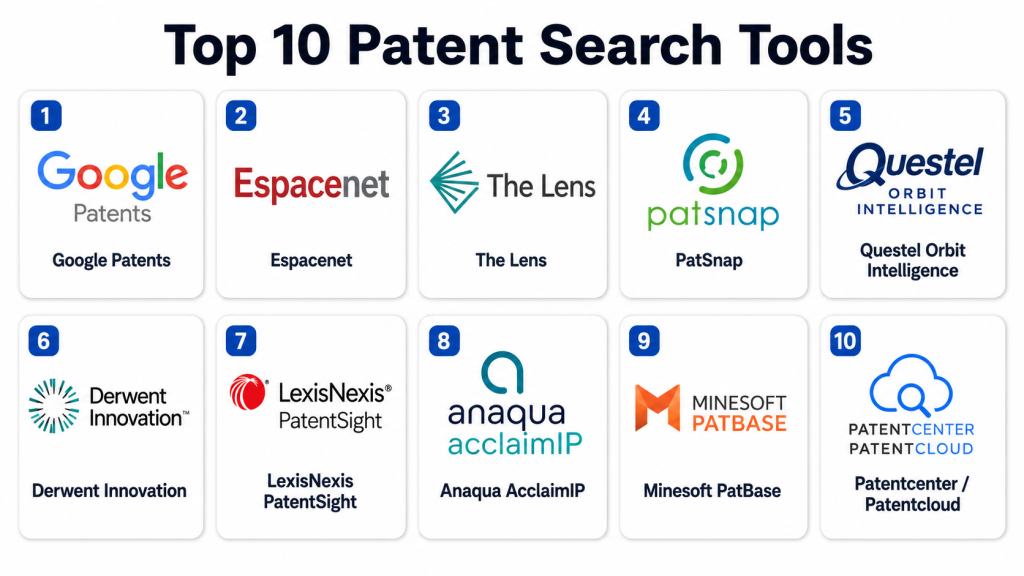
Top 10 Patent Search Tools
#1 — Google Patents
Short description:
Google Patents is a widely used free patent search tool that helps users search patent documents from multiple jurisdictions using keywords, inventors, assignees, classifications, and publication details. It is useful for inventors, students, startups, researchers, and professionals who need a quick and accessible starting point for patent research. The platform is easy to use and supports broad discovery, but it may not replace professional-grade patent analytics tools for complex legal work. It is best for early-stage prior art exploration, basic patent lookup, and general patent research.
Key Features
- Free patent search interface
- Keyword and phrase-based search
- Inventor, assignee, and classification filters
- Patent family and citation visibility
- Machine translation support for many documents
- Simple access to patent documents and drawings
- Useful for quick prior art exploration
Pros
- Easy to use and accessible for beginners
- Good starting point for free patent research
- Useful for quick invention and competitor checks
Cons
- Not ideal as the only tool for high-risk legal research
- Advanced analytics and workflow features are limited
- Professional reporting and collaboration options are basic
Platforms / Deployment
Web / Cloud
Security & Compliance
Not publicly stated for patent-specific professional confidentiality workflows. Users should avoid entering highly sensitive invention strategy into public search tools without internal review.
SOC 2, ISO 27001, GDPR, HIPAA: Not publicly stated for this specific use case.
Integrations & Ecosystem
Google Patents is mainly a public search tool rather than a full enterprise IP workflow platform.
- Web search workflows
- Patent document lookup
- Manual research workflows
- Export or citation workflows
- Public patent research
- Early-stage innovation research
Support & Community
Support is mainly self-service. Users rely on help content, public documentation, and general web search skills rather than dedicated professional patent research support.
#2 — Espacenet
Short description:
Espacenet is a free patent search platform offered for searching patent documents from global patent collections. It is widely used by inventors, researchers, students, IP professionals, and businesses for patent discovery and prior art research. The platform is useful for reviewing patent bibliographic data, descriptions, claims, drawings, legal status indicators, and patent families. It is best suited for users who need free access to structured patent search and international patent data.
Key Features
- Free access to large patent document collections
- Patent family information
- Legal status indicators
- Classification-based search
- Bibliographic patent data
- Claims, descriptions, drawings, and publication details
- Useful international patent search coverage
Pros
- Strong free patent research resource
- Useful for global patent discovery
- Good for patent family and classification-based review
Cons
- Interface may feel technical for beginners
- Advanced analytics and enterprise workflows are limited
- Legal conclusions still require professional review
Platforms / Deployment
Web / Cloud
Security & Compliance
Not publicly stated for confidential enterprise search workflows. Users should use care when researching sensitive invention ideas on public systems.
SOC 2, ISO 27001, GDPR, HIPAA: Not publicly stated.
Integrations & Ecosystem
Espacenet is mainly used as a public patent search and research environment.
- Patent family review
- Patent classification research
- Prior art search workflows
- Legal status lookup
- Manual reporting
- R&D discovery workflows
Support & Community
Support is mostly public documentation and user guidance. Many IP professionals and patent searchers use it, but it is not positioned like a dedicated enterprise support platform.
#3 — The Lens
Short description:
The Lens is a free and open patent and scholarly search platform that helps users explore patents, patent families, citations, biological sequences, scholarly literature, and innovation data. It is useful for researchers, universities, nonprofits, inventors, and analysts who need patent and research data together. The platform supports patent landscape discovery, citation review, and technology research. It is best suited for users who want an accessible research environment that connects patents with academic and scientific knowledge.
Key Features
- Patent and scholarly search
- Patent family and citation analysis
- Biological sequence search support
- Open research and innovation data
- Filtering by applicants, inventors, jurisdictions, and classifications
- Saved search and analysis support
- Useful for research-driven patent discovery
Pros
- Strong for combining patent and scholarly research
- Useful for academic, scientific, and nonprofit research
- Free access makes it practical for early-stage users
Cons
- May not replace paid enterprise IP intelligence platforms
- Some workflows may require learning curve
- Advanced legal workflow features are limited
Platforms / Deployment
Web / Cloud
Security & Compliance
Not publicly stated for enterprise confidential IP workflows. Users should avoid relying on public tools alone for sensitive legal or commercial strategy.
SOC 2, ISO 27001, GDPR, HIPAA: Not publicly stated.
Integrations & Ecosystem
The Lens supports research workflows where patents and scientific publications need to be explored together.
- Patent search
- Scholarly literature search
- Citation analysis
- Biological sequence research
- Research reporting
- Innovation landscape analysis
Support & Community
Support is mostly self-service and community-oriented. Researchers, academics, and analysts commonly use the platform for open innovation discovery.
#4 — PatSnap
Short description:
PatSnap is an innovation intelligence and patent analytics platform used by R&D, IP, legal, and strategy teams to search patents, analyze technology trends, monitor competitors, and support innovation decisions. It combines patent data, analytics, AI-assisted search, landscape mapping, and portfolio insights. The platform is best suited for enterprises, research-led organizations, and IP teams that need more than basic patent lookup. It is especially useful when patent search must support product strategy, competitive intelligence, and R&D investment decisions.
Key Features
- Patent search and analytics
- AI-assisted discovery and insights
- Technology landscape analysis
- Competitor and portfolio monitoring
- Patent family and citation analysis
- Dashboards and reporting tools
- Innovation intelligence workflows
Pros
- Strong fit for R&D and IP strategy teams
- Useful for patent landscapes and competitor intelligence
- Offers more advanced analytics than free patent tools
Cons
- May be too costly or advanced for casual users
- Requires training to use deeper analytics effectively
- Pricing is not publicly stated
Platforms / Deployment
Web / Cloud
Security & Compliance
Security details should be confirmed directly with the vendor. Buyers should ask about SSO, MFA, RBAC, encryption, audit logs, data privacy, and compliance documentation.
SOC 2, ISO 27001, GDPR, HIPAA: Not publicly stated.
Integrations & Ecosystem
PatSnap fits innovation and IP workflows where patent data needs to support business, R&D, and legal decisions.
- IP management workflows
- R&D research systems
- Competitive intelligence workflows
- Portfolio analysis
- Reporting and dashboard tools
- Export and collaboration workflows
Support & Community
PatSnap provides vendor support, onboarding, training, and customer success resources. Support depth depends on package, team size, and use case complexity.
#5 — Questel Orbit Intelligence
Short description:
Questel Orbit Intelligence is a professional patent search and IP intelligence platform used by patent professionals, law firms, R&D teams, and corporate IP departments. It supports patent search, analysis, monitoring, landscaping, legal status review, and portfolio intelligence. The platform is best suited for users who need deep patent data, advanced search capabilities, and professional-grade IP workflows. It is especially useful for prior art research, competitive monitoring, and patent portfolio strategy.
Key Features
- Advanced patent search
- Patent analytics and landscapes
- Patent family and legal status review
- Monitoring and alerting workflows
- Citation and classification analysis
- Portfolio intelligence support
- Professional reporting and export tools
Pros
- Strong fit for professional IP teams
- Useful for deep patent research and monitoring
- Good for portfolio and landscape analysis
Cons
- May have a learning curve for new users
- More advanced than casual patent search needs
- Pricing is not publicly stated
Platforms / Deployment
Web / Cloud
Security & Compliance
Security details should be confirmed directly with the vendor. Buyers should ask about SSO, MFA, RBAC, encryption, audit trails, data protection, and compliance documentation.
SOC 2, ISO 27001, GDPR, HIPAA: Not publicly stated.
Integrations & Ecosystem
Questel Orbit Intelligence works well in professional IP workflows where search, monitoring, analytics, and portfolio management need to connect.
- IP management systems
- Patent monitoring workflows
- Reporting and export tools
- Portfolio analysis
- Legal research workflows
- R&D intelligence systems
Support & Community
Questel provides professional support, training, onboarding, and IP research assistance. Support is suitable for patent professionals and enterprise IP teams that need guided usage.
#6 — Derwent Innovation
Short description:
Derwent Innovation is a professional patent research and analytics platform designed for IP professionals, R&D teams, patent searchers, and enterprise innovation teams. It supports advanced patent searching, curated patent data, analytics, citation review, and technology landscape analysis. The platform is especially useful for organizations that need reliable patent intelligence for prior art research, freedom-to-operate studies, competitive monitoring, and portfolio decisions. It is best suited for serious patent research teams that require professional-grade content and analytics.
Key Features
- Professional patent search
- Curated patent data and indexing
- Patent analytics and visualizations
- Citation and family analysis
- Prior art and freedom-to-operate workflows
- Technology landscape analysis
- Monitoring and reporting tools
Pros
- Strong fit for professional patent research
- Useful for high-quality patent intelligence workflows
- Supports complex IP and R&D research needs
Cons
- May be expensive for small teams
- Requires patent search expertise for best results
- Pricing is not publicly stated
Platforms / Deployment
Web / Cloud
Security & Compliance
Security details should be verified directly with the vendor. Buyers should review SSO, MFA, RBAC, encryption, audit logs, data protection, and compliance documentation.
SOC 2, ISO 27001, GDPR, HIPAA: Not publicly stated.
Integrations & Ecosystem
Derwent Innovation supports enterprise IP research and analytics environments.
- IP management systems
- Research intelligence workflows
- Citation analysis tools
- Portfolio reporting
- Patent monitoring workflows
- Export and collaboration workflows
Support & Community
Support is vendor-led and professional-user focused. Training, onboarding, and search expertise are important for teams using advanced patent search and analytics functions.
#7 — LexisNexis PatentSight
Short description:
LexisNexis PatentSight is a patent analytics platform focused on portfolio intelligence, patent valuation, competitive benchmarking, and strategic IP insights. It is not only a patent search tool but also a decision-support platform for understanding patent strength and business relevance. It is especially useful for corporate IP teams, strategy leaders, innovation teams, and executives who need portfolio-level intelligence. The platform is best suited for organizations that want to connect patent data with competitive and business strategy.
Key Features
- Patent portfolio analytics
- Competitive benchmarking
- Patent quality and value indicators
- Technology trend analysis
- Patent family and ownership insights
- Executive-level IP dashboards
- Strategic IP decision support
Pros
- Strong for portfolio strategy and benchmarking
- Useful for executive IP and innovation decisions
- Helps compare patent strength across companies and technologies
Cons
- Less focused on basic beginner patent search
- May require IP strategy knowledge to use effectively
- Pricing is not publicly stated
Platforms / Deployment
Web / Cloud
Security & Compliance
Security details should be confirmed directly with the vendor. Buyers should ask about SSO, MFA, RBAC, encryption, data privacy, audit logs, and compliance documentation.
SOC 2, ISO 27001, GDPR, HIPAA: Not publicly stated.
Integrations & Ecosystem
PatentSight fits enterprise IP strategy workflows where patent data must support portfolio and competitive decisions.
- IP portfolio systems
- Competitive intelligence workflows
- Executive reporting
- Innovation strategy workflows
- M&A and licensing analysis
- Patent landscape reporting
Support & Community
LexisNexis provides professional support, training, documentation, and IP analytics expertise. Support is usually oriented toward professional and enterprise users.
#8 — Anaqua AcclaimIP
Short description:
Anaqua AcclaimIP is a patent search and analytics platform designed to help users search patent documents, review patent families, analyze citations, monitor competitors, and generate patent insights. It is suitable for IP professionals, law firms, corporate patent teams, and research organizations. The platform supports professional patent searching while also offering analytics and reporting features. It is best for teams that need a practical patent research tool connected with broader IP management needs.
Key Features
- Patent search and analysis
- Patent family review
- Citation analysis
- Competitor monitoring
- Search history and saved projects
- Reporting and export tools
- Patent portfolio insight support
Pros
- Practical patent search and analytics platform
- Useful for law firms and corporate IP teams
- Good fit for patent monitoring and research workflows
Cons
- May require patent search knowledge for best results
- Advanced enterprise needs should be validated in demo
- Pricing is not publicly stated
Platforms / Deployment
Web / Cloud
Security & Compliance
Security information should be confirmed directly with the vendor. Buyers should ask about SSO, MFA, RBAC, encryption, audit logs, data protection, and compliance documentation.
SOC 2, ISO 27001, GDPR, HIPAA: Not publicly stated.
Integrations & Ecosystem
AcclaimIP fits IP workflows where search, analytics, and portfolio review need to work together.
- IP management systems
- Patent monitoring workflows
- Citation review
- Competitor tracking
- Export and reporting tools
- Legal research workflows
Support & Community
Anaqua provides vendor support, training, onboarding, and IP management assistance. Support depth depends on package, user needs, and enterprise requirements.
#9 — Minesoft PatBase
Short description:
Minesoft PatBase is a professional patent search database used by patent information specialists, IP professionals, law firms, and corporate research teams. It supports advanced patent search, patent family analysis, legal status review, citation analysis, and patent monitoring. PatBase is especially useful for experienced searchers who need broad patent coverage and powerful search commands. It is best suited for professional IP teams conducting prior art, invalidity, freedom-to-operate, and landscape searches.
Key Features
- Advanced patent database search
- Patent family analysis
- Legal status information
- Citation and classification search
- Patent monitoring and alerts
- Export and reporting tools
- Professional search syntax support
Pros
- Strong fit for experienced patent searchers
- Useful for complex prior art and FTO searches
- Good patent family and database research capabilities
Cons
- Learning curve for non-specialist users
- May be more powerful than casual users need
- Pricing is not publicly stated
Platforms / Deployment
Web / Cloud
Security & Compliance
Security details should be validated directly with the vendor. Buyers should ask about user access controls, encryption, audit logs, data protection, and compliance documentation.
SOC 2, ISO 27001, GDPR, HIPAA: Not publicly stated.
Integrations & Ecosystem
PatBase supports professional patent research environments and structured IP workflows.
- Patent search workflows
- Legal status review
- Patent family analysis
- Monitoring and alerting
- Export and reporting
- IP research documentation
Support & Community
Minesoft provides support, training, documentation, and search assistance for professional users. Support is especially helpful for advanced searchers and enterprise IP teams.
#10 — Patentcenter / Patentcloud
Short description:
Patentcenter / Patentcloud is a patent intelligence platform focused on patent search, analytics, portfolio review, litigation insights, and competitive intelligence. It helps IP professionals and businesses understand patent landscapes, evaluate patent strength, and monitor technology trends. The platform is useful for teams that need patent analytics beyond simple document lookup. It is best suited for corporate IP teams, law firms, innovation teams, and competitive intelligence professionals.
Key Features
- Patent search and analytics
- Portfolio intelligence
- Technology landscape analysis
- Patent litigation and ownership insights
- Competitor monitoring
- Patent value and quality indicators
- Reporting and dashboard features
Pros
- Useful for patent analytics and strategic IP review
- Good fit for portfolio and competitor intelligence
- Helps connect patent data with business decision-making
Cons
- May be more advanced than basic patent lookup needs
- Feature depth should be validated during demo
- Pricing is not publicly stated
Platforms / Deployment
Web / Cloud
Security & Compliance
Security details should be confirmed directly with the vendor. Buyers should request information about SSO, MFA, RBAC, encryption, audit logs, data privacy, and compliance documentation.
SOC 2, ISO 27001, GDPR, HIPAA: Not publicly stated.
Integrations & Ecosystem
Patentcenter / Patentcloud supports IP intelligence workflows where patent search, analytics, and portfolio insights need to connect.
- Patent analytics workflows
- IP portfolio review
- Competitive intelligence systems
- Legal research workflows
- Reporting dashboards
- Export and collaboration tools
Support & Community
Support is vendor-led and generally focused on professional IP, legal, and business users. Buyers should review onboarding, training, documentation, and customer support expectations.
Comparison Table
| Tool Name | Best For | Platform(s) Supported | Deployment | Standout Feature | Public Rating |
|---|---|---|---|---|---|
| Google Patents | Free beginner patent search | Web | Cloud | Simple public patent search and discovery | N/A |
| Espacenet | Free international patent research | Web | Cloud | Patent family and global patent document search | N/A |
| The Lens | Patent and scholarly research | Web | Cloud | Open patent and academic research discovery | N/A |
| PatSnap | Innovation intelligence and patent analytics | Web | Cloud | Patent landscapes and R&D intelligence | N/A |
| Questel Orbit Intelligence | Professional patent search and monitoring | Web | Cloud | Advanced IP search and patent analytics | N/A |
| Derwent Innovation | Enterprise patent research | Web | Cloud | Curated patent data and professional analytics | N/A |
| LexisNexis PatentSight | Patent portfolio intelligence | Web | Cloud | Patent benchmarking and strategic portfolio insights | N/A |
| Anaqua AcclaimIP | Practical patent search and analytics | Web | Cloud | Patent monitoring and portfolio research | N/A |
| Minesoft PatBase | Professional patent database search | Web | Cloud | Advanced patent family and prior art search | N/A |
| Patentcenter / Patentcloud | Patent intelligence and competitive analytics | Web | Cloud | Portfolio, landscape, and litigation intelligence | N/A |
Evaluation & Scoring of Patent Search Tools
| Tool Name | Core (25%) | Ease (15%) | Integrations (15%) | Security (10%) | Performance (10%) | Support (10%) | Value (15%) | Weighted Total (0–10) |
|---|---|---|---|---|---|---|---|---|
| Google Patents | 7 | 10 | 5 | 6 | 8 | 5 | 10 | 7.35 |
| Espacenet | 8 | 7 | 5 | 6 | 8 | 6 | 10 | 7.25 |
| The Lens | 8 | 8 | 6 | 6 | 8 | 6 | 10 | 7.55 |
| PatSnap | 9 | 8 | 8 | 7 | 8 | 8 | 7 | 8.10 |
| Questel Orbit Intelligence | 9 | 7 | 8 | 7 | 8 | 9 | 7 | 7.95 |
| Derwent Innovation | 9 | 7 | 8 | 7 | 9 | 9 | 7 | 8.05 |
| LexisNexis PatentSight | 8 | 8 | 7 | 7 | 8 | 8 | 7 | 7.65 |
| Anaqua AcclaimIP | 8 | 8 | 7 | 7 | 8 | 8 | 8 | 7.80 |
| Minesoft PatBase | 9 | 6 | 7 | 7 | 8 | 8 | 7 | 7.60 |
| Patentcenter / Patentcloud | 8 | 8 | 7 | 7 | 8 | 7 | 7 | 7.55 |
These scores are comparative and should be used as a shortlist guide. Free tools score well for accessibility and value, while paid platforms score better for analytics, workflow depth, support, and professional research capabilities. Patent attorneys and enterprise IP teams should prioritize coverage, legal status accuracy, advanced search, and reporting. Startups and inventors may begin with free tools before moving to paid platforms for higher-risk decisions.
Which Patent Search Tool Is Right for You?
Solo / Freelancer
Solo inventors, freelance researchers, students, and independent patent searchers may start with Google Patents, Espacenet, and The Lens. These tools are accessible, free, and useful for early-stage discovery.
However, if the work involves professional prior art, invalidity, or freedom-to-operate decisions, a paid platform such as PatBase, Orbit Intelligence, Derwent Innovation, or AcclaimIP may be more suitable. For legal conclusions, software should support research but not replace professional judgment.
SMB
Small and medium businesses need practical patent visibility without overbuying. Startups and growing product companies can use free tools for early discovery, then move to PatSnap, AcclaimIP, Orbit Intelligence, or Patentcloud when patent strategy becomes more important.
SMBs should focus on patent family views, competitor monitoring, alerts, exportable reports, and easy collaboration. The goal is to understand the patent landscape before spending heavily on R&D, filing, or product launch.
Mid-Market
Mid-market companies usually need stronger patent monitoring, landscape analysis, portfolio review, and competitor intelligence. PatSnap, Questel Orbit Intelligence, Anaqua AcclaimIP, PatentSight, Derwent Innovation, and Patentcloud can be strong options.
This segment should prioritize tools that support both IP teams and business users. Patent data becomes more valuable when R&D, product, strategy, and legal teams can understand and act on it together.
Enterprise
Large enterprises need professional-grade search, global coverage, patent family intelligence, legal status data, analytics dashboards, portfolio benchmarking, and strong support. Derwent Innovation, Questel Orbit Intelligence, PatentSight, PatSnap, PatBase, and AcclaimIP are stronger candidates for enterprise use.
Enterprise buyers should evaluate advanced search syntax, AI search, classification coverage, legal status reliability, patent family grouping, export options, API availability, user permissions, and support for large portfolios.
Budget vs Premium
Budget-conscious users should begin with Google Patents, Espacenet, and The Lens. These tools are valuable for early research, education, and basic prior art discovery.
Premium buyers should invest in professional tools when patent risk, filing strategy, competitive intelligence, invalidity research, or portfolio value matters. Paid tools can save time, improve coverage, support reporting, and reduce research blind spots.
Feature Depth vs Ease of Use
Free tools are easier to access but may lack deep workflow features. Professional tools offer stronger analytics, monitoring, reporting, and search precision, but they may require training.
For ease of use, Google Patents, The Lens, PatSnap, and AcclaimIP can be approachable. For deeper professional search, Orbit Intelligence, Derwent Innovation, PatBase, and PatentSight may be more suitable.
Integrations & Scalability
Patent search tools should support exports, saved searches, alerts, project folders, reporting, collaboration, and possible integration with IP management or portfolio systems. Enterprise users should ask about API access, bulk exports, data refresh frequency, and user role management.
Scalability matters when teams search across many technologies, jurisdictions, competitors, and patent families. Large IP teams should prioritize workflow governance, search history, shared annotations, and reliable portfolio analytics.
Security & Compliance Needs
Patent search activity can reveal sensitive invention ideas, R&D direction, product strategy, filing plans, and competitive priorities. Security is especially important for law firms, corporate IP teams, and early-stage invention research.
Buyers should ask vendors about SSO, MFA, RBAC, encryption, audit logs, access controls, data handling, confidentiality practices, API security, and incident response. If certifications are not publicly stated, request official documentation before procurement.
Frequently Asked Questions
1. What is a patent search tool?
A patent search tool is software that helps users find patent documents, prior art, patent families, inventors, assignees, classifications, legal status, citations, and technology trends. It helps users understand whether similar inventions already exist.
2. Why is patent search important?
Patent search is important because it helps reduce the risk of filing weak patents, missing prior art, infringing existing patents, or investing in technology that is already protected. It also helps teams understand competitor innovation.
3. Are free patent search tools enough?
Free tools are useful for early research and basic discovery, but they may not be enough for high-risk legal decisions. Professional patent searches often require advanced databases, legal status review, expert search strategy, and careful analysis.
4. What is prior art search?
Prior art search is the process of finding existing patents, publications, products, or public disclosures that may affect whether an invention is new or patentable. It is a key step before filing a patent application.
5. What is freedom-to-operate search?
Freedom-to-operate search helps determine whether a product or process may infringe active patents in a target market. It is different from basic patentability search because it focuses on legal risk in specific jurisdictions.
6. How much do patent search tools cost?
Pricing varies widely. Some tools are free, while professional platforms use custom pricing based on users, features, data access, analytics, support, and enterprise needs. Many paid vendors do not publish fixed pricing.
7. What features should I compare before choosing a patent search tool?
Important features include database coverage, search accuracy, semantic search, classification filters, patent family views, legal status, citation analysis, analytics dashboards, export options, alerts, collaboration tools, and support quality.
8. Can AI replace a patent search professional?
AI can help speed up discovery, identify similar concepts, summarize results, and improve search coverage. However, patent search still requires human judgment, legal understanding, technical interpretation, and careful review.
9. What mistakes should users avoid during patent search?
Common mistakes include relying only on keywords, ignoring patent classifications, missing foreign-language patents, overlooking patent families, not checking legal status, and treating search results as legal advice without professional review.
10. Are patent search tools secure?
Professional patent tools may offer stronger security features, but buyers should verify details directly. Since patent research may involve confidential invention ideas, teams should review access controls, encryption, user permissions, and data handling policies.
Conclusion
Patent search tools help inventors, companies, researchers, and IP professionals make better decisions by revealing existing inventions, prior art, competitor activity, patent families, legal status, and technology trends. The best tool depends on the user’s goal, budget, search complexity, jurisdiction needs, and risk level. Free tools such as Google Patents, Espacenet, and The Lens are excellent starting points for basic research. Professional platforms such as PatSnap, Questel Orbit Intelligence, Derwent Innovation, PatentSight, AcclaimIP, PatBase, and Patentcloud are better suited for serious IP strategy, portfolio analysis, and professional patent research.
