Upgrade & Secure Your Future with DevOps, SRE, DevSecOps, MLOps!
We spend hours scrolling social media and waste money on things we forget, but won’t spend 30 minutes a day earning certifications that can change our lives.
Master in DevOps, SRE, DevSecOps & MLOps by DevOps School!
Learn from Guru Rajesh Kumar and double your salary in just one year.
Introduction
Sales Force Automation (SFA) Tools are specialized platforms designed to streamline and automate sales processes. In simple terms, these tools help sales teams manage leads, opportunities, accounts, and customer interactions more efficiently. By automating repetitive tasks such as data entry, follow-ups, and reporting, SFA platforms allow sales representatives to focus on selling, improving productivity and conversion rates. In and beyond, these platforms are becoming critical as organizations embrace digital sales workflows, remote selling, and AI-powered insights to maintain competitive advantage.
Real-world use cases include:
- Managing leads and tracking sales pipelines automatically
- Automating follow-up reminders and customer communications
- Integrating with CRM and marketing platforms for unified workflows
- Forecasting sales performance and generating actionable insights
- Monitoring sales team productivity and performance metrics
Key evaluation criteria:
- Lead and opportunity management capabilities
- Automation of sales tasks and workflows
- Integration with CRM, ERP, and marketing tools
- Reporting and analytics for pipeline insights
- Mobile access for remote sales teams
- AI-driven sales insights and predictive analytics
- Ease of use and user experience
- Security and compliance with data privacy standards
- Customization and scalability for growing teams
- Vendor support and training resources
Best for: Sales teams, revenue operations, and organizations with complex sales processes.
Not ideal for: Small businesses with straightforward sales pipelines and minimal automation needs.
Key Trends in Sales Force Automation (SFA) Tools
- AI-driven lead scoring and opportunity prioritization
- Automated email sequencing and follow-ups
- Enhanced predictive analytics for forecasting revenue
- Integration with marketing automation and CRM platforms
- Mobile-first applications for remote selling
- Real-time dashboards for sales performance and KPI tracking
- Cross-channel communication and collaboration tools
- Subscription-based and usage-based pricing models
- Global compliance features for data privacy and security
- Scenario planning for territory and quota management
How We Selected These Tools (Methodology)
- Market adoption and popularity among sales teams
- Feature completeness covering pipeline, leads, and reporting
- Workflow automation and efficiency enhancements
- Integration with existing CRM, ERP, and marketing platforms
- Security posture, compliance, and data privacy adherence
- Analytics, forecasting, and reporting capabilities
- Scalability for small to enterprise-level organizations
- User experience for sales reps, managers, and admins
- Customer support, onboarding, and training availability
- Industry recognition and reviews
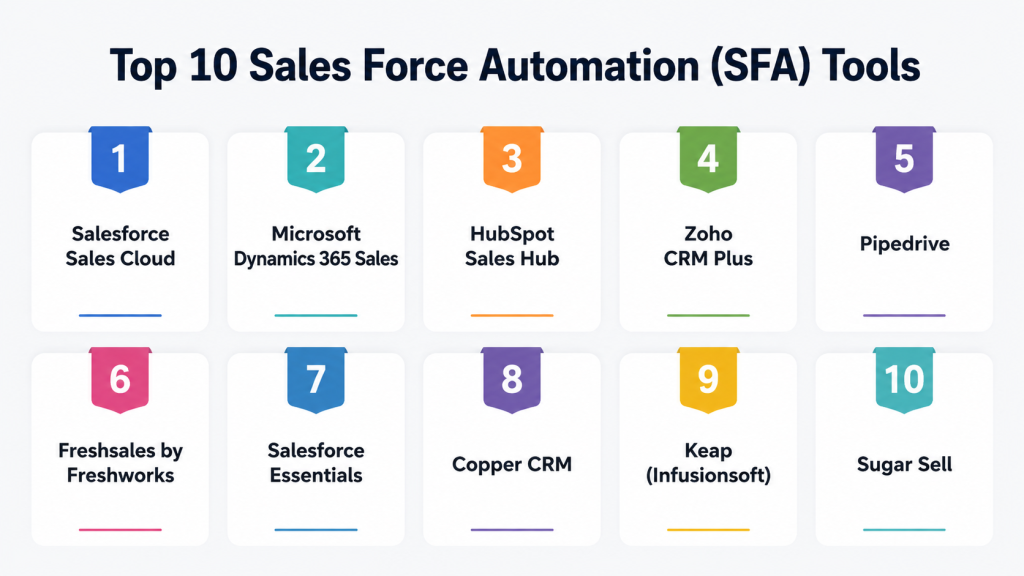
Top 10 Sales Force Automation (SFA) Tools
#1 — Salesforce Sales Cloud
Short description: Salesforce Sales Cloud is a leading SFA platform offering comprehensive tools for managing leads, opportunities, accounts, and contacts. It leverages AI for predictive insights, automation, and workflow optimization, making it suitable for enterprises and global sales teams.
Key Features
- Lead and opportunity management
- AI-driven sales forecasting
- Workflow automation and approvals
- Integration with marketing and service clouds
- Mobile application for field sales
- Real-time analytics dashboards
Pros
- Highly customizable and scalable
- Strong ecosystem and partner integrations
Cons
- Steeper learning curve for new users
- Can be costly for small teams
Platforms / Deployment
- Web / iOS / Android
- Cloud
Security & Compliance
- SOC 2, ISO 27001, GDPR
- MFA, encryption, RBAC
Integrations & Ecosystem
- Marketing Cloud, Service Cloud, CPQ
- ERP systems
- API support for custom integrations
Support & Community
- Extensive documentation and training
- Active user community
#2 — Microsoft Dynamics 365 Sales
Short description: Dynamics 365 Sales helps organizations automate sales processes, manage accounts and leads, and gain predictive insights. Integration with Microsoft ecosystem enhances productivity and collaboration.
Key Features
- Opportunity and lead management
- Predictive sales insights
- Workflow automation
- Integration with Microsoft Teams and Outlook
- AI-driven recommendations
- Customizable dashboards
Pros
- Seamless integration with Microsoft suite
- AI-powered sales guidance
Cons
- May require configuration for complex processes
- Licensing complexity
Platforms / Deployment
- Web / Windows / iOS / Android
- Cloud / Hybrid
Security & Compliance
- SOC 2, ISO 27001
- Encryption, audit logs, MFA
Integrations & Ecosystem
- Microsoft 365, Power BI
- ERP integrations
- API and connectors
Support & Community
- Vendor support and knowledge base
- Active Microsoft partner network
#3 — HubSpot Sales Hub
Short description: HubSpot Sales Hub offers user-friendly SFA with automation, email tracking, and pipeline management. Ideal for SMBs and fast-growing sales teams.
Key Features
- Email and activity tracking
- Lead and deal pipelines
- Automation of tasks and follow-ups
- Real-time reporting
- CRM integration
- Sales sequences and templates
Pros
- Easy to use and quick to deploy
- Cost-effective for small to mid-sized teams
Cons
- Limited advanced forecasting for large enterprises
- Some automation features require premium plans
Platforms / Deployment
- Web / iOS / Android
- Cloud
Security & Compliance
- SOC 2, GDPR
- MFA, encryption
Integrations & Ecosystem
- HubSpot CRM
- Email, calendar, marketing automation tools
- API support for custom integrations
Support & Community
- Extensive online resources
- Active HubSpot community
#4 — Zoho CRM Plus
Short description: Zoho CRM Plus integrates SFA with marketing, analytics, and customer support tools. It helps sales teams automate workflows and track performance in real-time.
Key Features
- Lead, contact, and deal management
- Workflow and process automation
- AI-powered sales predictions
- Analytics and dashboards
- Omnichannel communication tools
- Mobile app for field sales
Pros
- Comprehensive all-in-one platform
- Affordable pricing for SMBs
Cons
- Interface can be overwhelming
- Limited enterprise-level customizations
Platforms / Deployment
- Web / iOS / Android
- Cloud
Security & Compliance
- SOC 2, ISO 27001
- RBAC, encryption
Integrations & Ecosystem
- Zoho ecosystem (CRM, Campaigns, Analytics)
- Third-party marketing tools
- API for custom workflows
Support & Community
- Knowledge base and tutorials
- Active user forums
#5 — Pipedrive
Short description: Pipedrive is a visual SFA platform focused on pipeline management and deal tracking. Designed for sales teams seeking simplicity and efficiency.
Key Features
- Visual sales pipelines
- Automated reminders and follow-ups
- Deal and activity tracking
- Reporting and analytics
- Email integration
- Mobile app access
Pros
- Intuitive and easy to use
- Quick deployment
Cons
- Lacks advanced enterprise analytics
- Limited AI forecasting
Platforms / Deployment
- Web / iOS / Android
- Cloud
Security & Compliance
- SOC 2
- Encryption, MFA
Integrations & Ecosystem
- Email platforms
- Zapier for automation
- CRM and marketing integrations
Support & Community
- Email and chat support
- Online tutorials and guides
#6 — Freshsales by Freshworks
Short description: Freshsales offers AI-based lead scoring, sales pipeline automation, and activity tracking, suitable for SMBs and mid-sized sales teams.
Key Features
- Lead scoring and prioritization
- Workflow automation
- Sales forecasting
- Reporting dashboards
- Email and call tracking
- Mobile app for field sales
Pros
- AI-driven recommendations
- Easy to use and configure
Cons
- Some advanced features require higher-tier plans
- Limited integrations for large enterprises
Platforms / Deployment
- Web / iOS / Android
- Cloud
Security & Compliance
- SOC 2
- Encryption and MFA
Integrations & Ecosystem
- Freshworks suite
- Email platforms, Zapier
- API for custom connections
Support & Community
- Online documentation and support
- Community forums
#7 — Salesforce Essentials
Short description: Salesforce Essentials is a lightweight version of Sales Cloud designed for small teams. Provides basic SFA features with simplified setup.
Key Features
- Contact and lead management
- Opportunity tracking
- Email integration and automation
- Basic reporting
- Mobile access
Pros
- Affordable for small teams
- Fast onboarding
Cons
- Limited advanced features
- Not suitable for large enterprises
Platforms / Deployment
- Web / iOS / Android
- Cloud
Security & Compliance
- SOC 2
- Encryption
Integrations & Ecosystem
- Salesforce ecosystem
- Third-party apps via AppExchange
- API support
Support & Community
- Online support
- Active community
#8 — Copper CRM
Short description: Copper CRM integrates closely with Google Workspace, enabling SFA and workflow automation for teams relying on Gmail and Google tools.
Key Features
- Lead and deal management
- Workflow automation
- Email tracking and sequences
- Reporting and dashboards
- Mobile app
Pros
- Deep Google Workspace integration
- Simple user interface
Cons
- Limited enterprise-level customizations
- Advanced reporting features require higher plans
Platforms / Deployment
- Web / iOS / Android
- Cloud
Security & Compliance
- SOC 2
- Encryption, RBAC
Integrations & Ecosystem
- Google Workspace apps
- Zapier and third-party tools
- API support
Support & Community
- Email support and documentation
- User community
#9 — Keap (Infusionsoft)
Short description: Keap offers CRM with SFA capabilities, including contact management, sales pipeline automation, and marketing integrations, targeted at SMBs.
Key Features
- Lead management and scoring
- Pipeline automation
- Email marketing integration
- Reporting and analytics
- Mobile access
Pros
- Combines sales and marketing automation
- Affordable for small businesses
Cons
- Limited advanced analytics
- Setup can be complex
Platforms / Deployment
- Web / iOS / Android
- Cloud
Security & Compliance
- SOC 2
- Encryption
Integrations & Ecosystem
- Email marketing tools
- Zapier for workflows
- API for custom integration
Support & Community
- Vendor support
- Tutorials and guides
#10 — Sugar Sell
Short description: Sugar Sell provides SFA features, pipeline management, and analytics, designed for mid-market and enterprise sales teams.
Key Features
- Lead and opportunity tracking
- Workflow automation
- Sales forecasting
- Reporting dashboards
- Integration with CRM and ERP
- Mobile access
Pros
- Flexible and customizable
- Enterprise-grade analytics
Cons
- Learning curve for new users
- Premium pricing
Platforms / Deployment
- Web / iOS / Android
- Cloud
Security & Compliance
- SOC 2
- Encryption, MFA
Integrations & Ecosystem
- ERP and CRM systems
- API access
- Third-party integrations
Support & Community
- Vendor support
- Knowledge base and community
Comparison Table (Top 10)
| Tool Name | Best For | Platform(s) Supported | Deployment | Standout Feature | Public Rating |
|---|---|---|---|---|---|
| Salesforce Sales Cloud | Enterprise | Web/iOS/Android | Cloud | AI-driven insights | N/A |
| Microsoft Dynamics 365 Sales | Enterprise | Web/Windows/iOS/Android | Cloud/Hybrid | Microsoft ecosystem integration | N/A |
| HubSpot Sales Hub | SMB | Web/iOS/Android | Cloud | Ease of use and quick deployment | N/A |
| Zoho CRM Plus | SMB/Mid-market | Web/iOS/Android | Cloud | All-in-one platform | N/A |
| Pipedrive | SMB | Web/iOS/Android | Cloud | Visual sales pipelines | N/A |
| Freshsales | SMB/Mid-market | Web/iOS/Android | Cloud | AI-powered lead scoring | N/A |
| Salesforce Essentials | SMB | Web/iOS/Android | Cloud | Simplified setup | N/A |
| Copper CRM | SMB | Web/iOS/Android | Cloud | Google Workspace integration | N/A |
| Keap | SMB | Web/iOS/Android | Cloud | Sales + marketing automation | N/A |
| Sugar Sell | Mid-market | Web/iOS/Android | Cloud | Enterprise-grade analytics | N/A |
Evaluation & Scoring of Sales Force Automation Tools
| Tool Name | Core (25%) | Ease (15%) | Integrations (15%) | Security (10%) | Performance (10%) | Support (10%) | Value (15%) | Weighted Total |
|---|---|---|---|---|---|---|---|---|
| Salesforce Sales Cloud | 9 | 8 | 9 | 9 | 9 | 8 | 8 | 8.7 |
| Microsoft Dynamics 365 Sales | 9 | 8 | 8 | 9 | 9 | 8 | 8 | 8.4 |
| HubSpot Sales Hub | 8 | 9 | 8 | 8 | 8 | 8 | 8 | 8.1 |
| Zoho CRM Plus | 8 | 8 | 8 | 8 | 8 | 8 | 8 | 8.0 |
| Pipedrive | 8 | 9 | 7 | 8 | 8 | 8 | 8 | 7.9 |
| Freshsales | 8 | 8 | 8 | 8 | 8 | 8 | 8 | 8.0 |
| Salesforce Essentials | 7 | 9 | 7 | 8 | 8 | 8 | 8 | 7.8 |
| Copper CRM | 8 | 9 | 7 | 8 | 8 | 8 | 8 | 7.9 |
| Keap | 8 | 8 | 7 | 8 | 8 | 8 | 8 | 7.9 |
| Sugar Sell | 8 | 8 | 8 | 8 | 8 | 8 | 8 | 8.0 |
Interpretation: Higher weighted totals indicate stronger capabilities across automation, integrations, and analytics. Scores are comparative across SMB, mid-market, and enterprise use cases.
Which Sales Force Automation Tool Is Right for You?
Solo / Freelancer
- Not ideal; manual CRM may suffice for single-user pipelines.
SMB
- HubSpot, Pipedrive, Freshsales, Keap, Copper offer ease of use and quick deployment.
Mid-Market
- Zoho CRM Plus, Sugar Sell, Microsoft Dynamics provide automation, analytics, and scalability.
Enterprise
- Salesforce Sales Cloud and Dynamics 365 Sales offer robust integrations, AI insights, and compliance for global teams.
Budget vs Premium
- Budget: HubSpot, Pipedrive, Freshsales, Copper
- Premium: Salesforce, Dynamics 365, Sugar Sell
Feature Depth vs Ease of Use
- Depth: Salesforce, Dynamics 365, Sugar Sell
- Ease: HubSpot, Pipedrive, Freshsales
Integrations & Scalability
- Enterprise tools integrate with CRM, ERP, marketing automation, and analytics platforms.
Security & Compliance Needs
- SOC 2, ISO 27001, encryption, RBAC, and audit logs are standard in enterprise-grade tools.
Frequently Asked Questions (FAQs)
1. How is pricing structured?
Most SFA platforms offer subscription-based pricing, often tiered by user count and feature set.
2. Can SFA automate follow-ups and tasks?
Yes, leading tools automate reminders, emails, and activity logging.
3. Are these tools suitable for global teams?
Enterprise platforms like Salesforce and Dynamics support multi-currency, multi-language, and compliance requirements.
4. How long does implementation take?
SMBs can implement in a few weeks; enterprise rollouts may take several months.
5. Can SFA integrate with CRM and marketing tools?
Yes, integration is core, enabling unified sales and marketing workflows.
6. Are mobile applications available?
Yes, most platforms offer iOS and Android apps for field sales.
7. Can performance be tracked in real-time?
Yes, dashboards and analytics provide live insights into pipeline and revenue metrics.
8. Can AI assist in lead prioritization?
Premium tools leverage AI for lead scoring, opportunity prediction, and sales guidance.
9. Are security standards maintained?
Enterprise-grade SFA platforms comply with SOC 2, ISO 27001, encryption, MFA, and audit logs.
10. Are these tools scalable?
Yes, platforms like Salesforce, Dynamics, and Zoho CRM scale from small teams to global enterprises.
Conclusion
Selecting the right Sales Force Automation tool depends on organization size, complexity, and goals. SMBs benefit from HubSpot, Pipedrive, and Freshsales for simplicity and affordability, while mid-market and enterprise organizations gain value from Zoho, Sugar Sell, Salesforce, and Dynamics 365 for automation, analytics, and global compliance. Organizations should shortlist platforms, pilot implementations, and validate usability, integrations, and security before full deployment.
