Upgrade & Secure Your Future with DevOps, SRE, DevSecOps, MLOps!
We spend hours scrolling social media and waste money on things we forget, but won’t spend 30 minutes a day earning certifications that can change our lives.
Master in DevOps, SRE, DevSecOps & MLOps by DevOps School!
Learn from Guru Rajesh Kumar and double your salary in just one year.
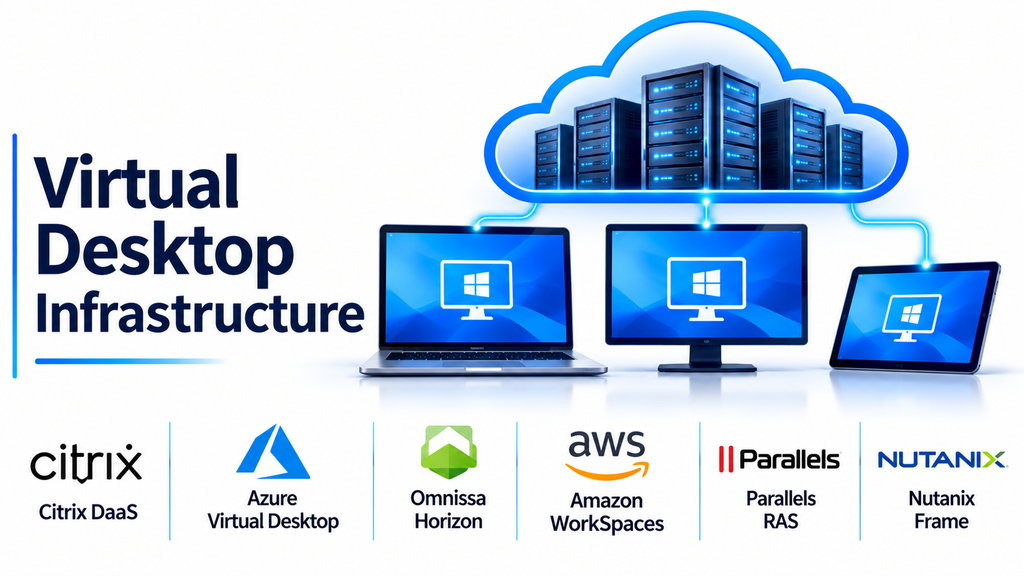
Virtual Desktop Infrastructure (VDI) is a technology that allows organizations to host desktop environments on centralized servers and deliver them to users through a network connection. Instead of depending entirely on individual physical computers, employees can access their assigned desktop environments from compatible devices and locations.
VDI has become an important part of modern IT infrastructure because businesses need flexible working arrangements, centralized administration, stronger data control, and efficient resource utilization.
From large enterprises and financial institutions to educational organizations and healthcare providers, VDI can help simplify desktop deployment while providing users with consistent access to applications and business resources.
What Is Virtual Desktop Infrastructure?
Virtual Desktop Infrastructure is a desktop virtualization model in which desktop operating systems run as virtual machines on centralized infrastructure.
Users connect to these virtual desktops through client applications, web browsers, or compatible endpoint devices.
The processing and storage can remain within a data center or cloud environment, while the user’s device primarily handles displaying the desktop and transmitting keyboard and mouse input.
A typical VDI environment includes:
- Virtualization infrastructure: Hosts the virtual machines that run desktop operating systems.
- Connection broker: Directs users to their assigned or available virtual desktops.
- Desktop images: Provide standardized operating systems and application configurations.
- User profiles: Maintain personal settings and preferences.
- Storage systems: Store operating systems, applications, user data, and virtual machine files.
- Endpoint devices: Allow users to connect through computers, laptops, thin clients, or supported mobile devices.
- Management tools: Help administrators provision, monitor, update, and maintain virtual desktops.
VDI can be deployed using persistent or non-persistent desktops.
Persistent desktops maintain an individual environment for each user, while non-persistent desktops can be recreated or reset from standardized images after a session.
Leading Virtual Desktop Infrastructure Platforms
Several technology providers offer platforms for deploying, managing, and delivering virtual desktop environments. Their deployment models and management responsibilities vary.
Citrix DaaS: Enterprise Desktop and Application Delivery
Citrix DaaS provides cloud-managed capabilities for delivering virtual desktops and applications to users.
It is designed for organizations that need controlled access across different devices, locations, and infrastructure environments.
The platform supports centralized management and policies for desktop and application delivery. It is particularly relevant to businesses operating hybrid environments that combine on-premises infrastructure with public cloud resources.
Key capabilities:
- Virtual desktop delivery.
- Application virtualization and delivery.
- Centralized access management.
- User session management.
- Policy-based administration.
- Hybrid and multi-cloud deployment options.
Best suited for: Large enterprises, organizations with complex application environments, and IT departments managing distributed workforces.
Consideration: Implementation can require careful planning around licensing, networking, identity, infrastructure, and ongoing administration.
Microsoft Azure Virtual Desktop: Cloud-Based Windows Desktops
Azure Virtual Desktop is Microsoft’s cloud-based desktop and application virtualization service.
It allows organizations to deliver Windows desktops and applications through Azure infrastructure.
The platform supports pooled and personal desktop environments, as well as multi-session Windows deployments where supported.
Its integration with Microsoft Azure and other Microsoft services makes it particularly relevant to organizations already operating within the Microsoft ecosystem.
Key capabilities:
- Cloud-hosted virtual desktops.
- Pooled and personal desktop configurations.
- Remote application delivery.
- Windows multi-session support.
- Centralized resource management.
- Integration with Microsoft identity and security services.
Best suited for: Microsoft-focused businesses, enterprises using Azure, and organizations supporting remote or hybrid employees.
Consideration: Organizations remain responsible for important design and operational areas, including session-host management, application deployment, identity, capacity, and cloud costs.
Omnissa Horizon: Enterprise Virtual Desktop Management
Omnissa Horizon, formerly associated with VMware’s end-user computing portfolio, is an enterprise platform for delivering and managing virtual desktops and applications.
It supports organizations that require centralized desktop access across data centers, private cloud environments, and supported public cloud deployments.
The platform is relevant to enterprises with established virtualization infrastructure and complex desktop management requirements.
Key capabilities:
- Virtual desktop delivery.
- Application access management.
- Centralized desktop administration.
- Support for hybrid infrastructure.
- Enterprise user access policies.
- Integration with associated desktop management technologies.
Best suited for: Large organizations, enterprises with existing virtualization investments, and IT departments managing hybrid desktop environments.
Consideration: Review the current product editions, licensing arrangements, infrastructure compatibility, and migration requirements.
Amazon WorkSpaces: Managed Cloud Desktop Infrastructure
Amazon WorkSpaces is an AWS service that provides managed virtual desktops.
It allows organizations to provision desktop environments in the cloud and make them available to users through supported client applications and access methods.
Businesses can select desktop configurations according to workload requirements and manage their environments through AWS services.
This model can reduce the need to operate all desktop infrastructure within an organization’s own data center.
Key capabilities:
- Managed cloud desktop provisioning.
- Windows and Linux desktop options, depending on service.
- Centralized administration.
- Flexible desktop configurations.
- Integration with AWS infrastructure.
- Remote access through supported devices.
Best suited for: AWS-focused organizations, distributed businesses, temporary workforce environments, and companies looking for managed cloud desktops.
Consideration: Evaluate regional availability, storage, compute consumption, licensing, and ongoing AWS costs.
Parallels RAS: Flexible Desktop and Application Publishing
Parallels RAS is a remote application and desktop delivery platform that supports virtual desktop and Remote Desktop Services environments.
It provides organizations with a way to publish applications and desktops to users without requiring every employee to work directly on a physical office computer.
Its flexibility across different deployment environments makes it relevant to organizations that want to combine traditional remote desktop infrastructure with virtualization and cloud resources.
Key capabilities:
- Virtual desktop delivery.
- Application publishing.
- Centralized administration.
- Remote access management.
- Hybrid deployment support.
- Integration with supported virtualization platforms.
Best suited for: Small and medium-sized businesses, managed service providers, and enterprises with mixed application and desktop delivery requirements.
Consideration: Determine whether the organization needs full VDI, session-based desktops, application publishing, or a combination of these approaches.
Nutanix Frame: Cloud-Native Desktop and Application Delivery
Nutanix Frame provides desktop and application delivery capabilities through cloud and supported infrastructure environments.
It is designed to simplify access to virtualized applications and desktop environments through supported client access methods, including browser-based experiences.
Organizations can evaluate Frame when they want centralized desktop delivery without building every component of the environment from scratch.
Key capabilities:
- Cloud-delivered desktops.
- Application virtualization.
- Centralized management.
- Browser-based access options.
- Integration with supported cloud and infrastructure environments.
- Flexible desktop deployment models.
Best suited for: Organizations exploring cloud desktop delivery, businesses with distributed users, and teams requiring centralized access to specialized applications.
Consideration: Validate application compatibility, graphics requirements, storage needs, and the supported infrastructure model before deployment.
Comparing Popular VDI Platforms
| Platform | Primary focus | Suitable environment |
|---|---|---|
| Citrix DaaS | Enterprise desktop and application delivery | Complex hybrid environments |
| Azure Virtual Desktop | Cloud-based Windows desktops | Microsoft-focused organizations |
| Omnissa Horizon | Enterprise virtual desktop management | Hybrid and established VDI environments |
| Amazon WorkSpaces | Managed cloud desktops | AWS-based organizations |
| Parallels RAS | Desktop and application publishing | SMB and enterprise environments |
| Nutanix Frame | Cloud-native desktop delivery | Distributed cloud environments |
These platforms are not identical products. Some provide broad desktop management infrastructure, while others focus more heavily on managed cloud desktop delivery.
Persistent vs. Non-Persistent VDI
One of the most important design decisions in a VDI environment is whether users need persistent or non-persistent desktops.
Persistent Virtual Desktops
Persistent desktops provide individual virtual machines that retain user settings, installed applications, and changes between sessions.
They are useful when employees need a personalized environment.
Advantages include:
- Personalized desktop settings.
- Persistent application configurations.
- Greater individual customization.
- Consistent working environments.
However, persistent desktops may require additional storage, maintenance, and lifecycle management.
Non-Persistent Virtual Desktops
Non-persistent desktops are commonly created from standardized desktop images.
After users finish their sessions, the desktop may be reset or recreated according to the organization’s configuration.
Advantages include:
- Easier centralized maintenance.
- Standardized desktop environments.
- Efficient resource management.
- Simplified application updates.
- Reduced configuration differences.
This model can work well for employees who use a consistent set of applications and do not require extensive desktop customization.
The appropriate model depends on user requirements, application behavior, storage design, and operational policies.
Important Features to Evaluate in VDI Software
Selecting a VDI platform requires examining both user experience and infrastructure management capabilities.
Centralized Desktop Management
Administrators should be able to provision desktops, manage desktop images, configure policies, and monitor virtual machine availability from a centralized environment.
This reduces the need to configure every employee’s computer separately.
Security and Access Control
VDI can help organizations centralize sensitive information and reduce reliance on locally stored business data.
Important controls include:
- Multi-factor authentication.
- Role-based access permissions.
- Encrypted connections.
- Session monitoring.
- Endpoint access policies.
- Secure identity integration.
- Data access restrictions.
VDI does not automatically guarantee security. The underlying servers, hypervisors, networks, identities, and storage systems must also be properly protected.
Scalability
Organizations should be able to increase or decrease desktop capacity according to changing workforce requirements.
Cloud-based VDI can provide additional flexibility, while on-premises environments may require infrastructure expansion.
Consider peak login periods, concurrent sessions, application workloads, and expected user growth.
Application Compatibility
A virtual desktop environment is only useful if employees can access the applications required for their jobs.
Test important business applications, peripherals, printing requirements, multimedia workloads, and specialized software before deployment.
Performance and User Experience
VDI performance depends on several factors, including server resources, storage performance, network latency, and desktop configuration.
Users should be able to work with applications without excessive delays or interruptions.
For graphics-intensive workloads, evaluate GPU acceleration and suitable desktop configurations.
Backup and Disaster Recovery
Virtual desktop infrastructure requires appropriate backup and recovery strategies.
Organizations should consider desktop images, user profiles, application configurations, storage systems, and critical business information.
Recovery procedures should be tested to confirm that users can regain access following infrastructure failures.
Common Business Applications of VDI
VDI supports a wide range of organizational requirements.
Remote and hybrid work: Employees can access standardized work environments from home or other approved locations.
Financial services: Financial organizations can centralize access to business applications and sensitive information through controlled desktop environments.
Healthcare: Authorized healthcare personnel can access supported applications while organizations maintain centralized security and administration.
Education: Educational institutions can provide students with consistent access to specialized applications and virtual computer laboratories.
Call centers: Support agents can access standardized desktops and business applications without requiring individually configured physical workstations.
Software development: Developers can access centralized environments with predefined development tools and resources.
Contractor management: Organizations can provide temporary workers with controlled desktop environments without permanently configuring personal devices.
VDI vs. Desktop as a Service (DaaS)
VDI and Desktop as a Service are closely related technologies, but their infrastructure responsibilities differ.
Traditional VDI generally involves an organization managing the underlying virtualization and desktop infrastructure, although deployment models can vary.
DaaS delivers virtual desktops through a service provider, which manages some or much of the underlying infrastructure.
| Feature | Traditional VDI | DaaS |
|---|---|---|
| Infrastructure | Usually organization-managed | Provider-managed infrastructure |
| Deployment | On-premises or supported cloud environments | Primarily service-based cloud delivery |
| Maintenance | Greater internal responsibility | Shared or provider-led responsibility |
| Scalability | Depends on available infrastructure | Often easier to expand |
| Customization | Can provide extensive infrastructure control | Depends on provider capabilities |
| Cost structure | Infrastructure and operational expenses | Subscription or consumption-based costs |
The choice depends on the organization’s technical resources, security requirements, infrastructure strategy, and cost expectations.
Common Challenges in VDI Implementation
Despite its advantages, VDI requires careful planning.
High initial infrastructure requirements: On-premises deployments may require investment in servers, storage, networking, and virtualization platforms.
Storage performance problems: Poorly configured storage can cause slow desktop startup times and application delays.
Network dependency: Users need reliable connectivity to maintain productive sessions.
Licensing complexity: Operating systems, applications, virtualization software, and cloud services may have separate licensing requirements.
Application compatibility: Some applications may require adjustments before working properly in virtual environments.
Resource allocation: Insufficient CPU, memory, or GPU resources can affect user experience.
Management complexity: Large deployments require skilled administrators and well-defined maintenance processes.
A pilot deployment can help organizations identify these issues before rolling out virtual desktops to an entire workforce.
How to Choose the Right VDI Platform
The right VDI platform depends on the organization’s infrastructure, applications, user requirements, and operational capabilities.
Citrix DaaS is worth evaluating for complex enterprise desktop delivery. Azure Virtual Desktop suits organizations already invested in Microsoft Azure. Omnissa Horizon can be relevant to established enterprise virtualization environments, while Amazon WorkSpaces provides managed desktops within AWS.
Parallels RAS is useful for mixed application and desktop delivery, and Nutanix Frame is another option for cloud-oriented desktop environments.
Before selecting a solution, evaluate:
- Number of users and concurrent desktop sessions.
- Required operating systems and applications.
- Persistent or non-persistent desktop requirements.
- Cloud, on-premises, or hybrid deployment preferences.
- Authentication and security policies.
- Storage, CPU, memory, and graphics requirements.
- Backup and disaster recovery capabilities.
- Licensing and total cost of ownership.
Organizations should conduct a pilot using representative employee workloads and realistic network conditions.
Building an Efficient Virtual Desktop Environment
VDI provides organizations with a centralized approach to desktop delivery, administration, and access management.
By hosting desktop environments on managed infrastructure, businesses can simplify endpoint administration and provide employees with consistent access to important applications.
Citrix DaaS, Azure Virtual Desktop, Omnissa Horizon, Amazon WorkSpaces, Parallels RAS, and Nutanix Frame each offer different approaches to virtual desktop delivery.
The most effective implementation is not necessarily the platform with the largest feature set. It is the one that meets business requirements while maintaining reliable performance, manageable infrastructure, appropriate security, and predictable operating costs.
With careful planning, capacity management, and ongoing monitoring, VDI can become a valuable foundation for modern workplace computing.
