Upgrade & Secure Your Future with DevOps, SRE, DevSecOps, MLOps!
We spend hours scrolling social media and waste money on things we forget, but won’t spend 30 minutes a day earning certifications that can change our lives.
Master in DevOps, SRE, DevSecOps & MLOps by DevOps School!
Learn from Guru Rajesh Kumar and double your salary in just one year.
Introduction
Presentation software helps users create slide decks, visual stories, pitch decks, training materials, business reports, product demos, webinars, and classroom content. It combines text, images, charts, videos, animations, templates, and collaboration features into one structured format.
Presentation software matters more now because teams work across offices, remote locations, webinars, client meetings, investor calls, online classes, and sales demos. Modern tools are no longer only about slides. They now include AI design help, brand kits, real-time editing, analytics, video narration, template libraries, and cloud sharing.
Common use cases include:
- Sales and investor pitch decks
- Training and onboarding presentations
- Business reports and strategy decks
- Webinars and online classes
- Product demos and marketing presentations
Buyers should evaluate:
- Ease of use
- Template quality
- AI features
- Collaboration tools
- Export formats
- Brand control
- Security options
- Integrations
- Offline access
- Pricing and scalability
Best for: business teams, founders, marketers, educators, trainers, consultants, sales teams, product teams, agencies, and enterprises that regularly create visual communication.
Not ideal for: users who only need simple documents, static PDFs, or long-form written reports. In those cases, document editors, whiteboards, or publishing tools may be better.
Key Trends in Presentation Software
Real-time collaboration is now expected, especially for remote teams working on sales decks, reports, and training content.
- Brand-controlled templates are more important for companies that want consistent fonts, colors, layouts, and messaging.
- Video-first presentations are growing because teams now share async updates, recorded walkthroughs, webinars, and training modules.
- Interactive storytelling is becoming popular through zoomable canvases, embedded media, polls, and clickable navigation.
- Cloud-based sharing is replacing email attachments for many teams because it improves version control and review workflows.
- Data visualization is more important as teams present dashboards, metrics, financial results, and performance reports.
- Security and access controls matter more for enterprise decks containing financial, product, legal, or customer information.
- Template marketplaces and asset libraries are helping non-designers create professional slides quickly.
- Cross-platform workflows are essential because users work across web, Windows, macOS, iOS, Android, and meeting platforms.
How We Selected These Tools
The tools below were selected using practical buyer-focused criteria:
- Market adoption and recognition among business, education, design, and enterprise users
- Feature completeness for slide creation, storytelling, design, and delivery
- Strength of collaboration and sharing workflows
- Template quality and brand control capabilities
- AI-assisted design and content generation where applicable
- Integration with productivity, design, storage, and meeting tools
- Performance and reliability for real-world presentation work
- Fit across freelancers, SMBs, mid-market teams, and enterprises
- Export options such as PPTX, PDF, video, image, and web sharing
- Value for different user types and pricing expectations
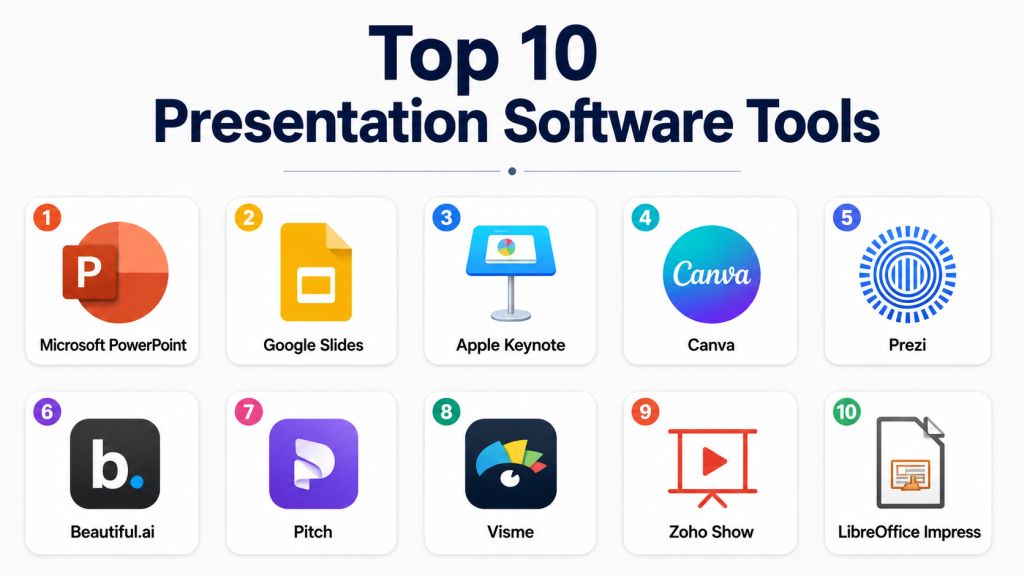
Top 10 Presentation Software Tools
#1 — Microsoft PowerPoint
Short description = Microsoft PowerPoint is one of the most widely used presentation tools for business, education, training, sales, and enterprise communication. It is best for users who need strong formatting control, broad compatibility, offline access, and professional slide workflows.
Key Features
- Advanced slide creation and formatting tools
- Strong support for charts, tables, images, video, and animations
- PPTX compatibility and PDF export
- Speaker notes and presenter view
- Collaboration through Microsoft 365
- AI-assisted features through Microsoft Copilot where available
- Strong template and theme support
Pros
- Very familiar for business and enterprise users
- Excellent file compatibility and offline access
- Strong integration with Microsoft 365 apps
Cons
- Advanced design can still require manual effort
- Collaboration is good but may feel less simple than cloud-first tools
- Some AI and enterprise features depend on plan availability
Platforms / Deployment
Web / Windows / macOS / iOS / Android
Cloud / Desktop / Hybrid
Security & Compliance
Microsoft 365 enterprise plans commonly include MFA, admin controls, encryption, audit logs, and compliance capabilities. Specific features depend on the plan and configuration.
Integrations & Ecosystem
PowerPoint fits deeply into Microsoft-based productivity and enterprise workflows.
- Microsoft Word
- Microsoft Excel
- Microsoft Teams
- OneDrive
- SharePoint
- Microsoft Copilot
Support & Community
Microsoft provides extensive documentation, enterprise support, learning resources, templates, and a very large global user community.
#2 — Google Slides
Short description = Google Slides is a cloud-based presentation tool built for simple slide creation, real-time collaboration, and easy sharing. It is ideal for teams, educators, students, startups, and businesses already using Google Workspace.
Key Features
- Real-time multi-user editing
- Cloud-based sharing and version history
- Simple templates and layouts
- Integration with Google Drive, Docs, Sheets, and Meet
- Commenting and suggestion workflows
- Web publishing and export options
- Gemini-based AI features where available
Pros
- Excellent collaboration experience
- Easy to use and accessible from a browser
- Strong fit for Google Workspace teams
Cons
- Limited advanced design control compared with PowerPoint
- Animation and visual effects are basic
- Template library may feel limited for design-heavy teams
Platforms / Deployment
Web / iOS / Android
Cloud
Security & Compliance
Google Workspace business and enterprise plans commonly include MFA, admin controls, encryption, audit logs, and compliance features. Exact availability depends on the plan.
Integrations & Ecosystem
Google Slides works best inside the Google Workspace ecosystem.
- Google Drive
- Google Docs
- Google Sheets
- Google Meet
- Google Forms
- Google Gemini
Support & Community
Google provides documentation, help resources, workspace support options, and a large user community across education and business.
#3 — Apple Keynote
Short description = Apple Keynote is a presentation tool known for polished visual design, smooth animations, and strong Apple ecosystem integration. It is best for Mac, iPad, and iPhone users who want elegant presentations with a clean design experience.
Key Features
- Professionally designed themes
- Smooth animations and transitions
- Strong media handling
- Apple Pencil support on iPad
- Presenter tools and rehearsal features
- Export to PowerPoint and PDF
- iCloud-based sharing and collaboration
Pros
- Beautiful visual output with minimal effort
- Strong performance on Apple devices
- Free for Apple users
Cons
- Best experience is limited to Apple ecosystem
- Collaboration is less universal than Google Slides
- Business compatibility may still require PowerPoint exports
Platforms / Deployment
macOS / iOS / iPadOS / Web via iCloud
Cloud / Desktop / Hybrid
Security & Compliance
Security depends on Apple ID, iCloud settings, and organization configuration. Specific compliance details for Keynote are Not publicly stated.
Integrations & Ecosystem
Keynote works best with Apple’s creative and productivity ecosystem.
- iCloud
- Apple Photos
- Apple Numbers
- Apple Pages
- AirPlay
- Apple Pencil workflows
Support & Community
Apple provides official documentation and learning resources. The community is strong among educators, Apple users, designers, and creative professionals.
#4 — Canva
Short description = Canva is a cloud-based design platform that includes presentation creation, templates, brand kits, animations, and visual assets. It is best for marketers, educators, creators, small businesses, and non-designers who need polished slides quickly.
Key Features
- Large presentation template library
- Drag-and-drop slide design
- Brand kit support
- AI-assisted content and design features
- Stock images, icons, videos, and graphics
- Team collaboration
- Export to PDF, video, images, and presentation formats
Pros
- Very easy for non-designers
- Strong template and visual asset library
- Fast for marketing and social-ready presentations
Cons
- Less advanced slide control than PowerPoint
- Some assets and features require paid plans
- Not ideal for highly technical enterprise decks
Platforms / Deployment
Web / Windows / macOS / iOS / Android
Cloud
Security & Compliance
Canva offers business and enterprise controls, but specific compliance details vary by plan.
SOC 2, ISO 27001, HIPAA: Not publicly stated here.
Integrations & Ecosystem
Canva works well for marketing, social, education, and content workflows.
- Brand kits
- Cloud storage workflows
- Social media publishing
- Presentation templates
- Video export
- Team content workflows
Support & Community
Canva has strong help resources, tutorials, templates, onboarding content, and a large creator community. Support options vary by plan.
#5 — Prezi
Short description= Prezi is a presentation platform known for zoomable, non-linear storytelling. It is useful for speakers, educators, sales teams, and presenters who want more dynamic visual navigation than traditional slide-by-slide decks.
Key Features
- Zoomable presentation canvas
- Non-linear storytelling
- Templates and visual structures
- Video presentation options
- Web-based sharing
- Collaboration features
- Interactive delivery style
Pros
- Strong for engaging visual storytelling
- Useful for training, education, and sales demos
- Helps break away from traditional slide formats
Cons
- Can feel distracting if overused
- Learning curve is different from slide-based tools
- Not always ideal for formal corporate decks
Platforms / Deployment
Web / Windows / macOS / iOS / Android
Cloud / Desktop-assisted
Security & Compliance
Not publicly stated.
Integrations & Ecosystem
Prezi supports interactive presentation and video communication workflows.
- Video presentation workflows
- Web sharing
- Meeting presentation workflows
- Template libraries
- Team collaboration
- Export workflows
Support & Community
Prezi provides documentation, tutorials, and support resources. Its community is strongest among educators, trainers, and visual presenters.
#6 — Beautiful.ai
Short description = Beautiful.ai is an AI-assisted presentation tool focused on smart templates, automatic slide formatting, and fast professional deck creation. It is best for business teams that want consistent, polished presentations without spending too much time on manual design.
Key Features
- Smart slide templates
- Automatic layout adjustment
- AI-assisted deck creation
- Brand control features
- Team collaboration
- Business presentation templates
- Export and sharing options
Pros
- Helps users create clean decks quickly
- Good for non-design business teams
- Reduces manual formatting work
Cons
- Less flexible than fully manual design tools
- Best value depends on presentation volume
- Advanced custom layouts may feel limited
Platforms / Deployment
Web
Cloud
Security & Compliance
Not publicly stated.
Integrations & Ecosystem
Beautiful.ai fits business presentation workflows where speed and consistency matter.
- Team templates
- Brand controls
- Web sharing
- Export workflows
- Business deck workflows
- AI-assisted slide creation
Support & Community
Beautiful.ai provides documentation, onboarding resources, and customer support options. Community size is smaller than PowerPoint or Google Slides but useful for business users.
#7 — Pitch
Short description= Pitch is a modern collaborative presentation platform built for teams creating pitch decks, sales decks, reports, and business presentations. It is best for startups, product teams, marketing teams, and collaborative business users.
Key Features
- Team-based deck creation
- Modern presentation templates
- Real-time collaboration
- Brand and style controls
- Presentation analytics on some plans
- Sharing and workspace features
- Export options
Pros
- Strong collaboration workflow
- Clean and modern interface
- Good fit for startups and business teams
Cons
- Smaller ecosystem than Microsoft or Google
- Offline workflows may be limited
- Some advanced business features may depend on paid plans
Platforms / Deployment
Web / Windows / macOS
Cloud
Security & Compliance
Not publicly stated.
Integrations & Ecosystem
Pitch is designed for collaborative business deck creation.
- Team workspaces
- Brand templates
- Sharing workflows
- Presentation analytics
- Business reporting workflows
- Export workflows
Support & Community
Pitch provides documentation, help resources, and customer support. Its community is growing among startups and modern business teams.
#8 — Visme
Short description = Visme is a visual content and presentation platform used for slide decks, infographics, reports, charts, social graphics, and branded content. It is best for marketers, educators, consultants, and business teams that need more than traditional slides.
Key Features
- Presentation templates
- Infographic and report design tools
- Brand kit support
- Charts and data visualization
- Animation and interactivity
- Team collaboration
- Export and sharing options
Pros
- Strong for visual storytelling and content marketing
- Good mix of presentations, reports, and infographics
- Useful for non-designers and marketing teams
Cons
- May feel broader than needed for simple decks
- Advanced customization can take learning
- Some features depend on paid plans
Platforms / Deployment
Web
Cloud
Security & Compliance
Not publicly stated.
Integrations & Ecosystem
Visme supports visual communication workflows beyond slides.
- Brand assets
- Data visualization
- Infographic workflows
- Report design
- Web sharing
- Marketing content workflows
Support & Community
Visme provides documentation, templates, tutorials, onboarding resources, and support options. Community strength is solid among marketers and content creators.
#9 — Zoho Show
Short description = Zoho Show is a cloud-based presentation tool for creating, collaborating on, and delivering slide decks. It is best for teams already using Zoho apps or businesses that want a browser-based presentation tool with collaboration features.
Key Features
- Cloud-based slide creation
- Collaboration and commenting
- Presentation templates
- Import and export support
- Browser-based presenting
- Integration with Zoho ecosystem
- Team sharing options
Pros
- Good fit for Zoho users
- Browser-based and collaborative
- Useful for business presentations
Cons
- Smaller mindshare than PowerPoint or Google Slides
- Template ecosystem may feel limited
- Advanced design depth may not match premium tools
Platforms / Deployment
Web / iOS / Android
Cloud
Security & Compliance
Zoho business plans include security and admin features, but specific compliance availability depends on product and plan. For Zoho Show specifically: Not publicly stated.
Integrations & Ecosystem
Zoho Show fits well inside the Zoho business software ecosystem.
- Zoho WorkDrive
- Zoho CRM workflows
- Zoho Meeting
- Zoho Workplace
- Browser-based sharing
- Business productivity workflows
Support & Community
Zoho provides documentation, support resources, and product help. Community strength is strongest among Zoho ecosystem users.
#10 — LibreOffice Impress
Short description (2–3 lines): LibreOffice Impress is a free and open-source presentation tool included in the LibreOffice suite. It is best for users who need offline presentation creation without paid licensing.
Key Features
- Free desktop presentation creation
- Slide templates and layouts
- Drawing and diagram tools
- Animation and transition support
- PDF export
- Offline access
- Open document format support
Pros
- Free and open-source
- Works offline
- Useful for budget-conscious users and Linux environments
Cons
- Interface may feel less modern
- Collaboration features are limited
- Compatibility with complex PowerPoint files may vary
Platforms / Deployment
Windows / macOS / Linux
Desktop / Self-hosted not applicable
Security & Compliance
Not publicly stated.
Integrations & Ecosystem
LibreOffice Impress fits open-source and offline productivity workflows.
- LibreOffice Writer
- LibreOffice Calc
- PDF export
- Open document formats
- Linux desktop workflows
- Offline office workflows
Support & Community
LibreOffice has documentation, community forums, and open-source support resources. Enterprise support may be available through third-party providers, but this varies.
Comparison Table
| Tool Name | Best For | Platform(s) Supported | Deployment | Standout Feature | Public Rating |
|---|---|---|---|---|---|
| Microsoft PowerPoint | Business and enterprise presentations | Web, Windows, macOS, iOS, Android | Hybrid | Deep formatting and broad compatibility | N/A |
| Google Slides | Real-time team collaboration | Web, iOS, Android | Cloud | Simple cloud collaboration | N/A |
| Apple Keynote | Apple users and polished visuals | macOS, iOS, iPadOS, Web | Hybrid | Elegant design and animation | N/A |
| Canva | Marketing and non-designer teams | Web, Windows, macOS, iOS, Android | Cloud | Templates and visual assets | N/A |
| Prezi | Interactive visual storytelling | Web, Windows, macOS, iOS, Android | Cloud / Desktop-assisted | Zoomable canvas | N/A |
| Beautiful.ai | AI-assisted business decks | Web | Cloud | Smart slide templates | N/A |
| Pitch | Startup and team presentations | Web, Windows, macOS | Cloud | Collaborative team decks | N/A |
| Visme | Visual reports and presentations | Web | Cloud | Presentations plus infographics | N/A |
| Zoho Show | Zoho ecosystem users | Web, iOS, Android | Cloud | Business presentation collaboration | N/A |
| LibreOffice Impress | Free offline presentations | Windows, macOS, Linux | Desktop | Open-source offline tool | N/A |
Evaluation & Scoring of Presentation Software
| Tool Name | Core (25%) | Ease (15%) | Integrations (15%) | Security (10%) | Performance (10%) | Support (10%) | Value (15%) | Weighted Total (0–10) |
|---|---|---|---|---|---|---|---|---|
| Microsoft PowerPoint | 10 | 8 | 10 | 9 | 9 | 10 | 8 | 9.15 |
| Google Slides | 8 | 9 | 10 | 9 | 8 | 9 | 9 | 8.85 |
| Apple Keynote | 8 | 8 | 7 | 7 | 9 | 8 | 9 | 8.05 |
| Canva | 7 | 10 | 9 | 7 | 8 | 8 | 8 | 8.05 |
| Prezi | 8 | 7 | 7 | 5 | 7 | 7 | 7 | 7.15 |
| Beautiful.ai | 8 | 9 | 7 | 6 | 8 | 7 | 7 | 7.65 |
| Pitch | 8 | 9 | 8 | 6 | 8 | 7 | 8 | 7.95 |
| Visme | 8 | 8 | 8 | 6 | 7 | 7 | 7 | 7.45 |
| Zoho Show | 7 | 8 | 8 | 7 | 7 | 7 | 8 | 7.45 |
| LibreOffice Impress | 6 | 6 | 5 | 4 | 7 | 7 | 10 | 6.35 |
The scores are comparative and should not be treated as universal rankings. A tool with a lower score may still be the right choice for a specific use case. For example, LibreOffice Impress is valuable for free offline work, while Canva is better for fast visual marketing decks. Enterprise buyers should give more weight to security, admin controls, integrations, and support.
Which Presentation Software Tool Is Right for You?
Solo / Freelancer
Freelancers should choose based on client expectations, speed, and export needs. PowerPoint is useful when clients expect standard business decks. Canva is strong for fast, polished visual slides. Keynote is excellent for Apple users who want clean design. LibreOffice Impress is useful when budget is the main concern.
SMB
Small businesses often need pitch decks, sales presentations, training content, and marketing slides. Google Slides is a practical option for collaboration. Canva is strong for visual marketing teams. Pitch is useful for startups that want modern collaborative decks.
Mid-Market
Mid-market companies usually need brand consistency, team access, templates, and stronger collaboration. PowerPoint works well for formal business communication. Google Slides is strong for collaborative internal teams. Beautiful.ai and Pitch can help teams create cleaner decks faster.
Enterprise
Enterprises should focus on identity management, access controls, file governance, compliance, admin settings, and integration with existing systems. Microsoft PowerPoint is strong for Microsoft 365 environments. Google Slides works well for Google Workspace organizations. Canva enterprise-style workflows may help brand and marketing teams.
Budget vs Premium
LibreOffice Impress is best for free offline use. Google Slides is a strong free or low-cost cloud option. Canva offers strong value for template-based design. PowerPoint is premium but highly compatible and enterprise-friendly.
Feature Depth vs Ease of Use
PowerPoint offers the strongest depth for business decks. Canva and Beautiful.ai are easier for non-designers. Google Slides is simple and collaborative. Prezi is best when storytelling style matters more than traditional slide structure.
Integrations & Scalability
PowerPoint scales best inside Microsoft 365. Google Slides scales well inside Google Workspace. Zoho Show is practical for Zoho users. Canva works well for marketing and content teams that need brand assets and templates.
Security & Compliance Needs
Security-focused buyers should confirm SSO, MFA, RBAC, audit logs, encryption, access policies, and data retention. Do not assume compliance unless it is clearly available in the vendor’s plan. Enterprise buyers should test admin controls before rollout.
Frequently Asked Questions (FAQs)
What is presentation software?
Presentation software helps users create slide-based or visual content for meetings, training, sales, education, webinars, and reports. It usually includes templates, text, images, charts, animations, and sharing tools.
Which presentation software is best for business users?
Microsoft PowerPoint is a strong choice for business users because of its compatibility, advanced features, and enterprise ecosystem. Google Slides is also strong for collaborative teams.
Which tool is easiest for beginners?
Canva is one of the easiest options for beginners because it provides templates, drag-and-drop editing, and ready-made visual assets. Google Slides is also simple for basic presentations.
Which presentation tool is best for collaboration?
Google Slides is one of the strongest tools for real-time collaboration. Pitch and Canva also provide useful collaboration features for team-based presentation creation.
Which tool is best for Apple users?
Apple Keynote is best for many Apple users because it works smoothly on macOS, iPadOS, and iOS. It is especially good for polished visual presentations and smooth animations.
Are AI presentation tools useful?
Yes, AI tools can help create outlines, suggest slide layouts, generate images, summarize content, and speed up deck creation. However, users should still review accuracy, tone, branding, and design quality.
What are common mistakes when choosing presentation software?
Common mistakes include choosing only by template design, ignoring file compatibility, not checking export formats, overlooking security, and failing to test collaboration workflows.
Can I switch from PowerPoint to another tool?
Yes, but you should test file imports, fonts, animations, charts, speaker notes, and export quality. Complex PowerPoint decks may not always transfer perfectly.
Which tool is best for sales decks?
PowerPoint, Google Slides, Pitch, Canva, and Beautiful.ai can all work for sales decks. The best choice depends on whether you need deep formatting, team collaboration, brand control, or faster design.
Which presentation software is best for education?
Google Slides, Canva, PowerPoint, Keynote, and Prezi are all useful for education. Google Slides is especially strong for classroom collaboration, while Canva is helpful for visual learning materials.
Is free presentation software enough?
Free tools can be enough for many users. Google Slides, Keynote for Apple users, and LibreOffice Impress can handle many common needs. Paid tools are better when you need advanced design, branding, support, analytics, or enterprise controls.
What should enterprises check before buying?
Enterprises should check security controls, SSO, MFA, audit logs, access permissions, admin management, compliance needs, data retention, support tiers, and integration with existing systems.
Conclusion
Presentation software is no longer just about making slides. It now supports collaboration, AI-assisted design, brand control, video communication, interactive storytelling, data visualization, and secure team workflows. Microsoft PowerPoint remains a strong choice for professional business and enterprise decks. Google Slides is excellent for simple cloud collaboration. Keynote is a strong option for Apple users. Canva helps non-designers create polished presentations quickly, while tools like Prezi, Beautiful.ai, Pitch, Visme, Zoho Show, and LibreOffice Impress serve more specific needs.
