Upgrade & Secure Your Future with DevOps, SRE, DevSecOps, MLOps!
We spend hours scrolling social media and waste money on things we forget, but won’t spend 30 minutes a day earning certifications that can change our lives.
Master in DevOps, SRE, DevSecOps & MLOps by DevOps School!
Learn from Guru Rajesh Kumar and double your salary in just one year.
Introduction
Access Control Management Software helps organizations control who can enter buildings, rooms, restricted areas, offices, data centers, warehouses, labs, and other secured spaces. In simple words, it replaces or improves traditional lock-and-key systems with software-based access rules, credentials, logs, alerts, and centralized monitoring.
It matters now because businesses need stronger physical security, remote access management, audit trails, mobile credentials, visitor controls, and integration with CCTV, alarms, HR systems, and identity platforms.
Common use cases include:
- Office door access management
- Employee and visitor entry control
- Multi-location security operations
- Data center and restricted room protection
- Audit-ready access logs for compliance
Buyers should evaluate:
- Door and hardware compatibility
- Cloud, self-hosted, or hybrid deployment
- Mobile credentials and card support
- User permissions and role-based access
- Visitor management
- Audit logs and reporting
- CCTV and alarm integrations
- Scalability across locations
- Security controls
- Support quality
Best for: facility managers, security teams, IT admins, office managers, enterprises, schools, hospitals, warehouses, retail chains, co-working spaces, and organizations with controlled entry needs.
Not ideal for: very small offices with simple lock-and-key needs, homes that only require basic smart locks, or teams that do not need centralized permissions, audit logs, visitor access, or multi-site control.
Key Trends in Access Control Management Software
- Cloud-managed access control is becoming popular because teams want remote door management without heavy on-site servers.
- Mobile credentials are replacing physical cards in many workplaces, especially for hybrid offices and modern campuses.
- AI-assisted security monitoring is helping detect unusual access patterns, repeated denied entries, tailgating risks, and after-hours activity.
- Integration with CCTV systems is becoming important because teams want to match access events with video evidence.
- Zero-trust thinking is influencing physical security, where users get only the access they need for their role.
- Hybrid deployment models are growing because regulated businesses may want local control with cloud visibility.
- Visitor access automation is improving guest check-ins, temporary passes, QR-based entry, and contractor access.
- Identity and HR integrations are helping automatically add, update, or remove access when employees join, move roles, or leave.
- Compliance reporting is becoming a stronger requirement for healthcare, finance, education, logistics, and enterprise workplaces.
- Subscription pricing is becoming common, especially in cloud access control platforms.
How We Selected These Tools
The tools below were selected based on practical access control needs, not promotional claims. The evaluation considered:
- Market adoption and recognition in physical security
- Feature completeness for access control management
- Support for cloud, on-premise, and hybrid environments
- Suitability for SMB, mid-market, and enterprise users
- Mobile credential and physical card support
- Door controller and hardware ecosystem strength
- Integration with CCTV, alarms, HR, and identity systems
- Security posture signals such as permissions, logs, and admin controls
- Reliability for multi-site access operations
- Support, documentation, and partner ecosystem
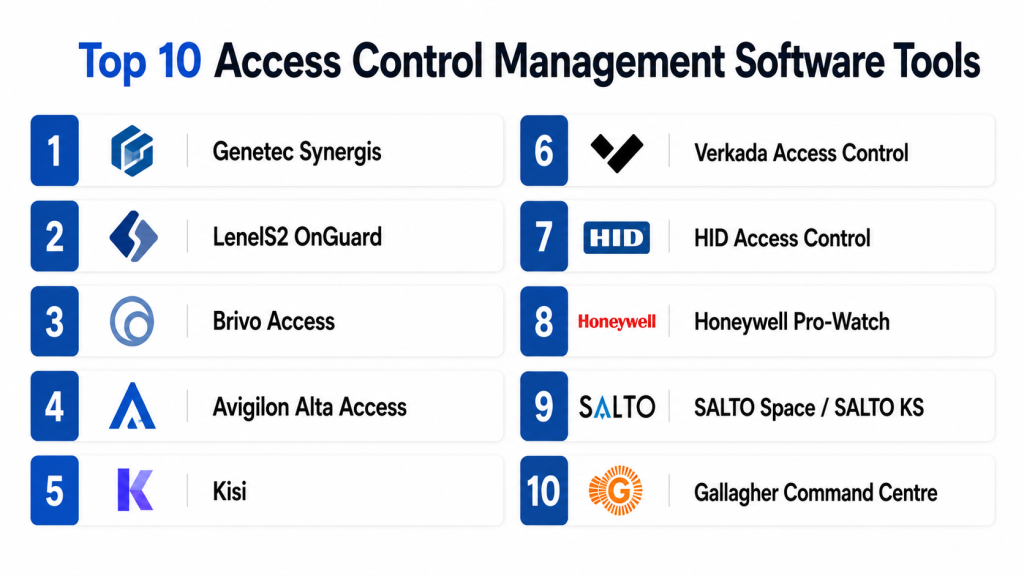
Top 10 Access Control Management Software Tools
#1 — Genetec Synergis
Short description:
Genetec Synergis is an enterprise access control system used to manage doors, credentials, users, and security events across complex facilities. It is part of the broader Genetec Security Center platform, which makes it useful for organizations that want access control, video surveillance, intrusion monitoring, and security operations in one environment. It is a strong option for large enterprises, campuses, airports, public facilities, logistics hubs, and critical infrastructure.
Key Features
- Centralized access control management
- Door, cardholder, and credential administration
- Integration with video surveillance
- Event monitoring and alarm handling
- Role-based permissions
- Multi-site access control
- Reporting and audit support
Pros
- Strong fit for enterprise security environments
- Works well with unified physical security operations
- Good scalability for complex sites
Cons
- May be too advanced for small businesses
- Implementation can require expert planning
- Cost and deployment effort may be higher
Platforms / Deployment
Web / Windows / iOS / Android
Cloud / Self-hosted / Hybrid
Security & Compliance
Role-based access, audit logs, and centralized security controls are commonly supported. Specific certifications such as SOC 2, ISO 27001, GDPR, and HIPAA should be verified directly with the vendor. If not confirmed, treat as Not publicly stated.
Integrations & Ecosystem
Genetec Synergis is strong for integrated physical security programs where access control must work with video, alarms, identity systems, and operator workflows.
- Video surveillance systems
- Intrusion detection
- Identity and directory systems
- Visitor management workflows
- Security operations dashboards
- APIs and partner integrations
Support & Community
Genetec has professional documentation, partner-led deployment, onboarding support, and enterprise support options. Its ecosystem is strong in large security environments.
#2 — LenelS2 OnGuard
Short description:
LenelS2 OnGuard is an enterprise access control platform designed for large organizations that need centralized security management. It supports identity-based access, credential control, visitor workflows, alarm monitoring, and integration with video and building systems. It is commonly used in enterprises, government facilities, universities, healthcare environments, and high-security buildings.
Key Features
- Enterprise access control management
- Credential and cardholder administration
- Alarm monitoring
- Visitor and identity workflows
- Video integration options
- Role-based access permissions
- Multi-site security management
Pros
- Strong enterprise access control capabilities
- Suitable for complex and regulated environments
- Good fit for large-scale physical security teams
Cons
- Can be complex to deploy and manage
- May require certified integrator support
- Less suitable for very small offices
Platforms / Deployment
Web / Windows / iOS / Android
Self-hosted / Hybrid
Security & Compliance
Role-based permissions, audit logs, and enterprise security controls are commonly supported. SSO/SAML, MFA, encryption, SOC 2, ISO 27001, GDPR, and HIPAA details may vary by deployment. Not publicly stated where uncertain.
Integrations & Ecosystem
LenelS2 OnGuard is built for enterprise security ecosystems and can connect with other physical security and operational systems.
- Video surveillance
- Alarm systems
- Identity platforms
- Visitor management
- Building systems
- Security operations tools
Support & Community
LenelS2 has professional documentation, integrator support, and enterprise-focused service options. Community strength is mainly through security partners and certified professionals.
#3 — Brivo Access
Short description:
Brivo Access is a cloud-based access control platform used by businesses that want remote door management, mobile credentials, and centralized visibility across locations. It is suitable for offices, retail chains, commercial buildings, property managers, and distributed organizations. It helps teams manage users, schedules, permissions, alerts, and access events from a web-based platform.
Key Features
- Cloud-based access control
- Remote door management
- Mobile credential support
- User and permission management
- Access event history
- Multi-site administration
- Visitor and video integration options
Pros
- Good for distributed businesses
- Remote management is simple and practical
- Useful for cloud-first security teams
Cons
- Subscription costs should be reviewed carefully
- Hardware compatibility should be validated
- Advanced enterprise needs may require configuration
Platforms / Deployment
Web / iOS / Android
Cloud / Hybrid
Security & Compliance
User permissions, admin controls, and access logs are commonly supported. Details for SSO/SAML, MFA, encryption, SOC 2, ISO 27001, GDPR, and HIPAA should be confirmed with the vendor. Not publicly stated where uncertain.
Integrations & Ecosystem
Brivo supports access control workflows with integrations for security, identity, visitor management, and video-related use cases.
- Video surveillance
- Visitor management
- Mobile credentials
- Directory services
- APIs
- Building security systems
Support & Community
Brivo provides documentation, onboarding resources, partner support, and customer support options. Community strength is moderate, with stronger vendor and partner support.
#4 — Avigilon Alta Access
Short description:
Avigilon Alta Access is a cloud-based access control platform designed for modern physical security management. It helps organizations manage doors, users, credentials, schedules, and remote access from a centralized system. It is suitable for offices, schools, healthcare sites, retail locations, and multi-site businesses that want mobile-first access control and cloud management.
Key Features
- Cloud access control
- Mobile credential support
- Remote user and door management
- Access logs and activity monitoring
- Visitor access support
- Video security integration options
- Multi-site access administration
Pros
- Strong cloud-based access control experience
- Good mobile credential capabilities
- Useful for modern office and multi-site environments
Cons
- Hardware ecosystem should be reviewed before purchase
- May not suit teams wanting fully open hardware flexibility
- Pricing and features can vary by deployment
Platforms / Deployment
Web / iOS / Android
Cloud / Hybrid
Security & Compliance
User permissions, access logs, and admin controls are commonly supported. Specific compliance details such as SOC 2, ISO 27001, GDPR, and HIPAA should be verified directly. Not publicly stated where uncertain.
Integrations & Ecosystem
Avigilon Alta Access fits well inside a broader physical security ecosystem and can work with video and identity-related workflows.
- Video security
- Mobile credentials
- Visitor access
- Directory systems
- APIs
- Security dashboards
Support & Community
Support is available through vendor and partner channels. Documentation and onboarding resources are generally available for administrators and security teams.
#5 — Kisi
Short description:
Kisi is a cloud-based access control platform focused on simple, modern, and remote-friendly workplace access. It is commonly used by offices, co-working spaces, gyms, schools, and growing businesses that need easy door access management. Kisi supports mobile credentials, web administration, user permissions, and integrations with workplace tools.
Key Features
- Cloud-based door access control
- Mobile unlock and credentials
- Web-based admin dashboard
- User groups and access schedules
- Remote access management
- Access logs
- Integration support
Pros
- Easy to use for modern workplaces
- Good for SMBs and flexible offices
- Mobile-first access experience
Cons
- May not fit highly complex enterprise security needs
- Hardware and compatibility should be checked
- Advanced customization may be limited compared with enterprise platforms
Platforms / Deployment
Web / iOS / Android
Cloud / Hybrid
Security & Compliance
User permissions, access logs, and admin controls are commonly available. Details for SSO/SAML, MFA, SOC 2, ISO 27001, GDPR, and HIPAA should be verified. Not publicly stated where uncertain.
Integrations & Ecosystem
Kisi is useful for workplace environments where access control needs to connect with identity, scheduling, and office management tools.
- Directory integrations
- Workplace tools
- Mobile credentials
- APIs
- Visitor workflows
- Door hardware ecosystem
Support & Community
Kisi offers documentation, onboarding resources, and support options. Community strength is moderate, with strong relevance among modern office and co-working users.
#6 — Verkada Access Control
Short description:
Verkada Access Control is part of Verkada’s cloud-managed physical security platform. It helps organizations manage doors, users, credentials, events, and access permissions from a central dashboard. It is useful for schools, offices, healthcare sites, retail businesses, and organizations that want access control, video security, alarms, and sensors in one ecosystem.
Key Features
- Cloud-managed access control
- Door and credential management
- Video security integration
- User permissions
- Event logs
- Mobile access options
- Centralized multi-site dashboard
Pros
- Simple cloud-based administration
- Strong fit with Verkada cameras and security tools
- Useful for multi-site visibility
Cons
- Vendor ecosystem lock-in can be a concern
- Less ideal for teams wanting open hardware choice
- Total cost should be reviewed carefully
Platforms / Deployment
Web / iOS / Android
Cloud
Security & Compliance
RBAC, audit logs, and security controls may be available. MFA and encryption-related controls should be validated directly. Specific SOC 2, ISO 27001, GDPR, and HIPAA details: Not publicly stated where uncertain.
Integrations & Ecosystem
Verkada Access Control works best when used with Verkada’s broader security platform.
- Video cameras
- Alarms
- Sensors
- User management
- Mobile credentials
- Security dashboards
Support & Community
Verkada provides vendor-led documentation, onboarding, and business support. Community is more product-led than open-platform based.
#7 — HID Access Control
Short description:
HID Access Control is a widely recognized access control ecosystem covering credentials, readers, controllers, and management technologies. It is used by organizations that need secure identity-based access for offices, campuses, government facilities, healthcare, finance, and enterprise environments. HID is especially strong where credential security, smart cards, mobile IDs, and hardware reliability matter.
Key Features
- Physical access credentials
- Smart cards and mobile IDs
- Reader and controller ecosystem
- Identity-based access support
- Enterprise access control compatibility
- Secure authentication options
- Broad partner ecosystem
Pros
- Strong brand recognition in access control
- Wide hardware and credential ecosystem
- Good fit for enterprise identity-based access
Cons
- Software experience depends on selected system
- Deployment may involve multiple components
- Buyers must validate exact platform capabilities
Platforms / Deployment
Varies / N/A
Cloud / Self-hosted / Hybrid
Security & Compliance
HID is known for secure credential and identity technologies, but exact software security controls depend on the selected product and deployment. SOC 2, ISO 27001, GDPR, and HIPAA details: Not publicly stated where uncertain.
Integrations & Ecosystem
HID has a broad ecosystem across physical access, credentials, readers, and identity systems.
- Smart cards
- Mobile credentials
- Door readers
- Controllers
- Enterprise access platforms
- Identity systems
Support & Community
HID has strong enterprise documentation, partner support, and a large global ecosystem of integrators and security professionals.
#8 — Honeywell Pro-Watch
Short description:
Honeywell Pro-Watch is an access control management platform designed for commercial and enterprise security environments. It helps organizations manage doors, cardholders, credentials, alarms, and security events. It is suitable for large buildings, enterprise campuses, industrial facilities, airports, healthcare sites, and organizations using Honeywell building or security systems.
Key Features
- Access control management
- Cardholder and credential administration
- Alarm monitoring
- Visitor and badge support
- Event reporting
- Multi-site scalability
- Integration with building and security systems
Pros
- Strong fit for enterprise facilities
- Useful for building security environments
- Scalable for complex access needs
Cons
- May require experienced implementation
- Can be too heavy for small businesses
- Exact features depend on deployment
Platforms / Deployment
Web / Windows
Self-hosted / Hybrid
Security & Compliance
Role-based permissions, access logs, and administrative controls may be supported. Specific SSO/SAML, MFA, SOC 2, ISO 27001, GDPR, and HIPAA details: Not publicly stated.
Integrations & Ecosystem
Honeywell Pro-Watch is useful when access control must connect with broader building and security systems.
- Video surveillance
- Building management systems
- Alarm systems
- Visitor management
- Badge systems
- Enterprise security workflows
Support & Community
Honeywell has professional documentation, integrator support, and enterprise service options. Community strength is mainly through certified partners and building security professionals.
#9 — SALTO Space / SALTO KS
Short description:
SALTO offers access control solutions for electronic locks, mobile access, cloud access, and smart building security. SALTO Space is often used for on-premise access management, while SALTO KS is cloud-based. These tools are useful for offices, education, hospitality, healthcare, co-working spaces, residential buildings, and multi-door environments needing flexible access control.
Key Features
- Electronic lock management
- Cloud and local access options
- Mobile credential support
- User and permission control
- Access schedules
- Event history
- Wireless lock ecosystem
Pros
- Strong electronic lock ecosystem
- Useful for flexible door access scenarios
- Cloud and local options available
Cons
- Product choice must match building needs
- Hardware planning is important
- Advanced integrations may vary
Platforms / Deployment
Web / Windows / iOS / Android
Cloud / Self-hosted / Hybrid
Security & Compliance
User permissions and access logs are commonly available. Specific compliance details such as SOC 2, ISO 27001, GDPR, and HIPAA should be verified directly. Not publicly stated where uncertain.
Integrations & Ecosystem
SALTO works well in environments where smart locks and access credentials need centralized management.
- Electronic locks
- Mobile credentials
- Door controllers
- Building systems
- Visitor access
- APIs where available
Support & Community
SALTO has documentation, partner support, and an established access control hardware ecosystem. Support may vary by region and deployment partner.
#10 — Gallagher Command Centre
Short description:
Gallagher Command Centre is an enterprise security management platform used for access control, perimeter security, alarms, and site protection. It is suitable for high-security environments such as utilities, government sites, education campuses, logistics facilities, industrial operations, and large enterprises. It is designed for organizations that need deep control, strong monitoring, and scalable physical security management.
Key Features
- Enterprise access control
- Alarm and event monitoring
- Cardholder management
- Perimeter security support
- Multi-site operations
- Reporting and audit tools
- Security system integrations
Pros
- Strong for high-security environments
- Good enterprise security capabilities
- Suitable for complex site protection
Cons
- May be too advanced for smaller businesses
- Implementation can require specialist support
- Cost and complexity should be evaluated
Platforms / Deployment
Web / Windows / iOS / Android
Self-hosted / Hybrid
Security & Compliance
Role-based permissions, audit logs, and enterprise access controls may be supported. Specific SSO/SAML, MFA, SOC 2, ISO 27001, GDPR, and HIPAA details: Not publicly stated where uncertain.
Integrations & Ecosystem
Gallagher Command Centre is designed for broad physical security operations.
- Access control hardware
- Alarm systems
- Perimeter security
- Video surveillance
- Identity workflows
- Security operations tools
Support & Community
Gallagher has professional documentation, enterprise support options, and partner-led deployment. It has a strong presence in complex physical security environments.
Comparison Table
| Tool Name | Best For | Platform(s) Supported | Deployment | Standout Feature | Public Rating |
|---|---|---|---|---|---|
| Genetec Synergis | Enterprise unified security | Web, Windows, iOS, Android | Cloud, Self-hosted, Hybrid | Unified access control and video security | N/A |
| LenelS2 OnGuard | Large enterprise access control | Web, Windows, iOS, Android | Self-hosted, Hybrid | Deep enterprise access management | N/A |
| Brivo Access | Cloud-based multi-site access | Web, iOS, Android | Cloud, Hybrid | Remote door management | N/A |
| Avigilon Alta Access | Mobile-first cloud access | Web, iOS, Android | Cloud, Hybrid | Cloud access with mobile credentials | N/A |
| Kisi | Modern offices and SMBs | Web, iOS, Android | Cloud, Hybrid | Simple mobile-first workplace access | N/A |
| Verkada Access Control | Cloud-managed security teams | Web, iOS, Android | Cloud | Access control with video security ecosystem | N/A |
| HID Access Control | Secure credentials and identity access | Varies / N/A | Cloud, Self-hosted, Hybrid | Strong credential and reader ecosystem | N/A |
| Honeywell Pro-Watch | Enterprise facilities and buildings | Web, Windows | Self-hosted, Hybrid | Building security integration | N/A |
| SALTO Space / SALTO KS | Smart locks and flexible door access | Web, Windows, iOS, Android | Cloud, Self-hosted, Hybrid | Electronic lock ecosystem | N/A |
| Gallagher Command Centre | High-security enterprise sites | Web, Windows, iOS, Android | Self-hosted, Hybrid | Enterprise site protection | N/A |
Evaluation & Scoring of Access Control Management Software
| Tool Name | Core (25%) | Ease (15%) | Integrations (15%) | Security (10%) | Performance (10%) | Support (10%) | Value (15%) | Weighted Total (0–10) |
|---|---|---|---|---|---|---|---|---|
| Genetec Synergis | 9 | 7 | 9 | 8 | 9 | 8 | 7 | 8.25 |
| LenelS2 OnGuard | 9 | 7 | 8 | 8 | 9 | 8 | 7 | 8.10 |
| Brivo Access | 8 | 9 | 8 | 7 | 8 | 8 | 8 | 8.05 |
| Avigilon Alta Access | 8 | 9 | 8 | 7 | 8 | 8 | 7 | 7.90 |
| Kisi | 7 | 9 | 7 | 7 | 8 | 7 | 8 | 7.60 |
| Verkada Access Control | 8 | 9 | 7 | 8 | 8 | 8 | 7 | 7.90 |
| HID Access Control | 8 | 7 | 8 | 8 | 8 | 8 | 7 | 7.80 |
| Honeywell Pro-Watch | 8 | 7 | 8 | 7 | 8 | 8 | 7 | 7.65 |
| SALTO Space / SALTO KS | 8 | 8 | 7 | 7 | 8 | 7 | 8 | 7.65 |
| Gallagher Command Centre | 9 | 7 | 8 | 8 | 9 | 8 | 7 | 8.10 |
These scores are comparative and should be used as a starting point, not as final buying advice. A higher score does not mean a tool is best for every organization. The right choice depends on your building type, number of doors, hardware, compliance needs, IT maturity, and security operations model. Always validate the platform with a real pilot before full deployment.
Which Access Control Management Software Tool Is Right for You?
Solo / Freelancer
Solo users and very small offices may not need a full access control management platform. A basic smart lock or simple mobile access system may be enough. If you need professional access logs and user permissions, Kisi or SALTO KS can be easier starting points.
SMB
SMBs should focus on simple deployment, mobile credentials, remote access, and manageable pricing. Brivo Access, Kisi, Avigilon Alta Access, Verkada Access Control, and SALTO KS are practical options for small and growing businesses.
Mid-Market
Mid-market organizations usually need multi-location control, user groups, integrations, reporting, and stronger admin features. Brivo Access, Avigilon Alta Access, Verkada Access Control, HID-based systems, and SALTO can be strong fits depending on hardware needs.
Enterprise
Enterprises should prioritize scalability, audit logs, role-based permissions, integration with video and identity systems, and strong partner support. Genetec Synergis, LenelS2 OnGuard, Gallagher Command Centre, Honeywell Pro-Watch, and HID ecosystems are strong candidates.
Budget vs Premium
Budget-focused buyers should review the full cost, including door controllers, readers, locks, cards, mobile credentials, installation, software licenses, support, and future expansion. Premium platforms may cost more but can provide better governance, integrations, and scalability.
Feature Depth vs Ease of Use
Cloud-first platforms are often easier to use and faster to deploy. Enterprise platforms usually offer deeper customization and stronger control. Choose ease of use if your team is small. Choose feature depth if you manage many doors, sites, roles, and compliance needs.
Integrations & Scalability
If access control must connect with CCTV, alarms, HR systems, directories, visitor management, and building systems, integration strength becomes very important. Genetec, LenelS2, Brivo, Verkada, Honeywell, and Gallagher are worth evaluating for integration-heavy environments.
Security & Compliance Needs
For regulated industries, do not choose based only on convenience. Validate MFA, RBAC, encryption, audit logs, user lifecycle management, access review reports, data retention, and compliance documentation before purchase.
Frequently Asked Questions
1. What is access control management software?
Access control management software helps organizations manage who can enter specific buildings, rooms, doors, or restricted areas. It controls users, credentials, schedules, permissions, and access logs from a centralized system.
2. How is access control software different from normal locks?
Normal locks depend on physical keys, which can be lost, copied, or hard to track. Access control software allows digital permissions, mobile credentials, cards, audit logs, remote access changes, and better control over who enters where.
3. What are common pricing models for access control software?
Pricing can vary by number of doors, users, locations, hardware, mobile credentials, cloud subscription, support level, and integrations. Some platforms use subscription pricing, while others use license and hardware-based pricing.
4. Is cloud access control better than on-premise access control?
Cloud access control is easier for remote management and multi-site administration. On-premise or hybrid access control may be better for highly regulated environments, critical infrastructure, or organizations with strict local control requirements.
5. What are common implementation mistakes?
Common mistakes include choosing software before checking door hardware compatibility, ignoring visitor workflows, weak admin permissions, poor network planning, lack of backup access process, and not training security staff properly.
6. Can access control software integrate with CCTV systems?
Yes, many access control platforms can integrate with CCTV systems. This helps security teams connect door events with video footage, making investigation faster and more reliable after an incident.
7. Is mobile access secure enough for businesses?
Mobile access can be secure when supported by strong authentication, device controls, encryption, user permissions, and proper admin policies. However, businesses should validate security controls before replacing physical credentials fully.
8. Can access control software support multiple locations?
Yes, many modern access control platforms support multiple sites from one dashboard. This is useful for retail chains, offices, schools, warehouses, healthcare groups, and enterprises with distributed buildings.
9. What security features should buyers check?
Buyers should check MFA, RBAC, audit logs, encryption, access review reports, user lifecycle management, alerting, admin controls, and secure remote access. Compliance documents should be verified directly with the vendor.
10. Can I switch from one access control platform to another?
Yes, but switching requires planning. You must review existing readers, locks, controllers, credentials, user records, access schedules, integrations, and data retention needs before migration.
Conclusion
Access Control Management Software is now a core part of modern physical security. It helps organizations move beyond keys and manual entry control by adding centralized permissions, mobile credentials, audit logs, visitor access, remote management, and integrations with CCTV, alarms, identity systems, and building platforms.Genetec Synergis, LenelS2 OnGuard, Gallagher Command Centre, Honeywell Pro-Watch, and HID-based systems are strong for enterprise and complex security environments. Brivo Access, Avigilon Alta Access, Kisi, Verkada Access Control, and SALTO solutions are practical for cloud-first teams, modern offices, distributed businesses, and flexible access needs.
