Upgrade & Secure Your Future with DevOps, SRE, DevSecOps, MLOps!
We spend hours scrolling social media and waste money on things we forget, but won’t spend 30 minutes a day earning certifications that can change our lives.
Master in DevOps, SRE, DevSecOps & MLOps by DevOps School!
Learn from Guru Rajesh Kumar and double your salary in just one year.
When an important business app stops working, every minute counts. Developers, system operators, and support engineers often rush to solve the problem. Too often, they work in separate rooms, look at different screens, and guess what went wrong. Misunderstandings happen, and fixing the problem takes much longer than it should.
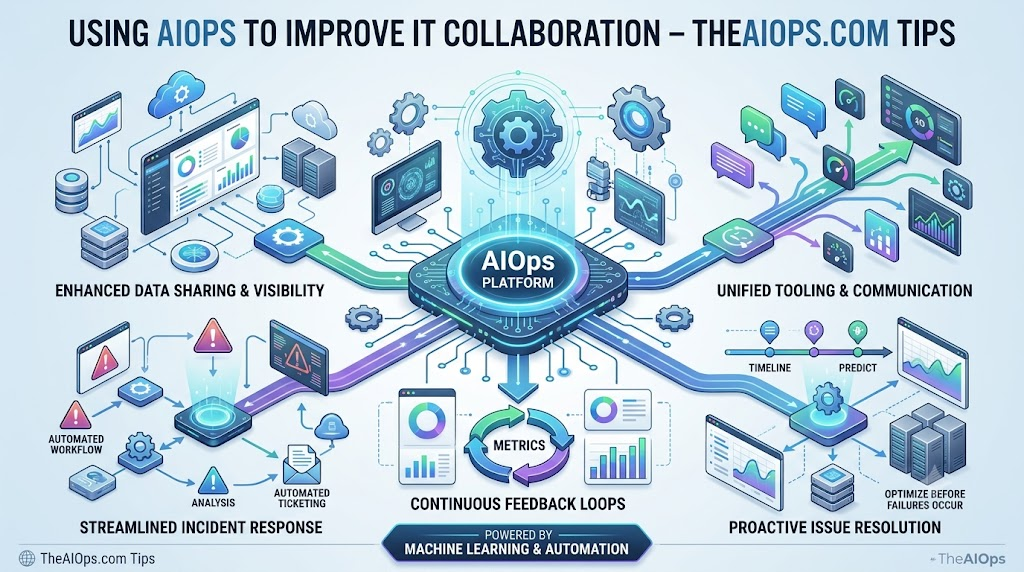
Using AIOps for IT collaboration helps bridge this gap. By combining artificial intelligence with daily operations data, teams can view the same facts, cut through alert noise, and resolve issues together. You can find practical guides, news, and resources to help modern teams adopt these smarter workflows at TheAIOps.com. This guide covers how intelligent operations streamline teamwork across your entire tech organization.
What Is AIOps?
AIOps stands for Artificial Intelligence for IT Operations. In simple words, it means using smart computer software to help humans manage complex technology systems.
Modern software setups produce millions of data points every hour. Humans cannot read all this data quickly enough. AIOps tools collect this operational data, clean it up, find unusual patterns, and alert the right people before a minor glitch becomes an outage.
Think of it like an air traffic controller for your software alerts. Instead of every pilot shouting on the radio at once, the system organizes the messages, highlights the danger, and guides everyone safely.
What Is IT Collaboration?
IT collaboration happens when different technical groups communicate, share data, and solve technical issues together.
In a standard company, several teams keep systems running:
- Developers: Write code and build new features.
- IT Operations: Keep servers, networks, and physical hardware stable.
- DevOps and SREs (Site Reliability Engineers): Bridge the gap between writing code and keeping it reliable.
- Security Teams: Protect company systems and user data.
- Service Desk: Talk directly to end users facing computer problems.
When an incident hits, these teams must act as one unit. Collaboration means everyone understands what is happening without pointing fingers or hiding data.
Why Collaboration Often Breaks Down
Technology problems are stressful, but bad communication makes them worse. Teams run into trouble when:
- Data is stuck in silos: The network team uses one dashboard, while developers use another. Neither group sees the full picture.
- Alert noise causes burnout: Thousands of notifications fire at once, burying the real issue.
- Ownership is unclear: Everyone assumes another team is handling the problem.
- Teams duplicate work: Two engineers run the same troubleshooting steps without realizing it.
How AIOps Improves IT Collaboration
AIOps changes how teams interact during critical moments by giving everyone a shared, factual foundation.
+-------------------------------------------------------------+
| Raw Telemetry: Metrics, Logs, Traces, Network Events        |
+-------------------------------------------------------------+
                              |
                              v
+-------------------------------------------------------------+
| AIOps Engine: Filters Noise, Correlates Related Alerts      |
+-------------------------------------------------------------+
                              |
                              v
+-------------------------------------------------------------+
| Shared Context Layer: Clear Incidents, Suggested Root Cause |
+-------------------------------------------------------------+
         |                        |                        |
         v                        v                        v
   [ Developers ]             [ SREs ]             [ IT Support ]
         \                        |                       /
          +-----------------------+----------------------+
                                  |
                                  v
              Coordinated, Fast Incident Resolution
1. Shared Operational Information
Instead of arguing over whose monitoring tool is correct, AIOps pools metrics, logs, and system events into a single view. When an outage occurs, operations engineers and developers review the exact same timeline.
2. Alert Correlation
During an outage, one broken database might trigger five hundred alerts across connected apps. AIOps groups those alerts into a single incident card. This stops five different engineers from investigating the same root issue independently.
3. Faster Incident Communication
AIOps tools connect directly into communication apps like Slack, Microsoft Teams, or ticketing systems. The platform notifies the right team member with clear context attached, removing the delay of manually hunting down on-call engineers.
4. Better Problem Investigation
Finding the root cause of an issue often requires digging through millions of lines of system logs. AIOps flags the specific change or error that happened right before performance dropped, saving hours of manual searching.
5. Automating Repetitive Tasks
Routine jobs—like restarting a frozen service or gathering diagnostic logs—can be automated safely. When software takes care of these simple chores, engineers stay focused on solving the core problem together.
6. Knowledge Sharing
Every time a team fixes a problem, that data can be saved. AIOps platforms can surface past incident notes when a similar bug shows up months later. New team members learn from previous solutions instead of starting from scratch.
A Practical Example
Imagine an online store experiences a slowdown during a busy sale.
- The Alert Storm: The checkout service, payment system, and product catalog all trigger warning alarms within two minutes.
- AIOps Groups the Issue: Instead of dispatching three separate teams, the AIOps platform analyzes the events. It links the failures to a saturated database connection pool.
- Coordinated Handoff: The platform posts a single ticket into the main incident channel, tagging the database administrator and the lead checkout developer.
- Joint Resolution: Both engineers open the shared workspace. They see the database configuration change made thirty minutes prior, revert the setting together, and restore normal checkout speeds within minutes.
Without AIOps, three separate teams would have spent an hour arguing over whether the network, application code, or database was at fault.
Real-World Benefits and Trade-offs
| Operational Area | Without AIOps | With AIOps |
| Alert Volume | High noise; important alerts get missed | Low noise; grouped incidents with context |
| Team Hand-offs | Manual triage; slow phone calls and emails | Automated routing to the correct engineers |
| Troubleshooting | Teams guess using isolated dashboards | Teams share a single source of truth |
| Post-Incident Review | Fragmented data across different team logs | Unified timeline of events and actions taken |
Realistic Challenges to Keep in Mind
AIOps helps collaboration, but it is not magic software that fixes a broken culture:
- Poor Input Data: If your monitoring agents are broken or out of date, the AI will produce bad recommendations.
- Tool Sprawl: Connecting dozens of legacy systems takes time, patience, and proper maintenance.
- Lack of Trust: Engineers may ignore AI suggestions if they do not understand how the system reached its conclusions.
- Weak Team Processes: If your teams do not have clear runbooks or escalation rules, automated alerts will still sit unaddressed.
Tips for Better Collaboration Using AIOps
- Define ownership early: Make sure every technical service has a clear team assigned to it before setting up automated routing.
- Integrate where teams already talk: Send AIOps summaries directly into your everyday team chat apps rather than forcing people into a new tool.
- Start small with automation: Automate simple diagnostic tasks—like collecting error logs—before trying full automated fixes.
- Review AI alerts together: Hold brief weekly reviews between operations and development to tune out noisy, low-value alerts.
- Keep your documentation clean: The suggestions provided by intelligent tools are only as helpful as the runbooks you link to them.
Frequently Asked Questions
What is AIOps in simple terms?
AIOps uses artificial intelligence to help IT teams collect data, filter out noise, and spot system problems before they disrupt business operations.
How does AIOps improve team collaboration?
It breaks down data silos by gathering metrics and logs into a shared view, allowing developers and operations engineers to look at identical information during outages.
Can AIOps replace human engineers?
No. AIOps handles data sorting, noise reduction, and pattern finding, but human engineers are still needed to make complex decisions and fix underlying code.
What is alert correlation?
Alert correlation is the process of grouping multiple related alerts into a single incident report, preventing teams from being overwhelmed by hundreds of individual notifications.
How does AIOps help DevOps and SRE teams work together?
It provides an unbiased record of system behavior. Developers see how their code runs in production, while SREs get clear context on how changes affect overall reliability.
Do we need to replace all our current monitoring tools to use AIOps?
No. Most AIOps platforms connect to your existing monitoring, logging, and ticketing tools, acting as an intelligent central hub.
What is the biggest challenge when adopting AIOps for teamwork?
Getting teams to trust the automated insights and ensuring the underlying monitoring data is accurate and complete.
How does AIOps reduce finger-pointing during incidents?
Because the system tracks cross-platform metrics on a single timeline, teams can quickly see where an issue started rather than guessing which team is responsible.
Is AIOps only useful for large enterprises?
While large enterprises with complicated architectures benefit the most, medium-sized businesses with complex cloud infrastructure also use it to manage on-call stress.
What is the first step to get started with AIOps?
Audit your existing monitoring tools, clean up your telemetry data, and identify your team’s biggest communication bottlenecks during incidents.
Conclusion
Modern IT systems are too complex for any single team to manage alone. Successful operations rely on fast information sharing, clear responsibilities, and minimal distractions. Implementing AIOps for IT collaboration helps cut away alert noise, points teams toward root causes, and creates a unified view of your entire infrastructure.
While software handles the heavy lifting of data analysis, human communication and sound processes remain the heart of reliable operations. By pairing clean teamwork with intelligent tools, technical organizations can solve issues faster and build more dependable services.
