Upgrade & Secure Your Future with DevOps, SRE, DevSecOps, MLOps!
We spend hours scrolling social media and waste money on things we forget, but won’t spend 30 minutes a day earning certifications that can change our lives.
Master in DevOps, SRE, DevSecOps & MLOps by DevOps School!
Learn from Guru Rajesh Kumar and double your salary in just one year.
Introduction
Think about a large company on an ordinary Tuesday morning. A server runs out of space. A login system slows down. Someone forgot to restart a service after last night’s update. Each of these is small, but the IT team has to handle all of them by hand, one at a time, while new requests keep coming in.
Now multiply that by thousands of servers, hundreds of apps, and dozens of teams. This is what many large businesses live with every day. Manual work does not just take time. It also creates mistakes, delays, and a lot of stress for the people doing it. Most IT teams know they should automate more, but they are not sure where to start or what to trust.
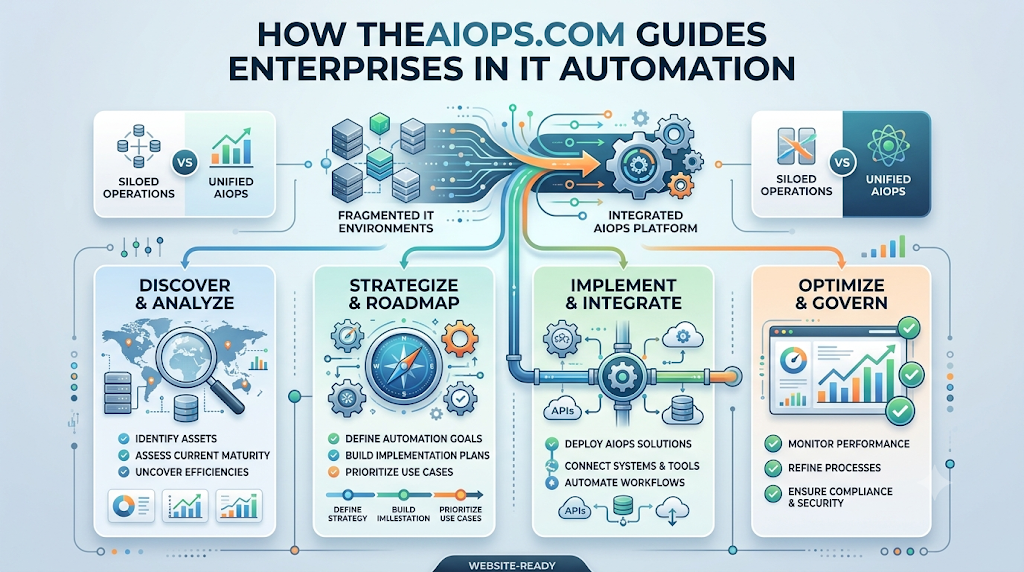
This is where good guidance makes a difference. TheAIOps.com helps enterprises understand IT automation and AIOps in a clear, practical way. In this article, we will walk through the problems companies face, how this guidance helps solve them, and how you can begin step by step. I will keep it simple, the way I would explain it to a smart new team member on their first week.
Why Enterprises Are Struggling with Manual IT
Let us start with the honest truth. Most big companies did not plan to run IT by hand. It just grew that way. A team built one script here, another team added a checklist there, and over the years the whole thing turned into a maze of small fixes that only a few people understand.
The first big pain point is the sheer volume of work. Every day, systems create thousands of alerts, logs, and tickets. Humans cannot read them all. So important warnings get buried under useless noise. A real problem might sit unnoticed for an hour simply because it looked like the other hundred alerts that did not matter.
The second pain point is speed. When something breaks, the team has to figure out what happened, who owns it, and how to fix it. This often means jumping between five or six different tools, each showing a different piece of the picture. While the team hunts for answers, users wait, customers get frustrated, and money is lost. In some businesses, even one hour of downtime can cost a huge amount.
The third pain point is people. Skilled IT engineers are hard to find and hard to keep. When they spend most of their day on boring, repeated tasks like restarting services, resetting accounts, or clearing disk space, they get tired and leave. The knowledge in their heads leaves with them. New hires then have to learn the same messy process from scratch.
Finally, there is the problem of mistakes. When a person does the same task fifty times, they will eventually make an error. One wrong command on a live server can cause a much bigger outage than the original problem. Manual work simply does not scale safely.
How TheAIOps.com Solves These Problems
The main idea is simple. Let software handle the repeated, predictable work, and let people focus on the tasks that need thinking. TheAIOps.com guides enterprises to do this in a careful, step-by-step way, so automation becomes a trusted helper and not a risky experiment.
Making Sense of the Noise
The first thing to fix is the flood of alerts. The guidance here focuses on how AIOps groups related alerts together. Imagine one database slows down and triggers 300 alerts across ten tools. Instead of showing you 300 warnings, a good AIOps setup shows you one clear problem with the likely cause attached. This alone can save a team hours every week, and it makes the day feel much calmer.
Finding Problems Before Users Do
Most teams find out about problems when someone complains. A better way is to watch normal behavior and notice when something drifts. For example, if a payment service usually answers in 60 milliseconds and slowly creeps up to 200, that is a warning sign, even if nothing has failed yet. TheAIOps.com explains how enterprises can use this early warning idea so they fix small issues before they turn into big outages.
Automating the Boring, Repeated Tasks
Every IT team has a list of tasks they do again and again. Restarting a stuck service. Clearing temporary files. Adding storage when a disk fills up. Resetting a locked account. These are perfect for automation because the steps are clear and the same every time. The guidance encourages teams to begin with these safe, simple tasks first, so they can see quick wins without taking big risks.
Faster Root Cause Finding
When something breaks, the hardest question is “Why?” AIOps helps by checking what changed just before the problem began. Maybe a new software update went live. Maybe a setting was changed. Maybe traffic jumped suddenly. By pointing at the most likely cause, the software saves engineers from long, stressful guessing sessions.
Building Trust in Automation Slowly
Many enterprises worry that automation might do something wrong on its own. That is a fair worry. So the approach is to move in stages. First, the tool only suggests fixes and a person approves them. Later, once the team sees that the suggestions are right, low-risk fixes can run by themselves. High-risk actions always stay under human control. This slow build-up of trust is what makes automation last in a big company.
The Practical Implementation: Step-by-Step
After many years of watching companies try automation, I can tell you that the ones who succeed do not try to do everything at once. They follow a calm, steady path. Here is how a company can start.
Step 1: Pick One Painful Problem
Do not begin with “let us automate everything.” Begin with one problem that hurts today. It might be too many alerts, slow ticket handling, or a service that keeps failing every week. A clear, small target gives you something to measure and something to celebrate.
Step 2: Look at Your Current Data
Automation runs on data. Check what your systems already record, such as logs, metrics, alerts, and tickets. Ask simple questions. Is this data complete? Is it easy to reach? Is it in one place or scattered? Messy data gives messy results, so a little cleanup at this stage saves a lot of pain later.
Step 3: Write Down the Manual Steps
Before you automate a task, write down exactly how a person does it today. Every click, every command, every check. Many teams find that this step alone reveals waste and confusion. Once the steps are clear, turning them into automation becomes much easier.
Step 4: Start With a Small Pilot
Choose one application or one team for the first try. Keep the risk low. Let the automation suggest actions first, and have a person confirm them. This gives your team time to learn and to spot any mistakes without any real damage.
Step 5: Measure the Results
Track a few simple numbers before and after. How long does it take to spot a problem? How long does it take to fix it? How many alerts does the team handle each day? When people see these numbers improve, they start to trust the new way of working.
Step 6: Train Your People
The best tool will fail if the team does not understand it. Give your engineers time to learn, ask questions, and share feedback. Make it clear that automation is there to remove boring work, not to remove jobs. When people feel safe, they become your strongest supporters.
Step 7: Grow Step by Step
Once the first project works, add another one. Then another. Slowly, automation spreads across more systems and more teams. Over months, the company moves from a reactive style, where it always fights fires, to a steady style, where most problems are handled before anyone notices.
Comparing Traditional IT vs. Automated IT
Here is a simple side-by-side look at how daily work changes.
| Area | Traditional (Manual) IT | Automated IT with AIOps Guidance |
|---|---|---|
| Alerts | Hundreds of separate warnings, many of them useless | Related alerts grouped into one clear issue |
| Finding problems | Usually after users complain | Often spotted early from small changes |
| Root cause search | Hours of checking many tools | Likely cause pointed out quickly |
| Routine tasks | Done by hand, again and again | Done by software, the same way each time |
| Human errors | Common when work is repeated and rushed | Much less common, since steps are fixed |
| Downtime | Often long and surprising | Shorter, and often avoided |
| Team focus | Mostly firefighting | More time for planning and improvement |
| Knowledge | Stored in a few people’s heads | Written into clear, shared processes |
| Growth | Needs more people as systems grow | Handles more systems with the same team |
| Cost over time | Rises with every new system | Becomes steadier and easier to predict |
Look at the table closely and you will see a pattern. Automation does not replace good engineers. It gives them room to do the work that only humans can do well, like design, planning, and solving new problems.
Real-World Benefits for the Whole Company
The first benefit is time. When routine tasks run on their own, engineers get hours back every single week. A team that once spent half its day on repeated fixes can now spend that time improving systems, testing new ideas, or learning new skills. Over a year, this adds up to a big gain in output without hiring more people.
The second benefit is lower cost. Downtime is expensive, and so is emergency work at night. When problems are caught early, fewer of them turn into big outages. Fewer outages mean fewer angry customers, fewer refunds, and fewer late-night calls. There are also savings from using resources smartly. For example, AIOps can show you when servers are sitting idle, so you can stop paying for power you do not use.
The third benefit is stability. Picture a busy shopping website on a big sale day. Without automation, traffic rises, the site slows down, and the team panics. With automation, the system notices the rise early, adds more capacity, and keeps checkout smooth. Customers keep buying, and the team stays calm. This kind of steady performance builds trust, and trust is hard to win back once lost.
The last benefit is happier people. It may sound like a small thing, but it matters a lot. Engineers who are not tired from constant alerts do better work, stay longer, and share what they know. Managers get clearer reports. Leaders can plan with more confidence. The whole company runs with less stress and more focus.
FAQs
1. What is IT automation?
IT automation means using software to do routine IT tasks that people once did by hand, such as restarting services, clearing disk space, or handling simple requests.
2. What is AIOps in simple words?
AIOps means using smart software to watch your IT systems, find patterns, spot problems early, and help fix them faster. It works like an assistant that never gets tired.
3. How does TheAIOps.com help enterprises?
It guides enterprises with clear, practical advice on how to start with IT automation and AIOps, from picking the first problem to growing step by step across the company.
4. Is IT automation only for very large companies?
No. Large companies feel the pain most, but medium and small teams can also start with one or two simple tasks and grow over time.
5. Will automation replace IT engineers?
No. It takes over boring and repeated tasks so engineers can spend more time on planning, problem solving, and improving systems.
6. Where should a company begin with automation?
Begin with one clear pain point, like too many alerts or a task that people repeat every day. Small and safe projects give quick wins and build trust.
7. What kind of data is needed for AIOps?
AIOps mainly uses logs, metrics, alerts, and tickets. The cleaner and more complete this data is, the better the results will be.
8. How long does it take to see results?
Many teams see early benefits, like fewer noisy alerts, within a few weeks. Bigger results take longer because the system needs time to learn what normal looks like.
9. What can go wrong with IT automation?
Common problems include messy data, too much automation too soon, and a team that is not trained. You can avoid these by starting small, testing carefully, and keeping people in control of big decisions.
10. How do I measure if automation is working?
Track simple numbers before and after, such as how long it takes to find a problem, how long it takes to fix it, how many alerts your team handles, and how much downtime you have.
Conclusion
IT automation is not about buying a magic tool and hoping for the best. It is about a clear way of thinking. Find the repeated work, understand it, automate it carefully, and keep people in charge of the important decisions. When enterprises follow this path, they stop living in a world of endless alerts and late-night emergencies.
TheAIOps.com guides companies through this journey in plain language and practical steps. It helps teams cut the noise, find causes faster, catch problems early, and build trust in automation slowly and safely. You do not need to change everything overnight. Pick one problem, run a small test, measure the results, and grow from there.
The companies that do this well end up with stronger systems, calmer teams, and happier customers. The best time to start is before the next big outage, not after it.
