Upgrade & Secure Your Future with DevOps, SRE, DevSecOps, MLOps!
We spend hours scrolling social media and waste money on things we forget, but won’t spend 30 minutes a day earning certifications that can change our lives.
Master in DevOps, SRE, DevSecOps & MLOps by DevOps School!
Learn from Guru Rajesh Kumar and double your salary in just one year.
Introduction
Organizations create and store records every day, including contracts, invoices, employee files, customer correspondence, financial statements, and operational documents. Managing these records properly is essential for efficient operations, information security, regulatory compliance, and long-term accountability. Records management and retention tools help businesses organize records, apply retention policies, control access, and dispose of information according to defined rules.
What Are Records Management and Retention Tools?
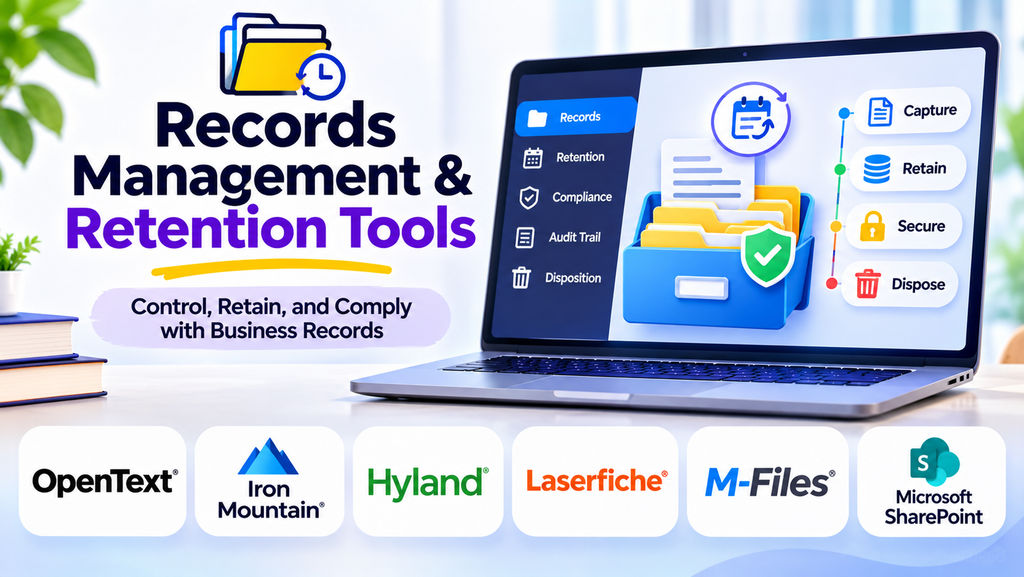
Records management and retention tools are software solutions that manage records throughout their lifecycle, from creation or receipt to classification, storage, retrieval, retention, archival, and authorized disposal. They help organizations establish consistent processes for handling business records and maintaining evidence of important activities and decisions.
Unlike a basic file-storage system, a records management solution can apply retention schedules, track record versions and metadata, manage legal holds, and maintain audit trails of important actions.
Why Are These Tools Important?
1. Regulatory and Policy Compliance
Organizations may need to retain records for specific periods under applicable laws, regulations, contracts, or internal policies. Retention tools help teams apply documented schedules consistently, although organizations remain responsible for determining the rules that apply to their records.
2. Better Organization and Retrieval
Classification, metadata, indexing, and search features make it easier to locate records without manually searching through folders or email archives.
3. Stronger Security
Role-based permissions and access controls help limit sensitive records to authorized employees. Audit trails can also provide visibility into record access and changes.
4. Reduced Storage and Administration Costs
Keeping every record indefinitely can increase storage costs and make information harder to manage. Approved retention and disposal procedures help reduce unnecessary accumulation.
5. Support for Audits and Legal Holds
Records systems can help preserve relevant information for audits, investigations, or litigation. Legal holds should suspend routine disposal when applicable and must be managed according to legal and organizational requirements.
Essential Features to Look For
| Feature | Purpose |
|---|---|
| Records classification | Groups records by type, department, or business function |
| Metadata management | Captures details such as owner, date, category, and status |
| Retention schedules | Defines how long records should be kept |
| Automated disposition | Supports authorized archival or deletion after retention periods |
| Legal hold management | Prevents disposal of records that must be preserved |
| Access controls | Restricts records to approved users |
| Audit trails | Records relevant actions for accountability |
| Search and retrieval | Helps users find records quickly |
| Version and history tracking | Maintains visibility into changes and record history |
| Reporting | Helps administrators monitor retention and policy activity |
Common Records Management and Retention Tools
Microsoft SharePoint
Microsoft SharePoint supports document organization, collaboration, metadata, and records-related retention capabilities through Microsoft 365 features and configuration. Its suitability depends on the organization’s licensing, setup, and governance requirements.
OpenText Content Management
OpenText offers enterprise content and records management capabilities designed to help organizations manage business information, apply governance controls, and support information lifecycle processes.
Hyland OnBase
Hyland OnBase is an enterprise content management platform used to manage business documents and information workflows. Organizations can configure content governance and records processes to suit their requirements.
Laserfiche
Laserfiche provides document and content management capabilities, including workflow automation and tools for organizing and governing information. Available records management functions depend on the product configuration and edition.
IBM FileNet Content Manager
IBM FileNet Content Manager supports enterprise content management and information governance workflows. It can form part of a larger approach to controlled document and records handling.
M-Files
M-Files uses metadata-driven information management to help organizations classify, find, and govern documents. Its suitability for specific retention requirements depends on the capabilities and configuration selected.
How to Choose the Right Solution
- Identify record types: List the records your organization creates, receives, and maintains.
- Define retention requirements: Determine the applicable legal, regulatory, contractual, and internal policy requirements with qualified stakeholders.
- Evaluate governance features: Check classification, retention schedules, legal holds, audit trails, access controls, and disposition approvals.
- Review integrations: Consider how the system will work with email, collaboration tools, document repositories, and business applications.
- Assess migration needs: Plan how existing records, metadata, permissions, and audit information will be transferred.
- Test search and reporting: Confirm that staff can retrieve records and administrators can monitor policy compliance.
- Plan training and ownership: Assign responsibility for retention rules, exceptions, system administration, and periodic reviews.
Records Management vs. Document Management
Document management primarily focuses on storing, organizing, editing, sharing, and retrieving documents. Records management adds formal controls for declaring records, applying retention schedules, preserving evidence, managing legal holds, and authorizing final disposition. Some enterprise platforms support both functions, but the capabilities and configuration may differ.
Best Practices for Records Retention
- Create a documented retention schedule approved by the appropriate legal, compliance, and business stakeholders.
- Apply classification and metadata consistently when records are created or received.
- Restrict access according to job responsibilities and information sensitivity.
- Suspend routine disposal when a valid legal hold or other preservation requirement applies.
- Require appropriate authorization for final disposition and retain evidence of completed actions where necessary.
- Review retention rules and system permissions regularly.
- Train employees to distinguish business records from temporary or duplicate information.
- Test backups, recovery procedures, and audit reporting as part of governance reviews.
Frequently Asked Questions
What is a records retention schedule?
A records retention schedule defines how long particular categories of records must be kept and what should happen when the retention period ends. Requirements vary by record type, jurisdiction, and organizational policy.
Can records management software delete records automatically?
Some systems can automate disposition workflows, but organizations should configure approvals, exceptions, and legal holds carefully. Automation should follow an approved policy rather than delete records indiscriminately.
Are cloud-based records management tools secure?
Security depends on the product, configuration, identity controls, encryption, monitoring, data residency, and the organization’s operating practices. Evaluate these factors against your requirements before selecting a solution.
Is records management useful for small businesses?
Yes. Small businesses also need to manage contracts, financial records, employee documents, and customer information. A proportionate system can improve retrieval, consistency, and control without unnecessary complexity.
Conclusion
Records management and retention tools help organizations maintain reliable, searchable, secure, and well-governed records. The right solution should support classification, retention schedules, legal holds, audit trails, controlled disposition, and integration with existing business systems. By combining suitable software with clear policies and trained staff, organizations can improve efficiency while managing compliance and information risks more effectively.
