Upgrade & Secure Your Future with DevOps, SRE, DevSecOps, MLOps!
We spend hours scrolling social media and waste money on things we forget, but won’t spend 30 minutes a day earning certifications that can change our lives.
Master in DevOps, SRE, DevSecOps & MLOps by DevOps School!
Learn from Guru Rajesh Kumar and double your salary in just one year.
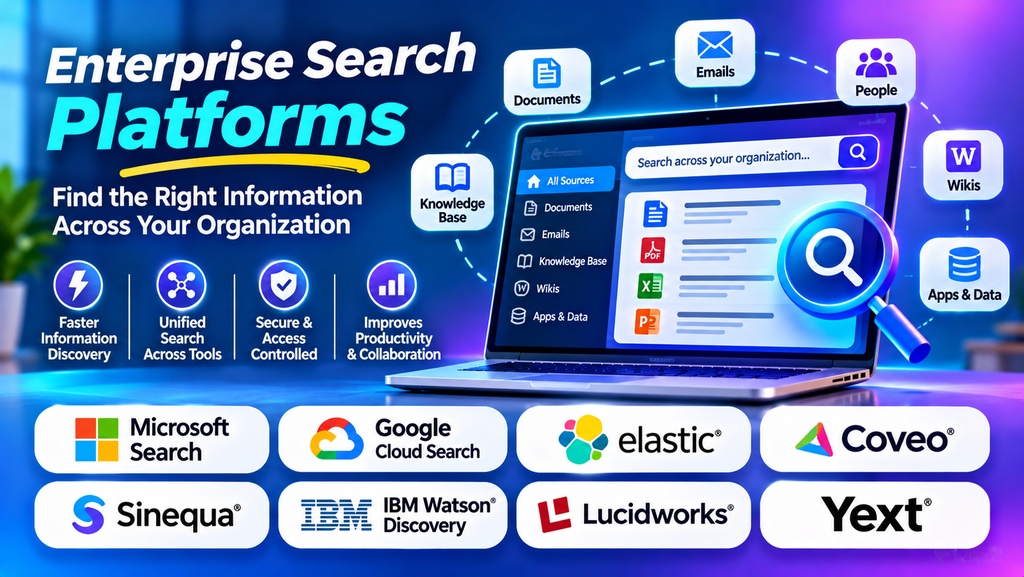
Organizations store valuable information across document repositories, intranets, cloud applications, databases, customer relationship management systems, and collaboration tools. When employees need information, searching each system individually can waste time and make important knowledge difficult to access.
Enterprise search platforms help solve this problem by allowing users to search across multiple information sources through a unified search experience. Depending on the platform, these tools can index documents, retrieve relevant results, understand natural-language queries, and apply access permissions to the information displayed.
By making organizational information easier to discover, enterprise search can support employee productivity, customer service, research, and knowledge management.
What Is Enterprise Search Software?
Enterprise search software is designed to discover and retrieve information from multiple systems used within an organization. Rather than searching one website or document library, users can search connected sources through a central interface.
Depending on the product, an enterprise search platform may support document indexing, connectors, filters, relevance ranking, natural-language queries, permission-aware results, analytics, and AI-powered search.
Common data sources include:
- Internal documents and shared drives
- Company intranets and knowledge bases
- Collaboration and communication platforms
- Customer relationship management systems
- Enterprise resource planning applications
- Cloud storage and content repositories
- Technical documentation and internal websites
The information available through search depends on the connectors, permissions, indexing configuration, and supported data sources.
Best Enterprise Search Platforms to Consider
1. Coveo
Coveo provides AI-powered search and relevance capabilities for digital experiences, workplace knowledge, and customer service scenarios. Its offerings can help organizations retrieve relevant information from connected content sources.
It may suit businesses that want to improve employee search, customer self-service, or digital product discovery. Depending on the implementation, relevance tuning and personalization can help users find useful information more efficiently.
When evaluating Coveo, review its available connectors, permission handling, analytics, relevance controls, integration requirements, and pricing.
2. Elastic Enterprise Search
Elastic provides search capabilities built on the Elastic Stack, including technologies used to index, retrieve, and analyze information. Its search tools can support applications that need customized search experiences across structured and unstructured content.
Elastic may suit technical teams that need control over search architecture, query behavior, indexing, and application integration.
Organizations should consider deployment complexity, infrastructure costs, security configuration, maintenance requirements, and the technical expertise needed to operate the solution.
3. Glean
Glean focuses on enterprise knowledge discovery and AI-powered workplace search. It is designed to help employees find information across connected business applications and organizational content.
Its capabilities may be useful for teams that work across many cloud applications and need a more unified way to discover company knowledge.
Before adopting Glean, assess supported connectors, identity and permission synchronization, search relevance, administrative controls, data governance, and integration with existing workplace tools.
4. Microsoft Search
Microsoft Search provides search experiences across supported Microsoft services and connected organizational content. It can help employees discover information in the Microsoft 365 environment, depending on the applications and configuration in use.
It may be particularly relevant for organizations already using Microsoft 365, SharePoint, Teams, and other Microsoft services.
Review licensing requirements, available search experiences, content connectors, permissions, administration, and how the implementation handles information stored outside the Microsoft ecosystem.
5. Google Cloud Search
Google Cloud Search is designed to help users find information across supported enterprise content sources, particularly within Google Workspace environments and configured integrations.
It may be relevant to organizations that use Google Workspace and want employees to discover company information without manually navigating individual repositories.
Evaluate supported data sources, connector requirements, identity integration, access controls, search administration, and the fit with your organization’s existing Google services.
6. Algolia
Algolia provides search and discovery technology commonly used for websites, applications, ecommerce, and digital content experiences. Although it is not exclusively an internal enterprise search platform, it can support enterprise search use cases when configured for the relevant data and application.
It may suit organizations building customized search experiences for products, documentation, knowledge portals, or other searchable content.
Assess indexing workflows, API capabilities, relevance tuning, filtering, analytics, security requirements, and the engineering effort needed for implementation.
7. Sinequa
Sinequa provides enterprise search and knowledge discovery capabilities designed to help organizations access information across complex enterprise environments.
It may be relevant to large organizations with substantial volumes of technical documents, internal knowledge, and information distributed across multiple systems.
Evaluate connector coverage, language support, security trimming, AI capabilities, deployment requirements, and the level of customization needed for your use cases.
Enterprise Search Platform Comparison
| Platform | Main strength | Potential fit |
|---|---|---|
| Coveo | AI-powered relevance and search experiences | Customer service and enterprise knowledge |
| Elastic Enterprise Search | Flexible, developer-oriented search capabilities | Technical teams and customized applications |
| Glean | Workplace knowledge discovery | Organizations using multiple business applications |
| Microsoft Search | Search across supported Microsoft services | Microsoft 365 environments |
| Google Cloud Search | Search across supported enterprise content | Google Workspace environments |
| Algolia | API-driven search and discovery | Websites, applications, and content portals |
| Sinequa | Enterprise knowledge discovery | Large organizations with complex information sources |
This comparison describes general product positioning. Feature availability, deployment choices, supported connectors, and licensing can change, so verify current vendor documentation before selecting a platform.
How Does Enterprise Search Work?
Enterprise search usually involves several stages that transform scattered information into searchable results.
1. Connecting information sources
The platform connects to supported repositories such as document management systems, intranets, cloud storage, and collaboration applications.
2. Indexing content
Content is collected or synchronized and prepared for search. Depending on the source and platform, indexing may include document text, metadata, and other searchable fields.
3. Processing search queries
When a user enters a query, the platform analyzes the terms and searches its index. More advanced systems may support synonyms, natural-language queries, semantic retrieval, or AI-based query interpretation.
4. Ranking results
The search engine orders results according to relevance and other configured factors. Some platforms allow administrators to tune ranking based on business requirements.
5. Applying permissions
Enterprise search should respect the user’s access rights. Permission-aware search helps prevent users from discovering content they are not authorized to view.
6. Displaying and refining results
Users review the results, apply filters, open source documents, or refine the query. Analytics may help administrators understand common searches and identify gaps in the information available.
The effectiveness of enterprise search depends on the quality of source content, connector reliability, indexing configuration, permissions, and relevance tuning.
Key Benefits of Enterprise Search
Faster access to information
Employees can search across connected sources rather than opening multiple applications and repeating the same query. This can reduce the time spent locating documents and answers.
Improved employee productivity
When information is easier to discover, teams can spend less time searching and more time on analysis, customer support, and operational work.
Better knowledge sharing
Enterprise search can make organizational knowledge more accessible across departments, helping employees discover relevant documentation beyond their immediate teams.
More effective customer service
Support teams can retrieve policies, product documentation, troubleshooting steps, and previous knowledge resources while assisting customers.
Reduced information silos
Connecting different repositories through search can make information from separate departments easier to discover without necessarily moving all content into one storage system.
Insights into information needs
Search analytics can reveal common queries, unsuccessful searches, and topics where documentation may be missing or difficult to locate.
Common Use Cases for Enterprise Search
- Employee knowledge discovery: Find internal policies, procedures, and shared documents.
- Customer support: Retrieve troubleshooting instructions, product documentation, and service resources.
- Legal and compliance: Discover authorized documents and records across supported repositories.
- Research and development: Search technical reports, research documents, specifications, and project records.
- IT operations: Locate system documentation, incident notes, configuration information, and troubleshooting guides.
- Human resources: Find onboarding resources, employee policies, benefits information, and training materials.
- Sales enablement: Discover approved presentations, product information, proposals, and sales resources.
- Ecommerce and digital experiences: Help users discover relevant products, articles, and other searchable content.
Each use case may require different connectors, permissions, indexing rules, and relevance settings.
Essential Features to Look For
Connectors and integrations
Check whether the platform connects to the organization’s actual information sources. Confirm which connectors are included, which require custom development, and how frequently content changes are synchronized.
Search relevance
Relevant results are essential for user adoption. Evaluate keyword matching, synonyms, filters, ranking controls, semantic search, and query interpretation where available.
Security and permissions
The platform should preserve source-system access controls and correctly apply permissions to search results. Test this with representative users and sensitive documents before launch.
Natural-language and AI search
Some platforms support conversational queries, semantic retrieval, or AI-generated answers. Assess accuracy, source citations, access enforcement, data handling, and the ability to verify answers against original documents.
Filters and facets
Filters based on document type, department, date, author, or other metadata help users narrow large result sets.
Search analytics
Analytics can reveal failed searches, popular queries, user behavior, and content gaps. These insights help teams improve both search configuration and source documentation.
Scalability and performance
Evaluate indexing speed, query latency, content volume, concurrency, and the infrastructure needed to support growth.
Administration and governance
Look for controls for managing connectors, monitoring indexing, configuring relevance, handling permissions, and investigating search issues.
Enterprise Search vs. Website Search
Enterprise search and website search both retrieve information, but they typically serve different audiences and data environments.
| Comparison | Enterprise search | Website search |
|---|---|---|
| Primary audience | Employees and authorized business users | Website visitors and customers |
| Content sources | Internal applications and business repositories | Public website content or online catalogues |
| Access controls | Often essential at document and user level | Depends on whether content is public or restricted |
| Common filters | Departments, document types, authors, and permissions | Products, categories, topics, and attributes |
| Typical goal | Find organizational knowledge | Find website content, products, or services |
Some search platforms can support both scenarios, but the architecture, security model, and relevance requirements may differ.
Challenges of Enterprise Search Implementation
Fragmented data sources
Organizations may use different systems with inconsistent metadata, document formats, and update schedules. Integrating these sources requires careful planning.
Poor content quality
Duplicated, outdated, or incomplete documents can produce weak results. Improving source content is often as important as tuning the search engine.
Permission complexity
Access rules may differ between repositories. Incorrect synchronization can expose restricted information or prevent authorized users from finding necessary documents.
Search relevance problems
Users may struggle if the engine returns irrelevant results or fails to understand common terminology. Query analysis, synonyms, metadata, and relevance tuning can help.
Integration and maintenance costs
Connectors, indexing pipelines, authentication, monitoring, and custom integrations require ongoing ownership and technical support.
AI accuracy and governance
AI-powered search may produce incomplete or inaccurate answers. Organizations should test response quality, require appropriate source grounding, preserve access permissions, and establish clear data governance.
How to Choose the Right Enterprise Search Platform
- Identify the search problem: Define which information employees or customers struggle to find.
- Inventory data sources: List the repositories, applications, and document systems that must be searchable.
- Map access requirements: Document the permissions and security rules that search must preserve.
- Evaluate connectors: Confirm compatibility with the existing technology environment.
- Test relevance: Use realistic queries, including common terminology, abbreviations, and difficult searches.
- Assess AI requirements: Decide whether keyword search, semantic search, or AI-generated answers are necessary.
- Estimate total cost: Include licensing, infrastructure, integrations, administration, and maintenance.
- Run a pilot: Test representative sources, user groups, permissions, and queries before wider deployment.
Enterprise Search Best Practices
- Improve source content: Keep documents accurate, clearly titled, and properly maintained.
- Use meaningful metadata: Apply consistent labels, dates, categories, and ownership information.
- Preserve permissions: Validate access controls across all connected systems.
- Tune relevance: Review common queries and adjust ranking or synonyms when appropriate.
- Monitor unsuccessful searches: Identify missing documents and confusing terminology.
- Maintain connectors: Check synchronization failures and indexing delays.
- Train users: Explain available filters, search operators, and advanced features.
- Review security regularly: Test access boundaries and audit configuration changes.
- Measure outcomes: Track search success, time to find information, and user feedback.
Frequently Asked Questions
What is the main purpose of enterprise search?
Its main purpose is to help users find relevant information across multiple organizational systems through a unified search experience.
Is enterprise search the same as a search engine?
Both retrieve information, but enterprise search is designed for an organization’s content sources, workflows, and access permissions. General web search engines primarily discover and retrieve publicly accessible web content.
Can enterprise search use AI?
Yes. Some platforms offer semantic search, natural-language queries, or AI-generated answers. Available capabilities differ by product, and AI features should be evaluated for accuracy, security, and source traceability.
Is enterprise search suitable for small businesses?
It can be, particularly when information is spread across multiple applications. However, a smaller organization may find that the search capabilities already included in its document or collaboration tools are sufficient.
How can enterprise search success be measured?
Organizations can monitor search success rates, unsuccessful queries, time required to find information, result relevance, user satisfaction, and adoption. The most useful metrics depend on the original business problem.
