Upgrade & Secure Your Future with DevOps, SRE, DevSecOps, MLOps!
We spend hours scrolling social media and waste money on things we forget, but won’t spend 30 minutes a day earning certifications that can change our lives.
Master in DevOps, SRE, DevSecOps & MLOps by DevOps School!
Learn from Guru Rajesh Kumar and double your salary in just one year.
Introduction
Billing & Invoicing Software) Toolkits are platforms designed to automate invoice generation, recurring billing, payment collection, and financial reporting for businesses. They streamline revenue operations, reduce manual errors, and enhance cash flow management. By digitizing billing processes, these tools improve accuracy, ensure compliance, and provide actionable insights for finance teams.
In , the need for automated billing has grown as organizations handle subscription-based models, multi-currency operations, and complex service pricing structures. AI-powered invoice recognition, automated reminders, and integration with accounting systems enable businesses to optimize revenue collection and reduce administrative workloads.
Real-world use cases include:
- Automating recurring subscription billing for SaaS businesses.
- Generating invoices for freelance services or professional services companies.
- Tracking payments and overdue accounts with automated reminders.
- Integrating with accounting and ERP systems for unified financial reporting.
- Offering customers flexible payment options including digital wallets and ACH.
Buyers should evaluate:
- Invoice generation and customization
- Recurring billing automation
- Payment gateway and method support
- Integration with accounting, CRM, and ERP systems
- Reporting and analytics capabilities
- Multi-currency and tax compliance
- Workflow automation for approvals and reminders
- Security and data protection
- Ease of use and mobile access
Best for: Finance teams, small-to-large businesses, SaaS companies, freelancers, subscription-based services, and enterprises with high billing volume.
Not ideal for: Businesses with minimal invoicing needs, very small teams using spreadsheets, or organizations seeking simple one-off billing without automation.
Key Trends in Billing & Invoicing Software Toolkits
- AI-driven invoice generation and error detection.
- Automated recurring billing and subscription management.
- Integration with multiple payment gateways and digital wallets.
- Cloud-native platforms enabling remote finance team access.
- Real-time analytics for cash flow forecasting.
- Multi-currency, tax, and compliance automation.
- Workflow automation for approvals, reminders, and notifications.
- Mobile-first apps for on-the-go invoice management.
- Flexible pricing models: subscription, per-invoice, or per-user.
- Enhanced security and encryption for sensitive financial data.
How We Selected These Tools (Methodology)
- Evaluated market adoption and mindshare among finance and billing professionals.
- Reviewed feature completeness including invoicing, payment processing, and reporting.
- Assessed reliability, uptime, and platform performance.
- Checked security measures, encryption, and compliance standards.
- Considered integration capabilities with accounting, CRM, and ERP systems.
- Evaluated customer fit across SMBs, mid-market, and enterprise users.
- Prioritized automation and AI capabilities for efficiency.
- Verified mobile access and ease of adoption for finance teams.
- Analyzed support options, documentation, and community engagement.
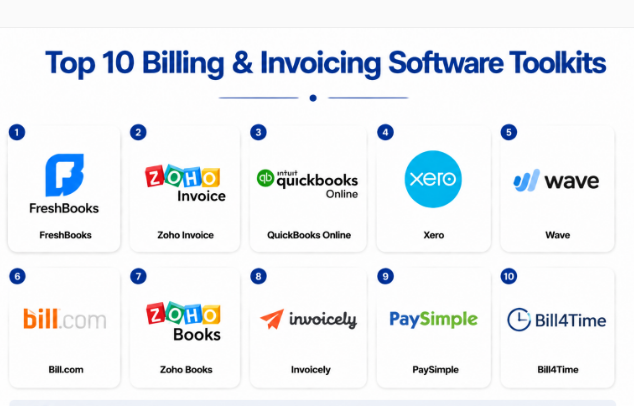
Top 10 Billing & Invoicing Software Toolkits
#1 — FreshBooks
Short description: FreshBooks is a cloud-based billing and invoicing solution designed for freelancers and small businesses. It automates invoice creation, tracks payments, and integrates with accounting systems to simplify revenue management.
Key Features
- Customizable invoice templates
- Automated recurring billing
- Payment reminders and late fee management
- Expense tracking and reporting
- Integration with accounting tools
- Multi-currency support
- Mobile app for invoicing and tracking
Pros
- Easy to use for freelancers and small teams
- Simplifies recurring billing and payment tracking
Cons
- Limited advanced analytics for large enterprises
- Some integrations require higher-tier plans
Platforms / Deployment
- Web / iOS / Android
- Cloud
Security & Compliance
- SSO, encryption
- Not publicly stated for SOC/ISO
Integrations & Ecosystem
- Accounting tools (QuickBooks, Xero)
- Payment gateways
- CRM integrations
- API for custom automation
Support & Community
- Documentation, live chat support, webinars. Moderate online community.
#2 — Zoho Invoice
Short description: Zoho Invoice is designed for SMBs and freelancers to manage billing, automate invoicing, and collect payments online. It provides integration with Zoho’s ecosystem and third-party accounting software.
Key Features
- Invoice generation and customization
- Recurring billing automation
- Payment reminders
- Multi-currency and tax management
- Reporting and analytics
- Online payment acceptance
Pros
- Affordable and easy-to-use solution
- Good integration with Zoho ecosystem
Cons
- Limited features for large enterprises
- Some advanced reporting requires premium plans
Platforms / Deployment
- Web / iOS / Android
- Cloud
Security & Compliance
- Not publicly stated
Integrations & Ecosystem
- Zoho apps, accounting software
- Payment gateways
- API access for custom automation
Support & Community
- Email support, documentation, and online tutorials.
#3 — QuickBooks Online
Short description: QuickBooks Online offers billing, invoicing, and accounting capabilities for SMBs. It automates invoice creation, payment collection, and financial reporting.
Key Features
- Automated invoice creation
- Recurring billing
- Payment tracking and reminders
- Expense and revenue tracking
- Integration with accounting and payroll
- Multi-currency support
Pros
- Widely adopted, reliable platform
- Strong accounting and invoicing integration
Cons
- Limited flexibility for large enterprise invoicing
- Some automation features require higher-tier plans
Platforms / Deployment
- Web / iOS / Android
- Cloud
Security & Compliance
- Encryption, SSO
- Not publicly stated for SOC/ISO
Integrations & Ecosystem
- Accounting platforms, payment gateways
- CRM integrations
- API for custom workflows
Support & Community
- Extensive documentation, live chat, community forums.
#4 — Xero
Short description: Xero is a cloud-based accounting and invoicing platform for SMBs. It automates invoice generation, online payments, and integrates with a broad ecosystem of business applications.
Key Features
- Custom invoice templates
- Online payment integration
- Automated reminders
- Recurring billing
- Multi-currency and tax support
- Analytics dashboards
Pros
- Strong multi-currency and international capabilities
- Easy integration with multiple financial apps
Cons
- Some advanced features are add-ons
- Learning curve for first-time users
Platforms / Deployment
- Web / iOS / Android
- Cloud
Security & Compliance
- Encryption, MFA
- Not publicly stated
Integrations & Ecosystem
- Payment gateways
- Accounting and ERP software
- API access for automation
Support & Community
- Documentation, live chat, and training webinars.
#5 — Wave
Short description: Wave offers free cloud-based invoicing and billing for SMBs and freelancers. It simplifies invoice creation, payment collection, and integrates with basic accounting tools.
Key Features
- Invoice creation and tracking
- Online payment processing
- Recurring billing
- Expense tracking
- Multi-currency support
Pros
- Free solution for small businesses
- Simple and easy-to-use interface
Cons
- Limited enterprise features
- Reporting is basic
Platforms / Deployment
- Web / iOS / Android
- Cloud
Security & Compliance
- Not publicly stated
Integrations & Ecosystem
- Payment gateways
- Accounting software
- Basic API access
Support & Community
- Email support and documentation. Small online community.
#6 — Bill.com
Short description: Bill.com automates accounts payable and receivable, integrating with accounting systems. It is ideal for SMBs and mid-market businesses seeking automation in billing and payments.
Key Features
- Automated invoice approvals
- Payment processing
- Vendor and client management
- Recurring billing and reminders
- Reporting dashboards
Pros
- Streamlines both AP and AR workflows
- Reduces manual invoice handling
Cons
- Premium subscription cost
- Some features require integration setup
Platforms / Deployment
- Web / iOS / Android
- Cloud
Security & Compliance
- SOC 2, encryption, SSO
- Not publicly stated
Integrations & Ecosystem
- Accounting software (QuickBooks, Xero)
- Payment gateways
- API for custom workflows
Support & Community
- Email and phone support, documentation, and online community.
#7 — Zoho Books
Short description: Zoho Books provides billing, invoicing, and accounting for SMBs. It automates recurring invoices, integrates with payment gateways, and manages clients efficiently.
Key Features
- Automated invoice creation
- Recurring billing and reminders
- Payment processing
- Expense and revenue tracking
- Analytics and reporting
Pros
- Good integration with Zoho ecosystem
- Affordable for SMBs
Cons
- Limited features for large enterprises
- Some automation requires higher-tier plans
Platforms / Deployment
- Web / iOS / Android
- Cloud
Security & Compliance
- Not publicly stated
Integrations & Ecosystem
- Payment gateways
- ERP and accounting tools
- API access
Support & Community
- Email support, documentation, and tutorials.
#8 — Invoicely
Short description: Invoicely offers billing and invoicing software for freelancers and SMBs, automating recurring invoices, payment tracking, and reporting.
Key Features
- Invoice creation and tracking
- Recurring billing
- Payment reminders
- Analytics and reporting
- Multi-currency support
Pros
- Easy setup and lightweight
- Free and premium plans available
Cons
- Limited features for enterprise
- Advanced analytics require premium plans
Platforms / Deployment
- Web / iOS / Android
- Cloud
Security & Compliance
- Not publicly stated
Integrations & Ecosystem
- Payment gateways
- Basic accounting software
- API support
Support & Community
- Email support and online documentation.
#9 — PaySimple
Short description: PaySimple automates invoicing, billing, and payment collection for SMBs, providing recurring billing and client management capabilities.
Key Features
- Recurring billing
- Invoice creation and tracking
- Payment collection and reporting
- Client management
- Automated reminders
Pros
- Simplifies recurring payments
- User-friendly interface
Cons
- Limited advanced reporting
- Integration options limited
Platforms / Deployment
- Web / iOS / Android
- Cloud
Security & Compliance
- Not publicly stated
Integrations & Ecosystem
- Payment gateways
- Accounting software
- API access
Support & Community
- Email support, documentation, tutorials.
#10 — Bill4Time
Short description: Bill4Time provides billing, invoicing, and time-tracking software for professionals and service-based businesses, automating client invoicing and payments.
Key Features
- Invoice generation
- Time tracking integration
- Recurring billing
- Payment processing
- Reporting dashboards
Pros
- Combines time tracking and billing
- Automates client invoicing
Cons
- Less suitable for large enterprises
- Advanced features require premium plans
Platforms / Deployment
- Web / iOS / Android
- Cloud
Security & Compliance
- Not publicly stated
Integrations & Ecosystem
- Payment gateways
- Accounting tools
- API access
Support & Community
- Email support, documentation, and onboarding guides.
Comparison Table (Top 10)
| Tool Name | Best For | Platform(s) Supported | Deployment | Standout Feature | Public Rating |
|---|---|---|---|---|---|
| FreshBooks | Freelancers & SMBs | Web/iOS/Android | Cloud | Recurring billing automation | N/A |
| Zoho Invoice | SMBs & freelancers | Web/iOS/Android | Cloud | Integration with Zoho ecosystem | N/A |
| QuickBooks Online | SMB accounting & billing | Web/iOS/Android | Cloud | Accounting + invoicing integration | N/A |
| Xero | SMBs & small enterprises | Web/iOS/Android | Cloud | Multi-currency support | N/A |
| Wave | Freelancers & SMBs | Web/iOS/Android | Cloud | Free invoicing | N/A |
| Bill.com | SMB & mid-market AP | Web/iOS/Android | Cloud | End-to-end AP automation | N/A |
| Zoho Books | SMBs | Web/iOS/Android | Cloud | Integration with Zoho apps | N/A |
| Invoicely | Freelancers & SMBs | Web/iOS/Android | Cloud | Lightweight invoicing | N/A |
| PaySimple | SMBs & service businesses | Web/iOS/Android | Cloud | Recurring billing | N/A |
| Bill4Time | Service professionals | Web/iOS/Android | Cloud | Time tracking + billing | N/A |
Evaluation & Scoring of Billing & Invoicing Tools
| Tool Name | Core (25%) | Ease (15%) | Integrations (15%) | Security (10%) | Performance (10%) | Support (10%) | Value (15%) | Weighted Total (0–10) |
|---|---|---|---|---|---|---|---|---|
| FreshBooks | 8 | 9 | 7 | 7 | 8 | 8 | 8 | 8.1 |
| Zoho Invoice | 8 | 8 | 7 | 7 | 8 | 7 | 8 | 7.9 |
| QuickBooks Online | 9 | 7 | 8 | 8 | 8 | 7 | 8 | 8.1 |
| Xero | 8 | 8 | 7 | 7 | 8 | 7 | 8 | 7.9 |
| Wave | 7 | 9 | 6 | 7 | 7 | 6 | 9 | 7.5 |
| Bill.com | 9 | 8 | 8 | 8 | 8 | 7 | 8 | 8.2 |
| Zoho Books | 8 | 8 | 7 | 7 | 8 | 7 | 8 | 7.9 |
| Invoicely | 7 | 8 | 6 | 7 | 7 | 6 | 8 | 7.3 |
| PaySimple | 7 | 8 | 6 | 7 | 7 | 6 | 8 | 7.3 |
| Bill4Time | 8 | 8 | 7 | 7 | 7 | 7 | 8 | 7.8 |
Interpretation: Weighted totals compare platforms based on core features, usability, integration potential, and overall value. Higher scores indicate broader suitability for businesses needing automated billing.
Which Billing & Invoicing Tool Is Right for You?
Solo / Freelancer
- FreshBooks, Wave, Invoicely for simple and cost-effective invoicing.
SMB
- Zoho Invoice, Zoho Books, Bill.com for automated recurring billing and workflow integration.
Mid-Market
- QuickBooks Online, Xero, Bill.com for scalable automation and accounting integration.
Enterprise
- Bill.com, QuickBooks Online with premium tiers for advanced workflows and compliance.
Budget vs Premium
- Budget: Wave, Invoicely
- Premium: Bill.com, QuickBooks Online
Feature Depth vs Ease of Use
- Depth: QuickBooks Online, Bill.com
- Ease: FreshBooks, Wave
Integrations & Scalability
- Enterprise-grade: Bill.com, QuickBooks Online
- SMB-friendly: FreshBooks, Zoho Invoice
Security & Compliance Needs
- High compliance: Bill.com, QuickBooks Online
- Standard compliance: FreshBooks, Wave
Frequently Asked Questions (FAQs)
1. How is pricing structured for billing software?
Pricing is generally subscription-based, per user, or per invoice, with add-ons for premium automation and analytics.
2. What is required to onboard a billing platform?
Typically, account setup, customer database import, workflow configuration, and payment method integration.
3. Can these tools integrate with ERP or accounting systems?
Yes, most provide built-in connectors or APIs to integrate with popular accounting and ERP platforms.
4. Do these platforms support multi-currency and tax management?
Leading solutions like Xero, QuickBooks Online, and Bill.com support multi-currency invoicing and automated tax calculations.
5. Are AI features available for billing automation?
Yes, AI helps with invoice recognition, error detection, and recurring billing predictions.
6. Can freelancers benefit from these platforms?
Yes, solutions like FreshBooks, Wave, and Invoicely are tailored for freelancers and SMBs.
7. How scalable are these solutions?
Enterprise-tier platforms like Bill.com and QuickBooks Online handle thousands of invoices per month.
8. Are mobile apps available?
Yes, all top solutions provide mobile apps for invoicing, payments, and tracking on-the-go.
9. How long does implementation take?
Implementation ranges from a few hours for small businesses to several weeks for enterprise setups.
10. Can billing data be exported for reporting?
Yes, most tools support CSV, Excel, or API-based exports for analytics and accounting integration.
Conclusion
Billing & Invoicing Software) Toolkits are critical for automating revenue operations, improving cash flow, and ensuring accurate, timely invoicing. Smaller businesses and freelancers benefit from FreshBooks, Wave, or Invoicely for ease of use, while mid-market and enterprise organizations gain value from Bill.com, QuickBooks Online, and Xero with advanced automation and integration capabilities. The next step is to shortlist , run a pilot, and validate recurring billing, automation, and ERP integration before full deployment.
