Upgrade & Secure Your Future with DevOps, SRE, DevSecOps, MLOps!
We spend hours scrolling social media and waste money on things we forget, but won’t spend 30 minutes a day earning certifications that can change our lives.
Master in DevOps, SRE, DevSecOps & MLOps by DevOps School!
Learn from Guru Rajesh Kumar and double your salary in just one year.
Introduction
Enterprise Content Management, or ECM, is a system that helps companies store, organize, protect, search, approve, and manage business content. This content can include contracts, invoices, HR records, policies, legal documents, scanned files, customer records, project documents, and internal knowledge.
ECM matters because modern businesses create large volumes of digital content across cloud apps, remote teams, mobile devices, and regulated workflows. Without a proper ECM system, documents become hard to find, approvals slow down, compliance risks increase, and teams waste time using outdated files.
Real-world use cases include:
- Contract and legal document control
- HR employee file management
- Invoice processing and finance approvals
- Policy and compliance document governance
- Customer onboarding and case document management
Buyers should evaluate:
- Document storage and version control
- Search and metadata quality
- Workflow automation
- Access control and audit logs
- Records retention
- Cloud, hybrid, or self-hosted deployment
- Integrations with Microsoft 365, ERP, CRM, and e-signature tools
- Migration effort
- AI-assisted search and classification
- Total cost and administration effort
Best for: ECM is best for IT teams, legal teams, compliance teams, finance teams, HR departments, government bodies, healthcare organizations, banks, insurers, manufacturers, and mid-sized to large enterprises that handle high document volume.
Not ideal for: Very small teams with basic file-sharing needs may not need a full ECM platform. In those cases, simple cloud storage, a lightweight document tool, or a team collaboration app may be enough.
Key Trends in Enterprise Content Management (ECM)
AI-powered content discovery is becoming important. Teams want to search documents using natural language instead of only file names or folder paths.
- Automated document classification helps reduce manual tagging by identifying document type, department, customer name, invoice data, or contract category.
- Workflow automation is moving beyond IT teams. Business users now expect low-code approvals, routing, reminders, and escalation rules.
- Security governance is becoming stricter. Buyers now look closely at SSO, MFA, encryption, RBAC, audit logs, retention rules, and data residency.
- Hybrid deployment still matters. Many regulated industries want cloud flexibility but also need private, regional, or self-hosted control.
- Integration-first ECM is now essential. ECM platforms must connect with Microsoft 365, Google Workspace, Salesforce, SAP, Oracle, ServiceNow, Slack, Teams, and e-signature tools.
- Records management is becoming more automated. Organizations want clear retention, legal hold, archive, and deletion policies.
- User experience is now a buying factor. Employees avoid ECM systems that feel slow, confusing, or too technical.
- Industry-specific ECM is growing. Healthcare, banking, legal, education, government, and manufacturing teams need tailored content workflows.
- AI governance is becoming a concern. Buyers want to understand how AI handles private files, permissions, sensitive data, and compliance boundaries.
How We Selected These Tools
The following tools were selected based on practical ECM buyer needs:
- Strong market adoption and enterprise recognition
- Clear document management and content governance capabilities
- Workflow, metadata, search, and version control features
- Security posture signals such as SSO, MFA, RBAC, encryption, and audit logs
- Integration strength with business applications
- Fit for different company sizes, from SMB to enterprise
- Deployment flexibility, including cloud, self-hosted, and hybrid options where relevant
- Support, documentation, onboarding, and partner ecosystem
- Suitability for regulated and document-heavy industries
- Long-term scalability and platform maturity
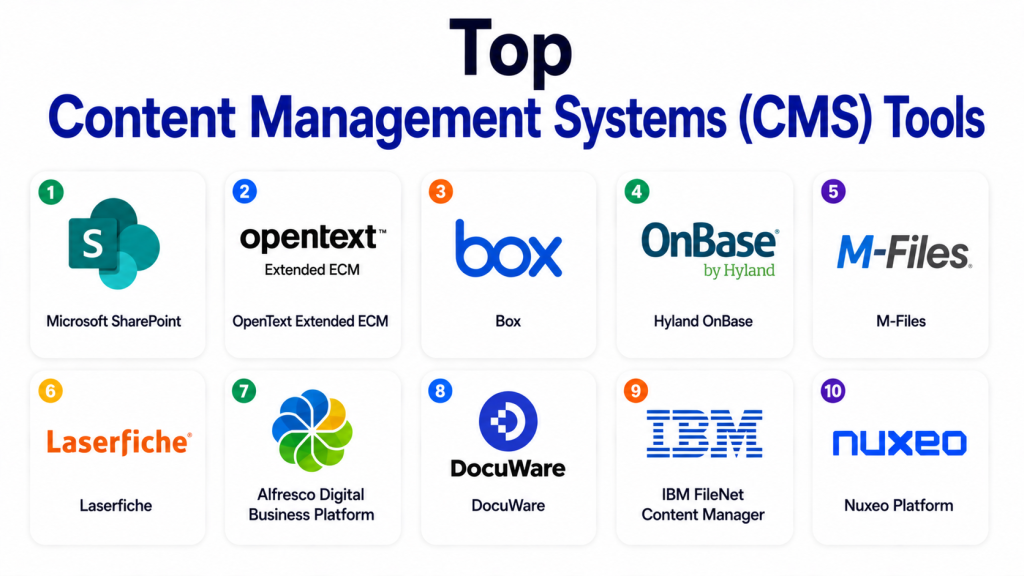
Top Content Management Systems (CMS) Tools
#1 — Microsoft SharePoint
Short description: Microsoft SharePoint is a widely used content management and collaboration platform for organizations using Microsoft 365. It supports document libraries, team sites, permissions, versioning, intranet content, workflows, and enterprise search.
Key Features
- Document libraries with metadata and version history
- Strong integration with Microsoft Teams and OneDrive
- Access permissions and sharing controls
- Workflow automation through Microsoft Power Automate
- Enterprise search across sites and content
- Intranet and knowledge portal capabilities
- Records and retention support through Microsoft Purview
Pros
- Strong fit for Microsoft 365-based organizations
- Familiar user experience for many business users
- Large partner, consultant, and integration ecosystem
Cons
- Can become difficult to manage without strong governance
- Advanced records management may need extra configuration
- Poorly planned sites can create content duplication
Platforms / Deployment
Web / Windows / macOS / iOS / Android
Cloud / Hybrid
Security & Compliance
Supports SSO, MFA, encryption, RBAC, audit logs, retention, and compliance controls through Microsoft 365 and Microsoft Purview. SOC 2, ISO 27001, GDPR, and HIPAA support may depend on Microsoft plan, region, and configuration.
Integrations & Ecosystem
SharePoint has a very strong Microsoft-centered ecosystem and works well for companies already using Microsoft tools.
- Microsoft Teams
- OneDrive
- Outlook
- Power Automate
- Power Apps
- Microsoft Purview
Support & Community
Microsoft provides detailed documentation, enterprise support options, admin resources, and partner-led implementation support. Community strength is very strong due to large global adoption.
#2 — OpenText Extended ECM
Short description: OpenText Extended ECM is an enterprise-grade content management platform for large organizations with complex governance, compliance, records, and process content requirements. It is often used in regulated and document-heavy industries.
Key Features
- Enterprise document and records management
- Business workspace and process content management
- Metadata-driven content organization
- Strong lifecycle governance
- Integration with SAP and other enterprise systems
- Workflow and process support
- Retention, audit, and compliance capabilities
Pros
- Strong fit for regulated enterprises
- Deep governance and records management features
- Good for complex business process content
Cons
- Can be expensive and complex to implement
- Requires skilled administration
- May be too heavy for small organizations
Platforms / Deployment
Web / Windows / Mobile support varies
Cloud / Self-hosted / Hybrid
Security & Compliance
Supports enterprise security features such as SSO/SAML, RBAC, audit logs, encryption, records controls, and retention policies. Specific certifications vary by product edition, deployment, and region.
Integrations & Ecosystem
OpenText is strong in enterprise application integration, especially where content must connect with business processes.
- SAP
- Microsoft 365
- Salesforce
- Oracle
- ServiceNow
- Enterprise workflow systems
Support & Community
OpenText provides enterprise support, professional services, documentation, training, and partner-led implementation. Community strength is mainly enterprise and specialist-focused.
#3 — Box
Short description: Box is a cloud content management platform built for secure file sharing, collaboration, workflow, and content governance. It is useful for cloud-first businesses that want simple adoption with strong security controls.
Key Features
- Secure cloud content storage
- File sharing and collaboration
- Version history and access control
- Workflow automation with Box Relay
- Metadata and content classification
- E-signature support with Box Sign
- AI-assisted content intelligence capabilities
Pros
- Clean and easy user experience
- Strong secure collaboration features
- Good integrations with common business tools
Cons
- Advanced governance may require higher plans
- No full self-hosted deployment option
- Complex enterprise workflows may need careful setup
Platforms / Deployment
Web / Windows / macOS / iOS / Android
Cloud
Security & Compliance
Supports SSO, MFA, encryption, RBAC, audit logs, data governance, and compliance-related features. SOC 2, ISO 27001, GDPR, and HIPAA support may depend on plan and configuration.
Integrations & Ecosystem
Box has a strong cloud business ecosystem and works well for cross-functional teams.
- Microsoft 365
- Google Workspace
- Salesforce
- Slack
- Zoom
- Okta
Support & Community
Box provides documentation, customer support, onboarding resources, enterprise support tiers, and partner services. Community and marketplace support are strong.
#4 — Hyland OnBase
Short description: Hyland OnBase is an enterprise content services platform for document management, workflow automation, case management, and records. It is common in healthcare, finance, insurance, government, and education.
Key Features
- Document capture and imaging
- Workflow and process automation
- Case management capabilities
- Records management and retention
- Metadata and enterprise search
- Integration with industry systems
- Content lifecycle management
Pros
- Strong for document-heavy business processes
- Good fit for regulated industries
- Mature workflow and case management capabilities
Cons
- Implementation can be complex
- May require specialist consulting
- Pricing depends on modules and use case
Platforms / Deployment
Web / Windows / Mobile support varies
Cloud / Self-hosted / Hybrid
Security & Compliance
Supports RBAC, audit trails, encryption, SSO, and compliance-focused content controls. Specific certifications should be verified based on deployment and subscription.
Integrations & Ecosystem
Hyland OnBase connects well with enterprise and industry-specific systems.
- ERP systems
- Healthcare systems
- Finance platforms
- Microsoft 365
- Capture tools
- Records systems
Support & Community
Hyland provides documentation, training, enterprise support, customer success, and implementation partner support. Community strength is strong in industry-specific user groups.
#5 — M-Files
Short description: M-Files is a metadata-driven document management and ECM platform. It helps organizations organize content by what it is, instead of where it is stored, making search and governance easier.
Key Features
- Metadata-based document management
- Version control and document lifecycle workflows
- AI-assisted classification and search
- Permissions and access control
- Compliance and audit support
- Microsoft 365 and business system integrations
- Flexible cloud, self-hosted, and hybrid options
Pros
- Strong metadata-first approach
- Good search and document organization
- Flexible deployment choices
Cons
- Metadata design requires planning
- Users may need training to adapt
- Advanced setup may need expert help
Platforms / Deployment
Web / Windows / iOS / Android
Cloud / Self-hosted / Hybrid
Security & Compliance
Supports SSO, permissions, encryption, audit logs, and compliance-related document controls. Specific certifications vary by product, region, and deployment.
Integrations & Ecosystem
M-Files is useful when companies need content connected across different systems.
- Microsoft 365
- Salesforce
- DocuSign
- ERP systems
- CRM systems
- APIs and connectors
Support & Community
M-Files provides documentation, onboarding resources, partner support, and professional services. Community strength is moderate, supported by an active partner ecosystem.
#6 — Laserfiche
Short description: Laserfiche is an ECM and business process automation platform used for document management, digital forms, workflows, records, and compliance. It is popular with government, education, finance, and public-sector teams.
Key Features
- Document capture and indexing
- Digital forms and process automation
- Workflow approvals and routing
- Records management and retention
- Search and metadata support
- Secure access control
- Cloud and self-hosted options
Pros
- Strong workflow and forms capabilities
- Good fit for public-sector and regulated teams
- Mature document management features
Cons
- Advanced setup may require training
- New users may need onboarding
- Cost depends on modules and deployment
Platforms / Deployment
Web / Windows / Mobile support varies
Cloud / Self-hosted / Hybrid
Security & Compliance
Supports SSO, RBAC, audit logs, encryption, and records management controls. Specific certifications should be verified based on deployment and plan.
Integrations & Ecosystem
Laserfiche supports automation and document workflows across business applications.
- Microsoft 365
- ERP systems
- CRM systems
- Public-sector applications
- APIs
- Workflow tools
Support & Community
Laserfiche provides documentation, support resources, training, and partner support. Community is strong among government, education, and process automation users.
#7 — Alfresco Digital Business Platform
Short description: Alfresco is a content services platform with open architecture and developer-friendly flexibility. It is useful for organizations that want custom ECM applications, document repositories, workflow, and integration control.
Key Features
- Document and content management
- Open architecture and APIs
- Workflow and process automation
- Metadata, permissions, and versioning
- Records management capabilities
- Search and repository services
- Flexible deployment models
Pros
- Developer-friendly and customizable
- Good for custom ECM applications
- Strong open architecture
Cons
- Requires technical skills for customization
- Enterprise support may be needed
- Not the simplest option for business-only users
Platforms / Deployment
Web / Windows / Linux / Mobile support varies
Cloud / Self-hosted / Hybrid
Security & Compliance
Supports RBAC, audit logs, encryption, authentication integrations, and enterprise security controls. Specific compliance certifications vary by deployment and offering.
Integrations & Ecosystem
Alfresco is strong for technical teams that need API-based content services.
- REST APIs
- Enterprise repositories
- Workflow engines
- Microsoft integrations
- Custom enterprise applications
- Developer extensions
Support & Community
Alfresco has documentation, professional support options, and technical community resources. Community strength is good among developers, architects, and ECM specialists.
#8 — DocuWare
Short description: DocuWare is a document management and workflow automation platform focused on digitizing paper-heavy processes. It is useful for finance, HR, invoice processing, and administrative document workflows.
Key Features
- Document capture and indexing
- Digital document storage
- Workflow automation
- Invoice and finance process support
- Search and metadata
- Access control and audit trails
- Cloud and on-premise options
Pros
- Good for digitizing manual processes
- Strong workflow support for SMB and mid-market teams
- Practical for finance and HR use cases
Cons
- Complex workflows may need expert setup
- Not as broad as larger enterprise ECM suites
- Pricing varies by users, storage, and modules
Platforms / Deployment
Web / Windows / Mobile support varies
Cloud / Self-hosted / Hybrid
Security & Compliance
Supports access controls, encryption, audit logs, and authentication features. Specific compliance certifications are Not publicly stated.
Integrations & Ecosystem
DocuWare supports common business document workflows and automation needs.
- Microsoft 365
- ERP systems
- Accounting systems
- Scanners and capture tools
- Workflow integrations
- APIs
Support & Community
DocuWare provides documentation, partner support, training, and onboarding resources. Community strength is moderate, with strong partner-led implementation support.
#9 — IBM FileNet Content Manager
Short description: IBM FileNet Content Manager is a large-scale enterprise content management platform for organizations with complex document, case, governance, and records requirements. It is best suited for large and regulated enterprises.
Key Features
- Enterprise document and content management
- Case management support
- High-volume content repository
- Records and lifecycle governance
- Metadata and enterprise search
- Workflow and process integration
- Strong enterprise security controls
Pros
- Strong fit for complex enterprise environments
- Suitable for regulated industries
- Scalable repository capabilities
Cons
- Implementation can be heavy
- Requires skilled technical administration
- Not ideal for small teams or simple file sharing
Platforms / Deployment
Web / Windows / Linux / Mobile support varies
Cloud / Self-hosted / Hybrid
Security & Compliance
Supports enterprise security features such as RBAC, authentication integrations, encryption, and audit controls. Specific certifications vary by IBM offering and deployment.
Integrations & Ecosystem
IBM FileNet is usually used in complex enterprise architecture where content connects with business systems.
- IBM automation ecosystem
- Case management systems
- ERP systems
- CRM systems
- Business automation tools
- APIs and enterprise connectors
Support & Community
IBM provides enterprise support, documentation, consulting, and partner services. Community is more enterprise and specialist-focused than general user-focused.
#10 — Nuxeo Platform
Short description: Nuxeo is a modern content services platform designed for scalable content applications and digital asset management. It is useful for enterprises that need flexible content models, APIs, and high-volume digital content workflows.
Key Features
- Scalable content repository
- Flexible content modeling
- Metadata and search
- Digital asset and rich media management
- API-first architecture
- Workflow and automation capabilities
- Cloud-focused deployment options
Pros
- Strong for custom content applications
- Good for digital assets and rich media
- API-first design supports extensibility
Cons
- May require technical expertise
- Less suitable for simple document workflows
- Enterprise implementation may need professional services
Platforms / Deployment
Web
Cloud / Hybrid options may vary
Security & Compliance
Supports enterprise access controls, authentication integrations, encryption, and audit-related capabilities. Specific compliance certifications are Not publicly stated.
Integrations & Ecosystem
Nuxeo is useful when content needs to connect with digital business workflows and custom applications.
- APIs
- Digital asset workflows
- Creative tools
- Enterprise applications
- Workflow systems
- Cloud services
Support & Community
Support is generally enterprise-focused. Documentation and professional services are available. Community strength is more technical and implementation-focused.
Comparison Table
| Tool Name | Best For | Platform(s) Supported | Deployment | Standout Feature | Public Rating |
|---|---|---|---|---|---|
| Microsoft SharePoint | Microsoft 365-based organizations | Web, Windows, macOS, iOS, Android | Cloud / Hybrid | Deep Microsoft 365 integration | N/A |
| OpenText Extended ECM | Large regulated enterprises | Web, Windows, Mobile varies | Cloud / Self-hosted / Hybrid | Enterprise governance and records management | N/A |
| Box | Cloud-first secure content collaboration | Web, Windows, macOS, iOS, Android | Cloud | Secure cloud collaboration | N/A |
| Hyland OnBase | Healthcare, finance, insurance, government | Web, Windows, Mobile varies | Cloud / Self-hosted / Hybrid | Workflow and case management | N/A |
| M-Files | Metadata-driven document management | Web, Windows, iOS, Android | Cloud / Self-hosted / Hybrid | Metadata-first content organization | N/A |
| Laserfiche | Public sector and workflow-heavy teams | Web, Windows, Mobile varies | Cloud / Self-hosted / Hybrid | Forms and process automation | N/A |
| Alfresco Digital Business Platform | Developer-friendly ECM customization | Web, Windows, Linux, Mobile varies | Cloud / Self-hosted / Hybrid | Open architecture and APIs | N/A |
| DocuWare | SMB and mid-market document automation | Web, Windows, Mobile varies | Cloud / Self-hosted / Hybrid | Document capture and workflow automation | N/A |
| IBM FileNet Content Manager | Large-scale enterprise content systems | Web, Windows, Linux, Mobile varies | Cloud / Self-hosted / Hybrid | Scalable enterprise repository | N/A |
| Nuxeo Platform | Custom content and digital asset workflows | Web | Cloud / Hybrid varies | Flexible content modeling | N/A |
Evaluation & Scoring of Enterprise Content Management (ECM)
| Tool Name | Core (25%) | Ease (15%) | Integrations (15%) | Security (10%) | Performance (10%) | Support (10%) | Value (15%) | Weighted Total (0–10) |
|---|---|---|---|---|---|---|---|---|
| Microsoft SharePoint | 9 | 8 | 10 | 9 | 8 | 9 | 9 | 8.90 |
| OpenText Extended ECM | 10 | 6 | 9 | 9 | 9 | 9 | 7 | 8.60 |
| Box | 8 | 9 | 9 | 9 | 8 | 8 | 8 | 8.40 |
| Hyland OnBase | 9 | 7 | 8 | 9 | 8 | 8 | 7 | 8.00 |
| M-Files | 8 | 8 | 8 | 8 | 8 | 8 | 8 | 8.00 |
| Laserfiche | 8 | 7 | 8 | 8 | 8 | 8 | 8 | 7.85 |
| IBM FileNet Content Manager | 9 | 5 | 8 | 9 | 9 | 8 | 6 | 7.75 |
| Alfresco Digital Business Platform | 8 | 6 | 9 | 8 | 8 | 7 | 8 | 7.65 |
| DocuWare | 7 | 8 | 7 | 7 | 8 | 8 | 8 | 7.55 |
| Nuxeo Platform | 8 | 6 | 8 | 7 | 8 | 7 | 7 | 7.35 |
The scores are comparative, not official ratings. A higher score means the tool performs strongly across more evaluation areas. However, the right ECM platform depends on your company size, compliance needs, integrations, deployment model, budget, and internal skills. A large bank may prefer OpenText or IBM FileNet, while a Microsoft-first company may get more practical value from SharePoint.
Which Enterprise Content Management (ECM) Tool Is Right for You?
Solo / Freelancer
Solo users usually do not need a full ECM platform. If the need is only file storage, sharing, and basic version history, a lightweight cloud tool may be enough.
Best-fit options:
- Box for simple secure file collaboration
- SharePoint if already using Microsoft 365
- DocuWare only if document capture and workflow are important
SMB
Small and mid-sized businesses need quick setup, easy adoption, and practical workflows. They usually want document storage, approvals, permissions, and search without heavy consulting.
Best-fit options:
- Box
- DocuWare
- M-Files
- Laserfiche
Mid-Market
Mid-market companies often need stronger governance, better workflow automation, and deeper integrations. They may have multiple departments using the same content platform.
Best-fit options:
- Microsoft SharePoint
- M-Files
- Laserfiche
- Hyland OnBase
- Box
Enterprise
Large enterprises need scalability, auditability, records management, integration depth, and long-term governance. They may also need hybrid or self-hosted deployment.
Best-fit options:
- OpenText Extended ECM
- IBM FileNet Content Manager
- Hyland OnBase
- Microsoft SharePoint
- Alfresco Digital Business Platform
Budget vs Premium
If budget is tight, start by checking tools already included in your current software stack. Microsoft 365 users may get strong value from SharePoint. Cloud-first teams may prefer Box. Large enterprises should consider total cost, including implementation, migration, support, governance, and administration.
Feature Depth vs Ease of Use
OpenText, IBM FileNet, and Hyland OnBase offer deep enterprise features but require more planning. Box and SharePoint are easier for users to adopt, but they still need good governance. M-Files is a good middle path for teams that want better structure without overly heavy systems.
Integrations & Scalability
Choose based on your core systems. SharePoint works well for Microsoft-heavy businesses. OpenText is strong for SAP-centered enterprises. Alfresco and Nuxeo are better for technical teams building custom content applications. Box is useful for cloud-first collaboration across departments.
Security & Compliance Needs
For strict compliance, prioritize SSO, MFA, RBAC, audit logs, retention policies, encryption, records management, and legal hold. OpenText, IBM FileNet, Hyland OnBase, Microsoft SharePoint, and Laserfiche are stronger candidates for regulated environments.
Frequently Asked Questions (FAQs)
What is Enterprise Content Management?
Enterprise Content Management is software that helps companies manage documents and business content from creation to storage, approval, search, retention, and deletion. It improves control, security, and access to important information.
How is ECM different from cloud storage?
Cloud storage mainly stores and shares files. ECM adds structured metadata, workflows, access control, audit logs, records retention, compliance controls, and deeper content governance.
Which ECM tool is best for Microsoft 365 users?
Microsoft SharePoint is usually the best starting point for Microsoft 365 users. It connects closely with Teams, OneDrive, Outlook, Power Automate, and Microsoft governance tools.
Are ECM platforms expensive?
Pricing varies widely. Some tools are part of larger productivity suites, while enterprise ECM platforms may include license fees, migration costs, implementation services, support, and ongoing administration.
How long does ECM implementation take?
Implementation depends on document volume, workflows, integrations, compliance needs, and migration complexity. Simple departmental setups are faster, while enterprise rollouts need careful planning.
What are common ECM implementation mistakes?
Common mistakes include weak metadata design, poor permission planning, messy migration, limited user training, no retention policy, and treating ECM as simple file storage.
Is ECM secure?
ECM can be secure when configured correctly. Buyers should check SSO, MFA, encryption, RBAC, audit logs, data residency, retention policies, and compliance controls.
Can ECM tools integrate with ERP and CRM systems?
Yes. Many ECM tools integrate with ERP, CRM, HR, finance, workflow, and e-signature systems. Common integrations include Microsoft 365, SAP, Salesforce, Oracle, ServiceNow, and DocuSign.
Is open-source ECM a good option?
Open-source or open-architecture ECM can be useful for technical teams that need customization. However, it usually requires stronger internal skills or paid enterprise support.
When should a company replace its ECM system?
A company should consider replacing its ECM system when content is hard to find, workflows are slow, governance is weak, integrations are poor, or the platform no longer meets compliance needs.
Do ECM tools support AI?
Many modern ECM tools are adding AI for search, classification, summarization, metadata suggestions, and workflow automation. Buyers should check how AI handles permissions, private content, and sensitive documents.
What is the best ECM alternative for small teams?
Small teams can often use cloud storage, project management tools, knowledge bases, or lightweight document management platforms. Full ECM becomes important when governance, compliance, and workflow control matter.
Conclusion
Enterprise Content Management is now a core part of digital business operations. It helps organizations reduce document chaos, improve approvals, protect sensitive content, support compliance, and make information easier to find. But there is no single best ECM platform for every company.
SharePoint is strong for Microsoft-based businesses. Box is a good fit for cloud-first secure collaboration. OpenText, IBM FileNet, and Hyland OnBase are better for large regulated enterprises. M-Files is strong for metadata-driven document control. Laserfiche and DocuWare are practical choices for workflow-heavy teams. Alfresco and Nuxeo are useful for organizations that need flexible, developer-friendly content platforms.
