Upgrade & Secure Your Future with DevOps, SRE, DevSecOps, MLOps!
We spend hours scrolling social media and waste money on things we forget, but won’t spend 30 minutes a day earning certifications that can change our lives.
Master in DevOps, SRE, DevSecOps & MLOps by DevOps School!
Learn from Guru Rajesh Kumar and double your salary in just one year.
Introduction
A Headless CMS is a content management system where the content backend is separated from the frontend design layer. In simple words, it lets teams create and manage content in one place, then deliver it to websites, mobile apps, ecommerce stores, digital screens, portals, and other channels through APIs.
This matters because modern businesses no longer publish content only to one website. They need fast content delivery, reusable content models, personalization, localization, developer flexibility, and stronger governance. A headless CMS helps developers build with modern frameworks while giving content teams a structured place to manage content.
Common use cases include:
- Marketing websites and landing pages
- Ecommerce product content
- Mobile app content delivery
- Multi-language and multi-region content
- Developer-led digital experience platforms
Buyers should evaluate:
- API quality and performance
- Content modeling flexibility
- Visual editing experience
- Localization support
- Workflow and approval controls
- Security, SSO, RBAC, and audit logs
- Developer SDKs and documentation
- Deployment model
- Integrations with ecommerce, analytics, translation, and personalization tools
- Pricing and scalability
Best for: Headless CMS platforms are best for developers, marketers, product teams, ecommerce teams, agencies, startups, SMBs, mid-market firms, and enterprises that need flexible content delivery across many digital channels.
Not ideal for: A headless CMS may not be ideal for small teams that only need a simple blog or basic website editing. Traditional CMS platforms or website builders may be easier when content is only published to one simple website.
Key Trends in Headless CMS
AI-assisted content operations are becoming more common, including content suggestions, summaries, translation help, metadata generation, and reusable content creation.
- Composable architecture is now a major buying factor. Teams want CMS platforms that connect easily with ecommerce, search, analytics, CRM, personalization, and digital asset tools.
- Visual editing is becoming essential. Marketers want headless flexibility without losing preview, drag-and-drop editing, and page-building comfort.
- Structured content is more valuable than page-only content. Teams want reusable content blocks that can power websites, apps, portals, and AI systems.
- Localization workflows are improving. Global companies need translation management, locale-level publishing, and region-specific content control.
- Security expectations are higher. Buyers now check SSO, MFA, RBAC, audit logs, encryption, compliance posture, and data residency before choosing a platform.
- Developer experience remains critical. Strong APIs, SDKs, CLI tools, webhooks, preview APIs, and clean documentation are major selection factors.
- Hybrid and self-hosted needs still exist. SaaS headless CMS is common, but some teams prefer self-hosting for control, compliance, or data ownership.
- Content governance is becoming more formal. Approval workflows, roles, publishing permissions, and audit trails matter more as teams scale.
- Pricing transparency is under pressure. Buyers want predictable pricing based on usage, users, locales, API calls, projects, and environments.
How We Selected These Tools
These top headless CMS tools were selected using practical evaluation criteria:
- Strong market adoption and mindshare among developers, marketers, and digital teams
- Clear headless CMS capabilities with API-first content delivery
- Feature completeness across content modeling, publishing, workflow, localization, and preview
- Reliability and performance signals for production use
- Security posture signals such as SSO, RBAC, MFA, audit logs, encryption, and compliance claims
- Integration ecosystem with modern frontend frameworks, ecommerce platforms, analytics, DAM, and translation tools
- Fit across different buyer segments, including startups, agencies, SMBs, mid-market, and enterprises
- Developer experience, documentation, SDKs, and community strength
- Deployment flexibility, including cloud, self-hosted, and hybrid options where relevant
- Long-term scalability for multi-site, multi-brand, and multi-channel content operations
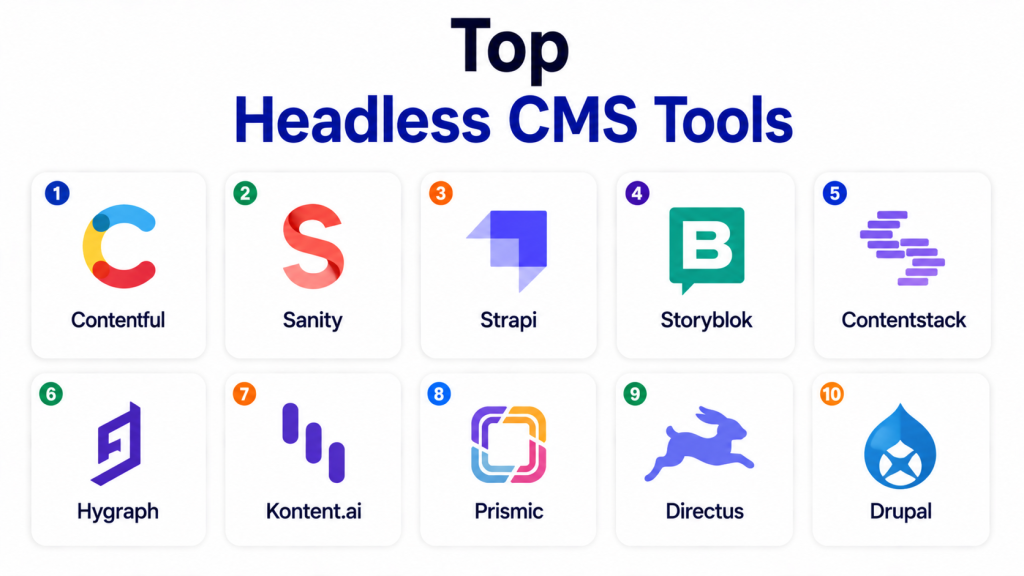
Top Headless CMS Tools
#1 — Contentful
Short description: Contentful is a leading API-first headless CMS used by digital teams to manage structured content and deliver it across websites, apps, and other channels. It is well suited for mid-market and enterprise teams that need scalable content operations, localization, and integration flexibility.
Key Features
- Structured content modeling for reusable content
- REST and GraphQL APIs for content delivery
- Multi-language and localization support
- Roles, permissions, and publishing workflows
- Preview and content delivery APIs
- Marketplace and app framework for extensions
- AI-driven and composable content capabilities
Pros
- Strong enterprise adoption and ecosystem
- Flexible content modeling for multi-channel publishing
- Good fit for teams building modern digital experiences
Cons
- Pricing can become expensive as usage grows
- Content modeling requires planning
- Business users may need setup support for complex workflows
Platforms / Deployment
Web
Cloud
Security & Compliance
Supports SSO/SAML, roles and permissions, encryption, audit-related controls, and enterprise governance features. SOC 2, ISO 27001, GDPR, and HIPAA support may depend on plan, region, and configuration.
Integrations & Ecosystem
Contentful has a mature ecosystem for composable digital experience teams.
- Frontend frameworks
- Ecommerce platforms
- Translation tools
- Analytics tools
- Digital asset platforms
- Webhooks and APIs
Support & Community
Contentful offers strong documentation, developer resources, onboarding options, enterprise support tiers, and a large community. Support level depends on plan and customer agreement.
#2 — Sanity
Short description: Sanity is a flexible headless CMS and content platform focused on structured content, real-time collaboration, and custom editorial workspaces. It is popular with developer-led teams that want deep customization and strong content modeling flexibility.
Key Features
- Highly customizable Sanity Studio
- Real-time collaborative editing
- Structured content modeling
- GROQ query language and APIs
- Content Lake for centralized content storage
- Portable Text for rich structured content
- Strong developer tooling and customization options
Pros
- Excellent flexibility for custom editorial workflows
- Strong developer experience
- Good fit for content-heavy digital products
Cons
- Requires developer involvement for best results
- GROQ may require learning for new teams
- Non-technical teams may need training if heavily customized
Platforms / Deployment
Web / Developer tooling on Windows / macOS / Linux
Cloud / Hybrid-style custom frontend deployment
Security & Compliance
Supports roles and permissions, SSO options, authentication controls, and enterprise security features. Specific compliance details vary by plan and deployment.
Integrations & Ecosystem
Sanity works well in custom and composable architecture.
- Next.js and modern frontend frameworks
- Ecommerce systems
- Translation workflows
- Custom APIs
- Webhooks
- Developer plugins
Support & Community
Sanity has strong documentation, active developer community, templates, examples, and enterprise support options. Community support is especially strong among modern frontend developers.
#3 — Strapi
Short description: Strapi is an open-source headless CMS built with JavaScript and TypeScript. It is a strong choice for developers who want self-hosting, API control, customization, and ownership of infrastructure.
Key Features
- Open-source and developer-first architecture
- REST and GraphQL API support
- Custom content types and fields
- Role-based access control
- Plugin ecosystem
- Self-hosted and cloud options
- Custom backend logic and extensibility
Pros
- Strong flexibility and control
- Good fit for self-hosted projects
- Large developer community
Cons
- Self-hosting requires infrastructure management
- Upgrades and customizations need technical care
- Enterprise features may require paid plans
Platforms / Deployment
Web / Windows / macOS / Linux
Cloud / Self-hosted / Hybrid
Security & Compliance
Supports RBAC, authentication controls, API permissions, and security configuration options. SOC 2 is publicly referenced by Strapi, while other compliance details may depend on plan and deployment.
Integrations & Ecosystem
Strapi is strong for developers who want API control and custom backend logic.
- REST APIs
- GraphQL
- Databases
- Frontend frameworks
- Authentication providers
- Plugins and custom extensions
Support & Community
Strapi has strong documentation, open-source community support, GitHub activity, tutorials, plugins, and paid support options. Enterprise support varies by plan.
#4 — Storyblok
Short description: Storyblok is a headless CMS known for its visual editor and component-based content approach. It is a strong fit for marketers, agencies, and teams that want headless flexibility with a more familiar editing experience.
Key Features
- Visual editor with live preview
- Component-based content blocks
- Headless API delivery
- Content workflows and collaboration
- Localization support
- Role and permission management
- AI and automation-oriented content features
Pros
- Strong editing experience for marketers
- Good fit for agencies and multi-site teams
- Useful visual preview for headless projects
Cons
- Complex enterprise governance may need careful planning
- Developers must structure components well
- Some advanced needs may require higher plans
Platforms / Deployment
Web
Cloud
Security & Compliance
Supports SSO, RBAC, audit logs, and enterprise security controls. ISO 27001 and SOC 2 Type II are publicly associated with Storyblok by trusted implementation partners, but buyers should verify current details directly during procurement.
Integrations & Ecosystem
Storyblok works well with modern frontend and composable stacks.
- Next.js and Nuxt
- Ecommerce platforms
- Translation tools
- DAM tools
- Webhooks
- APIs and SDKs
Support & Community
Storyblok provides documentation, onboarding resources, partner support, tutorials, and a strong agency ecosystem. Community is active among frontend and Jamstack teams.
#5 — Contentstack
Short description: Contentstack is an enterprise headless CMS designed for composable digital experiences. It is useful for large teams that need governance, workflow, localization, integrations, and strong security posture.
Key Features
- API-first content management
- Visual building and content experience tools
- Workflow and approval management
- Localization and multi-site support
- Marketplace and integration hub
- Enterprise governance and permissions
- Composable DXP capabilities
Pros
- Strong enterprise focus
- Good governance and workflow features
- Strong fit for complex digital experience teams
Cons
- May be too advanced for small teams
- Pricing can be premium
- Implementation may require planning and partner support
Platforms / Deployment
Web
Cloud
Security & Compliance
Contentstack publicly references SOC 2 Type II, ISO 27001, GDPR, HIPAA, SSO, RBAC, and enterprise security controls. Buyers should still validate current compliance scope during vendor review.
Integrations & Ecosystem
Contentstack is designed for composable enterprise architecture.
- Ecommerce platforms
- Search tools
- DAM platforms
- Personalization engines
- Translation systems
- APIs and webhooks
Support & Community
Contentstack offers enterprise support, onboarding, documentation, partner services, and professional services. Community is strongest in enterprise digital experience and composable architecture circles.
#6 — Hygraph
Short description: Hygraph is a GraphQL-native headless CMS built for structured content, content federation, and API-first delivery. It is strong for teams that need content from multiple systems delivered through a flexible GraphQL layer.
Key Features
- GraphQL-native content delivery
- Content federation from external systems
- Structured content modeling
- Role and permission controls
- Localization support
- API-first delivery for web, apps, and portals
- Sandbox environments for schema testing
Pros
- Excellent fit for GraphQL-first teams
- Strong content federation capabilities
- Useful for complex multi-source content projects
Cons
- GraphQL knowledge helps adoption
- May feel technical for simple marketing teams
- Enterprise workflows need careful setup
Platforms / Deployment
Web
Cloud
Security & Compliance
Hygraph publicly states SOC 2 Type 2 and GDPR compliance and hosting on ISO 27001 certified infrastructure. It also offers security and governance features for enterprise use.
Integrations & Ecosystem
Hygraph fits well into modern API-first and composable stacks.
- GraphQL APIs
- Ecommerce platforms
- Product information systems
- CRM systems
- Frontend frameworks
- External content sources
Support & Community
Hygraph provides documentation, learning resources, customer support, and enterprise assistance. Community is strong among GraphQL and composable architecture teams.
#7 — Kontent.ai
Short description: Kontent.ai is a cloud-based headless CMS focused on content operations, governance, workflow, and enterprise content control. It is suitable for teams that need structured publishing, approvals, localization, and strong compliance posture.
Key Features
- Cloud-based headless content management
- Structured content modeling
- Workflow and content governance
- Omnichannel content delivery through APIs
- Localization and content planning support
- AI-assisted content operations
- Enterprise security and compliance features
Pros
- Strong content governance focus
- Good fit for regulated and enterprise teams
- Useful for structured editorial operations
Cons
- May be more than small teams need
- Best value comes with structured implementation
- Pricing and plan details vary by use case
Platforms / Deployment
Web
Cloud
Security & Compliance
Kontent.ai publicly references SOC 2, ISO 27001, ISO 27017, GDPR, HIPAA, CSA STAR, and GLBA compliance. Buyers should validate the exact scope and applicability during procurement.
Integrations & Ecosystem
Kontent.ai supports omnichannel content delivery and enterprise workflows.
- APIs and SDKs
- Frontend frameworks
- Translation workflows
- Digital experience platforms
- Ecommerce tools
- Analytics and personalization systems
Support & Community
Kontent.ai provides documentation, learning resources, system status resources, support, and partner services. Support depth depends on plan and customer agreement.
#8 — Prismic
Short description: Prismic is a headless website builder and CMS focused on developer-friendly page sections and marketing website workflows. It is especially useful for teams building modern websites with frameworks like Next.js.
Key Features
- Slice-based content modeling
- Page and website content management
- API-based content delivery
- Visual preview and page editing
- Localization support
- Developer tooling for frontend teams
- Integration with modern web frameworks
Pros
- Good for marketing websites and landing pages
- Developer-friendly approach
- Easier content editing than many pure developer tools
Cons
- Less suitable for complex enterprise records or ECM needs
- May not be ideal for very advanced content governance
- Best fit depends on frontend implementation quality
Platforms / Deployment
Web
Cloud
Security & Compliance
Supports user roles, access controls, authentication, and cloud security controls. Specific certifications are Not publicly stated.
Integrations & Ecosystem
Prismic is strong for modern website development workflows.
- Next.js
- Nuxt
- SvelteKit
- Frontend frameworks
- Webhooks
- APIs
Support & Community
Prismic has good documentation, developer examples, onboarding content, and active community resources. Support varies by plan.
#9 — Directus
Short description: Directus is an open-source headless CMS and backend platform that turns SQL databases into APIs and admin interfaces. It is useful for teams that want database control, self-hosting, and a flexible backend workspace.
Key Features
- Works with existing SQL databases
- Auto-generated REST and GraphQL APIs
- Visual data and content studio
- Role-based permissions
- Self-hosted and cloud options
- Automation and workflow features
- Open-source extensibility
Pros
- Strong control over data and database structure
- Good self-hosted option
- Flexible for content and internal tools
Cons
- Requires technical knowledge for best setup
- Not as marketer-first as visual CMS tools
- Security and scaling depend on deployment choices
Platforms / Deployment
Web / Windows / macOS / Linux
Cloud / Self-hosted / Hybrid
Security & Compliance
Supports roles, permissions, authentication, and deployment-level security controls. Specific compliance certifications are Not publicly stated.
Integrations & Ecosystem
Directus is useful for teams that want content, data, and APIs in one flexible backend.
- SQL databases
- REST APIs
- GraphQL APIs
- Webhooks
- Custom extensions
- Frontend frameworks
Support & Community
Directus has documentation, open-source community resources, cloud support options, and developer-focused guidance. Community is active among developers and backend teams.
#10 — Drupal
Short description: Drupal is a mature open-source CMS that can be used in traditional, decoupled, or headless architecture. It is suitable for organizations that need strong content modeling, permissions, multilingual support, and deep customization.
Key Features
- Flexible content types and taxonomies
- Strong user roles and permissions
- Multilingual content support
- Decoupled and headless API support
- Large module ecosystem
- Workflow and content moderation
- Open-source customization flexibility
Pros
- Very flexible and mature
- Strong for complex structured content
- Large open-source ecosystem
Cons
- Requires technical expertise
- Maintenance and upgrades need planning
- Not as simple as SaaS headless CMS tools
Platforms / Deployment
Web / Linux / Windows / macOS depending on hosting
Self-hosted / Cloud / Hybrid
Security & Compliance
Supports roles, permissions, security modules, authentication integrations, and audit-related extensions. Specific compliance certifications depend on hosting, configuration, and implementation.
Integrations & Ecosystem
Drupal has a large ecosystem for custom digital platforms.
- REST and JSON:API
- GraphQL modules
- Commerce tools
- Search platforms
- Authentication systems
- Custom modules and integrations
Support & Community
Drupal has one of the strongest open-source CMS communities, with extensive documentation, community modules, agencies, consultants, and enterprise hosting partners.
Comparison Table
| Tool Name | Best For | Platform(s) Supported | Deployment | Standout Feature | Public Rating |
|---|---|---|---|---|---|
| Contentful | Enterprise and mid-market digital experience teams | Web | Cloud | Mature API-first content platform | N/A |
| Sanity | Developer-led structured content teams | Web, Windows, macOS, Linux developer tooling | Cloud / Hybrid-style frontend delivery | Customizable content workspace | N/A |
| Strapi | Open-source and self-hosted CMS projects | Web, Windows, macOS, Linux | Cloud / Self-hosted / Hybrid | Developer control and extensibility | N/A |
| Storyblok | Marketer-friendly headless websites | Web | Cloud | Visual editor with component content | N/A |
| Contentstack | Enterprise composable digital experiences | Web | Cloud | Enterprise governance and integrations | N/A |
| Hygraph | GraphQL-first content platforms | Web | Cloud | GraphQL-native content federation | N/A |
| Kontent.ai | Enterprise content operations and governance | Web | Cloud | Structured content workflow control | N/A |
| Prismic | Modern marketing websites | Web | Cloud | Slice-based website content editing | N/A |
| Directus | Database-first custom content backends | Web, Windows, macOS, Linux | Cloud / Self-hosted / Hybrid | Existing database to API platform | N/A |
| Drupal | Open-source decoupled CMS projects | Web, Linux, Windows, macOS depending on hosting | Self-hosted / Cloud / Hybrid | Mature open-source content framework | N/A |
Evaluation & Scoring of Headless CMS
| Tool Name | Core (25%) | Ease (15%) | Integrations (15%) | Security (10%) | Performance (10%) | Support (10%) | Value (15%) | Weighted Total (0–10) |
|---|---|---|---|---|---|---|---|---|
| Contentful | 9 | 8 | 10 | 9 | 9 | 9 | 7 | 8.65 |
| Contentstack | 9 | 7 | 9 | 10 | 9 | 9 | 7 | 8.50 |
| Sanity | 9 | 7 | 9 | 8 | 9 | 8 | 8 | 8.25 |
| Storyblok | 8 | 9 | 8 | 8 | 8 | 8 | 8 | 8.15 |
| Hygraph | 8 | 7 | 9 | 9 | 9 | 8 | 8 | 8.15 |
| Kontent.ai | 8 | 8 | 8 | 10 | 8 | 8 | 7 | 8.10 |
| Strapi | 8 | 7 | 8 | 7 | 8 | 8 | 9 | 7.85 |
| Directus | 8 | 7 | 8 | 7 | 8 | 7 | 9 | 7.75 |
| Drupal | 8 | 6 | 8 | 8 | 8 | 9 | 8 | 7.75 |
| Prismic | 7 | 8 | 7 | 7 | 8 | 7 | 8 | 7.45 |
These scores are comparative, not official ratings. A high score means the tool performs strongly across several practical buying areas. However, the best choice depends on your project type, team skills, content model, compliance needs, budget, and preferred deployment style. A developer-led team may prefer Sanity, Strapi, or Directus, while an enterprise marketing team may prefer Contentful, Contentstack, Hygraph, or Kontent.ai.
Which Headless CMS Tool Is Right for You?
Solo / Freelancer
Solo users usually need a CMS that is easy to start, affordable, and not too heavy to maintain. If you are building portfolio sites, small marketing websites, or client landing pages, simplicity matters more than enterprise governance.
Good choices:
- Prismic for modern marketing websites
- Strapi for open-source control
- Directus for database-first projects
- Sanity for flexible content modeling
SMB
SMBs need a balance of ease, price, and future scalability. They may not need heavy enterprise governance, but they do need reliable publishing, simple workflows, integrations, and good documentation.
Good choices:
- Storyblok for marketer-friendly editing
- Sanity for flexible content operations
- Strapi for self-hosted or developer-first teams
- Prismic for website-focused teams
- Directus for teams that want database control
Mid-Market
Mid-market companies often manage multiple websites, campaigns, content teams, regions, and integrations. They need stronger permissions, localization, workflows, and predictable performance.
Good choices:
- Contentful
- Sanity
- Storyblok
- Hygraph
- Kontent.ai
Enterprise
Enterprises need governance, security, workflow depth, localization, auditability, integration strength, and vendor support. They may also need procurement review, compliance checks, and architecture validation.
Good choices:
- Contentful
- Contentstack
- Hygraph
- Kontent.ai
- Drupal for open-source enterprise builds
- Storyblok for enterprise teams prioritizing visual editing
Budget vs Premium
If budget is limited, open-source or lower-cost tools such as Strapi, Directus, Drupal, or Prismic may be better starting points. If your organization needs governance, compliance, SLAs, enterprise support, advanced workflows, and multi-brand scale, premium SaaS tools such as Contentful, Contentstack, Hygraph, and Kontent.ai may justify the cost.
Feature Depth vs Ease of Use
Tools like Contentful, Contentstack, Hygraph, and Kontent.ai offer strong enterprise depth, but they need proper implementation. Storyblok and Prismic are easier for content editors. Sanity offers deep flexibility, but it works best when developers are involved. Strapi and Directus give control, but teams must handle more technical responsibility.
Integrations & Scalability
For composable architecture, choose a CMS that connects smoothly with your frontend framework, ecommerce platform, search engine, analytics stack, translation workflow, and DAM. Contentful and Contentstack have mature ecosystems. Hygraph is strong for GraphQL and content federation. Sanity is strong for custom content operations. Directus is useful when existing databases matter.
Security & Compliance Needs
For regulated teams, security review should happen before vendor selection. Check SSO, MFA, RBAC, audit logs, encryption, data residency, backup policy, and compliance claims. Contentstack, Kontent.ai, Hygraph, Contentful, and Storyblok are stronger candidates for enterprise security reviews, while self-hosted tools depend heavily on your own hosting and configuration.
Frequently Asked Questions (FAQs)
What is a headless CMS?
A headless CMS is a content management system that separates content management from the frontend design layer. Content is managed in the backend and delivered to websites, apps, or other channels through APIs.
How is a headless CMS different from a traditional CMS?
A traditional CMS usually manages content and presentation together. A headless CMS only manages content and lets developers build the frontend separately using any framework or channel.
Is a headless CMS good for SEO?
Yes, a headless CMS can support SEO well when the frontend is built properly. SEO success depends on page speed, metadata, schema, URLs, rendering approach, internal linking, and content structure.
Is headless CMS only for developers?
No. Developers are important during setup, but many modern headless CMS tools now offer visual editing, previews, workflows, and easier content operations for marketers and editors.
What is the pricing model for headless CMS tools?
Pricing usually depends on users, projects, content entries, API usage, bandwidth, locales, environments, roles, and enterprise features. Some tools offer free or open-source plans, while enterprise plans are custom.
How long does implementation take?
A simple website can be implemented quickly, but enterprise projects take longer due to content modeling, migration, integrations, workflows, localization, and security review.
What are common mistakes when choosing a headless CMS?
Common mistakes include choosing only based on developer preference, ignoring editor experience, underestimating migration, weak content modeling, poor workflow design, and not checking API limits or pricing scale.
Can a headless CMS handle ecommerce content?
Yes. Many headless CMS tools work well with ecommerce platforms. They can manage product storytelling, landing pages, category content, buying guides, banners, and localized campaign content.
Is self-hosted headless CMS better than cloud?
Self-hosted is better when you need infrastructure control, data ownership, or custom backend logic. Cloud is better when you want faster setup, managed infrastructure, vendor support, and less maintenance.
Can I migrate from a traditional CMS to a headless CMS?
Yes, but migration needs planning. You must map old content types, clean content, define new models, migrate media, rebuild frontend pages, and train editors on the new workflow.
Which headless CMS is best for marketers?
Storyblok, Prismic, Contentful, and Kontent.ai are often good for marketers because they offer better editing workflows, previews, structured content, and collaboration features.
Which headless CMS is best for developers?
Sanity, Strapi, Directus, Hygraph, and Drupal are strong developer-friendly options. The right choice depends on whether the team wants SaaS, self-hosting, GraphQL, database control, or deep customization.
Conclusion
A headless CMS is a strong choice for organizations that want flexible, scalable, and multi-channel content delivery. It gives developers freedom to build modern frontends while helping content teams manage structured content from one central place. But the best headless CMS depends on your real context.
Contentful and Contentstack are strong for enterprise digital experience teams. Sanity is excellent for custom structured content workflows. Strapi and Directus are useful for teams that want open-source or database-first control. Storyblok and Prismic are practical for marketing websites with visual editing needs. Hygraph is strong for GraphQL and content federation. Kontent.ai is a good fit for governance-heavy content operations. Drupal remains powerful for open-source and decoupled enterprise builds.
