Upgrade & Secure Your Future with DevOps, SRE, DevSecOps, MLOps!
We spend hours scrolling social media and waste money on things we forget, but won’t spend 30 minutes a day earning certifications that can change our lives.
Master in DevOps, SRE, DevSecOps & MLOps by DevOps School!
Learn from Guru Rajesh Kumar and double your salary in just one year.
Introduction
Document Conversion Tools help users convert files from one format to another, such as PDF to Word, Word to PDF, image to text, Excel to PDF, HTML to PDF, scanned documents to searchable files, and many other format changes. These tools are useful when teams need documents to be easier to edit, archive, share, search, print, or upload into business systems.
Document conversion matters because businesses work with many file types across departments, customers, vendors, and cloud platforms. A finance team may need invoices converted into searchable PDFs. A legal team may need scanned contracts turned into editable text. A developer team may need HTML-to-PDF generation. A marketing team may need documents converted for publishing or sharing.
Common use cases include PDF conversion, OCR processing, scanned file conversion, document archiving, report conversion, legal document preparation, invoice processing, and bulk file transformation.
Buyers should evaluate supported formats, OCR accuracy, batch conversion, API access, security, file size limits, cloud vs desktop options, integrations, automation, pricing, and output quality.
Best for: legal teams, finance teams, HR teams, operations teams, document-heavy businesses, students, freelancers, developers, government teams, healthcare teams, and enterprises that regularly handle multiple document formats.
Not ideal for: users who only convert files occasionally, teams with very simple PDF needs, or organizations that need full enterprise content management rather than file conversion.
Key Trends in Document Conversion Tools
- AI-assisted OCR: Modern tools are improving scanned document recognition, handwriting extraction, table detection, and layout preservation.
- Batch conversion at scale: Businesses need to convert hundreds or thousands of documents without manual upload and download cycles.
- API-first conversion: Developers increasingly need document conversion inside SaaS products, customer portals, and internal workflows.
- Secure file handling: Buyers expect encryption, access control, automatic file deletion, audit logs, and secure processing.
- Cloud and desktop flexibility: Some users prefer cloud convenience, while regulated teams may prefer desktop or self-hosted processing.
- Better PDF workflows: PDF remains central for contracts, invoices, forms, reports, and compliance documents.
- Multi-format support: Teams want conversion between PDF, Word, Excel, PowerPoint, images, HTML, CSV, TXT, and archival formats.
- Automation integrations: Document conversion is increasingly connected with cloud storage, workflow tools, CRMs, ERPs, and document management systems.
- Higher accuracy expectations: Users want converted documents to preserve formatting, tables, fonts, images, and layout.
- Compliance-aware workflows: Legal, finance, healthcare, and government users need better control over sensitive file processing.
How We Selected These Tools
The tools below were selected using practical SaaS and business evaluation logic:
- Recognition in document conversion, PDF conversion, OCR, or file transformation workflows.
- Breadth of supported document formats.
- Quality of output conversion and layout preservation.
- Availability of OCR, batch conversion, and automation features.
- Suitability for individuals, SMBs, developers, and enterprises.
- Security posture signals such as encryption, access control, and secure file handling.
- Platform availability across web, desktop, and mobile.
- Integration options with cloud storage, APIs, and business workflows.
- Ease of use for non-technical users.
- Long-term value based on features, support, and scalability.
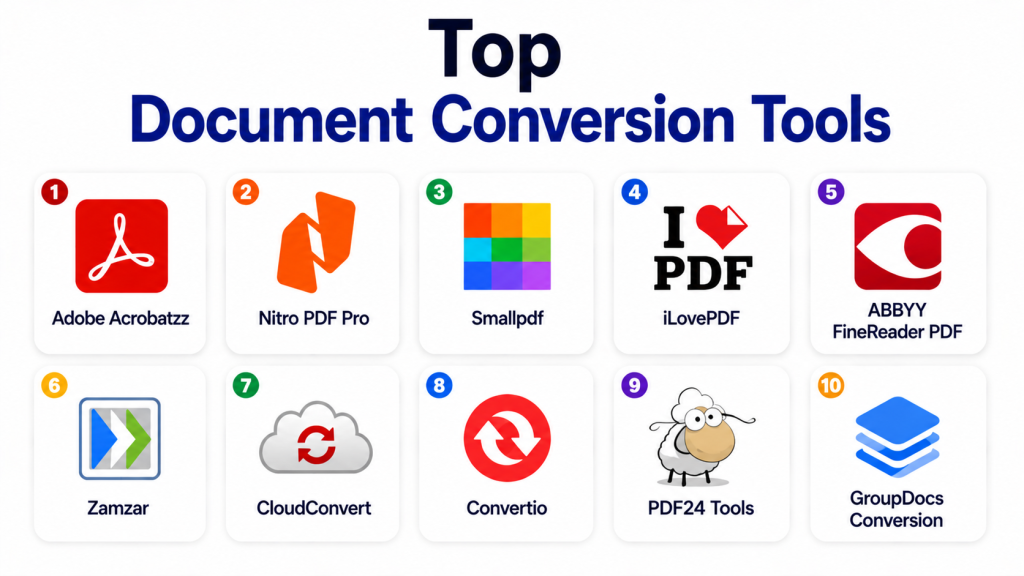
Top Document Conversion Tools
#1 — Adobe Acrobat
Short description: Adobe Acrobat is a leading PDF and document conversion platform used for creating, editing, converting, signing, and managing PDF files. It is suitable for individuals, businesses, legal teams, finance teams, and enterprises that need reliable PDF workflows.
Key Features
- PDF to Word, Excel, PowerPoint, and image conversion.
- Word, Excel, and PowerPoint to PDF conversion.
- OCR for scanned documents.
- PDF editing and page organization.
- E-signature support.
- Document protection options.
- Cloud and desktop workflows.
Pros
- Strong PDF conversion quality.
- Widely adopted across businesses.
- Useful for editing, signing, and securing PDFs.
Cons
- May be more expensive than simple conversion tools.
- Some features may feel heavy for basic users.
- Best value is for frequent PDF users.
Platforms / Deployment
Web / Windows / macOS / iOS / Android
Cloud / Desktop
Security & Compliance
Encryption, password protection, permissions, identity controls, and enterprise admin features are available. Specific compliance details vary by plan and configuration.
Integrations & Ecosystem
Adobe Acrobat works well for business PDF workflows and document productivity.
- Microsoft 365
- Google Drive
- Dropbox
- Adobe ecosystem
- E-signature workflows
- Cloud storage tools
Support & Community
Adobe provides documentation, support resources, learning materials, enterprise support options, and a large user community.
#2 — Nitro PDF Pro
Short description: Nitro PDF Pro is a PDF productivity and conversion tool for creating, editing, converting, signing, and sharing PDF documents. It is useful for teams that need strong PDF conversion with a business-friendly interface.
Key Features
- PDF to Word, Excel, and PowerPoint conversion.
- Office documents to PDF.
- PDF editing and annotation.
- OCR support.
- E-signature features.
- Batch processing options.
- Document collaboration tools.
Pros
- Good business PDF workflow support.
- Strong alternative to larger PDF suites.
- Useful for teams converting and editing PDFs often.
Cons
- May be more than needed for occasional conversion.
- Some advanced features depend on plan.
- Collaboration and cloud features may vary.
Platforms / Deployment
Windows / macOS / Web
Cloud / Desktop
Security & Compliance
Password protection, permissions, encryption, and admin controls are available. Specific compliance details are Not publicly stated.
Integrations & Ecosystem
Nitro PDF Pro supports common office and business document workflows.
- Microsoft Office
- Cloud storage
- PDF editing workflows
- E-signature workflows
- Batch conversion
- Business document sharing
Support & Community
Nitro provides documentation, customer support, knowledge resources, and business support options.
#3 — Smallpdf
Short description: Smallpdf is an online PDF and document conversion platform focused on simple, fast file conversion. It is useful for students, freelancers, small teams, and business users who need quick PDF tools without complex setup.
Key Features
- PDF to Word, Excel, PowerPoint, and image conversion.
- Office files to PDF.
- Compress, merge, split, and edit PDFs.
- E-signature support.
- OCR features on supported plans.
- Cloud-based access.
- Simple drag-and-drop interface.
Pros
- Very easy to use.
- Good for quick PDF tasks.
- Useful for casual and SMB users.
Cons
- Online upload may not suit sensitive files.
- Advanced controls may be limited for enterprises.
- File size or usage limits may apply by plan.
Platforms / Deployment
Web / Windows / macOS / iOS / Android
Cloud / Desktop options
Security & Compliance
Encryption and secure processing features are available. Specific compliance details vary by plan and should be validated directly.
Integrations & Ecosystem
Smallpdf is built for lightweight document conversion and PDF handling.
- Cloud storage
- Browser-based workflows
- PDF compression
- E-signature workflows
- Desktop access
- Mobile document workflows
Support & Community
Smallpdf provides help resources, product documentation, and customer support options depending on plan.
#4 — iLovePDF
Short description: iLovePDF is an online and desktop PDF toolset for converting, merging, splitting, compressing, editing, and organizing PDFs. It is useful for users who need affordable and simple PDF conversion workflows.
Key Features
- PDF to Word, Excel, PowerPoint, and image conversion.
- Word, Excel, PowerPoint, and image to PDF.
- Merge, split, compress, and rotate PDFs.
- OCR features.
- Batch processing options.
- Web and desktop tools.
- Mobile access.
Pros
- Easy for everyday PDF conversion.
- Good range of PDF utilities.
- Useful for students, SMBs, and admin teams.
Cons
- Not ideal for complex enterprise governance.
- Online processing may not suit sensitive documents.
- Advanced automation options may be limited.
Platforms / Deployment
Web / Windows / macOS / iOS / Android
Cloud / Desktop
Security & Compliance
Secure file processing and encryption features are available. Specific compliance details are Not publicly stated.
Integrations & Ecosystem
iLovePDF supports practical PDF conversion and office document workflows.
- Cloud storage
- Browser-based conversion
- Desktop workflows
- Mobile PDF tools
- OCR workflows
- Batch PDF tasks
Support & Community
iLovePDF provides help documentation, support resources, and user guides. Enterprise support details are Varies / Not publicly stated.
#5 — ABBYY FineReader PDF
Short description: ABBYY FineReader PDF is a document conversion and OCR tool known for converting scanned documents, images, and PDFs into editable and searchable formats. It is useful for legal, finance, education, government, and document-heavy teams.
Key Features
- OCR for scanned documents and images.
- PDF to editable format conversion.
- Document comparison.
- PDF editing and annotation.
- Batch conversion.
- Searchable PDF creation.
- Layout and table recognition.
Pros
- Strong OCR and text recognition capabilities.
- Useful for scanned and paper-heavy documents.
- Good for legal, finance, and archive workflows.
Cons
- May be more advanced than casual users need.
- Pricing can be higher than simple online tools.
- Collaboration features are not the main focus.
Platforms / Deployment
Windows / macOS
Desktop
Security & Compliance
Security depends on local deployment and organizational controls. Specific compliance details are Not publicly stated.
Integrations & Ecosystem
ABBYY FineReader PDF is strong for OCR and scanned document conversion.
- Scanning workflows
- PDF editing
- Searchable archives
- Batch conversion
- Document comparison
- Local file processing
Support & Community
ABBYY provides documentation, customer support, training resources, and enterprise support options.
#6 — Zamzar
Short description: Zamzar is a web-based file conversion platform that supports many document, image, audio, video, and archive formats. It is useful for users who need quick multi-format conversion without installing software.
Key Features
- Wide file format conversion.
- Document, image, audio, and video conversion.
- Web-based upload and conversion.
- Email-style delivery options.
- Batch conversion on supported plans.
- Simple interface.
- No desktop installation needed.
Pros
- Supports many file types.
- Easy to use for occasional conversions.
- Useful beyond document-only workflows.
Cons
- Online upload may not suit confidential documents.
- Not focused only on enterprise document workflows.
- Advanced automation may require paid options.
Platforms / Deployment
Web
Cloud
Security & Compliance
Not publicly stated.
Integrations & Ecosystem
Zamzar is useful for broad file conversion needs.
- Web-based conversion
- Multi-format workflows
- Batch conversion
- Email delivery
- General file conversion
- Lightweight business use
Support & Community
Zamzar provides support resources and help documentation. Enterprise-level support details are Varies / Not publicly stated.
#7 — CloudConvert
Short description: CloudConvert is an online file conversion platform with broad format support and API access. It is useful for developers, SaaS teams, operations teams, and businesses needing automated file conversion workflows.
Key Features
- Broad file format conversion.
- Document, image, audio, video, and archive conversion.
- API-based conversion workflows.
- Batch conversion support.
- Cloud-based processing.
- File customization options.
- Integration-friendly design.
Pros
- Strong API for automated conversion.
- Supports many file types.
- Useful for SaaS and workflow automation.
Cons
- Requires careful handling of sensitive files.
- Developer setup may be needed for API workflows.
- Not a full document management platform.
Platforms / Deployment
Web
Cloud
Security & Compliance
Encryption and secure processing features are available. Specific compliance details should be validated directly.
Integrations & Ecosystem
CloudConvert is useful for automated and developer-driven conversion workflows.
- API access
- Cloud storage
- SaaS applications
- Workflow automation
- Batch processing
- Custom file pipelines
Support & Community
CloudConvert provides API documentation, support resources, and developer-focused guidance. Support options vary by plan.
#8 — Convertio
Short description: Convertio is an online file converter that supports documents, images, videos, audio, and other formats. It is useful for users who need fast browser-based conversion for everyday files.
Key Features
- Document format conversion.
- Image, audio, and video conversion.
- OCR features.
- Cloud file import options.
- Browser-based access.
- Simple drag-and-drop workflow.
- Multiple output formats.
Pros
- Easy for quick file conversion.
- Supports many formats.
- Useful for casual and small business users.
Cons
- Online upload may not suit sensitive files.
- Not ideal for enterprise governance.
- Advanced batch and automation workflows may be limited.
Platforms / Deployment
Web
Cloud
Security & Compliance
Not publicly stated.
Integrations & Ecosystem
Convertio works well for lightweight multi-format conversion.
- Cloud storage import
- OCR workflows
- Browser conversion
- Multi-format output
- Document and media conversion
- Simple upload/download workflows
Support & Community
Convertio provides help resources and product support. Enterprise support details are Varies / Not publicly stated.
#9 — PDF24 Tools
Short description: PDF24 Tools is a collection of free PDF utilities for converting, compressing, merging, splitting, editing, and organizing PDFs. It is useful for users who need simple PDF conversion and utility workflows.
Key Features
- PDF conversion tools.
- PDF compression.
- Merge and split PDFs.
- OCR support.
- PDF editing utilities.
- Desktop and online access.
- Free PDF utility set.
Pros
- Good for basic PDF tasks.
- Free and easy to access.
- Useful for simple office workflows.
Cons
- Not designed for enterprise governance.
- Interface may feel utility-focused rather than workflow-focused.
- Advanced integration and admin features are limited.
Platforms / Deployment
Web / Windows
Cloud / Desktop
Security & Compliance
Not publicly stated.
Integrations & Ecosystem
PDF24 Tools is best for lightweight PDF conversion and editing tasks.
- PDF utilities
- OCR tools
- Desktop PDF workflows
- Browser workflows
- Compression and merging
- Basic office document handling
Support & Community
PDF24 provides user guidance and support resources. Enterprise support details are Not publicly stated.
#10 — GroupDocs Conversion
Short description: GroupDocs Conversion is a developer-focused document conversion platform and API library for converting files across many formats inside applications. It is useful for software teams, SaaS platforms, and enterprise developers building conversion features.
Key Features
- Document conversion APIs.
- Support for many business file formats.
- Conversion inside custom applications.
- Cloud and on-premises style options.
- Developer SDKs.
- Batch processing possibilities.
- Format customization options.
Pros
- Strong for developers and custom applications.
- Useful for embedded document conversion.
- Supports many document formats.
Cons
- Requires developer skills.
- Not ideal for casual business users.
- User interface is not the main focus.
Platforms / Deployment
Web / Windows / Linux / macOS
Cloud / Self-hosted / Hybrid
Security & Compliance
Security depends on deployment, configuration, and application environment. Specific compliance details are Not publicly stated.
Integrations & Ecosystem
GroupDocs Conversion fits technical and application-driven document conversion workflows.
- APIs
- SDKs
- Custom applications
- SaaS products
- Enterprise workflows
- Batch conversion pipelines
Support & Community
GroupDocs provides developer documentation, technical support resources, and implementation guidance. Community strength is Varies / Not publicly stated.
Comparison Table
| Tool Name | Best For | Platform(s) Supported | Deployment | Standout Feature | Public Rating |
|---|---|---|---|---|---|
| Adobe Acrobat | Professional PDF conversion and editing | Web, Windows, macOS, iOS, Android | Cloud / Desktop | Complete PDF conversion workflow | N/A |
| Nitro PDF Pro | Business PDF conversion | Windows, macOS, Web | Cloud / Desktop | PDF editing and conversion suite | N/A |
| Smallpdf | Simple online PDF conversion | Web, Windows, macOS, iOS, Android | Cloud / Desktop options | Easy drag-and-drop PDF tools | N/A |
| iLovePDF | Affordable PDF utilities | Web, Windows, macOS, iOS, Android | Cloud / Desktop | Broad PDF utility set | N/A |
| ABBYY FineReader PDF | OCR and scanned document conversion | Windows, macOS | Desktop | High-quality OCR workflows | N/A |
| Zamzar | General multi-format conversion | Web | Cloud | Broad file format support | N/A |
| CloudConvert | API-based file conversion | Web | Cloud | Developer-friendly conversion API | N/A |
| Convertio | Quick browser-based conversion | Web | Cloud | Multi-format online converter | N/A |
| PDF24 Tools | Free PDF conversion utilities | Web, Windows | Cloud / Desktop | Free PDF toolkit | N/A |
| GroupDocs Conversion | Embedded developer conversion | Web, Windows, Linux, macOS | Cloud / Self-hosted / Hybrid | Conversion APIs and SDKs | N/A |
Evaluation & Scoring of Document Conversion Tools
| Tool Name | Core (25%) | Ease (15%) | Integrations (15%) | Security (10%) | Performance (10%) | Support (10%) | Value (15%) | Weighted Total |
|---|---|---|---|---|---|---|---|---|
| Adobe Acrobat | 9 | 8 | 9 | 9 | 9 | 9 | 7 | 8.55 |
| Nitro PDF Pro | 8 | 8 | 8 | 8 | 8 | 8 | 8 | 8.00 |
| Smallpdf | 8 | 9 | 7 | 7 | 8 | 7 | 8 | 7.75 |
| iLovePDF | 8 | 9 | 6 | 6 | 8 | 7 | 9 | 7.55 |
| ABBYY FineReader PDF | 9 | 7 | 7 | 7 | 9 | 8 | 7 | 7.85 |
| Zamzar | 7 | 9 | 6 | 5 | 7 | 6 | 8 | 6.95 |
| CloudConvert | 8 | 8 | 9 | 7 | 8 | 7 | 8 | 7.95 |
| Convertio | 7 | 9 | 6 | 5 | 7 | 6 | 8 | 6.95 |
| PDF24 Tools | 7 | 8 | 5 | 5 | 7 | 6 | 10 | 6.95 |
| GroupDocs Conversion | 8 | 6 | 9 | 7 | 8 | 7 | 7 | 7.45 |
These scores are comparative and should be interpreted based on your use case. A legal team may value ABBYY FineReader PDF because OCR quality matters. A developer team may prefer CloudConvert or GroupDocs Conversion because APIs matter. A small business may prefer Smallpdf, iLovePDF, or PDF24 Tools for simple workflows. Security-sensitive teams should avoid uploading confidential files to tools without validating file handling, storage, and deletion practices.
Which Document Conversion Tool Is Right for You?
Solo / Freelancer
Solo users usually need simple, low-cost conversion for PDFs, Word files, images, and scanned documents. Smallpdf, iLovePDF, PDF24 Tools, Convertio, and Zamzar are practical options. If OCR quality matters, ABBYY FineReader PDF is stronger. If the user works with sensitive files, a desktop tool may be safer than browser upload.
SMB
Small businesses often need PDF conversion, compression, merging, OCR, and document editing. Adobe Acrobat, Nitro PDF Pro, Smallpdf, and iLovePDF are strong choices. SMBs should focus on ease of use, output quality, file security, and whether employees need desktop or web access.
Mid-Market
Mid-market teams may need batch conversion, OCR, secure workflows, and integration with cloud storage or internal systems. Adobe Acrobat, Nitro PDF Pro, ABBYY FineReader PDF, CloudConvert, and GroupDocs Conversion are good options to evaluate. If developers need APIs, CloudConvert and GroupDocs Conversion are stronger.
Enterprise
Enterprises should focus on security, compliance, deployment control, batch processing, audit requirements, APIs, and integration with document management systems. Adobe Acrobat, ABBYY FineReader PDF, GroupDocs Conversion, CloudConvert, and Nitro PDF Pro are useful options depending on whether the workflow is user-driven or system-driven.
Budget vs Premium
Budget-focused users can start with PDF24 Tools, iLovePDF, Convertio, or Zamzar. Premium tools like Adobe Acrobat, Nitro PDF Pro, ABBYY FineReader PDF, and GroupDocs Conversion are better when document quality, OCR accuracy, integration, admin control, or professional support matters.
Feature Depth vs Ease of Use
Smallpdf, iLovePDF, Convertio, Zamzar, and PDF24 Tools are easier for everyday users. Adobe Acrobat and Nitro PDF Pro offer deeper PDF editing and conversion workflows. ABBYY FineReader PDF is stronger for OCR-heavy use cases. CloudConvert and GroupDocs Conversion are better for technical automation.
Integrations & Scalability
CloudConvert and GroupDocs Conversion are strong for API-based and application-driven conversion. Adobe Acrobat and Nitro PDF Pro fit business PDF workflows. ABBYY FineReader PDF is useful for scanned document projects. Teams handling large volumes should test batch processing, speed, file limits, and output accuracy.
Security & Compliance Needs
Security-focused buyers should review encryption, file retention, deletion policies, access controls, audit logs, deployment model, and whether files are processed locally or in the cloud. Sensitive legal, healthcare, finance, and government documents should not be uploaded to online tools unless security requirements are verified.
Frequently Asked Questions (FAQs)
What is a Document Conversion Tool?
A Document Conversion Tool changes files from one format to another, such as PDF to Word, Word to PDF, image to PDF, scanned document to searchable PDF, or HTML to PDF.
Which document conversion tool is best for PDF workflows?
Adobe Acrobat, Nitro PDF Pro, Smallpdf, iLovePDF, and PDF24 Tools are strong PDF-focused options. The best choice depends on editing needs, budget, and security requirements.
Which tool is best for OCR?
ABBYY FineReader PDF is strong for OCR-heavy workflows. Adobe Acrobat also supports OCR for scanned documents and searchable PDFs.
Are online document converters safe?
Online converters can be convenient, but sensitive files require caution. Users should check encryption, storage, deletion policies, and whether the vendor provides secure processing controls.
Can document conversion tools handle batch files?
Yes, some tools support batch conversion. Batch capabilities vary by product and plan, so teams should test real file volumes before buying.
Do document conversion tools support APIs?
Some tools offer APIs for automated conversion. CloudConvert and GroupDocs Conversion are strong options for developer and application-driven workflows.
What is the difference between OCR and file conversion?
File conversion changes one format into another. OCR reads text from scanned images or PDFs and turns it into searchable or editable text.
Can document conversion tools preserve formatting?
Many tools preserve formatting well, but results depend on file complexity. Tables, images, columns, fonts, and scanned files may require testing.
What are common mistakes when choosing a conversion tool?
Common mistakes include ignoring security, choosing a tool without needed formats, not testing OCR accuracy, overlooking file size limits, and assuming all conversions preserve formatting perfectly.
Are free document conversion tools good enough?
Free tools can be enough for occasional and non-sensitive files. Businesses handling frequent, large, or confidential documents usually need stronger paid or controlled solutions.
Can document conversion tools replace document management systems?
No. Conversion tools change file formats, while document management systems store, organize, secure, search, and govern documents across workflows.
What alternatives exist to document conversion tools?
Alternatives include PDF editors, OCR software, document management systems, workflow automation tools, custom scripts, office suites, and developer APIs.
Conclusion
Document Conversion Tools are important for teams that work with PDFs, scanned documents, office files, images, reports, and multiple content formats. The best tool depends on how often you convert files, what formats you need, whether OCR is required, how sensitive your files are, and whether you need automation or APIs. Adobe Acrobat is strong for professional PDF workflows. Nitro PDF Pro is a good business PDF option. Smallpdf, iLovePDF, Convertio, Zamzar, and PDF24 Tools are useful for simple online conversion. ABBYY FineReader PDF is strong for OCR and scanned documents. CloudConvert and GroupDocs Conversion are better for developer-driven and automated conversion workflows.
