Upgrade & Secure Your Future with DevOps, SRE, DevSecOps, MLOps!
We spend hours scrolling social media and waste money on things we forget, but won’t spend 30 minutes a day earning certifications that can change our lives.
Master in DevOps, SRE, DevSecOps & MLOps by DevOps School!
Learn from Guru Rajesh Kumar and double your salary in just one year.
Introduction
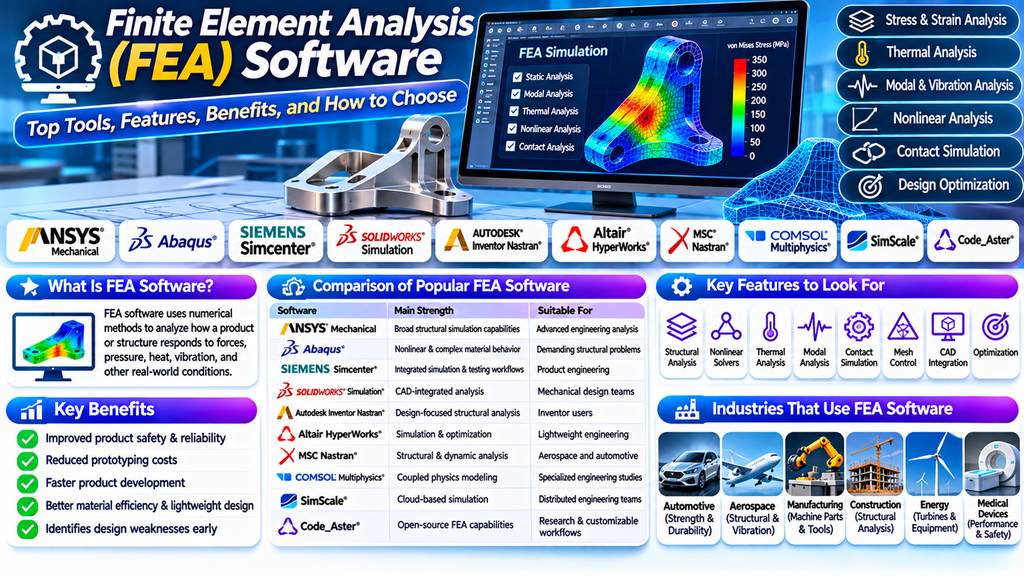
Finite Element Analysis (FEA) software helps engineers predict how products and structures respond to forces, pressure, heat, vibration, and other physical conditions. By creating a virtual model and dividing it into smaller elements, engineers can evaluate performance before manufacturing or conducting costly physical tests.
FEA tools are widely used in mechanical engineering, automotive design, aerospace, construction, electronics, and industrial manufacturing. The right software can help identify weak points, improve durability, reduce material waste, and support safer product development.
What Is Finite Element Analysis Software?
Finite Element Analysis software uses numerical methods to approximate how a component or system behaves under specified conditions. A model is divided into a mesh of smaller elements connected at nodes. The software solves the relevant equations to estimate quantities such as stress, strain, displacement, temperature, and natural frequencies.
The quality of an FEA result depends on factors including geometry, mesh quality, material properties, boundary conditions, solver settings, and validation.
Top 10 FEA Software Tools
1. ANSYS Mechanical
ANSYS Mechanical offers advanced structural simulation capabilities, including linear and nonlinear analysis, contact modeling, thermal analysis, and vibration studies. It is used for complex engineering applications across many industries.
2. Abaqus
Abaqus is known for advanced nonlinear finite element analysis. It is suitable for problems involving complex material behavior, large deformation, contact, and demanding structural simulations.
3. Siemens Simcenter
Simcenter provides simulation tools for structural performance, dynamics, durability, and product engineering. It can support integrated design and testing workflows.
4. SOLIDWORKS Simulation
SOLIDWORKS Simulation integrates analysis into the SOLIDWORKS CAD environment. It is useful for mechanical design teams that want to evaluate designs during the development process.
5. Autodesk Inventor Nastran
Autodesk Inventor Nastran supports finite element analysis within engineering design workflows. Typical applications include stress, vibration, and thermal analysis.
6. Altair HyperWorks
Altair HyperWorks provides a broad simulation environment with structural analysis and optimization capabilities. It is often used for lightweight design and complex engineering studies.
7. MSC Nastran
MSC Nastran is a structural analysis solver used in applications such as aerospace, automotive, and industrial engineering. It supports demanding structural and dynamic simulation workloads.
8. COMSOL Multiphysics
COMSOL Multiphysics supports structural analysis and coupled physics simulations. It is useful when mechanical behavior interacts with thermal, electrical, fluid, or other physical effects.
9. SimScale
SimScale offers cloud-based engineering simulation, including structural FEA. Its browser-based workflow can support collaborative projects and reduce the need to maintain local simulation infrastructure.
10. Code_Aster
Code_Aster is an open-source finite element analysis software system used for structural and multiphysics applications. It can be suitable for organizations and researchers seeking customizable simulation capabilities.
Key Features to Look for in FEA Software
- Structural analysis: Calculate stress, strain, deformation, and displacement.
- Linear and nonlinear solvers: Support different levels of material and geometric complexity.
- Thermal analysis: Study temperature distribution and heat transfer.
- Modal analysis: Identify natural frequencies and mode shapes.
- Dynamic analysis: Evaluate responses to time-dependent loads and vibration.
- Contact simulation: Model interaction between components.
- Fatigue and durability: Estimate performance under repeated loading where supported.
- Mesh controls: Refine elements in areas with important stress gradients.
- CAD integration: Import and prepare models from design tools.
- Optimization capabilities: Compare design alternatives against performance and weight targets.
Benefits of FEA Software
Improved Product Safety
Engineers can identify areas of high stress or excessive deformation and revise designs before production.
Reduced Prototyping Costs
Virtual testing can reduce the number of physical prototypes required, although testing and validation may still be necessary.
Faster Product Development
Designers can compare alternatives and evaluate changes earlier in the engineering process.
Better Material Efficiency
Simulation helps engineers explore opportunities to reduce weight and material usage while meeting required performance targets.
Enhanced Reliability
Thermal, vibration, fatigue, and structural studies can help uncover potential failure mechanisms before products enter service.
Comparison of Popular FEA Tools
| Software | Main Strength | Suitable For |
|---|---|---|
| ANSYS Mechanical | Broad structural simulation capabilities | Advanced engineering analysis |
| Abaqus | Nonlinear and complex material behavior | Demanding structural problems |
| Siemens Simcenter | Integrated simulation and testing workflows | Product engineering |
| SOLIDWORKS Simulation | CAD-integrated analysis | Mechanical design teams |
| Autodesk Inventor Nastran | Design-focused structural analysis | Inventor users |
| Altair HyperWorks | Simulation and optimization | Lightweight engineering |
| MSC Nastran | Structural and dynamic analysis | Aerospace and automotive |
| COMSOL Multiphysics | Coupled physics modeling | Specialized engineering studies |
| SimScale | Cloud-based simulation | Distributed engineering teams |
| Code_Aster | Open-source FEA capabilities | Research and customizable workflows |
Actual capabilities vary by product edition, available modules, and solver configuration.
How to Choose the Best FEA Software
- Identify the engineering problem: Determine whether you need stress analysis, vibration, fatigue, thermal analysis, or nonlinear simulation.
- Assess model complexity: Simple static studies have different requirements from large-deformation or contact problems.
- Check CAD compatibility: Choose software that fits your existing design and geometry-preparation workflow.
- Review solver capabilities: Confirm support for the materials, loads, contacts, and analysis types required.
- Consider computing resources: Large meshes and nonlinear models may require significant memory and processing power.
- Compare licensing and training: Evaluate software costs, learning requirements, technical support, and maintenance.
- Validate the results: Use mesh-convergence checks, benchmark problems, engineering judgment, and physical testing when appropriate.
Common FEA Mistakes to Avoid
- Using incorrect material properties or load conditions.
- Applying unrealistic constraints that make a model artificially stiff.
- Relying on a coarse mesh near stress concentrations.
- Ignoring contact definitions between interacting components.
- Assuming a colorful stress plot proves the design is safe.
- Failing to check units, solver warnings, and convergence.
- Treating simulation as a substitute for all physical testing.
Industries That Use FEA Software
- Automotive: Vehicle components, chassis strength, crashworthiness, and durability.
- Aerospace: Aircraft structures, lightweight components, and vibration analysis.
- Mechanical manufacturing: Machine parts, tools, frames, and pressure-containing components.
- Construction: Structural components and load-response studies.
- Electronics: Thermal deformation, vibration, and component reliability.
- Energy: Turbines, equipment, and structural components under demanding conditions.
- Medical devices: Mechanical performance and design evaluation.
Frequently Asked Questions
What does FEA stand for?
FEA stands for Finite Element Analysis. It is a numerical technique used to estimate how a physical system behaves under specified conditions.
Which FEA software is best for beginners?
The best choice depends on the user’s CAD experience, budget, and project requirements. CAD-integrated tools may offer a familiar starting point, while advanced platforms may be better suited to complex simulations.
Is FEA software free?
Some options, including Code_Aster, are open source. Many commercial FEA platforms require paid licenses, and additional costs may include training, support, and computing resources.
Is FEA used in mechanical engineering?
Yes. Mechanical engineers use FEA to assess stress, deformation, vibration, heat transfer, fatigue, and the structural performance of components and assemblies.
Can FEA predict product failure?
FEA can help identify potential failure locations and estimate behavior under modeled conditions. Reliable predictions depend on accurate inputs, suitable analysis methods, validation, and engineering interpretation.
Conclusion
Finite Element Analysis software is an important tool for designing, evaluating, and improving engineering products. Platforms such as ANSYS Mechanical, Abaqus, SOLIDWORKS Simulation, Siemens Simcenter, and Altair HyperWorks offer different capabilities for structural analysis and design validation.
The best FEA software is the one that matches your engineering problem, model complexity, available expertise, computing resources, and budget. Careful model setup and result validation are essential for producing trustworthy engineering conclusions.
