Upgrade & Secure Your Future with DevOps, SRE, DevSecOps, MLOps!
We spend hours scrolling social media and waste money on things we forget, but won’t spend 30 minutes a day earning certifications that can change our lives.
Master in DevOps, SRE, DevSecOps & MLOps by DevOps School!
Learn from Guru Rajesh Kumar and double your salary in just one year.
Introduction
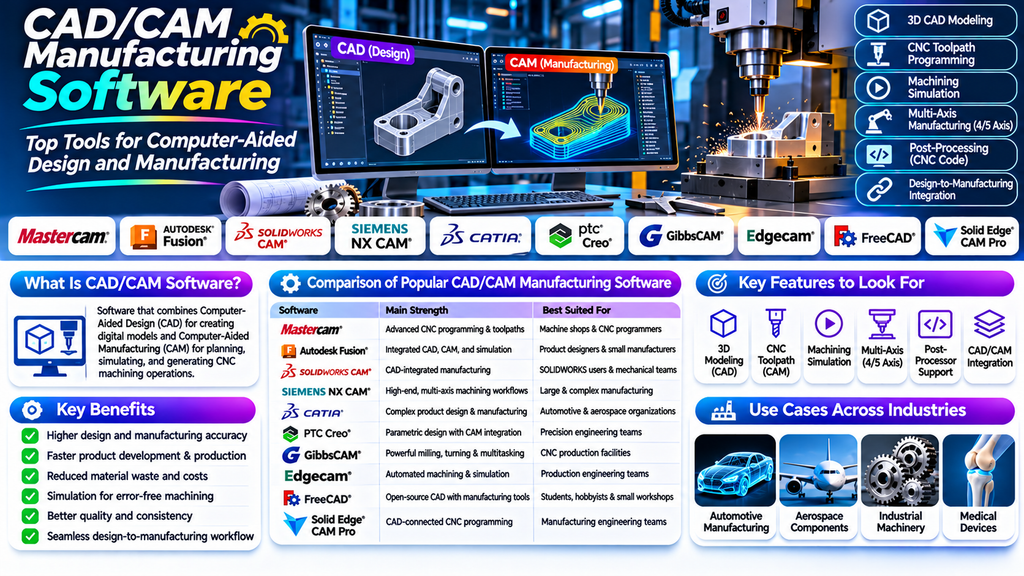
CAD/CAM Manufacturing Software plays an important role in modern product design and manufacturing. Computer-Aided Design (CAD) tools help engineers create accurate digital models and technical drawings, while Computer-Aided Manufacturing (CAM) tools use design data to plan and generate manufacturing operations.
Together, CAD and CAM technologies help manufacturers streamline product development, improve machining accuracy, reduce repetitive manual work, and maintain consistency between design and production. These tools are widely used in automotive engineering, aerospace, industrial machinery, medical devices, electronics, and precision manufacturing.
What Is CAD/CAM Manufacturing Software?
CAD/CAM Manufacturing Software combines or connects digital design tools with manufacturing preparation and machining workflows.
CAD functionality supports 2D drafting, 3D modeling, assemblies, and engineering documentation. CAM functionality converts suitable geometry into manufacturing instructions, including toolpaths, cutting strategies, and CNC machine code.
Depending on the platform, users can also simulate machining operations, detect potential collisions, estimate production time, and optimize material removal.
Top CAD/CAM Manufacturing Software Tools
1. Mastercam
Mastercam is a widely used CAM solution for CNC programming and machining. It supports a range of milling, turning, and multiaxis manufacturing workflows.
Key features:
- CNC toolpath generation
- Milling and turning operations
- Multiaxis machining capabilities
- Toolpath simulation and verification
Best for: Machine shops and manufacturers requiring flexible CNC programming tools.
2. Autodesk Fusion
Autodesk Fusion combines CAD, CAM, simulation, and product development capabilities in an integrated environment. It supports workflows from initial design to CNC manufacturing preparation.
Key features:
- Parametric and direct 3D modeling
- Integrated CAM toolpath creation
- CNC machining simulation
- Cloud-connected design collaboration
Best for: Product designers, small manufacturers, startups, and engineering teams seeking an integrated workflow.
3. SOLIDWORKS CAM
SOLIDWORKS CAM connects manufacturing preparation with SOLIDWORKS part and assembly design. It supports rules-based machining workflows for compatible manufacturing tasks.
Key features:
- CAD-integrated CAM programming
- Feature recognition for supported machining operations
- CNC toolpath generation
- Design-to-manufacturing integration
Best for: Mechanical design teams and manufacturers already using SOLIDWORKS.
4. Siemens NX CAM
Siemens NX CAM provides advanced manufacturing capabilities for complex parts and production processes. It is used in industries where precision, automation, and integration with engineering data are important.
Key features:
- Advanced CNC programming
- Multiaxis machining
- Toolpath optimization
- Integration with CAD and manufacturing workflows
Best for: Aerospace, automotive, and industrial manufacturers producing complex components.
5. CATIA
CATIA is a product engineering platform from Dassault Systèmes that supports complex design and manufacturing workflows. Its capabilities can be extended through appropriate manufacturing modules and connected applications.
Key features:
- Advanced surface and solid modeling
- Complex assembly design
- Engineering documentation
- Supported manufacturing and CNC programming workflows
Best for: Large engineering organizations developing complex products and components.
6. PTC Creo
PTC Creo provides parametric CAD tools and supports connected manufacturing workflows through compatible CAM capabilities and integrations.
Key features:
- Parametric 3D modeling
- Assembly and mechanical design
- Manufacturing-oriented model preparation
- Integration with supported CAM workflows
Best for: Mechanical engineers and manufacturers developing precision components.
7. GibbsCAM
GibbsCAM is CAM software designed for CNC programming, including milling, turning, and multitasking machine operations.
Key features:
- CNC milling and turning
- Multiaxis machining support
- Toolpath visualization
- Programming for supported multitasking machines
Best for: Manufacturers and machine shops handling complex machining operations.
8. Edgecam
Edgecam is a CAM solution used to create CNC machining programs for milling and turning applications. Its tools help manufacturers plan and simulate machining operations.
Key features:
- Automated machining strategies
- Milling and turning toolpaths
- CNC program generation
- Machining simulation and verification
Best for: Production engineering teams and CNC programmers.
9. FreeCAD
FreeCAD is a free, open-source parametric 3D CAD application. It supports mechanical design and includes manufacturing-related workflows through its Path workbench and available extensions.
Key features:
- Parametric solid modeling
- Technical drawings
- Open-source customization
- CNC toolpath preparation through supported workflows
Best for: Students, hobbyists, small workshops, and users seeking an accessible open-source CAD option.
10. Solid Edge CAM Pro
Solid Edge CAM Pro provides manufacturing programming capabilities for supported machining operations. It is designed to connect engineering design with CNC production workflows.
Key features:
- CNC programming
- Milling and multiaxis machining capabilities
- Toolpath simulation
- Integration with compatible design and manufacturing processes
Best for: Manufacturing teams seeking connected CAD and CAM workflows.
Comparison of Popular CAD/CAM Manufacturing Software
| Software | Main strength | Best suited for |
|---|---|---|
| Mastercam | CNC programming and machining | Machine shops and CNC programmers |
| Autodesk Fusion | Integrated CAD and CAM | Small manufacturers and product developers |
| SOLIDWORKS CAM | Design-integrated manufacturing | SOLIDWORKS users |
| Siemens NX CAM | Advanced machining workflows | Large industrial manufacturers |
| CATIA | Complex product engineering | Automotive and aerospace teams |
| PTC Creo | Parametric mechanical design | Precision engineering teams |
| GibbsCAM | Milling, turning, and multitasking | CNC production facilities |
| Edgecam | Automated machining strategies | Production engineers |
| FreeCAD | Open-source CAD and manufacturing workflows | Students and small workshops |
| Solid Edge CAM Pro | CAD-connected CNC programming | Manufacturing engineering teams |
Feature availability, licensing, and supported machining operations vary by product edition and version. Confirm current specifications before purchasing.
Key Features to Look for in CAD/CAM Software
3D Modeling and Design Tools
CAD capabilities should support the geometry, dimensions, assemblies, and technical documentation required for your products.
CNC Toolpath Generation
CAM tools should support the machine types and machining strategies required for your production environment.
Machining Simulation
Simulation helps users inspect tool movements, identify potential collisions, and check manufacturing operations before running them on physical equipment.
Multiaxis Machining
Complex components may require four-axis or five-axis machining. Verify that the selected software supports your machine configuration and post-processing needs.
Post-Processor Support
Post-processors translate CAM operations into instructions suitable for specific CNC machines and controllers. Reliable post-processing is essential for safe, accurate production.
CAD/CAM Integration
A connected workflow can reduce duplicate modeling, simplify design changes, and help keep manufacturing data aligned with engineering revisions.
Benefits of CAD/CAM Manufacturing Software
- Improved accuracy: Digital models and programmed toolpaths support consistent manufacturing.
- Reduced production time: Automated programming can reduce repetitive manual tasks.
- Lower material waste: Appropriate machining strategies can improve material utilization.
- Faster product development: Integrated workflows help teams move from design to production efficiently.
- Better quality control: Simulation and verification can identify potential problems before machining.
- Enhanced collaboration: Shared design and manufacturing data help engineering and production teams coordinate.
How to Choose the Right CAD/CAM Manufacturing Software
- Identify your manufacturing process: Determine whether you need milling, turning, drilling, multiaxis machining, or another process.
- Review your machine configuration: Check compatibility with your CNC machines, controllers, and post-processors.
- Assess design requirements: Choose CAD tools that support your product geometry and documentation needs.
- Evaluate simulation capabilities: Look for appropriate toolpath verification and collision checking.
- Compare integration options: Confirm that the software works with your existing CAD, PLM, and manufacturing systems.
- Consider total cost: Evaluate licenses, training, maintenance, hardware, and implementation.
- Run a test project: Validate the complete workflow using a representative part before adopting the software.
Common Mistakes to Avoid
- Choosing CAM software without checking CNC machine compatibility
- Using an incorrect or unverified post-processor
- Skipping toolpath simulation and verification
- Ignoring cutting tools, materials, and machining constraints
- Overlooking design revisions and manufacturing data management
- Selecting a platform without considering training and support
Conclusion
CAD/CAM Manufacturing Software connects product design with digital manufacturing, helping engineers create accurate models and prepare efficient CNC machining operations. Tools such as Mastercam, Autodesk Fusion, SOLIDWORKS CAM, Siemens NX CAM, and GibbsCAM support different manufacturing needs.
The best choice depends on your design complexity, machining processes, equipment, budget, and integration requirements. By evaluating these factors and validating a representative workflow, manufacturers can select CAD/CAM software that supports reliable production and more efficient product development.
