Upgrade & Secure Your Future with DevOps, SRE, DevSecOps, MLOps!
We spend hours scrolling social media and waste money on things we forget, but won’t spend 30 minutes a day earning certifications that can change our lives.
Master in DevOps, SRE, DevSecOps & MLOps by DevOps School!
Learn from Guru Rajesh Kumar and double your salary in just one year.
Introduction
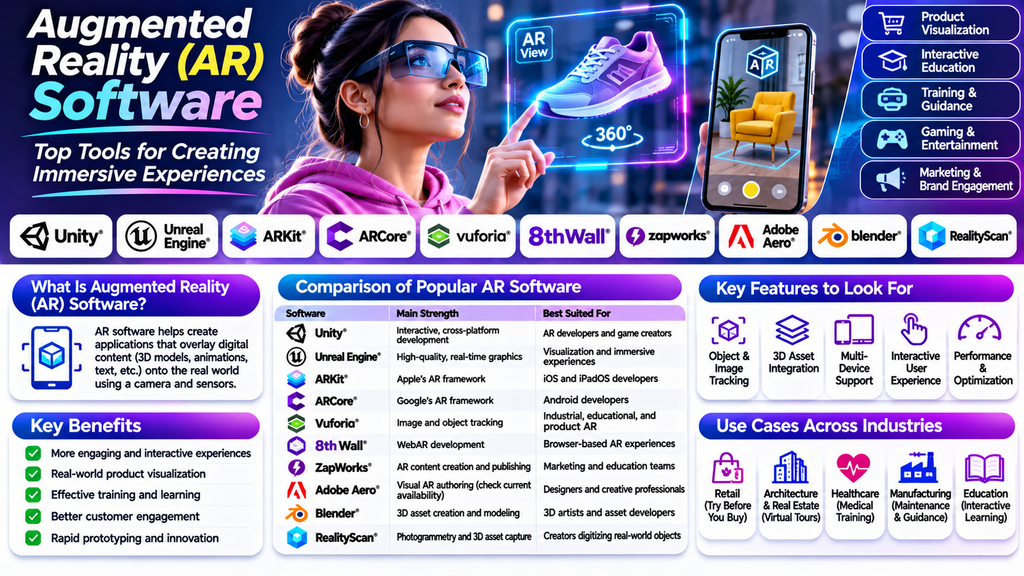
Augmented Reality (AR) Software enables developers and businesses to combine digital content with the real world. By overlaying 3D models, animations, text, and interactive elements onto real-world environments, AR creates engaging experiences for mobile applications, games, retail, education, healthcare, and industrial training.
From interactive social media filters to advanced enterprise visualization, AR technology is changing how people interact with digital information. Choosing the right AR development platform helps teams build immersive experiences that match their target devices, performance requirements, and business objectives.
What Is Augmented Reality (AR) Software?
Augmented Reality Software provides tools for creating applications that display digital content in a real-world environment. Depending on the platform, it may use a smartphone camera, motion sensors, depth sensors, or specialized headsets to understand the surrounding space and position virtual objects.
AR software can support features such as image tracking, surface detection, face tracking, object recognition, spatial mapping, and interactive 3D visualization.
Top Augmented Reality (AR) Software Tools
1. Unity
Unity is a widely used real-time development platform for interactive 3D applications and AR experiences. It supports AR development through compatible frameworks and platform-specific packages.
Key features:
- Real-time 3D rendering
- Interactive AR application development
- Cross-platform development workflows
- Asset management and animation tools
Best for: Developers creating interactive AR applications, games, and product visualization experiences.
2. Unreal Engine
Unreal Engine provides advanced real-time graphics capabilities for immersive applications. It can be used to develop AR experiences where detailed visuals and high-quality rendering are important.
Key features:
- High-quality real-time rendering
- Blueprint visual scripting
- 3D asset and animation workflows
- Support for compatible AR development pipelines
Best for: Teams building visually rich interactive experiences and specialized visualization applications.
3. ARKit
ARKit is Apple’s framework for building augmented reality experiences on supported Apple devices. It provides capabilities for understanding device position and the surrounding environment.
Key features:
- Motion tracking
- Surface and scene understanding on supported devices
- Image and object tracking capabilities
- Integration with Apple’s development ecosystem
Best for: Developers building AR applications for supported iPhone and iPad devices.
4. ARCore
ARCore is Google’s platform for creating augmented reality experiences on supported Android devices and other compatible environments.
Key features:
- Motion tracking
- Environmental understanding
- Light estimation
- Anchoring and placement of virtual objects
Best for: Developers building AR applications for supported Android devices.
5. Vuforia Engine
Vuforia Engine offers tools for creating AR experiences using image targets, object targets, and other supported tracking methods. It is used in product visualization, education, industrial guidance, and interactive marketing.
Key features:
- Image-based tracking
- Object recognition workflows
- Interactive 3D overlays
- Integration with supported development platforms
Best for: Applications that rely on recognizing physical objects, images, or product markers.
6. 8th Wall
8th Wall has been known for browser-based WebAR development, allowing experiences to run through compatible mobile web browsers without requiring a dedicated native app. Its current availability and product offering should be checked before selecting it for a new project.
Key features:
- Browser-based AR workflows
- Web-focused interactive experiences
- 3D content integration
- Support for web-based marketing activations
Best for: Web-based AR campaigns and browser-accessible interactive experiences, where the platform remains suitable.
7. ZapWorks
ZapWorks provides tools for creating interactive augmented reality experiences for marketing, education, and product engagement.
Key features:
- AR content authoring
- Interactive digital overlays
- Image-triggered experiences
- Tools for branded and educational content
Best for: Marketing teams, educators, and creators developing interactive AR content.
8. Adobe Aero
Adobe Aero was designed to help users create augmented reality experiences with visual authoring tools and imported digital assets. Before choosing it for a new project, check Adobe’s current product availability and support status.
Key features:
- Visual AR scene creation
- Importing compatible 3D assets
- Interactive triggers and behaviors
- Design-oriented authoring workflows
Best for: Designers and creative professionals seeking a visual approach to AR prototyping, subject to current availability.
9. Blender
Blender is a free, open-source 3D creation application that can be used to create models, materials, animations, and assets for AR projects. It is primarily a content creation tool rather than a complete AR deployment framework.
Key features:
- 3D modeling and sculpting
- Texturing and material creation
- Animation and asset preparation
- Export workflows for compatible development tools
Best for: Artists and developers who need custom 3D assets for augmented reality applications.
10. RealityScan
RealityScan provides photogrammetry workflows that can turn photographs of real objects into digital 3D assets. These assets can then be prepared for use in compatible AR applications.
Key features:
- Image-based 3D reconstruction
- Textured model generation
- Real-world object digitization
- Asset creation for compatible 3D pipelines
Best for: Creators who want to incorporate scanned real-world objects into AR experiences.
Comparison of Popular AR Software
| Software | Main strength | Best suited for |
|---|---|---|
| Unity | Interactive cross-platform development | AR developers and game creators |
| Unreal Engine | Advanced real-time graphics | Visualization and immersive experiences |
| ARKit | Apple’s AR framework | iOS and iPadOS developers |
| ARCore | Google’s AR framework | Android developers |
| Vuforia Engine | Image and object tracking | Industrial, educational, and product AR |
| 8th Wall | WebAR development | Browser-based experiences, subject to current availability |
| ZapWorks | AR content creation | Marketing and education teams |
| Adobe Aero | Visual AR authoring | Designers, subject to current availability |
| Blender | 3D asset creation | 3D artists and asset developers |
| RealityScan | Photogrammetry | Creators digitizing physical objects |
Key Features to Look for in AR Software
Tracking and Environmental Understanding
Choose software that supports the tracking methods your project needs, such as image tracking, surface detection, face tracking, or spatial mapping.
Device Compatibility
Check which operating systems, mobile devices, browsers, and headsets the platform supports.
3D Asset Integration
A strong workflow should support compatible models, textures, animations, and other digital assets.
Interaction and User Experience
Look for tools that let users move, rotate, select, or interact with virtual objects in intuitive ways.
Performance Optimization
AR applications must maintain responsive performance while handling camera input, rendering, and tracking.
Analytics and Integration
For commercial experiences, consider analytics, content management, commerce integration, and other business requirements.
Benefits of Using AR Software
- Enhanced engagement: Interactive digital content can make learning and marketing more engaging.
- Product visualization: Customers can preview compatible products in their surroundings.
- Training and guidance: Visual instructions can support learning and maintenance tasks.
- Interactive education: 3D objects can help explain complex concepts.
- Rapid prototyping: Developers can test ideas before committing to full production.
- Digital experiences: AR can connect physical spaces and products with useful digital information.
How to Choose the Right AR Software
- Define the project: Decide whether you are building a game, product preview, training tool, or marketing experience.
- Choose the target devices: Identify whether the experience will run on iOS, Android, the web, or a compatible headset.
- Select the development approach: Decide between native frameworks, a game engine, a browser-based solution, or visual authoring tools.
- Check tracking requirements: Make sure the platform supports the real-world features your experience needs.
- Evaluate content workflows: Verify compatibility with your 3D models, animations, and design tools.
- Test a prototype: Validate usability, tracking quality, device performance, and accessibility before launch.
- Confirm current product status: Check licensing, pricing, support, and availability, especially for tools whose offerings may have changed.
Common AR Development Mistakes
- Choosing a platform before defining target devices
- Using overly complex 3D assets that reduce performance
- Ignoring lighting and environmental conditions
- Failing to test on real supported devices
- Designing interactions that are difficult to understand
- Overlooking privacy and permissions associated with camera access
- Depending on a service without checking its current availability
Conclusion
Augmented Reality (AR) Software makes it possible to create interactive digital experiences that connect virtual content with the real world. Platforms such as Unity, Unreal Engine, ARKit, ARCore, and Vuforia serve different development needs, while tools such as Blender and RealityScan help create the digital assets used in AR projects.
The best choice depends on your target devices, tracking requirements, design workflow, budget, and deployment goals. Evaluate current platform support and test a prototype to build a reliable and engaging augmented reality experience.
