Upgrade & Secure Your Future with DevOps, SRE, DevSecOps, MLOps!
We spend hours scrolling social media and waste money on things we forget, but won’t spend 30 minutes a day earning certifications that can change our lives.
Master in DevOps, SRE, DevSecOps & MLOps by DevOps School!
Learn from Guru Rajesh Kumar and double your salary in just one year.
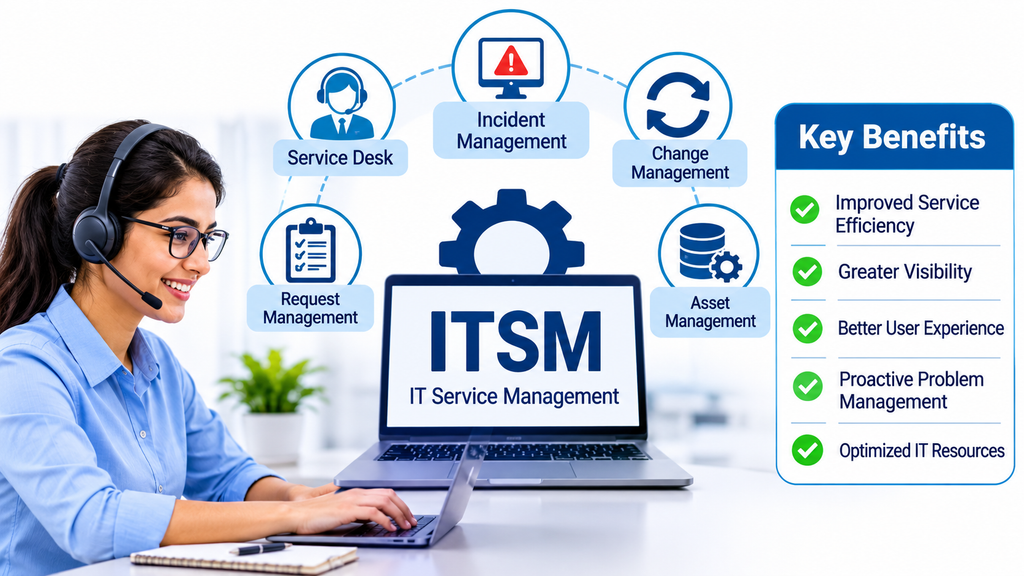
Streamlining Enterprise IT Operations with Service Management Technology
Information technology plays a central role in modern business operations. Organizations depend on applications, networks, cloud infrastructure, employee devices, and digital services to maintain productivity and deliver value to customers.
As technology environments become more complex, managing IT services through emails, spreadsheets, and disconnected applications becomes increasingly difficult. Technical incidents may remain unresolved, service requests can be delayed, and IT teams may struggle to coordinate changes across departments.
IT Service Management (ITSM) tools help organizations establish structured processes for delivering, maintaining, and improving technology services.
These platforms provide centralized capabilities for incident management, problem resolution, change management, service requests, configuration tracking, and performance monitoring.
Modern ITSM solutions also incorporate automation, artificial intelligence, self-service portals, and analytics to help IT departments improve service quality and operational efficiency.
What Are IT Service Management Tools?
IT Service Management tools are software platforms that help organizations plan, deliver, manage, and improve IT services throughout their lifecycle.
They provide structured workflows for handling technology-related activities and ensuring that employees receive reliable IT support.
Common capabilities include:
- Incident management.
- Problem management.
- Change management.
- Service request management.
- IT asset management.
- Configuration management.
- Knowledge management.
- Service level agreement tracking.
- Workflow automation.
- Self-service portals.
- Reporting and analytics.
- IT service catalog management.
ITSM tools are commonly used by internal IT departments, managed service providers, enterprise technology teams, and organizations operating complex digital environments.
Leading IT Service Management Tools
1. ServiceNow IT Service Management
ServiceNow ITSM provides enterprise-level capabilities for managing IT services and operational workflows.
Its functionality includes incident management, problem management, change management, service catalog management, knowledge management, and automation.
Organizations can use the platform to coordinate IT operations, standardize support processes, and improve visibility across technology services.
Its extensive workflow capabilities make it relevant to large enterprises with complex IT environments.
Businesses should evaluate implementation complexity, customization requirements, integration capabilities, and licensing costs.
2. Jira Service Management
Jira Service Management provides ITSM capabilities for IT support, development, and operational teams.
Its features include incident management, service requests, change management, knowledge management, and automation.
Its integration with Jira Software and Confluence helps connect IT support activities with development workflows and internal documentation.
It is particularly useful for organizations that want closer collaboration between IT operations and software development teams.
Organizations should examine automation requirements, asset management capabilities, integrations, and subscription options.
3. BMC Helix ITSM
BMC Helix ITSM provides enterprise service management capabilities designed for complex IT environments.
Its functionality supports incident management, problem management, change management, asset management, and service request workflows.
Organizations can use it to coordinate IT services, manage operational processes, and improve service delivery.
It is particularly relevant to enterprises with established IT service management practices and extensive infrastructure requirements.
Businesses should evaluate deployment models, integration complexity, automation capabilities, and implementation resources.
4. Freshservice
Freshservice provides cloud-based IT service management capabilities for organizations that want to centralize internal IT support.
Its features include incident management, service requests, change management, asset management, knowledge management, and workflow automation.
The platform helps IT teams organize employee requests and maintain visibility into ongoing support activities.
It is suitable for businesses looking for an accessible service management environment with integrated asset capabilities.
Organizations should evaluate its workflow flexibility, reporting features, integrations, and subscription requirements.
5. ManageEngine ServiceDesk Plus
ManageEngine ServiceDesk Plus provides ITSM and IT asset management capabilities for organizations managing internal technology operations.
Its features include incident management, service requests, problem management, change management, and asset tracking.
It helps IT departments organize support activities and maintain information about hardware and software resources.
It is relevant to organizations that want service management and asset visibility within a connected platform.
Businesses should compare deployment options, customization, integrations, and licensing requirements.
6. Ivanti Neurons for ITSM
Ivanti Neurons for ITSM provides service management capabilities designed to help organizations coordinate IT operations.
Its functionality includes incident management, service requests, change management, automation, and workflow management.
Organizations can use it to standardize support processes and connect IT service activities with broader technology management operations.
It is relevant to enterprises that need structured service delivery and integration with endpoint and IT operations environments.
Important evaluation areas include automation, platform integration, implementation requirements, and ongoing administration.
7. OpenText Service Management
OpenText Service Management provides enterprise service management capabilities for organizations managing IT support and business services.
Its functionality can support incident management, service requests, change processes, and service workflow coordination.
Organizations can evaluate it when they need structured service management capabilities within an established enterprise technology environment.
Buyers should examine integration requirements, deployment options, workflow flexibility, and long-term platform support.
8. TOPdesk
TOPdesk provides service management software for IT departments and other internal service teams.
Its capabilities include incident management, service requests, asset management, knowledge management, and self-service portals.
Organizations can use it to organize employee support and coordinate services across different departments.
It is particularly relevant to educational institutions, public organizations, and businesses with internal service management requirements.
9. SysAid
SysAid provides IT service management software designed to help IT teams manage support operations.
Its capabilities include ticket management, incident handling, workflow automation, asset management, and reporting.
Organizations can use the platform to coordinate technical support and automate repetitive administrative activities.
It is relevant to businesses looking for a connected IT support environment with service management functionality.
10. SolarWinds Service Desk
SolarWinds Service Desk provides cloud-based IT service management capabilities.
Its features include incident management, service requests, change management, asset management, and reporting.
The platform helps IT departments manage support workflows and improve visibility into technology-related service activities.
It is useful for organizations seeking a centralized service desk with integrated IT asset information.
Comparing ITSM Tools
| Platform | Primary focus | Suitable requirement |
|---|---|---|
| ServiceNow ITSM | Enterprise service management | Complex enterprise environments |
| Jira Service Management | ITSM and development collaboration | IT and DevOps teams |
| BMC Helix ITSM | Enterprise IT operations | Large organizations |
| Freshservice | Cloud-based ITSM | Growing IT departments |
| ManageEngine ServiceDesk Plus | ITSM and asset management | Internal IT operations |
| Ivanti Neurons for ITSM | IT service automation | Enterprise technology teams |
| OpenText Service Management | Enterprise service management | Established IT environments |
| TOPdesk | Internal service management | Education and business services |
| SysAid | IT support and automation | Small and medium-sized IT teams |
| SolarWinds Service Desk | Cloud IT service management | Centralized IT support |
The right platform depends on organizational complexity, IT infrastructure, service management maturity, integration requirements, and available resources.
Essential Features of ITSM Software
Incident management
Incident management helps IT teams respond to unexpected technology disruptions.
Examples include network failures, application outages, email problems, hardware malfunctions, and login issues.
The software records incidents, assigns responsibilities, establishes priorities, and tracks resolution progress.
Effective incident management helps restore normal IT services while maintaining communication with affected users.
Problem management
Problem management focuses on identifying the underlying causes of recurring incidents.
For example, repeated application crashes may indicate a deeper software configuration issue.
IT teams can investigate root causes, document known errors, and implement permanent solutions.
This helps reduce repeated disruptions and improve service reliability.
Change management
Technology changes can introduce operational risks if they are not properly planned.
Change management provides structured workflows for requesting, evaluating, approving, implementing, and reviewing changes.
Examples include server upgrades, application deployments, network modifications, and security updates.
These processes help organizations reduce disruption and maintain accountability.
Service request management
Employees frequently need routine IT services such as software installation, access permissions, device allocation, and account configuration.
Service request management standardizes these activities through predefined request forms and approval workflows.
This improves consistency and makes it easier for IT teams to manage employee requirements.
Configuration management
Configuration management helps organizations maintain information about IT components and their relationships.
These components may include servers, applications, databases, networks, and endpoints.
A configuration management database can provide visibility into how technology components depend on one another.
This information is useful when investigating incidents or evaluating proposed changes.
IT asset management
IT asset management helps organizations track technology resources throughout their lifecycle.
This includes purchasing, allocation, maintenance, ownership, usage, and retirement.
When connected with ITSM workflows, asset information can help support teams identify affected devices and understand the technology assigned to employees.
Knowledge management
Knowledge management provides a centralized location for troubleshooting guides, technical documentation, standard procedures, and frequently asked questions.
Employees can use self-service resources to resolve common problems independently.
IT agents can also use knowledge articles to provide consistent technical assistance.
Workflow automation
Automation reduces repetitive IT administration tasks.
Common examples include ticket assignment, approval notifications, escalation rules, access requests, and routine service provisioning.
Organizations should design automation around established processes and review workflows regularly.
Benefits of Implementing ITSM Tools
Improved IT service delivery: Standardized workflows help IT departments manage requests and incidents more consistently.
Faster issue resolution: Prioritization, assignment, and escalation capabilities help teams organize technical problems.
Greater operational visibility: Dashboards and reports provide insights into IT workloads and service performance.
Reduced manual administration: Automation minimizes repetitive activities and improves workflow efficiency.
Better employee experience: Self-service portals and knowledge bases make technical assistance easier to access.
Improved accountability: Ticket ownership, approval records, and activity histories create clearer responsibility.
Stronger change control: Structured approval processes help reduce risks associated with technology modifications.
Better resource management: Asset and configuration information helps organizations understand their technology environments.
ITSM and the ITIL Framework
Many ITSM platforms support practices associated with ITIL, a widely recognized framework for IT service management.
ITIL provides guidance for organizing and improving IT service delivery.
Common practices include:
- Incident management.
- Problem management.
- Change enablement.
- Service request management.
- Service configuration management.
- Service level management.
- Knowledge management.
- Continual improvement.
Organizations do not necessarily need to implement every ITIL practice immediately.
Instead, they can identify their most important operational requirements and introduce structured processes gradually.
The goal is to improve service outcomes rather than create unnecessary administrative procedures.
Common ITSM Implementation Challenges
Complex workflow configuration
Enterprise ITSM systems can support extensive customization.
However, poorly designed workflows may become difficult to maintain.
Organizations should begin with essential processes and expand functionality as operational needs evolve.
Employee adoption
Employees may continue submitting requests through informal channels if the official service portal is difficult to use.
A simple interface, clear instructions, and employee training can encourage adoption.
Incomplete IT documentation
Incident and problem management depend on accurate technical information.
Organizations should maintain documentation about infrastructure, applications, dependencies, and support procedures.
Integration difficulties
ITSM platforms often need to connect with monitoring systems, identity management tools, asset databases, and collaboration applications.
Integration requirements should be documented before implementation.
Lack of measurable objectives
Implementing software without defining expected outcomes makes it difficult to evaluate success.
Organizations should establish measurable service objectives before deployment.
AI and Automation in IT Service Management
Artificial intelligence is increasingly becoming part of modern ITSM environments.
AI-powered capabilities can help teams automate routine support activities and identify operational patterns.
Common applications include:
Intelligent ticket classification: Automatically categorizes incoming support requests.
Automated ticket routing: Directs requests to appropriate teams based on their content and priority.
Virtual support assistants: Help employees find information and resolve supported issues.
Incident summarization: Creates concise summaries of technical incidents and related activities.
Predictive insights: Identifies patterns that may indicate emerging operational problems.
Knowledge recommendations: Suggests relevant documentation to support agents.
AI capabilities should be implemented with appropriate oversight, especially when workflows involve access permissions, security incidents, or sensitive employee information.
Security and Compliance Considerations
ITSM platforms may contain sensitive information about users, devices, business applications, infrastructure, and access permissions.
Security should therefore be a major factor during platform selection.
Organizations should evaluate:
- Role-based access controls.
- Multi-factor authentication.
- Encryption of stored and transmitted data.
- Audit trails and activity monitoring.
- Secure integrations.
- Data retention policies.
- Backup and recovery capabilities.
- Administrative permission controls.
- Vendor security documentation.
- Applicable privacy and regulatory requirements.
ITSM administrators should also regularly review user permissions and ensure that employees can access only the information required for their responsibilities.
How to Choose the Right ITSM Tool
Selecting an ITSM platform requires understanding the organization’s existing IT processes and future operational requirements.
A smaller IT department may need incident management, service requests, and a knowledge base. A large enterprise may require advanced change management, configuration tracking, asset integration, automation, and extensive reporting.
Before purchasing, evaluate:
- Number of IT users and support agents.
- Current service management maturity.
- Incident and problem management requirements.
- Change management and approval workflows.
- Asset and configuration management capabilities.
- Knowledge base and self-service features.
- Integration with existing business applications.
- Reporting and service level management.
- Security and compliance requirements.
- Licensing, implementation, and maintenance costs.
A pilot implementation can help determine whether the platform supports real operational workflows and provides measurable improvements.
Frequently Asked Questions
What is ITSM software used for?
ITSM software helps organizations manage IT services through structured processes such as incident management, problem management, change management, service requests, and knowledge management.
What is the difference between ITSM and ITIL?
ITSM refers to the management and delivery of IT services. ITIL is a framework that provides guidance and recommended practices for managing those services.
Is ITSM software suitable for small businesses?
Yes. Small businesses can use ITSM platforms to organize support requests, automate routine processes, and improve visibility into technical issues.
What is the difference between ITSM and help desk software?
Help desk software generally focuses on resolving support requests. ITSM covers broader IT service management activities, including incidents, problems, changes, service requests, and service improvement.
Can ITSM tools integrate with monitoring platforms?
Many ITSM solutions support integrations with infrastructure monitoring, endpoint management, identity management, and cloud operations tools.
What metrics should ITSM teams monitor?
Common metrics include incident resolution time, first contact resolution, ticket backlog, service level achievement, change success rate, recurring incident volume, and employee satisfaction.
Building More Reliable and Efficient IT Service Operations
IT Service Management tools have become essential for organizations that depend on technology to maintain business continuity and employee productivity.
ServiceNow, Jira Service Management, BMC Helix ITSM, Freshservice, ManageEngine ServiceDesk Plus, Ivanti, OpenText, TOPdesk, SysAid, and SolarWinds Service Desk provide different approaches to organizing and managing IT services.
The right choice depends on organizational size, infrastructure complexity, service management requirements, integration needs, and budget.
Businesses should prioritize practical workflows, automation, security, reporting, and employee adoption when evaluating solutions.
A well-implemented ITSM platform can help organizations reduce operational inefficiencies, improve incident resolution, strengthen IT governance, and deliver more reliable technology services.
