Upgrade & Secure Your Future with DevOps, SRE, DevSecOps, MLOps!
We spend hours scrolling social media and waste money on things we forget, but won’t spend 30 minutes a day earning certifications that can change our lives.
Master in DevOps, SRE, DevSecOps & MLOps by DevOps School!
Learn from Guru Rajesh Kumar and double your salary in just one year.
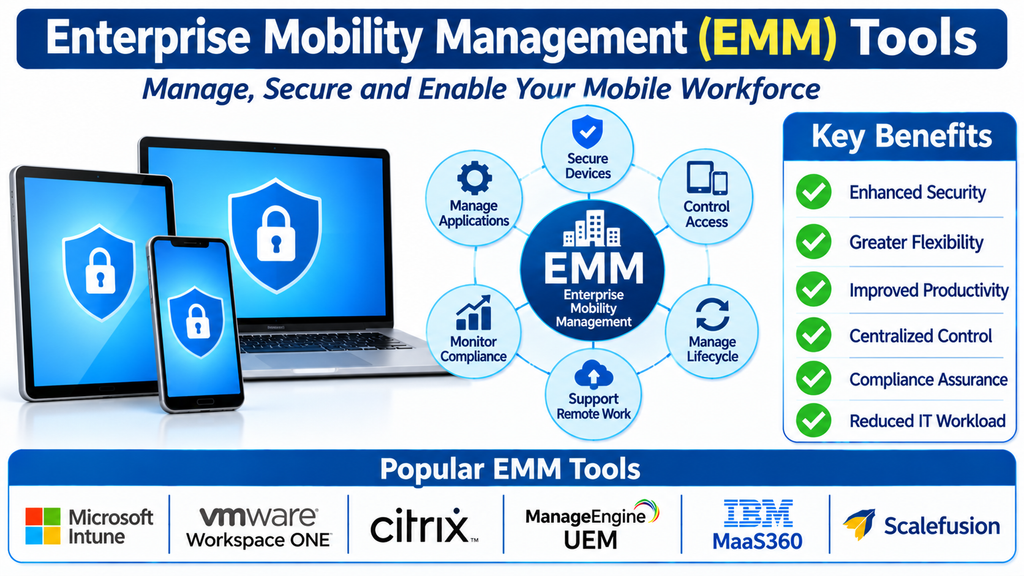
Enterprise Mobility Management (EMM) Tools: Features, Benefits, and Top Platforms
Mobile technology has transformed how organizations operate. Employees now use smartphones, tablets, laptops, and other connected devices to access business applications, communicate with teams, manage customer information, and complete tasks from almost anywhere. While this flexibility supports productivity, it also introduces challenges involving security, device administration, application access, and corporate data protection.
Enterprise Mobility Management (EMM) tools help organizations manage these challenges through centralized policies and security controls. They provide IT teams with capabilities to manage mobile devices, control business applications, protect company information, and support employees working across different locations.
As businesses adopt hybrid work environments and increasingly rely on mobile technology, EMM platforms have become an important part of enterprise IT management.
What Is Enterprise Mobility Management?
Enterprise Mobility Management is a collection of technologies and policies used to manage and secure mobile devices, applications, and business data across an organization.
EMM builds on mobile device management by combining device administration with application management, identity controls, and mobile information protection. This broader approach allows IT departments to manage not only the devices employees use but also how business applications and corporate information are accessed.
For example, an organization can use an EMM platform to configure employee smartphones, distribute approved applications, enforce authentication requirements, and protect corporate information. If an employee leaves the company, administrators can revoke access and remove managed business data from supported devices.
Key Components of EMM Solutions
1. Mobile Device Management (MDM)
MDM provides centralized control over smartphones and tablets. Administrators can enroll devices, configure settings, enforce security policies, monitor compliance, and perform remote actions such as locking or wiping a device.
2. Mobile Application Management (MAM)
MAM focuses on controlling business applications. IT teams can distribute approved apps, manage application configurations, apply security restrictions, and control how corporate applications access organizational resources.
3. Mobile Information Management (MIM)
Mobile information management helps protect business data accessed through mobile devices. Depending on platform capabilities, organizations can restrict copying, sharing, downloading, or transferring sensitive information between managed and unmanaged applications.
4. Identity and Access Management Integration
EMM platforms can work with identity services to support authentication, access policies, and conditional access. This helps organizations ensure that only authorized users and compliant devices can reach protected business resources.
5. Endpoint Security and Compliance
Many EMM solutions provide security and compliance capabilities that help IT teams identify devices with outdated operating systems, weak configurations, or policy violations. Integration with endpoint security platforms can provide additional protection.
Important Features of EMM Tools
Centralized Administration: A unified console allows administrators to manage devices, applications, users, and policies from one location.
Cross-Platform Support: Enterprise environments often include Android, iOS, iPadOS, Windows, and macOS devices. EMM platforms help manage supported operating systems through consistent administrative workflows.
Automated Enrollment: Automated enrollment simplifies device setup by applying configurations, installing required applications, and establishing management policies.
Application Distribution: Administrators can publish approved applications, configure app settings, manage updates, and restrict unauthorized software where supported.
Data Protection: Security controls help protect corporate information through encryption requirements, managed application policies, access restrictions, and remote removal of business data.
Remote Troubleshooting: IT teams can diagnose certain device issues, review device status, and provide support without requiring employees to visit an office.
Policy-Based Access: Organizations can connect device compliance and user identity information to access decisions, helping protect company applications and services.
Reporting and Auditing: Dashboards and reports provide visibility into device inventory, policy compliance, application deployment, and security status.
Popular Enterprise Mobility Management Tools
Several platforms provide EMM or broader unified endpoint management capabilities. The right choice depends on the organization’s operating systems, security requirements, and existing IT infrastructure.
Microsoft Intune
Microsoft Intune provides cloud-based endpoint management for mobile devices and computers. It supports device configuration, application management, compliance policies, and integration with Microsoft Entra ID and Microsoft security services. Organizations using Microsoft 365 can use Intune to manage access to corporate resources across supported devices.
Omnissa Workspace ONE UEM
Workspace ONE UEM offers unified endpoint management across mobile and desktop environments. Its capabilities include device enrollment, application delivery, configuration management, and security policy enforcement. It is designed to help organizations manage diverse enterprise device environments.
IBM MaaS360
IBM MaaS360 provides unified endpoint management and mobile security capabilities. It helps administrators manage devices, distribute applications, monitor compliance, and protect corporate information. Its analytics and security features can support organizations with complex mobile environments.
Ivanti Neurons for UEM
Ivanti Neurons for UEM provides endpoint management capabilities across supported device types. It helps IT teams manage configurations, applications, security policies, and device compliance through centralized administration.
ManageEngine Endpoint Central
ManageEngine Endpoint Central supports endpoint management across desktop and mobile environments. It provides capabilities for device configuration, software deployment, patch management, and remote troubleshooting, helping IT teams coordinate endpoint operations.
Hexnode UEM
Hexnode offers unified endpoint management for supported mobile and desktop operating systems. Its capabilities include device enrollment, application management, kiosk configuration, security restrictions, and remote administration.
SOTI MobiControl
SOTI MobiControl focuses on managing and securing mobile devices used in business operations. It is particularly relevant to industries such as logistics, retail, transportation, and field services, where organizations may depend on specialized mobile devices.
Cisco Meraki Systems Manager
Cisco Meraki Systems Manager provides cloud-managed endpoint and mobile device management. It supports device enrollment, application distribution, configuration policies, and device visibility, making it useful for organizations operating within the Meraki ecosystem.
Scalefusion
Scalefusion provides unified endpoint and mobile management capabilities across supported operating systems. It includes device enrollment, application control, kiosk management, remote support, and security policy enforcement.
Jamf Pro
Jamf Pro specializes in Apple device management, including iPhone, iPad, and Mac environments. It provides Apple-focused deployment, configuration, inventory, application distribution, and security management capabilities.
Benefits of Enterprise Mobility Management
Stronger Corporate Data Protection: EMM policies help reduce the risk of unauthorized access and accidental exposure of business information.
Simplified IT Operations: Centralized administration reduces repetitive manual tasks and gives IT teams a consistent way to manage devices and applications.
Support for Hybrid Work: Employees can securely access approved business tools from supported devices while working remotely or across multiple locations.
Improved Productivity: Automated enrollment and application deployment help employees receive the configurations and software they need with less setup time.
Better Compliance Visibility: Reporting and policy monitoring help organizations identify devices that do not meet established security requirements.
Flexible Device Ownership Models: EMM platforms can support different approaches, including company-owned devices and certain bring-your-own-device arrangements, depending on the platform and enrollment method.
EMM vs. MDM: What Is the Difference?
Mobile Device Management primarily focuses on controlling and securing devices. It covers enrollment, configuration, restrictions, compliance, and remote device actions.
Enterprise Mobility Management takes a broader approach. It combines device management with application management, data protection, and identity-related access controls.
In practical terms, MDM is generally one component of an EMM strategy. EMM aims to manage the wider relationship between users, devices, applications, and corporate information. Modern unified endpoint management platforms often combine capabilities that were traditionally separated across MDM and EMM products.
How to Choose the Right EMM Platform
Start by reviewing the devices and operating systems used across the organization. A business with a large Apple environment may prioritize Apple-focused management capabilities, while an organization with a mixed fleet may need broad cross-platform support.
Next, evaluate security requirements. Consider application-level protection, encryption policies, identity integration, conditional access, compliance reporting, and the ability to remove corporate information from devices.
Integration with existing systems is equally important. Check compatibility with identity providers, productivity suites, security tools, service desks, and directory services.
Organizations should also assess ease of administration, automation, scalability, vendor support, reporting capabilities, and licensing costs. Running a pilot with a representative group of users and devices can reveal practical limitations before a full deployment.
Best Practices for Implementing EMM
A successful EMM program begins with clear mobility policies. Define which devices can access business resources, which applications are approved, and what security standards users must follow.
Use role-based administration to limit access to management functions. Apply security policies consistently, monitor compliance, and review access permissions regularly.
For employee-owned devices, explain the management scope clearly. Use privacy-conscious enrollment methods and managed work environments where available so that corporate data can be protected without unnecessary access to personal information.
Finally, maintain an accurate device inventory, review security reports, update policies as technology changes, and provide employees with guidance on secure mobile working practices.
Conclusion
Enterprise Mobility Management tools help organizations manage the growing complexity of mobile work. By combining device administration, application control, data protection, and access policies, EMM platforms provide a structured approach to securing business mobility.
Solutions such as Microsoft Intune, Workspace ONE UEM, IBM MaaS360, Ivanti Neurons for UEM, ManageEngine Endpoint Central, Hexnode, SOTI MobiControl, Cisco Meraki Systems Manager, Scalefusion, and Jamf Pro offer capabilities for different enterprise environments.
Choosing the right platform requires evaluating device diversity, security needs, integrations, administrative requirements, and long-term scalability. With the right EMM strategy, organizations can support flexible work while maintaining stronger control over corporate devices and information.
