Upgrade & Secure Your Future with DevOps, SRE, DevSecOps, MLOps!
We spend hours scrolling social media and waste money on things we forget, but won’t spend 30 minutes a day earning certifications that can change our lives.
Master in DevOps, SRE, DevSecOps & MLOps by DevOps School!
Learn from Guru Rajesh Kumar and double your salary in just one year.
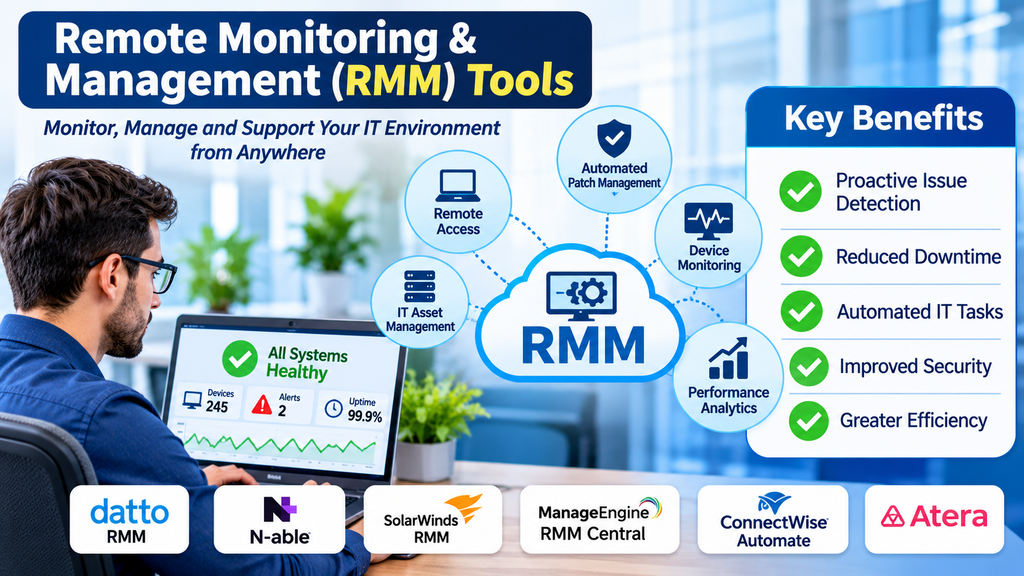
Improving IT Operations Through Remote Monitoring and Management
Modern organizations rely on computers, servers, networks, applications, and connected devices to support everyday business activities. As technology environments expand across offices, remote locations, and cloud infrastructure, maintaining visibility and control over every system becomes increasingly challenging.
IT teams need ways to monitor device health, identify technical problems, perform maintenance, and provide support without having to visit every location physically.
Remote Monitoring and Management (RMM) tools help address these requirements by allowing IT professionals and managed service providers to monitor, maintain, and manage technology systems from a centralized platform.
These solutions are especially valuable for organizations supporting distributed workforces, multiple business locations, and large numbers of endpoints.
What Are Remote Monitoring and Management Tools?
Remote Monitoring and Management tools are software platforms that enable IT teams to monitor and manage computers, servers, networks, and other IT assets remotely.
They collect system information, identify potential problems, generate alerts, and support remote maintenance activities.
Common capabilities include:
- Endpoint monitoring.
- Server monitoring.
- Network device monitoring.
- Remote desktop access.
- Patch management.
- Software deployment.
- Automated maintenance.
- System health alerts.
- IT asset inventory.
- Remote troubleshooting.
- Script execution.
- Reporting and performance analytics.
RMM platforms are widely used by managed service providers (MSPs), internal IT departments, enterprise support teams, and organizations responsible for distributed technology environments.
Leading Remote Monitoring and Management Tools
1. NinjaOne
NinjaOne provides endpoint management and remote monitoring capabilities through a centralized platform.
Its features include device monitoring, patch management, remote access, automation, endpoint inventory, and reporting.
IT teams can use it to monitor managed devices, identify technical issues, and perform maintenance tasks remotely.
It is particularly relevant to MSPs and IT departments looking for a unified environment to manage distributed endpoints.
Organizations should evaluate its supported operating systems, automation capabilities, integrations, and pricing structure.
2. ConnectWise RMM
ConnectWise RMM provides remote monitoring and management capabilities designed primarily for managed service providers.
Its functionality includes endpoint monitoring, automated maintenance, patch management, alerting, and remote support workflows.
The platform helps service providers manage multiple customer environments and coordinate technical operations.
It is relevant to MSPs that need centralized monitoring and management across different client networks.
Buyers should assess integration requirements, workflow complexity, scalability, and the broader ConnectWise ecosystem.
3. Datto RMM
Datto RMM supports remote monitoring and management for IT service providers.
Its capabilities include endpoint monitoring, automation, patch management, remote access, and device management.
Managed service providers can use it to monitor client infrastructure and perform maintenance activities without requiring physical access to devices.
It is useful for organizations that need to manage multiple customer environments from a central interface.
Important evaluation areas include automation, reporting, integrations, and operational requirements.
4. Atera
Atera combines remote monitoring and management with IT service management capabilities.
Its features include device monitoring, remote access, ticketing, patch management, automation, and reporting.
The platform helps IT professionals manage endpoints and organize support activities in one environment.
It is particularly relevant to smaller IT teams and MSPs seeking an integrated approach to device management and service delivery.
Organizations should evaluate its device support, pricing model, automation options, and integration capabilities.
5. ManageEngine RMM Central
ManageEngine RMM Central provides centralized monitoring and management capabilities for distributed IT infrastructure.
Its functionality supports endpoint monitoring, server management, network monitoring, patch management, and remote troubleshooting.
IT teams can use it to maintain visibility into managed systems and coordinate maintenance operations.
It is relevant to organizations that want to manage multiple types of IT infrastructure through a connected management environment.
Buyers should assess supported devices, deployment options, reporting, and integration with other ManageEngine products.
6. N-able N-central
N-able N-central provides remote monitoring and management capabilities for MSPs and IT professionals.
Its features include endpoint monitoring, network monitoring, patch management, automation, remote access, and reporting.
The platform helps service providers manage customer environments and identify potential infrastructure problems.
It is particularly relevant to MSPs managing diverse technology environments.
Organizations should examine monitoring flexibility, automation, integrations, and administration requirements.
7. Kaseya VSA
Kaseya VSA provides remote monitoring and management capabilities for IT service providers and internal IT teams.
Its functionality includes endpoint monitoring, remote control, patch management, automation, and IT asset management.
IT administrators can use it to maintain systems, automate repetitive maintenance, and support distributed endpoints.
It is relevant to organizations that require centralized control over large numbers of devices.
Buyers should evaluate platform capabilities, integration requirements, security controls, and deployment complexity.
8. Pulseway
Pulseway provides remote monitoring and management capabilities with an emphasis on real-time visibility and remote administration.
Its features include server and endpoint monitoring, alerts, remote control, automation, and patch management.
IT professionals can use the platform to monitor systems and respond to issues from a centralized interface, including through supported mobile workflows.
It is useful for IT teams that need remote infrastructure visibility and responsive administration.
Organizations should review device compatibility, alert configuration, automation, and pricing.
9. SuperOps
SuperOps combines RMM and professional services automation capabilities for managed service providers.
Its features include endpoint monitoring, asset management, patch management, automation, ticketing, and service workflows.
The platform helps MSPs coordinate technical support and customer management activities.
It is relevant to service providers seeking connected tools for managing devices and service operations.
Buyers should compare its monitoring capabilities, workflow customization, integrations, and commercial plans.
10. Action1
Action1 provides cloud-based endpoint management and patch management capabilities.
Its features support vulnerability identification, patch deployment, endpoint visibility, and remote remediation.
Organizations can use it to manage software updates and improve the security posture of distributed devices.
It is particularly relevant to IT teams focused on endpoint patching and vulnerability remediation.
Businesses should evaluate its broader RMM requirements, operating system coverage, reporting, and integration needs.
Comparing Popular RMM Platforms
| Platform | Primary focus | Suitable requirement |
|---|---|---|
| NinjaOne | Endpoint monitoring and management | Distributed IT environments |
| ConnectWise RMM | MSP-focused RMM | Managed service providers |
| Datto RMM | Remote infrastructure management | MSP customer environments |
| Atera | RMM and service management | Smaller IT teams and MSPs |
| ManageEngine RMM Central | Endpoint, server, and network monitoring | Centralized IT operations |
| N-able N-central | MSP infrastructure management | Complex customer environments |
| Kaseya VSA | Endpoint automation and management | Large device fleets |
| Pulseway | Real-time remote monitoring | Responsive IT administration |
| SuperOps | RMM and service workflows | Growing MSPs |
| Action1 | Endpoint and patch management | Distributed endpoint security |
The best platform depends on the number of managed devices, infrastructure complexity, automation requirements, service delivery model, and budget.
Essential Features of RMM Software
Endpoint monitoring
Endpoint monitoring provides visibility into the health and performance of computers, laptops, and servers.
IT teams can monitor system status, processor usage, memory consumption, disk capacity, and other operational indicators.
This helps administrators identify unusual behavior before it causes larger disruptions.
Server monitoring
Servers support important business applications, databases, websites, and internal services.
RMM tools help IT teams monitor server availability, resource utilization, performance, and system health.
Alerts can notify administrators when a server experiences unusual conditions or becomes unavailable.
Network monitoring
Network monitoring provides information about connected infrastructure such as routers, switches, firewalls, and other network devices.
It helps IT teams identify connectivity problems, performance degradation, and infrastructure failures.
Some RMM platforms offer integrated network monitoring, while others rely on integrations or complementary tools.
Remote access and control
Remote access allows authorized IT professionals to connect to managed devices and troubleshoot problems without visiting the user’s location.
This is useful for supporting remote employees, branch offices, and geographically distributed customers.
Secure authentication and permission controls are essential when enabling remote administration.
Patch management
Patch management helps IT teams deploy operating system and software updates across managed devices.
Regular patching can address known vulnerabilities, improve stability, and reduce exposure to security threats.
Administrators should test important updates and establish maintenance policies to reduce disruption.
Automation and scripting
Automation helps IT teams perform repetitive administrative tasks consistently.
Examples include restarting services, clearing temporary files, checking system status, installing approved software, and executing maintenance scripts.
Scripts should be tested carefully and restricted through appropriate permissions.
Alerting and notifications
RMM platforms can generate alerts when monitored devices experience problems.
Examples include low disk space, high resource usage, failed services, unexpected device shutdowns, and missing updates.
Effective alert configuration helps administrators prioritize issues without creating unnecessary notification noise.
Asset inventory
Asset inventory helps organizations maintain information about managed devices, installed software, operating systems, and hardware specifications.
This information supports troubleshooting, lifecycle planning, software management, and compliance activities.
Reporting and analytics
Reporting capabilities help IT teams understand infrastructure performance and service delivery.
Useful reports may include device health, patch compliance, unresolved alerts, endpoint inventory, and maintenance activity.
MSPs can also use reporting to communicate service performance to customers.
Benefits of Using RMM Tools
Centralized infrastructure visibility: IT teams can monitor distributed systems through a unified interface.
Faster troubleshooting: Remote access and system alerts help administrators investigate issues more quickly.
Reduced manual work: Automation supports repetitive maintenance and administrative tasks.
Improved endpoint security: Patch management and device monitoring help identify and address common risks.
Proactive maintenance: Monitoring can reveal warning signs before they develop into major disruptions.
Lower support overhead: Remote management reduces the need for physical visits for many routine technical tasks.
Consistent IT operations: Standardized policies and scripts help teams manage devices more uniformly.
Better scalability: Centralized management helps IT departments and MSPs support growing device populations.
RMM Tools for Managed Service Providers
Managed service providers support technology environments for multiple customers.
Managing each customer separately through disconnected systems can create unnecessary complexity.
RMM platforms help MSPs centralize monitoring, automate routine tasks, and maintain visibility across client environments.
Important MSP capabilities include:
- Multi-tenant management.
- Customer-specific monitoring policies.
- Centralized alert handling.
- Remote support.
- Patch management.
- Device inventory.
- Automation and scripting.
- Service desk integration.
- Technician activity tracking.
- Customer reporting.
MSPs should also consider role separation and access controls to prevent information from one customer environment from being exposed to another.
Security Considerations for RMM Software
RMM tools often have powerful access to managed devices and infrastructure. This makes them valuable operational platforms but also important security targets.
Organizations should evaluate the following safeguards:
Multi-factor authentication: Require additional verification for administrative access.
Role-based access control: Limit technicians to the devices and functions required for their responsibilities.
Secure remote connections: Protect remote sessions through appropriate encryption and authentication.
Audit logging: Maintain records of administrative actions, script execution, and remote access.
Credential protection: Store and manage privileged credentials securely.
Network restrictions: Limit administrative access to approved environments where practical.
Software updates: Keep the RMM platform and its agents updated.
Script governance: Review and test automation scripts before deployment.
Incident response planning: Establish procedures for investigating suspicious activity involving RMM systems.
Because RMM platforms can control many devices, organizations should treat their security as a critical part of the overall IT security strategy.
Common RMM Implementation Challenges
Too many alerts
Poorly configured monitoring can generate large numbers of low-value notifications.
Organizations should define meaningful thresholds, group related alerts, and prioritize events based on operational impact.
Incomplete device coverage
Some devices may remain unmanaged because of network restrictions, incompatible operating systems, or deployment issues.
IT teams should maintain an accurate device inventory and periodically verify agent coverage.
Unsafe automation
A script that works in one environment may cause problems in another.
Organizations should test scripts, document their purpose, limit permissions, and use controlled deployment procedures.
Integration complexity
RMM platforms may need to connect with ticketing systems, identity providers, endpoint security products, and asset management platforms.
Integration requirements should be reviewed before selecting a solution.
Limited technician training
Remote administration tools provide extensive capabilities, but inexperienced users may configure monitoring incorrectly or perform risky actions.
Training, access restrictions, and documented procedures help reduce these risks.
RMM and the Future of IT Operations
RMM platforms are evolving as organizations adopt cloud services, hybrid infrastructure, remote work, and increasingly distributed endpoints.
Several developments are influencing the future of remote IT management.
AI-assisted monitoring: Intelligent analysis can help identify unusual system behavior and prioritize important alerts.
Predictive maintenance: Historical performance information can help teams identify patterns associated with potential failures.
Automated remediation: Approved workflows can resolve certain recurring problems without manual intervention.
Cloud-based administration: Centralized cloud platforms make it easier to manage devices across locations.
Improved security integration: RMM platforms increasingly connect with endpoint protection, vulnerability management, and identity security workflows.
Unified IT management: Organizations are seeking connected environments that combine monitoring, endpoint management, service desk operations, and automation.
These capabilities can improve efficiency, but organizations should maintain human oversight for sensitive administrative actions.
How to Choose the Right RMM Platform
Selecting an RMM tool requires a clear understanding of the organization’s technology environment and operational requirements.
Before purchasing, evaluate:
- Number and types of endpoints to manage.
- Supported operating systems and device compatibility.
- Server and network monitoring requirements.
- Remote access and troubleshooting capabilities.
- Patch management and software deployment.
- Automation and scripting flexibility.
- Alert configuration and reporting.
- Integration with service desk and security platforms.
- Multi-tenant requirements for MSPs.
- Security controls and audit capabilities.
- Deployment complexity and training needs.
- Subscription costs and scalability.
A pilot deployment can help determine whether the platform works effectively with actual devices and network conditions.
Organizations should also consider the total cost of ownership, including implementation, technician training, integrations, and ongoing administration.
Frequently Asked Questions
What is an RMM tool used for?
An RMM tool helps IT teams remotely monitor, manage, maintain, and troubleshoot computers, servers, networks, and other technology assets.
Who uses RMM software?
Managed service providers, internal IT departments, enterprise support teams, and organizations managing distributed devices commonly use RMM software.
What is the difference between RMM and remote desktop software?
Remote desktop software primarily provides access to another computer. RMM platforms offer broader capabilities, including monitoring, alerting, patch management, automation, inventory, and remote access.
Are RMM tools suitable for small businesses?
Yes. Small businesses can use RMM solutions to monitor devices, automate maintenance, and obtain remote IT support without building a large internal infrastructure team.
Can RMM tools manage servers?
Many RMM platforms support server monitoring and administration, including performance tracking, service monitoring, patching, and remote troubleshooting. Capabilities vary by product.
Do RMM platforms improve cybersecurity?
They can support security operations through patch management, endpoint visibility, access controls, and monitoring. However, RMM software is not a replacement for a complete cybersecurity strategy.
Conclusion
Remote Monitoring and Management tools have become important for organizations that need reliable control over distributed IT environments.
Platforms such as NinjaOne, ConnectWise RMM, Datto RMM, Atera, ManageEngine RMM Central, N-able N-central, Kaseya VSA, Pulseway, SuperOps, and Action1 offer different approaches to remote infrastructure management.
The right solution depends on endpoint coverage, monitoring requirements, automation needs, security controls, and organizational scale.
By selecting an appropriate RMM platform and implementing it with strong security practices, businesses can improve infrastructure visibility, reduce repetitive maintenance, respond to technical problems more efficiently, and support reliable IT operations.
