Upgrade & Secure Your Future with DevOps, SRE, DevSecOps, MLOps!
We spend hours scrolling social media and waste money on things we forget, but won’t spend 30 minutes a day earning certifications that can change our lives.
Master in DevOps, SRE, DevSecOps & MLOps by DevOps School!
Learn from Guru Rajesh Kumar and double your salary in just one year.
Building Better IT Visibility with Configuration Management Technology
Modern IT environments consist of interconnected systems, applications, servers, databases, networks, cloud resources, and business services. Understanding how these components work together is essential for maintaining reliable technology operations.
When an application stops working, the cause may involve a server, network connection, database, cloud service, or another dependent component. Without accurate configuration information, identifying the source of a problem can take considerable time.
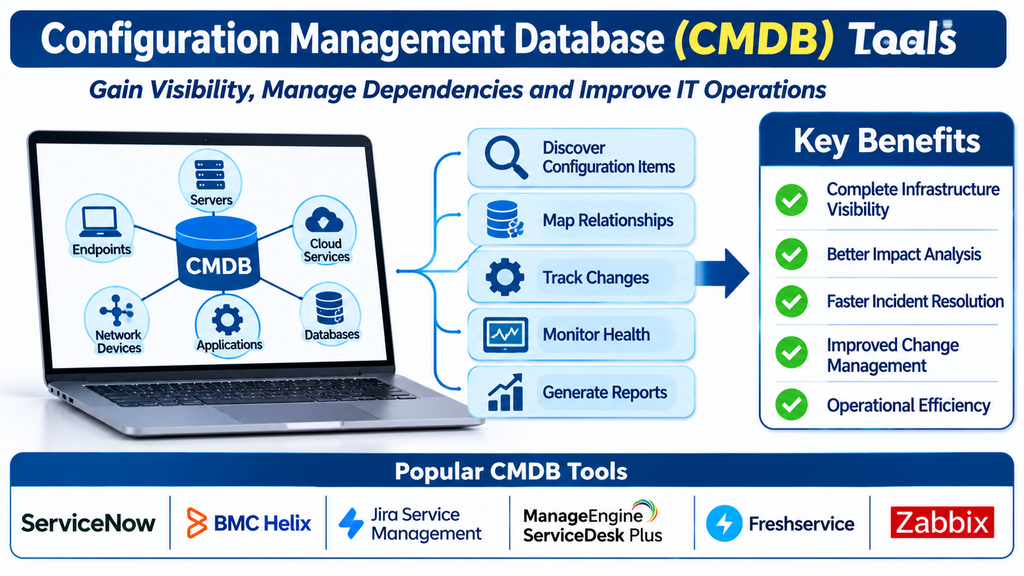
Configuration Management Database (CMDB) tools help organizations maintain structured information about IT components and the relationships between them.
A well-managed CMDB gives IT teams a clearer view of infrastructure, service dependencies, configuration changes, and operational risks.
What Are CMDB Tools?
A Configuration Management Database is a centralized repository that stores information about configuration items (CIs) and the relationships between them.
Configuration items can include:
- Servers and virtual machines.
- Network devices.
- Databases.
- Business applications.
- Cloud resources.
- Operating systems.
- Storage systems.
- Software services.
- End-user devices.
- Business and IT services.
CMDB tools help discover, organize, update, and visualize this information.
They are commonly used by IT operations teams, service management departments, infrastructure teams, and organizations with complex technology environments.
Leading CMDB Tools
1. ServiceNow CMDB
ServiceNow CMDB provides enterprise configuration management capabilities within the ServiceNow platform.
It helps organizations maintain configuration item records, map relationships, track infrastructure dependencies, and connect configuration information with IT service management processes.
Its capabilities support impact analysis, change management, incident investigation, and service visibility.
It is particularly relevant to enterprises that need a centralized configuration management environment connected to broader IT workflows.
Organizations should evaluate discovery coverage, data quality controls, integrations, implementation complexity, and licensing.
2. BMC Helix CMDB
BMC Helix CMDB provides configuration management capabilities for organizations managing complex IT infrastructure.
It supports configuration item discovery, relationship mapping, data reconciliation, and infrastructure visibility.
IT teams can use it to understand how infrastructure components connect to applications and business services.
It is relevant to enterprises with established service management and configuration management practices.
Buyers should assess discovery integrations, data governance, scalability, and implementation requirements.
3. Device42
Device42 provides IT infrastructure discovery, asset visibility, and dependency mapping capabilities.
Its features help organizations identify infrastructure components, document relationships, and visualize dependencies across data centers and cloud environments.
It can support infrastructure planning, migration projects, and operational troubleshooting.
It is useful for organizations seeking detailed infrastructure discovery and dependency information.
Businesses should evaluate supported environments, integration options, discovery methods, and reporting.
4. ManageEngine ServiceDesk Plus
ManageEngine ServiceDesk Plus includes CMDB capabilities that help IT teams manage configuration items and their relationships.
Organizations can maintain information about devices, software, assets, and other infrastructure components while connecting records with service desk workflows.
It is relevant to businesses seeking service management and configuration visibility in a connected environment.
Buyers should assess configuration modeling, discovery capabilities, integrations, and the complexity of their infrastructure.
5. iTop
iTop is an open-source IT service management and configuration management platform.
It supports configuration item records, relationship mapping, service management workflows, and infrastructure documentation.
Organizations can adapt its data model to represent their IT environments and business services.
It is relevant to teams seeking a flexible CMDB solution with control over configuration and deployment.
Businesses should consider hosting, customization, maintenance, security, and internal technical expertise.
6. Atlassian Jira Service Management Assets
Jira Service Management Assets provides asset and configuration management capabilities for organizations using Atlassian service management products.
It helps teams maintain records of assets, services, and configuration items, along with their relationships.
This information can support incident investigation, change management, and service dependency analysis.
It is particularly relevant to organizations already using Jira Service Management.
Buyers should evaluate data modeling, discovery integrations, automation, and licensing requirements.
7. OpenText Universal Discovery and CMDB
OpenText provides discovery and configuration management capabilities designed for complex IT environments.
Its solutions can help organizations collect infrastructure information, identify dependencies, and maintain configuration visibility.
These capabilities are relevant to enterprises managing diverse infrastructure and service environments.
Organizations should assess current product offerings, integration coverage, data quality processes, and implementation requirements.
8. SolarWinds Service Desk
SolarWinds Service Desk provides IT service management and asset-related capabilities that can support configuration visibility.
Its functionality helps organizations organize asset information and connect technology records with service desk activities.
It may be suitable for businesses seeking centralized support workflows with related asset information.
Organizations should verify whether its configuration management capabilities meet their required CMDB depth and relationship modeling needs.
9. Freshservice CMDB
Freshservice provides configuration management capabilities within its IT service management environment.
Its CMDB functionality helps organizations organize configuration items, maintain relationships, and connect infrastructure information with incidents and changes.
It is relevant to IT departments seeking accessible configuration management connected to service desk workflows.
Buyers should evaluate discovery, relationship mapping, automation, and integration requirements.
10. Virima
Virima provides IT discovery, asset management, and CMDB capabilities.
Its features support infrastructure discovery, configuration item management, dependency mapping, and visualization.
Organizations can use it to improve visibility into infrastructure and understand relationships between technology components.
It is relevant to businesses that need discovery-led configuration management across complex environments.
Buyers should assess supported infrastructure, integrations, data accuracy, and reporting capabilities.
Comparing Popular CMDB Platforms
| Platform | Primary focus | Suitable requirement |
|---|---|---|
| ServiceNow CMDB | Enterprise configuration management | Large IT environments |
| BMC Helix CMDB | Enterprise infrastructure relationships | Complex service operations |
| Device42 | Infrastructure discovery and dependency mapping | Data centers and cloud |
| ManageEngine ServiceDesk Plus | Service desk and configuration records | Centralized IT support |
| iTop | Open-source CMDB and ITSM | Flexible configuration management |
| Jira Service Management Assets | Asset and service relationship management | Atlassian environments |
| OpenText discovery and CMDB | Enterprise discovery and configuration visibility | Diverse infrastructure |
| SolarWinds Service Desk | Service management and asset visibility | IT support teams |
| Freshservice CMDB | Cloud-based service configuration management | Growing IT departments |
| Virima | Discovery and dependency mapping | Infrastructure visibility |
The right platform depends on infrastructure complexity, discovery requirements, relationship modeling, data governance, and integration needs.
Essential Features of CMDB Software
Configuration item management
Configuration item management provides structured records for the technology components within an organization.
Records may contain names, identifiers, device details, software versions, ownership, location, status, and other relevant information.
Accurate records help IT teams understand what exists in their environment.
Relationship mapping
A CMDB becomes especially valuable when it shows how configuration items depend on one another.
For example, an employee-facing application may depend on a web server, database, network connection, and cloud infrastructure.
Relationship mapping helps teams understand the potential impact of failures and planned changes.
Automated discovery
Discovery capabilities collect information about infrastructure through agents, network scans, integrations, and other supported methods.
Automated discovery can reduce manual data entry and help identify changes in the IT environment.
Discovery coverage depends on network access, permissions, supported technologies, and platform configuration.
Data reconciliation
Configuration information may come from multiple sources, such as discovery tools, asset systems, cloud platforms, and manual records.
Data reconciliation helps combine information and resolve duplicate or conflicting records.
This is important for maintaining a consistent configuration database.
Change tracking
CMDB tools can maintain information about configuration changes and help teams understand how infrastructure evolves.
Connecting configuration records with change management workflows provides a clearer history of modifications.
Impact analysis
Impact analysis helps identify which services, applications, and users may be affected when a configuration item changes or fails.
This can support incident prioritization, maintenance planning, and risk assessment.
Service mapping
Service mapping connects infrastructure components to the business services they support.
It helps IT teams understand how technical resources contribute to important business functions.
Reporting and dashboards
CMDB dashboards can show configuration item counts, data quality, infrastructure relationships, discovery status, and changes.
Reports help teams identify incomplete records and prioritize database maintenance.
Benefits of Implementing CMDB Tools
Improved infrastructure visibility: Centralized configuration records help organizations understand their IT environments.
Faster troubleshooting: Relationship information helps teams investigate incidents and identify potentially affected components.
Better change management: Accurate configuration data supports change assessment and reduces uncertainty.
Reduced operational risk: Dependency mapping helps teams identify potential service impacts before making changes.
Improved service mapping: Organizations can connect technical infrastructure with the business services it supports.
More reliable documentation: Automated discovery and controlled updates help maintain current configuration information.
Better IT planning: Infrastructure relationships and configuration history support migration and modernization projects.
Stronger governance: Ownership, status, and configuration records improve operational accountability.
CMDB and IT Asset Management
CMDB and IT Asset Management are related disciplines, but they have different objectives.
IT Asset Management focuses on the lifecycle, ownership, financial value, procurement, and use of technology assets.
A CMDB focuses on configuration items and the relationships that help explain how IT services operate.
For example, an asset management system may record the purchase cost, warranty, and assigned employee for a server.
A CMDB may record that the same server hosts a business application and depends on a particular database and network service.
Connecting both systems can provide a more complete view of technology resources.
CMDB and IT Service Management
CMDB information can support several ITSM practices.
Incident management: Helps identify infrastructure components that may be related to an incident.
Problem management: Supports investigation of recurring failures and infrastructure dependencies.
Change management: Helps assess which services may be affected by a proposed change.
Service request management: Provides context about devices, applications, and services associated with a request.
Service configuration management: Maintains information about configuration items and their relationships.
The value of a CMDB increases when its information is integrated into everyday IT workflows rather than maintained as an isolated documentation repository.
Common CMDB Implementation Challenges
Inaccurate configuration data
Outdated or incomplete records can reduce confidence in the CMDB.
Organizations should establish data ownership, verification procedures, and automated update processes.
Duplicate configuration items
Information collected from multiple sources may create duplicate records.
Reconciliation rules and unique identifiers can help improve consistency.
Excessive data collection
Attempting to document every possible detail can make a CMDB difficult to maintain.
Organizations should prioritize configuration items and relationships that support important operational decisions.
Poor relationship mapping
A list of infrastructure components without meaningful relationships provides limited value.
Teams should focus on mapping dependencies that matter for service delivery, incidents, and changes.
Limited ownership
If no team is responsible for configuration data quality, records may become unreliable.
Organizations should assign responsibility for important configuration domains and establish review schedules.
Complex integrations
CMDB platforms often need to connect with discovery, monitoring, asset management, cloud, and service desk systems.
Integration requirements should be planned before implementation.
CMDB Data Quality Best Practices
A successful CMDB depends on accurate and useful information.
Organizations can improve data quality by:
- Defining which configuration items should be recorded.
- Establishing consistent naming and identification rules.
- Assigning ownership for important data categories.
- Automating discovery where practical.
- Creating reconciliation rules for multiple data sources.
- Mapping critical service dependencies.
- Reviewing stale and duplicate records.
- Connecting changes with configuration updates.
- Monitoring completeness and accuracy.
- Regularly reviewing whether the CMDB supports operational needs.
A smaller, reliable CMDB is often more useful than a large database filled with outdated information.
Security and Governance Considerations
CMDB records can reveal details about infrastructure, applications, network relationships, and critical business services.
Organizations should protect this information through:
- Role-based access controls.
- Strong administrator authentication.
- Encryption where appropriate.
- Audit logs for configuration changes.
- Secure discovery credentials.
- Restricted integration permissions.
- Data retention policies.
- Regular access reviews.
- Controlled administrative workflows.
- Backup and recovery procedures.
Access to sensitive infrastructure details should be limited to authorized personnel.
AI and Automation in CMDB Management
AI and automation are increasingly being used to improve configuration management.
Potential applications include:
Automated data classification: Helps categorize discovered configuration items.
Relationship recommendations: Suggests possible connections between infrastructure components.
Anomaly detection: Identifies unexpected configuration changes or unusual data patterns.
Data quality assistance: Highlights incomplete, duplicate, or inconsistent records.
Change impact insights: Helps teams review possible dependencies before approving changes.
Automated discovery updates: Keeps configuration information more closely aligned with the actual infrastructure environment.
These capabilities can improve efficiency, but important configuration changes and relationship decisions should still be validated by responsible IT teams.
How to Choose the Right CMDB Tool
Choosing a CMDB platform begins with understanding the organization’s infrastructure and operational requirements.
A small IT department may need basic configuration records and service relationships. A large enterprise may require automated discovery, complex dependency mapping, data reconciliation, cloud visibility, and integration with multiple ITSM platforms.
Before selecting a solution, evaluate:
- Number and types of configuration items.
- Automated discovery capabilities.
- Relationship mapping and service modeling.
- Data reconciliation and duplicate handling.
- Integration with ITSM and ITAM platforms.
- Cloud and hybrid infrastructure support.
- Change and impact analysis.
- Reporting and data quality controls.
- Security and access management.
- Deployment and maintenance requirements.
- Scalability and customization.
- Total cost of ownership.
A pilot project focused on a critical business service can help demonstrate whether the platform produces accurate and useful dependency information.
Frequently Asked Questions
What is a CMDB tool used for?
A CMDB tool helps organizations maintain records of IT configuration items and their relationships to support infrastructure visibility, incident investigation, change management, and service operations.
What is a configuration item?
A configuration item is a component that needs to be managed to deliver or support an IT service. Examples include servers, applications, databases, network devices, and cloud resources.
What is the difference between CMDB and ITAM?
ITAM focuses on technology asset ownership, cost, procurement, and lifecycle. CMDB focuses on configuration information and relationships between components.
Is a CMDB part of ITIL?
Service configuration management is an established ITIL practice, and a CMDB can support it by maintaining configuration item information and relationships.
Does a CMDB update automatically?
Many CMDB platforms support automated discovery and integrations, but data quality still requires governance, reconciliation, and regular review.
Do small businesses need a CMDB?
Small businesses with relatively simple infrastructure may only need basic configuration records. A dedicated CMDB becomes more valuable as systems, dependencies, and operational complexity increase.
Conclusion
Configuration Management Database tools help organizations understand the structure and relationships within their technology environments.
Platforms such as ServiceNow CMDB, BMC Helix CMDB, Device42, ManageEngine ServiceDesk Plus, iTop, Jira Service Management Assets, OpenText, Freshservice, and Virima offer different approaches to configuration management and infrastructure visibility.
The right solution depends on infrastructure complexity, discovery coverage, relationship mapping, data quality, and integration requirements.
By maintaining accurate configuration records and meaningful service relationships, organizations can improve troubleshooting, reduce change-related risks, strengthen IT governance, and support more reliable technology services.
