Upgrade & Secure Your Future with DevOps, SRE, DevSecOps, MLOps!
We spend hours scrolling social media and waste money on things we forget, but won’t spend 30 minutes a day earning certifications that can change our lives.
Master in DevOps, SRE, DevSecOps & MLOps by DevOps School!
Learn from Guru Rajesh Kumar and double your salary in just one year.
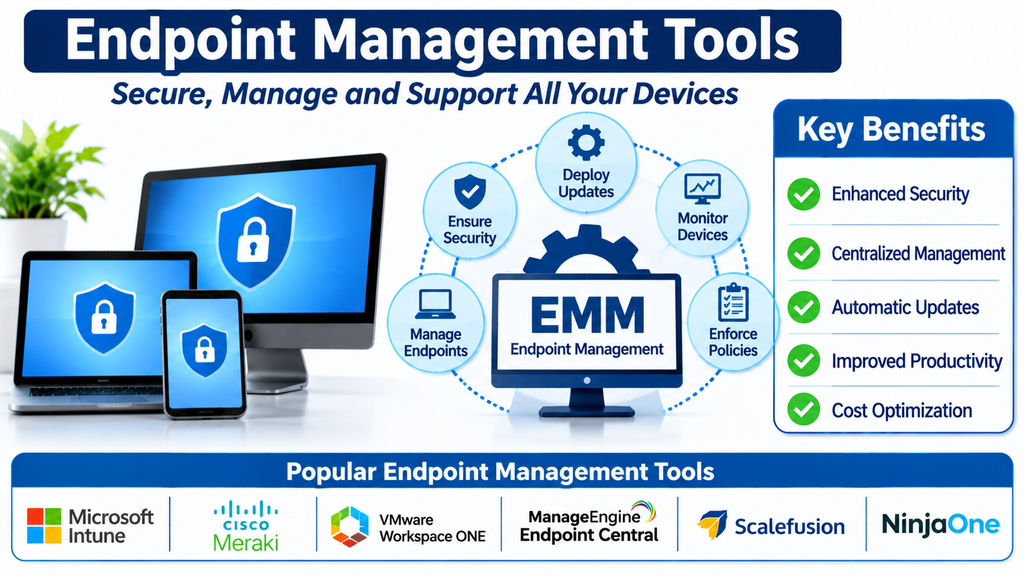
Managing and Securing Devices Across Modern IT Environments
Businesses depend on a growing number of devices to support daily operations. Employees use desktops, laptops, smartphones, tablets, and specialized equipment to access applications, communicate with colleagues, and work with business information.
Managing these devices individually can become difficult, especially when employees work remotely or across multiple office locations. IT teams need consistent ways to configure devices, deploy applications, enforce security policies, monitor device health, and troubleshoot problems.
Endpoint management tools provide a centralized way to perform these tasks. They help organizations maintain control over devices throughout their lifecycle while supporting productivity, security, and operational efficiency.
What Are Endpoint Management Tools?
Endpoint management tools are software platforms that help IT teams monitor, configure, secure, and maintain devices connected to an organization’s technology environment.
An endpoint is a device that connects to a network or accesses organizational resources. Common examples include:
- Desktop computers.
- Laptops and workstations.
- Smartphones and tablets.
- Virtual desktops.
- Servers and specialized devices.
- Point-of-sale terminals.
- Shared and kiosk devices.
Endpoint management platforms help administrators manage device settings, deploy software, enforce security policies, monitor compliance, and support users remotely.
They are used by internal IT departments, enterprises, educational institutions, government organizations, and managed service providers.
Leading Endpoint Management Tools
1. Microsoft Intune
Microsoft Intune is a cloud-based endpoint management solution that helps organizations manage devices and applications.
Its capabilities include device enrollment, configuration policies, application deployment, compliance management, and integration with Microsoft security and identity services.
Organizations can use it to manage supported Windows, macOS, iOS, Android, and other device environments.
It is particularly relevant to businesses using Microsoft 365 and Microsoft Entra ID.
Buyers should evaluate device compatibility, licensing, policy requirements, and integration with existing security tools.
2. ManageEngine Endpoint Central
ManageEngine Endpoint Central provides unified endpoint management capabilities for business devices.
Its features include software deployment, patch management, remote troubleshooting, operating system deployment, device configuration, and asset inventory.
IT teams can use it to manage endpoints through a centralized administration environment.
It is relevant to organizations that need broad endpoint administration across different operating systems.
Businesses should review supported platforms, deployment options, automation, and integration requirements.
3. Ivanti Neurons for Unified Endpoint Management
Ivanti Neurons for Unified Endpoint Management helps organizations manage and secure endpoints across distributed environments.
Its capabilities support device management, application delivery, configuration control, and endpoint visibility.
It can help IT teams coordinate device operations and maintain consistent policies across supported platforms.
It is relevant to enterprises managing a diverse collection of devices and operating systems.
Buyers should assess product modules, supported devices, integrations, and implementation complexity.
4. IBM MaaS360
IBM MaaS360 provides unified endpoint management and mobile device management capabilities.
Its functionality includes device enrollment, policy enforcement, application management, security monitoring, and endpoint visibility.
Organizations can use it to manage mobile and other supported endpoint environments while applying centralized security controls.
It is useful for businesses that need structured device management and security across distributed workforces.
Buyers should evaluate supported operating systems, security features, integration options, and licensing.
5. VMware Workspace ONE UEM
Workspace ONE UEM, now part of Omnissa’s product portfolio, provides unified endpoint management capabilities for enterprise devices.
It supports device enrollment, application management, configuration policies, compliance workflows, and remote administration.
Organizations can use it to manage endpoints across different operating systems and work environments.
It is relevant to businesses with complex device fleets and enterprise mobility requirements.
Buyers should review current product capabilities, licensing, integrations, and migration considerations.
6. Jamf Pro
Jamf Pro specializes in managing Apple devices in organizational environments.
Its features include device enrollment, configuration profiles, application deployment, inventory, security policies, and device lifecycle workflows.
It is particularly useful for schools, businesses, and enterprises that operate large fleets of Mac computers, iPhones, and iPads.
Organizations should assess Apple ecosystem requirements, integrations, automation, and administration needs.
7. Cisco Meraki Systems Manager
Cisco Meraki Systems Manager provides cloud-based endpoint management capabilities.
Its features support device enrollment, configuration management, application deployment, inventory, and security policy enforcement.
Organizations can use it to manage supported devices through a centralized cloud dashboard.
It is relevant to businesses already using Cisco Meraki networking and security products.
Buyers should evaluate supported operating systems, device management depth, and integration with their existing infrastructure.
8. Hexnode UEM
Hexnode UEM provides unified endpoint management capabilities for organizations managing multiple device types.
Its features include device enrollment, configuration management, application deployment, kiosk management, remote access, and compliance controls.
It supports organizations that need to manage mobile devices, computers, and specialized endpoints from a central platform.
Businesses should assess platform compatibility, security controls, automation, and pricing.
9. Scalefusion
Scalefusion provides endpoint and unified device management capabilities for business environments.
Its functionality includes device enrollment, application management, policy enforcement, kiosk mode, remote troubleshooting, and compliance management.
It can support organizations managing distributed teams and purpose-specific devices.
Buyers should evaluate supported platforms, integrations, device limits, and administrative workflows.
10. NinjaOne
NinjaOne provides endpoint management and IT operations capabilities for internal IT teams and managed service providers.
Its features include endpoint monitoring, patch management, remote access, software deployment, automation, and asset visibility.
It helps IT professionals manage distributed devices and perform routine maintenance through a centralized platform.
Organizations should review its operating system coverage, remote administration capabilities, automation, and integration requirements.
Comparing Popular Endpoint Management Platforms
| Platform | Primary focus | Suitable requirement |
|---|---|---|
| Microsoft Intune | Cloud-based device and application management | Microsoft-centered environments |
| ManageEngine Endpoint Central | Endpoint administration and patching | Mixed-device environments |
| Ivanti Neurons UEM | Enterprise endpoint management | Complex device fleets |
| IBM MaaS360 | Unified endpoint and mobile management | Distributed workforces |
| Workspace ONE UEM | Enterprise unified endpoint management | Diverse operating systems |
| Jamf Pro | Apple device management | Mac, iPhone, and iPad fleets |
| Cisco Meraki Systems Manager | Cloud-based endpoint administration | Meraki environments |
| Hexnode UEM | Multi-platform device management | Business and specialized devices |
| Scalefusion | Device policy and application management | Distributed teams and kiosks |
| NinjaOne | Endpoint management and monitoring | IT departments and MSPs |
The right platform depends on device types, operating systems, security requirements, deployment preferences, and existing IT infrastructure.
Essential Features of Endpoint Management Software
Device discovery and enrollment
Device discovery helps IT teams identify endpoints connected to the organization’s environment.
Enrollment registers devices with the management platform so administrators can apply policies and monitor compliance.
Enrollment methods may include automated provisioning, user-driven registration, directory integration, and other supported workflows.
Centralized configuration management
Configuration management allows administrators to apply consistent settings across managed devices.
Policies may control password requirements, Wi-Fi settings, security configurations, application permissions, and device restrictions.
Centralized configuration reduces manual work and helps maintain consistent standards.
Application deployment
Application deployment enables IT teams to install, update, and remove approved software remotely.
This helps employees receive the applications they need without requiring individual manual installations.
Organizations can also use application policies to restrict unauthorized or unnecessary software.
Patch and update management
Patch management helps keep operating systems and applications updated.
Endpoint management platforms may support update scheduling, deployment policies, compliance reporting, and automated maintenance.
Organizations should test important updates and coordinate deployment schedules to reduce disruption.
Security policy enforcement
Endpoint security policies help protect devices and organizational data.
Common controls include encryption requirements, password policies, screen locks, firewall settings, application restrictions, and compliance checks.
Some platforms integrate with dedicated endpoint protection and threat detection products.
Remote troubleshooting
Remote support features allow authorized IT technicians to investigate problems without physically accessing a device.
Depending on the platform, capabilities may include remote desktop sessions, command execution, device diagnostics, and support actions.
Access should be restricted to authorized personnel.
Inventory and reporting
Endpoint inventory provides information about device models, operating systems, installed applications, ownership, and compliance status.
Reporting helps IT teams identify unmanaged devices, outdated systems, and policy violations.
Device lifecycle management
Endpoint management can support device provisioning, assignment, maintenance, reassignment, and retirement.
This helps organizations maintain consistent processes throughout the useful life of each device.
Benefits of Using Endpoint Management Tools
Centralized device control: Administrators can manage large numbers of endpoints through a unified platform.
Improved security consistency: Standard policies help protect devices across different locations.
Reduced manual administration: Remote configuration and software deployment reduce repetitive work.
Faster technical support: Remote troubleshooting helps IT teams respond to common device problems.
Better compliance visibility: Device reporting helps identify endpoints that do not meet organizational requirements.
Simplified onboarding: Automated enrollment and application deployment help prepare devices for new employees.
Improved software control: Application management helps organizations maintain approved software environments.
Support for remote work: Cloud-based management enables IT teams to administer devices outside traditional office networks.
Endpoint Management and Unified Endpoint Management
Endpoint Management and Unified Endpoint Management (UEM) are closely related.
Traditional endpoint management often focuses on specific device categories, such as desktop computers and laptops.
UEM expands this approach by bringing multiple endpoint types into a more unified management framework.
A UEM platform may support:
- Windows computers.
- macOS devices.
- iPhones and iPads.
- Android devices.
- Shared tablets.
- Kiosk devices.
- Other supported endpoints.
The goal is to simplify administration through common policies, centralized visibility, and consistent workflows.
Not every platform provides the same depth of support for every operating system, so organizations should validate requirements before selecting a solution.
Endpoint Management and Endpoint Security
Endpoint management helps configure, maintain, and monitor devices. Endpoint security focuses on protecting them from malicious activity and unauthorized access.
These disciplines complement each other.
For example, endpoint management may ensure that a laptop uses encryption and receives operating system updates. Endpoint security software may detect malware, investigate suspicious activity, and respond to threats.
Integrating endpoint management with security products can improve visibility and help IT teams respond to compliance or security problems.
Common Endpoint Management Challenges
Managing different operating systems
Organizations may operate Windows, macOS, Android, and iOS devices simultaneously.
Management capabilities can vary across platforms, so IT teams should test important workflows on each supported operating system.
Incomplete device enrollment
Devices that are not properly enrolled may remain outside centralized management.
Clear onboarding procedures and regular inventory checks can help reduce unmanaged endpoints.
Policy conflicts
Different configuration policies may overlap or contradict one another.
Administrators should document policy priorities, test changes, and use controlled deployment groups.
Update disruptions
Large-scale patch deployments can affect business operations if they are not scheduled carefully.
Organizations should use testing groups and maintenance windows for important updates.
Remote workforce support
Devices used outside corporate networks may have different connectivity and security conditions.
Cloud-based administration and secure remote access can help support these environments.
User privacy concerns
Employee devices may contain personal information, particularly when organizations support bring-your-own-device arrangements.
Businesses should clearly communicate what information is collected and which administrative actions are permitted.
Security Best Practices for Endpoint Management
Endpoint management platforms often have significant control over organizational devices. Their administration should be protected carefully.
Organizations should implement:
- Multi-factor authentication for administrators.
- Role-based access controls.
- Least-privilege administrative permissions.
- Secure device enrollment.
- Encryption and screen-lock policies.
- Regular platform and agent updates.
- Audit logging for administrative activity.
- Secure integration credentials.
- Device compliance monitoring.
- Remote lock or wipe procedures where appropriate.
- Regular reviews of administrator access.
- Documented incident response procedures.
Organizations should also test recovery and device retirement workflows to ensure that business information is handled securely.
AI and Automation in Endpoint Management
AI and automation are creating new possibilities for endpoint administration.
Automated device provisioning: Helps prepare devices with approved applications and configurations.
Predictive maintenance: Uses device health information to identify potential problems.
Intelligent alert prioritization: Helps administrators focus on important endpoint events.
Automated remediation: Can perform approved actions to resolve recurring configuration or maintenance issues.
Compliance recommendations: Helps identify devices that may need policy corrections.
Software deployment automation: Supports consistent application delivery across large device populations.
Human oversight remains important, especially for actions that affect business-critical systems or employee data.
How to Choose the Right Endpoint Management Tool
Choosing a platform starts with understanding the organization’s device environment.
A small business may need basic laptop administration and software deployment. A large enterprise may require multi-platform support, automated provisioning, advanced compliance policies, security integrations, and detailed reporting.
Before selecting a solution, evaluate:
- Number and types of endpoints.
- Operating system compatibility.
- Device enrollment options.
- Configuration and policy management.
- Application deployment capabilities.
- Patch and update management.
- Remote troubleshooting features.
- Security and compliance controls.
- Integration with identity and security platforms.
- Reporting and inventory capabilities.
- Deployment complexity and training.
- Total cost of ownership.
A pilot deployment can help determine whether the platform supports the organization’s actual devices and administrative workflows.
Frequently Asked Questions
What is endpoint management software used for?
Endpoint management software helps IT teams configure, monitor, secure, update, and troubleshoot computers, mobile devices, and other connected endpoints.
What devices can endpoint management tools manage?
Depending on the platform, they can manage desktops, laptops, smartphones, tablets, virtual endpoints, kiosks, and other supported devices.
What is the difference between endpoint management and UEM?
Endpoint management covers the administration of organizational devices. UEM brings management of multiple device types and operating systems into a more unified framework.
Is endpoint management the same as endpoint security?
No. Endpoint management focuses on device administration and configuration, while endpoint security focuses on protecting devices against threats. The two can work together.
Can endpoint management tools support remote employees?
Yes. Many platforms provide cloud-based management, remote configuration, application deployment, and troubleshooting capabilities for devices outside corporate offices.
Are endpoint management tools suitable for small businesses?
Yes. Small businesses can use them to simplify device setup, apply security policies, deploy software, and manage updates without handling every device manually.
Conclusion
Endpoint management tools help organizations maintain control over the growing number of devices used in modern workplaces.
Platforms such as Microsoft Intune, ManageEngine Endpoint Central, Ivanti Neurons, IBM MaaS360, Workspace ONE UEM, Jamf Pro, Cisco Meraki Systems Manager, Hexnode, Scalefusion, and NinjaOne provide different approaches to device administration and security.
The best solution depends on the organization’s device mix, operating systems, workforce distribution, security requirements, and existing IT infrastructure.
With centralized policies, reliable enrollment, automated maintenance, and strong access controls, businesses can simplify endpoint operations while supporting a secure and productive workforce.
