Upgrade & Secure Your Future with DevOps, SRE, DevSecOps, MLOps!
We spend hours scrolling social media and waste money on things we forget, but won’t spend 30 minutes a day earning certifications that can change our lives.
Master in DevOps, SRE, DevSecOps & MLOps by DevOps School!
Learn from Guru Rajesh Kumar and double your salary in just one year.
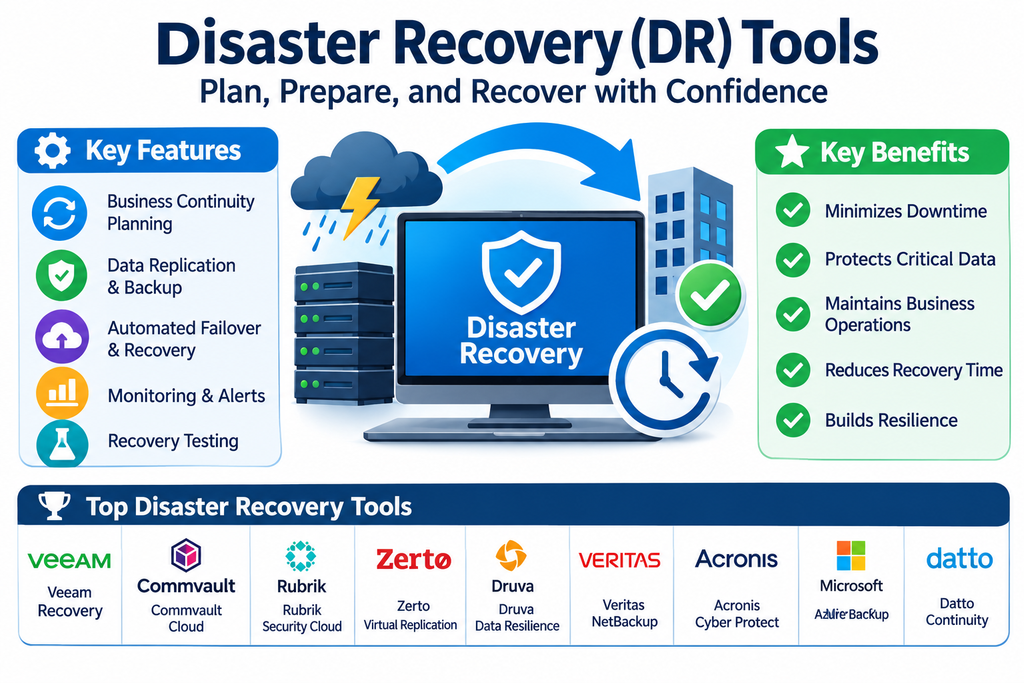
Disaster Recovery (DR) Tools: Features, Benefits, and Top Platforms
Unexpected disruptions can bring business operations to a standstill. Hardware failures, cyberattacks, ransomware, natural disasters, power outages, and human errors can make critical systems unavailable and interrupt access to important information. For organizations that depend on digital infrastructure, even a short outage can affect customers, employees, revenue, and business reputation.
Disaster Recovery (DR) tools help organizations restore IT systems, applications, and data after a major disruption. These platforms support backup recovery, workload replication, recovery orchestration, failover, and continuity planning. They help IT teams prepare for incidents and restore essential services in a controlled and predictable way.
As businesses increasingly rely on cloud services, virtual infrastructure, and distributed applications, disaster recovery has become a key part of enterprise resilience.
What Are Disaster Recovery Tools?
Disaster Recovery tools are software platforms and services designed to help organizations recover technology systems after an unexpected failure or disruptive event.
They can protect servers, virtual machines, databases, applications, cloud workloads, and other business-critical resources. Depending on the solution, organizations can replicate systems to another location, maintain recoverable backups, automate recovery procedures, and switch workloads to an alternative environment when the primary infrastructure becomes unavailable.
A disaster recovery strategy defines how an organization will restore its systems, who is responsible for recovery activities, and how quickly essential services should return.
Key Features of Disaster Recovery Software
1. Data Replication
Replication creates copies of data or workloads in another location or environment. Depending on the solution, replication can occur continuously or at scheduled intervals, helping organizations maintain a recoverable copy outside the primary infrastructure.
2. Automated Failover
Failover moves services or workloads to a secondary environment when the primary system becomes unavailable. Automation can reduce manual intervention and help restore critical operations more quickly.
3. Failback Capabilities
After the original infrastructure has been repaired, failback procedures help return workloads to their intended primary environment. A well-planned failback process helps prevent data inconsistencies and unnecessary disruption.
4. Recovery Orchestration
Recovery orchestration allows administrators to define and automate sequences of recovery actions. These workflows may include starting virtual machines, restoring dependencies, connecting networks, and validating services in a planned order.
5. Cloud-Based Disaster Recovery
Cloud disaster recovery uses cloud infrastructure as a recovery destination or standby environment. It can help organizations avoid maintaining a fully duplicated physical data center, although costs and technical requirements vary.
6. Backup Integration
Many disaster recovery platforms integrate with backup systems to provide additional recovery options. Backups can help restore information when replication alone is insufficient or when data has been corrupted.
7. Recovery Testing
Testing features allow IT teams to validate recovery plans and confirm that systems can be restored. Some solutions support isolated test environments that do not interfere with production workloads.
8. Monitoring and Reporting
Centralized dashboards provide information about replication status, recovery readiness, system health, and recovery activities. Alerts help administrators identify problems that could affect recovery performance.
Popular Disaster Recovery Tools
Disaster recovery solutions range from cloud-native services to enterprise platforms designed for complex data centers and hybrid IT environments.
Veeam Data Platform
Veeam Data Platform provides backup, replication, and recovery capabilities for virtual, physical, and cloud workloads. It supports recovery orchestration and data resilience workflows that help organizations prepare for infrastructure failures and cyber incidents.
Azure Site Recovery
Microsoft Azure Site Recovery helps organizations replicate supported workloads to Azure or another supported recovery location. It provides recovery plans, failover, and failback capabilities to support business continuity across on-premises and cloud environments.
AWS Elastic Disaster Recovery
AWS Elastic Disaster Recovery helps organizations recover supported applications on AWS infrastructure. It continuously replicates source servers and supports recovery into a cloud environment when a disruption occurs.
Zerto
Zerto provides disaster recovery and data protection capabilities for enterprise environments. Its platform supports workload replication, recovery orchestration, and recovery testing to help organizations reduce downtime and data loss.
VMware Live Recovery
VMware Live Recovery provides disaster recovery and cyber recovery capabilities for supported VMware environments. It helps organizations protect workloads, coordinate recovery operations, and maintain service availability following disruptions.
Rubrik Security Cloud
Rubrik Security Cloud combines data protection and cyber resilience capabilities. It supports protected backups, recovery workflows, and security monitoring to help organizations respond to data loss and cyber incidents.
Commvault Cloud
Commvault Cloud provides enterprise backup, recovery, and cyber resilience capabilities across supported workloads and environments. Organizations can use its data protection and recovery features as part of a broader disaster recovery strategy.
Cohesity DataProtect
Cohesity DataProtect provides backup and recovery capabilities for virtual, physical, and cloud workloads. Its data protection features can support disaster recovery planning and restoration across enterprise environments.
Acronis Cyber Protect
Acronis Cyber Protect combines backup and recovery with cybersecurity capabilities. It can help organizations protect endpoints and workloads while providing recovery options following system failures or security incidents.
Datto SIRIS
Datto SIRIS is a business continuity and disaster recovery solution designed to help organizations protect systems and restore operations after disruptions. It is particularly relevant to managed service providers and businesses seeking integrated backup and recovery capabilities.
Benefits of Using Disaster Recovery Tools
Reduced Downtime: Replication, failover, and recovery automation can help restore important systems more quickly after an incident.
Improved Data Protection: Backup integration and replicated copies provide additional ways to recover business information when production systems fail.
Business Continuity: Recovery planning helps organizations maintain or resume essential services and reduce the impact of unexpected disruptions.
Greater IT Resilience: Regular testing and monitoring help identify weaknesses before a real disaster occurs.
Centralized Recovery Management: Administrators can coordinate recovery tasks and monitor protected systems from a central interface.
Support for Hybrid Infrastructure: Many platforms support combinations of on-premises infrastructure, private clouds, and public cloud environments.
Important Disaster Recovery Metrics
Organizations should define recovery targets before choosing a DR platform. Two important measurements are:
Recovery Time Objective (RTO): RTO defines the maximum acceptable time required to restore a system or service after an interruption. Critical applications generally require shorter recovery times than less important systems.
Recovery Point Objective (RPO): RPO defines the maximum acceptable amount of data loss, measured in time. For example, an RPO of 15 minutes means the organization aims to recover data to a point no more than 15 minutes before the disruption.
These targets influence the choice of replication frequency, backup schedules, infrastructure, and recovery technology.
Disaster Recovery vs. Backup and Recovery
Backup and recovery focuses on creating copies of data and restoring them when information is lost, damaged, or deleted.
Disaster recovery has a broader purpose. It addresses how an organization restores entire IT services and business operations after a major disruption. It may include backups, replication, failover, recovery orchestration, alternate infrastructure, communication procedures, and testing.
Backups are therefore an important part of disaster recovery, but a backup solution alone does not automatically provide a complete disaster recovery plan.
How to Choose the Right Disaster Recovery Platform
Start by identifying the systems that are essential to business operations. These may include databases, customer-facing applications, authentication services, file systems, virtual machines, and cloud workloads.
Define RTO and RPO targets for each important service. A system that supports financial transactions may require a different recovery strategy from an internal application that can tolerate longer downtime.
Evaluate platform compatibility with existing infrastructure, cloud providers, hypervisors, storage systems, and applications. Check whether the solution supports automated failover, failback, recovery orchestration, monitoring, and isolated recovery testing.
Consider security features such as encryption, access controls, immutable backup integration, and protection against compromised credentials. Review licensing, storage, network bandwidth, cloud compute costs, support, and ongoing administration requirements.
A pilot deployment and recovery test can help confirm whether the solution meets the organization’s technical and operational expectations.
Disaster Recovery Best Practices
A strong disaster recovery program begins with a documented plan that identifies critical systems, recovery priorities, responsible teams, and escalation procedures.
Maintain protected backups and, where appropriate, replicate critical workloads to a separate location or recovery environment. Avoid relying entirely on infrastructure that could be affected by the same incident as the primary environment.
Test recovery procedures regularly. Confirm that systems can be restored, dependencies work correctly, applications are accessible, and business users can complete essential tasks.
Keep recovery documentation current, secure administrative credentials, monitor replication health, and review recovery targets as business requirements change. Employees and technical teams should understand their responsibilities during an incident.
Conclusion
Disaster Recovery tools help organizations prepare for unexpected disruptions and restore critical technology services when failures occur. Through replication, automated failover, recovery orchestration, backup integration, and regular testing, these platforms help businesses reduce downtime and improve operational resilience.
Solutions such as Veeam Data Platform, Azure Site Recovery, AWS Elastic Disaster Recovery, Zerto, VMware Live Recovery, Rubrik Security Cloud, Commvault Cloud, Cohesity DataProtect, Acronis Cyber Protect, and Datto SIRIS offer different capabilities for disaster recovery planning.
The right platform depends on infrastructure, recovery objectives, workload priorities, security requirements, and budget. A well-designed disaster recovery strategy supported by suitable tools and regularly tested procedures helps organizations recover with greater confidence and maintain business continuity.
