Upgrade & Secure Your Future with DevOps, SRE, DevSecOps, MLOps!
We spend hours scrolling social media and waste money on things we forget, but won’t spend 30 minutes a day earning certifications that can change our lives.
Master in DevOps, SRE, DevSecOps & MLOps by DevOps School!
Learn from Guru Rajesh Kumar and double your salary in just one year.
Vector Database Platforms: Powering Semantic Search and AI Applications
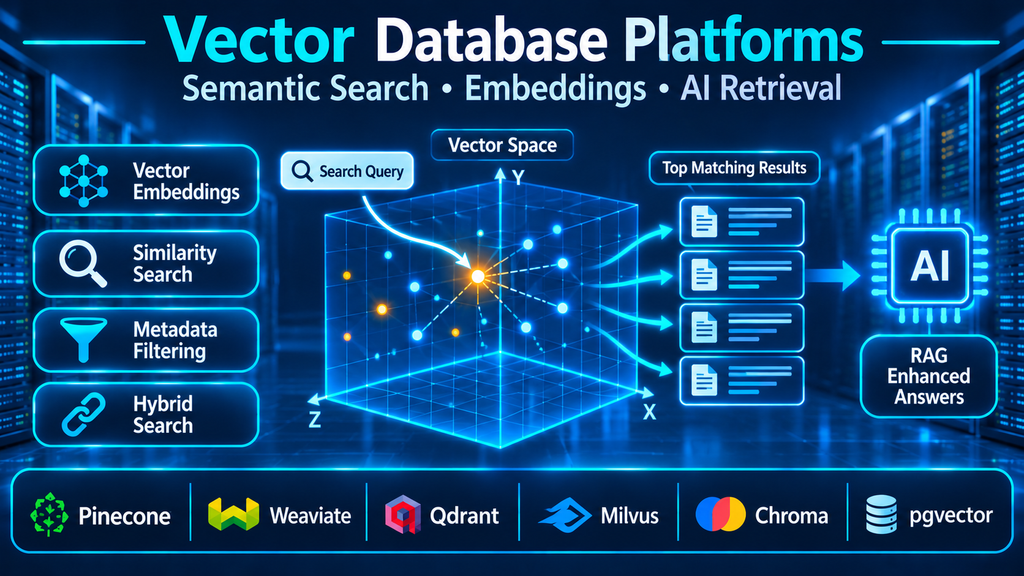
Vector database platforms are becoming an important part of modern AI infrastructure. They store and retrieve vector embeddings—numerical representations of text, images, audio, and other data—so applications can find information by semantic similarity rather than relying only on exact keyword matches. Their value is especially clear in semantic search, recommendation systems, retrieval-augmented generation (RAG), and other applications that need to locate contextually relevant information across large collections of data.
What is a vector database?
A vector database is a data platform designed to store, index, and retrieve vector embeddings. An embedding is a numerical representation generated by a machine-learning model. It encodes selected characteristics or meaning of an item, such as a paragraph, product image, audio segment, or document.
When an application receives a search query, an embedding model converts that query into a vector. The database compares it with stored vectors and returns nearby matches according to a selected similarity or distance measure. The application can then retrieve the original records associated with those vectors.
Unlike conventional keyword search, vector search can identify conceptually related information even when the query and stored content use different words. For example, a search for “ways to reduce electricity use” may retrieve a document about energy efficiency even if that exact phrase does not appear in the document.
A vector database is more than a similarity-search algorithm. Production platforms may also provide persistent storage, indexing, metadata filtering, update and deletion operations, replication, access controls, and operational management.
How vector databases work
Embedding generation
The first step is converting source information into vectors using an embedding model. Text, images, audio, and other supported inputs can be transformed into numerical representations. The selected model determines the vector dimensions and the semantic characteristics captured.
The database generally stores the vector alongside an identifier and associated metadata or a reference to the original content. Some platforms provide integrations or automated embedding workflows, while others expect the application to generate embeddings separately.
Vector indexing
Comparing a query against every stored vector can become expensive as collections grow. Vector databases therefore use indexing techniques to reduce the amount of search required.
Common approaches include:
- HNSW (Hierarchical Navigable Small World): A graph-based approximate nearest-neighbor index designed to find close vectors efficiently.
- IVF (Inverted File Index): Divides vectors into clusters or lists and searches selected areas rather than the entire collection.
- Quantization: Compresses vector representations to reduce memory and storage requirements, with potential trade-offs in retrieval accuracy.
The appropriate index depends on collection size, update frequency, hardware, memory budget, query latency, and the level of retrieval accuracy required.
Similarity and distance calculations
A vector search engine compares vectors using a distance or similarity measure. Common choices include cosine similarity, dot product, and Euclidean distance (L2).
These measures are not interchangeable in every situation. Their suitability depends on how the embedding model represents information and whether vectors are normalized. Teams should use the metric recommended for their embedding model and evaluate retrieval quality using representative queries.
Metadata filtering
Vector similarity alone may return results that are conceptually relevant but do not meet business requirements. Metadata filters allow applications to narrow results by attributes such as document type, customer, language, access permissions, date, category, or product availability.
For example, an internal knowledge assistant might search semantically across technical documents while restricting results to material the requesting employee is authorized to access. Filtering behavior and index support differ across platforms, so these requirements should be tested early.
Retrieval and application integration
The database returns matching records, identifiers, or metadata. The application then uses those results for a search page, recommendation, automated workflow, or AI-generated response.
In a retrieval-augmented generation workflow, retrieved passages are supplied as context to a language model. The model can then formulate an answer grounded in the retrieved material. Retrieval quality, source quality, context selection, and access control all influence the final result.
Leading vector database platforms
The vector database market includes dedicated vector systems, managed services, and extensions that add vector search to existing databases. The following platforms illustrate different architectural choices.
Pinecone: managed vector infrastructure
Pinecone is a managed vector database platform designed for applications that need vector search without operating the underlying database infrastructure themselves. Its platform supports vector storage and similarity retrieval, with metadata filtering and features intended for AI search and retrieval workflows.
A managed approach can reduce the operational work associated with cluster deployment, scaling, and maintenance. It is worth evaluating when a team wants a dedicated vector-search service and prefers a provider-managed operating model.
Before selecting it, examine service limits, deployment and region requirements, data transfer, pricing dimensions, integration requirements, and how the service fits the organization’s data governance policies.
Official documentation: https://docs.pinecone.io/
Weaviate: vector-native search with hybrid capabilities
Weaviate is an open-source vector database with managed deployment options. Its documentation covers vector similarity search, collections, filtering, indexing, and hybrid search. It can work with vectors supplied by an application or with supported vectorization integrations.
Its hybrid-search approach is useful when applications need to combine semantic similarity with keyword relevance. This is particularly relevant for enterprise search, product discovery, and knowledge retrieval where exact terms, names, or identifiers may matter alongside conceptual meaning.
Teams should evaluate its deployment model, vectorization choices, indexing configuration, and operational requirements against their data volume and search patterns.
Official documentation: https://docs.weaviate.io/
Qdrant: vector search with payload filtering
Qdrant is an open-source vector search engine and database with managed options. It stores vectors alongside payload data and supports similarity search with filtering. Its filtering documentation describes how indexed payload fields can support efficient constrained searches.
This is important for applications where semantic relevance must be combined with precise conditions. A shopping application, for example, may need similar products while enforcing price, category, or availability constraints.
Qdrant is worth evaluating when filtered vector retrieval is central to the workload. Its documentation also highlights the need to design payload indexes around the fields used by application queries.
Official documentation: https://qdrant.tech/documentation/
Milvus: distributed vector database infrastructure
Milvus is an open-source vector database designed for large-scale similarity-search workloads. Its documentation covers collection management, vector indexing, search, hybrid search, scaling, deployment, and monitoring.
Its distributed architecture makes it a candidate for applications that need to manage substantial vector collections and tune indexing and deployment behavior. The flexibility comes with operational decisions around infrastructure, resource allocation, indexing, and cluster management, depending on the deployment approach.
Milvus is suitable for teams that need a dedicated vector database and have the engineering capacity to evaluate and operate the selected architecture.
Official documentation: https://milvus.io/docs
Chroma: developer-oriented vector storage
Chroma is an open-source vector database designed to support AI application development. It provides collections for storing documents, embeddings, and metadata, along with retrieval functionality that can be used in semantic search and RAG workflows.
Its developer-oriented approach can make it useful for experimentation, prototypes, and application-level retrieval systems. Teams considering it for production should assess persistence, deployment, scaling, security, backup, and operational requirements for their chosen version and hosting model.
Official documentation: https://docs.trychroma.com/
PostgreSQL with pgvector: vector search inside a relational database
pgvector is an open-source PostgreSQL extension that adds vector data types and similarity search capabilities. It supports exact nearest-neighbor search and approximate indexing options, including HNSW and IVFFlat.
This approach is attractive when an application already uses PostgreSQL and needs to keep embeddings alongside relational records. Teams can use SQL and existing PostgreSQL capabilities while adding vector similarity operations.
The trade-off is that vector workload characteristics become part of the PostgreSQL environment. Index memory, query planning, filtering, write activity, and resource contention should be evaluated under realistic workloads.
Official project documentation: https://github.com/pgvector/pgvector
Comparing vector database platforms
| Platform | Approach | Potential fit | Key consideration |
|---|---|---|---|
| Pinecone | Managed vector database | Teams seeking provider-managed vector infrastructure | Service limits, pricing, and provider dependency |
| Weaviate | Vector-native database | Semantic and hybrid search applications | Deployment, indexing, and vectorization choices |
| Qdrant | Vector search engine and database | Filtered similarity search | Payload index design and filtering performance |
| Milvus | Distributed vector database | Large vector collections and distributed workloads | Cluster architecture and operational complexity |
| Chroma | Developer-oriented vector database | Prototyping and application retrieval workflows | Validate production deployment and operational requirements |
| PostgreSQL with pgvector | Relational database extension | Applications already using PostgreSQL | Shared database resources and index tuning |
This comparison describes broad architectural positioning rather than a performance ranking. Results depend on embedding models, vector dimensions, collection size, filters, hardware, index configuration, and query patterns.
Vector databases and retrieval-augmented generation
Retrieval-augmented generation (RAG) connects information retrieval with generative AI. Instead of relying only on a language model’s internal knowledge, an application retrieves relevant content from a selected information source and provides it as context for the response.
A typical RAG workflow includes:
- Collecting source material such as documents, support articles, product information, or internal knowledge.
- Splitting content into appropriately sized chunks while preserving useful context and metadata.
- Generating embeddings for the chunks with an embedding model.
- Storing the vectors and associated records in a vector database.
- Converting a user query into an embedding.
- Retrieving relevant chunks using similarity search and appropriate metadata filters.
- Supplying retrieved context to a language model to generate a response.
- Evaluating answer quality, retrieval relevance, source attribution, and access restrictions.
The vector database is one component of this architecture, not the entire RAG system. Poor document preparation, unsuitable embedding models, incorrect chunking, weak retrieval settings, or inadequate evaluation can undermine the result even when the database operates correctly.
Where vector databases are used
Enterprise knowledge search
Organizations can use semantic retrieval to search policies, technical documentation, training materials, product guides, and internal knowledge repositories. Employees can ask questions in natural language and retrieve relevant passages even when their wording differs from the source material.
Access-control metadata is essential when the repository contains confidential or department-specific content.
Customer support and conversational AI
Support assistants can retrieve relevant product documentation, troubleshooting instructions, and approved knowledge articles. This can help ground generated responses in company material rather than relying only on a language model’s general training.
The system should preserve source references and ensure that outdated or restricted content is not returned as authoritative guidance.
Product discovery and recommendations
Vector search can identify products with similar descriptions, images, features, or usage characteristics. It can also support recommendations based on user interests or contextual signals.
Applications may combine vector similarity with structured filters such as price, stock status, product category, or location.
Image, audio, and multimodal search
Embedding models can represent images, audio, and other supported content in vector form. This enables applications to search for visually or semantically similar items, retrieve related media, or connect information across modalities when compatible models and representations are used.
Fraud detection and anomaly investigation
Vector representations can help identify patterns of similarity across transactions, entities, or behavioral records. They may support investigative workflows, but vector similarity alone does not establish fraud. It should be combined with validated signals, business rules, and appropriate review processes.
How to select the right vector database
Define the actual retrieval problem
Start by identifying what users need to search and what makes a result useful. A product discovery engine, internal knowledge assistant, image retrieval application, and real-time recommendation service may have very different data and latency requirements.
Define expected query types, filtering conditions, result counts, update patterns, and the consequences of missing a relevant result.
Choose the embedding model before finalizing the database design
The embedding model determines vector dimensions and influences semantic retrieval quality. Different models can produce different representations for the same content, so vectors from incompatible models should not be treated as directly comparable without a deliberate strategy.
Evaluate model quality using representative application queries. Consider language coverage, modality support, inference cost, latency, hosting, and data privacy.
Balance retrieval accuracy and response time
Approximate nearest-neighbor indexes can reduce search time by examining a subset of the vector space, but may not return exactly the same results as exhaustive search. Index configuration influences the trade-off between recall, latency, memory, and index-building effort.
Benchmark representative queries and compare approximate results against an exact-search baseline where practical. Do not select an index based only on a vendor’s headline speed claims.
Evaluate metadata filtering and hybrid search
Many real applications need both semantic and exact matching. A user may search for a product by its meaning while also specifying a model number, price range, region, or availability requirement.
Hybrid search combines vector retrieval with keyword or other search methods. Evaluate how the platform combines scores, applies filters, handles pagination, and preserves relevance across different query types.
Assess operational requirements
Consider whether a managed service or self-hosted platform is more appropriate. Evaluate backup and restore, replication, high availability, upgrades, monitoring, access control, encryption, regional deployment, and incident response.
A managed service may reduce infrastructure work, while a self-managed system may provide more control over deployment and data location. Neither approach removes the need for operational ownership.
Understand cost drivers
Vector database costs can include storage, memory, compute, indexing, query volume, replication, data transfer, managed-service tiers, and embedding generation. Large vector dimensions and high query concurrency can influence resource needs.
Estimate cost using realistic data volumes and query patterns. Also include the cost of embedding model usage, data ingestion, re-indexing, and ongoing retrieval evaluation.
Security, privacy, and governance
Vector embeddings should not automatically be treated as harmless or anonymous data. Depending on the source material, embeddings and associated metadata may reveal or enable inferences about sensitive information. Organizations should apply data protection policies to the full retrieval pipeline.
Use authentication and role-based access controls, encrypt connections, protect credentials, and restrict administrative access. Ensure that metadata filters enforce the correct tenant, user, or document permissions. Do not rely solely on the language model to avoid disclosing information that the retrieval system has already exposed.
Review data retention, deletion, backup, and residency requirements. When source documents change or access permissions are revoked, determine how their stored chunks and embeddings are updated or removed. The system should also track source versions so that stale content does not continue appearing in answers.
Common vector database implementation mistakes
Using embeddings without evaluating retrieval quality: A technically successful vector search can still return irrelevant results. Build a representative test set and measure relevance.
Choosing an embedding model without considering the workload: Language coverage, content type, vector dimensions, model cost, and domain-specific terminology all affect results.
Ignoring metadata filters: Similarity does not enforce business constraints or user permissions. Design filtering into the retrieval architecture.
Treating approximate search as exact: Approximate indexes trade some retrieval accuracy for performance. Measure recall and latency under realistic conditions.
Assuming vector search replaces keyword search: Exact terms, product codes, names, and identifiers may still require lexical search. Hybrid retrieval can address both needs.
Overlooking data lifecycle management: Document updates, deletions, re-embedding, index rebuilding, and source-version tracking need clear procedures.
Treating the database as the entire RAG solution: Retrieval quality also depends on document preparation, embedding models, chunking, ranking, prompt design, and evaluation.
The future of vector database platforms
Vector search is increasingly becoming part of broader database and search ecosystems. Dedicated vector databases continue to serve specialized retrieval workloads, while relational databases, document stores, and search engines add vector capabilities to existing data platforms.
This creates more architectural choice. Some organizations may prefer a dedicated service for independent scaling and specialized retrieval. Others may find that storing embeddings alongside application records reduces integration complexity and keeps data in an existing operational system.
Hybrid retrieval, multimodal embeddings, improved indexing, quantization, and more sophisticated retrieval pipelines are also shaping how AI applications access information. The central engineering challenge remains the same: deliver relevant, secure, and timely results while keeping the system manageable and cost-effective.
Conclusion
Vector database platforms provide the storage, indexing, and retrieval capabilities that make semantic search and many AI-powered applications practical. Pinecone, Weaviate, Qdrant, Milvus, Chroma, and PostgreSQL with pgvector represent different approaches to vector storage and search, from managed dedicated services to extensions within established databases.
The right choice depends on the application’s retrieval patterns, data volume, filtering requirements, accuracy targets, operational capacity, security policies, and total cost. By evaluating the full retrieval pipeline—not just the database—organizations can build AI search systems that are useful, reliable, and ready to evolve.
