Upgrade & Secure Your Future with DevOps, SRE, DevSecOps, MLOps!
We spend hours scrolling social media and waste money on things we forget, but won’t spend 30 minutes a day earning certifications that can change our lives.
Master in DevOps, SRE, DevSecOps & MLOps by DevOps School!
Learn from Guru Rajesh Kumar and double your salary in just one year.
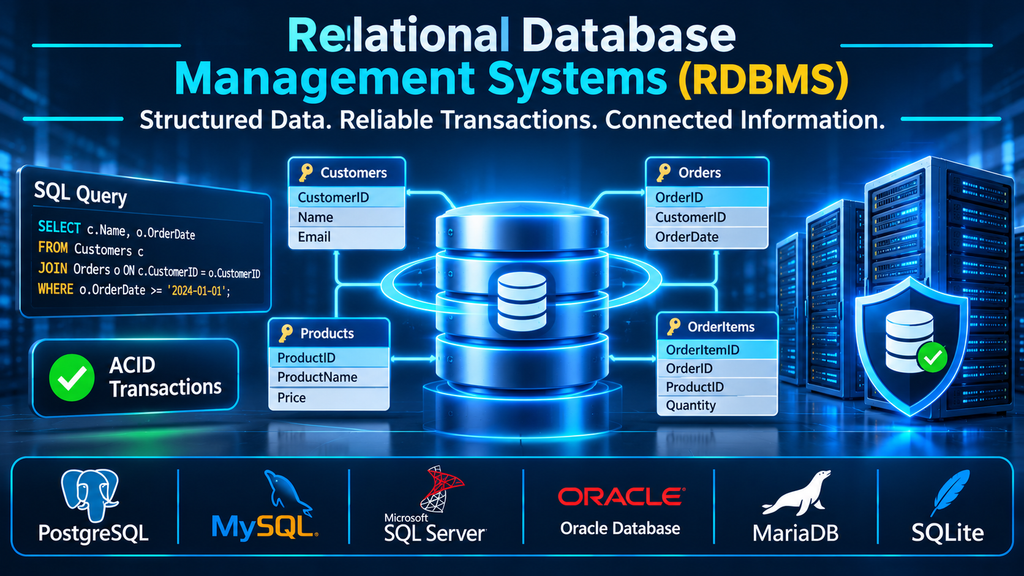
Relational Database Management Systems (RDBMS): Choosing the Right Foundation for Structured Business Data
A relational database management system organizes information into structured tables and uses defined relationships to keep connected data consistent. Choosing an RDBMS involves more than comparing SQL support: transaction behavior, data integrity, application compatibility, operational requirements, scalability, and licensing all influence the right fit.
What is a relational database management system?
A relational database management system (RDBMS) is software that stores, organizes, retrieves, and manages data using a relational model. Information is represented in tables made up of rows and columns. Each table describes a particular entity or subject, while keys and constraints define how records relate to one another.
For example, an online retail application might maintain separate Customers, Orders, Products, and OrderItems tables. An order can reference a customer through a customer ID, while order items connect purchases to individual products. Instead of duplicating customer and product details in every order record, the database maintains relationships between these entities.
SQL (Structured Query Language) is the primary language used to define database structures, query information, modify records, and manage database objects. Although major RDBMS products support SQL, they do not all implement identical syntax, functions, data types, or administrative behavior.
How the relational model organizes information
Tables, rows, and columns
A table stores records about a particular entity. Columns define the attributes that each record can contain, and rows represent individual records. Data types restrict the kinds of values stored in columns, helping prevent invalid or inconsistent information.
Primary and foreign keys
A primary key uniquely identifies a row in a table. A foreign key creates a relationship by referencing a key in another table. These mechanisms help maintain referential integrity and prevent relationships from pointing to records that do not exist, subject to the constraints defined by the database.
Constraints and data integrity
Constraints enforce rules such as uniqueness, required values, valid ranges, and relationships between tables. They help ensure that invalid data is rejected at the database level rather than relying entirely on application code.
SQL queries and joins
SQL allows applications and users to retrieve and manipulate data. Joins combine related information across tables, while filtering, grouping, sorting, and aggregation support reporting and business operations. Database engines use query planners and optimizers to determine how to execute queries, but query performance still depends on schema design, indexes, workload patterns, and available resources.
Why transactions and ACID properties matter
Transactions group database operations into a logical unit of work. Consider an online payment: the system may need to record an order, reduce inventory, and update payment status. If part of the operation fails, the application must avoid leaving the database in an inconsistent state.
The ACID properties describe important transaction guarantees:
- Atomicity: A transaction is treated as a unit; it completes or its changes are rolled back.
- Consistency: Transactions preserve the integrity rules and constraints defined for the database.
- Isolation: Concurrent transactions are controlled so that their interactions follow the configured isolation behavior.
- Durability: Committed changes are preserved according to the database’s durability guarantees.
ACID is a key reason relational databases are widely used for financial records, orders, inventory, reservations, and other applications where reliable updates matter. Actual isolation levels, durability settings, and implementation details differ among database engines and configurations, so teams should verify the guarantees they require.
Major relational database management systems
RDBMS products share a relational foundation, but their architecture, licensing, tooling, extensions, ecosystem integration, and operating characteristics differ. These differences can have a major effect on application development and long-term operations.
PostgreSQL: extensibility and advanced data capabilities
PostgreSQL is an open-source object-relational database management system known for its extensibility and broad SQL capabilities. It supports relational data structures alongside features such as JSON handling, custom data types, indexing options, and extensions.
It is a strong candidate for applications that need complex queries, custom database functionality, geospatial capabilities, or a flexible open-source platform. Its extension ecosystem can add useful capabilities, but organizations should assess extension maintenance, compatibility, and operational complexity before depending on them.
Official documentation: https://www.postgresql.org/docs/
MySQL: a widely adopted application database
MySQL is an open-source relational database management system commonly used for websites, application backends, and transactional workloads. Its ecosystem includes connectors, development frameworks, administration tools, and managed hosting options.
Its InnoDB storage engine provides transactional capabilities, foreign-key support, and crash recovery. MySQL is often a practical choice when application compatibility, developer familiarity, and an established ecosystem are important. Teams should distinguish Community Edition capabilities from features that are available only in commercial offerings.
Official documentation: https://dev.mysql.com/doc/
Microsoft SQL Server: integration with Microsoft environments
Microsoft SQL Server is a commercial relational database platform with integration across Microsoft’s development, analytics, identity, and cloud ecosystems. It supports transactional applications, reporting workloads, business intelligence integrations, and enterprise database operations.
Organizations already using Microsoft technologies may benefit from its tooling and ecosystem integration. However, licensing, edition-specific capabilities, infrastructure requirements, and the cost of enterprise features should be included in procurement decisions.
Official documentation: https://learn.microsoft.com/en-us/sql/sql-server/
Oracle Database: enterprise data management
Oracle Database is an enterprise relational database platform used for demanding transactional and business-critical applications. It offers a broad range of capabilities for data management, availability, security, performance, and large-scale enterprise operations.
It is frequently evaluated by organizations with established Oracle applications, complex enterprise requirements, and specialist database teams. Its licensing and deployment choices require careful review because costs and available capabilities can vary significantly by edition, option, and environment.
Official documentation: https://docs.oracle.com/en/database/
MariaDB: an open-source relational database option
MariaDB is an open-source relational database management system with roots in the MySQL ecosystem. It provides its own development path, storage-engine options, and database features. Although it maintains compatibility with many MySQL clients and applications, compatibility should not be assumed to be complete across all versions, features, and configurations.
It can be considered by organizations seeking an open-source database platform, especially where existing application requirements align with its supported functionality. Migration plans should test SQL behavior, connectors, replication, and operational tooling before production adoption.
Official documentation: https://mariadb.com/docs/
SQLite: an embedded relational database
SQLite differs from traditional client-server database platforms. It is a self-contained, serverless SQL database engine that stores a database in a file and runs within the application process. It requires no separate database server to manage.
This architecture makes SQLite useful for mobile applications, desktop software, embedded systems, prototypes, and local application storage. It supports SQL and ACID transactions, but its deployment and concurrency model differ from server-based platforms. It should not be treated as a direct substitute for a centralized enterprise database server in every workload.
Official documentation: https://www.sqlite.org/docs.html
Comparing leading RDBMS platforms
| RDBMS | Typical fit | Key consideration |
|---|---|---|
| PostgreSQL | Complex applications and extensible data platforms | Extension and operational compatibility should be assessed |
| MySQL | Web applications and general-purpose transactional workloads | Review storage-engine behavior and edition-specific features |
| Microsoft SQL Server | Microsoft-centered enterprise environments | Licensing and edition selection matter |
| Oracle Database | Enterprise and business-critical applications | Licensing and architecture can be complex |
| MariaDB | Open-source relational database deployments | Verify compatibility with MySQL-dependent applications |
| SQLite | Embedded, local, and lightweight application databases | Serverless architecture has different concurrency and deployment characteristics |
No single product is best for every application. The right platform depends on data relationships, transaction requirements, deployment architecture, engineering expertise, integration needs, and the organization’s operating budget.
Common use cases for RDBMS platforms
Financial and payment systems
Financial applications rely on structured records, transaction controls, and integrity constraints. Relational databases can coordinate updates across accounts, payments, balances, and transaction histories while preserving defined consistency rules.
Enterprise resource planning
ERP systems connect business functions such as procurement, inventory, accounting, manufacturing, and human resources. A relational model can represent the relationships among these functions and support reporting across shared business data.
Customer relationship management
CRM applications manage customer profiles, contacts, interactions, opportunities, and service records. Relational structures help connect these records while reducing unnecessary duplication.
E-commerce and order management
Online stores use relational databases to manage products, customers, orders, payments, stock, and fulfillment. Transactions and constraints help coordinate updates that must remain consistent across related records.
Business reporting and operational applications
Relational systems can support operational reporting, application dashboards, and structured analytics queries. For very large analytical workloads, organizations may complement an RDBMS with a dedicated data warehouse or analytical platform.
RDBMS versus NoSQL databases
The choice between relational and NoSQL systems should begin with the application’s data and access patterns, not with broad claims that one category is newer or more scalable.
Relational databases are particularly useful when data has clearly defined relationships, structured constraints, and transaction requirements. They provide SQL interfaces and mature mechanisms for joining data and enforcing integrity.
NoSQL systems cover several different data models, including document, key-value, wide-column, and graph databases. They may be suitable when an application’s data structure, access patterns, distribution requirements, or schema flexibility align better with a particular NoSQL design.
The distinction is not absolute. Some relational platforms support JSON and other semi-structured data, while many NoSQL products provide transactional capabilities. Evaluate the specific engine and workload rather than relying only on category labels.
How to select the right RDBMS
Start with the data model
Identify the entities, relationships, constraints, and expected query patterns. If the application requires consistent relationships across many business records, a relational model may be a natural fit. Design the schema around real business rules rather than forcing every use case into a generic table structure.
Define transaction requirements
Determine which operations must succeed or fail as a unit, how concurrent updates should behave, and what recovery guarantees are required. Review isolation levels, locking behavior, durability settings, and replication architecture for each candidate.
Evaluate workload and scale
Estimate transaction volume, read/write patterns, data growth, query complexity, and availability expectations. Test realistic workloads instead of relying on generic performance rankings. Index design, query plans, hardware, configuration, and application behavior all influence performance.
Review ecosystem compatibility
Check whether the RDBMS supports the application’s programming languages, drivers, frameworks, reporting tools, integration services, and operational utilities. Migration from one database engine to another can involve changes to SQL dialects, stored procedures, data types, indexing, and application logic.
Compare deployment and cost models
Decide whether the database should run on premises, in a virtual machine, in containers, or as a managed cloud service. Compare licensing, infrastructure, storage, backup, high availability, support, and administration costs. Managed services reduce some operational responsibilities but do not remove the need for data modeling, access governance, or application-level performance management.
Security and reliability considerations
An RDBMS often contains sensitive operational, financial, and customer information. Security needs to be part of database architecture from the beginning.
Apply least-privilege access, use separate application and administrative accounts, and review permissions regularly. Encrypt network connections and evaluate encryption at rest according to the platform and deployment model. Protect credentials, secrets, backups, and administrative interfaces.
Reliability also requires tested backup and recovery procedures, monitoring, patch management, capacity planning, and a documented response process for failures. High availability and replication can reduce downtime, but they do not replace independent backups or recovery testing.
Organizations should also understand the shared-responsibility model of managed databases. Cloud providers may operate the underlying infrastructure and database service components, while customers remain responsible for aspects such as data access, application configuration, and recovery requirements.
Common RDBMS implementation mistakes
Designing tables without understanding relationships: Poor normalization or missing constraints can introduce duplicated, inconsistent, and difficult-to-maintain data.
Treating SQL as completely portable: SQL dialects and database-specific features differ. Migration between engines requires compatibility testing and often application changes.
Ignoring query performance until production: Inefficient queries, unsuitable indexes, and untested workloads can create performance problems as data volume and concurrency increase.
Overlooking recovery requirements: Backups that have never been restored do not demonstrate that recovery objectives can be met.
Choosing only by licensing cost: A low-cost platform may require more engineering effort, while a commercial platform may introduce licensing and specialist administration expenses. Total operating cost is the more useful comparison.
The future of relational database management
Relational databases continue to evolve as applications become more distributed and data workloads become more varied. Modern platforms increasingly combine traditional relational capabilities with JSON support, geospatial functions, cloud deployment options, replication, and integrations with analytical systems.
Managed database services also change how teams operate. Organizations can delegate infrastructure maintenance, backups, patching, and availability functions to a provider, depending on the service and selected configuration. This can reduce routine administration, but teams still need to understand performance, access controls, data architecture, and service limitations.
Rather than disappearing in favor of newer database categories, relational systems remain an important foundation for applications that need structured information, dependable transactions, and well-defined relationships.
Conclusion
Relational database management systems provide the structure and transaction capabilities behind a wide range of business applications. PostgreSQL, MySQL, Microsoft SQL Server, Oracle Database, MariaDB, and SQLite offer different approaches to relational data management, from embedded application storage to enterprise-scale database environments.
The best RDBMS is the one that matches the application’s data model, transaction guarantees, workload, integration requirements, and operational capabilities. A careful evaluation of compatibility, security, recovery, deployment, and total cost will produce a more sustainable choice than selecting a platform based on popularity alone.
